What Is the MVVM Pattern?
Imagine a car’s fuel gauge. You never open the fuel tank and measure the gasoline yourself — a sensor does that, and the needle on your dashboard simply moves on its own the moment the fuel level changes. No one has to remember to update it. That quiet, automatic syncing is the whole idea behind Model-View-ViewModel.
The Big Idea, in One Breath
Picture two clocks hanging in different rooms of the same house, magically connected so that whenever one clock’s hands move, the other clock’s hands move too, instantly and automatically, without anyone walking between rooms to adjust them by hand. You’d never have to remember to update the second clock — it would simply always agree with the first one, on its own.
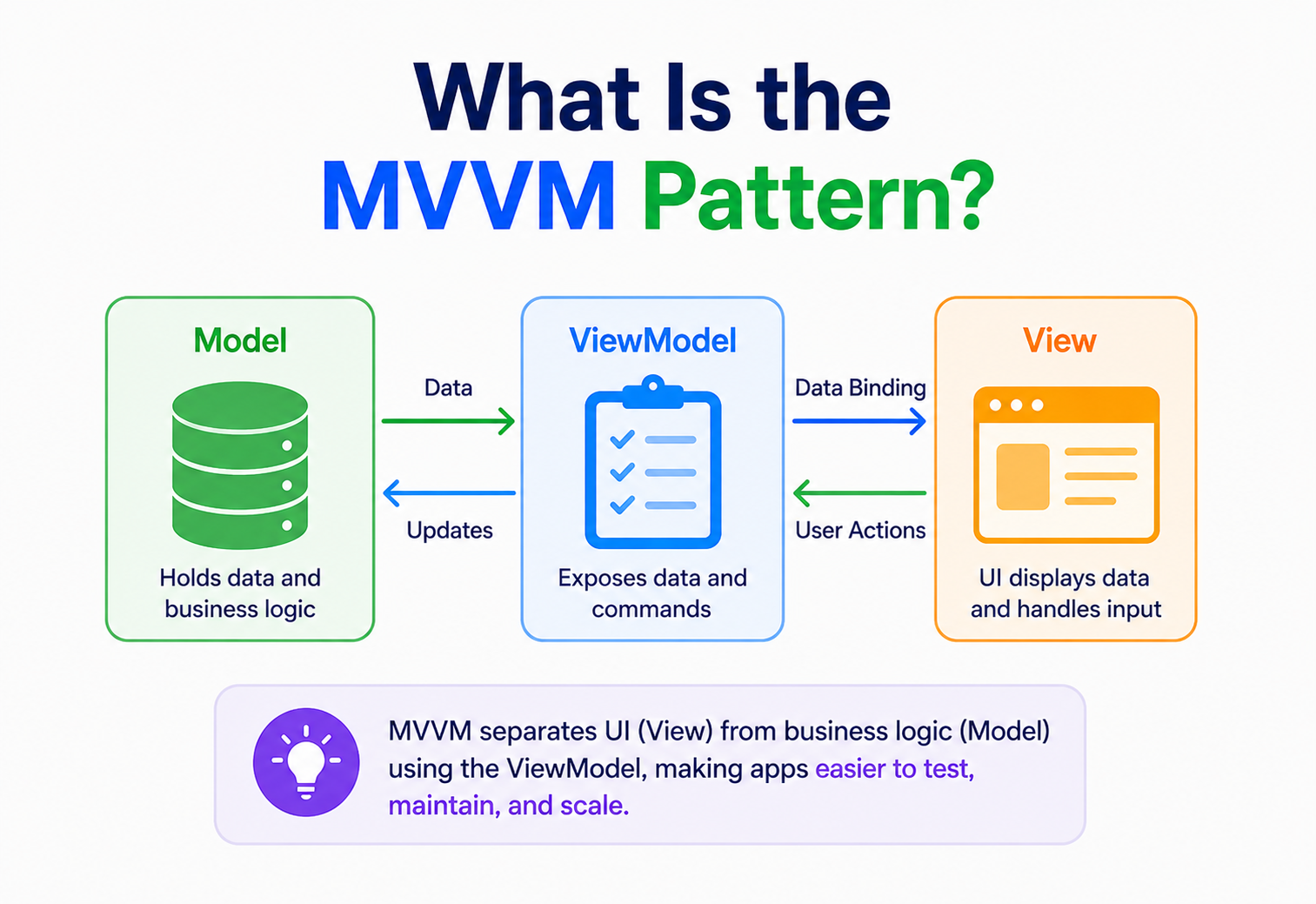
That’s the everyday feeling behind the MVVM pattern, short for Model-View-ViewModel. It’s a way of organizing an application so that the data behind the scenes and the screen a person actually looks at stay in sync automatically, without a programmer having to write manual, repetitive “now go update the screen” instructions every single time something changes.
Think about a car’s dashboard. The engine, fuel tank, and various sensors are the real, messy mechanical reality under the hood — that’s the Model. The dashboard’s gauges and warning lights are the View — simple, clean, and easy to glance at. But there’s a third piece most people never think about: the car’s onboard computer, quietly translating raw sensor readings into the exact numbers and warning states the dashboard displays. That translator is the ViewModel. Change the fuel level, and the needle moves on its own — nobody has to manually recalculate anything or push an update to the dashboard by hand.
MVVM builds directly on the ideas behind MVC and its close cousin MVP, but it adds one particularly clever ingredient: a ViewModel that exposes data in a form the View can automatically “bind” to. Once that binding is set up, changes flow between the View and the ViewModel on their own, in both directions, without a programmer having to write the plumbing code that pushes every single update back and forth by hand.
It’s worth pausing on why this particular refinement mattered enough to become its own named pattern. Earlier patterns like MVC did a wonderful job of separating what data means from how it looks, but they still left one job squarely on a human programmer’s shoulders: physically writing the code that notices a change and pushes it onto the screen. MVVM’s real innovation isn’t the three-part split itself — that idea was already well established — it’s handing that tedious “notice and push” job over to the framework, so a programmer only has to declare the connection once, rather than maintaining it by hand forever.
What the MVVM Pattern Really Is
Formally speaking, MVVM is an architectural pattern that separates an application’s data (the Model) from its user interface (the View) by introducing a ViewModel — an intermediate layer that exposes the Model’s data and behavior in a form specifically shaped for data binding. The word “binding” is the single most important idea in this entire pattern, so it’s worth sitting with for a moment.
Data binding is simply a declared connection between a piece of data and a piece of the screen, set up once, that the underlying framework then keeps in sync automatically. Instead of a programmer writing “when this number changes, manually go find the text label and update it,” the programmer instead declares “this text label is bound to this number” a single time, and the framework quietly handles every future update on its own, for the entire lifetime of that connection.
- The ViewModel doesn’t know the View exists. It exposes data and commands in a generic, screen-agnostic way, with no direct reference to any particular button, label, or layout.
- The View knows about the ViewModel, but contains almost no logic of its own. It simply declares which pieces of itself are bound to which pieces of the ViewModel, and lets the framework do the rest.
If someone asks “what does MVVM actually do?”, the honest short answer is: it sets up an automatic, always-in-sync connection between your data and your screen, so you almost never have to write code that manually pushes updates back and forth between them.
MVVM was introduced by Microsoft architects, notably John Gossman, in the mid-2000s, originally to take full advantage of data-binding features built into a new user interface framework called Windows Presentation Foundation, or WPF. The pattern turned out to be so useful that it quickly spread well beyond its original home, becoming a favorite in mobile development, web front-end frameworks, and game development tools, anywhere a rich, frequently changing user interface needs to stay reliably in sync with underlying data.
The name itself is a helpful little mnemonic once you notice the pattern behind it. Model and View mean roughly the same thing they mean in MVC — the data, and the way it’s displayed. “ViewModel” is best read as “a model of the View” — not the application’s core business data, but a simplified, screen-shaped stand-in for whatever the View currently needs to show and do. Thinking of the ViewModel this way — as a purpose-built translation layer rather than a second copy of the Model — tends to prevent a lot of confusion for people encountering the pattern for the first time.
The Problem It Solves (Why It Matters)
To understand why MVVM exists, it helps to look at what happens in a traditional MVC or MVP-style application once the user interface becomes genuinely rich and interactive — sliders that update live previews, forms that validate as you type, dashboards with numbers constantly refreshing. In those patterns, a Controller or Presenter typically has to manually reach into the View and update each individual piece of it, one instruction at a time, every single time something changes.
Imagine a profile-editing screen with a name field, an email field, a save button that should only be clickable once both fields are valid, and a small character counter under the name field. In a traditional setup, a Controller has to explicitly say: update the character counter when the name changes, check validity and enable or disable the save button when either field changes, and update an error message if the email looks malformed. Every one of these has to be wired up by hand, and it’s remarkably easy to add a new field to the form later and simply forget to wire up one of these manual updates, leaving a quiet, easy-to-miss bug.
This specific kind of tedious, error-prone busywork has a name: UI synchronization logic. It isn’t really business logic — it’s just the repetitive plumbing required to keep what’s on screen matching what the underlying data actually says. As user interfaces became richer through the 2000s and 2010s, this plumbing started to take up a genuinely large share of many teams’ time and bug reports.
The same manual sync code, over and over
Every new piece of UI needs its own explicit “go update this” instruction written by hand.
Easy to forget one
Adding a new field later means remembering every single place it needs to be manually synced.
Logic tangled with UI updates
Testing “is this form valid” often meant also testing whether the right UI elements got updated.
A lot of code for very little real logic
Much of the Controller or Presenter’s code ends up being pure plumbing, not genuine decision-making.
MVVM tackles this problem head-on by letting the framework itself handle the plumbing. A ViewModel simply exposes its data as bindable properties, and the View declares which of its elements are bound to which properties. From that point forward, keeping everything in sync becomes the framework’s job, not the programmer’s — freeing engineers to focus on the actual business logic and validation rules, rather than the repetitive busywork of pushing updates around by hand.
There’s a subtler benefit hiding in this shift too. When UI synchronization logic is scattered throughout a Controller or Presenter, it tends to get tangled up with genuine business logic, making both harder to read and harder to test in isolation. Once the synchronization job moves into an automatic binding system, whatever logic remains in the ViewModel is far more likely to be real, meaningful logic — validation rules, calculations, decisions — rather than a mixture of real logic and repetitive screen-updating instructions all jumbled together in the same block of code.
The Building Blocks
Every implementation of MVVM, across every framework, is built from the same three roles, connected in a very particular way.
The data and the rules
Holds the actual information and business rules — very similar to the Model in MVC, and often shared directly between the two patterns.
What the person sees
The visual layer — buttons, labels, sliders — containing almost no logic, and declaring bindings to the ViewModel instead of manually reading or writing data.
The bindable translator
Exposes the Model’s data and actions in a screen-friendly, bindable form, and notifies the View automatically whenever something it exposes changes.
That last detail is worth underlining: a well-built ViewModel could, in principle, be connected to several completely different Views — a phone screen and a tablet screen, for instance — without changing a single line of the ViewModel’s own code. It simply exposes data and commands, indifferent to exactly which visual elements happen to be bound to them at any given moment.
There’s also a second kind of binding worth knowing about, alongside the ordinary data properties covered above: commands. A command is simply a bindable action, rather than a bindable piece of data — a button’s click can be bound directly to a ViewModel’s saveCommand, the same way a text field is bound to a name property. This means even user-triggered actions, not just displayed data, can flow through the same clean, declarative binding system, keeping the View almost entirely free of any custom logic of its own.
How It Works, Step by Step
Let’s build a small profile-editing example, using simple pseudocode that reads a lot like C#, Swift, Kotlin, or TypeScript, since MVVM looks remarkably similar across all of them.
Step 1 — The Model holds the real data
UserModel.tsclass UserProfile {
    name: string
    email: string
}
Step 2 — The ViewModel exposes bindable properties
The ViewModel wraps the Model, adding validation logic and exposing everything the View might need in a bindable form. Notice the special “observable” property wrapper — this is what tells the framework to automatically notify anything bound to it whenever the value changes.
ProfileViewModel.tsclass ProfileViewModel {
    @Observable name: string = ""
    @Observable email: string = ""
    @Observable characterCount: number = 0
    @Observable isSaveEnabled: boolean = false

    onNameChanged() {
        this.characterCount = this.name.length
        this.revalidate()
    }

    onEmailChanged() {
        this.revalidate()
    }

    revalidate() {
        this.isSaveEnabled = this.name.length > 0 && this.email.includes("@")
    }

    saveCommand() {
        // send this.name and this.email to storage
    }
}
Step 3 — The View simply declares its bindings
Notice how little the View actually does — no manual update calls, no explicit “refresh the character count” instruction anywhere.
ProfileView.tsTextField(bindTo: viewModel.name)
Label(bindTo: viewModel.characterCount)
TextField(bindTo: viewModel.email)
Button("Save", enabledWhen: viewModel.isSaveEnabled, onClick: viewModel.saveCommand)
The moment a person types into the name field, the binding framework automatically updates viewModel.name, which in turn triggers onNameChanged(), which updates characterCount and revalidates — and because characterCount and isSaveEnabled are also bound to the View, the character count label and the save button’s enabled state update on screen automatically, with no line of code anywhere saying “now go update the label” or “now go enable the button.”
Notice that not a single line in either the ViewModel or the View manually reaches out and modifies the other. The binding framework is doing all of that plumbing invisibly, in both directions, the entire time.
MVVM vs. MVC vs. MVP
MVVM is best understood as part of a small family of related patterns, each one adjusting how much responsibility the View is allowed to keep for itself.
| Pattern | How Updates Reach the View | How Much Logic the View Holds |
|---|---|---|
| MVC | A Controller manually tells the View to redraw, often reading directly from the Model too. | Moderate — the View may query the Model directly for data to display. |
| MVP | A Presenter manually calls specific methods on the View to update it, one instruction at a time. | Low — the View exposes simple methods like showError(), and does little else. |
| MVVM | The View is bound to the ViewModel, and updates flow automatically through the binding framework. | Very low — the View mostly just declares bindings, with almost no other logic. |
A useful way to see the family resemblance: MVC, MVP, and MVVM are all trying to answer the same underlying question — “how does the View find out that something changed, and how little does it need to know to display that change correctly?” MVC lets the View know a fair amount, sometimes reading the Model directly. MVP tightens that considerably, requiring an explicit method call for every single update. MVVM goes a step further still, replacing those manual method calls with an automatic, declared binding, so the View barely has to do anything at all beyond declaring what it’s connected to.
Each pattern in this family trusts the View with a little less responsibility than the one before it.
Real-World Examples You’ve Already Used
MVVM quietly powers a huge share of modern app development, especially anywhere a rich, constantly updating interface is involved.
WPF and the Universal Windows Platform
MVVM’s original home, built specifically to take advantage of these frameworks’ powerful data-binding features.
Android Jetpack architecture
Google’s official recommended architecture for modern Android apps is built explicitly around ViewModel and observable data.
SwiftUI’s state-driven views
SwiftUI’s design leans heavily on MVVM-style thinking, with views automatically refreshing whenever bound state changes.
Vue.js and Angular
Both popular frameworks are built around two-way data binding, echoing MVVM’s core idea directly in the browser.
Game development tools have embraced MVVM too, for a very practical reason — a game’s user interface, like health bars, score counters, and inventory screens, tends to update constantly and rapidly, exactly the kind of scenario data binding was designed to handle gracefully. Several popular game engines and UI toolkits now offer MVVM-style architecture as a recommended way to build in-game menus and heads-up displays.
Smart home apps offer a particularly fitting everyday example, given how naturally they mirror the fuel-gauge analogy from earlier in this guide. A thermostat app’s ViewModel might expose a bindable currentTemperature property and a bindable targetTemperature property. When the physical thermostat reports a new reading, the Model updates, the ViewModel’s bound property updates automatically in response, and the number on your phone’s screen changes instantly — all without the app’s screen code ever containing a single explicit “go update the temperature display” instruction anywhere.
Strengths and Trade-offs
Strengths
- Removes an enormous amount of repetitive manual UI-updating code.
- ViewModels are easy to unit test, since they don’t depend on any actual visual framework.
- A well-designed ViewModel can power more than one View, similar to how a Model can.
- Keeps rich, frequently changing interfaces reliably in sync with far less code.
- Strongly supported by many modern frameworks’ built-in data-binding tools.
Trade-offs
- Data binding can feel a bit “magical,” making bugs harder to trace for beginners.
- Debugging an automatic binding chain can be trickier than following an explicit method call.
- Overly generic ViewModels can bloat quickly on very complex screens.
- Not every framework or language offers strong built-in binding support.
- The learning curve is a little steeper than the more explicit MVC or MVP.
The “magic” of data binding is a genuine trade-off, not a free upgrade. It saves enormous amounts of repetitive code, but it also hides the exact moment an update happens, which takes some getting used to when debugging.
When to Reach for It (and When Not To)
Rich, frequently updating interfaces
Forms with live validation, dashboards, and interactive editors benefit enormously from automatic syncing.
A framework with strong binding support
MVVM shines brightest in ecosystems like WPF, SwiftUI, Android Jetpack, or Vue, which were built with binding in mind.
Teams that value testable ViewModels
Business logic and validation rules living in a plain, framework-independent ViewModel are very easy to test thoroughly.
Very simple, mostly static screens
A screen that rarely changes gains little from binding infrastructure, and a simpler pattern may be quicker to build.
A useful gut-check question: “Does this screen have several pieces of data and UI state that all need to stay perfectly in sync as the user interacts with it?” If yes, MVVM’s automatic binding will likely save real time and prevent real bugs. If a screen barely changes once it’s loaded, the extra structure MVVM introduces may not pay for itself, and a simpler approach might get the job done just as well with less ceremony.
Team familiarity matters too, and it’s worth being honest about that. A team that has spent years building MVC-style applications may find MVVM’s binding mechanics genuinely unfamiliar at first, even if the pattern is objectively well suited to a particular screen. In those cases, the right decision often balances the technical fit of the pattern against the very real cost of a learning curve — sometimes it’s worth investing in that learning curve because a project’s interfaces are rich enough to benefit hugely, and sometimes a team is better served sticking with a pattern they already know deeply, at least for now.
Common Pitfalls and Best Practices
The “Massive ViewModel” Problem
Just as MVC controllers can grow bloated, ViewModels can quietly absorb more and more responsibility over time, eventually becoming a single, overloaded class handling far more than one screen’s worth of logic. Splitting a screen’s concerns into smaller, focused ViewModels — or delegating specific responsibilities to helper classes — keeps this from spiraling out of control.
Letting the ViewModel Know Too Much About the View
A ViewModel that starts holding onto visual details — colors, specific layout positions, screen-only formatting — has quietly taken on part of the View’s job, undermining its own reusability and testability. A healthy ViewModel exposes clean, general-purpose data and lets the View decide how to visually present it.
Memory Leaks From Forgotten Bindings
Because bindings create a live, ongoing connection between View and ViewModel, forgetting to properly release that connection when a screen is closed can quietly keep both objects alive in memory long after they’re needed, gradually slowing an app down. Most modern frameworks handle this automatically, but it’s still worth understanding, especially in frameworks with more manual memory management.
Over-Testing the Binding Itself
One of MVVM’s biggest advantages is that ViewModels can be tested without any real UI at all. Some teams undercut this benefit by writing tests that check whether a specific visual element updated correctly, rather than testing the ViewModel’s exposed data and logic directly. Testing the ViewModel on its own terms — its properties and its logic — captures nearly all of the value, far faster and more reliably than testing through the UI.
Keep the ViewModel’s exposed data as plain and screen-agnostic as possible. If a ViewModel could just as easily power a completely different-looking View without any changes, it’s usually a well-designed one.
Binding Absolutely Everything, Even When It Doesn’t Help
Data binding is a genuinely powerful tool, but not every single piece of a View benefits from being bound. Static text that never changes, or a purely decorative visual flourish, doesn’t need a bindable property watching it forever — doing so just adds unnecessary overhead and a little extra mental tracking for whoever reads the code later. Reaching for binding specifically where data genuinely changes over time, rather than applying it everywhere by reflex, keeps a ViewModel focused and easy to follow.
A Quick Tour Across Frameworks
The core idea of MVVM stays consistent, but the exact binding mechanics look a little different depending on where you encounter it.
| Framework / Platform | How MVVM Typically Appears |
|---|---|
| WPF / .NET (C#) | MVVM’s original home, using a rich, mature binding system built directly into the framework. |
| Android (Kotlin/Java) | Google’s Jetpack libraries offer a ViewModel class and observable data holders as an officially recommended architecture. |
| iOS (Swift) | SwiftUI’s declarative views automatically refresh when bound state changes, echoing MVVM even without always using the exact name. |
| Vue.js / Angular (JavaScript) | Both frameworks build two-way data binding directly into their templates, a very close cousin of classic MVVM. |
What stays constant across every one of these is the underlying discipline: keep the ViewModel screen-agnostic and easily testable, and let the framework’s binding system handle the tedious, repetitive work of keeping the screen in sync. Once that habit clicks, recognizing — and comfortably using — MVVM in any new framework becomes far easier, since the binding syntax may differ, but the underlying shape rarely does.
Key Takeaways
Remember This
- MVVM splits an application into Model, View, and ViewModel, with the ViewModel exposing bindable data the View can automatically sync with.
- It solves the tedious, error-prone problem of manually writing code to keep a rich, changing user interface up to date.
- The ViewModel has no idea any particular View exists — it simply exposes data and commands in a generic, screen-agnostic form.
- It’s part of a family of related patterns alongside MVC and MVP, each trusting the View with progressively less direct responsibility.
- Its biggest strength is dramatically reduced boilerplate and highly testable ViewModels — its biggest risk is “magical” binding behavior that can be trickier to debug for newcomers.
- MVVM shines brightest in rich, frequently updating interfaces, especially inside frameworks — like WPF, SwiftUI, Android Jetpack, and Vue — built with strong data-binding support from the ground up.