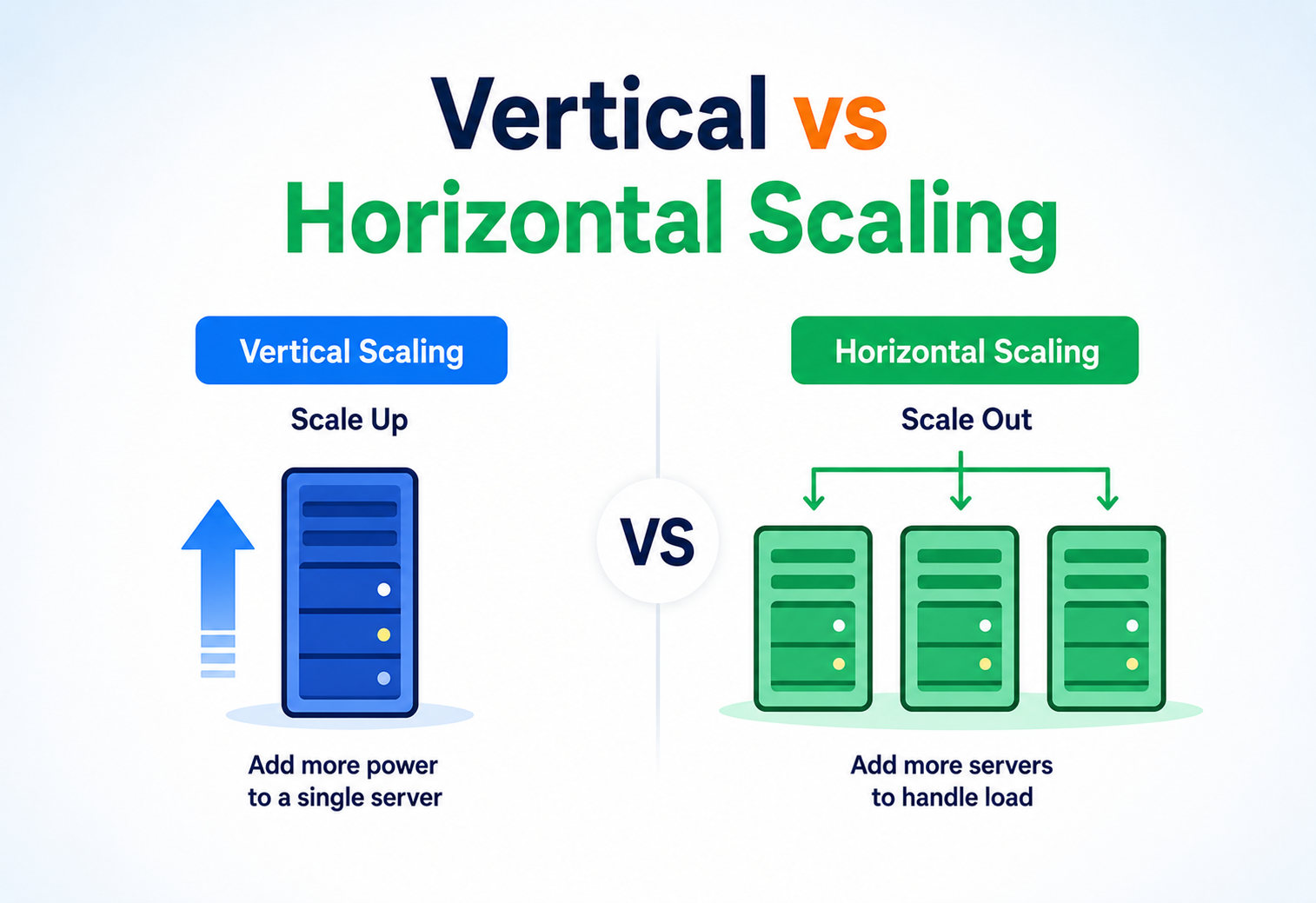
The Two Main Approaches to Scaling a System
A complete, beginner-to-production walkthrough of vertical scaling and horizontal scaling — what they are, how they work internally, when to use each, and how companies like Netflix, Amazon, Uber, and Google actually scale their systems in real life.
From Mainframes to Server Fleets
Every piece of software starts small, and every successful one eventually asks the same question: how do we make this handle more? The answer, no matter how complex the system, always comes down to two fundamental strategies — or a combination of both.
Every piece of software starts small. A single server, a single database, a handful of users. Then, if you are lucky, it grows. More users sign up, more requests hit your servers, more data piles up in your database — and at some point, the machine that used to handle everything comfortably starts to sweat. This is the moment every engineer eventually faces: how do we make this system handle more?
The answer to that question, no matter how complex the system, always boils down to one of two fundamental strategies — or a combination of both:
- Vertical Scaling (also called Scaling Up) — making a single machine more powerful.
- Horizontal Scaling (also called Scaling Out) — adding more machines to share the load.
These two approaches are not a modern invention. The idea traces back to the earliest days of mainframe computing in the 1960s and 1970s, when organisations like IBM sold enormously powerful “big iron” machines — the only way to get more computing power was to buy a bigger, more expensive mainframe. That is vertical scaling in its purest historical form.
Horizontal scaling emerged later, driven by two forces: the falling cost of commodity hardware in the 1990s, and the rise of internet-scale companies in the early 2000s — Google, Amazon, Yahoo — who discovered that renting a warehouse full of cheap servers and coordinating them with clever software was far more economical (and more resilient) than buying ever-larger single machines. Google’s original search infrastructure, described in papers like the Google File System (2003) and MapReduce (2004), was explicitly built on the idea of using thousands of ordinary machines instead of a few extraordinary ones.
Today, this choice between “bigger machine” and “more machines” sits at the heart of almost every system-design conversation, every cloud architecture diagram, and every performance review of a growing application. Understanding it deeply is one of the most foundational skills an engineer can have — it shapes how you design databases, APIs, deployment pipelines, and even how your organisation structures its teams.
Almost every advanced system-design topic — load balancing, sharding, replication, microservices, caching, CDNs — exists because of the trade-offs between vertical and horizontal scaling. Master this concept first, and the rest of system design starts to click into place.
Why Every Growing System Hits This Wall
The scaling problem is the gap between how much work your system can currently handle and how much it actually needs to handle. Every growing system eventually hits this wall, and only two fundamental tools exist to close the gap.
Imagine you built a small web application. On day one, it runs comfortably on a single server: one CPU, a bit of RAM, a small database sitting right next to your application code. Ten users a day is nothing for this machine.
Then your product gets popular. Ten users becomes ten thousand. Ten thousand becomes a million. Suddenly:
- The CPU is pegged at 100% during peak hours.
- Response times balloon from 50 ms to 5 seconds.
- The database starts rejecting connections because it has run out of capacity.
- A single hardware failure takes your entire product offline, because everything lives on one machine.
This is the scaling problem: the gap between how much work your system can currently handle and how much work it actually needs to handle. Every growing system eventually hits this wall, and the two approaches — vertical and horizontal scaling — are the two fundamental tools available to close that gap.
Think of a small restaurant kitchen with one chef. When customer orders increase, you have two choices: hire a “super-chef” who works twice as fast and has a bigger stove (vertical scaling), or hire three more regular chefs and give each of them their own station (horizontal scaling). Both approaches let the kitchen serve more customers — but they change how the kitchen is organised, how orders are coordinated, and what happens if one chef calls in sick.
The motivation for choosing carefully between these two approaches comes down to three practical business concerns:
- Cost — bigger machines get disproportionately expensive as you go up in size; commodity machines are cheap but need coordination software.
- Availability — a single powerful machine is a single point of failure; a fleet of machines can tolerate individual failures.
- Growth ceiling — there is a physical limit to how big one machine can get; there is (practically) no limit to how many machines you can add.
Understanding these two approaches — and knowing when to reach for one, the other, or both — is what separates an engineer who can build a small prototype from one who can build a system that survives success.
The Vocabulary of Scaling
Before comparing architectures, let’s pin down the exact meaning of each term. These definitions will be re-used in every following section.
What Is Vertical Scaling (Scaling Up)?
Vertical scaling means increasing the capacity of a single machine by adding more resources to it — a faster CPU, more RAM, faster disks (SSD/NVMe instead of spinning disks), or a better network card. The number of machines running your application stays the same (usually just one); what changes is how powerful that one machine is.
2 vCPU → 8 vCPU
Your Java Spring Boot application runs on a cloud server with 2 CPU cores and 4 GB of RAM. Under load, it slows down. You upgrade the same server to 8 CPU cores and 32 GB of RAM. Nothing changes in your code — the exact same application simply now has more horsepower underneath it. That is vertical scaling.
One 8-core → three 2-core
Instead of upgrading your single 8-core server, you keep three separate 2-core servers running identical copies of your Spring Boot application. A load balancer sits in front of them and routes incoming requests round-robin across all three. If traffic grows further, you simply add a fourth, fifth, or tenth server — you don’t need to touch the existing ones. That is horizontal scaling.
What Is Horizontal Scaling (Scaling Out)?
Horizontal scaling means adding more machines (often called nodes, instances, or servers) to your system and distributing the workload across all of them, typically with the help of a load balancer. Instead of one big machine doing all the work, many smaller machines each do a slice of the work.
The Core Distinction, Side by Side
Vertical Scaling
- One machine, more power.
- Add CPU, RAM, disk, or network capacity to an existing server.
- No architectural changes required.
Horizontal Scaling
- More machines, shared power.
- Add servers and distribute load across the fleet.
- Requires a load balancer and (usually) stateless application design.
A single PostgreSQL primary database is often scaled vertically first (bigger instance type on AWS RDS, e.g. moving from db.m5.large to db.m5.4xlarge) because relational databases are harder to split across machines. Meanwhile, the stateless web/API tier in front of it (say, a fleet of Spring Boot microservices) is scaled horizontally — adding more container instances behind a load balancer as traffic grows. Most real production systems use both strategies together, applied to different layers of the stack.
A Third Term You’ll Often Hear: Diagonal Scaling
In practice, teams rarely pick one approach forever. A common pattern — sometimes called diagonal scaling — is to scale a machine vertically until it becomes cost-inefficient or hits a hardware ceiling, and only then start scaling horizontally by cloning that (now well-sized) machine. This hybrid approach is extremely common in real production systems and will come up repeatedly throughout this article.
Elasticity vs Scalability — A Related but Different Idea
It is worth separating two terms that are often used interchangeably but mean slightly different things:
- Scalability is the property of a system that describes its ability to handle growth — whether by scaling up or scaling out.
- Elasticity is the property of a system that can scale automatically and dynamically, growing during peak demand and shrinking again once demand drops, without manual intervention.
Horizontal scaling lends itself naturally to elasticity because adding or removing a node is a fast, low-risk operation that can be automated (an auto-scaling group can spin up a new instance in seconds to a few minutes). Vertical scaling is rarely elastic in the same sense — resizing a running machine’s core hardware allocation on demand, moment to moment, is either unsupported or far slower on most platforms, since it typically requires a restart.
Elasticity is like a rubber band — it stretches when you pull (demand rises) and snaps back when you let go (demand falls), automatically, with no one manually cutting or re-tying it. A vertically scaled machine is more like a fixed-size room: if you need more space, someone has to physically knock down a wall and rebuild it — a slower, more deliberate process that can’t happen on the fly every few minutes.
Which One Do You Reach for First?
As a rule of thumb that holds true across most real-world systems:
- Start with vertical scaling. It is the fastest way to buy headroom when a system first starts to struggle, and it requires no architectural changes.
- Move to horizontal scaling once you hit one of: a hardware ceiling, an availability requirement that a single machine cannot satisfy, or a cost curve that has become unfavourable compared to commodity hardware.
- Combine both as the system matures — vertically-sized nodes, horizontally replicated, is the pattern most large-scale systems eventually converge on.
What Actually Changes in the Diagram
Vertical and horizontal scaling produce very different-looking architectures. Let’s put them next to each other and see what each strategy adds or removes from a system’s block diagram.
Vertical Scaling Architecture
Vertically scaled architecture is deliberately simple: one application instance, one database instance, sitting on increasingly powerful hardware. There is no need for a load balancer, no need for session synchronisation between servers, and no need for distributed coordination — because there is only ever one “brain.”
Horizontal Scaling Architecture
Horizontally scaled architecture introduces new components that don’t exist in the vertical model: a load balancer to distribute traffic, multiple identical application instances, a mechanism for service discovery so the load balancer knows which instances are healthy, and often a shared session store or stateless design so any instance can handle any request.
New Components Horizontal Scaling Introduces
| Component | Purpose |
|---|---|
| Load Balancer | Distributes incoming requests across available instances (round-robin, least-connections, IP-hash, etc.) |
| Service Registry / Discovery | Tracks which instances are alive so the load balancer and other services can find them |
| Shared Session Store | Keeps user session data outside of any single instance (e.g. Redis) so requests can land on any node |
| Health Checks | Periodic pings to confirm each instance is still responsive before routing traffic to it |
| Auto-scaling Group | Automatically adds/removes instances based on load (CPU %, request count, queue depth) |
Vertical scaling does not eliminate the need for good architecture — a single giant machine can still crash, run out of disk, or have a slow query bring it to its knees. It simply avoids the specific distributed-systems complexity that horizontal scaling introduces.
What Happens Beneath the Surface
Both strategies look simple in a block diagram. Under the hood, one changes the capacity of a single process while the other multiplies the process itself and hands routing off to a coordination layer.
How Vertical Scaling Works Internally
When you vertically scale a machine — say, on a cloud provider like AWS, Azure, or GCP — you are typically doing one of the following:
- Resizing the instance type: stopping the VM, changing its instance class (e.g. from
t3.mediumtom5.2xlarge), and restarting it with more vCPUs and memory allocated by the hypervisor. - Upgrading storage: attaching faster disks (SSD/NVMe) or increasing IOPS provisioning.
- Tuning the OS and application to actually use the new resources — e.g. increasing JVM heap size (
-Xmx), database connection-pool size, or OS-level file-descriptor limits, since simply adding RAM does nothing if your application is still configured to use only 2 GB of it.
Internally, the operating system’s scheduler now has more CPU cores to allocate threads to, and the memory manager has a larger address space to work with — but the software architecture itself (single process, single point of coordination) does not change.
@Configuration
public class ThreadPoolConfig {

    // On a 4-core box you might use a pool of ~8-16 threads.
    // After vertically scaling to 32 cores, this must be increased
    // to actually take advantage of the new hardware.
    @Bean
    public Executor taskExecutor() {
        ThreadPoolTaskExecutor executor = new ThreadPoolTaskExecutor();
        executor.setCorePoolSize(32);       // was 8 before scaling up
        executor.setMaxPoolSize(64);        // was 16 before scaling up
        executor.setQueueCapacity(500);
        executor.setThreadNamePrefix("order-svc-");
        executor.initialize();
        return executor;
    }
}
How Horizontal Scaling Works Internally
Horizontal scaling relies on a coordination layer that decides where each request goes and keeps all instances working from a consistent view of the world. Internally, this typically involves:
- Load-balancing algorithm — the load balancer picks a healthy instance using a strategy like round-robin, least-connections, or consistent hashing.
- Statelessness — each application instance must not rely on in-memory data that only it has; anything that needs to persist between requests (sessions, cached data) is pushed to a shared store like Redis.
- Health checking — the load balancer or orchestrator (e.g. Kubernetes) periodically calls a
/healthendpoint on each instance; unhealthy instances are removed from rotation. - Auto-scaling logic — a controller watches metrics (CPU, request latency, queue depth) and spins up or tears down instances automatically.
@RestController
public class HealthController {

    @Autowired
    private DataSource dataSource;

    // Kubernetes / load balancer calls this every few seconds.
    // If it fails, this instance is pulled out of rotation.
    @GetMapping("/health")
    public ResponseEntity<String> health() {
        try (Connection conn = dataSource.getConnection()) {
            if (conn.isValid(2)) {
                return ResponseEntity.ok("UP");
            }
        } catch (SQLException e) {
            return ResponseEntity.status(503).body("DOWN");
        }
        return ResponseEntity.status(503).body("DOWN");
    }
}
Vertical scaling changes the capacity of one running process. Horizontal scaling changes the number of running processes and requires a routing + coordination layer that simply doesn’t exist in a single-machine system.
A Single Request, Two Different Journeys
The clearest way to feel the difference between the two strategies is to trace one HTTP request end-to-end through each of them and count the hops.
Request Lifecycle — Vertical Scaling
Client Sends HTTP Request
There is exactly one server to send it to.
Server Processes on Available CPU Core
The OS scheduler picks whichever core is currently free.
Server Queries the Local Database
The database sits on the same machine or a very short network hop away.
Database Returns Result
No coordination with other machines required.
Server Responds to Client
End of lifecycle — simple, linear, predictable.
The lifecycle is straightforward because there’s only one possible destination for every request. The only thing that changes as the machine scales up is how many requests it can process concurrently, and how fast each one completes.
Request Lifecycle — Horizontal Scaling
Client Sends HTTP Request
Directed to the load balancer’s public IP or DNS entry.
Load Balancer Picks a Healthy Instance
Uses round-robin, least-connections, or another strategy; unhealthy instances are automatically excluded.
Request Forwarded to a Chosen App Instance
A new network hop is introduced compared with the vertical case.
App Fetches Session/Context from Shared Cache
Redis or an equivalent shared store returns the user’s session state.
App Queries the Shared Database
All instances read from and write to the same data layer.
Response Flows Back Through the Load Balancer
The load balancer returns the response to the client, hiding the fact that many instances existed.
Notice the extra hops: the load balancer’s routing decision, and (if the app needs user context) a round-trip to a shared session store. This is the “tax” horizontal scaling pays for its ability to spread load — a small amount of added latency and complexity in exchange for near-limitless capacity and resilience.
At a bank with one teller (vertical scaling), you just walk up — there’s nothing to decide. At a bank with five tellers (horizontal scaling), there’s a “please take a number” queue system (the load balancer) that directs you to whichever teller is free, and the tellers share a common filing system (the shared database) so any teller can pull up your account regardless of which one served you last time.
Pros, Cons & the Real Cost of Each
Neither strategy is free. Each buys something valuable and charges something else in return. Knowing that ledger is the whole game.
Vertical Scaling
Pros
- Simple — no code changes, no distributed-systems complexity.
- No need for load balancers, service discovery, or session sharing.
- Strong consistency is trivial (only one copy of data / state).
- Lower operational overhead for small teams.
- Easier debugging (one process, one log stream).
Cons
- Hard ceiling — there is a maximum machine size you can buy.
- Single point of failure — if the machine goes down, everything goes down.
- Downtime usually required to resize (reboot to apply new instance type).
- Cost grows non-linearly — doubling capacity often costs more than double.
- Cannot scale beyond what a single OS/hardware instance supports.
Horizontal Scaling
Pros
- Practically unlimited scaling — just add more nodes.
- High availability — one node failing doesn’t take down the system.
- Can scale / descale elastically based on real-time demand.
- Often cheaper at scale using commodity hardware.
- Rolling deployments possible with zero downtime.
Cons
- Significantly more complex architecture (load balancer, service discovery, health checks).
- Requires stateless application design or a shared session / cache layer.
- Distributed data consistency becomes hard (CAP-theorem trade-offs).
- Debugging is harder — logs and traces span multiple machines.
- Network latency between nodes adds overhead.
The moment you scale horizontally and split data across multiple nodes, you run into the CAP theorem: in the presence of a network Partition, you must choose between Consistency (every node sees the same data at the same time) and Availability (every request gets a response, even if it might be slightly stale). Vertical scaling sidesteps this entirely because there is only one copy of the data — there is nothing to keep “consistent” across nodes. This is one of the most important hidden costs of horizontal scaling.
Concurrency and Consensus in Horizontal Scaling
Two deeper distributed-systems concepts become unavoidable the moment you scale horizontally with shared mutable state:
- Concurrency control: when multiple application instances can write to the same record at the same time, you need mechanisms like optimistic locking (a version column checked on update), pessimistic locking (row-level database locks), or distributed locks (e.g. using Redis with a TTL) to prevent lost updates or race conditions. A single vertically scaled instance can sometimes get away with simpler in-process locking (like a Java
synchronizedblock), because there’s only one JVM to coordinate — that guarantee disappears the moment a second instance joins the fleet. - Consensus: when multiple nodes must agree on a single source of truth (for example, “who is the current primary database” or “which node owns this shard”), horizontally scaled systems often rely on consensus algorithms such as Raft or Paxos, implemented in coordination services like Apache ZooKeeper or etcd. Vertical scaling never needs this — with one machine, there’s nothing to reach agreement about.
@Entity
public class Account {
    @Id
    private Long id;

    private BigDecimal balance;

    @Version   // JPA automatically checks this on every UPDATE
    private Long version;
}

// If two app instances try to update the same Account concurrently,
// the second write fails with an OptimisticLockException instead of
// silently overwriting the first instance's change.
On a vertically scaled system, failure recovery usually means restarting the single process or rebooting the machine — a well-understood, linear procedure. On a horizontally scaled system, failure recovery is a coordinated process: the load balancer must detect the failed node, traffic must reroute, and if that node was holding a role (like “primary” in a database cluster), a new leader must be elected through the consensus mechanism before writes can safely resume.
Cost Curve Comparison
Amdahl’s Law and the Moving Bottleneck
“Scalability” is not just about handling more traffic — it’s about how gracefully a system’s performance responds as load grows. Two related concepts every engineer should know:
- Scale-up limit: vertical scaling has a hard ceiling defined by the largest available hardware (currently, cloud providers offer instances with hundreds of vCPUs and terabytes of RAM — but there is always a maximum).
- Diminishing returns: in vertical scaling, doubling CPU cores rarely doubles throughput, because of Amdahl’s Law — the portion of your code that can’t run in parallel (locks, single-threaded bottlenecks, I/O waits) caps your speedup no matter how many cores you add.
If 20% of your program’s execution time is inherently sequential (can’t be parallelised — e.g. writing to a single log file), then no matter how many CPU cores you throw at the other 80%, your maximum possible speed-up is capped at 5×. This is a fundamental argument for why horizontal scaling, applied at the request level rather than the instruction level, tends to scale further in real systems — each request is independent, so there is no shared sequential bottleneck across requests (as long as your database / storage layer can also scale).
Horizontal scaling, by contrast, scales closer to linearly for stateless, independent workloads — twenty servers can (in theory) handle roughly twenty times the traffic of one server, provided the shared resources they depend on (the database, the cache, the network) don’t themselves become the bottleneck.
Throughput vs Latency
It is worth separating two performance metrics that scaling affects differently:
| Metric | Vertical Scaling Effect | Horizontal Scaling Effect |
|---|---|---|
| Throughput (requests/sec) | Improves, but with diminishing returns per added core | Improves near-linearly by adding nodes |
| Latency (per-request time) | Can improve for CPU-bound work (faster clock, more cache) | Can slightly increase due to load-balancer/network hops |
| Peak capacity ceiling | Bounded by largest available hardware | Practically unbounded (add more nodes) |
The Bottleneck Shifts, It Doesn’t Disappear
A common mistake is assuming horizontal scaling solves performance problems automatically. In practice, if you scale your application tier horizontally but your single database remains vertically-scaled-only, the database becomes the new bottleneck — you have simply moved the constraint, not removed it. This is why production systems eventually need to scale the data layer too (via replication, sharding, or caching), which we cover in Section 13.
Where the Two Approaches Diverge Most Sharply
This is the topic where vertical and horizontal scaling stop looking like variations of the same idea and start looking like entirely different philosophies about failure.
Vertical Scaling and Availability
A vertically scaled system is, by design, a single point of failure. No matter how powerful the machine, if its power supply fails, its motherboard dies, or the cloud provider’s underlying host has an outage, your entire application goes down. There is no “spare” instance to fail over to unless you explicitly set one up (which starts to blend into horizontal-scaling territory — e.g. an active-passive failover pair).
Horizontal Scaling and Availability
Horizontal scaling naturally provides redundancy. If you have five instances behind a load balancer and one crashes, the load balancer’s health checks detect the failure within seconds, remove that instance from rotation, and traffic continues flowing to the remaining four — often without users noticing anything happened.
Netflix famously built “Chaos Monkey,” a tool that randomly terminates production instances on purpose, specifically to prove that their horizontally scaled, redundant architecture can absorb individual node failures without impacting users. This kind of resilience testing is only meaningful in a horizontally scaled system — there is nothing to “chaos test” on a single vertically scaled machine except turning it off entirely.
Disaster Recovery Angle
For true disaster recovery (e.g. an entire data centre or cloud region going down), horizontal scaling extends naturally into multi-region deployment — running instances of your application in geographically separate data centres, so even a regional outage doesn’t take your product offline. Vertical scaling has no equivalent story; a bigger single machine is still just one machine in one place.
How Scaling Strategy Changes the Attack Surface
Scaling strategy affects your security surface area in real ways — more machines mean more attack surface, but also more opportunities for containment.
Vertical Scaling
- Smaller attack surface: one machine, one set of network ports, one OS to patch and harden.
- Simpler network security: no inter-node traffic to secure, no service-to-service authentication needed.
- Risk concentration: a single successful breach compromises the entire system at once — there is no “blast radius” containment.
Horizontal Scaling
- Larger attack surface: more machines mean more OS instances to patch, more network paths, more configuration to get right.
- Inter-service authentication becomes necessary — services must verify each other (mutual TLS, service-mesh policies, signed tokens) since traffic now crosses the network between nodes rather than staying in-process.
- Load balancer as a security choke point: it can enforce TLS termination, rate limiting, and WAF (Web Application Firewall) rules centrally — a security benefit that a single-server setup doesn’t get “for free.”
- Blast-radius containment: if one node is compromised, well-designed network segmentation (e.g. Kubernetes network policies) can limit the attacker’s reach to that one node rather than the whole system.
@Bean
public RestTemplate secureRestTemplate(SslBundles sslBundles) throws Exception {
    SslBundle bundle = sslBundles.getBundle("service-mesh-mtls");
    SSLContext sslContext = bundle.createSslContext();

    HttpClient httpClient = HttpClient.newBuilder()
            .sslContext(sslContext)   // mutual TLS between microservice instances
            .connectTimeout(Duration.ofSeconds(3))
            .build();

    ClientHttpRequestFactory factory =
            new JdkClientHttpRequestFactory(httpClient);
    return new RestTemplate(factory);
}
Teams often horizontally scale their application tier but forget to secure the network paths between instances, assuming “it’s all internal traffic.” In cloud environments, internal traffic can still be intercepted if network segmentation isn’t configured — treat inter-node communication with the same care as external traffic.
From One Log File to a Whole Fleet
The moment you go from one machine to many, monitoring shifts from “how is this box doing?” to “how is the fleet doing?” The tools and mental models involved are genuinely different.
Monitoring a Vertically Scaled System
This is refreshingly simple: one CPU-utilisation graph, one memory graph, one set of application logs written to one log file (or log stream). Tools like top, htop, or a single Grafana dashboard pointed at one host are often sufficient.
Monitoring a Horizontally Scaled System
Now you have N sets of everything — N CPU graphs, N memory graphs, N log streams — and the real question becomes “how is the fleet, in aggregate, performing?” This requires:
- Centralised logging — shipping logs from every instance to a single place (e.g. the ELK stack: Elasticsearch, Logstash, Kibana, or a managed equivalent) so you can search across all nodes at once.
- Aggregated metrics — tools like Prometheus scrape metrics from every instance and aggregate them (e.g. average latency across the fleet, total request count, 95th-percentile response time).
- Distributed tracing — since a single user request might touch multiple instances / services, a correlation ID is attached to each request and passed along so you can reconstruct its full journey across the fleet (tools: Jaeger, Zipkin, OpenTelemetry).
@Component
public class CorrelationIdFilter extends OncePerRequestFilter {

    private static final String HEADER = "X-Correlation-Id";

    @Override
    protected void doFilterInternal(HttpServletRequest req,
                                     HttpServletResponse res,
                                     FilterChain chain)
            throws ServletException, IOException {

        String correlationId = req.getHeader(HEADER);
        if (correlationId == null) {
            correlationId = UUID.randomUUID().toString();
        }
        MDC.put("correlationId", correlationId);   // shows up in every log line
        res.setHeader(HEADER, correlationId);

        try {
            chain.doFilter(req, res);
        } finally {
            MDC.clear();
        }
    }
}
Without a correlation ID, debugging a slow request in a horizontally scaled system means manually cross-referencing timestamps across a dozen separate log streams — an approach that falls apart quickly. This single-machine-to-fleet monitoring shift is one of the most underestimated costs of moving to horizontal scaling.
Zero-Downtime Deployment Is a Horizontal-Scaling Feature
One of the most underrated benefits of horizontal scaling is the deployment flexibility it unlocks — strategies that literally cannot exist on a single-server system.
Deploying to a Vertically Scaled System
Deployment is direct: stop the process (or briefly take the server offline), deploy the new code, restart it. This usually means a short outage window unless you set up a secondary standby machine (which again edges toward horizontal territory). Resizing the machine itself (e.g. on AWS EC2, changing the instance type) typically requires a stop/start cycle too.
Deploying to a Horizontally Scaled System
Horizontal scaling enables zero-downtime deployment strategies that simply aren’t possible with a single machine:
- Rolling deployment: update instances a few at a time, keeping the rest serving traffic, until all instances run the new version.
- Blue-green deployment: stand up an entirely new fleet (“green”) alongside the current one (“blue”), test it, then switch the load balancer to point at green all at once.
- Canary deployment: route a small percentage of traffic (e.g. 5%) to the new version, monitor for errors, then gradually increase the percentage.
Rolling — Update Instance 1
Take Instance 1 out of rotation, deploy the new version, run its health check, put it back in rotation. Instances 2 and 3 keep serving traffic on the old version.
Rolling — Update Instance 2
Same procedure for Instance 2; Instance 1 (new) and Instance 3 (old) share the load in the meantime.
Rolling — Update Instance 3
Once Instance 3 is upgraded, the whole fleet is running the new version. No user ever saw an outage.
Cloud & Auto-scaling
Modern cloud platforms (AWS Auto Scaling Groups, GCP Managed Instance Groups, Kubernetes Horizontal Pod Autoscaler) are built specifically to automate horizontal scaling: they watch metrics like CPU utilisation or request-queue depth, and automatically add or remove instances to match demand — something that has no direct equivalent for vertical scaling, since resizing a running machine’s underlying hardware live is far more limited (some cloud databases do offer “serverless” auto-vertical-scaling for specific workloads, but it is the exception, not the rule).
A Kubernetes Horizontal Pod Autoscaler (HPA) configuration might say: “keep average CPU utilisation across all pods at 60%; if it goes above that, add pods (up to a max of 20); if it drops below, remove pods (down to a minimum of 3).” This is horizontal scaling automated as policy — the cluster self-adjusts to load without a human deciding when to add capacity.
The Data Tier Is Where Scaling Really Gets Hard
The application tier is usually the easiest layer to scale horizontally, because it’s often stateless. The data layer is where the real engineering challenge lives.
Scaling the Database Vertically
The simplest first step for almost every growing system: give the database server more CPU, RAM, and faster disks. This buys time and is often sufficient for a surprisingly long while — a well-tuned relational database on a large modern instance can handle tens of thousands of transactions per second.
Scaling the Database Horizontally
When vertical scaling of the database hits its ceiling, teams reach for:
- Read replicas: copies of the primary database that handle read-only queries, letting the primary focus on writes. This scales read throughput horizontally while writes still go to one place.
- Sharding (partitioning): splitting data across multiple database instances based on a key (e.g. user-ID range, geographic region), so each shard holds only a fraction of the total data and load.
- Replication: keeping multiple copies of the same data in sync across nodes, for both availability and read scaling.
Instagram famously shards its PostgreSQL data by user ID, using a custom ID-generation scheme that embeds the shard number directly into each generated ID. This lets any application server compute, from the ID alone, exactly which physical database shard to query — a horizontal-scaling technique for data that keeps lookups fast even across billions of rows spread over many machines.
Caching as a Scaling Multiplier
Caching (e.g. with Redis or Memcached) reduces the load that ever reaches the database in the first place, effectively multiplying the capacity of whatever scaling strategy you have chosen underneath it. A cache can itself be scaled both vertically (bigger Redis instance) and horizontally (Redis Cluster, sharding cache keys across nodes).
@Service
public class ProductService {

    private final RedisTemplate<String, Product> redisTemplate;
    private final ProductRepository repository;

    public Product getProduct(String productId) {
        String cacheKey = "product:" + productId;
        Product cached = redisTemplate.opsForValue().get(cacheKey);
        if (cached != null) {
            return cached;   // cache hit — database never touched
        }

        Product product = repository.findById(productId)
                .orElseThrow(() -> new NotFoundException(productId));

        redisTemplate.opsForValue().set(cacheKey, product, Duration.ofMinutes(10));
        return product;
    }
}
Load-Balancing Strategies
| Strategy | How It Works | Best For |
|---|---|---|
| Round Robin | Requests distributed sequentially across instances | Uniform, stateless workloads |
| Least Connections | New requests go to the instance with fewest active connections | Long-lived or uneven request durations |
| IP Hash | Client IP determines which instance handles the request (sticky routing) | Session affinity without a shared store |
| Consistent Hashing | Requests/keys mapped to nodes such that adding/removing a node reshuffles minimal data | Distributed caches and sharded databases |
Scaling Strategy Shapes Service Architecture
The vertical / horizontal choice isn’t just about hardware — it deeply shapes what kind of software architecture you can practically build on top of it.
Monoliths and Vertical Scaling
A monolithic application — everything in one deployable unit — is naturally paired with vertical scaling early on, because splitting a tightly coupled codebase across machines is hard. Many successful products (including early-stage Amazon, Shopify, and countless start-ups) ran as vertically scaled monoliths for years before needing anything more elaborate.
Microservices and Horizontal Scaling
Microservices architecture is designed hand-in-hand with horizontal scaling: each service is independently deployable, independently scalable, and communicates over the network (REST, gRPC, or message queues) rather than in-process function calls. This lets teams scale only the services under heavy load, rather than the entire application.
An e-commerce platform might see 100× more traffic on its “product search” service than its “return a refund” service. With microservices, you can run 50 instances of the search service and just 2 instances of the refund service — independent horizontal scaling per service, something a monolith can’t do without scaling the entire application uniformly.
API Gateway’s Role
In a horizontally scaled microservices system, an API Gateway often sits at the edge, acting as a smart load balancer and router: it handles authentication, rate limiting, and routes each incoming request to the correct backend service — abstracting away from clients the fact that there are many services, each independently scaled, behind the scenes.
What to Reach for, and What to Avoid
Every scaling toolkit boils down to a short list of proven patterns worth using by default, and an equally important short list of shapes to steer clear of.
Useful Patterns
- Stateless service pattern: design every application instance to hold no client-specific state in memory, enabling any instance to serve any request — the foundation of clean horizontal scaling.
- Database-per-service: in microservices, giving each service its own database avoids one service’s scaling needs from being coupled to another’s.
- Circuit breaker: when horizontally scaling, one slow downstream dependency shouldn’t cascade into failures across the whole fleet; a circuit breaker (e.g. Resilience4j) trips and fails fast instead of piling up requests.
- Bulkhead pattern: isolating resource pools (thread pools, connection pools) per dependency so one overloaded dependency can’t starve the rest of the system — useful on both vertically and horizontally scaled systems.
@CircuitBreaker(name = "inventoryService", fallbackMethod = "fallbackInventory")
public InventoryStatus checkInventory(String sku) {
    return inventoryClient.getStatus(sku);   // calls another horizontally-scaled service
}

public InventoryStatus fallbackInventory(String sku, Throwable t) {
    // Fail fast with a safe default instead of letting requests pile up
    return InventoryStatus.unknown(sku);
}
Anti-Patterns to Avoid
Relying on IP-hash “sticky sessions” instead of a shared session store means one instance failing logs out or breaks the experience for every user pinned to it — undermining the resilience horizontal scaling is supposed to provide.
Adding 50 application instances in front of one small, un-tuned database just moves the bottleneck — and can make things worse by generating more concurrent connections than the database can handle.
Introducing load balancers, service discovery, and distributed complexity for a system that a single, reasonably sized vertical instance could handle for years — this adds operational cost and bugs without a matching benefit.
Continuing to buy bigger and bigger single machines well past the point where the cost curve has become exponential, instead of considering horizontal scaling.
A very common mistake among newer teams is assuming horizontal scaling is always “the right way” and over-engineering a brand-new product with Kubernetes clusters, service meshes, and multi-region deployments before it has real traffic. This adds enormous complexity and slows down early development for a scaling problem that doesn’t exist yet. Start simple (often vertical), and scale horizontally when you have evidence you need to.
Best Practices & Common Mistakes
Do these things by default, avoid these traps, and walk through this checklist before you scale — and you avoid most of the pain teams typically discover the hard way.
Best Practices
- Start vertical, evolve horizontal. Most systems don’t need horizontal scaling from day one. Squeeze value out of vertical scaling first — it’s cheaper to operate and reason about.
- Design for statelessness early, even before you need to scale horizontally. It costs little upfront and saves painful rewrites later.
- Measure before you scale. Use metrics (CPU, memory, request latency, queue depth) to identify the actual bottleneck rather than guessing.
- Scale the right layer. Don’t horizontally scale your application tier while your database remains the bottleneck — profile the whole request path.
- Automate horizontal scaling with auto-scaling groups or Kubernetes HPA rather than manually adding instances during traffic spikes.
- Plan for graceful degradation. Under extreme load, a well-designed horizontally scaled system should degrade gracefully (e.g. serve cached / stale data) rather than fail completely.
- Test failure scenarios deliberately (chaos engineering) once you are horizontally scaled, to validate that redundancy actually works as intended.
Common Mistakes
- Treating vertical and horizontal scaling as mutually exclusive rather than complementary tools applied at different layers.
- Forgetting to update application-level configuration (thread pools, connection pools, JVM heap size) after a vertical resize — leaving new hardware capacity unused.
- Not load-testing before and after a scaling change, so regressions or gains go unnoticed.
- Under-provisioning the shared database / cache layer when horizontally scaling the application tier, causing “thundering herd” problems where many instances overwhelm a single shared resource at once.
- Ignoring cost monitoring — auto-scaling without upper bounds can lead to runaway cloud bills during traffic spikes or misconfigured triggers.
A Practical Checklist Before You Scale
Before reaching for either strategy, it helps to walk through a short checklist so the decision is based on evidence rather than instinct:
- Identify the actual bottleneck. Is it CPU-bound, memory-bound, I/O-bound, or network-bound? Vertical scaling helps most with CPU/memory-bound workloads on a single node; horizontal scaling helps most when you need more total capacity or resilience across independent units of work.
- Check whether the workload is parallelisable. If individual requests are independent of one another, horizontal scaling will scale close to linearly. If the workload has heavy shared state or sequential dependencies, vertical scaling (or a redesign) may deliver better returns.
- Estimate the cost of each path. Compare the price of the next instance size up against running an additional smaller instance plus the operational cost of coordinating it.
- Consider your team’s operational maturity. A small team without experience running distributed systems may be better served by vertical scaling and strong monitoring, deferring horizontal complexity until it is truly justified.
- Revisit the decision periodically. The right choice today may not be the right choice in a year — scaling strategy should be reviewed as traffic patterns, team size, and budget evolve.
Think of vertical scaling as buying yourself time, and horizontal scaling as buying yourself a ceiling-free future. Almost every system uses vertical scaling to survive its first real growth spurt, and horizontal scaling to sustain growth well beyond what any single machine could ever provide.
How Well-Known Companies Actually Do This
A short tour of how well-known engineering organisations translate the ideas in this article into daily practice — including one famous case that went the other way.
Thousands of horizontal microservices
Netflix runs one of the largest horizontally scaled microservices architectures in the world, with thousands of independently deployable services, each auto-scaled on AWS based on real-time demand — critical for handling massive, predictable evening traffic spikes as people start streaming after work. Their open-source resilience tools (Hystrix, and later Resilience4j-style patterns) exist specifically to keep a horizontally scaled fleet stable under partial failure.
The API mandate
Amazon’s retail platform pioneered much of modern horizontal scaling and microservices thinking — famously mandating that internal teams communicate only through well-defined service APIs (the “API mandate”), which naturally enabled each team’s service to be scaled independently. AWS itself, the cloud platform born from this internal need, now offers Auto Scaling Groups as a core product specifically to let any customer replicate this pattern.
Geographic sharding
Uber’s core dispatch and matching systems are horizontally scaled and geographically partitioned — traffic for a given city is often handled by nodes responsible for that geographic shard, since a ride request in Mumbai has no need to touch servers or data primarily serving São Paulo. This is horizontal scaling combined with geographic sharding for both performance and regulatory data-residency reasons.
A vertical-scaling exemplar
Stack Overflow was famous for years for serving enormous traffic from a surprisingly small number of powerful, vertically scaled servers, rather than a large horizontally scaled fleet — a deliberate choice that kept their architecture simple and their operational costs low, made possible by aggressive caching and efficient, well-tuned code. It is a useful reminder that horizontal scaling is not automatically “better” — it is a tool to reach for when the trade-offs make sense for your specific system and team.
Commodity fleets at planet scale
Google’s foundational infrastructure papers (Google File System, Bigtable, MapReduce, and later Spanner) are built entirely around the philosophy of horizontal scaling using massive fleets of commodity machines rather than a smaller number of powerful ones — a strategic bet that shaped not just Google’s own infrastructure but the entire modern cloud-computing industry that followed.
Service-oriented on Kubernetes
Airbnb runs a large horizontally scaled service-oriented architecture on top of Kubernetes, with individual services auto-scaled independently based on real-time traffic patterns that vary heavily by time zone and season — a booking surge in one region shouldn’t require over-provisioning capacity for every region. Their search and pricing services in particular scale horizontally to absorb bursty traffic during major travel-booking windows, while more steady-state internal tools remain on comparatively modest, vertically-sized infrastructure.
In its early years, WhatsApp famously served hundreds of millions of users with a remarkably small engineering team, relying heavily on tuning individual FreeBSD servers to handle enormous numbers of concurrent connections per machine — squeezing extraordinary throughput out of vertically scaled boxes before adding more of them horizontally. Their approach is often cited as proof that deep vertical optimisation, combined with just enough horizontal replication, can outperform a much larger, less-tuned horizontally scaled fleet.
The pattern across all of these examples is consistent: the strongest engineering organisations do not treat vertical and horizontal scaling as opposing camps. They pick the right technique for each layer of their stack, revisit the choice as the business grows, and are willing to invest in whichever combination best matches the traffic and reliability targets they need to hit — not the one that sounds most impressive on an architecture diagram.
Frequently Asked Questions
The questions engineers and interviewers ask most often once the vertical / horizontal distinction is on the table.
Summary
Vertical scaling (scaling up) makes a single machine more powerful by adding CPU, RAM, or faster storage — it is simple, fast to reason about, and free of distributed-systems complexity, but it has a hard ceiling and remains a single point of failure. Horizontal scaling (scaling out) adds more machines and distributes load across them using a load balancer — it offers near-limitless growth and built-in redundancy, but requires embracing statelessness, distributed coordination, and the consistency trade-offs described by the CAP theorem.
Neither approach is a silver bullet on its own. The strongest production systems — from Netflix to Amazon to Google — apply vertical scaling where simplicity wins, and horizontal scaling where growth and availability demand it, often within the very same architecture, just at different layers.
Key Takeaways
- Vertical scaling = bigger machine. Horizontal scaling = more machines.
- Vertical scaling is simpler but has a hard ceiling and a single point of failure.
- Horizontal scaling offers near-unlimited growth and high availability, but introduces load balancing, statelessness requirements, and distributed data-consistency challenges.
- Horizontal scaling of data (replication, sharding) directly runs into the CAP theorem’s consistency-versus-availability trade-off.
- Real production systems almost always use both strategies together, applied to different layers of the stack.
- Start simple — don’t reach for horizontal scaling’s complexity before you have evidence you actually need it.
To go deeper, explore related tutorials on load balancers, database sharding, the CAP theorem, replication strategies, and microservices architecture — each builds directly on the vertical-versus-horizontal foundation covered here.

