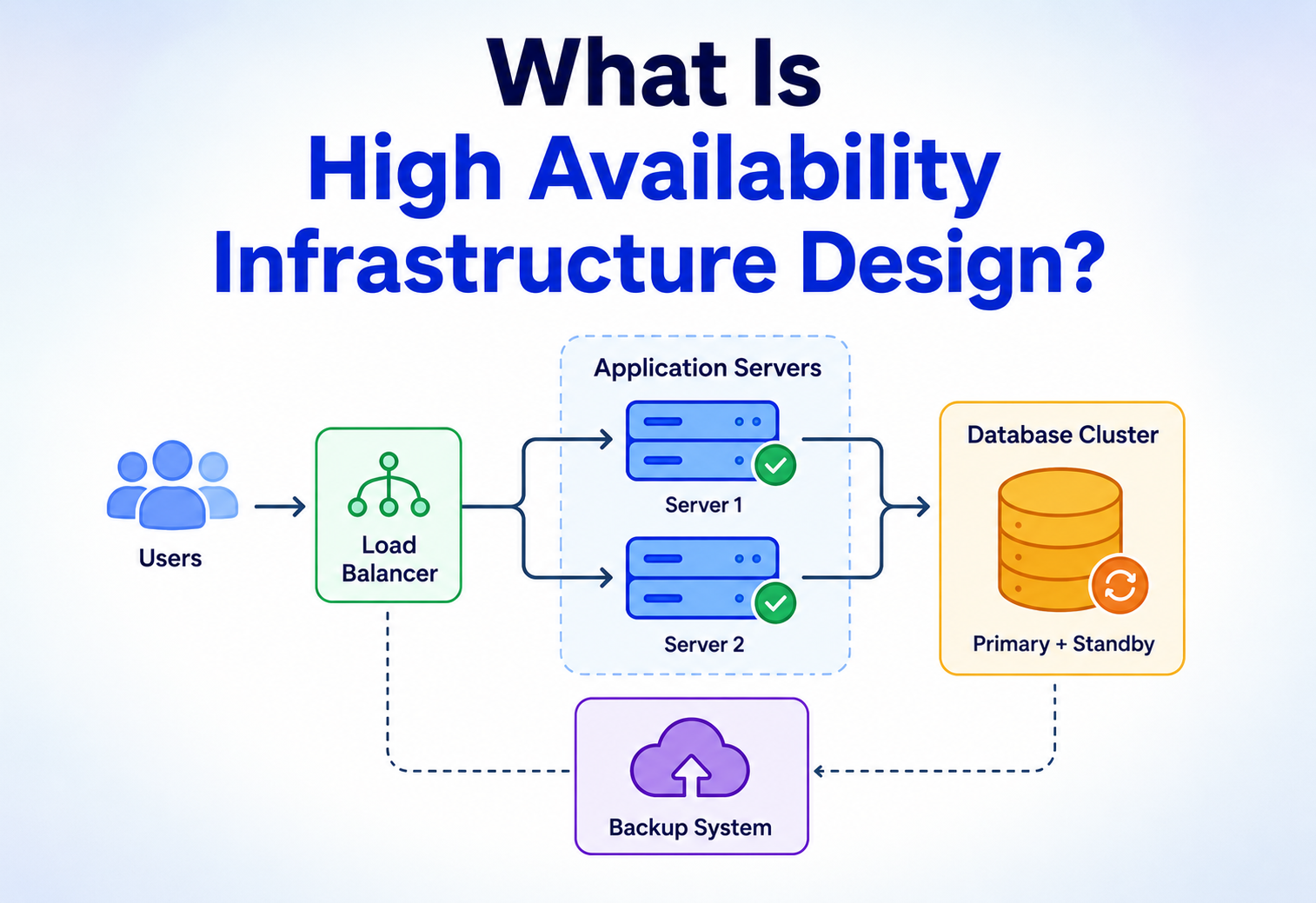
What Is High Availability Infrastructure Design?
A complete, ground-up guide to building systems that stay up — covering redundancy, failover, replication, load balancing, monitoring, and the real architecture patterns companies like Netflix, Amazon, and Google use to hit 99.99%+ uptime. Failure is treated as certain; visibility of that failure to users is what HA design refuses to allow.
High availability infrastructure design is the discipline of building systems that keep working when their parts break. This guide walks 19 sections from historical roots (telephone exchanges, aviation redundancy, mainframes) to modern practice: SPOF elimination, active-active vs. active-passive, replication, quorum consensus, chaos engineering, error budgets, deployment strategies, circuit breakers with backoff and jitter, and case studies from Netflix, Amazon, Google, Uber, and regulated banking systems. Two Java code samples make the resilience patterns concrete.
Introduction & History
From telephone exchanges to hot-swappable mainframes to “always-on” web architecture — why HA is now non-negotiable for any serious system.
Imagine a lemonade stand that's open only when the owner feels like it. Some days it's open, some days it's closed, and nobody ever knows in advance. Customers get frustrated and start going to the stand across the street that's always open, rain or shine, morning or night. That second stand has something the first one doesn't: high availability.
In computing, high availability (HA) means designing a system so that it keeps working — keeps serving users — even when individual parts of it break. Not “we'll fix it by tomorrow,” but “the user never even noticed anything went wrong.” HA infrastructure design is the discipline of building the servers, networks, databases, and software processes that make that possible.
The idea isn't new. Long before the internet, engineers who built telephone exchanges, power grids, and airplanes were obsessed with the same question: what happens when a part fails? The telephone network of the 1900s, for example, was built with redundant switching paths so that one damaged cable wouldn't cut off a whole city. Aviation borrowed the same logic — commercial jets have multiple engines and redundant flight computers because a single failure should never be able to bring the plane down.
When computers started running businesses in the 1960s and 70s, mainframes like IBM's System/370 introduced hardware redundancy and hot-swappable components. In the 1990s, as the web exploded, companies quickly discovered that a single web server sitting in a closet was a single point of failure — one power outage and the entire business went dark. This gave rise to clustering, load balancers, and the first generation of “always-on” web architecture.
Today, HA is not optional for any serious system. Whether it's a bank's payment platform, a hospital's patient record system, or a video streaming service, users expect the lights to always be on. High availability infrastructure design is the set of principles, patterns, and technologies that make that expectation a reality.
High availability is the practice of designing a system so that when one piece breaks — a server, a disk, a network cable, even an entire data center — the system as a whole keeps running, usually by having a backup ready to take over automatically.
Problem & Motivation
Everything breaks eventually. The only real question is whether users see it break — and how much every extra “nine” of availability actually costs.
Why does this matter so much? Because everything breaks eventually. Hard drives fail. Power grids flicker. Network cables get chewed by rodents (this really happens — it's a known cause of outages). Software has bugs. Data centers catch fire. Engineers make mistakes while deploying code at 2 a.m. None of this is hypothetical; it is the normal, guaranteed background noise of running any real system at scale.
The question isn't if something will fail — it's when, and more importantly, what happens to your users when it does. A system without HA design treats every failure as an emergency: pages go out, engineers scramble, customers see error pages, and revenue stops. A system with HA design treats failure as a routine, expected event that's handled automatically, often without anyone noticing.
2.1 · THE COST OF DOWNTIME
Downtime isn't just an inconvenience — it's measured in real money and real trust. A large e-commerce site can lose hundreds of thousands of dollars for every hour its checkout page is down. A hospital's system going offline can delay critical care. A bank's ATM network failing locks people out of their own money. Beyond the immediate financial hit, repeated outages erode the one thing that's hardest to win back: user trust.
This table is the beating heart of every HA conversation. Notice how each additional “nine” is dramatically harder and more expensive to achieve than the last. Going from 99% to 99.9% might mean adding a second server. Going from 99.9% to 99.999% might mean multiple data centers, automated failover, chaos testing, and a dedicated reliability team. HA design is fundamentally about deciding how many nines your system actually needs — and building only as much redundancy as that target requires, because over-engineering has its own costs.
HA does not mean “the system never fails.” It means the system is designed so individual failures don't turn into outages that users can see. Failure is expected and planned for — it's just handled invisibly.
2.2 · AVAILABILITY AS A SPECTRUM, NOT A SWITCH
It helps to stop thinking of “available” and “down” as two binary states and instead picture a dial. At one extreme, a system might be fully down — nothing works for anyone. At the other, it's fully healthy. In between sits a whole range of partial-availability states: maybe only 5% of requests are slow, or only users in one region are affected, or writes work but reads are stale. Good HA design cares about the whole dial, not just the two extremes, because most real incidents live in that messy middle ground.
This is also why “is the site up?” is often the wrong question to ask during an incident. The better questions are: what fraction of users are affected, what fraction of requests are failing, and how long has this been going on? Those numbers are what actually drive decisions about whether to trigger a failover, roll back a deployment, or simply wait it out.
Core Concepts
The shared vocabulary of HA: redundancy, SPOF, failover, active-active vs active-passive, replication, load balancing, health checks, RTO/RPO, MTBF/MTTR, idempotency, and quorum.
Before going further, let's build a shared vocabulary. Every HA conversation eventually uses these words, so let's define each one simply, with an analogy.
Redundancy
What: Having more than one copy of something so that if one fails, another can take over.
Why: A single copy of anything is a single point of failure.
Analogy: Carrying a spare tire in your car. You don't need it most days, but when you get a flat, you're not stranded.
Single Point of Failure (SPOF)
What: Any single component whose failure brings down the whole system.
Why it matters: HA design is largely the art of hunting down and eliminating SPOFs, one at a time.
Example: If your entire application depends on one database server with no replica, that database is a SPOF.
Failover
What: The automatic process of switching from a failed component to a healthy backup.
Analogy: A backup generator that kicks in automatically the instant the power grid goes out, so the lights barely flicker.
3.1 · REDUNDANCY MODELS — ACTIVE-ACTIVE VS. ACTIVE-PASSIVE
Active-Active
- All nodes handle traffic simultaneously
- Failure of one node just reduces capacity, doesn't cause an outage
- Better hardware utilization — nothing sits idle
Active-Passive
- One node is “standby,” only kicks in on failure
- Simpler to reason about (no concurrent writes)
- Wastes capacity while standby is idle
Replication
What: Continuously copying data from one node to another so backups are always up to date.
Analogy: A student who takes notes and immediately photocopies them for a friend who missed class — the friend's copy stays current without them attending every lecture.
Load Balancing
What: Distributing incoming requests across multiple servers so no single one is overwhelmed — and so traffic can be rerouted away from unhealthy servers.
Analogy: A supermarket manager who opens a new checkout lane and directs customers to it when a line gets too long.
Health Checks & Heartbeats
What: Periodic “are you still alive?” signals a system sends to itself. If a heartbeat is missed a few times in a row, the component is marked unhealthy and traffic is rerouted.
3.2 · RTO AND RPO
Two acronyms every HA engineer lives by:
| Term | Full Name | Plain-English Meaning |
|---|---|---|
| RTO | Recovery Time Objective | How long can we be down before it's unacceptable? |
| RPO | Recovery Point Objective | How much data can we afford to lose (measured in time)? |
For example, an RPO of 5 minutes means that in a disaster, you can accept losing at most 5 minutes' worth of data — so your backups/replication must run at least that frequently.
3.3 · MEAN TIME BETWEEN FAILURES AND MEAN TIME TO RECOVERY
Two more measurements engineers track constantly are MTBF (Mean Time Between Failures) and MTTR (Mean Time To Recovery). MTBF answers “on average, how long does a component run before it breaks?” MTTR answers “once it breaks, how long until it's fixed and traffic is flowing normally again?” Interestingly, HA design often focuses more energy on shrinking MTTR than on growing MTBF — because failures are inevitable no matter how reliable individual components are, but the speed of recovery is almost entirely within an engineering team's control. A system that fails often but recovers in two seconds can feel more available to users than a system that rarely fails but takes two hours to recover when it does.
Idempotency
What: An operation is idempotent if doing it once has the same effect as doing it five times.
Why it matters for HA: Failover and retries mean a request might accidentally be processed more than once. If “charge the customer $10” isn't idempotent, a retry after a network blip could charge them $20 instead.
Analogy: Pressing an elevator call button five times doesn't summon five elevators — the operation “request an elevator” is idempotent by design.
Quorum
What: The minimum number of nodes that must agree before a decision (like a leader election or a write) is considered valid.
Why: Requiring a majority (not just any one node) to agree prevents two isolated halves of a cluster from both believing they're in charge at the same time.
Architecture & Components
A tower of individually-redundant layers, plus the invisible ones most diagrams forget: network paths, availability zones, and the control-plane / data-plane split.
A high-availability system is really a collection of individually-redundant layers stacked on top of each other. If any one layer has a weak link, the whole tower is only as strong as that link. Let's walk through the layers from the outside in.
4.1 · LAYER BY LAYER
DNS / Global Traffic Manager
Routes users to the healthiest, closest region. If an entire region fails, DNS can redirect all traffic elsewhere within minutes.
Load Balancer
Distributes requests across multiple app servers and stops sending traffic to any server that fails its health check.
Application Servers
Stateless copies of your app running on multiple machines, so any one instance can be killed and restarted without users noticing.
Caching Layer
A fast in-memory layer (like Redis) that reduces load on the database and can serve stale-but-usable data during a brief outage.
Database Cluster
A primary node for writes and multiple replicas for reads and failover, kept in sync via replication.
Storage & Backups
Data written to multiple disks/availability zones, with regular snapshots stored somewhere geographically separate.
4.2 · AVAILABILITY ZONES AND REGIONS
Cloud providers organize data centers into availability zones (AZs) — physically separate facilities within a region, each with independent power, cooling, and networking — and regions, which are entirely separate geographic areas (e.g., US East vs. Europe West). Spreading your infrastructure across multiple AZs protects you from a single data center failure. Spreading across multiple regions protects you from a whole-region disaster like a natural catastrophe or a regional network failure.
4.3 · NETWORK-LEVEL REDUNDANCY
It's easy to focus on servers and forget that the network connecting them is just as capable of failing. Serious HA deployments use redundant network paths — multiple physical fiber routes into a data center, multiple internet service providers, and redundant top-of-rack switches — so that a single cut cable or failed switch doesn't isolate an entire rack of otherwise-healthy servers. This is often invisible in architecture diagrams, which is exactly why it's a common source of surprise outages: the app servers, database, and load balancer can all be individually redundant and still go dark together if they all depend on one shared network path.
4.4 · THE CONTROL PLANE VS. THE DATA PLANE
A subtler but important distinction is between the data plane (the components that actually serve user traffic — app servers, databases, caches) and the control plane (the components that manage and configure the data plane — orchestrators like Kubernetes' API server, service discovery systems, configuration stores). A well-designed HA system ensures the data plane can keep serving existing traffic even if the control plane is temporarily unavailable. If your app servers stop serving requests the instant your orchestrator has a bad five minutes, you've accidentally made your control plane a single point of failure for the entire system.
Internal Working — How Failover Actually Happens
Heartbeats, Raft-style consensus, leader election, and traffic rerouting — plus the split-brain problem that quorum exists to prevent.
It's one thing to say “the backup takes over automatically” — but how does a machine actually know another machine has died, and how does it decide who takes charge? This is where things get genuinely interesting.
Detecting failure
Every node in a cluster periodically sends a small “heartbeat” message — essentially a digital “I'm still here!” — to its peers or to a central coordinator. If a node misses several heartbeats in a row (not just one, to avoid false alarms from a brief network hiccup), it's marked as unhealthy.
Reaching consensus
Here's the tricky part: in a distributed system, how do multiple machines agree on the fact that another machine is actually dead, and not just experiencing a temporary network delay? This is the essence of the consensus problem, and it's solved by algorithms like Raft and Paxos. In simple terms, these algorithms let a group of machines vote and agree on shared facts (like “node C is dead, node B is now the new leader”) even if some messages get lost or some machines are slow.
Promoting a new leader
Once consensus is reached that the primary node is down, one of the healthy replicas is promoted to be the new primary. This is called a leader election. The new leader starts accepting writes, and the load balancer or service discovery system is updated to point traffic at it.
Rerouting traffic
The load balancer (or DNS, or a service mesh) stops routing requests to the dead node and starts routing them to the newly promoted node instead. If done well, this whole sequence — detect, elect, reroute — takes seconds, not minutes.
Think of Raft like a classroom electing a new class president when the old one is absent. Everyone votes, and as long as more than half the class agrees on the same candidate, the decision is official — even if a few students' votes arrive late.
If a network glitch makes two nodes each think they're the primary at the same time, you get “split brain” — both accept writes, and data diverges. This is why HA systems use quorum-based consensus (a majority must agree) rather than letting any single node self-promote.
Data Flow & Lifecycle Of A Request
Six hops from a browser tap to a database write — and, at every one of them, a redundant sibling waiting silently in the wings.
Let's trace a single user request end-to-end through a highly available system, to see redundancy in action at every hop.
DNS resolution
The user's browser asks DNS for the app's IP address. A global traffic manager returns the IP of the nearest healthy region.
Load balancer entry
The request hits a load balancer, which checks its list of healthy app servers (updated continuously via health checks) and picks one.
Application processing
The app server, which is stateless, processes the request. Because it holds no unique session state, any other instance could have handled this request equally well.
Cache check
The app checks a distributed cache first. If the data is there, it skips the database entirely — faster, and it takes load off the DB.
Database read/write
On a cache miss, or for a write, the app talks to the database primary (for writes) or a replica (for reads), which is itself replicated across zones.
Response & logging
The response streams back to the user, while structured logs and metrics about this request are shipped asynchronously to a monitoring pipeline.
Notice that at every single step, there's a redundant option ready to take over: another DNS-returned region, another load-balanced server, another cache node, another DB replica. That layered redundancy, not any single “magic” technology, is what high availability actually is.
Advantages, Disadvantages & Trade-offs
Redundancy pays a visible dividend and an invisible tax — and the CAP theorem forces a conscious choice between consistency and availability the moment the network splits.
Advantages
- Users experience fewer (ideally zero) visible outages
- Individual hardware failures become non-events
- Maintenance and upgrades can happen without downtime (rolling deploys)
- Builds long-term trust and brand reputation
- Regulatory compliance for critical industries (finance, healthcare) often requires it
Disadvantages / Costs
- Significantly higher infrastructure cost (running duplicate capacity)
- More operational complexity — more moving parts to monitor and secure
- Distributed systems introduce new failure modes (split-brain, consistency issues)
- Requires specialized engineering skill and tooling
- Testing failover scenarios (chaos engineering) takes real ongoing investment
7.1 · THE CORE TRADE-OFF — CONSISTENCY VS. AVAILABILITY
This brings us to one of the most famous ideas in distributed systems: the CAP theorem. It states that a distributed data store can only guarantee two out of these three at the same time:
- Consistency — every read gets the most recent write
- Availability — every request gets a (non-error) response
- Partition tolerance — the system keeps working even if network communication between nodes breaks down
Since network partitions are a fact of life in any real distributed system, partition tolerance isn't really optional — so in practice, the real trade-off engineers face is between consistency and availability when a partition happens. Do you serve possibly-stale data to stay available (an “AP” system, like DNS or many NoSQL databases), or do you refuse to answer until you're sure the data is correct (a “CP” system, like many traditional relational databases in cluster mode)? Neither answer is universally “right” — it depends entirely on what the application needs. A bank's account balance probably needs strong consistency; a social media “like” counter can tolerate a little staleness in exchange for always being available.
Performance & Scalability
Horizontal scaling and stateless design carry availability along for the ride — and Little's Law explains why queue depth matters as much as CPU.
HA and scalability are close cousins but not identical. Scalability is about handling more load; availability is about surviving failure. Good news: many techniques serve both goals at once.
8.1 · HORIZONTAL VS. VERTICAL SCALING
Vertical scaling means making a single server bigger (more CPU, more RAM). It's simple but has a ceiling, and it doesn't help availability at all — a bigger single server is still a single point of failure. Horizontal scaling means adding more servers. This is the foundation of HA, because more servers naturally means more redundancy.
8.2 · STATELESS DESIGN
The single biggest enabler of both scalability and availability is making application servers stateless — meaning no server stores unique data (like a user's session) that only it has. If any server can handle any request, then losing a server, or adding ten more, is trivial. Session data instead lives in a shared store like Redis, accessible to all app servers equally.
8.3 · AUTOSCALING
Modern cloud platforms can automatically add or remove server instances based on real-time load, using rules like “if average CPU exceeds 70% for 5 minutes, add 2 instances.” This keeps the system responsive under load spikes and cost-efficient during quiet periods — while the redundancy inherent in having multiple instances also improves availability.
The number of requests “in flight” in your system equals the arrival rate multiplied by how long each request takes to process. If requests start piling up faster than they're processed, latency snowballs — which is why HA systems watch queue depth as closely as they watch CPU.
8.4 · BOTTLENECK — THE DATABASE
App servers scale horizontally with ease because they're stateless — but the database holds the actual state, making it the classic scalability bottleneck. Techniques like read replicas, caching, connection pooling, and sharding (splitting data across multiple database instances by key) all exist largely to relieve pressure on this one critical layer.
8.5 · CONNECTION POOLING
Opening a new database connection is surprisingly expensive — it involves a network handshake, authentication, and resource allocation on the database side. Without pooling, a burst of traffic can spend more time opening connections than actually running queries, and can exhaust the database's maximum connection limit entirely, causing an outage that has nothing to do with actual query load. A connection pool keeps a set of ready-to-use connections open and hands them out to requests as needed, dramatically improving both performance and resilience under load spikes.
8.6 · THUNDERING HERD AND BACKPRESSURE
When a popular cache entry expires, or a failed service comes back online, every waiting client can rush in at once — a phenomenon called the thundering herd. This sudden spike can immediately re-crash the very component that just recovered. HA systems defend against this with techniques like request coalescing (only one request actually goes to the backend while others wait for its result), staggered cache expiration times, and backpressure — deliberately slowing down or rejecting incoming requests when a downstream system signals it's overwhelmed, rather than blindly forwarding every request and hoping for the best.
High Availability & Reliability Deep Dive
SPOF-hunting, N+1 through 2N+1 redundancy, graceful degradation, chaos engineering, DR strategies, blast radius reduction, and the runbooks that turn a 3 a.m. page into a checklist.
Let's zoom in specifically on how reliability is engineered, measured, and continuously improved — the heart of the topic.
9.1 · REDUNDANCY AT EVERY LAYER, REVISITED
A useful mental model: draw your entire system as a diagram, then ask of every single box and every single arrow, “what happens if this dies right now?” If the honest answer is “the system goes down,” you've found a SPOF, and HA design means fixing it — usually by duplicating that box or arrow.
9.2 · N+1, 2N, AND 2N+1 REDUNDANCY
| Model | Meaning | Example |
|---|---|---|
| N+1 | One extra unit beyond what's needed | 4 servers needed for load, 5 deployed |
| 2N | A full duplicate of the entire system | Complete mirrored data center on standby |
| 2N+1 | A full duplicate, plus one extra for safety margin | Used in mission-critical systems like power grids, hospitals |
9.3 · GRACEFUL DEGRADATION
Sometimes full redundancy isn't feasible, and the next best HA strategy is graceful degradation — designing the system so that when a non-critical component fails, the core experience still works, just with reduced features. For example, if a “recommended for you” service goes down, an e-commerce site can hide that widget and keep letting people buy things, rather than showing an error page for the whole site.
9.4 · CHAOS ENGINEERING
You can't be sure your failover actually works until you've tested it — deliberately. Chaos engineering is the practice of intentionally injecting failures into a system (killing a server, cutting network access, adding artificial latency) in a controlled way to verify that HA mechanisms actually behave as designed. Netflix pioneered this with a tool called Chaos Monkey, which randomly terminates production instances during business hours specifically to force engineers to build resilient systems, not just resilient-looking ones.
A failover mechanism that has never actually been triggered in a realistic test is a mechanism you cannot trust. Untested disaster recovery plans are one of the most common causes of “the backup didn't actually work” during real incidents.
9.5 · DISASTER RECOVERY (DR) STRATEGIES
Backup & Restore
Cheapest, slowest. Data backed up regularly; in a disaster, you provision new infrastructure and restore from backup. High RTO/RPO.
Pilot Light
A minimal version of the environment is always running in a secondary region, ready to be scaled up quickly.
Warm Standby
A scaled-down but fully functional copy runs continuously in a second region, ready to take full load with some scale-up time.
Multi-Site Active-Active
Full production capacity running in two or more regions simultaneously. Fastest recovery, highest cost.
9.6 · BLAST RADIUS REDUCTION
Even with excellent redundancy, it's worth designing systems so that any single failure — or any single bad deployment — can only affect a limited “blast radius” rather than the entire user base at once. This is the thinking behind deploying to one availability zone at a time, rolling out to a small percentage of traffic before going wide, and partitioning customers into independent cells or shards. If something does go wrong despite all the testing in the world, a small blast radius turns a company-wide crisis into a contained, manageable incident.
9.7 · RUNBOOKS AND HUMAN FACTORS
Automation handles the vast majority of routine failures, but rare, novel situations still require human judgment. A good runbook — a step-by-step guide for diagnosing and responding to specific classes of incidents — turns a stressful 3 a.m. page into a calm checklist instead of a scramble. The best HA organizations treat runbooks as living documents, updated after every incident, and run regular “game days” where teams practice using them against simulated failures before a real one ever happens.
Security In Highly Available Systems
Availability is one leg of the CIA triad. DDoS, redundant security controls, secrets on failover, and the humble expired-certificate outage.
Availability is actually one-third of the classic security triad — Confidentiality, Integrity, Availability (CIA). A system that's been taken offline by an attacker has had its availability compromised just as surely as if data had been stolen.
10.1 · DDoS PROTECTION
A Distributed Denial of Service (DDoS) attack floods a system with fake traffic to overwhelm it. HA infrastructure that scales automatically can actually make things worse without protection, since it may “successfully” scale up to serve an attacker's junk traffic, running up costs while legitimate users still can't get through. This is why HA systems pair autoscaling with dedicated DDoS mitigation services that filter malicious traffic before it ever reaches app servers.
10.2 · REDUNDANCY OF SECURITY CONTROLS
Firewalls, authentication services, and certificate authorities are all part of the critical path — and each needs its own redundancy story. A single firewall appliance that fails shouldn't take down all network access; a single authentication server that fails shouldn't lock every user out.
10.3 · SECRETS AND FAILOVER
When a new node is promoted during failover, it needs the same credentials, certificates, and secrets as the node it's replacing — instantly. Centralized secrets management (like HashiCorp Vault or a cloud provider's secrets manager) ensures the new node can authenticate immediately rather than waiting on manual credential provisioning.
Modern designs increasingly assume no implicit trust between internal components — every service authenticates every other service. This adds overhead, but it means a compromised node can be isolated without taking down the whole system, which is itself an availability benefit.
10.4 · CERTIFICATE EXPIRY — A SURPRISINGLY COMMON OUTAGE CAUSE
It sounds almost too simple to matter, but an expired TLS certificate has caused major, headline-making outages at large, sophisticated companies. Because certificates are configured once and then quietly sit unnoticed for months or years, they're an easy thing to forget — until the exact moment they expire and every client suddenly refuses to connect. HA-minded teams treat certificate renewal the same way they treat any other redundancy problem: automate it entirely (using tools like Let's Encrypt's automated renewal or a managed certificate service), and alert well in advance of expiry as a safety net, rather than relying on a human to remember a calendar reminder.
Monitoring, Logging & Metrics
Metrics, logs, traces; SLIs, SLOs, SLAs; error budgets; alerting on symptoms not causes; dashboards that answer the right question fast; and blameless postmortems.
You cannot achieve high availability without visibility into whether your system is actually available. “If you can't measure it, you can't manage it” is doubly true here.
11.1 · THE THREE PILLARS OF OBSERVABILITY
Metrics
Numeric time-series data — CPU usage, request rate, error rate, latency percentiles (p50/p95/p99). Good for dashboards and alerting thresholds.
Logs
Timestamped, detailed records of individual events. Good for digging into exactly what happened during an incident.
Traces
Follow a single request as it hops across multiple services, showing exactly where time was spent or where it failed.
11.2 · SLIs, SLOs, AND SLAs
| Term | Meaning |
|---|---|
| SLI (Indicator) | An actual measured value, e.g., “99.95% of requests succeeded last month” |
| SLO (Objective) | An internal target, e.g., “we aim for 99.9% success rate” |
| SLA (Agreement) | A contractual promise to customers, often with financial penalties if missed |
SLOs are usually set a bit stricter than SLAs, giving engineering teams an internal early-warning buffer before they'd ever actually breach a customer contract.
11.3 · ERROR BUDGETS
If your SLO is 99.9% availability, that means you have an “error budget” of 0.1% — roughly 43 minutes a month — that you're allowed to spend on things like risky deployments or planned maintenance. This reframes reliability from “never fail” (impossible) to “fail within an agreed, tracked, and intentional budget,” which is a much healthier way for teams to balance shipping new features against system stability.
11.4 · ALERTING DONE RIGHT
Good alerting pages a human only for things that need a human — symptoms that affect users (like elevated error rates), not every individual internal event. Alerting on causes instead of symptoms produces “alert fatigue,” where engineers start ignoring pages, which is far more dangerous than having no alerts at all.
11.5 · DASHBOARDS THAT TELL A STORY
During an incident, the difference between a five-minute diagnosis and a fifty-minute one often comes down to whether the dashboards were designed in advance to answer the right questions. Effective HA dashboards are laid out in layers: a top-level view showing overall user-facing health (error rate, latency, traffic volume), then a level below showing per-service health, then a level below that showing infrastructure metrics like CPU, memory, and disk. Engineers can drill down from “something is wrong” to “this specific service, this specific dependency” in seconds rather than hunting blindly through dozens of unrelated graphs.
11.6 · BLAMELESS POSTMORTEMS
After any significant incident, mature HA organizations write a postmortem — a detailed account of what happened, why, how it was detected, how it was resolved, and what will change to prevent a recurrence. The word “blameless” matters: postmortems that focus on which engineer made a mistake tend to make people hide problems and avoid honest reporting. Postmortems that focus on which systems and processes allowed the mistake to become an outage tend to produce genuine improvements, because they treat human error as a predictable input to design around, not a moral failing to punish.
Deployment & Cloud Strategies
Rolling, blue-green, canary, feature flags, IaC, and the honest limits of “just go multi-region” as a reflex.
How you roll out new code is itself an availability concern — a bad deployment is one of the most common causes of real-world outages.
12.1 · DEPLOYMENT STRATEGIES
Rolling Deployment
Update servers a few at a time, keeping most of the fleet serving traffic throughout.
Blue-Green Deployment
Run two identical environments; switch all traffic from “blue” (old) to “green” (new) instantly, with instant rollback available.
Canary Deployment
Release the new version to a small percentage of users first, watch metrics closely, then gradually expand.
Feature Flags
Ship code dark, then turn features on/off remotely without a redeploy — makes rollback instant and low-risk.
12.2 · INFRASTRUCTURE AS CODE (IaC)
Tools like Terraform and CloudFormation let teams define their entire infrastructure — servers, networks, load balancers — as version-controlled code. This matters enormously for HA because it means a destroyed data center or region can be rebuilt from scratch, identically, in minutes, rather than someone trying to remember which settings were clicked in a console two years ago.
12.3 · MULTI-CLOUD AND MULTI-REGION
Running across multiple regions of the same cloud provider protects against a regional outage. Running across multiple cloud providers entirely (AWS + GCP, for instance) protects against an outage of the provider itself — but this adds substantial complexity and cost, and is usually reserved for the most mission-critical systems rather than adopted by default.
Multi-region is not free redundancy — cross-region data replication introduces latency, and keeping data consistent across thousands of miles is genuinely hard. Many teams over-invest in multi-region before they've even eliminated single points of failure within one region.
Databases, Caching & Load Balancing
Synchronous vs asynchronous replication, sharding, cache-as-shock-absorber, four LB algorithms, cache stampedes, and the timeout you forgot to set.
13.1 · DATABASE REPLICATION STRATEGIES
| Strategy | How it works | Trade-off |
|---|---|---|
| Synchronous replication | Write isn't confirmed until it's copied to replicas | Strong consistency, higher write latency |
| Asynchronous replication | Write is confirmed immediately; replicas catch up shortly after | Low latency, risk of losing recent writes on failure |
| Semi-synchronous | Confirmed after at least one replica acknowledges | A balance between the two |
13.2 · SHARDING
When a single database can no longer handle the write volume, data can be split (sharded) across multiple database instances, typically by a key like user ID or region. Each shard is independently replicated for HA. This adds real complexity — queries spanning multiple shards become harder — but it's often the only way to scale write-heavy systems.
13.3 · CACHING FOR AVAILABILITY
Caches like Redis or Memcached don't just improve speed — they can act as a shock absorber during a database outage, serving slightly-stale cached data instead of a hard error. This pattern is sometimes called “fail open,” and it's a deliberate trade-off of correctness for availability during a crisis.
13.4 · LOAD BALANCING ALGORITHMS
Round Robin
Requests cycle evenly through all servers in order. Simple, works well when all servers are similarly sized.
Least Connections
Routes to whichever server currently has the fewest active connections — better for uneven request durations.
Weighted
Servers with more capacity get proportionally more traffic.
Consistent Hashing
Routes based on a hash of the request (e.g., user ID), useful for cache locality and minimizing reshuffling when servers change.
13.5 · CACHE INVALIDATION AND STAMPEDES
Caches introduce their own availability risk if not handled carefully. A cache stampede happens when a widely-used cache entry expires and a flood of simultaneous requests all miss the cache at once, slamming the database with duplicate work it was previously shielded from. Mitigations include staggering expiration times with a bit of randomness, using a “lock” so only one request repopulates the cache while others wait briefly, and serving stale data for a short grace period while a fresh copy is fetched in the background.
13.6 · TIMEOUTS AS A FIRST-CLASS DESIGN DECISION
Every network call — to a database, a cache, another service — needs an explicit timeout. Without one, a single slow dependency can hold threads or connections open indefinitely, eventually exhausting a resource pool and taking down a service that was otherwise perfectly healthy. Setting sensible timeouts (and testing what happens when they trigger) is one of the cheapest, highest-leverage HA improvements a team can make, and yet it's one of the most commonly skipped.
APIs & Microservices
Circuit breakers, exponential backoff with jitter, bulkheads, API gateways and service meshes, service discovery, and rate limiting as an availability tool.
In a microservices architecture, a single user action might touch a dozen independent services. HA here means each service must be independently resilient — and, just as importantly, resilient to the failure of the services it depends on.
14.1 · CIRCUIT BREAKERS
A circuit breaker pattern stops a service from repeatedly calling a dependency that's clearly failing. After enough failures, the circuit “opens” and calls fail fast (or return a fallback) instead of waiting on a slow, doomed request — preventing one struggling service from dragging down every service that depends on it.
public class CircuitBreaker {
    private int failureCount = 0;
    private final int failureThreshold = 5;
    private boolean open = false;
    private long lastFailureTime;
    private final long resetTimeoutMs = 30000;

    public String callService(Supplier<String> remoteCall, Supplier<String> fallback) {
        if (open) {
            if (System.currentTimeMillis() - lastFailureTime > resetTimeoutMs) {
                open = false; // try again, "half-open" state
            } else {
                return fallback.get(); // fail fast
            }
        }
        try {
            String result = remoteCall.get();
            failureCount = 0; // reset on success
            return result;
        } catch (Exception e) {
            failureCount++;
            lastFailureTime = System.currentTimeMillis();
            if (failureCount >= failureThreshold) {
                open = true;
            }
            return fallback.get();
        }
    }
}
This class tracks consecutive failures; once too many happen in a row, it “opens” the circuit and stops calling the failing service for a cooldown period, calling the fallback instead — protecting the rest of the system.
14.2 · RETRIES WITH BACKOFF
Transient failures (a brief network blip) are often best solved by simply retrying — but retrying immediately and repeatedly can make things worse by overwhelming an already-struggling service. Exponential backoff waits progressively longer between retries (1s, 2s, 4s, 8s…), often with a bit of random “jitter” added so that many clients don't all retry at exactly the same moment.
public String callWithRetry(Supplier<String> call, int maxRetries) throws InterruptedException {
    int attempt = 0;
    long delay = 500; // ms
    while (true) {
        try {
            return call.get();
        } catch (Exception e) {
            attempt++;
            if (attempt >= maxRetries) throw new RuntimeException("Max retries reached", e);
            long jitter = (long) (Math.random() * 100);
            Thread.sleep(delay + jitter);
            delay *= 2; // exponential growth
        }
    }
}
14.3 · BULKHEADS
Named after the watertight compartments in a ship's hull, the bulkhead pattern isolates resources (like thread pools or connection pools) per dependency, so that one overwhelmed dependency can't exhaust resources needed by the rest of the application — the same way one flooded compartment doesn't sink the whole ship.
14.4 · API GATEWAYS AND SERVICE MESHES
An API gateway centralizes cross-cutting concerns (rate limiting, authentication, routing) in front of many microservices. A service mesh (like Istio) goes further, handling retries, circuit breaking, and load balancing for service-to-service traffic transparently, without every team having to reimplement this logic themselves.
14.5 · SERVICE DISCOVERY
In a dynamic environment where instances are constantly being created and destroyed by autoscaling or self-healing, hardcoding IP addresses simply doesn't work. Service discovery systems (like Consul, etcd, or a cloud provider's native service registry) maintain a live, continuously updated map of “which instances of which service are currently healthy and where.” When a new instance starts, it registers itself; when it fails a health check, it's automatically removed from the map, and traffic stops flowing to it within seconds — without any human editing a configuration file.
14.6 · RATE LIMITING AS A PROTECTIVE MEASURE
Rate limiting is often thought of purely as an abuse-prevention tool, but it's equally important for availability. By capping how many requests a single client (or even an internal service) can make in a given time window, rate limiting prevents one misbehaving caller — whether malicious, buggy, or simply too popular for its own good — from consuming all of a shared resource's capacity and starving every other legitimate user of service.
Design Patterns & Anti-Patterns
Four proven patterns and four textbook anti-patterns — the hidden SPOF, untested failover, cascading retries, and sticky sessions without replication.
15.1 · PROVEN PATTERNS
Redundant N+1
Always provision at least one more instance than the minimum needed, so a single failure never causes capacity shortfall.
Health Check & Self-Healing
Unhealthy instances are automatically replaced by orchestrators like Kubernetes without human intervention.
Idempotent Operations
Design operations so repeating them (due to a retry) has the same effect as doing them once — critical for safe retries.
Graceful Shutdown
When an instance is being taken down intentionally, it finishes in-flight requests before stopping, rather than dropping them.
15.2 · ANTI-PATTERNS TO AVOID
Teams often eliminate the obvious single points of failure (one web server) but miss subtler ones — a single DNS provider, a single certificate, a single person who knows how to run the failover manually.
Building redundancy but never actually triggering a real failover test means you're trusting a theory, not a verified capability.
Every layer in a call chain retrying independently, without coordination, can multiply a small failure into a traffic storm that takes down an already-struggling service entirely.
Pinning a user to one specific server (“sticky sessions”) without replicating that server's session data means a failure of that one server logs the user out or loses their cart — undermining the very redundancy you built.
Best Practices & Common Mistakes
Eight habits of teams that consistently hit their SLOs, and five ways smart teams still trip themselves up.
Best practices
- Eliminate SPOFs systematically — draw the architecture, interrogate every box and arrow.
- Automate failover — manual failover during a 3 a.m. incident is slow and error-prone.
- Test failure regularly — chaos engineering, game days, and disaster recovery drills aren't optional extras.
- Design for graceful degradation — decide in advance which features can be sacrificed under stress.
- Keep app servers stateless — it's the foundation that makes everything else easier.
- Set realistic RTO/RPO targets per system, rather than chasing “five nines” everywhere by default.
- Invest in observability early — you can't improve what you can't see.
- Document and rehearse incident response — the best architecture still needs humans who know what to do.
Common mistakes
- Treating HA as purely a hardware/infrastructure problem while ignoring application-level statefulness
- Over-engineering HA for systems that don't actually need five nines, burning budget better spent elsewhere
- Assuming cloud providers guarantee availability by default — the shared responsibility model still requires you to architect for HA within their platform
- Ignoring the “boring” layers — DNS TTLs, certificate expiry, and config drift cause a surprising share of real outages
- Skipping post-incident reviews, so the same failure mode recurs months later
Real-World & Industry Examples
Netflix, Amazon, Google, Uber, and regulated banking — five different scales, one shared assumption: failure is a certainty.
Chaos-first architecture
Netflix runs entirely on AWS across multiple regions and pioneered chaos engineering with Chaos Monkey — a tool that randomly kills production instances to force every team to build services that survive failure by default, not by luck. Their architecture assumes failure is constant and designs accordingly, using circuit breakers extensively via their open-source Hystrix library (now largely succeeded by newer resilience libraries).
Two-pizza teams & AZs
Amazon's retail platform is built from thousands of independent microservices, each owned by a small team responsible for its own availability. AWS itself is organized into regions and availability zones specifically so customers can build the same layered redundancy Amazon uses internally.
SRE & global consensus
Google popularized the discipline of Site Reliability Engineering (SRE), including concepts covered above like error budgets and SLOs. Google's global network and data infrastructure (e.g., Spanner, a globally distributed database) are engineered to survive not just server failures but entire data center losses, using techniques like Paxos-based consensus across continents.
Cell-based architecture
Uber's real-time matching system must stay available across time zones and demand spikes (like New Year's Eve). They rely heavily on geographically sharded data, aggressive caching, and cell-based architecture — isolating customers into independent “cells” so a failure in one cell can't cascade to affect users elsewhere in the world.
Regulated resilience
Banks and payment processors operate under some of the strictest availability requirements of any industry, both for customer trust and because of regulatory obligations. Core banking systems typically run in multiple data centers with synchronous replication for critical transaction data (favoring consistency over raw speed, given the CAP trade-off discussed earlier), extensive fraud-detection redundancy, and mandatory disaster recovery testing — often required by financial regulators, not just internal policy.
Every one of these companies treats failure as a certainty to design around, not an exception to hope against — and every one of them tests that design continuously in production, not just on paper.
Frequently Asked Questions
Five recurring questions from interviews, incident reviews, and design docs — answered plainly.
Is high availability the same as disaster recovery?
They're related but distinct. HA is about surviving small, routine failures (a server crashing) with little or no downtime. Disaster recovery (DR) is about recovering from large-scale catastrophic events (a whole region going offline) and typically accepts some downtime, governed by RTO/RPO targets.
How many “nines” do I actually need?
It depends entirely on the cost of downtime for your specific system. A personal blog might be fine at 99%. A payment processor probably needs 99.99% or higher. Calculate the real business cost of an hour of downtime, then work backward to figure out how much redundancy investment is justified.
Does using a cloud provider automatically give me high availability?
No. Cloud providers give you the building blocks (multiple AZs, managed load balancers, managed databases with replication) but you still have to architect your specific application to use them correctly — this is often called the “shared responsibility model.”
What's the difference between HA and fault tolerance?
Fault tolerance usually implies zero interruption at all, often via specialized hardware running in lockstep. High availability is a broader, more common goal: minimizing downtime to a very small, acceptable amount, typically through redundancy and fast automated failover rather than zero-interruption hardware.
Can a small startup afford high availability?
Yes, at an appropriate scale. Simple, cheap steps — running at least two app server instances behind a load balancer, enabling a managed database's built-in replication — deliver a large chunk of the benefit at modest cost. Full multi-region active-active architecture can wait until it's actually justified by scale and revenue.
Summary & Key Takeaways
Accept that failure is inevitable and design so it becomes invisible to users. Layered redundancy plus fast, automated, well-tested failover is the whole discipline.
High availability infrastructure design is the discipline of accepting that failure is inevitable, and building systems that absorb it gracefully instead of collapsing. It spans every layer of a system — DNS, load balancers, application servers, caches, databases, and the humans who operate all of it — and it's achieved not through any single silver-bullet technology, but through consistent, layered redundancy paired with fast, automated, well-tested failover.
19.1 · KEY TAKEAWAYS
- HA doesn't mean “never fails” — it means failures are invisible to users.
- Every “nine” of availability is exponentially harder and more expensive than the last — match your target to real business need.
- Eliminate single points of failure layer by layer: DNS, load balancer, app servers, cache, database, storage.
- Stateless application design is the foundation that makes both scaling and failover simple.
- Consensus algorithms (Raft, Paxos) let distributed systems safely agree on who's in charge during failure.
- The CAP theorem means you must consciously choose between consistency and availability during a network partition.
- Untested failover is not reliable failover — chaos engineering and DR drills are essential, not optional.
- Patterns like circuit breakers, retries with backoff, and bulkheads keep microservice failures from cascading.
- Observability (metrics, logs, traces) and SLOs/error budgets turn “reliability” from a vague hope into a measurable, manageable engineering practice.

