Asynchronous Processing and Its Effect on Scalability
A ground-up, no-assumptions guide to why “don’t wait around” is one of the most powerful ideas in software engineering — and how it lets systems serving a handful of users grow into systems serving billions.
01 · INTRODUCTION & HISTORY
The Idea That Powers Systems Serving Billions
Before we touch a single line of code, let's build the idea in plain words — the way you'd explain it to a curious friend at a coffee shop.
Imagine you walk into a coffee shop and order a latte. There are two ways this can play out. In the synchronous world, you stand at the counter, staring at the barista, unable to do anything else, until your latte is handed to you. Nobody behind you can even place their order because you're blocking the counter. In the asynchronous world, you order, get a buzzer, and go sit down. You check your phone, chat with a friend, read a book. When the buzzer vibrates, you go get your latte. Meanwhile, ten other people ordered too, all using the same counter.
Synchronous world
- You freeze at the counter, one order at a time, blocking everyone behind you.
Asynchronous world
- You get a buzzer and step aside; ten other people can order in parallel while yours is being made.
That buzzer is the entire idea behind asynchronous processing. Instead of a person (or a program) freezing in place while waiting for something slow to finish, they get a “notify me later” mechanism and go do something else in the meantime. This one shift in thinking — from “wait here” to “I'll let you know” — is one of the biggest levers we have for building systems that can serve millions of people instead of just a handful.
What “synchronous” and “asynchronous” actually mean
Synchronous comes from Greek roots meaning “same time.” In programming, a synchronous call means: “Do this task, and don't do anything else until it's done.” The program's execution is blocked — frozen — waiting for a result. Asynchronous means “not at the same time.” An asynchronous call means: “Start this task, but don't wait for it. Keep doing other things. I'll tell you (or you can check back) when it's finished.”
Think of a synchronous phone call versus a text message. A phone call is synchronous — both people are locked into the conversation in real time; you can't do much else while on the call. A text message is asynchronous — you send it, go about your day, cook dinner, watch TV, and reply whenever the response arrives. Nobody is “frozen” waiting by the phone.
A short history: from CPU interrupts to global event streaming
In the earliest days of computing, programs ran one instruction after another on a single processor, and “waiting” simply meant the CPU sat idle. As computers began talking to slow peripherals — disks, printers, and eventually networks — engineers noticed that the CPU, which could execute millions of instructions per second, was wasting enormous amounts of time waiting on devices that were thousands of times slower.
This led to the invention of interrupts in the 1950s and 60s: instead of a CPU repeatedly asking a disk “are you done yet? are you done yet?” (a wasteful technique called polling), the disk would send an electrical signal — an interrupt — the moment it was finished. The CPU could go do other useful work in between. This is the ancestor of everything we call “asynchronous” today.
As software moved from single programs to multi-user operating systems, then to networked servers, then to the web, the same fundamental pattern kept reappearing at every layer: don't block on slow things; get notified when they're done. Callback-based I/O in Unix, event loops in graphical user interfaces, non-blocking sockets, message queues like IBM MQ in the 1990s, JavaScript's callback-driven browser model, Node.js's single-threaded event loop in 2009, reactive programming libraries, and modern async/await syntax in languages like C#, Python, JavaScript, and Java's CompletableFuture — all of these are the same idea, wearing different clothes, applied at different layers of the stack.
Today, asynchronous processing isn't a niche trick — it is a foundational assumption baked into nearly every large-scale system: web servers, mobile apps, databases, message brokers, and cloud infrastructure all lean on it heavily. Understanding it well is one of the highest-leverage things you can learn as a software engineer.
Hardware interrupts
CPUs stop polling slow devices and instead get a signal when I/O finishes — the ancestor of all async.
Message queues
IBM MQ and JMS give enterprise systems a standard vocabulary for asynchronous, message-based integration.
Node.js
Popularises the single-threaded event loop model for I/O-bound web servers at scale.
Apache Kafka
LinkedIn open-sources a durable, replayable, partitioned event log — the backbone of modern event streaming.
Java Virtual Threads
Project Loom lets developers write blocking-looking code that scales like async I/O under the hood.
02 · PROBLEM & MOTIVATION
Why Waiting Is Wasteful — And What It Breaks
Why did engineers need this idea at all? What breaks without it?
The problem: threads are expensive, and waiting is wasteful
Let's build intuition with a concrete, beginner-friendly example. Imagine a web server that handles requests. A very naive way to build it: for every incoming request, create a dedicated worker (in the real world, this is often a thread — think of a thread as one “worker” inside a program who can do one thing at a time) to handle it from start to finish, synchronously.
Now suppose handling a request involves calling another service over the network — say, fetching a user's profile from a database. That network call might take 50 milliseconds. During those 50 milliseconds, if the worker is blocked (frozen, waiting), it is doing nothing productive. It's not free — it's still occupying memory (each thread commonly reserves around 512KB–1MB of stack space) and it still counts against the operating system's limit on how many threads can reasonably be scheduled at once.
If your server has 200 worker threads, and each incoming request blocks a thread for 200ms waiting on a slow database, your server can only handle roughly 200 requests every 200ms — about 1,000 requests per second, no matter how fast your CPU is. The bottleneck isn't computation. It's idle waiting that hogs a limited resource (threads).
This is the core motivation for asynchronous processing: most of the time a program spends “working” on a typical request is actually spent waiting — waiting on a disk, waiting on a network call, waiting on another service, waiting on a slow downstream API. If we can free up the worker during that waiting time instead of freezing it, that same worker can go serve other requests. One thread can then effectively serve thousands of “in-flight” requests instead of just one.
A real motivating scenario: the e-commerce checkout
Picture an e-commerce checkout flow. When a user clicks “Place Order,” the system might need to: charge a credit card (calls an external payment gateway — slow, maybe 800ms), reserve inventory, send a confirmation email, notify a shipping partner, and update analytics. If all of this happens synchronously, the user stares at a spinning wheel for several seconds, and — worse — if the email service is slow or down, the entire order fails, even though the payment succeeded.
The motivating insight: the user only really needs to know “your order is confirmed” quickly. Sending the email, notifying the warehouse, and updating analytics don't need to block that response. They can happen asynchronously, in the background, decoupled from the user's wait time.
Scalability is about how gracefully a system handles more load — more users, more requests, more data — usually by adding more resources (servers, threads, CPU). Asynchronous processing matters here because it changes the relationship between “load” and “resources needed.” Done well, it lets one machine handle far more concurrent work with the same hardware, which means you need fewer machines (or you can serve far more users on the same machines) — directly translating into better scalability and lower cost.
“Most of the time a program spends ‘working’ on a typical request is actually spent waiting. Asynchronous processing is what reclaims that wasted time.”
03 · CORE CONCEPTS
The Vocabulary You Will See Everywhere
Let's define every term carefully, in plain English, before going further.
Process, thread, and task
A process is a running instance of a program, with its own private chunk of memory. A thread is a unit of execution inside a process — a process can have many threads, and they share the same memory. Think of a process as an office building, and threads as employees inside it who can share filing cabinets (memory) but each does their own work.
A task is simply a unit of work — “send this email,” “compute this total,” “fetch this record.” Tasks can be run synchronously (by a thread doing it directly, blocking until done) or asynchronously (handed off, with the thread free to do something else while it completes).
Blocking vs. non-blocking
Blocking means a function call does not return control to the caller until the operation is fully complete — the caller is stuck waiting. Non-blocking means the function call returns immediately, even if the underlying operation hasn't finished, often returning a placeholder that will be filled in later.
Blocking is like calling a restaurant and staying on the line, saying nothing, until your pizza is literally delivered to your door. Non-blocking is like calling, placing the order, hanging up, and getting a text later when it's on its way.
Concurrency vs. parallelism
These two are often confused, so let's separate them clearly. Concurrency is about structure: dealing with many things “in progress” at once, even if only one is truly executing at any given instant (like a single chef juggling three dishes, working on each a little bit at a time). Parallelism is about execution: multiple things physically happening at the exact same instant, which requires multiple CPU cores (like three chefs, each cooking their own dish, simultaneously).
Asynchronous processing is primarily a tool for concurrency. It does not necessarily require multiple CPU cores — a single-threaded event loop (like in Node.js or JavaScript in the browser) can handle thousands of concurrent operations using async I/O, without any parallel execution at all, because most of that “concurrency” is just tasks waiting their turn to be notified.
Callback, Promise/Future, and async/await
These are three generations of syntax for expressing “do this, and let me know later” in code.
- Callback: a function you hand to another function, saying “call this when you're done.” Simple, but when you chain many of them, code becomes deeply nested and hard to read — famously nicknamed “callback hell.”
- Promise / Future: an object that represents “a value that will exist eventually.” In Java, this is called
Future(basic) orCompletableFuture(richer, chainable). You can attach actions to run once the value is ready, without deeply nested callbacks. - async/await: syntax sugar that lets asynchronous code read like synchronous code, while still behaving asynchronously under the hood. Java doesn't have native
async/awaitkeywords (that's more of a C#/JavaScript/Python feature), butCompletableFuturechains and, more recently, Virtual Threads (Project Loom, Java 21+) achieve a similar readability benefit.
Event loop
An event loop is a continuously running loop that checks: “Is there a finished task whose result needs to be delivered? Is there a new event to handle?” and dispatches work accordingly. It's the engine that makes single-threaded asynchronous systems (like JavaScript, or Java's Netty-based servers) possible: one thread, cycling through a queue of ready-to-run callbacks, never blocking on I/O.
Message queue and event-driven architecture
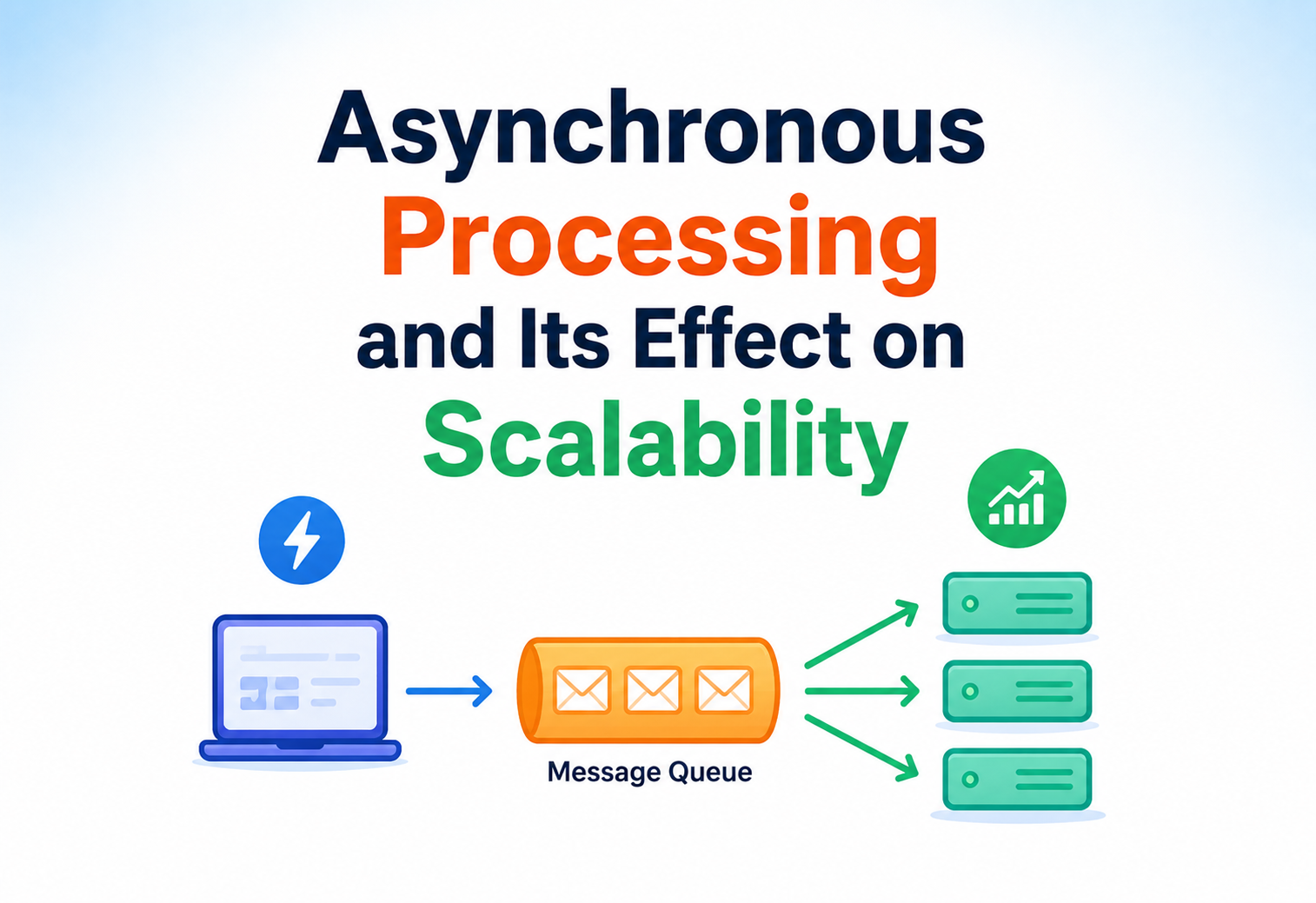
A message queue is a durable, ordered (or partially ordered) buffer that sits between a producer of work and a consumer of work. The producer drops a message (“please send this email”) into the queue and moves on immediately — it doesn't wait for the email to actually be sent. A separate consumer process picks up messages from the queue whenever it's ready and processes them. This is asynchronous processing at the architecture level, not just the code level, and it's central to how large systems scale (we'll dig into this heavily in later sections).
Beginner example: A JavaScript setTimeout(() => console.log("done"), 1000) — schedules work to run later without blocking the rest of the script.
Production example: An order-processing service publishes an OrderPlaced event to a Kafka topic and returns an HTTP 202 Accepted to the client immediately, while a fleet of downstream consumers (billing, shipping, analytics) asynchronously process that event at their own pace.
04 · ARCHITECTURE & COMPONENTS
The Building Blocks Of An Async System
Now let's zoom out from a single function call to the pieces that make up a full asynchronous system.
A typical asynchronous processing architecture has these building blocks:
Producer
The part of the system that creates work and doesn't want to wait for it to finish — e.g., a web server handling an HTTP request.
Message Broker / Queue
A durable middleman that stores tasks until a consumer is ready — e.g., Apache Kafka, RabbitMQ, Amazon SQS.
Consumer / Worker
A process that pulls tasks off the queue and does the actual work — e.g., a background job runner.
Result Store / Callback Channel
Where results end up, and how the original caller finds out — e.g., a database row, a webhook, a WebSocket push, or a polling endpoint.
Thread pools and worker pools
Rather than creating a brand-new thread for every task (expensive — creating and destroying threads has real overhead), production systems maintain a thread pool — a fixed or elastic set of reusable worker threads. Tasks are submitted to a queue, and idle threads in the pool pick them up. Java's ExecutorService is the standard abstraction for this.
Non-blocking I/O and the event loop (within a single component)
Inside a single server, non-blocking I/O libraries (like Java NIO, or frameworks like Netty, Vert.x, or Spring WebFlux) let a small number of threads handle a huge number of concurrent network connections, because the threads never sit idle waiting on I/O — the operating system notifies them when a socket has data ready.
Coordinators and orchestrators
In more complex asynchronous workflows (e.g., “process a video: transcode, generate thumbnail, extract captions, then notify user”), an orchestrator (like Netflix Conductor, AWS Step Functions, or Temporal) coordinates the sequence of asynchronous steps, tracks state, retries failures, and enforces ordering where needed.
import java.util.concurrent.*;

public class AsyncDemo {
    public static void main(String[] args) throws Exception {
        ExecutorService pool = Executors.newFixedThreadPool(4);

        // Submit a task without waiting for it to finish
        Future<String> future = pool.submit(() -> {
            Thread.sleep(200); // simulate slow work, e.g. a network call
            return "Order confirmed";
        });

        System.out.println("Request accepted, doing other work...");

        // Only block HERE, at the point we actually need the result
        String result = future.get();
        System.out.println(result);

        pool.shutdown();
    }
}
05 · INTERNAL WORKING
Step By Step, Under The Hood
What actually happens, step by step, under the hood when you make something asynchronous?
Step by step: how a non-blocking call works
Registration
The calling code says “start this operation” (e.g., “read from this network socket”) and registers interest in being notified when it completes, instead of waiting right there.
Immediate return
Control returns to the caller instantly, often with a placeholder object (a Future, Promise, or callback reference) representing “the result that will exist later.”
Caller continues
The thread that made the call is now free — it can pick up other work, like handling a different incoming request.
Background completion
The operating system, network card, or a separate worker thread does the actual slow work (disk I/O, network round-trip, etc.).
Notification
When the operation finishes, the system triggers a completion signal — an OS-level interrupt, an event pushed onto the event loop's queue, or a thread completing a Future.
Callback / resumption
The registered callback runs (or, in async/await style, the paused function resumes exactly where it left off) with the result now available.
Single-threaded event loops vs. thread-pool-based async
There are two dominant internal models, and it's worth understanding both clearly since they show up constantly in real systems.
| Model | How it works | Examples |
|---|---|---|
| Single-threaded event loop | One thread runs a loop, picking up ready callbacks. Never blocks. Great for I/O-heavy work, bad for CPU-heavy work (a slow computation freezes everything). | Node.js, JavaScript in browsers, Redis (mostly single-threaded core) |
| Thread-pool-based async | A pool of threads picks up tasks from a queue. Multiple tasks can genuinely run in parallel on multiple CPU cores. Slow CPU-bound tasks on one thread don't freeze others. | Java ExecutorService, Java virtual threads, most JVM-based servers |
Java's evolution: Future → CompletableFuture → Virtual Threads
It's worth understanding this evolution because it mirrors the industry's broader journey with asynchronous code.
Future(Java 5, 2004): Represents a result that will exist later, but you can only block on it with.get()— there's no clean way to say “run this when it's done” without blocking.CompletableFuture(Java 8, 2014): Lets you chain non-blocking transformations:.thenApply(),.thenCompose(),.thenCombine(). This is Java's version of Promises.- Virtual Threads (Java 21, 2023 — Project Loom): A newer, modern approach. Instead of forcing developers to write callback chains, the JVM lets you write plain, blocking-looking synchronous code, but runs it on extremely lightweight “virtual threads” (millions can exist at once, unlike OS threads which are limited to thousands). When a virtual thread blocks on I/O, the JVM automatically unmounts it from the real OS thread, freeing that OS thread to run other virtual threads — giving you async-level scalability with synchronous-style code. This is widely considered today's best-practice direction for I/O-bound Java services.
CompletableFuture<String> result = CompletableFuture
    .supplyAsync(() -> fetchUserFromDatabase(userId))    // runs async
    .thenApply(user -> user.getEmail())                  // transforms result, still non-blocking
    .thenCompose(email -> sendWelcomeEmailAsync(email)); // chains another async op

result.thenAccept(status ->
    System.out.println("Email dispatch status: " + status));

System.out.println("Main thread is free immediately, not blocked.");try (ExecutorService executor = Executors.newVirtualThreadPerTaskExecutor()) {
for (int i = 0; i < 100_000; i++) {
int requestId = i;
executor.submit(() -> {
String result = callSlowDownstreamService(requestId); // blocking-looking call
// but the underlying OS thread is freed while this "blocks"
System.out.println("Handled request " + requestId + ": " + result);
});
}
} // executor auto-closes and waits for completionWhether it's a 1950s hardware interrupt, a JavaScript callback, or a 2023 Java virtual thread, the underlying trick is the same: don't hold a thread hostage on something slow — hand off the wait to the OS or the scheduler, and let the thread do useful work in the meantime.
06 · DATA FLOW & LIFECYCLE
One Task, Traced From Birth To Death
Let's trace one task from birth to death through an asynchronous system, the way you'd trace a single food order through a busy restaurant kitchen.
The lifecycle of an asynchronous task
- Submission: A task is created and handed off — e.g., an HTTP request triggers a message being published to a queue.
- Acknowledgment: The producer gets a fast, lightweight confirmation (“accepted,” not “completed”) — often an HTTP 202 status code with a tracking ID.
- Queuing: The task sits durably in a queue or buffer, waiting for a free worker. This buffer absorbs bursts of traffic — this is critical for scalability, covered more in Section 08.
- Dispatch: A worker (thread, process, or serverless function) becomes available and picks up the task.
- Execution: The worker performs the actual work — calling other services, writing to a database, etc.
- Completion / failure: The task either finishes successfully (result stored, event emitted) or fails (retried, sent to a dead-letter queue, or logged for investigation).
- Notification: The original caller (or other interested systems) is informed — via polling, webhook, WebSocket push, or a downstream event.
- Cleanup: Resources tied to the task (memory, temporary state, queue message) are released.
How the caller finds out: three common patterns
| Pattern | How it works | Best for |
|---|---|---|
| Polling | Caller periodically asks “is it done yet?” via an endpoint like GET /tasks/123. | Simple systems, low-frequency checks, mobile clients |
| Webhook / callback | The system calls a URL the client registered in advance, once work is done. | Server-to-server integrations (e.g., payment gateways) |
| Push (WebSocket / SSE) | An open connection lets the server push the result the instant it's ready. | Real-time UIs, chat apps, live dashboards |
Polling is checking your mailbox every hour to see if a package arrived. A webhook is the delivery company calling you the moment it's dropped off. A push connection (WebSocket) is like leaving your front door open with someone watching it live, so you know the second it happens with zero delay.
07 · ADVANTAGES, DISADVANTAGES & TRADEOFFS
What You Gain, What You Pay For It
Advantages
- Higher throughput: One thread/process can juggle many in-flight operations instead of being stuck on one.
- Better resource utilization: CPU and threads aren't wasted idling on I/O.
- Improved responsiveness: Users get fast acknowledgments even when the real work takes longer.
- Resilience to slow dependencies: A slow downstream service doesn't necessarily freeze the whole system.
- Natural load leveling: Queues absorb traffic spikes, smoothing bursts into a steady stream of work.
- Decoupling: Producers and consumers can be developed, deployed, and scaled independently.
Disadvantages
- Increased complexity: Reasoning about code that doesn't execute top-to-bottom is genuinely harder. Debugging is trickier — stack traces can be less useful, and bugs like race conditions appear.
- Eventual consistency: Since work completes “later,” the system may briefly be in an inconsistent state (e.g., order placed, but inventory not yet decremented).
- Harder error handling: Failures happen far from where the original request was made, requiring retries, dead-letter queues, and careful monitoring to avoid silently losing work.
- Operational overhead: Message brokers, worker fleets, and monitoring for async pipelines are additional infrastructure to run and maintain.
- Harder testing: Timing-dependent behavior is inherently more difficult to test deterministically.
- Ordering challenges: Tasks may complete out of order, which matters a lot for some workflows (e.g., “cancel order” arriving before “create order” is processed).
Trade-off summary
| Dimension | Synchronous | Asynchronous |
|---|---|---|
| Code simplicity | Simple, linear, easy to reason about | More complex control flow |
| Resource efficiency | Poor under I/O-heavy load | Much better under I/O-heavy load |
| Latency for a single request | Predictable, but can be slow under load | Can be faster overall; may add small overhead per task |
| Failure visibility | Immediate — caller knows right away | Delayed — needs explicit tracking/notification |
| Consistency | Usually strong/immediate | Often eventual |
| Best suited for | Simple CRUD, low-concurrency internal tools | High-throughput, I/O-heavy, user-facing systems at scale |
Asynchronous processing is not free scalability. It shifts complexity from “waiting” to “coordinating,” and if you don't handle failures, retries, and ordering carefully, you can end up with a system that's fast but silently loses or duplicates work — which is often worse than being slow.
08 · PERFORMANCE & SCALABILITY — THE HEART OF THIS TOPIC
Little's Law, C10K, And Why Async Is A Scalability Lever
This is the section that directly answers our title question: what is the effect of asynchronous processing on scalability? Let's build the answer carefully, with real numbers.
First, define scalability precisely
Scalability is a system's ability to handle a growing amount of work by adding resources, ideally without a proportional increase in cost, complexity, or degradation in performance. There are two common directions: vertical scaling (making one machine bigger — more CPU, more RAM) and horizontal scaling (adding more machines). Asynchronous processing primarily helps by increasing how much useful work a single machine can do, and it also makes horizontal scaling far more natural, because decoupled producers and consumers can each be scaled independently.
The math: Little's Law
A foundational formula from queueing theory, Little's Law, states:
L = λ × W
(Number of items in a system) = (arrival rate) × (average time each item spends in the system)
Applied to servers: the number of concurrent requests a server is handling equals the rate of incoming requests multiplied by how long each request takes to fully process. If a request takes 200ms to complete synchronously (mostly spent waiting on a slow downstream call), and requests arrive at 1,000 per second, your server needs to be able to hold 200 concurrent in-flight requests at any given moment (1000 × 0.2 = 200). In a purely synchronous, one-thread-per-request model, that means you need at least 200 threads just to keep up — and every additional millisecond of waiting multiplies that thread requirement.
Asynchronous processing doesn't change how long the external dependency takes — the database is still slow, the network call still takes 200ms. What it changes is how many threads/resources are needed to hold those 200 concurrent, mostly-waiting requests. With non-blocking I/O, those 200 “waiting” requests don't need 200 dedicated threads — they can be juggled by a handful of threads (sometimes even one, in an event-loop model), because “waiting” no longer consumes a thread; it just consumes a small amount of memory holding state.
Concrete before/after comparison
| Metric | Synchronous (blocking, thread-per-request) | Asynchronous (non-blocking) |
|---|---|---|
| Threads needed for 1,000 concurrent requests | ~1,000 (roughly 1GB+ of stack memory alone) | As few as 4–16 event-loop threads, or thousands of lightweight virtual threads at a fraction of the memory |
| Max throughput on modest hardware | Limited by thread count and context-switch overhead | Limited mostly by actual CPU work and downstream capacity |
| Behavior under traffic spike | Threads exhausted → new requests rejected or queued at OS level, latency spikes sharply | Queue absorbs the burst; latency increases gracefully rather than falling over |
| Cost to handle 10x traffic | Often requires roughly 10x more servers | Often requires far less than 10x, since resource use scales with actual work, not wait time |
Why this matters at scale: the “C10K problem” and beyond
In the late 1990s, engineer Dan Kegel wrote about the C10K problem: how can a single server handle 10,000 concurrent connections? At the time, the thread-per-connection model made this essentially impossible on typical hardware — the memory and scheduling overhead of 10,000 threads would cripple the machine. This exact problem is what drove the creation of non-blocking I/O models (like epoll on Linux, kqueue on BSD) and asynchronous server architectures (Nginx, Node.js, Netty). Today we routinely talk about the C10M problem — 10 million concurrent connections — and asynchronous, event-driven architecture is the only reason that's even conceivable.
Horizontal scalability: decoupling producers from consumers
Beyond a single machine's efficiency, asynchronous processing changes scalability at the architecture level. When work is handed off to a queue instead of processed inline, the producer (e.g., your API layer) and the consumer (e.g., your worker fleet) become independently scalable:
- If traffic spikes, you can scale out API servers to accept more requests quickly, while workers catch up at their own pace — the queue is the shock absorber.
- If a particular type of work (say, video transcoding) is especially CPU-heavy, you can scale that specific worker pool up or down without touching the rest of the system.
- Autoscaling becomes simpler and more precise: queue depth (how many messages are waiting) is an excellent, direct signal for “we need more workers,” far more reliable than CPU usage alone.
The nuance: async doesn't create free capacity, it removes waste
It's important to be precise here, because it's a common misconception: asynchronous processing does not make your CPU faster, and it doesn't make a slow database magically fast. What it does is eliminate wasted idle time spent by threads/processes doing nothing but waiting. If your bottleneck is genuinely CPU-bound (e.g., heavy image processing, complex calculations), asynchronous I/O alone won't help — you need parallelism (more cores) instead. Async processing shines specifically when the workload is I/O-bound: lots of waiting on networks, disks, or other services relative to actual computation.
Netflix's API gateway (historically built on Node.js and later on reactive Java frameworks like RxJava/Reactor) fans a single incoming device request out to dozens of backend microservices (recommendations, artwork, licensing, playback data) concurrently, asynchronously, and combines the results. Doing this synchronously — one call after another — could take seconds. Done asynchronously, in parallel, the total time is close to the slowest single call, not the sum of all of them.
09 · HIGH AVAILABILITY & RELIABILITY
Making Async Systems Correct, Not Just Fast
Making a system fast is one thing; making sure it stays correct and available under failure is another. Asynchronous systems need deliberate design here.
At-least-once, at-most-once, and exactly-once delivery
When work is handed off to a queue, what happens if the worker crashes mid-task? This is where delivery guarantees matter:
- At-most-once: A message is delivered zero or one times — it might be lost if the consumer crashes, but it will never be processed twice. Simple, but risks losing work.
- At-least-once: The system guarantees the message will eventually be processed, even if that means processing it more than once (e.g., if a worker crashes after processing but before acknowledging). This is the most common guarantee in practice, and requires consumers to be idempotent (safe to run multiple times with the same effect as running once).
- Exactly-once: The hardest and most expensive guarantee — the message is processed exactly one time, no more, no less. True exactly-once semantics across distributed systems are notoriously difficult (often approximated via at-least-once delivery combined with idempotent processing).
Retries, backoff, and dead-letter queues
Failures happen — a downstream service times out, a worker crashes. Reliable async systems build in:
Retry with exponential backoff
Automatically retry a failed task, waiting progressively longer between attempts (e.g., 1s, 2s, 4s, 8s) to avoid hammering an already-struggling downstream service.
Dead-letter queues (DLQ)
After a maximum number of retries, a task is moved to a separate queue for manual inspection rather than being retried forever or silently dropped.
Circuit breakers
If a downstream service is consistently failing, temporarily stop calling it altogether (failing fast) rather than piling up a backlog of doomed retries.
Broker durability
Production brokers (Kafka, RabbitMQ with persistent queues, SQS) write messages to disk and replicate them across nodes before acknowledging — so a single machine failure doesn't lose in-flight work.
Backpressure
Backpressure is the mechanism by which a system signals “slow down, I can't keep up” back toward the producer, instead of accepting unlimited work and collapsing under memory pressure. Reactive frameworks (like Project Reactor or RxJava) build this in explicitly; queue-based systems achieve it implicitly through queue depth limits or by workers pulling at their own pace rather than being pushed to.
A queue with no bound on size and no backpressure can grow unbounded during an incident (say, a downstream outage), consuming all available memory/disk and eventually crashing the broker itself — turning a temporary slowdown into a total outage. Always set limits and monitor queue depth.
10 · SECURITY
Security Concerns Unique To Async Pipelines
Async systems introduce a few security considerations that don't exist in simple synchronous request/response flows.
- Message authentication: Since work is decoupled from the original caller, workers must not blindly trust a message's contents. Messages should be signed or come through an authenticated channel so a worker can verify they weren't tampered with or injected by an unauthorized party.
- Authorization context propagation: The original request might have been made by an authenticated, authorized user — but by the time a worker picks up the task, that context can be lost. Systems must explicitly carry identity/authorization tokens (or a snapshot of the relevant permissions) along with the task, not assume the environment is still “logged in” as that user.
- Replay attacks: Since messages can be redelivered (at-least-once semantics), an attacker who intercepts a message could replay it. Idempotency keys and message expiration help mitigate this.
- Queue access control: Message brokers need their own access controls — not everyone should be able to publish to or consume from every queue/topic. Misconfigured broker permissions are a common real-world vulnerability.
- Sensitive data at rest in queues: Messages sitting in a queue are, in effect, data at rest — sensitive fields (PII, payment data) should be encrypted or tokenized rather than stored in plaintext in the broker.
- Webhook validation: If using webhooks to notify callers asynchronously, always validate the callback endpoint (avoid Server-Side Request Forgery) and sign webhook payloads so the receiver can confirm authenticity.
Because event-driven systems fan out data to many consumers automatically, it's easy to accidentally over-expose sensitive information (like full customer PII) to services that only needed a small subset of the data. Apply the principle of least privilege to event payload design just as strictly as to API design.
11 · MONITORING, LOGGING & METRICS
Visibility When Work Happens “Later” And “Elsewhere”
Because work happens “later” and “elsewhere,” visibility is more important — and harder — in asynchronous systems than in simple synchronous ones.
Key metrics to track
| Metric | Why it matters |
|---|---|
| Queue depth (backlog size) | Rising backlog means consumers can't keep up with producers — an early warning sign, and a great autoscaling signal. |
| Consumer lag | (Especially in Kafka) how far behind consumers are from the latest published message — directly reflects real-time freshness of processing. |
| Task processing latency | Time from task submission to completion — the real end-to-end user-perceived delay. |
| Retry rate / error rate | Spikes indicate a failing downstream dependency or a bug in worker logic. |
| Dead-letter queue size | Tasks that failed permanently and need human attention. |
| Worker utilization / throughput | Tasks processed per second per worker — used for capacity planning. |
Distributed tracing
Because an asynchronous task might hop across an API server, a queue, and one or more workers, a single log file on one machine tells only part of the story. Distributed tracing (using a trace ID or correlation ID attached to every message and propagated through every hop) lets engineers reconstruct the full journey of a single request across all these components — tools like OpenTelemetry, Jaeger, and Zipkin are built for exactly this.
Without a correlation ID, debugging an async pipeline is like trying to follow one specific letter through a massive postal sorting system with no tracking number — you only see snapshots at each station, never the full journey.
Structured logging
Because logs from many workers interleave, structured logging (JSON logs with consistent fields like task_id, trace_id, status, duration_ms) is essential so logs can be filtered and correlated programmatically, rather than relying on humans reading raw text.
12 · DEPLOYMENT & CLOUD
Running Async Pipelines In The Real World
How does this all get deployed and run in the real world, especially in the cloud?
Managed message brokers
Rather than running your own Kafka or RabbitMQ cluster, most cloud providers offer managed equivalents: Amazon SQS/SNS, Google Cloud Pub/Sub, Azure Service Bus, and managed Kafka offerings (Amazon MSK, Confluent Cloud). These handle replication, durability, and scaling of the broker itself, letting teams focus on producers and consumers.
Serverless async processing
Cloud functions (AWS Lambda, Google Cloud Functions, Azure Functions) are a natural fit for async consumers: a function can be configured to automatically trigger whenever a new message lands in a queue, scaling the number of concurrent function instances up or down based on backlog — without manually managing a worker fleet at all.
Autoscaling workers based on queue depth
In container orchestration (Kubernetes), tools like KEDA (Kubernetes Event-Driven Autoscaling) let you scale a worker Deployment directly based on queue length rather than CPU usage — a much more accurate proxy for “do we need more workers?” in an async pipeline.
Graceful shutdown
A crucial, often-overlooked deployment detail: when deploying a new version of a worker (rolling deploy), the old worker process must finish (or safely re-queue) any in-flight task before shutting down, rather than dropping it mid-execution. Kubernetes' preStop hooks and configurable termination grace periods exist specifically to give async workers time to drain gracefully.
Amazon's order pipeline uses SQS queues extensively between its internal services specifically so that a slow or failed component (say, gift-wrapping logic) never blocks the core checkout path. This queue-heavy, “cell-based” architecture is part of why Amazon's site stays responsive even when individual backend components are degraded.
13 · DATABASES, CACHING & LOAD BALANCING
Where The Data Layer Meets Async
Asynchronous database drivers
Traditional JDBC (Java Database Connectivity) is blocking — a thread calling the database sits idle until the query returns. Newer reactive database drivers (like R2DBC for relational databases, or MongoDB's reactive driver) allow database calls themselves to be non-blocking, which is essential if you want a fully non-blocking pipeline end-to-end — otherwise a blocking database call inside an “async” service quietly reintroduces the exact thread-starvation problem async was meant to solve.
A very common mistake: building a beautifully async, non-blocking web layer (e.g., Spring WebFlux) but calling a traditional blocking JDBC driver underneath. The blocking call silently ties up an event-loop thread, defeating the entire purpose and potentially causing worse performance than a plain synchronous design, because event-loop threads are few and precious.
Caching and asynchronous writes
Write-heavy systems often use write-behind (write-back) caching: a write is applied to a fast in-memory cache immediately, and asynchronously flushed to the slower durable database later, in batches. This trades a small window of durability risk (data in the cache could be lost before it's flushed) for significantly higher write throughput — a classic scalability trade-off enabled by async processing.
Load balancing across async workers
Load balancers distributing traffic to synchronous servers typically use simple strategies (round robin, least connections). For async worker pools consuming from a shared queue, the queue itself acts as a natural load balancer — any idle worker simply pulls the next available message, which tends to distribute load more evenly than upfront routing decisions, especially when individual tasks vary a lot in processing time.
Database connection pool sizing under async load
An important, often-missed subtlety: even in a fully async application, most databases still have a finite connection pool. If thousands of concurrent async operations all try to hit the database at once, the connection pool itself — not thread count — becomes the new bottleneck. Async processing shifts the constraint; it doesn't eliminate the need for capacity planning.
14 · APIs & MICROSERVICES
Async APIs, Event-Driven Services, And gRPC Streams
Synchronous vs. asynchronous API design
A synchronous REST API returns a full result in the same HTTP response. An asynchronous API pattern instead returns an immediate acknowledgment (commonly HTTP 202 Accepted) along with a way to check status later — a status URL, a webhook registration, or a resource that can be polled.
// 1. Client submits a long-running job
POST /video/transcode
{ "videoUrl": "s3://bucket/raw.mp4" }

// 2. Server responds immediately, without doing the work yet
HTTP/1.1 202 Accepted
Location: /jobs/8f14e45f
{ "jobId": "8f14e45f", "status": "queued" }

// 3. Client polls (or receives a webhook) for status
GET /jobs/8f14e45f
{ "jobId": "8f14e45f", "status": "completed", "outputUrl": "s3://bucket/out.mp4" }
Event-driven microservices
In a microservices architecture, services can communicate synchronously (service A calls service B's REST API directly and waits) or asynchronously (service A publishes an event; any interested services subscribe and react independently). The asynchronous, event-driven style is generally preferred for scalability and resilience, because it removes tight temporal coupling: service B being slow or briefly down doesn't block service A at all — the event simply waits in the broker until B is ready.
The trade-off: choreography vs. orchestration
Choreography means each service reacts to events independently, with no central controller — highly decoupled, but harder to see the “big picture” of a business process. Orchestration means a central coordinator explicitly directs each asynchronous step in sequence — easier to reason about and debug, at the cost of a more central dependency.
gRPC and async streaming
Modern RPC frameworks like gRPC support asynchronous, bidirectional streaming — letting a client and server exchange many messages over a single long-lived connection without either side blocking, which is heavily used in high-throughput service-to-service communication.
15 · DESIGN PATTERNS & ANTI-PATTERNS
Patterns That Age Well, Traps To Avoid
Useful patterns
Publish-Subscribe
A producer publishes an event once; any number of independent subscribers receive and react to it, without the producer knowing or caring who's listening.
Competing Consumers
Multiple worker instances pull from the same queue, naturally load-balancing work and allowing horizontal scaling of processing capacity.
Saga Pattern
Manages a multi-step business transaction across services using a sequence of asynchronous local transactions, each with a compensating action if a later step fails (since traditional distributed ACID transactions don't scale well across services).
CQRS
Command Query Responsibility Segregation — separates the “write” path (often asynchronous, eventually consistent) from the “read” path (optimized, fast), useful when writes and reads have very different scaling needs.
Transactional Outbox
Solves the tricky problem of atomically updating a database and publishing an event — the event is written to an “outbox” table in the same database transaction, then a separate process reliably publishes it asynchronously.
Fan-out / Fan-in
A single request triggers many parallel asynchronous sub-tasks (fan-out), and the results are later collected and combined (fan-in) — e.g., Netflix's API gateway example from Section 08.
Anti-patterns to avoid
Callback Hell
Deeply nested chains of callbacks that become unreadable and error-prone — solved by Promises/Futures or async/await style code.
Blocking-in-Async
A single blocking call inside an async pipeline can silently strangle throughput (see Section 13).
Unbounded Queues
Queues with no size limit or backpressure lead to memory exhaustion and cascading failure during incidents.
Fire-and-forget without guarantees
Publishing a task and assuming it's handled, without confirming persistence or a retry/DLQ strategy — silent data loss waiting to happen.
Distributed Monolith
Over-decomposing every internal call into an asynchronous hop, adding latency and operational complexity for little gain.
Ignoring ordering guarantees
Assuming events are always processed in the order they were published, when the broker only guarantees order within a single partition/queue.
Not everything needs to be async. Simple, fast, low-risk operations are often better left synchronous for simplicity. Reach for asynchronous complexity deliberately, where I/O-bound waiting is significant or where multiple services genuinely need to react to the same event.
16 · BEST PRACTICES & COMMON MISTAKES
A Portable Checklist For Async Systems
Best practices
- Make consumers idempotent. Since most real systems use at-least-once delivery, design every consumer so processing the same message twice has no harmful side effect (e.g., use unique idempotency keys before charging a card twice).
- Set explicit timeouts everywhere. Never let an asynchronous operation wait forever — always bound how long you'll wait before treating it as failed.
- Propagate a correlation/trace ID through every hop, from the original request to the final worker, for debuggability.
- Choose the right delivery guarantee deliberately (at-least-once vs. exactly-once-ish) rather than assuming the default behavior of whatever broker you picked.
- Monitor queue depth and consumer lag as first-class metrics, not an afterthought.
- Use dead-letter queues for anything that can fail, and alert on them.
- Avoid mixing blocking and non-blocking code in the same execution path without being deliberate about it (e.g., isolate unavoidable blocking calls onto a dedicated thread pool, separate from your main event-loop threads).
- Prefer async only where I/O-bound waiting is significant. Don't reach for asynchronous complexity for purely CPU-bound work where it won't help.
Common mistakes
- Assuming asynchronous automatically means “faster” — it means “more resource-efficient under waiting,” which usually translates to better scalability, but a single request's latency floor is still bound by the slowest real dependency.
- Forgetting that async introduces eventual consistency, and building user experiences that assume immediate consistency (e.g., showing “0 items” right after an async inventory update that hasn't landed yet).
- Not load-testing the actual failure and retry paths, only the happy path.
- Letting queues become a dumping ground with no schema/versioning discipline, causing consumers to break when message formats change.
- Over-engineering: introducing a message queue and asynchronous workers for a low-traffic internal tool where a simple synchronous call would have been perfectly adequate and much easier to maintain.
Design your async pipeline as if every message will be delivered twice, retried three times, and arrive slightly out of order. If your consumer is still correct under those assumptions, you have a system that will survive real-world production conditions.
17 · REAL-WORLD / INDUSTRY EXAMPLES
How The Big Platforms Actually Do It
Netflix
Netflix's API gateway (Zuul, and its device API layer) fans a single device request out into dozens of parallel, asynchronous calls to backend microservices (recommendations, playback licensing, artwork selection), combining results as they arrive. This lets Netflix serve responses in roughly the time of the single slowest dependency rather than the sum of all of them, at massive global scale.
Amazon
Amazon's order pipeline decouples “order accepted” from the many downstream steps (payment capture, fraud checks, warehouse notification, shipping label generation) using internal messaging systems. This is a major reason checkout feels instantaneous even though a real order triggers a long chain of work behind the scenes.
Uber
Uber's trip and location-update pipeline processes millions of asynchronous location pings per second through Kafka-based event streaming, feeding real-time matching, pricing, and ETA systems without any single component blocking on another.
LinkedIn originally created Apache Kafka to handle its own massive scale of asynchronous activity events (views, likes, connections) — it's now one of the most widely used message brokers in the industry, directly born from a real scalability need.
A generic case study: scaling an image-sharing app
Consider a photo-sharing app. When a user uploads a photo, the naive synchronous approach resizes it into five different resolutions, runs content moderation, and updates a search index — all before responding “upload complete,” possibly taking 5–10 seconds and holding a thread the whole time.
Refactored asynchronously: the original image is saved, the API responds “upload complete” in under 200ms, and an event is published. Independent workers pick up that event to generate thumbnails, run moderation, and update search — each scaled independently based on its own load (image resizing might need many CPU-heavy workers; moderation might call a slower external API and need more concurrent, I/O-bound workers). The user sees a fast response, and the system as a whole can absorb far more uploads per second on the same hardware.
18 · FREQUENTLY ASKED QUESTIONS
The Questions That Come Up Every Time
Does asynchronous processing always improve performance?
No. It improves resource efficiency and throughput specifically for I/O-bound workloads with significant waiting time. For pure CPU-bound work with little to no waiting, asynchronous I/O provides little benefit — you'd need parallelism (more CPU cores) instead, and adding async complexity there is often a net negative.
Is asynchronous processing the same as multithreading?
No, though they're related and often combined. Asynchronous processing is about not blocking while waiting; multithreading is about having multiple independent sequences of execution. You can have single-threaded asynchronous code (like JavaScript's event loop) or multithreaded synchronous code (traditional thread-per-request servers). Java's virtual threads blend both ideas.
What's the difference between concurrency and scalability?
Concurrency is a code/design property — the ability to structure work as multiple independent, interleavable operations. Scalability is a system property — the ability to handle growing load by adding resources. Good concurrency design (often achieved via async processing) is one of the key enablers of good scalability, but they're not the same thing.
When should I NOT use asynchronous processing?
When the operation is fast and simple, when strong immediate consistency is required (the user must see the guaranteed final result right away), when the added operational complexity (queues, monitoring, retries) isn't justified by the traffic or performance need, or for purely CPU-bound work as noted above.
How does async processing relate to eventual consistency?
When work is deferred to run later, the system is briefly in a state where not everything reflects the latest action yet — this is eventual consistency. It's a deliberate trade-off: you accept a short window of “not fully up to date yet” in exchange for much better throughput and responsiveness.
What is the single biggest risk in async systems?
Silent data loss or duplication from poorly handled failures — a message that's dropped without retry, or processed twice without idempotency. Because failures happen “elsewhere” and “later,” they're easy to miss without deliberate monitoring, dead-letter queues, and idempotent design.
19 · SUMMARY & KEY TAKEAWAYS
The One Idea To Remember
Asynchronous processing is, at its core, a simple idea: don't freeze while waiting for something slow — hand it off, keep working, and get notified later. That idea, applied consistently from a single function call all the way up to entire system architectures, is one of the most powerful tools we have for building scalable software.
- Most real-world workloads spend far more time waiting (on networks, disks, other services) than actually computing — asynchronous processing reclaims that wasted waiting time.
- It reduces the resources (threads, memory) required to handle a given amount of concurrent, in-flight work — directly improving how much load a single machine can handle.
- At the architecture level, message queues and event-driven design decouple producers from consumers, letting each scale independently and absorbing traffic bursts gracefully.
- It comes with real trade-offs: added complexity, eventual consistency, and the need for careful failure handling (retries, idempotency, dead-letter queues, monitoring).
- It is not a universal performance fix — it specifically targets I/O-bound waiting, not raw computation.
- Modern tools (Java's
CompletableFuture, virtual threads, reactive frameworks, managed cloud message brokers) have made asynchronous design steadily more approachable, but the underlying principle — from 1960s hardware interrupts to today's global-scale event streaming platforms — has never changed.
“Understanding when and how to apply asynchronous processing — and being honest about the complexity it introduces — is what separates systems that gracefully absorb ten times their current load from systems that fall over the first time they get popular.”

