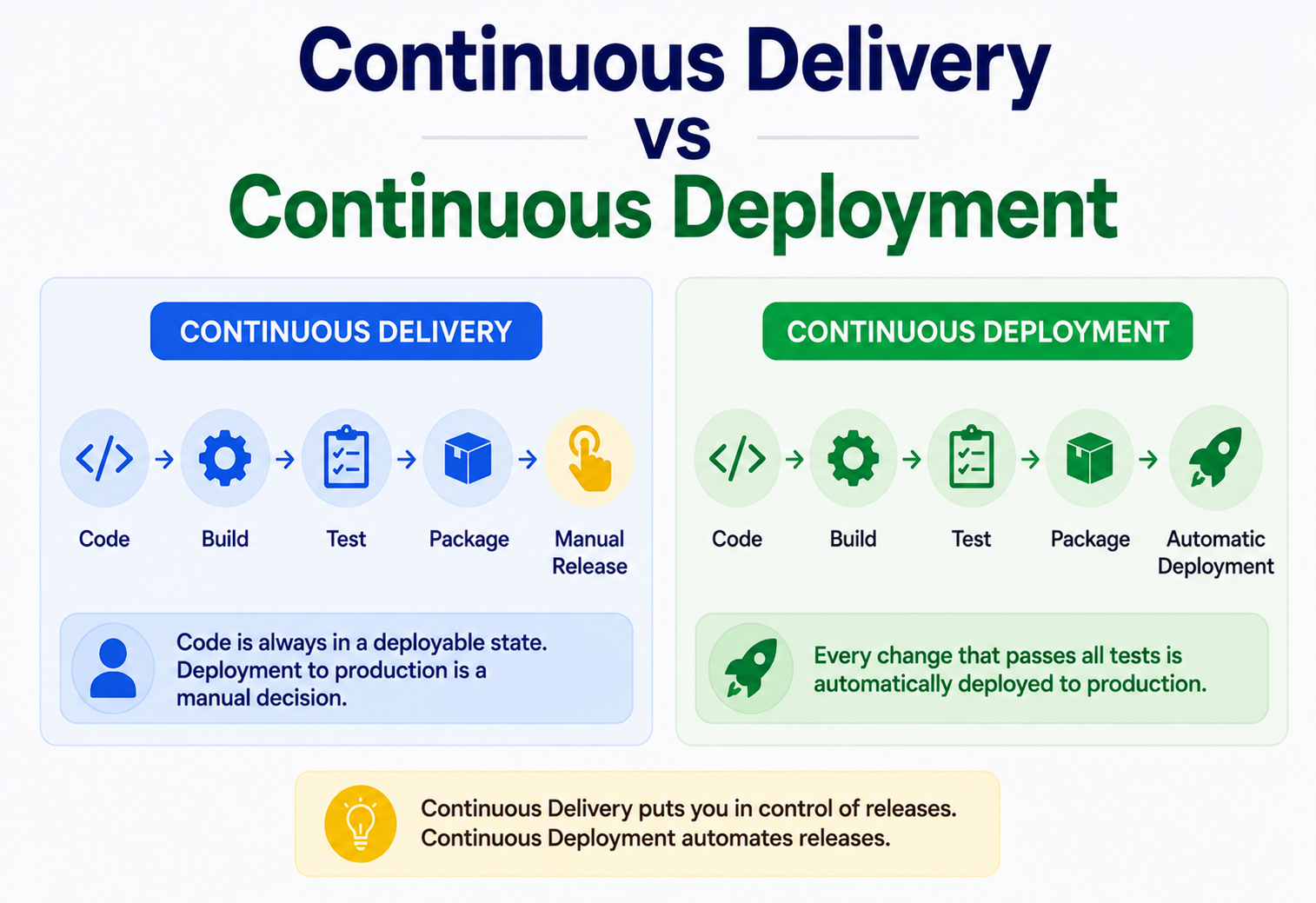
Continuous Delivery vs Continuous Deployment
A beginner-to-production deep dive into the two most confused terms in modern software delivery — what they actually mean, how they differ, how the pipelines really work inside, and how companies like Netflix, Amazon, Etsy and Google ship code hundreds of times a day while keeping an instant, safe rollback path.
Introduction & History
If you have spent any time around DevOps engineers, you have probably heard the terms Continuous Delivery and Continuous Deployment used almost interchangeably — and both are abbreviated as “CD,” which only makes the confusion worse. They sound similar, they share almost the same pipeline, and they even share the same goal: getting code from a developer’s laptop into the hands of real users as safely and quickly as possible. But they are not the same thing, and the difference between them is not academic — it changes how a team operates, how much trust it places in its automated tests, and how fast it can genuinely move.
To understand where these ideas came from, rewind to the mid-2000s. Software used to ship in enormous, infrequent batches. A team would work for months on a “big bang” release, freeze the code, hand it to a separate QA team for weeks of manual testing, and then hand it again to an operations team who would deploy it during a scheduled maintenance window — often at 2 AM on a Saturday, with the whole engineering team on a bridge call in case something broke. This is sometimes called the Waterfall release model, and it worked reasonably well when software shipped on physical media or was updated a few times a year. It did not work at all once companies started running their business on the web, where users expected fixes and features constantly.
The turning point came from the Agile movement and, more specifically, from the practice of Continuous Integration (CI), popularised by Kent Beck and Martin Fowler in the early 2000s as part of Extreme Programming (XP). CI said: instead of merging code once a month and discovering hundreds of conflicts, merge constantly — multiple times a day — and run automated tests on every merge. This kept the codebase in a perpetually working state.
CI solved the “does the code work” problem, but it left a bigger question unanswered: once the code is verified, how does it actually get to production? In 2010, Jez Humble and David Farley published the book Continuous Delivery, which extended the CI philosophy all the way to production readiness. Their central argument was radical for its time: every single change that passes automated tests should be deployable at any moment, packaged and ready to go live with the push of a button. A few years later, as companies like Etsy, Flickr and Netflix pushed this idea even further, a stricter variant emerged — what if there is no button to push at all? What if every change that passes the pipeline goes live automatically, with no human in the loop? That stricter variant became known as Continuous Deployment.
Understanding this distinction is one of the most commonly misunderstood topics in software-engineering interviews and real production discussions. Teams that don’t clearly separate the two often end up with pipelines that claim to be “continuous deployment” but actually have three hidden manual approval gates inside them — which quietly defeats the purpose.
It’s worth noting that the “continuous” in both terms is often misread as “constantly, all the time, with no breaks.” A more accurate reading is “continuously available as an option, without artificial delay.” A team practising Continuous Delivery might genuinely release only once a week — but the key property is that they could release at any moment of any day, because every merged change is already packaged, tested, and proven deployable. The word describes the readiness of the pipeline, not necessarily the calendar frequency of releases, although in practice both tend to increase together as a team matures.
Over the past decade and a half, these ideas have moved from being a niche practice at a handful of Silicon Valley web companies to being close to a baseline expectation for any serious engineering organisation. The annual State of DevOps research programme run by DORA (DevOps Research and Assessment, later acquired by Google) has repeatedly found a strong statistical link between elite software-delivery performance — measured by deployment frequency, lead time for changes, change-failure rate and time to restore service — and overall organisational performance, including profitability and market share. In other words, this is not just an engineering nicety; it has become a documented driver of business outcomes, which is a large part of why the topic shows up so often in architecture interviews and system-design discussions today.
It also helps to place CI, Continuous Delivery and Continuous Deployment on a single continuum rather than as three unrelated ideas. Continuous Integration is the foundation layer — it guarantees the codebase is always in a working, mergeable state. Continuous Delivery builds directly on top of that foundation, extending automated verification all the way through packaging and staging so that “working” becomes “provably ready for production.” Continuous Deployment is the final, optional extension of that same pipeline, removing the last manual checkpoint. You cannot skip a layer: there is no such thing as safe Continuous Deployment without first having reliable Continuous Delivery, and no reliable Continuous Delivery without disciplined Continuous Integration underneath it.
The Problem & Motivation
Before we define anything precisely, it’s worth sitting with the actual pain that these practices were built to solve. Imagine you are a junior developer on a team that ships once a month.
- Batching risk: A release bundles 200 commits from 15 developers. If something breaks in production, you have to figure out which of those 200 changes caused it — a needle in a haystack.
- Deployment fear: Because releases are rare, nobody is confident doing them. The process is manual, poorly documented, and different every time. This creates a vicious cycle: infrequent releases are risky, so teams release even less often, which makes each release even bigger and riskier.
- Slow feedback: A feature built in week one doesn’t reach a real user until week four. If the feature turns out to be wrong, the team has burned a month before finding out.
- Manual toil: Someone has to manually copy build artifacts to servers, restart services, run smoke tests and watch dashboards — a repetitive, error-prone and mentally exhausting job.
Think of releasing software like moving houses. Waterfall releases are like packing your entire home into one truck and moving everything in a single stressful weekend — if a box breaks, you don’t know what’s in it until it’s too late. Continuous Delivery is like packing labeled boxes as you go, keeping them all near the door, ready to move at a moment’s notice, but only actually loading the truck when you decide to. Continuous Deployment is like having a robot that automatically loads and drives away every box the instant it’s packed and labelled correctly — no human decides when the truck leaves.
The motivation, then, is simple to state but hard to execute: reduce the size and risk of each release by shrinking the batch to a single change, automate every step of the journey from commit to production, and use fast automated feedback (tests, monitoring, automated rollback) instead of slow human gatekeeping to catch problems.
There’s also a subtler, more human motivation behind these practices: psychological safety around releasing software. In organisations with rare, high-stakes releases, deployment becomes an emotionally loaded event. Engineers dread it, schedule their lives around it, and treat any deploy-day incident as a personal failure. This dread, paradoxically, makes releases worse, not better — tired, anxious engineers working through a 2 AM release window make more mistakes than calm engineers deploying a single small change during business hours with an automated rollback safety net behind them. Jez Humble often summarised this with a simple principle: “if it hurts, do it more often, and bring the pain forward.” Counter-intuitively, deploying more frequently, in smaller increments, tends to make each individual deployment less risky and less stressful, not more.
There is a well-known quantitative argument for this too, sometimes illustrated with a simple thought experiment. Suppose each individual code change has a small, fixed probability of introducing a production bug — say one percent. If you batch 100 such changes into a single release, the probability that the release as a whole contains at least one bug is far higher than one percent (roughly 63%, following basic probability), and worse, if something does go wrong, you now have 100 candidate changes to investigate. If instead you release each change individually, your overall bug rate might arithmetically be similar over time, but each individual incident is trivially easy to diagnose and roll back, because there is exactly one candidate cause. This is the mathematical core of why small, frequent batches are safer in practice than large, infrequent ones, even though it feels intuitively backwards to non-engineers who assume “fewer releases must mean fewer chances to break things.”
Core Concepts & Terminology
3.1 Continuous Integration (CI)
CI is the practice of merging all developers’ working copies to a shared mainline frequently — ideally several times a day — with each merge triggering an automated build and test suite. CI’s job is to answer one question quickly: “Is the code in a working state right now?” CI does not deploy anything; it only verifies.
Before CI became standard practice, teams often used long-lived feature branches that stayed separate from the mainline for weeks or months. When it finally came time to merge, engineers faced what’s sometimes called “merge hell” — hundreds of conflicting changes that had drifted apart, each needing careful manual reconciliation, often introducing new bugs in the process. CI eliminates this by making integration a small, constant, low-stakes activity rather than a rare, terrifying one. The practical effect is that a developer who has been working on a feature for three days is never more than a few hours away from discovering that their change conflicts with, or breaks, something a teammate just merged — while the context is still fresh in everyone’s mind and the fix is cheap.
A well-implemented CI setup typically enforces several disciplines simultaneously: every commit triggers a build; a broken build is treated as the team’s top priority to fix, often literally blocking further merges until resolved (a practice sometimes called “stopping the line,” borrowed from Toyota’s manufacturing philosophy); and the full test suite runs fast enough — usually under ten minutes — that developers actually wait for the result instead of moving on and ignoring it.
3.1.1 The Test Pyramid
CI pipelines typically organise automated tests according to the test pyramid — a large base of fast, cheap unit tests, a smaller middle layer of integration tests that verify components work together, and a small number of slow, expensive end-to-end tests at the top that verify entire user journeys. This shape matters because it keeps the overall pipeline fast: if a team inverts the pyramid and relies mostly on slow, brittle end-to-end tests, the entire promise of a fast feedback loop collapses under its own weight.
3.2 Continuous Delivery
Continuous Delivery extends CI by ensuring that every change which passes the automated pipeline is packaged into a release candidate that is proven to be deployable to production at any time — but a human still decides when to actually deploy it. The last mile — clicking the “deploy” button — is a deliberate, manual decision, often made for business reasons (a product launch date, a marketing campaign, a change freeze during a big sales event).
It’s important to be precise about what “proven to be deployable” actually means, because it’s a much stronger claim than just “the tests passed.” A true Continuous Delivery pipeline builds the exact artifact that would run in production, deploys that exact artifact to a staging environment that mirrors production configuration as closely as practically possible, and runs a meaningful subset of real-world verification against it — not just unit tests in isolation. The point is that when a human finally does click “deploy,” there should be no surprises left; the risk has already been retired by the pipeline, and the button click is a business-timing decision, not a technical gamble.
3.3 Continuous Deployment
Continuous Deployment goes one step further: there is no manual gate at all. Every change that passes all automated stages — build, unit tests, integration tests, security scans, staging verification — is deployed to production automatically, often within minutes of the commit, with zero human approval in the loop.
This might sound reckless on first hearing, but it’s worth flipping the framing: in a mature Continuous Deployment setup, the automated pipeline is actually applying a more rigorous, more consistent standard than most human approvers ever do. A tired release manager glancing at a dashboard before clicking “approve” at the end of a long day is, in practice, often a weaker safety check than a battery of hundreds of automated tests plus statistical canary analysis comparing real production metrics between old and new versions. The trust isn’t blind — it’s earned incrementally, usually starting with lower-risk internal services, and expanded to customer-facing systems only once the underlying automated safety net has demonstrated it catches the failure modes that matter.
3.4 Release Candidate & Deployment Pipeline
A release candidate is a specific, versioned, immutable build artifact (a JAR file, a Docker image, a binary) that has passed through the pipeline and is considered a legitimate candidate for release. A deployment pipeline is the automated sequence of stages — build, test, package, deploy — that a change travels through, visualised often as a series of gates.
3.5 Feature Flags
A feature flag (or feature toggle) is a conditional switch in code that lets you turn a feature on or off without deploying new code. Feature flags are a critical enabler of Continuous Deployment because they decouple deployment (code reaching production servers) from release (a feature becoming visible to users). This distinction — deploy versus release — is one of the most important mental models in modern delivery practice.
Feature flags come in a few common flavours, each solving a slightly different problem. Release flags hide unfinished work in progress, letting engineers merge incomplete features to trunk safely. Experiment flags (used for A/B testing) show different code paths to different user segments to measure impact. Ops flags act as an emergency kill switch, letting an on-call engineer instantly disable a misbehaving feature without needing a full deployment or rollback. Permission flags gate features by user entitlement, such as showing enterprise-only functionality to paying customers. A mature flagging system, such as LaunchDarkly, Unleash, or a homegrown Spring-based solution, typically supports targeting rules (percentage rollouts, specific user IDs, geographic regions) and can flip a flag in real time without any redeploy at all.
The trade-off worth naming honestly is that feature flags are not free — every flag left in the codebase after it’s no longer needed becomes a small piece of permanent complexity, an extra conditional branch that every future engineer has to reason about. Teams that adopt heavy feature-flagging without discipline often accumulate “flag debt”: dozens of stale flags nobody remembers the purpose of, each one a small landmine. Good practice treats flag removal as part of the definition of “done” for a feature, not an optional cleanup task for later.
3.6 Immutable Artifacts & Versioning
A principle that underlies both practices is that the exact same, unchanged build artifact should move through every stage of the pipeline — built once, tested repeatedly, and eventually deployed. This is called an immutable artifact. It might seem obvious, but it directly rules out a surprisingly common anti-pattern in less mature organisations: rebuilding the application separately for each environment (“build once for staging, build again for production”), which introduces the risk that the two builds subtly differ — different dependency resolution, different environment variables baked in at build time — meaning that passing tests in staging says nothing reliable about the production build at all. Continuous Delivery and Continuous Deployment both depend on this “build once, promote everywhere” discipline to make their guarantees meaningful.
You merge a small change that fixes a typo in a button label. In a CI-only setup, this change is verified by tests but sits in the repository. In Continuous Delivery, it’s built into a release-ready package waiting for someone to click “deploy.” In Continuous Deployment, it goes live in production automatically within minutes — with no human ever looking at it after the pull request was approved.
Continuous Delivery vs Continuous Deployment: The Real Difference
This is the heart of the topic, so let’s be as precise as possible.
| Aspect | Continuous Delivery | Continuous Deployment |
|---|---|---|
| Final step to production | Manual approval / button click | Fully automatic, no human gate |
| Release frequency | On-demand, whenever the business decides | Every passing commit, potentially dozens/day |
| Human involvement | Required for the go-live decision | None after code review / merge |
| Confidence required in tests | High | Extremely high — tests are the only gate |
| Typical trigger for release | Product manager, release manager, business event | Merge to main branch passing pipeline |
| Rollback strategy importance | Important | Absolutely critical — must be automated |
| Common use case | Regulated industries, enterprise software, mobile apps (app-store review) | SaaS web platforms, internal tools, high-maturity engineering orgs |
| Relationship to CI | Builds directly on CI | Builds on Continuous Delivery — it is the “maximal” version |
Every Continuous Deployment setup is also a Continuous Delivery setup — but not every Continuous Delivery setup is a Continuous Deployment setup. Deployment is a stricter subset that removes the human decision point.
A banking app’s core ledger service uses Continuous Delivery: every change is fully tested and packaged, but a release manager clicks “go” only after a compliance sign-off, because the cost of an error is extremely high and regulators require an audit trail of who approved what. Meanwhile, that same bank’s internal developer-tools dashboard uses Continuous Deployment: any approved pull request to the dashboard’s repository goes live within ten minutes, because the blast radius of a bug is tiny and low-stakes.
Architecture & Components
Both practices are implemented through a deployment pipeline — a series of automated stages a change must pass through. The typical components are:
Source Control
A Git repository (GitHub, GitLab, Bitbucket) holding the trunk branch that every pipeline run is triggered from.
CI Server / Orchestrator
Jenkins, GitHub Actions, GitLab CI, CircleCI, Argo Workflows — the engine that runs each pipeline stage.
Artifact Repository
Nexus, Artifactory, Docker Hub or a cloud container registry storing versioned, immutable build outputs.
Test Suites
Unit tests, integration tests, contract tests, end-to-end tests and non-functional tests (performance, security).
Staging / Pre-Prod Environment
A production-like environment for final verification before real traffic ever sees the change.
Deployment Orchestrator
Kubernetes, Spinnaker, AWS CodeDeploy, Argo CD — manages the actual rollout mechanics (canary, blue-green, rolling).
5.1 A typical Spring Boot pipeline (GitHub Actions)
Here is a simplified but realistic pipeline definition for a Java Spring Boot microservice. The same YAML powers both Continuous Delivery and Continuous Deployment — the only difference is whether the final “deploy” job requires manual approval.
name: build-and-deploy
on:
  push:
    branches: [main]

jobs:
  build-and-test:
    runs-on: ubuntu-latest
    steps:
      - uses: actions/checkout@v4
      - name: Set up JDK 21
        uses: actions/setup-java@v4
        with:
          java-version: '21'
          distribution: 'temurin'
      - name: Build with Maven
        run: mvn -B clean verify
      - name: Run static analysis
        run: mvn -B sonar:sonar -Dsonar.projectKey=order-service
      - name: Build Docker image
        run: docker build -t registry.gauravsinghtech.io/order-service:${{ github.sha }} .
      - name: Push image
        run: docker push registry.gauravsinghtech.io/order-service:${{ github.sha }}

  deploy-staging:
    needs: build-and-test
    runs-on: ubuntu-latest
    steps:
      - name: Deploy to staging
        run: kubectl set image deployment/order-service order-service=registry.gauravsinghtech.io/order-service:${{ github.sha }} -n staging
      - name: Run smoke tests
        run: mvn -B failsafe:integration-test -Denv=staging

  deploy-production:
    needs: deploy-staging
    runs-on: ubuntu-latest
    # For Continuous Delivery: keep 'environment: production-approval' below
    # For Continuous Deployment: remove it, so the job runs automatically
    environment: production-approval
    steps:
      - name: Deploy to production
        run: kubectl set image deployment/order-service order-service=registry.gauravsinghtech.io/order-service:${{ github.sha }} -n production
In GitHub Actions specifically, the line environment: production-approval ties the job to a protected environment that requires a designated reviewer to click “Approve” before the job runs — this single line is effectively the entire technical difference between Continuous Delivery and Continuous Deployment in this pipeline. Remove it, and the pipeline becomes fully automatic Continuous Deployment.
Internal Working — What Actually Happens, Step by Step
Let’s trace exactly what happens when a developer merges a pull request, in a Continuous Deployment setup, using our Spring Boot order-service as an example.
1. Trigger
A merge to
mainfires a webhook to the CI orchestrator (for example, a GitHub Actions runner spins up).2. Build
Maven compiles the code, resolves dependencies from a repository like Maven Central or an internal Nexus mirror, and produces a JAR.
3. Unit & component tests
JUnit and Mockito-based tests run against the compiled code in complete isolation, without any real network calls.
4. Static analysis & security scanning
Tools like SonarQube, Checkmarx or Snyk scan for code smells, known vulnerable dependencies, and secrets accidentally committed to the repo.
5. Containerisation
A Docker image is built from the JAR, tagged with the Git commit SHA (never “latest” — immutability matters), and pushed to a container registry.
6. Integration / contract tests
The image is spun up alongside a test database and any dependent services (or their contract-test doubles) to validate real interactions, often using something like Testcontainers.
7. Staging deployment
The exact same image is deployed to a staging namespace in Kubernetes that mirrors production configuration as closely as possible.
8. Automated smoke & end-to-end tests
A test suite hits real HTTP endpoints on staging to confirm the service actually works end-to-end, not just in isolation.
9. Gate decision
In Continuous Delivery, the pipeline now pauses and notifies a human via Slack or email: “Release candidate abc123 is ready — approve to deploy.” In Continuous Deployment, the pipeline proceeds immediately.
10. Production rollout
The orchestrator (Argo CD, Spinnaker or native Kubernetes rolling update) gradually shifts production traffic to the new version — often starting with 5% of traffic (a canary) before ramping to 100%.
11. Automated health verification
Metrics like error rate, latency and CPU usage on the new version are compared against the baseline. If they degrade beyond a threshold, an automated rollback is triggered.
12. Full rollout or rollback
If health checks pass, traffic is shifted to 100%. If not, the orchestrator automatically routes traffic back to the previous stable version — with no human woken up in the middle of the night for a routine bad deploy.
Netflix’s internal deployment platform, Spinnaker (which Netflix open-sourced), automates exactly this kind of canary analysis. It compares dozens of metrics between the new “canary” cluster and the existing “baseline” cluster using statistical judgment, and automatically fails the deployment if the canary looks unhealthy — all without a human watching a dashboard.
Data Flow & Lifecycle of a Change
It helps to think of a single code change as an object that moves through a lifecycle with clearly defined states:
Two subtleties matter here. First, “deployed” is not the same as “released.” A change can be physically running on production servers (deployed) while remaining invisible to users because it sits behind a disabled feature flag (not released). This decoupling is what lets high-maturity teams practise Continuous Deployment safely — code ships constantly, but product managers still control when a feature becomes visible, satisfying business timing needs without reintroducing a deployment bottleneck.
Second, the lifecycle is not linear in practice — it includes feedback loops. If automated health checks detect a problem after the “Live” stage, the change flows backward: traffic is rolled back to the previous version, and the change re-enters the “Written” stage as a bug fix.
Pros, Cons & Trade-offs
8.1 Continuous Delivery
Pros
- Business retains control over exact release timing.
- Works well with regulatory / compliance sign-off requirements.
- Lower operational risk for teams still maturing their testing culture.
- Still gets almost all the batch-size and feedback-speed benefits of CD.
Cons
- Manual approval step can become a bottleneck if release managers are slow or unavailable.
- Release candidates can pile up, partially reintroducing batching risk.
- Requires discipline to actually deploy often — teams can slip back into “big batch” habits even with the technical capability to deploy anytime.
8.2 Continuous Deployment
Pros
- Fastest possible feedback loop — bugs are found within minutes, not weeks.
- Forces extremely high automated test quality, which improves overall engineering rigor.
- Eliminates release-day stress entirely — deployment becomes a non-event.
- Enables true trunk-based development at scale.
Cons
- Requires very mature automated testing, monitoring, and rollback tooling before it’s safe.
- Unsuitable for contexts requiring formal human sign-off (medical devices, aviation, some financial systems).
- A subtle bug that tests don’t catch can reach 100% of users automatically before anyone notices.
- Harder to coordinate with external, non-technical release events (marketing launches, app-store timing).
Continuous Deployment isn’t “better” than Continuous Delivery in some absolute sense — it’s a stricter, higher-trust variant that only makes sense once a team’s automated safety net (tests, monitoring, automated rollback) is strong enough to replace a human’s judgment. Adopting it before that safety net exists just means shipping bugs to production faster.
Performance & Scalability
As an organisation scales from a handful of services to hundreds of microservices, pipeline performance becomes a real engineering concern in its own right.
9.1 Pipeline speed
A pipeline that takes 45 minutes to run destroys the value proposition of Continuous Deployment, because “continuous” implicitly means “fast.” Teams optimise pipeline speed through:
- Parallelisation: running unit tests, static analysis and dependency scans concurrently rather than sequentially.
- Test sharding: splitting a large test suite across multiple parallel runners.
- Build caching: caching Maven / Gradle dependencies and Docker layers between runs so unchanged parts of the build aren’t repeated.
- Selective test execution: using tools that map code changes to only the tests actually affected by them, rather than always running the full suite.
9.2 Scaling to many teams
At companies with hundreds of engineers deploying independently, a shared CI/CD platform must scale horizontally — running many pipelines concurrently across an elastic pool of build agents (often Kubernetes pods that spin up on demand and disappear after the job finishes), rather than a fixed set of static build servers that become a queueing bottleneck during peak hours.
If your pipeline is a single-lane road, ten developers merging code at the same time means nine of them sit in a traffic jam waiting their turn. A scalable pipeline is a multi-lane highway with on-demand lanes that appear whenever traffic increases — every developer’s pipeline run gets its own isolated, parallel “lane.”
9.3 Rollout speed vs safety
There’s a natural tension between shipping fast and shipping safely, and scalable pipelines resolve it not by picking one side, but by making the safe path also the fast path. A canary rollout that gradually shifts traffic from 5% to 25% to 100% might take fifteen minutes longer than an instantaneous big-bang deployment, but because it catches bad changes automatically after only 5% of users are affected instead of 100%, it’s actually faster in the metric that matters most — time to detect and contain a problem, sometimes called Mean Time to Detect (MTTD). Organisations at scale generally tune the pace of automated canary stages based on the traffic volume of the service: a high-traffic service might only need thirty seconds at 5% traffic to gather a statistically meaningful signal, while a low-traffic internal tool might need several minutes at each stage simply to accumulate enough requests to judge health confidently.
9.4 Cost of pipeline infrastructure
Running hundreds of parallel, on-demand build agents is not free, and at large scale, CI/CD infrastructure cost becomes a real line item that platform teams actively manage — for example, by using cheaper spot / pre-emptible compute instances for build agents (since a failed build agent simply gets retried), aggressively caching dependencies to cut build agent runtime, and tearing down idle staging environments automatically after a period of inactivity rather than leaving dozens of forgotten environments running around the clock.
High Availability & Reliability
Reliability in this context isn’t just about the application being up — it’s about the deployment process itself being safe enough that shipping code doesn’t become a source of outages.
10.1 Deployment strategies
| Strategy | How it works | Risk profile |
|---|---|---|
| Rolling deployment | Instances updated a few at a time while old and new versions run side by side briefly | Low-medium; brief mixed-version window |
| Blue-Green | Two full environments; traffic switched instantly from old (“blue”) to new (“green”) | Low; instant rollback by switching back |
| Canary release | New version receives a small % of traffic first, then gradually increases | Very low; limits blast radius of bad releases |
| Big-bang (all at once) | Every instance updated simultaneously | High; no gradual safety net |
10.2 Automated rollback
In Continuous Deployment especially, rollback cannot depend on a human noticing a problem and remembering the right command. The pipeline must continuously compare live metrics (error rate, p99 latency, CPU saturation) of the new version against a healthy baseline and automatically revert traffic if thresholds are breached — often within seconds.
// Simplified Spring Boot health indicator used by a canary analysis job
package com.gauravsinghtech.deployment.health;

import io.micrometer.core.instrument.MeterRegistry;
import org.springframework.boot.actuate.health.Health;
import org.springframework.boot.actuate.health.HealthIndicator;
import org.springframework.stereotype.Component;

@Component
public class OrderServiceHealthIndicator implements HealthIndicator {

    private final MeterRegistry meterRegistry;

    public OrderServiceHealthIndicator(MeterRegistry meterRegistry) {
        this.meterRegistry = meterRegistry;
    }

    @Override
    public Health health() {
        double errorRate = meterRegistry.get("http.server.requests")
                .tag("status", "5xx")
                .counter()
                .count();

        if (errorRate > 5.0) {
            return Health.down()
                    .withDetail("reason", "5xx error rate exceeds rollback threshold")
                    .build();
        }
        return Health.up().build();
    }
}
An external canary-analysis job polls an endpoint like /actuator/health on the new version every few seconds during rollout; a sustained “down” status triggers the deployment orchestrator to automatically halt the rollout and shift traffic back.
10.3 Rollback vs roll-forward
There are actually two distinct recovery strategies, and mature teams choose deliberately between them rather than defaulting to one. Rollback means reverting traffic to the previous known-good version — fast, low-risk, and the default choice for most automated systems, since it doesn’t require writing and testing new code under pressure. Roll-forward means quickly writing and shipping a fix through the same pipeline rather than reverting — sometimes necessary when reverting isn’t safe, such as when a database migration has already run and going back to old code would be incompatible with the new schema. This is one of the reasons the expand and contract migration pattern discussed later in this guide matters so much: it’s specifically designed to keep rollback safe even when schema changes are involved.
10.4 Blast-radius containment
Beyond rollout strategy, reliability at scale depends on containing how much damage any single bad deployment can do before it’s caught. Common techniques include deploying to one geographic region or availability zone before others, deploying to internal employees (“dogfooding”) before external customers, and using cell-based architecture, where the overall user base is partitioned into independent “cells” (each with its own full stack), so a bad deploy to one cell can never take down 100% of users even in the worst case of a canary check failing to catch it.
Security
A pipeline that can push code to production automatically is an extremely high-value target, so securing it is non-negotiable.
11.1 Secrets management
Database credentials, API keys and signing certificates used during the pipeline must never be hardcoded in pipeline configuration files. Instead, they’re pulled at runtime from a dedicated secrets manager such as HashiCorp Vault, AWS Secrets Manager, or Kubernetes Secrets (ideally encrypted at rest with a KMS-backed provider).
11.2 Supply-chain security
Because a compromised dependency or build tool can inject malicious code into every downstream deployment, mature pipelines adopt supply-chain protections:
- Dependency scanning (Snyk, OWASP Dependency-Check) to catch known-vulnerable libraries before they’re built into an image.
- Signed artifacts — build outputs are cryptographically signed (for example, using Sigstore / Cosign) so the deployment orchestrator can verify an image wasn’t tampered with after it left the build stage.
- Least-privilege pipeline identities — a build job should only have the exact permissions it needs (e.g., push to one specific registry namespace), not broad admin credentials.
- Branch protection — requiring code review and passing checks before merge to the branch that triggers deployment, so no single compromised developer account can push straight to production.
Continuous Deployment amplifies the impact of any security gap in the pipeline, since a malicious or accidental change reaches production with no human review step at the end. This is exactly why organisations practising full Continuous Deployment invest disproportionately in pipeline security, mandatory code review at merge time, and automated policy enforcement (e.g., Open Policy Agent gates that block deploys violating security rules).
11.3 Auditability and compliance
Even without a manual approval click, a Continuous Deployment pipeline still needs to answer the question “who changed what, when and why” for compliance and incident-response purposes. In practice this is satisfied differently than in a manual process: instead of an approval log, the audit trail comes from the combination of Git history (every change tied to an author and a reviewed pull request), immutable, signed build artifacts tied to a specific commit SHA, and deployment logs from the orchestrator recording exactly when each artifact reached production. Regulated industries such as banking and healthcare often still require an explicit human approval step for certain categories of change, which is precisely why those organisations tend to standardise on Continuous Delivery rather than full Continuous Deployment for their most sensitive systems, even when their technical pipeline is otherwise just as automated.
11.4 Runtime security
Security in a CD pipeline doesn’t end at deploy time. Modern pipelines increasingly include runtime protections as part of the same automated flow: container images are scanned continuously (not just at build time) for newly discovered vulnerabilities in already-deployed dependencies, and admission controllers in Kubernetes (like Open Policy Agent Gatekeeper) reject any deployment that doesn’t meet baseline policy — for instance, refusing to run a container that requests root privileges or that was pulled from an unapproved registry — providing one more automated checkpoint that doesn’t depend on a human remembering to check.
Monitoring, Logging & Metrics
Since automated systems — not humans — are making the go/no-go call after deployment (especially in Continuous Deployment), observability becomes the safety net that replaces human judgment.
12.1 The three pillars
- Metrics: numeric time-series data (request rate, error rate, latency percentiles, CPU / memory) typically collected with Prometheus and visualised in Grafana.
- Logs: structured, timestamped event records aggregated centrally (ELK stack, Loki, Splunk) for debugging specific failures.
- Traces: end-to-end request paths across microservices (via OpenTelemetry, Jaeger, Zipkin), essential for pinpointing which service in a chain caused a regression after a deploy.
12.2 Deployment markers
Every dashboard should visually annotate exactly when each deployment happened, so any spike in errors can be immediately correlated with a specific release. Most CI/CD tools automatically push a deployment event to the monitoring system (e.g., a Grafana annotation) as part of the pipeline.
Amazon has described internally that a large share of production incidents historically traced back to deployments, which is exactly why deployment observability — automatically correlating error spikes with the deployment that likely caused them — became a first-class part of their internal tooling rather than an afterthought.
Deployment & Cloud
Modern CD pipelines are built on cloud-native infrastructure, most commonly Kubernetes, because it provides the primitives (rolling updates, health checks, service discovery) that automated deployment strategies depend on.
| Cloud / Platform | Native CD tooling |
|---|---|
| AWS | CodePipeline, CodeDeploy, CodeBuild |
| Azure | Azure DevOps Pipelines, Azure Deployment Center |
| Google Cloud | Cloud Build, Cloud Deploy |
| Kubernetes-native (any cloud) | Argo CD, Flux CD (GitOps-style continuous deployment) |
13.1 GitOps
A widely adopted modern pattern is GitOps: the desired state of production infrastructure is described declaratively in a Git repository, and a controller (Argo CD or Flux) continuously reconciles the live cluster to match that repository. In this model, “deploying” simply means merging a change to the GitOps repository — the controller detects the drift and applies it automatically, which is itself a form of Continuous Deployment applied to infrastructure, not just application code.
# Example GitOps kustomization pinning the order-service to a specific commit-SHA image tag.
# Merging this file's change is what triggers Argo CD to reconcile the live cluster.
apiVersion: kustomize.config.k8s.io/v1beta1
kind: Kustomization
resources:
  - deployment.yaml
  - service.yaml
images:
  - name: registry.gauravsinghtech.io/order-service
newTag: a1b2c3d4 # <-- immutable commit SHA, never "latest"APIs & Microservices
Continuous Delivery and Continuous Deployment matter enormously in a microservices architecture because dozens or hundreds of independently deployable services need to ship without waiting on each other.
14.1 Independent deployability
A core promise of microservices is that each service can be deployed independently of the others. This only works in practice if each service has its own pipeline, its own release cadence, and — critically — if API contracts between services are versioned and backward-compatible, so that deploying service A doesn’t break service B, which might not redeploy until next week.
14.2 Contract testing
Because true end-to-end testing across dozens of services before every deploy is slow and brittle, teams use consumer-driven contract testing (for example, Pact) — each consuming service defines the contract it expects from a provider service, and the provider’s pipeline verifies it still satisfies every known consumer’s contract before deploying, without needing to spin up the entire system.
@Configuration
public class OrderServiceApiVersioning {

    // API versioning lets producer and consumer services deploy independently.
    @Bean
    public RouterFunction<ServerResponse> orderRoutes(OrderHandler handler) {
        return RouterFunctions.route()
            .GET("/api/v1/orders/{id}", handler::getOrderV1)
            .GET("/api/v2/orders/{id}", handler::getOrderV2) // new fields added, old clients unaffected
            .build();
    }
}When a downstream consumer hasn’t yet redeployed to consume v2, they simply keep calling /api/v1/orders/{id} and are unaffected. When they’re ready, they switch endpoints in their own pipeline — on their own timeline — and the provider never had to coordinate a lockstep release across teams.
Design Patterns & Anti-Patterns
15.1 Helpful patterns
- Trunk-based development: all developers commit to a single main branch frequently, with short-lived feature branches (hours, not weeks), avoiding painful long-lived merges that make continuous delivery impossible.
- Feature flags: decouple deploy from release, letting incomplete features ship to production safely, hidden behind a toggle.
- Dark launching: deploying new backend code that runs in production and receives real traffic, but whose output isn’t yet shown to users — used to validate performance and correctness under real load before exposing it.
- Canary analysis: automating the comparison of new vs old version health, as discussed in the reliability section.
15.2 Anti-patterns to avoid
- “Fake” Continuous Deployment: calling a pipeline “continuous deployment” while it actually contains several hidden manual approval steps — this is really Continuous Delivery mislabelled, and the mismatch causes confusion during incidents.
- Long-lived feature branches: branches that diverge from main for weeks reintroduce the “big merge” risk that CI/CD was built to eliminate.
- Testing in production only: skipping a real staging environment and relying entirely on production monitoring to catch bugs — acceptable at very high engineering maturity with strong canary tooling, but reckless without it.
- Snowflake environments: staging and production environments configured differently by hand over time, so a change that passes staging still breaks in production due to environment drift.
- Deploying on Fridays with no on-call plan: not a technical anti-pattern, but a well-known cultural failure mode — deploying right before a period when nobody is available to respond to problems.
Best Practices & Common Mistakes
16.1 Best practices
- Keep the pipeline fast — teams generally aim for a total commit-to-staging time under 10–15 minutes to preserve the “continuous” feel.
- Make every build artifact immutable and traceable back to an exact Git commit.
- Invest in automated rollback before attempting full Continuous Deployment — it is the safety net that makes the practice viable.
- Use feature flags to separate “is the code live” from “is the feature visible.”
- Treat pipeline configuration as code, version-controlled alongside the application it builds.
- Start with Continuous Delivery, prove out the test suite’s reliability over months, and only then graduate specific low-risk services to full Continuous Deployment.
16.2 Common mistakes
- Chasing “Continuous Deployment” as a badge of engineering maturity before the automated test suite is actually trustworthy enough to replace a human gate.
- Treating the staging environment as an afterthought, so it drifts out of sync with production configuration and stops being predictive of real behaviour.
- Ignoring database migrations as part of the pipeline — schema changes need their own backward-compatible rollout strategy (e.g., expand-then-contract) since you can’t instantly “roll back” a destructive migration the way you can roll back application code.
- Under-investing in monitoring while over-investing in deployment automation — automating the ship without automating the “is it healthy” check just moves risk downstream instead of removing it.
A common real-world technique for handling schema changes safely inside a CI/CD pipeline is the “expand and contract” pattern: first deploy a change that adds a new column without removing the old one (expand), deploy application code that writes to both, backfill data, switch reads to the new column, and only in a later deployment remove the old column (contract). This lets database changes ride the same continuous pipeline as application code without requiring a risky, all-at-once migration.
16.3 Organisational practices that matter as much as tooling
It’s tempting to think of Continuous Delivery and Continuous Deployment purely as technical achievements — the right pipeline YAML, the right Kubernetes operator, the right monitoring dashboard. In practice, the organisational habits around the pipeline matter just as much as the tooling itself. Teams that succeed with these practices tend to share a few cultural traits: they treat a broken pipeline as an all-hands emergency rather than something to work around; they hold blameless post-incident reviews that focus on improving the pipeline’s automated safety net rather than assigning blame to the engineer who happened to merge the triggering change; and they measure themselves against the DORA metrics mentioned earlier — deployment frequency, lead time for changes, change-failure rate and mean time to restore — rather than vaguer, feeling-based notions of “how stable things are.”
Another underrated practice is deliberately limiting work in progress and batch size at the human level, not just the pipeline level. A developer who keeps five feature branches open simultaneously, each half-finished, will naturally produce large, risky merges regardless of how good the CI/CD pipeline is. Encouraging small, single-purpose pull requests that can be reviewed in minutes rather than hours is often the single highest-leverage habit a team can adopt to make Continuous Delivery or Deployment actually work well in day-to-day life, because it keeps the batch size small at the point where the biggest risk is created — the moment the code is written — not just at the point where it’s shipped.
Real-World Industry Examples
What these companies share is not any single tool, but a consistent underlying philosophy: reduce batch size, automate verification, and replace manual gatekeeping with fast, trustworthy automated feedback — whether the final step still has a human clicking “go” (Continuous Delivery) or not (Continuous Deployment).
It’s also worth highlighting an example from a more traditionally conservative industry to illustrate the “mixed” reality most organisations actually live in. Large banks and insurers, which are often assumed to move slowly, have in many cases adopted Continuous Delivery extensively for internal platforms, customer-facing web portals and mobile-app backends, while deliberately keeping a manual, audited approval gate for core ledger and payment-settlement systems where regulators require documented human sign-off. This isn’t a failure to “fully adopt” modern practices — it’s a reasoned, risk-based application of the same underlying pipeline technology, with the human gate present exactly where the cost of an undetected error is highest and absent everywhere else. This pattern — full automation everywhere, with the human decision point reserved specifically for the highest-risk systems — is probably the most common real-world shape these practices take in mature organisations, more common in practice than either “fully manual” or “fully automatic deployment for everything.”
Frequently Asked Questions
Is Continuous Deployment always better than Continuous Delivery?
No. It’s stricter and faster, but it demands a much higher level of automated test and monitoring maturity. Many excellent engineering organisations deliberately stay at Continuous Delivery for services where a human sign-off is valuable — for compliance reasons, business timing, or simply because the blast radius of an undetected bug is high.
Does Continuous Deployment mean there’s no code review?
No — code review typically still happens as a pull-request gate before merge. What Continuous Deployment removes is the separate, later approval step for “is this ready to go live,” not the code review step itself.
Can a single company use both practices at once?
Yes, and this is extremely common. Different services can sit at different points on the spectrum depending on their risk profile — a payments service might use Continuous Delivery with mandatory approval, while an internal admin tool uses full Continuous Deployment.
What’s the difference between “deploy” and “release” again?
Deploy means the code is physically running in the production environment. Release means the corresponding feature is actually visible or active for users. Feature flags let these happen at different times, which is what makes Continuous Deployment safe even for half-finished features.
Do mobile apps support Continuous Deployment?
Only partially, because app stores impose their own manual or semi-automated review process outside your control. Mobile teams typically practise Continuous Delivery up to the app-store submission, then rely on techniques like server-driven UI and feature flags for anything they want to control post-release.
How do I know if my team is ready to move from Continuous Delivery to full Continuous Deployment?
A reasonable readiness checklist includes: a test suite with a track record of catching real production-impacting bugs before release (not just high coverage numbers); automated rollback that has actually been exercised and proven to work, not just configured and forgotten; monitoring detailed enough to distinguish a bad deploy from unrelated noise within a couple of minutes; and, just as importantly, organisational comfort with the idea that code will reach production without a final human glance. Teams often pilot this on one low-risk internal service before expanding it to anything customer-facing.
Summary & Key Takeaways
Continuous Delivery and Continuous Deployment are two closely related but distinct practices sitting at the top of a three-layer stack that begins with Continuous Integration. Continuous Integration guarantees a working codebase; Continuous Delivery guarantees every verified change is release-ready and can be shipped at the click of a button; Continuous Deployment removes even that button, letting the pipeline itself decide when a change is ready to reach real users. Their differences are technical, cultural and organisational all at once — and the choice between them is not a binary preference but a judgment about how much automated safety net a given service has earned.
Key Takeaways
- Continuous Integration verifies code is not broken; Continuous Delivery ensures every verified change is release-ready; Continuous Deployment removes the human decision and ships it automatically.
- The entire technical difference between Delivery and Deployment often comes down to a single pipeline stage: a manual approval gate versus none.
- Continuous Deployment is not inherently superior — it’s a stricter practice that requires a strong automated safety net (tests, monitoring, automated rollback) before it’s safe to adopt.
- Feature flags decouple “deployed” from “released,” which is what makes frequent, low-risk deployment possible even for unfinished features.
- Deployment strategies like canary releases and blue-green deployments limit the blast radius of a bad change, whichever CD variant you use.
- Real companies frequently mix both practices across different services depending on each service’s risk profile and regulatory needs.
- Investing in pipeline speed, security and observability is what actually makes “continuous” practices safe and sustainable at scale — not just picking the term with the fancier name.
- The DORA metrics — deployment frequency, lead time for changes, change-failure rate and mean time to restore — are the industry-standard measure of whether a team is genuinely getting the promised benefits of these practices, rather than only claiming to.

