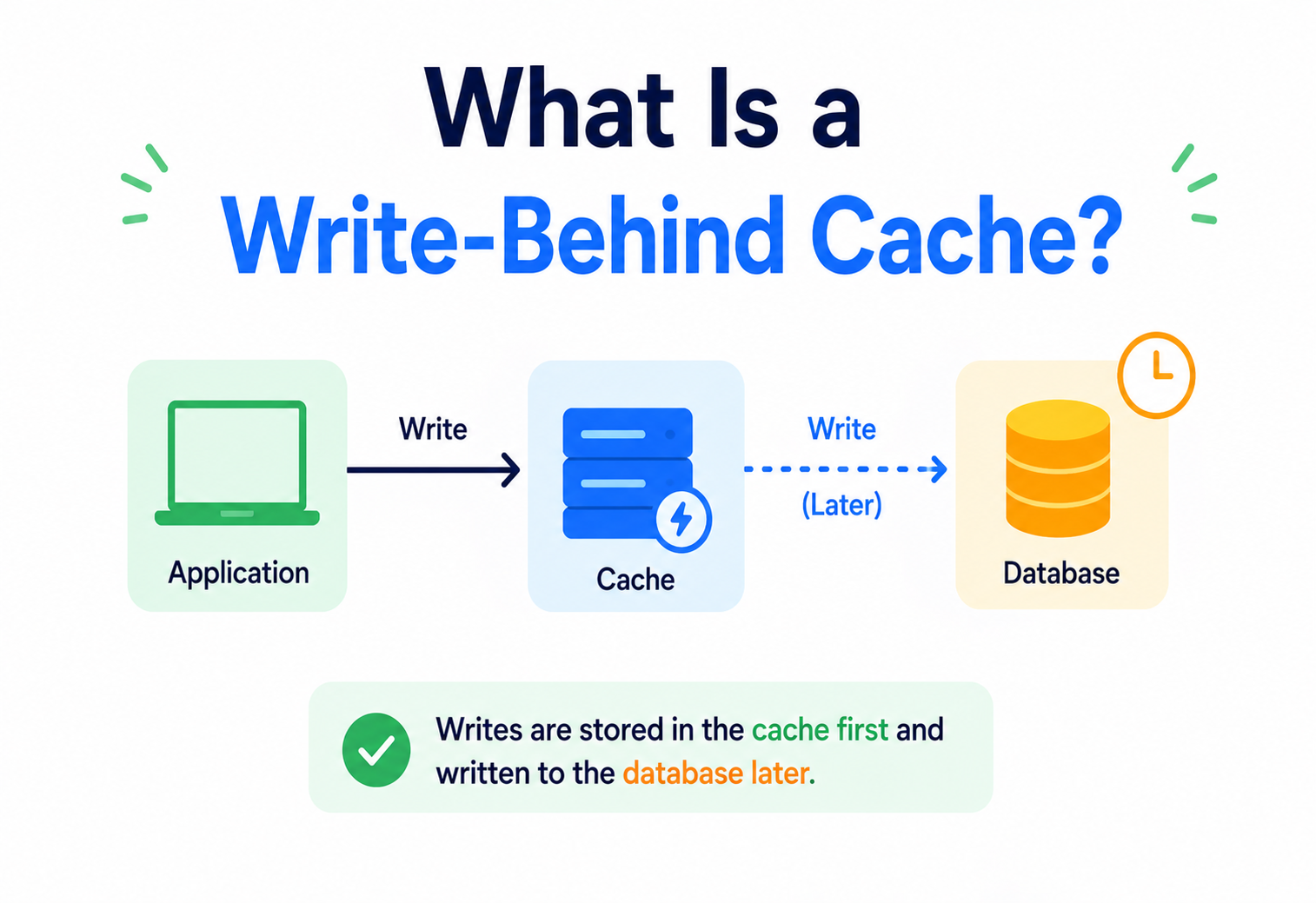
What Is a Write-Behind Cache?
A complete, beginner-friendly guide to write-behind (write-back) caching — how it works, why it exists, how to build one, and how companies like Netflix and Amazon use it in production.
Introduction & History
Imagine you run a small toy shop. Every time you sell a toy, you have two choices. You can either walk to the back office right away and update the big paper ledger before you help the next customer, or you can quickly jot the sale on a sticky note, keep serving customers, and update the ledger later — maybe every ten minutes — using the pile of sticky notes you collected.
The second approach is exactly what a write-behind cache (also called a write-back cache) does for computer systems. It lets an application record a change very quickly in a fast, temporary storage area (the cache), and then updates the slower, permanent storage (the database) a little later, in the background.
A write-behind cache is like a restaurant waiter who writes your order on a small notepad instead of running to the kitchen after every single item you say. The waiter takes the full order quickly, and only later walks to the kitchen to hand it over. You get served faster, and the kitchen still gets the order — just a few seconds later.
The idea of caching itself is old. It comes from computer hardware design in the 1960s and 1970s, when engineers noticed that CPUs were much faster than the memory that fed them data. They built small, fast memory chips called caches to sit between the CPU and the slow main memory. Very quickly, engineers realized caches needed a policy for handling writes (changes to data), not just reads. Two major policies emerged: write-through (update the cache and the slow storage at the same time) and write-back / write-behind (update the cache first, and update slow storage later).
Over the decades, this hardware-level idea moved into software. Modern applications — web apps, mobile apps, databases, and large-scale distributed systems — now use write-behind caching as a well-known design pattern to make applications feel instant to users, even when the underlying database is slow or far away.
The word “behind” simply means “later.” The cache is updated immediately. The database is updated behind — that is, after some delay.
Throughout this tutorial, we will build up your understanding piece by piece: starting from the everyday problem this pattern solves, moving into its internal machinery, then into how real companies keep it safe and fast at massive scale. By the end, you should be able to explain confidently not just what a write-behind cache is, but when to use one, when to avoid one, and exactly how to protect it against failure in a real production system.

Problem & Motivation
To understand why write-behind caching exists, we first need to understand a very basic but important fact: not all storage is equally fast.
| Storage Type | Typical Speed | Example |
|---|---|---|
| CPU Register | Less than 1 nanosecond | Inside the processor |
| RAM (Memory) / In-memory cache | ~100 nanoseconds | Redis, Memcached |
| SSD Disk | ~100 microseconds | Local disk database files |
| Traditional Database over network | 1–50 milliseconds | PostgreSQL, MySQL, MongoDB |
A millisecond sounds tiny, but computers can do millions of operations in that time. When an application writes data directly to a database on every single request, it pays that database “toll” every single time. If thousands of users are writing data every second, the database becomes the bottleneck — the slowest part that everyone has to wait for.
The Problem Without Caching
- Every write waits for the database — slow user experience.
- Database gets overloaded during traffic spikes.
- Repeated writes to the same record hit the database every time, even if 100 changes happen in one second.
- Database becomes a single point of slowness for the whole system.
What Write-Behind Caching Offers
- Application writes to fast memory and returns immediately.
- Many rapid changes to the same record can be merged into one database write.
- Database load is smoothed out and reduced dramatically.
- Users experience near-instant responses.
Beginner example: Think about a video app that counts “likes” on a video. If 10,000 people like the same video within one second, a naive system would try to run 10,000 separate database update operations in that second. With write-behind caching, the cache absorbs all 10,000 increments instantly in memory, and every few seconds, one single database write says “add 10,000 to the like count.” The database does 1 unit of work instead of 10,000.
Speed comes with a catch: if the server crashes before those sticky notes reach the database, that data can be lost. We will cover exactly how real systems protect against this later in this tutorial.
2.1 Why not just make the database faster instead?
A natural question beginners ask is: “Why not just buy a faster database server instead of adding a whole extra caching layer?” The honest answer is that faster hardware only helps up to a point. Physical limits like network latency (the time it takes data to travel between machines), disk speed, and the sheer cost of maintaining strict guarantees (like making sure a write is safely saved to multiple disks before confirming) mean that even the fastest database will always be slower than reading or writing to memory sitting right next to your application code. Caching doesn’t fight this physics — it works around it, by keeping the truth close and cheap for a little while, before syncing it with the more expensive, more durable source of truth.
2.2 Software example: an e-commerce “views” counter
Picture an online store showing “1,204 people viewed this item today” on a product page. Every page visit technically changes this number. Without caching, each of those 1,204 visits would trigger a separate database update statement — expensive, and largely pointless, since nobody needs the number to be accurate to the exact millisecond. With a write-behind cache, all same-second increments merge into memory, and the database receives one clean, efficient update every few seconds instead of over a thousand tiny ones.
Core Concepts
3.1 What Is a Cache?
A cache is a small, fast storage layer that keeps a copy of frequently used data close to where it’s needed, so the application doesn’t have to fetch it from a slower place every time. Caches exist because fast memory is expensive and limited, while slow storage is cheap and large. A cache is a compromise: keep the “hot” (frequently used) data in a small fast place, and keep everything else in a big slow place.
3.2 The Three Main Cache Writing Strategies
Whenever your application changes data, there needs to be a rule for how the cache and the database stay in sync. There are three classic strategies. Understanding all three helps you see exactly where write-behind fits in.
Write-Through
Every write goes to the cache and the database at the same time, before telling the user “done.” Safe, but as slow as writing directly to the database.
Write-Around
Writes go straight to the database, bypassing the cache. The cache is only filled when data is later read. Good for data that’s written once but rarely re-read soon after.
Write-Behind (Write-Back)
Writes go to the cache only. The cache confirms “done” immediately, then flushes (saves) the change to the database later, asynchronously (in the background).
3.3 Key Vocabulary You Must Know
| Term | Meaning |
|---|---|
| Dirty data | Data in the cache that has been changed but not yet saved to the database. Like a sticky note not yet delivered to the kitchen. |
| Flush | The act of writing dirty data from the cache into the database. |
| Write buffer / write queue | The temporary holding area where dirty data waits before it is flushed. |
| Cache hit | When requested data is found in the cache (fast). |
| Cache miss | When requested data is not in the cache and must be fetched from the database (slow). |
| Eviction | Removing data from the cache to free up space, usually the least recently used data. |
| Coalescing (batching) | Combining multiple small changes into one bigger database operation. |
Imagine a homework diary. Instead of running to tell your teacher about every single homework task the moment you think of it, you write them all in your diary during the day. At the end of the day, you show the whole diary to your teacher at once. The diary is your cache. Showing it to the teacher is the “flush.” This is way less tiring than running to the teacher’s desk fifty times a day!
3.4 Cache Eviction Policies (A Quick but Necessary Detour)
Because a cache is small compared to the database, it can’t hold everything forever. When it fills up, it must decide what to remove to make room for new data. This is called eviction, and it matters a lot for write-behind caches, because evicting a “dirty” (unsaved) entry the wrong way can cause data loss. Here are the most common eviction policies:

| Policy | How it decides what to remove |
|---|---|
| LRU (Least Recently Used) | Removes the entry that hasn’t been accessed for the longest time. The most common default choice. |
| LFU (Least Frequently Used) | Removes the entry that has been accessed the fewest number of times overall. |
| FIFO (First In, First Out) | Removes the oldest entry, regardless of how often it was used. |
| TTL (Time To Live) | Removes entries automatically after a fixed amount of time, whether or not they were used. |
A write-behind cache must never evict a dirty entry without flushing it first. If a “least recently used” entry happens to be dirty, the system should flush-then-evict, not simply throw it away. Skipping this rule is one of the fastest ways to silently lose user data.
3.5 Synchronous vs. Asynchronous Writes
Another core concept underneath all of this is the difference between synchronous and asynchronous operations. A synchronous write means the caller waits until the operation is completely finished before moving on — like standing at a bank counter until the teller hands you a receipt. An asynchronous write means the caller kicks off the operation and moves on immediately, trusting that it will finish later — like dropping a letter in a mailbox and walking away, trusting the postal service to deliver it. A write-behind cache is fundamentally built around making the “cache write” synchronous (so the user gets instant feedback) while making the “database write” asynchronous (so it doesn’t block anyone).
Architecture & Components
A production write-behind caching system usually has five essential parts working together. Let’s meet each one.
Application / Client
The code that wants to save data — for example, a web server handling a “like this post” button click.
Cache Store
Fast in-memory storage such as Redis, Memcached, or an in-process hash map. Holds the current data plus a “dirty” flag.
Write Buffer / Queue
A list or queue of pending changes waiting to be sent to the database. Often a message queue like Kafka is used here for durability.
Background Writer (Flusher)
A separate thread, process, or service that periodically reads the buffer and writes to the database.
Database
The permanent source of truth — PostgreSQL, MySQL, Cassandra, DynamoDB, and so on.
Notice something important in the diagram: the user gets a response after step 3, long before the database is touched. This is the entire secret of why write-behind caching feels so fast.
Some databases (like MySQL’s InnoDB engine) implement write-behind internally for their own memory pages. Other systems build it at the application layer using Redis plus a background worker. Cloud services like AWS ElastiCache, Amazon DynamoDB Accelerator (DAX), and write-behind connectors in tools like Debezium/Kafka Connect also offer this pattern as a managed feature.
4.1 A Note on Concurrency
Multiple application instances (or multiple threads within one instance) can try to update the same cached record at nearly the same moment. A well-built cache component must handle this safely using thread-safe data structures (like Java’s ConcurrentHashMap) or atomic operations provided by the cache server itself (like Redis’s built-in INCR command, which increments a number atomically without needing the application to read-modify-write it manually). Getting this wrong is a classic source of subtle, hard-to-reproduce bugs where updates seem to randomly “disappear” under heavy concurrent load.
Internal Working
Let’s zoom into exactly what happens, step by step, inside a write-behind cache, using a concrete example: a user updates their profile “status” text on a social app.
Request arrives
The app server receives: “Change status to ‘On vacation’”.
Cache is updated in memory
The new status is written into the cache entry for this user, replacing the old value.
Entry is marked dirty
A flag (or a separate tracking structure) records that this record differs from what’s in the database.
Response sent immediately
The user sees “Status updated!” right away — the database has not been touched yet.
Buffer accumulates
If the user changes their status five more times in the next few seconds, the cache simply keeps overwriting the same entry — no extra database work is created.
Flush trigger fires
Either a timer (e.g., every 2 seconds) or a size limit (e.g., every 1,000 dirty entries) triggers the background writer.
Batch write to database
The background writer collects all dirty entries and writes them to the database, ideally in one efficient batch operation.
Dirty flag cleared
Once the database confirms the write succeeded, the cache marks the entry as clean (in sync).
Two design decisions control almost everything about how a write-behind cache behaves: when to flush and how to handle failures. Let’s look at flush triggers first.
| Flush Trigger | How it works | Good for |
|---|---|---|
| Time-based | Flush every fixed interval (e.g., every 500ms) | Predictable, steady database load |
| Size-based | Flush once the buffer reaches N items | Bursty traffic; keeps memory bounded |
| Hybrid | Flush at N items OR T seconds, whichever comes first | Most production systems use this |
| Eviction-triggered | Flush a specific item right before it’s evicted from cache to make room | Memory-constrained caches |
If the database is temporarily down, a good write-behind system keeps the dirty data safely in the buffer and retries with backoff (waiting a little longer between each retry), instead of throwing the data away.
Data Flow & Lifecycle
It helps to see the complete lifecycle of a single piece of data as a sequence, including what happens when something goes wrong.
6.1 What Happens on a Cache Miss?
If a user asks to read data that isn’t currently in the cache, the system fetches it from the database, stores a copy in the cache, and then serves it. This read path is usually unrelated to the write-behind mechanism, but it matters because a write-behind cache must always serve reads from the cache first (checking dirty data) so users never see stale (outdated) information right after their own write.
6.2 Read-Your-Own-Write Consistency
Because the cache always holds the newest value (even before the database does), a user reading their own data immediately after writing it will correctly see their update. This is one of the underrated benefits of write-behind caching — it actually feels more consistent to the end user than some other patterns, even though the database is technically behind.
If you scribble a new phone number in your personal notebook, you can read it back instantly — you don’t need to wait until you’ve typed it into your computer’s contact list later. The notebook (cache) already has the truth for you, even though the “official” computer record (database) hasn’t caught up yet.
Java Code Example
Below is a simplified, educational Java implementation of a write-behind cache. It uses an in-memory map, a queue for dirty keys, and a scheduled background thread that flushes data to a simulated database. This is not production-grade (a real system would use Redis, persistence-backed queues, and proper distributed locking), but it shows the core mechanics clearly.
import java.util.concurrent.*;
import java.util.*;

public class WriteBehindCache<K, V> {

    private final ConcurrentHashMap<K, V> cache = new ConcurrentHashMap<>();
    private final Set<K> dirtyKeys = ConcurrentHashMap.newKeySet();
    private final Database<K, V> database;
    private final ScheduledExecutorService scheduler =
            Executors.newSingleThreadScheduledExecutor();

    public WriteBehindCache(Database<K, V> database, long flushIntervalMs) {
        this.database = database;
        // Background flusher runs every flushIntervalMs
        scheduler.scheduleAtFixedRate(this::flush, flushIntervalMs,
                flushIntervalMs, TimeUnit.MILLISECONDS);
    }

    // Steps 1-3: write to cache instantly, mark dirty, return fast
    public void put(K key, V value) {
        cache.put(key, value);
        dirtyKeys.add(key);
        // No database call here! This is what makes it fast.
    }

    // Reads always come from the cache first
    public V get(K key) {
        if (cache.containsKey(key)) {
            return cache.get(key);
        }
        V value = database.read(key);   // cache miss -> load from DB
        if (value != null) cache.put(key, value);
        return value;
    }

    // Background flush: batches all dirty keys into one DB call
    private void flush() {
        if (dirtyKeys.isEmpty()) return;

        Set<K> keysToFlush = new HashSet<>(dirtyKeys);
        Map<K, V> batch = new HashMap<>();
        for (K key : keysToFlush) {
            batch.put(key, cache.get(key));
        }

        try {
            database.batchWrite(batch);        // one efficient DB call
            dirtyKeys.removeAll(keysToFlush);  // mark clean only on success
        } catch (Exception e) {
            // Keep keys dirty so we retry on the next cycle
            System.err.println("Flush failed, will retry: " + e.getMessage());
        }
    }

    public void shutdown() {
        flush();                // final flush so nothing is lost
        scheduler.shutdown();
    }

    interface Database<K, V> {
        V read(K key);
        void batchWrite(Map<K, V> entries) throws Exception;
    }
}
What this code teaches: put() never talks to the database — it only updates the in-memory map and adds the key to a dirty set, so it returns almost instantly. A separate scheduled thread calls flush() periodically, batching everything into one database call. If the write fails, dirty keys are not removed, so they are retried automatically on the next cycle — this is the basic idea behind reliable write-behind systems.
Real systems usually replace the in-memory ConcurrentHashMap with Redis (for the cache) and a durable queue like Kafka or Amazon SQS (for the dirty-key buffer) so that data survives even if the application server itself crashes.
Advantages, Disadvantages & Trade-offs
Advantages
- Extremely fast write response times for users.
- Reduces database load through batching (coalescing) of repeated writes.
- Smooths out traffic spikes, protecting the database from overload.
- Improves database lifespan by lowering write amplification (fewer disk writes).
- Can support higher overall system throughput.
Disadvantages
- Risk of data loss if the cache crashes before flushing (unless mitigated).
- Database is temporarily “behind” reality — eventual consistency, not immediate.
- More complex to build and operate than write-through.
- Harder to debug: a bug might hide in the cache and only appear during flush.
- Requires careful monitoring of buffer size and flush health.
8.1 The Core Trade-off: Speed vs. Durability
This is the central trade-off of write-behind caching, and it is a classic example of a broader idea in system design: you often cannot maximize speed and safety at exactly the same time — you choose how much of each you need. Write-through caching leans fully toward safety. Write-behind caching leans toward speed, but modern implementations claw back safety using techniques discussed in Section 10 (High Availability & Reliability), such as write-ahead logs, replication, and durable queues.
“Write-behind caching doesn’t remove the need for durability — it just moves the responsibility for durability from the database to the caching layer.”
8.2 Weighing the Trade-off With a Real Scenario
Suppose an online game studio adds write-behind caching for in-game currency earned during matches, flushing every 3 seconds. If a server crashes during that 3-second window, a small number of players might lose a few seconds’ worth of earned currency. The studio decides this is acceptable because: (a) it happens rarely, (b) the amount lost per incident is small, and (c) players can be compensated via support tickets if it does happen. Compare this to a payment processor, where losing even one transaction confirmation for 3 seconds could mean a customer is charged but the record of the charge disappears — clearly unacceptable, which is why payment systems generally avoid pure write-behind for the core charge record, even though they might still use it for less critical data like “last login time” or “page view logs.”
Performance & Scalability
Write-behind caching directly attacks one of the most common bottlenecks in software systems: write amplification — the situation where one logical change causes many physical write operations.
9.1 Batching Reduces Database Operations Dramatically
10,000
individual writes per second going straight to the database.
1
batched write per flush interval — carrying all those changes.
~99%
possible reduction in database write operations for hot-key workloads.
Fewer database round trips means less network overhead, fewer transaction commits, and less pressure on database locks and indexes. This is why write-behind caching scales so well for “hot key” workloads — data that many users update very frequently, like view counts, leaderboards, or trending scores.
9.2 Choosing the Right Flush Interval
A shorter flush interval means less data at risk if something crashes, but more frequent (and smaller, less efficient) database writes. A longer interval means better batching and less database load, but more data sits “at risk” in memory at any moment. Engineers tune this based on how critical the data is — a bank would never use a long interval for account balances, but a video platform might happily use one for view counts.
| Data Type | Suggested Approach |
|---|---|
| View counts, “likes,” analytics events | Write-behind with longer intervals (seconds) — safe to lose a little. |
| Shopping cart contents | Write-behind with short intervals plus durable buffer. |
| Bank balance, payment transactions | Avoid write-behind, or use write-through / synchronous replication. |
9.3 Scaling the Cache Itself
As traffic grows, a single cache server becomes its own bottleneck. Production systems typically use:
- Sharding — splitting data across many cache nodes by key (e.g., using consistent hashing), so no single node holds everything.
- Replication — keeping copies of cache data on multiple nodes so a crash doesn’t wipe out unflushed data.
- Horizontal scaling of background writers — running multiple flusher workers, each responsible for a portion of the key space, to keep up with flush volume.
9.4 Tuning Throughput Against Consistency
Performance tuning in a write-behind system is really a dial between two goals that pull in opposite directions: throughput (how much work the system can handle per second) and freshness of the database (how close the database is to matching the cache at any moment). Increasing batch size and flush interval pushes throughput up but freshness down. Decreasing them does the opposite. Good engineering teams treat this as a measurable, adjustable setting — not a one-time decision — and revisit it as traffic patterns change, for example increasing flush frequency during low-traffic hours when the database has spare capacity anyway.
9.5 Hot Keys and Contention
A “hot key” is a single record that receives a disproportionately large share of all writes — think of a celebrity’s post on launch day getting a million likes in a minute, while a normal post gets ten. Write-behind caching is one of the best tools for handling hot keys, because all million updates coalesce into the cache’s in-memory counter and only a small number of batched flushes reach the database, instead of a million individual database row-lock contentions that would otherwise bring that single row’s throughput to a crawl.

High Availability & Reliability
The biggest fear with write-behind caching is simple: “What if the cache server dies before the data is flushed?” This section covers the real techniques production systems use to answer that question safely.
10.1 Write-Ahead Log (WAL)
Instead of only keeping dirty data in memory, the cache first appends every change to a durable, append-only log file on disk (or a durable queue like Kafka). Since this write is sequential (not random), it is still very fast — much faster than a full database update — but it survives a crash. If the server restarts, it can replay the log to rebuild the buffer and continue flushing.
10.2 Replication of the Cache
Systems like Redis support replica nodes. When the primary cache node accepts a write, it also streams the change to one or more replicas. If the primary crashes, a replica (which likely has the same dirty data) can be promoted to take over, minimizing data loss.
10.3 Durable Message Queues as the Buffer
Many modern architectures replace the simple in-memory buffer with a durable queue such as Apache Kafka or Amazon SQS. Once a change is written to the queue, it is persisted across multiple broker nodes before the app even gets its “success” response. This means the write survives even a complete loss of the cache server, because the queue — not just the cache — now holds the source of truth until the flush completes.
10.4 Idempotency and Exactly-Once-Ish Delivery
Because retries can happen after failures, the same change might get flushed to the database more than once. Good systems design their database writes to be idempotent — applying the same write twice produces the same correct result (for example, “set balance to 500” rather than “add 10 to balance,” or using unique operation IDs the database can deduplicate).
10.5 CAP Theorem Connection
Write-behind caching is a practical embodiment of choosing Availability and Partition tolerance over strict, immediate Consistency — it is fundamentally an AP-leaning, eventually consistent design. The database will always “catch up” eventually, but for a short window, the cache and database disagree. Systems that absolutely require strong consistency (like financial ledgers) generally avoid pure write-behind for critical fields.
A resilient write-behind system needs: (1) a durable buffer or WAL, (2) cache replication, (3) idempotent database writes, (4) retry with exponential backoff, and (5) alerting when the buffer grows abnormally large (a sign flushing has stalled).
10.6 Walking Through an Actual Crash Scenario
Let’s trace exactly what happens if the primary cache node crashes one second after accepting ten writes, so the mechanics feel concrete rather than abstract:
Crash occurs
The primary cache process dies unexpectedly, taking its in-memory state with it.
Health check fails
A monitoring/orchestration system (like Redis Sentinel or a Kubernetes liveness probe) detects the primary is unresponsive within a few seconds.
Replica promotion
A replica that had already received the replicated copies of those ten writes is promoted to become the new primary.
WAL replay (if used)
If a write-ahead log was also in use, any writes not yet replicated can be recovered by replaying the log from disk.
Flushing resumes
The background writer reconnects to the new primary and continues flushing dirty entries exactly as before — application code doesn’t need to know a failover happened.
Notice that without replication or a WAL, step 3 and step 4 would not be possible, and all ten writes would simply vanish. This is precisely why production systems never rely on a single, unreplicated in-memory cache for anything that matters.
Security
Caching layers are sometimes overlooked in security reviews because people assume “it’s just temporary data.” In reality, a write-behind cache holds real, sensitive user data — often before it’s even validated by the database layer — so it deserves real protection.
Encryption in transit
Connections between the app, cache (e.g., Redis with TLS), and database should always be encrypted, especially across networks or cloud regions.
Encryption at rest
If the write-behind buffer is backed by disk (WAL files, durable queues), that data should be encrypted at rest, since it may briefly be the only durable copy of sensitive data.
Access control
Only the application and background writer service should be able to read/write the cache — use authentication (Redis AUTH, IAM roles) and network isolation (VPCs, security groups).
Input validation before caching
Because the cache may temporarily be the only copy of the data, invalid or malicious input should be validated before it enters the cache, not only at database insert time.
Audit logging
Since data changes now happen in two stages (cache write, then flush), audit trails should capture both stages so investigators can trace exactly when a change was accepted versus persisted.
PII minimization
Avoid caching more personally identifiable information than necessary; the cache is an additional place that sensitive data now lives, however briefly.
Monitoring, Logging & Metrics
Because write-behind introduces a delay between “user thinks it’s saved” and “it’s actually saved,” strong observability is not optional — it is essential. Here are the metrics every production write-behind system should track.
| Metric | Why it matters |
|---|---|
| Buffer / queue size (dirty entries count) | A steadily growing number means flushing can’t keep up — an early warning sign of trouble. |
| Flush latency | How long each flush batch takes; rising latency signals database strain. |
| Flush failure rate | Percentage of flush attempts that error out; feeds retry and alerting logic. |
| Cache hit ratio | Percentage of reads served from cache vs. database; low ratio suggests cache sizing issues. |
| Time since oldest dirty entry | The maximum possible data-loss window right now if a crash happened this instant. |
| Eviction rate | How often data is removed from cache before being flushed — a serious risk indicator. |
Set alerts for: buffer size above a threshold, flush failure rate above a small percentage, and “oldest dirty entry age” above your acceptable data-loss window. Tools like Prometheus + Grafana, Datadog, or CloudWatch are commonly used to visualize these in real time. Distributed tracing (OpenTelemetry) can also tag each request with whether it was served from cache or triggered a flush, helping debug slow paths.
Practical example: Netflix-style engineering teams often build dashboards showing “cache dirty set size over time” as a sawtooth pattern — it grows as writes come in and drops sharply every time a flush completes. A flat, ever-rising line (no drops) is a clear, visual sign that flushing has stopped working.

Deployment & Cloud
You rarely need to build a write-behind cache completely from scratch today. Cloud providers and open-source tools offer building blocks:
Amazon ElastiCache (Redis)
Managed Redis/Memcached; pair with a custom background worker (e.g., an AWS Lambda on a schedule, or an ECS task) to flush to RDS/DynamoDB.
Amazon DynamoDB Accelerator (DAX)
An in-memory cache built directly in front of DynamoDB, primarily read-focused but demonstrates the managed-cache pattern well.
Debezium + Kafka Connect
Popular open-source combo for building durable, queue-backed write-behind pipelines between caches/services and databases.
MySQL InnoDB Buffer Pool
A built-in example of write-behind at the storage-engine level — dirty pages sit in memory and are flushed to disk by background threads.
Hazelcast / Ehcache
Popular Java caching libraries with built-in “write-behind” cache store configurations, including configurable batch size and delay.
Google Cloud Memorystore
Managed Redis on GCP, commonly paired with Cloud Functions or Dataflow jobs as the background flusher.
13.1 Containerized Deployment Pattern
In a typical Kubernetes deployment, the cache runs as a managed service or a StatefulSet (for self-hosted Redis), the application runs as stateless pods that talk to the cache, and the background writer runs as its own Deployment or CronJob so it can be scaled and restarted independently of the main application — this separation is important for reliability, since a crash in the app shouldn’t stop flushing, and vice versa.
Because write-behind reduces the number of database write operations, it directly reduces database costs on usage-billed services (like DynamoDB write capacity units or serverless database write pricing), sometimes by an order of magnitude for hot-key workloads.
Caching in the Bigger Picture: Databases, Load Balancing & Microservices
14.1 Where the Cache Sits Relative to the Database
A write-behind cache is usually placed as a layer that the application talks to directly, with the database hidden behind it for write paths. This is different from a read-through cache pattern, where the cache is more like a lookup-only accelerator.
Notice that all application instances share the same cache cluster. This is essential — if each instance had its own private cache, two instances could hold conflicting “dirty” versions of the same record, causing lost updates.
14.2 Microservices & APIs
In a microservices architecture, a write-behind cache is often owned by a single service (the one that “owns” that data), and other services access it only through that service’s API — never by talking to the cache or database directly. This respects the microservices principle of encapsulated data ownership and keeps the eventual-consistency behavior contained within one well-understood boundary.
API design implication: An API built on write-behind caching typically returns 202 Accepted or a fast 200 OK immediately, sometimes including a note like "status": "pending_persistence" if the API needs to be transparent about eventual durability — useful for clients that need strong guarantees for specific operations.
14.3 Relationship With Load Balancing
Load balancers distribute incoming requests across many app servers, but for write-behind caching to work correctly, all those servers must reach the same shared cache (not per-server local caches) — otherwise, requests routed to different servers would see inconsistent, conflicting data. This is why production caches are almost always run as a separate, shared cluster (like a Redis cluster) rather than embedded per-instance memory.
Design Patterns & Anti-patterns
15.1 Good Patterns
Do This
- Use write-behind for high-frequency, low-criticality data (counters, telemetry, session state).
- Batch and coalesce writes aggressively where correctness allows.
- Make database writes idempotent to survive retries safely.
- Monitor buffer size and flush latency as first-class metrics.
- Use a durable buffer (WAL or queue) for anything you cannot afford to lose.
Anti-patterns to Avoid
- Using write-behind for financial transactions without extra durability guarantees.
- Keeping the dirty buffer only in a single, unreplicated process’s memory.
- Never testing what happens when the cache or writer crashes mid-flush.
- Ignoring buffer growth alerts until the system runs out of memory.
- Letting multiple app instances each keep private, unsynced caches.
15.2 Related Patterns Worth Knowing
| Pattern | Relationship to write-behind |
|---|---|
| Cache-aside (Lazy loading) | Handles reads; often combined with write-behind for a complete caching strategy. |
| Event Sourcing | Similar spirit — record events fast, derive final state later — but focused on an immutable event log rather than a mutable cache. |
| CQRS (Command Query Responsibility Segregation) | Write-behind naturally fits CQRS systems, where the write model and read model can be updated at different times. |
| Outbox Pattern | A close cousin — writes an event to a durable “outbox” table/queue that’s later published, similar to how write-behind uses a durable buffer. |
Best Practices & Common Mistakes
Classify your data first
Before adopting write-behind, ask: “Can this business lose the last few seconds of this data during a crash?” If the honest answer is no, don’t use pure write-behind for it.
Set a maximum buffer age
Never let dirty data sit indefinitely — enforce a hard maximum delay (e.g., 5 seconds) even under heavy load, to bound the data-loss window.
Test crash scenarios
Deliberately kill the cache and writer process in staging environments to confirm your recovery plan actually works before you need it in production.
Keep flush operations small and fast
Huge, slow batch writes can themselves become a new bottleneck — tune batch size based on real measurements, not guesses.
Separate concerns
Run the background writer as its own scalable service, not as an afterthought thread bolted onto the main app.
Document the consistency model
Make sure every engineer (and ideally the API docs) clearly states that this data is eventually consistent, so nobody builds features assuming instant durability.
Teams often introduce write-behind caching purely to “make things faster” without first classifying which data can tolerate eventual consistency — then get surprised months later when a crash loses a small amount of data that actually mattered.
16.1 A Safe Rollout Strategy
Because write-behind caching changes the fundamental durability guarantees of a system, experienced teams roll it out gradually rather than flipping it on everywhere at once. A common, low-risk path looks like this: first, apply it only to a genuinely low-stakes field (like a view counter); second, run it in production while closely watching the monitoring metrics from Section 12 for a few weeks; third, deliberately trigger a controlled failure in a safe environment to confirm the recovery mechanisms actually work as designed; and only then, with real evidence in hand, consider extending the pattern to more important data, always re-evaluating the risk classification from Section 16 each time.
Real-World & Industry Examples
Netflix
Uses in-memory caching layers heavily (e.g., EVCache, built on Memcached) across its microservices to absorb massive read/write volume for things like viewing progress and personalization signals, flushing to durable storage asynchronously.
Amazon
Product view counts, “customers also bought” signals, and cart-related counters are commonly handled through caching layers backed by asynchronous persistence, so the shopping experience stays snappy under huge load, especially during sales events.
Uber
Real-time systems like driver location updates use in-memory, low-latency stores with asynchronous persistence, since a slightly stale historical record is acceptable, but instant responsiveness for matching riders and drivers is critical.
Social media “like” counters
Platforms handling millions of likes per second commonly batch counter increments in memory and periodically flush aggregated totals to the database, exactly as described in Section 2.
Gaming leaderboards
Online games often update score changes in an in-memory store (like Redis sorted sets) instantly for real-time leaderboards, syncing to a persistent database on a schedule rather than on every single point scored.
MySQL / InnoDB
As mentioned earlier, InnoDB’s buffer pool itself is a textbook write-behind cache: changed data pages live in memory and are flushed to disk by a background thread, not on every single row update.
Every one of these systems chose write-behind caching specifically for high-volume, high-frequency data where a tiny, bounded risk of data loss is an acceptable trade for a massive gain in speed and scalability.
17.1 Ad-tech and Analytics Pipelines
Advertising platforms that need to count billions of impressions and clicks per day almost always rely on some form of write-behind buffering: raw events are captured instantly in fast, in-memory or log-based storage, then periodically aggregated and written into analytical databases or data warehouses. Trying to write every single click directly and synchronously into a full relational database would collapse under the volume within minutes.
17.2 CDN and Edge Caching
Content Delivery Networks apply a related idea at the edge: statistics like “how many times was this file requested from this edge location” are tallied locally and shipped back to a central reporting system on a delay, rather than phoning home on every single request, which would defeat the purpose of having a fast edge server in the first place.
FAQ, Summary & Key Takeaways
Is write-behind the same as write-back?
Yes. “Write-back” is the original hardware/CPU-caching term; “write-behind” is the more common name in software and database contexts. They describe the same core idea.
Does write-behind caching mean I will lose data?
Not necessarily. There is a small window of risk between the cache write and the database flush, but techniques like write-ahead logs, cache replication, and durable queues (covered in Section 10) can shrink that risk close to zero for most practical purposes.
When should I NOT use a write-behind cache?
Avoid it for data where even a moment of loss is unacceptable — for example, core financial transactions, medical records, or audit-critical logs — unless you pair it with very strong durability guarantees (synchronous replication, durable queues with acknowledgments).
How is write-behind different from asynchronous replication?
Write-behind is about delaying when data moves from a fast cache to a primary database. Asynchronous replication is about delaying when data moves from a primary database to secondary/replica databases. They solve related but distinct problems and are often used together in the same system.
Can write-behind caching be combined with read caching?
Yes, and it usually is. Most production systems use the same cache for both fast reads (cache-aside/read-through) and fast writes (write-behind), since they naturally share the same in-memory store.
Does write-behind caching help with database scaling, or just speed?
Both. Speed is the most visible benefit to end users, but the reduction in database write volume (through batching) is often the bigger long-term win for a growing system, since it directly delays or avoids the need for more expensive database scaling, sharding, or hardware upgrades.
Is a message queue like Kafka required to build a write-behind cache?
No, it’s optional but common in serious production systems. A simple in-memory queue with a scheduled thread (like the Java example in Section 7) is enough to learn the concept and even to run small-scale systems. Durable queues become important once you need strong guarantees that data survives a crash.
Key Takeaways
- A write-behind (write-back) cache accepts writes instantly in fast memory and saves them to the slower database later, in the background.
- It exists to solve the problem of slow databases becoming bottlenecks under heavy or bursty write traffic.
- Its biggest strength is batching many rapid changes into fewer, cheaper database operations.
- Its biggest risk is potential data loss if the cache crashes before flushing — mitigated with write-ahead logs, replication, and durable queues.
- It trades strict, immediate consistency for speed and scalability — an “eventually consistent,” AP-leaning design.
- It’s ideal for counters, engagement metrics, session data, gaming scores, and similar high-frequency, loss-tolerant data.
- It’s risky for financial transactions and other data where even brief loss is unacceptable, unless paired with strong durability guarantees.
- Real systems — from Netflix to MySQL’s own storage engine — rely on this exact pattern every day, at massive scale.