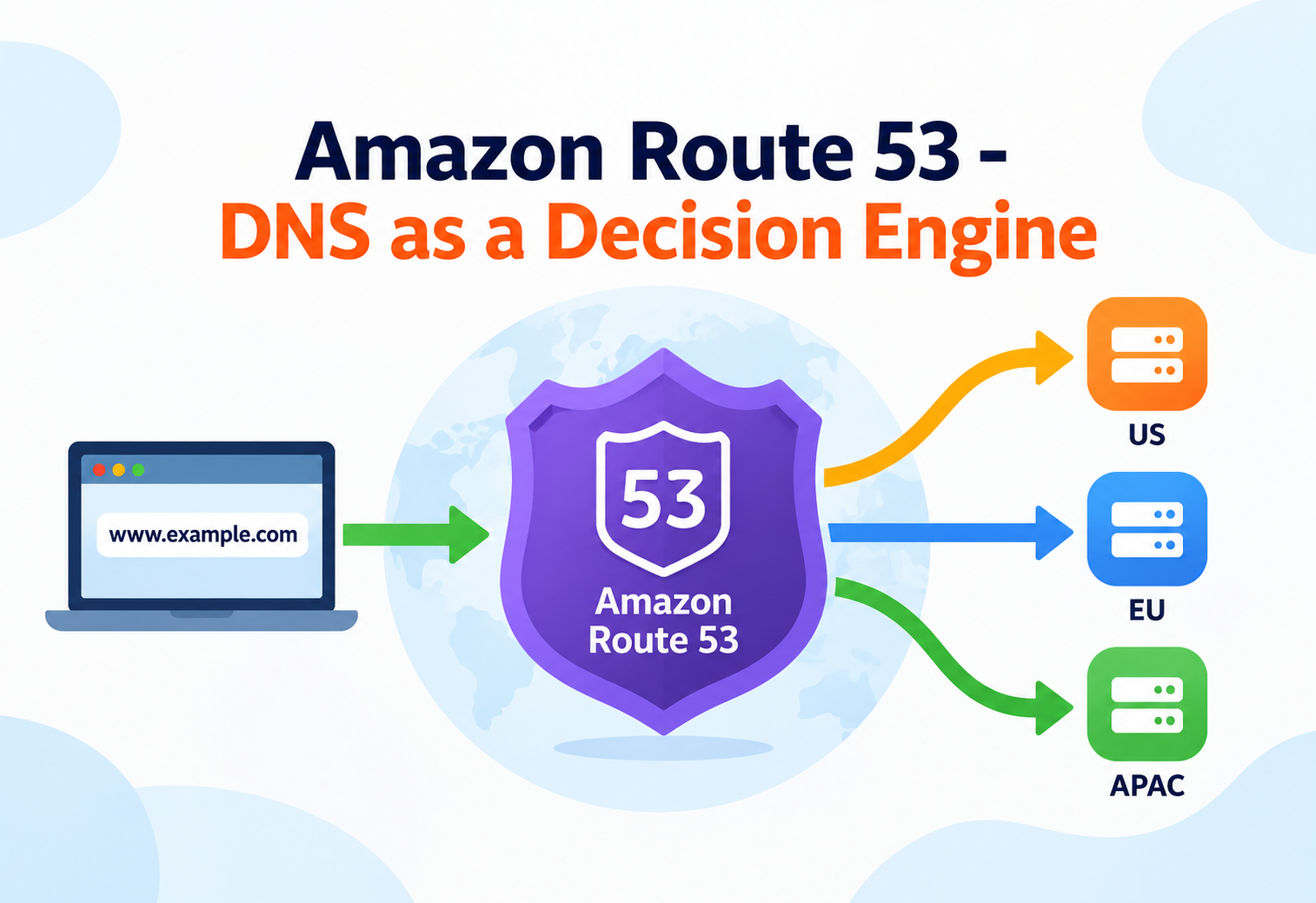
Amazon Route 53 – DNS as a Decision Engine
Beyond "it resolves domain names" — how Route 53's routing policies, health checks, and resolver internals actually decide where your traffic goes.
Picture a large hospital’s front desk on a chaotic morning. A patient walks in and asks for “the cardiology department.” The receptionist doesn’t just point to one fixed door — they might check which cardiology wing is closer to the patient, whether one wing is currently overloaded, or whether a wing is temporarily closed for cleaning, and then direct the patient accordingly. Amazon Route 53 is that receptionist for the internet: when a device asks “where is example.com?”, Route 53 doesn’t just return a single hardcoded answer — it can apply routing logic based on location, load, and health before answering. This guide assumes you already know what DNS is and what an A record does in general; it focuses on the intermediate mechanics that make Route 53 a routing decision engine rather than a plain lookup table.
1Introduction & History
Amazon Route 53 launched in 2010, taking its name from U.S. Route 66 combined with the fact that DNS operates over port 53 — a small naming detail that hints at the product’s identity: a highway system for directing traffic. At the time, DNS providers largely treated name resolution as a static, one-answer-per-query service. AWS’s bet was that DNS could become an active part of application architecture — not just translating names to addresses, but making routing decisions based on health, geography, and load, tightly integrated with the rest of AWS.
Over time Route 53 grew from a pure DNS service into three related but distinct product areas: DNS management (hosted zones and routing policies), domain registration (buying and managing domain names directly through AWS), and Route 53 Resolver (a hybrid DNS resolution service bridging on-premises networks and AWS VPCs). Understanding these as related but separate capabilities — rather than one monolithic feature — is itself an intermediate-level distinction many newcomers miss.
A traditional DNS provider is like a phone book that always gives the same number for a business no matter who’s asking or what’s currently happening at that business. Route 53 is more like a smart call-routing system for a company with multiple offices: it can send a caller to the nearest office, the least busy office, or skip an office entirely if it knows that location is currently closed.
A concrete example: Netflix uses Route 53’s traffic routing capabilities as part of the strategy that directs client requests to the nearest and healthiest regional infrastructure, since directing tens of millions of streaming clients to an unhealthy or distant endpoint would visibly degrade the viewing experience within seconds.
2Problem & Motivation
Running an application across multiple regions or availability zones creates a routing problem that plain DNS was never designed to solve: given several healthy endpoints, which one should a specific user actually be sent to, and what happens the moment one of those endpoints becomes unhealthy? A static DNS record can’t answer either question — it returns the same address to every requester, healthy or not, until someone manually notices a problem and edits the record, which could take minutes or hours during an outage.
This gap matters most exactly when it’s most dangerous: during a regional failure. If your primary region goes down and DNS keeps confidently pointing users at it, the failure is invisible to DNS and fully visible to users. Route 53 closes this gap by folding health awareness and geographic/load awareness directly into the resolution process itself, so the “which endpoint” decision is made per query, automatically, rather than as a manual, reactive edit.
This is the same underlying problem load balancers solve at the application layer — Route 53 solves a version of it at the DNS layer, one level higher in the stack, before a client connection is even established. Recognizing when to solve a routing problem at DNS level versus load-balancer level is a common system-design discussion point.
3Core Concepts (Intermediate Level)
Routing Policies
A routing policy determines what Route 53 returns when multiple possible answers exist for the same query. Choosing the wrong policy is one of the most common sources of unexpected traffic distribution in production.
Simple Routing
One record, one set of values, no health checks or logic — the classic single-answer DNS behavior.
Weighted Routing
Distributes traffic across multiple resources by assigned weight — commonly used for gradual blue/green or canary rollouts.
Latency-Based Routing
Routes each requester to the AWS region that historically provides the lowest latency for them, not necessarily the geographically nearest one.
Failover Routing
Sends traffic to a primary resource, automatically switching to a secondary only when the primary’s health check fails.
Geolocation Routing
Routes based on the requester’s actual geographic location — useful for content licensing or compliance restrictions, not just performance.
Geoproximity Routing
Routes based on geographic distance, with a “bias” value that lets you deliberately shift more or less traffic toward a given resource.
A seventh policy, multivalue answer routing, returns up to eight healthy records selected at random for a given query, functioning as a lightweight, DNS-level load-distribution mechanism with basic health awareness — useful when a full load balancer would be overkill.
Latency-based routing versus geolocation routing is a frequently confused pair. Geolocation asks “where is this person physically standing?” and answers accordingly, even if a farther server would actually respond faster — useful for legal or licensing rules. Latency-based routing asks “which server has historically answered this person fastest?” and picks that one, even if it isn’t the nearest one on a map — useful purely for performance.
Health Checks
A health check is a periodic probe — HTTP, HTTPS, or TCP — that Route 53 runs from multiple global locations against an endpoint, and the aggregated pass/fail result determines whether that endpoint is treated as healthy for routing decisions like failover. Health checks can also monitor CloudWatch alarms directly, or be calculated from the health of other health checks (a “calculated health check”), enabling more complex conditions like “treat this endpoint as healthy only if at least two of these three underlying checks pass.”
Alias Records vs. CNAME Records
An alias record is a Route 53-specific extension that looks like a CNAME to the end user (pointing one name to another AWS resource, such as a CloudFront distribution or an Application Load Balancer) but behaves differently under the hood: alias records can be used at the zone apex (the bare domain, like example.com, where a standard CNAME is not allowed by the DNS specification), and Route 53 resolves the target internally without an extra DNS lookup, which also means alias record queries to AWS resources are not billed the same way standard queries are.
4Architecture & Components
A hosted zone is the container for all the DNS records belonging to a domain, and there are two types: public hosted zones, which answer queries from the public internet, and private hosted zones, which only answer queries originating from one or more associated Amazon VPCs — allowing internal-only DNS names that never resolve outside your own network.
Resource record sets are the individual entries within a hosted zone — A records, AAAA records, CNAME records, alias records, and others — and it’s the routing policy attached to a given record set that determines how Route 53 chooses among multiple possible values when more than one exists. Health checkers are a globally distributed fleet of probing locations that continuously test configured endpoints and feed pass/fail status back into the routing decision layer, so failover and other health-aware policies always have current information to act on.
5Internal Working
When a resolver somewhere on the internet asks Route 53’s authoritative name servers for a record, the request first identifies the correct hosted zone based on the queried domain. Within that zone, if the requested record set uses a policy more complex than “simple,” Route 53 evaluates the relevant inputs for that policy — the client’s approximate location for latency or geolocation routing, the assigned weights for weighted routing, or the latest health-check status for failover routing — and selects the specific value (or values) to return from among the configured options.
Because Route 53’s authoritative name servers are deployed across a globally distributed anycast network, the same domain name (like ns-123.awsdns-45.com) can be answered by different physical name server locations depending on where the query originates, without any special configuration from the customer — this is what allows Route 53 to offer a 100% availability SLA for DNS query responses.
Anycast is like a single phone number that rings at whichever branch office is physically closest to the caller, rather than always ringing at one specific office regardless of where the call came from — the caller never knows or cares which branch actually answered.
Traffic flow policies let you visually compose multi-layered routing logic — for example, latency-based routing at the top level that then falls back to a weighted or failover policy underneath for each region — and Route 53 compiles that visual policy down into the actual nested DNS record configuration required to implement it, saving the manual work of wiring up each intermediate record by hand.
6Data Flow & Lifecycle
A typical resolution lifecycle begins when a client’s local DNS resolver (often a cache maintained by the operating system, browser, or ISP) receives a request for a domain name it doesn’t already have cached. That resolver walks the DNS hierarchy from the root servers down to the authoritative name servers for the domain — which, for a domain configured in Route 53, are Route 53’s own name servers — and the query finally lands at the correct hosted zone.
Once Route 53 returns an answer, it’s accompanied by a Time to Live (TTL) value telling the requesting resolver how long it may cache that answer before asking again. This TTL is a deliberate trade-off: a long TTL reduces query volume and speeds up repeat lookups for the client, but it also means that if you need to fail over or change a record, cached resolvers elsewhere on the internet may keep using the stale answer until their TTL expires — which is why many teams deliberately lower TTLs on records they expect might need to change quickly, such as failover targets, well before a planned migration.
7Advantages, Disadvantages & Trade-offs
Advantages
- 100% availability SLA for DNS queries, backed by a globally distributed anycast name server network
- Seven distinct routing policies cover most real-world traffic-distribution needs without custom tooling
- Health checks enable automatic failover at the DNS layer, before traffic ever reaches an unhealthy endpoint
- Alias records eliminate an extra DNS hop to AWS resources and are usable at the zone apex
- Deep integration with CloudFront, ELB, S3, and CloudWatch simplifies multi-service architectures
Disadvantages / Trade-offs
- DNS-layer failover is bound by TTL caching behavior elsewhere on the internet, so failover isn’t instantaneous for every client
- Complex traffic flow policies with multiple nested layers can become difficult to reason about and debug
- Health checks add cost and, for very low-traffic endpoints, may occasionally misjudge health due to check frequency and location variance
- Geolocation accuracy depends on third-party IP-to-location databases, which are not always perfectly precise
The central trade-off is that Route 53 operates at the DNS layer, which is powerful because it works before a connection is even established, but limited because it can’t see or react to anything happening after that — a load balancer or application-layer mechanism is still needed for finer-grained, real-time traffic decisions within an established connection.
8Performance & Scalability
Route 53’s name server infrastructure is designed to absorb enormous global query volume without customer-side scaling decisions — there is no concept of “provisioning more DNS capacity,” since the underlying anycast network already scales globally by design. From a performance-tuning perspective, the main levers available to customers are TTL configuration (balancing cache freshness against query volume and cost) and choosing the routing policy that matches the actual performance goal, such as latency-based routing for genuinely reducing perceived latency versus geolocation routing for compliance reasons that may not always align with the fastest possible path.
Route 53 Application Recovery Controller extends this further for critical multi-region failover scenarios, providing readiness checks and routing controls that let teams safely coordinate and test failover procedures ahead of time, rather than discovering during an actual incident that failover doesn’t behave as expected.
9High Availability & Reliability
Route 53’s own infrastructure is built for extreme redundancy — its name servers run across multiple independent networks and geographically distributed locations specifically so that a failure or attack affecting one part of the internet doesn’t take DNS resolution for your domain down entirely. This is also the basis for Route 53’s 100% availability SLA, one of the few AWS services with a perfect-availability commitment rather than a “four nines” or “five nines” target.
For the resources Route 53 routes to, reliability depends heavily on correctly configured health checks and an appropriate failover or multi-region routing policy — Route 53 will faithfully route traffic to an unhealthy endpoint if health checks aren’t configured at all, since without a health check attached, a routing policy has no signal to act on.
“You’ve configured failover routing, but during an outage traffic didn’t shift away from the unhealthy region for several minutes — why?” The expected answer touches TTL: clients and intermediate resolvers that had already cached the primary record won’t re-query until their cached TTL expires, so lower TTLs on failover-critical records reduce (but don’t eliminate) this delay.
10Security
Access to modify hosted zones, records, and health checks is controlled through AWS IAM policies, allowing fine-grained separation between, for example, a team allowed to create records in a specific hosted zone and a team allowed to manage domain registration settings. DNS Security Extensions (DNSSEC) can be enabled for public hosted zones, adding cryptographic signatures to DNS responses so resolvers can verify that a response genuinely came from the authoritative source and wasn’t tampered with in transit — protecting against certain DNS spoofing and cache-poisoning attacks.
Private hosted zones inherently limit exposure by only answering queries from associated VPCs, which is itself a security boundary — internal service names never need to be resolvable from the public internet at all. Route 53 Resolver DNS Firewall adds another layer, allowing domain-based allow and deny rules for outbound DNS queries from within a VPC, which can block resolution of known malicious domains as a defense against DNS-based exfiltration or command-and-control traffic.
11Monitoring, Logging & Metrics
Route 53 can publish query logs to CloudWatch Logs, recording the domain names queried, the query type, and the response returned, which is valuable both for debugging unexpected resolution behavior and for security analysis of unusual query patterns. Health check status itself is available as a CloudWatch metric, and CloudWatch alarms can be attached directly to a health check’s status, enabling notifications the moment an endpoint the DNS layer depends on becomes unhealthy — often faster than waiting for user-facing symptoms to be reported.
AWS CloudTrail records management-level API actions against Route 53, such as changes to a hosted zone’s records or health check configuration, supporting change-tracking and compliance auditing — a particularly important log given how much operational impact a single mistaken record change can have.
12Deployment & Cloud Integration
Hosted zones, record sets, and health checks are typically managed through the console, AWS CLI, CloudFormation, or Terraform, with infrastructure-as-code approaches strongly preferred for production DNS given how disruptive an accidental manual record change can be. Route 53 Resolver deserves particular attention in hybrid environments: it allows on-premises DNS servers to resolve names in AWS-hosted private zones (via inbound endpoints) and allows resources inside a VPC to resolve names hosted by on-premises DNS servers (via outbound endpoints and resolver rules), which is frequently the missing piece in hybrid cloud connectivity projects that otherwise focus only on network routing and forget DNS resolution needs its own bridge.
Alias records make integration with other AWS services close to seamless — pointing a domain at a CloudFront distribution, an Application or Network Load Balancer, an S3 static website endpoint, or an API Gateway custom domain typically requires only an alias record rather than any additional DNS gymnastics, and Route 53 automatically keeps the alias resolved correctly even if the underlying target’s IP addresses change.
13Design Patterns & Anti-Patterns
Context
A primary region serves all traffic under normal conditions, with a standby region ready to take over during a regional outage.
Pattern
Configure failover routing with a health check on the primary, and deliberately keep the TTL on the failover record low (commonly under a minute) so that when a real failure occurs, downstream caches expire and re-query quickly rather than continuing to serve the unhealthy primary for an extended period.
Context
A new version of a service needs to be exposed to a small percentage of real traffic before a full rollout.
Pattern
Use weighted routing to send a small percentage of DNS resolutions to the new version’s endpoint, gradually shifting the weight distribution upward as confidence increases, and shifting it back down instantly if problems appear.
Symptom
Traffic continues flowing to a clearly unhealthy primary endpoint during an outage, with no automatic shift to the configured secondary.
Root Cause
A failover routing policy has no health signal to act on unless a health check is explicitly attached to the primary record — without one, Route 53 has no way to know the primary is unhealthy.
Symptom
After a planned DNS cutover (e.g., migrating to a new load balancer), a meaningful share of users continue hitting the old endpoint for far longer than expected.
Root Cause
A long-standing high TTL was left unchanged going into the migration, so caches across the internet held onto the old answer well past the intended cutover window; lowering TTL well in advance of a planned change avoids this.
14Best Practices & Common Mistakes
- Always attach a health check to any record using failover, latency, or weighted routing where you actually want unhealthy endpoints excluded, since routing policies don’t self-verify endpoint health.
- Lower TTLs well before a planned migration or cutover, not at the moment of the change, since existing caches will hold the old TTL until it naturally expires.
- Prefer alias records over CNAMEs for AWS resource targets, especially at the zone apex where CNAMEs aren’t permitted at all.
- Use private hosted zones for internal service discovery rather than exposing internal names through public DNS unnecessarily.
- Common mistake: confusing geolocation with latency-based routing, using one when the actual business requirement calls for the other.
- Common mistake: building deeply nested traffic flow policies without documentation, making the routing logic difficult for anyone else (or future you) to reason about during an incident.
- Common mistake: forgetting DNS resolution in hybrid architectures, wiring up network connectivity between on-premises and AWS but neglecting to configure Route 53 Resolver endpoints so DNS names actually resolve across that connection.
15Real-World & Industry Examples
Netflix — Global Traffic Direction
Netflix relies on Route 53’s routing capabilities as part of directing streaming clients to healthy, well-performing regional infrastructure, where even brief misdirection to an unhealthy or distant endpoint would be immediately noticeable to viewers.
Expedia — Multi-Region Resilience
Large e-commerce and travel platforms commonly use Route 53 failover and latency-based routing across multiple regions so that a regional infrastructure issue degrades gracefully rather than taking the entire booking experience offline for all users simultaneously.
Hybrid Enterprises — Resolver Bridging
Enterprises migrating workloads gradually to AWS commonly use Route 53 Resolver inbound and outbound endpoints to let on-premises systems and AWS VPCs resolve each other’s private DNS names during the multi-year transition, avoiding a disruptive all-at-once cutover.
16Frequently Asked Questions
17Summary & Key Takeaways
Key Takeaways
- Route 53 turns DNS from a static lookup table into an active routing decision layer using seven distinct routing policies.
- Health checks are what give policies like failover and latency-based routing the signal to actually exclude unhealthy endpoints — without one attached, no health awareness exists.
- Alias records extend CNAME-like behavior to the zone apex and integrate natively with AWS resources like CloudFront and load balancers.
- TTL is the hidden variable behind perceived failover speed — cached answers elsewhere on the internet persist until their TTL expires, regardless of how fast Route 53 itself updates.
- Public and private hosted zones serve different audiences: internet-wide resolution versus VPC-scoped internal names.
- Route 53 Resolver, DNSSEC, and DNS Firewall extend the service into hybrid connectivity and security territory well beyond basic name resolution.
- DNS-layer routing is powerful because it acts before a connection is established, but it complements rather than replaces application- or load-balancer-layer traffic management.