What Is Defense in Depth?
The layered security strategy that protects modern systems — from castle walls to cloud-native microservices — explained from first principles with real production examples, Java code, and diagrams.
Introduction & History
Defense in depth is a security strategy that uses multiple, independent layers of protection so that if one layer fails, other layers still stand between an attacker and the thing you’re trying to protect. Instead of relying on a single strong wall, you build several walls, each different in nature, so that no single mistake or vulnerability leads to total compromise.
The term itself has military origins. It describes a defensive strategy where a force yields ground gradually across successive lines of defence rather than trying to stop an enemy in one decisive spot. The goal isn’t to make any single layer impenetrable — it’s to make the overall system resilient by combining several imperfect layers so their combined weakness is much lower than any one layer alone.
This idea entered computer security in the 1970s and 1980s as organisations realised that a single firewall or a single password wasn’t enough to protect valuable data. The U.S. National Security Agency (NSA) formally promoted “Defense in Depth” as an information assurance strategy, encouraging organisations to combine people, technology, and operations across multiple layers rather than trusting one control to do all the work. Today, defense in depth is a foundational principle behind almost every serious security architecture — from a bank’s core banking platform to a two-person startup’s SaaS product.
Defense in depth means: don’t trust any single security control to be perfect — stack multiple different controls so the failure of one doesn’t mean the failure of everything.
1.1 A Short Timeline
Ancient & Medieval Era — Layered Fortifications
Moats, outer walls, inner keeps, and vaults gave physical defence its earliest layered form. Every siege that failed proved the same lesson: no single wall stops everything.
20th Century — Military Doctrine
Modern armies formalise the idea of trading ground across successive defensive lines to buy time, wear the attacker down, and expose them to counter-attack.
1970s–1980s — Early Computer Security
Organisations discover that a single firewall or a single password is no longer enough to protect valuable data as networks grow.
1990s–2000s — NSA Codifies the Term
The NSA formally promotes “Defense in Depth” as an information assurance strategy combining people, technology, and operations.
Today — Cloud, Zero Trust, and DevSecOps
Layered defence is the default expectation behind cloud-native platforms, Zero Trust architectures, and every serious SaaS product, whether it has ten users or a hundred million.
1.2 From Military Doctrine to Information Assurance
Military defence in depth was never about winning at the first line of contact. Commanders expected the outermost line to be tested, sometimes even overrun, and planned for that from the start. Ground could be traded for time, and every successive line made the attacker weaker, slower, and easier to spot before they reached anything truly valuable. When information security matured as a discipline in the late twentieth century, this exact mindset was borrowed almost word for word. Early computer security relied heavily on a single “castle wall” — usually a network firewall separating a trusted internal network from the untrusted public internet. As internal threats, stolen laptops, insider mistakes, and increasingly sophisticated external attacks made it clear that one wall was not enough, defense in depth became the standard vocabulary security architects used to describe layered protection.
1.3 Software Example: How a Beginner Project Evolves
Picture a student’s first web project — a personal blog with a login form. Version one has a single layer: a password check. Version two adds HTTPS so the password isn’t sent in plain text. Version three adds password hashing so a stolen database doesn’t reveal the actual passwords. Version four adds rate limiting so an attacker can’t just guess passwords thousands of times per second. By version five, the student has unknowingly built a small defense-in-depth system — not because a textbook told them to add “defense in depth” as a checkbox, but because each new layer solved a specific weakness the previous version had.
1.4 Production Example: How the Concept Scales Up
Now scale that same evolution up to a company handling millions of users. A production platform like a stock trading app can’t rely on “add layers as bugs are found” reactively — the cost of a single breach is far too high. Instead, defense in depth is planned deliberately from day one: network isolation, identity verification, encrypted data, monitoring, and incident response are all designed together as one coherent architecture, reviewed by security architects, and tested through regular penetration testing before the system ever reaches real customers.
The Problem & Motivation
Why can’t we just build one really strong security control and be done with it? Because every security control, no matter how well designed, can fail. Software has bugs. Passwords get leaked. Employees click phishing links. Configurations get changed incorrectly during a 2 AM deploy. If your entire security posture rests on one control — say, a firewall — then the day that firewall is misconfigured or bypassed, your entire system is exposed.
2.1 The “Single Point of Failure” Problem
Security engineers borrow the term single point of failure (SPOF) from reliability engineering. A SPOF is any single component whose failure brings down the whole system. In security, a SPOF isn’t just about uptime — it’s about the difference between “an attacker got past one thing” and “an attacker owns everything.”
Imagine a web application that only checks whether a user is logged in at the login page, and every page after that simply trusts a cookie without re-validating anything. If an attacker steals that cookie once — through a coffee shop Wi-Fi sniff, a malicious browser extension, or a cross-site scripting bug — they now have full access to everything, forever, with no second checkpoint to stop them. One broken layer, total compromise.
2.2 Why “Perfect Security” Is Not a Realistic Goal
New vulnerabilities are discovered in software every single day. Even the most rigorously tested code from companies like Google, Microsoft, and Amazon ships with defects that are found months or years later (Heartbleed, Log4Shell, and Spectre are famous industry examples of deep, unexpected flaws in widely trusted software). Because we can’t guarantee any one layer is flawless, the rational engineering response is to assume every layer will eventually fail and design the system so that a failure in one place doesn’t cascade into a full breach.
2.3 Production Example: Why Banks Don’t Rely on One Lock
A production banking platform doesn’t just check a password. It combines a network firewall, a Web Application Firewall (WAF), TLS encryption in transit, multi-factor authentication, role-based access control on the backend, encryption of data at rest, fraud-detection anomaly systems, and 24/7 security monitoring — all layered together. If a phishing attack steals a customer’s password, MFA still blocks the login. If MFA is somehow bypassed, anomaly detection flags the unusual transaction pattern. If that fails too, encrypted data at rest limits the damage even if a database is somehow exfiltrated.
2.4 The Economics of Attackers
Most real-world attackers, whether criminal groups or opportunistic script kiddies, behave like economic actors. They compare the effort a target requires against the expected payoff. A system protected by a single weak control is cheap to break into, so it attracts more attempts. A system with several genuinely different layers dramatically raises the cost of a successful attack — more time, more tools, more skill, and a higher chance of getting caught along the way. Defense in depth doesn’t just reduce the probability that a given attack succeeds; it changes the economics enough that many attackers simply move on to an easier target.
2.5 Why “Compliance Checkbox” Security Fails
A common mistake, especially in growing companies, is treating security as a list of individual boxes to tick — “we have a firewall, check; we have a password policy, check” — without asking whether those controls actually cover different failure modes. Two firewalls from the same vendor, both misconfigured the same way, are not meaningfully more secure than one. True defense in depth requires asking, for every new control, “what specific failure of an existing layer does this protect against?” If the honest answer is “none, really,” that control isn’t adding depth — it’s adding cost without corresponding protection.
Core Concepts
3.1 Layering
Layering means placing multiple, independent security controls in the path an attacker must travel. Each layer should ideally use a different mechanism, so that one exploit technique doesn’t defeat multiple layers at once.
3.2 Redundancy vs. Diversity
These two words are often confused. Redundancy means having more than one of the same type of control (two firewalls of the same brand). Diversity means using genuinely different types of controls (a firewall and an intrusion detection system and strong authentication). Defense in depth cares much more about diversity than plain redundancy — two identical locks share the same weaknesses, but a lock plus a guard dog plus an alarm system do not.
3.3 Least Privilege
Every user, service, and process should have the minimum access needed to do its job, nothing more. This is a core building block of defense in depth: even if an attacker breaks into one layer, least privilege limits what they can actually do once inside.
3.4 Fail Secure (not Fail Open)
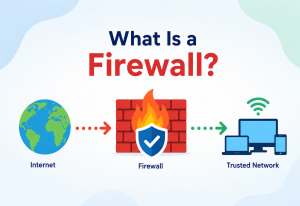
When a security control breaks or crashes, it should default to denying access (“fail secure”), not to allowing everything through (“fail open”). A firewall that crashes and lets all traffic through defeats the purpose of having it at all.
3.5 Compartmentalisation (Blast Radius Reduction)
Systems should be divided into isolated segments so that a compromise in one segment doesn’t automatically spread to others — similar to watertight compartments on a ship that stop one hull breach from sinking the whole vessel.
A simple to-do list app with just a login form has one layer. A more mature version adds: HTTPS (encrypts traffic), rate limiting on login (stops brute force), hashed + salted passwords (protects stolen data), and an audit log (detects suspicious activity). Each of these is a different type of control — that’s layering and diversity in action, even in a small app.
3.6 The “Swiss Cheese Model”
Security professionals often borrow the “Swiss cheese model” from aviation safety. Imagine several slices of Swiss cheese lined up, each slice representing one layer of defence, and each having random holes representing weaknesses. A single slice has holes an attacker could slip through. But when you stack many slices together, the odds that all the holes line up perfectly to create a single path all the way through become extremely small. That is exactly the mathematical intuition behind defense in depth: independent layers with independent weaknesses combine into a system that’s dramatically harder to fully bypass.
3.7 Defense in Breadth vs. Defense in Depth
It’s worth distinguishing two ideas that sound similar. Defense in breadth means covering many different attack surfaces (web app, mobile app, APIs, internal tools) with baseline protection. Defense in depth means stacking multiple layers behind any one of those surfaces. A mature security program needs both: breadth so nothing is left completely unprotected, and depth so nothing is protected by only one control.
3.8 Trust Boundaries
A trust boundary is any point where data or a request crosses from a less-trusted context into a more-trusted one — from the public internet into your network, from a browser into your API, from one microservice into another. Defense in depth is really about deciding, deliberately, what checks happen at each trust boundary rather than assuming that once something is “inside,” it can be trusted completely.
Imagine a mobile app that sends a user’s age to a server, and the server trusts that number completely to decide whether to show age-restricted content. The trust boundary here is the network call between the app and the server — and it’s a weak one, because anyone can intercept and modify that request. A defense-in-depth fix re-validates the age server-side against the account’s verified birth date, rather than trusting whatever the client sends.
3.9 Time as a Defensive Resource
One of the most underrated benefits of layering is that it buys defenders time. Every additional layer an attacker must defeat adds delay, and delay gives monitoring systems and human responders more opportunities to notice something is wrong before real damage occurs. This is why security teams often measure success not just by “did we prevent the breach” but by “how long did it take the attacker to get from initial access to their objective, and did we detect them before they got there.”
Architecture & Components: The Common Layers
While every system is different, most production defense-in-depth architectures include some version of the following layers, ordered roughly from the outside world moving inward toward the actual data.
Physical Security
Locked data centres, badge access, biometric locks, security cameras.
Perimeter / Network
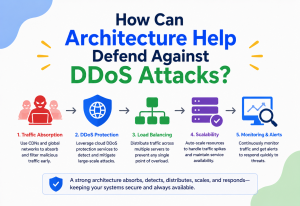
Firewalls, DDoS protection, VPNs, network segmentation.
Host Security
OS hardening, patching, endpoint detection, antivirus, host-based firewalls.
Application Security
Input validation, WAF, secure coding, dependency scanning.
Identity & Access
Authentication, MFA, RBAC/ABAC, least privilege.
Data Security
Encryption at rest & in transit, tokenisation, data masking, key management.
Monitoring & Response
Logging, SIEM, intrusion detection, alerting, incident response.
Human / Process
Security training, phishing simulations, code review, policies.
4.1 Why the Layers Are Ordered This Way
Notice the layers move from broad and coarse (network-wide firewall rules) to narrow and precise (encrypting one specific record in a database). This mirrors how real attacks unfold: an attacker typically has to get past the network before they can touch a host, past the host before they can touch an application, and past the application before they can touch raw data. Each layer buys defenders more time and more chances to detect the intrusion.
4.2 A Closer Look at Each Layer
| Layer | Beginner Example | Production Example |
|---|---|---|
| Physical | Locking your laptop screen when you step away | Biometric-controlled data centre access at an AWS region |
| Network | A home router’s built-in firewall | AWS Security Groups + Shield DDoS protection at Netflix’s edge |
| Host | Keeping your laptop’s OS updated | Automated patch management across thousands of EC2 instances |
| Application | Validating a form field isn’t empty | A WAF blocking SQL injection patterns across all of Uber’s public APIs |
| Identity | A strong, unique password | Google’s MFA + device trust checks via BeyondCorp |
| Data | Not writing your password in a plain text file | AES-256 encryption at rest with keys managed in AWS KMS |
| Monitoring | Noticing a strange login email notification | A 24/7 Security Operations Centre correlating millions of events per day |
| Human | Not clicking a suspicious email link | Company-wide phishing simulation and security awareness training programs |
Reading across each row, you can see the same underlying principle appearing at wildly different scales — from a single person locking a laptop to a company running a global security operations centre. Defense in depth doesn’t require enterprise scale to be meaningful; it’s a mindset that applies just as well to a solo developer’s side project as it does to a Fortune 500 company’s core platform.
Internal Working: How the Layers Actually Cooperate
Defense in depth isn’t just “add more tools.” The layers need to work together with a shared philosophy: each layer assumes the layers before it might have already failed, and asks “what should I do to protect the system anyway?” This is sometimes called Zero Trust thinking — never assume a request is safe just because it came from inside the network or passed an earlier check.
5.1 Beginner Example — A Simple Login Flow With Layered Checks
Below is a simplified Java/Spring Boot example showing how even a single request passes through several independent checks — rate limiting, authentication, and authorisation — rather than trusting just one gate.
@RestController
@RequestMapping("/api/accounts")
public class AccountController {

    private final RateLimiter rateLimiter;            // Layer: network / app throttling
    private final AuthenticationService authService;  // Layer: identity
    private final AccountService accountService;      // Layer: authorisation + business logic

    public AccountController(RateLimiter rateLimiter,
                             AuthenticationService authService,
                             AccountService accountService) {
        this.rateLimiter = rateLimiter;
        this.authService = authService;
        this.accountService = accountService;
    }

    @GetMapping("/{accountId}/balance")
    public ResponseEntity<BalanceResponse> getBalance(
            @PathVariable String accountId,
            @RequestHeader("Authorization") String token,
            HttpServletRequest request) {

        // Layer 1: Throttle to blunt brute force / scraping attempts
        if (!rateLimiter.allow(request.getRemoteAddr())) {
            return ResponseEntity.status(429).build();
        }

        // Layer 2: Verify identity independently of any earlier network trust
        AuthenticatedUser user = authService.validate(token)
                .orElseThrow(() -> new UnauthorizedException("Invalid or expired token"));

        // Layer 3: Authorise - does THIS user own THIS account?
        if (!accountService.isOwner(user.getId(), accountId)) {
            // Fail secure: deny by default even if earlier layers passed
            return ResponseEntity.status(403).build();
        }

        // Layer 4: Business logic operates only on validated, authorised input
        BalanceResponse balance = accountService.getBalance(accountId);
        return ResponseEntity.ok(balance);
    }
}
Notice that even after the user is authenticated (proved who they are), the code performs a separate authorisation check (proved they’re allowed to see this specific account). Authentication succeeding does not automatically grant authorisation — that’s a deliberate, independent layer, exactly the defense-in-depth mindset.

5.2 Production Example — Layered Request Path in a Real System
In a production cloud deployment, a single API request might pass through: a DDoS scrubbing service, a cloud load balancer with TLS termination, a Web Application Firewall inspecting for SQL injection patterns, an API gateway checking API keys and quotas, a service mesh enforcing mutual TLS between microservices, application-level authentication and authorisation, and finally a database with row-level security and encryption at rest. Every one of those is a separate team, tool, or vendor — meaning a single misconfiguration doesn’t take down the whole chain.
5.3 Independent Verification, Not Inherited Trust
A subtle but important detail in the code example above is that the authorisation check does not simply trust that authentication already handled everything. This is a deliberate design choice, not an accident. In systems that violate defense in depth, developers often write something like “the user passed login, so anything after this point can trust them completely.” That single assumption is exactly the kind of soft interior that turns one successful login into unrestricted access. Independent verification at each boundary means that even a completely valid, non-malicious user session still gets checked against the specific resource being requested, every single time.
// Anti-pattern: trusting authentication to also mean authorisation
@GetMapping("/{accountId}/balance")
public ResponseEntity<BalanceResponse> getBalanceUnsafe(
        @PathVariable String accountId,
        @RequestHeader("Authorization") String token) {

    AuthenticatedUser user = authService.validate(token)
            .orElseThrow(() -> new UnauthorizedException("Invalid token"));

    // BUG: no ownership check here - ANY logged-in user can read ANY account
    // by simply changing the accountId in the URL. This is a real, common
    // vulnerability class called "Broken Object Level Authorization" (BOLA).
    return ResponseEntity.ok(accountService.getBalance(accountId));
}
This kind of bug, known in the industry as Broken Object Level Authorization, is consistently one of the most common vulnerabilities found in real APIs. Defense in depth is the direct antidote: even if a developer forgets this check in one endpoint, a well-designed system might still catch the problem with a separate authorisation layer implemented once, centrally, at the API gateway or through a policy engine — rather than depending on every individual developer remembering to write it correctly every single time.
Attack Flow & Lifecycle Through the Layers
It helps to think of defense in depth from the attacker’s point of view: what does it actually take to break through, step by step?
Each stage the attacker fails at costs them time and increases the chance that monitoring detects them before they succeed. This is called increasing attacker cost — defense in depth rarely claims to make a breach impossible; it aims to make a breach so slow, noisy, and expensive that most attackers give up or get caught first.
A house with a flimsy lock, a barking dog, motion-sensor lights, an alarm system, and a safe for jewellery doesn’t guarantee a burglar can never get in. But it makes the break-in take far longer, far noisier, and far less rewarding — which is usually enough to make most burglars choose an easier target instead.
Pros, Cons & Trade-offs
Advantages
- No single point of failure for security
- Slows attackers, increasing detection chances
- Reduces blast radius of any one breach
- Resilient against unknown / zero-day flaws in any one layer
- Supports compliance frameworks (PCI-DSS, ISO 27001, SOC 2)
Trade-offs
- More components = more operational complexity
- Higher cost (tools, licences, engineering time)
- Potential performance overhead per layer
- Risk of “security theatre” — layers that look good but overlap uselessly
- Harder to debug when a legitimate request is blocked by an unclear layer
7.1 The Diminishing Returns Curve
Adding a second, genuinely different layer of defence usually gives a large security improvement. Adding a tenth layer that overlaps heavily with the ninth gives very little extra protection while adding real cost and friction. Mature security teams focus on covering distinct threat categories (network, identity, data, human) rather than piling on redundant tools within the same category.
| Approach | Single Strong Control | Defense in Depth |
|---|---|---|
| Resilience to one failure | Low | High |
| Operational complexity | Low | Higher |
| Cost | Lower | Higher |
| Attacker cost to breach | Low | High |
| Suitability for regulated data | Insufficient alone | Expected / Required |
Performance & Scalability Considerations
Every additional layer adds some latency — an extra network hop through a WAF, an extra database call to check permissions, an extra round trip to validate a token. In a high-traffic production system, this adds up, so architects need to be deliberate about where to spend that latency budget.
8.1 Practical Techniques to Keep Layered Security Fast
- Cache authorisation decisions briefly (with short TTLs) instead of hitting a database on every single request.
- Push checks to the edge — reject obviously malicious traffic at a CDN or edge firewall before it ever reaches application servers, saving compute for legitimate traffic.
- Use asynchronous logging for audit trails so security logging doesn’t block the request path.
- Parallelise independent checks where safe — e.g., fetching user roles and validating a token concurrently rather than sequentially.
- Scale each layer independently. A WAF, an API gateway, and an application server should each be able to scale horizontally without being coupled to one another’s capacity.
Large-scale platforms like Netflix and Amazon push a huge portion of their security filtering (bot detection, basic rate limiting, TLS termination) to edge locations distributed globally, so malicious or malformed traffic never reaches core services at all. This keeps the “expensive” deep layers (business logic, database checks) reserved for traffic that has already passed cheaper, faster filters.
8.2 Ordering Layers by Cost, Not Just by Trust
A useful mental model is to order your checks from cheapest-and-broadest to most-expensive-and-precise. A simple IP-based rate-limit check costs almost nothing in CPU time and can reject a huge fraction of abusive traffic instantly. A full authorisation check against a database is comparatively expensive. By placing cheap checks first, you make sure expensive checks are only ever run on traffic that’s already survived the cheaper filters — this keeps overall system load low even under attack, a technique sometimes called “fail fast, fail cheap.”
// Ordering checks from cheapest to most expensive
public ResponseEntity<?> handleRequest(HttpServletRequest request, String token) {
    // 1. Cheapest: in-memory IP rate limit (microseconds)
    if (!rateLimiter.allow(request.getRemoteAddr())) {
        return ResponseEntity.status(429).build();
    }
    // 2. Cheap: token signature check, no network call (microseconds)
    if (!jwtValidator.hasValidSignature(token)) {
        return ResponseEntity.status(401).build();
    }
    // 3. Moderate: token revocation check against cache (milliseconds)
    if (revocationCache.isRevoked(token)) {
        return ResponseEntity.status(401).build();
    }
    // 4. Most expensive: full authorisation query against the database
    // Only runs after everything cheaper has already passed
    return authorizeAndProcess(token, request);
}High Availability & Reliability of Security Layers
A defense-in-depth architecture is only as good as its weakest, least available layer. If your authentication service goes down, does your whole platform fail open (dangerous) or fail closed (safe but potentially a bad outage)? Reliability engineering and security engineering must be designed together.
9.1 Key Reliability Practices
- Redundant deployment of each security layer — run authentication services, firewalls, and gateways across multiple availability zones so one data centre outage doesn’t remove a whole layer of protection.
- Graceful degradation with a security-first bias — if a fraud-detection service is unreachable, a payments system might choose to add extra manual review rather than skip fraud checks entirely.
- Health checks and circuit breakers around security dependencies, so a slow security service doesn’t cascade into an outage of the entire application (see the related Utivra guide on circuit breakers).
- Regular failover drills — testing what actually happens, end to end, when a specific layer is deliberately taken offline.
Teams sometimes set a security control to “fail open” purely to avoid outages — for example, letting requests through if the authorisation service times out. This trades a rare availability problem for a much more dangerous security hole. The correct default in almost all cases is fail secure, with proper redundancy to minimise how often that failure path is even triggered.
9.2 Balancing Security and Availability: A Worked Example
Consider a payments platform deciding what to do when its fraud-scoring service is unreachable. Three options exist. Option one: fail open and approve every payment without a fraud check — fast, but dangerous, since a service outage would become an open invitation for fraud during exactly that window. Option two: fail closed and reject every payment — safe, but a fraud-service outage now takes down all revenue, which may be an unacceptable business trade-off. Option three, and usually the right one in production: fail into a degraded-but-safe mode, such as routing payments above a risk threshold to manual review while still auto-approving low-risk, low-value transactions using simpler rule-based checks. This preserves most business function while keeping the riskiest transactions protected — a defense-in-depth answer to what looks at first like a pure availability question.
9.3 Redundancy Patterns for Security Infrastructure
- Active-active identity providers across regions, so an authentication outage in one region doesn’t lock out an entire user base.
- Multiple, independently maintained firewall rule sets synced through infrastructure as code, reducing the risk of a single bad deployment removing protection everywhere at once.
- Local caching of authorisation decisions with short expiry, so a brief blip in a central policy service doesn’t immediately deny all legitimate traffic.
- Chaos engineering for security — deliberately disabling one security layer in a controlled test environment to confirm the remaining layers still hold, rather than assuming they will.
This last point deserves emphasis: many organisations only discover that a “backup” security layer wasn’t actually working during a real incident, because it was never tested independently. Just as reliability engineers run disaster-recovery drills to validate failover, mature security teams run similar drills specifically for their layered defences — intentionally turning off the WAF in a staging environment, for example, to confirm that application-level input validation still catches the same attacks on its own.
Security Controls, Layer by Layer
10.1 Physical Layer
Data centre access control, biometric authentication for server rooms, CCTV, and environmental controls. Cloud providers like AWS, Azure, and GCP handle this layer for you, but it’s still part of the overall chain of trust.
10.2 Network Layer
Firewalls, network segmentation (VLANs, VPCs, subnets), DDoS protection, VPNs for remote access, and intrusion prevention systems (IPS) that block known attack signatures in real time.
10.3 Host Layer
OS patching cadence, endpoint detection and response (EDR), host-based firewalls, disabling unused services, and hardened base images (a minimal container image with no unnecessary packages has a smaller attack surface than a full OS install).
10.4 Application Layer
Input validation, output encoding to prevent XSS, parameterised queries to prevent SQL injection, dependency vulnerability scanning, and a Web Application Firewall as an extra net.
// Application-layer example: parameterised query prevents SQL injection
// even if upstream validation is somehow bypassed
public Optional<User> findByEmail(String email) {
    String sql = "SELECT * FROM users WHERE email = ?";
    return jdbcTemplate.query(sql, new Object[]{email}, this::mapRow)
                       .stream().findFirst();
    // Never do: "SELECT * FROM users WHERE email = '" + email + "'"
}
10.5 Identity & Access Layer
Strong password policies, multi-factor authentication (MFA), single sign-on (SSO), role-based access control (RBAC), and short-lived credentials / tokens instead of long-lived static secrets.
10.6 Data Layer
Encryption in transit (TLS 1.2+), encryption at rest (AES-256), field-level encryption or tokenisation for the most sensitive fields (like card numbers), and strict key management using a dedicated key management service (KMS) rather than hardcoding keys.
Even if an attacker somehow steals a full database backup file, properly encrypted data at rest means they get useless scrambled bytes without the encryption key — which should be stored somewhere completely separate, like a managed KMS. This is defense in depth working exactly as intended: the network layer failed (they got the file), but the data layer still protected the actual information.
Monitoring, Logging & Metrics
Layers of defence are only useful if you know when they’re being tested or bypassed. Monitoring is the “nervous system” that ties every layer together and turns individual events into an early warning system.
11.1 What to Log at Each Layer
- Network: connection attempts, blocked IPs, unusual traffic spikes
- Host: failed logins, new process execution, file integrity changes
- Application: failed input validation, exceptions, unusual request patterns
- Identity: failed authentication attempts, MFA challenges, privilege escalations
- Data: unusual query volume, bulk exports, access to sensitive fields
11.2 Bringing It Together With a SIEM
A Security Information and Event Management (SIEM) system aggregates logs from every layer into one place and correlates events across them. A single failed login isn’t interesting. But a failed login, followed by a successful login from a new country, followed by an unusually large data export five minutes later — correlated together — is a strong signal of a real breach in progress. This correlation is only possible because defense in depth generates signals from multiple independent layers.
11.3 Metrics Worth Tracking
| Metric | Why It Matters |
|---|---|
| Mean Time to Detect (MTTD) | How quickly an intrusion is noticed after it begins — shorter is better |
| Mean Time to Respond (MTTR) | How quickly the team contains an incident once detected |
| Failed authentication rate | Sudden spikes often indicate credential stuffing or brute-force attempts |
| Privilege escalation events | Every instance should be reviewed, since legitimate escalations are rare and deliberate |
| Alert-to-noise ratio | Too many false positives cause “alert fatigue,” where real alerts get ignored |
11.4 Beginner Example — What a Small Team Can Realistically Monitor
A two-person startup doesn’t need a full-blown SIEM on day one. A realistic starting point is centralising application logs and infrastructure logs into a single searchable location, setting up an alert for repeated failed login attempts from the same account, and reviewing access logs weekly for anything unusual. This is a small, achievable version of the same monitoring layer that a large enterprise implements with dedicated tooling and a 24/7 team — the principle scales, even if the tooling doesn’t yet.
A well-tuned monitoring layer at a mature company doesn’t just alert on “a login failed” — it alerts on patterns, like “50 failed logins across 30 different accounts from the same IP address within 2 minutes,” which is a much stronger signal of an actual attack than any single failed login. Getting this right takes iteration: too sensitive, and the team drowns in noise; too loose, and real attacks slip through unnoticed.
Deployment & Cloud Considerations
Cloud environments make it much easier to implement defense in depth because most major providers give you pre-built layers you can compose together.
| Layer | AWS Example | Azure Example | GCP Example |
|---|---|---|---|
| Network | Security Groups, NACLs, Shield | NSGs, Azure Firewall, DDoS Protection | VPC Firewall Rules, Cloud Armor |
| Identity | IAM, Cognito | Entra ID (Azure AD) | Cloud IAM, Identity Platform |
| Application | WAF, API Gateway | Application Gateway WAF, API Management | Cloud Armor, Apigee |
| Data | KMS, S3 encryption | Key Vault, Storage Service Encryption | Cloud KMS, encryption by default |
| Monitoring | CloudTrail, GuardDuty | Azure Monitor, Sentinel | Cloud Logging, Security Command Center |
12.1 Infrastructure as Code Enforces Layering Consistently
Defining security groups, IAM policies, and encryption settings as code (Terraform, CloudFormation) means every environment — dev, staging, production — gets the same layered defences automatically, instead of relying on someone remembering to click the right checkbox in a console.
In a Kubernetes cluster, defense in depth might include: network policies restricting which pods can talk to which, pod security standards preventing privileged containers, a service mesh enforcing mutual TLS between services, RBAC controlling who can call the Kubernetes API, and secrets stored in a dedicated secrets manager rather than plain environment variables. Each of these is an independent layer that a Kubernetes-specific misconfiguration in one won’t automatically defeat.
12.2 Container Images as a Layer
Even before a container runs, its image itself is part of the defense-in-depth chain. Scanning images for known vulnerabilities in CI/CD, using minimal base images that exclude unnecessary shells and package managers, and signing images cryptographically so only verified builds can be deployed are all preventative layers that reduce risk long before the application ever serves live traffic. A compromised build pipeline that pushes a malicious image is a real-world attack vector, and image-signing verification is the layer specifically designed to catch it.
12.3 Multi-Account and Multi-Project Isolation
Cloud-native organisations increasingly separate workloads into different accounts or projects (rather than one giant account with many resources) specifically to gain a strong isolation layer for free — a compromise in a development account, for instance, cannot directly reach a completely separate production account’s resources, credentials, or data, because there is no shared trust boundary between them by default.
Databases, Caching & Load Balancing
Defense in depth extends into the data and traffic-distribution parts of an architecture too, not just the “security tools.”
13.1 Database Layer
- Network isolation — databases should never be directly reachable from the public internet.
- Least-privilege database users — an application should use a role that can only access the tables it needs, not a superuser account.
- Row-level security so one tenant’s queries can never see another tenant’s rows, even by application bug.
- Encrypted backups, stored separately from encryption keys.
13.2 Caching Layer
Caches (like Redis) can leak sensitive data if not secured — always require authentication on the cache itself, encrypt cache traffic if it crosses a network boundary, and avoid caching highly sensitive fields (like full card numbers) even temporarily.
13.3 Load Balancers
Modern load balancers do double duty as a security layer: TLS termination, basic rate limiting, and health-check-based automatic removal of compromised or misbehaving instances from rotation — limiting how long a compromised host stays in the traffic path.
Defense in Depth for APIs & Microservices
In a microservices architecture, defense in depth becomes even more important because there isn’t one monolithic perimeter — there are many internal service-to-service calls that also need protecting, not just the outer edge.
14.1 East-West vs. North-South Traffic
“North-south” traffic is external traffic entering your system (a user calling your API). “East-west” traffic is internal traffic between your own services. Many teams heavily protect north-south traffic but forget east-west — leaving internal services to trust each other blindly. If an attacker compromises just one internal service, unprotected east-west traffic lets them move freely (“lateral movement”) to every other service.
14.2 Practical API-Level Layers
- API gateway: centralises authentication, rate limiting, and request validation for every external call.
- Mutual TLS (mTLS) between microservices so services must prove their identity to each other, not just trust “you’re on the internal network.”
- Per-service authorisation — a service should check permissions itself, not assume the gateway already handled it completely.
- Schema validation on every request body, even for internal service calls.
// Spring Boot: enforcing input validation as one layer among many
public class CreateOrderRequest {
    @NotBlank
    @Size(max = 50)
    private String customerId;

    @Positive
    @Max(100000)
    private BigDecimal amount;

    @Pattern(regexp = "^[A-Z]{3}$")
    private String currencyCode;
    // Getters/setters omitted
}

@PostMapping("/orders")
public ResponseEntity<OrderResponse> createOrder(
        @Valid @RequestBody CreateOrderRequest request) {
    // If validation fails, Spring returns 400 before this line ever runs -
    // one layer stopping malformed data before it reaches business logic.
    return ResponseEntity.ok(orderService.create(request));
}Design Patterns & Anti-Patterns
Good Patterns
- Zero Trust — verify every request regardless of network origin.
- Least Privilege by Default — deny-by-default IAM policies.
- Segmentation — isolate networks, services, and tenants.
- Secure by Default — safe configuration out of the box, not opt-in.
- Independent Layer Ownership — different teams / tools own different layers.
Anti-Patterns
- Security theatre — many overlapping tools within the same category, no real diversity.
- Perimeter-only thinking — hard shell, soft interior; once inside, no further checks.
- Shared secrets everywhere — one leaked credential unlocks every layer.
- Fail-open defaults — controls that let traffic through when they break.
- Logging without alerting — collecting data nobody ever looks at.
Security professionals sometimes joke about the “M&M model” — hard and crunchy on the outside, soft and chewy on the inside. This describes a network with a strong firewall at the edge but almost no internal controls. Once an attacker gets past that one hard shell — through a phishing email, for instance — they can move freely through the entire internal network. This is the opposite of defense in depth, and it’s exactly what Zero Trust architecture was invented to fix.
15.1 Pattern: Defense in Depth Combined With the Circuit Breaker Pattern
Security layers and resilience patterns often reinforce each other. A circuit breaker placed in front of an authentication service, for example, can detect when that service is failing and stop hammering it with requests, giving it room to recover — while the application falls back to a safe, fail-secure default (deny access) rather than crashing entirely or accidentally failing open. This shows how defense in depth isn’t purely a security concern in isolation; it interacts directly with the broader reliability patterns covered elsewhere in software architecture, such as circuit breakers, retries, and graceful degradation.
15.2 Pattern: Policy as Code
Modern defense-in-depth architectures increasingly express authorisation and network rules as versioned, testable code (using tools like Open Policy Agent) rather than manually configured settings scattered across consoles. This turns security layers into something that can be code-reviewed, unit-tested, and rolled back like any other software change — reducing the chance that a rushed manual change silently weakens a layer.
Best Practices & Common Mistakes
16.1 Best Practices
- Map out every layer explicitly and document what threat each one is meant to stop.
- Prefer diverse controls over duplicate controls in the same category.
- Default every control to fail secure, then design redundancy to reduce how often that path triggers.
- Treat monitoring and logging as a first-class layer, not an afterthought.
- Regularly test layers with penetration testing and red-team exercises.
- Review and prune layers periodically — remove ones that no longer add real protection.
16.2 Common Mistakes
- Assuming internal network traffic is automatically trustworthy.
- Treating defense in depth as “buy more security products” rather than a design principle.
- Neglecting the human layer — technical controls mean little if staff fall for social engineering.
- Over-engineering low-risk systems with excessive layers, wasting budget better spent elsewhere.
- Never testing what actually happens when a layer fails, until it fails in production.
16.3 A Simple Exercise for Any Team
A practical way to audit your own defense in depth is to list every layer you currently have, and next to each one write down the specific type of failure it protects against. If two layers protect against the exact same failure using the same mechanism, you likely have redundancy without diversity. If there’s a category of failure — say, “an employee’s laptop gets malware” — with nothing listed at all, you’ve found a genuine gap worth addressing before adding yet another network-layer tool.
16.4 Checklist for a New Project
| Category | Minimum Baseline for Most Projects |
|---|---|
| Network | Firewall rules restricting inbound traffic to only required ports |
| Identity | MFA enabled, no shared accounts, least-privilege IAM roles |
| Application | Input validation, parameterised queries, dependency scanning in CI |
| Data | TLS in transit, encryption at rest, secrets stored in a secrets manager |
| Monitoring | Centralised logging with alerts on authentication failures and anomalies |
| Human | Basic security awareness training and a clear incident reporting process |
Real-World Industry Examples
Abstract advice becomes much sharper once you see how real platforms and real breaches have shaped current practice.
Google BeyondCorp
Google popularised the idea that no user or device should be trusted by default, even inside the corporate network. Instead of a traditional VPN-based perimeter, every request is verified based on device state, user identity, and context — a large-scale, famous implementation of defense in depth combined with Zero Trust principles.
Netflix — Layered Cloud Security
Netflix runs almost entirely on AWS and layers network segmentation, IAM roles scoped per microservice, automated vulnerability scanning in CI/CD pipelines, and extensive chaos-engineering-style security drills to continuously validate that layers actually work as intended, not just on paper.
Banking & PCI-DSS
The Payment Card Industry Data Security Standard (PCI-DSS) essentially codifies defense in depth as a compliance requirement: network segmentation, encryption, access control, monitoring, and regular testing are all mandated together — no single control satisfies the standard alone.
Target 2013 Breach — A Cautionary Tale
One of the most cited breaches in security education happened when attackers entered through a third-party HVAC vendor’s credentials and then moved laterally through the internal network to reach point-of-sale systems, because internal network segmentation between vendor access and payment systems was insufficient. It’s frequently used as a teaching example of what happens when the “hard shell, soft interior” anti-pattern is present — a single stolen credential can lead to compromise of far more sensitive systems than it should ever have had access to.
17.1 Healthcare and HIPAA-Driven Layering
Healthcare platforms handling patient records typically layer network isolation for clinical systems, strict role-based access so a billing employee cannot view clinical notes, detailed audit logs of every record access (required for compliance), and encryption of records both in transit and at rest. Regulators in this space explicitly expect layered controls rather than a single strong perimeter, because the sensitivity and permanence of health data make a single point of failure unacceptable.
17.2 E-Commerce and Fraud Layers
Large e-commerce platforms combine device fingerprinting, velocity checks (how many orders from this card in the last hour), address verification, machine-learning fraud scoring, and manual review queues for borderline transactions. No single one of these fraud signals is reliable alone — a legitimate customer might trigger a velocity check during a shopping spree, and a fraudster might pass an address check with stolen information. Layering multiple independent signals together produces a far more reliable overall fraud decision than any single check could.
17.3 Open-Source Software Supply Chain
The 2021 Log4Shell vulnerability in the widely used Log4j logging library showed how a flaw deep inside a dependency can affect an enormous number of unrelated applications at once. Organisations that survived this incident with minimal damage typically weren’t relying on “our code has no bugs” — they had layered defences including network segmentation that limited what a compromised server could reach, egress filtering that blocked unexpected outbound connections the exploit relied on, and rapid patch-management pipelines that could push fixes across thousands of servers within hours rather than weeks.
FAQ, Summary & Key Takeaways
The questions that come up most often the first time an engineer or architect seriously investigates defense in depth — followed by the summary and takeaways worth remembering.
They’re related but not identical. Defense in depth is the broader principle of layering diverse controls. Zero Trust is a specific architectural approach — “never trust, always verify” for every request — that is one of the strongest modern ways to implement defense in depth, especially at the identity and network layers.
No. It means covering distinct categories of risk (network, identity, application, data, monitoring, people) with controls that don’t share the same weaknesses — not simply buying every security product available. A small startup can practise solid defense in depth with just a handful of well-chosen, well-configured layers.
There’s no fixed number. The right approach is to map your realistic threats and make sure each major category of threat has at least one dedicated, well-tested control, then add depth where the data or system is most sensitive.
It can add friction if implemented carelessly, which is why good implementations automate security checks (in CI/CD pipelines, infrastructure as code, and default-secure platform tooling) so developers get protection without needing to manually configure every layer for every project.
It applies at every scale. A solo developer building a small SaaS product can practise defense in depth simply by combining HTTPS, hashed passwords, input validation, and basic logging — a handful of layers that cost little in time or money but meaningfully raise the difficulty of a successful attack. The principle scales down just as naturally as it scales up.
Security by obscurity relies on attackers not knowing how a system works — hiding an admin panel at a strange URL, for example. It’s fragile because once the secret is discovered, the protection disappears entirely. Defense in depth assumes attackers may eventually learn everything about your system’s design, and relies instead on stacked, independently verifiable controls that remain effective even when fully understood by an adversary.
The CIA triad describes the three goals security aims to protect. Defense in depth is one of the primary strategies used to achieve all three simultaneously — layered access controls and encryption protect confidentiality, layered validation and integrity checks protect data integrity, and layered redundancy across infrastructure protects availability.
Summary
Defense in depth replaces the fragile assumption that any one security control will always hold with a systemic answer: assume every layer can and will eventually fail, and design so that when it does, something else is already standing in the way. From medieval castles to modern cloud-native platforms, this idea has proven itself again and again — not because any one layer is perfect, but because the combined probability of every independent layer failing at once is dramatically smaller than the failure probability of any single one.
In practice this means covering distinct categories of risk with genuinely diverse controls, ordering those controls so cheap and broad checks run before expensive and precise ones, defaulting to fail-secure behaviour, and treating monitoring as the connective tissue that turns isolated events into correlated warnings. It also means recognising that defense in depth is not a shopping list of products but a design discipline — every layer must answer the question “what specific failure mode am I here to catch?”
Key Takeaways
- Defense in depth layers multiple, diverse security controls so no single failure leads to a total breach.
- Layers should span physical, network, host, application, identity, data, monitoring, and human dimensions.
- Diversity of controls matters more than sheer quantity — avoid redundant tools that share the same weaknesses.
- Every layer should fail secure by default, backed by redundancy to preserve availability.
- Monitoring ties layers together, turning isolated events into early, correlated warnings.
- Cloud platforms and microservice architectures make defense in depth both more necessary and more achievable through built-in layered tooling.
Defense in depth is the discipline of assuming any one security control can fail, and designing the system so that when it does, something else is already standing in the way.