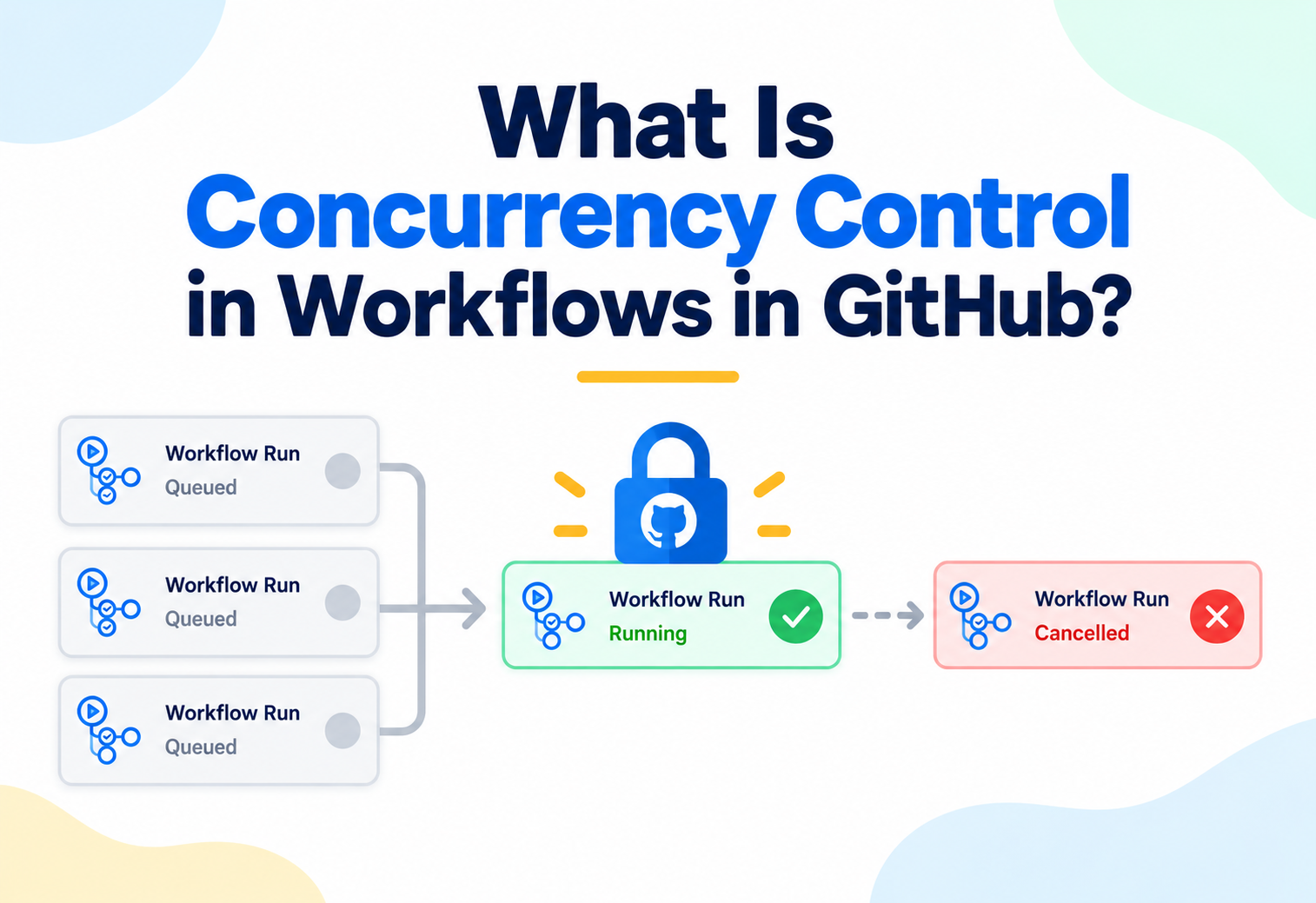
What Is Concurrency Control in Workflows in GitHub?
A deep, ground-up guide to GitHub Actions' concurrency control — why running workflows without limits leads to wasted runners and dangerous race conditions, exactly how concurrency groups and cancellation work internally, how the mechanism shapes a real, everyday development lifecycle, and the security, monitoring, and design practices that separate a safe, efficient pipeline from a fragile one.
Push five commits to a busy pull request in quick succession, and without any safeguard in place, a workflow can end up running five times in full, in parallel, each one burning through runner minutes to test code that’s already been superseded by the next commit. Worse, trigger two deployment workflows for the same environment close together, and without a safeguard, they can genuinely run at the same time, each one racing to update the same live infrastructure, with no guarantee about which one finishes last or what state the system ends up in. Concurrency control is GitHub Actions’ answer to both of these problems: a declarative mechanism for telling GitHub exactly which workflow runs are allowed to run at the same time, which should wait their turn, and which should simply be cancelled in favor of a newer one. This article goes deep on exactly what concurrency control is, how GitHub resolves and enforces it internally, how it reshapes the everyday flow of pushes, pull requests, and deployments, and the security, observability, and design considerations every team relying on it needs to understand.
1Core Concepts
Before looking at how concurrency control is configured, let’s build a clear understanding of the two distinct problems it exists to solve.
How the Problem Compounds With Team Size
Both of these problems scale roughly with how many people are actively contributing at once, which is part of why concurrency control tends to matter more for larger, busier teams than for small ones. A single developer working alone rarely pushes commits faster than their own CI can process them, and rarely triggers two deployments close enough together to actually overlap. A team of dozens, each pushing independently and merging frequently throughout the day, hits both scenarios routinely, often multiple times daily, making a deliberate concurrency policy less of an optional refinement and more of a genuinely necessary piece of pipeline infrastructure.
The Problem of Wasted, Stale Work
By default, GitHub Actions happily runs every workflow triggered by every qualifying event, entirely independently of any other run that might already be in progress. Push several commits to the same branch in a short window, and by default, every single push triggers its own complete, independent workflow run — including runs for commits that were already superseded before their own workflow even finished. This wastes runner capacity on results nobody will ever actually look at, and it can leave a pull request’s status checks flickering between different, temporarily conflicting results as several runs for different, no-longer-relevant commits complete out of order.
The Problem of Unsafe, Overlapping Execution
The second, more serious problem shows up specifically with workflows that touch shared, external state — most commonly, a deployment workflow updating a live environment. If two separate runs of a deployment workflow are allowed to execute at the same time against the same environment, they can genuinely interfere with each other, each one racing to apply its own changes, potentially leaving the environment in an inconsistent, unpredictable state depending on which run’s steps happen to execute in which order. This is a genuine correctness risk, not merely an efficiency concern.
Think of a single revolving door at a building’s entrance. Without any rule governing it, everyone might try to push through at once, at best wasting everyone’s time as they awkwardly collide, and at worst genuinely jamming the mechanism. A sensible queue — one person through at a time, and perhaps a rule that lets someone give up their place if they realize the person right behind them is in a bigger hurry — is exactly the kind of ordering discipline concurrency control brings to workflow runs that would otherwise all try to execute through the same “door” at once.
Why the Same Mechanism Can Serve Two Such Different Goals
It might seem surprising that one single mechanism can serve both an efficiency goal and a safety goal at once, but the reason is straightforward once the underlying commonality is made explicit: both problems are really the same question — “should this new run be allowed to start while another one is already using the same resource?” — with a different, situation-specific answer. For ordinary CI, the resource being protected is runner capacity and the relevance of the eventual result, and the best answer is usually “no, stop the old one.” For a deployment, the resource being protected is the live environment’s own consistency, and the best answer is usually “no, but let the old one finish safely first.” Concurrency control doesn’t need to know which situation it’s in — it just needs the workflow author to specify the right policy for each one.
What Concurrency Control Actually Provides
Concurrency control lets a workflow author declare a concurrency group — essentially a named lane that workflow runs are sorted into — along with a policy for what happens when more than one run lands in the same lane at the same time: either the newer run waits patiently until the earlier one finishes, or the earlier, now-superseded run is actively cancelled to make way for the newer one immediately. This single mechanism addresses both problems described above, simply by choosing the appropriate policy for each specific situation: cancellation for stale CI work that no longer matters, and strict, one-at-a-time queuing for anything touching shared, external state that must never be modified concurrently.
Wasted, Stale Runs
Rapid, successive triggers run redundant work for commits or events that are already superseded before they finish.
Unsafe Overlapping Execution
Two runs touching the same shared, external state at once can race each other, leaving that state inconsistent.
Named Concurrency Groups
Runs are sorted into named lanes; GitHub enforces a queue-or-cancel policy for any lane with more than one active run.
Cancel Versus Queue
A workflow author picks, per concurrency group, whether a newer run should cancel an in-progress one or wait behind it.
Concurrency control is fundamentally about deciding, in advance and declaratively, what should happen when more than one workflow run wants to occupy the same “lane” at the same time — cancel the older one, or make the newer one wait. Everything else in this mechanism is built around that one core decision.
Why This Problem Doesn’t Show Up Until a Project Gains Momentum
Concurrency issues are almost invisible in a young, quiet repository. A single developer pushing the occasional commit, or a deployment happening once every few days, rarely triggers two overlapping runs at all, simply because triggers are naturally spaced far apart. The problem becomes visible specifically once a project gains real momentum — an active team pushing frequently to a shared branch, or a deployment pipeline triggered by every merge during a busy release period — at which point overlapping runs stop being a rare coincidence and start being the normal, everyday case. This is part of why concurrency control is often added to a workflow reactively, once a team notices wasted runner minutes or, more worryingly, a genuine deployment incident traceable to two runs colliding, rather than being configured proactively from the very beginning.
Concurrency Control as a Declarative, Not Imperative, Mechanism
It’s worth appreciating that concurrency control is entirely declarative — a workflow author states the desired policy, and GitHub’s own scheduling logic is responsible for actually enforcing it, without the workflow’s own steps needing to contain any custom locking, polling, or coordination logic of their own. This is a meaningful simplification compared to how teams often had to handle this problem before such a mechanism existed, typically by writing custom scripts that checked for and waited on some kind of external lock file or lock service before proceeding, logic that itself needed to be written carefully and correctly in every single workflow that needed it.
2Architecture & Components
Concurrency control is configured through a small, specific set of declarative elements — understanding each one clearly is essential to configuring it correctly.
The concurrency Key
A workflow declares concurrency control through a concurrency: key, which can be placed at the top level of a workflow file, applying to the entire workflow run as a single unit, or within an individual job, applying that job’s own concurrency behavior independently of the rest of the workflow. This placement choice matters: workflow-level concurrency treats the whole run as one indivisible unit for queuing and cancellation purposes, while job-level concurrency lets different jobs within the same workflow follow entirely separate concurrency rules from one another.
The Concurrency Group Expression
At the heart of the concurrency key sits a group value — a string, often built dynamically using GitHub Actions’ expression syntax, that GitHub evaluates for every triggered run to determine which “lane” that run belongs to. Two runs that evaluate to the exact same group string are considered to be in the same concurrency group, and are therefore subject to the same queuing or cancellation policy relative to each other; runs evaluating to different group strings are entirely independent of one another; no matter how many of them are running at once.
cancel-in-progress
A boolean flag, cancel-in-progress, determines the specific policy applied within a concurrency group: when set to cancel, a newly triggered run immediately cancels whatever run is currently active in the same group, taking that group’s single active slot for itself. When left at its default, a newly triggered run instead waits, queued, until whatever run currently holds the group’s slot finishes on its own, at which point the queued run begins.
| Component | Role |
|---|---|
| concurrency: (workflow-level) | Applies one concurrency policy to an entire workflow run as a single unit |
| concurrency: (job-level) | Applies an independent concurrency policy to one specific job within a workflow |
| group: | An expression evaluated per run, determining which concurrency “lane” that run belongs to |
| cancel-in-progress: | Determines whether a new run in an occupied group cancels the existing run or waits behind it |
Building a Group Expression From Context Values
A group expression is rarely a fixed, static string — it’s typically built by combining the workflow’s own name with one or more context values, most commonly a reference to the specific branch, pull request, or ref that triggered the run. This is what allows a single concurrency configuration to behave correctly across many different branches and pull requests simultaneously: each distinct branch or pull request naturally resolves to its own distinct group string, keeping work on one branch from ever being queued or cancelled by activity on a completely unrelated one.
Using a fixed, static group name with no reference to the branch or ref that triggered the run causes every single branch’s activity to compete for the exact same one concurrency slot — a mistake that can cause work on entirely unrelated branches to cancel or queue behind each other unexpectedly.
How a Group Expression Is Typically Written in Practice
In practice, a group expression is usually written as a short template string, mixing literal text with one or more embedded expression references, resolved once per triggered run into a single, final value. This resolved value is opaque to GitHub itself — it’s treated purely as a string to compare for equality against every other currently active or queued run’s own resolved group string across the repository, with no deeper structural meaning attached to it beyond that comparison.
Referencing the Workflow’s Own Name in a Group Expression
A common, deliberate pattern is including the workflow’s own name as part of the group expression, alongside whatever branch or ref reference distinguishes different triggers. This matters specifically because, as covered in the Internal Working chapter, GitHub compares resolved group strings across the entire repository, not scoped automatically to a single workflow file — two entirely different workflows that happen to build an identical group string, perhaps both using nothing but the branch name, would be treated as competing for the same slot, an outcome that’s rarely intended. Including the workflow’s own name in the expression is a simple, reliable way to avoid this cross-workflow collision entirely.
Combining Multiple Signals in a Single Group Expression
A group expression isn’t limited to referencing just one context value — it’s an ordinary string built through GitHub Actions’ expression syntax, meaning it can combine the workflow name, a branch or ref reference, and even a specific input value or job name, concatenated together into one composite string. This flexibility is what lets a single concurrency configuration express fairly nuanced scoping — for instance, a group that’s specific to a particular combination of environment and deployment target, ensuring only genuinely conflicting deployments queue or cancel against each other, while deployments to two different, independent targets proceed entirely in parallel.
3Internal Working
Let’s go one level deeper into exactly what GitHub does, mechanically, from the moment a triggering event fires to the moment a run either begins, queues, or is cancelled.
Group Resolution Happens Before Execution Begins
The moment a workflow run is triggered, and before any of its jobs actually begin executing, GitHub evaluates that run’s concurrency group expression using the specific event and context data available for that particular trigger. This resolved group string is what GitHub then uses to check whether any other run is currently active in, or already queued for, that same group.
flowchart TD
    A["New workflow run triggered"] --> B["Evaluate group expression\nfor this run"]
    B --> C{"Is another run\nalready active in\nthis same group?"}
    C -->|No| D["Run begins\nimmediately"]
    C -->|Yes, cancel-in-progress: true| E["Cancel the active run;\nthis run takes the slot"]
    C -->|Yes, cancel-in-progress: false| F["Queue this run behind\nthe active one"]
Fig 1 — GitHub resolves a run’s concurrency group before it begins, then applies the group’s queue-or-cancel policy against whatever else currently occupies that group.
How Cancellation Actually Happens
When a new run’s arrival triggers cancellation of an existing one, GitHub sends a cancellation signal to every job currently running as part of the older run, the same signal that would be sent by a manual cancellation through GitHub’s own interface. Each affected job’s currently executing step receives this signal and is expected to stop promptly; any steps that haven’t yet started are skipped entirely, and the overall run is marked as cancelled rather than as having failed or succeeded on its own terms.
Only One Run Waits in Queue at a Time
When cancel-in-progress is left at its default, queuing behavior, it’s worth understanding precisely what “queued” means in this context: at most one run waits behind the currently active one in a given concurrency group. If several new runs are triggered while one is already active and another is already queued behind it, each additional new run effectively replaces whichever run was previously queued, rather than every single triggered run lining up individually — meaning only the single most recent contender for the group’s slot is guaranteed to eventually execute once the current one finishes.
What Happens to the Cancelled Run’s Status Checks
For a workflow tied to a pull request’s status checks, a cancellation caused by concurrency control updates that check’s reported status accordingly, marking it as cancelled rather than leaving it in a perpetually pending state or falsely reporting success or failure. This matters for branch protection rules that require specific checks to pass before a pull request can merge — a cancelled check does not satisfy such a requirement, meaning the newer, replacing run genuinely does need to complete successfully on its own before the pull request becomes mergeable, exactly as intended.
Group Scope Is Entirely Determined by the Resolved String
It’s worth being precise that GitHub itself has no inherent understanding of what a concurrency group “means” — it simply compares resolved group strings for equality. Two runs, from entirely different workflows, that happen to resolve to the exact same group string are treated as being in the same group and subject to the same queuing or cancellation policy against each other, which is a powerful capability when used deliberately, and a genuine source of confusing behavior when it happens by accident due to an overly generic group expression.
Job-Level Versus Workflow-Level Resolution
When concurrency is declared at the job level rather than the workflow level, each job with its own concurrency configuration is resolved and enforced independently, meaning one job within a workflow run might be queued or cancelled based on its own group’s activity, while a sibling job in the very same workflow run, governed by a different concurrency group or none at all, proceeds entirely unaffected.
What Happens to Jobs That Depend on a Queued or Cancelled Job
When a specific job’s own concurrency group causes it to queue, any other job in the same workflow run that depends on that job’s output, through an ordinary needs: relationship, naturally waits as well, since it can’t begin until its dependency has actually finished. If that dependency is instead cancelled, whether through its own job-level concurrency policy or because the entire workflow run was cancelled at the workflow level, any dependent job is skipped in turn, exactly as it would be if the dependency had failed outright rather than succeeded.
Interaction With Matrix Jobs
A workflow using a matrix strategy to run the same job across several different configurations produces multiple, genuinely separate job instances from a single job definition, and it’s worth being precise about how concurrency interacts with this. If concurrency is declared at the job level for a matrixed job, each individual matrix combination is typically treated according to how its own resolved group expression evaluates — meaning a group expression that doesn’t account for the specific matrix values in play can cause different matrix combinations to unexpectedly compete for the same slot, an outcome that’s rarely what an author actually intends when they add a matrix strategy specifically to run several combinations in parallel.
The Precise Timing of Group Evaluation Relative to Job Startup
It’s worth being precise about exactly when group resolution happens relative to a job’s own startup, since it affects how quickly a cancellation can actually take effect. Group evaluation and the corresponding queue-or-cancel decision happen at the workflow or job level, before any of that unit’s own steps begin executing — meaning a run that’s about to be cancelled might still incur a brief delay while GitHub processes the cancellation and stops whatever step happens to be currently executing, rather than the cancellation being instantaneous the very moment a new, competing run is triggered.
4Data Flow & Lifecycle
Let’s trace two realistic, contrasting scenarios end to end — a fast-moving pull request using cancellation, and a deployment pipeline using strict queuing.
Scenario A: Cancelling Stale CI Runs on a Pull Request
First Push Triggers a Run
A developer pushes a commit to their pull request branch; a CI workflow with a group expression based on the branch name begins running immediately, since no other run currently occupies that group.
A Second Push Arrives Before the First Finishes
The developer pushes a follow-up commit while the first run is still in progress. Because this workflow’s group expression resolves to the same value for both pushes, and cancellation is enabled, GitHub cancels the still-running first workflow immediately.
The New Run Takes the Slot
A fresh workflow run for the second commit begins immediately, now the sole occupant of that concurrency group, testing the code the developer actually cares about rather than the already-superseded first commit.
Scenario B: Strictly Queuing Deployments to a Shared Environment
A Deployment Run Begins
A merge to the main branch triggers a deployment workflow targeting the production environment, resolving to a concurrency group scoped specifically to that environment, with cancellation deliberately left disabled.
A Second Deployment Is Triggered Mid-Run
Before the first deployment finishes, another merge triggers a second deployment run targeting the same environment, resolving to the same concurrency group. Because cancellation is disabled, this second run is queued rather than cancelling the first.
The Queued Run Waits for a Clean Handoff
The first deployment completes fully, leaving the production environment in a known, consistent state, before the queued second deployment begins — at no point do the two runs’ deployment steps execute against the same environment simultaneously.
How This Plays Out Across a Workflow With Multiple Jobs
For a workflow with several jobs, workflow-level concurrency treats cancellation or queuing as an all-or-nothing decision for the entire run — cancelling one job as part of a workflow-level cancellation cancels every other job in that same run as well, since they’re all considered part of the one, indivisible unit occupying the group. Job-level concurrency, by contrast, allows more surgical control, letting only the specific job whose own group is contested be affected, while unrelated jobs in the same run proceed normally.
A Third Scenario: Mixed Concurrency Across a Single Workflow
A particularly instructive scenario combines both approaches within one workflow — a build-and-test job with cancellation enabled, scoped to the branch, sitting alongside a separate deployment job with strict queuing enabled, scoped to the target environment. In this configuration, rapid successive pushes to the same branch freely cancel each other’s build-and-test runs, keeping CI focused and efficient, while the deployment job, only reached once a build-and-test run actually completes successfully, queues safely behind any other deployment already in progress for that same environment, regardless of which branch or which specific run happened to trigger it. This layered approach lets a single workflow apply the appropriate policy to each of its own distinct concerns, rather than forcing one uniform policy across the entire pipeline.
How Re-Running a Workflow Interacts With Concurrency
Manually re-running a previously completed or failed workflow run triggers the exact same group resolution and queue-or-cancel logic as any other new trigger, meaning a manual re-run can itself cancel or be queued behind another active run occupying the same concurrency group, exactly as if it were an entirely fresh, automatically triggered run. This is a detail worth keeping in mind when manually re-running a workflow specifically to unblock a stuck pipeline — the re-run is still fully subject to whatever concurrency policy the workflow declares.
5Advantages, Disadvantages & Trade-offs
Concurrency control is a genuinely valuable mechanism, but it comes with real trade-offs and configuration risks worth weighing carefully.
ADVANTAGES
- Eliminates wasted runner minutes spent completing CI runs for commits that are already superseded by the time they’d finish
- Prevents genuinely unsafe overlapping execution against shared, external state, such as a live deployment environment
- Keeps a pull request’s visible status checks focused on the latest, actually relevant commit rather than flickering between stale results
- Configurable independently per workflow or per job, allowing different parts of a pipeline to follow different policies as appropriate
- Requires no external locking infrastructure — the entire mechanism is built directly into GitHub Actions itself
DISADVANTAGES
- An overly broad or incorrectly scoped group expression can cause unrelated work to cancel or queue behind each other unexpectedly
- Cancellation is not always instantaneous or clean — a step mid-execution when cancelled may leave partial, unintended side effects if not written defensively
- Strict queuing can create a real bottleneck under high deployment frequency, since only one run in a group can ever be active at a time
- Only a single run can wait in queue behind an active one; additional new arrivals replace whichever run was previously queued, not accumulate as a longer line
- Debugging why a specific run was queued or cancelled requires understanding exactly which group expression it resolved to, adding a layer of indirection to troubleshoot
Cancellation Versus Queuing: Choosing the Right Policy
The choice between cancellation and queuing should track directly back to the two core problems introduced in the Core Concepts chapter. Cancellation is the right choice whenever an older run’s results genuinely no longer matter once a newer trigger has arrived — the common case for ordinary CI on a fast-moving branch. Queuing is the right choice whenever an older run must be allowed to finish cleanly before anything else touches the same shared state — the common case for deployments, database migrations, or any other workflow whose steps have real, external, order-sensitive consequences.
Concurrency control’s value depends entirely on choosing the correct group scope and the correct cancellation policy for each specific workflow’s actual purpose — the same mechanism that safely accelerates a fast-moving pull request would be a dangerous choice for a production deployment, and vice versa.
The Cost of Getting the Scope Wrong in Either Direction
It’s worth spending a moment on the two specific ways a group expression’s scope can be wrong, since they fail in opposite directions with different consequences. A group scoped too broadly — for instance, a deployment group shared identically across every environment rather than being specific to each one — causes unrelated, genuinely independent work to needlessly queue or cancel against each other, costing time and possibly causing confusing cancellations with no real safety benefit. A group scoped too narrowly — for instance, a deployment group that includes the triggering commit’s own hash, making every single deployment attempt unique — defeats the entire purpose of concurrency control, since no two runs would ever actually share a group at all, silently reintroducing the exact race condition the mechanism was meant to prevent.
Runner Cost as a Secondary, Practical Consideration
Beyond correctness, there’s a straightforward practical cost dimension worth naming explicitly: every minute a workflow run spends executing, whether or not its results end up mattering, consumes billed runner capacity on many GitHub plans. Cancellation’s efficiency benefit isn’t purely about tidiness — for an active team pushing frequently, the runner-minutes saved by promptly cancelling stale, superseded CI runs can be a genuinely material fraction of an organization’s total GitHub Actions usage, particularly for workflows with long-running test suites.
6Security
Concurrency control isn’t primarily a security feature, but its correct or incorrect use has real, direct security and integrity consequences worth understanding carefully.
Preventing Race Conditions in Deployment and Infrastructure Changes
The most direct security-relevant benefit of strict, queued concurrency control is preventing exactly the kind of race condition that can leave a production system in an inconsistent, partially updated, or genuinely insecure state — for instance, two overlapping deployments each partially applying infrastructure changes in an interleaved, unpredictable order. Treating deployment-related concurrency configuration with the same seriousness as any other production safety control is a reasonable, and increasingly common, practice.
Cancellation interrupts a run mid-execution, wherever it happens to be — including potentially mid-way through a step that modifies shared, external state. A workflow relying on cancellation should never be one whose individual steps could leave dangerous partial effects if interrupted abruptly; such workflows should rely on strict queuing instead, precisely because cancellation offers no guarantee about exactly when a run actually stops.
Cancellation and Secret Exposure
Cancelling a run doesn’t retroactively erase log output already produced before the cancellation signal was received, meaning any secret that was already logged, whether through a masking failure or a genuine mistake in the workflow’s own steps, remains just as exposed as it would in a run that completed normally. Concurrency control’s cancellation mechanism should never be relied upon as any kind of safeguard against secret exposure; that responsibility remains entirely with the workflow’s own careful handling of sensitive values.
Group Expressions Built From Untrusted Input
Because a concurrency group expression is evaluated using GitHub Actions’ expression syntax, and can reference context values derived from a triggering event, it’s worth applying the same caution here that applies broadly to any expression built from untrusted, external input, such as data from a pull request opened by an outside contributor. While a maliciously crafted group name is a fairly low-severity concern compared to other forms of untrusted-input injection covered elsewhere in workflow security, deliberately keeping group expressions built from well-understood, predictable context values — a branch name or a ref, rather than raw, free-form user-supplied text — remains good practice.
Concurrency Control Is Not an Access-Control Mechanism
It’s worth being explicit that concurrency control governs timing and ordering, not permissions — it has no bearing on who is authorized to trigger a workflow, what that workflow’s steps are permitted to do, or what secrets it can access. A deployment workflow protected by strict queuing still needs its own, separate access controls, environment protection rules, and permission scoping; concurrency control complements those safeguards by ensuring only one authorized run executes against a given environment at a time, but it doesn’t substitute for any of them.
Prevents Deployment Races
Strict queuing on a deployment’s own concurrency group is a genuine safeguard against overlapping, order-sensitive infrastructure changes.
No Retroactive Log Redaction
Cancellation does not erase or redact log output a run already produced before being cancelled.
Group Expressions From Event Data
Prefer predictable, well-understood context values over raw, free-form user-supplied text when building a group expression.
Not a Permission System
Concurrency control governs ordering and overlap; it does not replace access controls, environment protection, or permission scoping.
Concurrency Control Alongside Environment Protection Rules
GitHub’s own environment protection rules — required reviewers, wait timers, and deployment branch restrictions — operate as a genuinely complementary safeguard alongside concurrency control, rather than a redundant one. Environment protection rules govern whether a given deployment is permitted to proceed at all; concurrency control governs whether it’s permitted to proceed at the same time as another one. A deployment workflow relying on both together gets a considerably stronger overall guarantee than either mechanism could provide alone — properly authorized, and properly ordered relative to every other deployment targeting the same environment.
Interaction With Self-Hosted Runners
For organizations running their own self-hosted runners rather than relying entirely on GitHub-hosted ones, concurrency control carries an additional, practical benefit worth naming: since self-hosted runner capacity is typically far more constrained than GitHub’s own hosted runner pool, promptly cancelling stale, superseded runs directly frees up a self-hosted runner for other, genuinely useful work sooner, which can meaningfully improve overall pipeline throughput for organizations operating under tighter self-hosted capacity limits.
7Monitoring, Logging & Metrics
Because concurrency control decides, invisibly and automatically, which runs actually execute and which are queued or cancelled, deliberate observability into its behavior is essential to catching misconfiguration early.
Distinguishing a Cancelled Run From a Failed One
GitHub’s own workflow run history clearly distinguishes a run cancelled due to concurrency control from one that genuinely failed on its own terms, and monitoring this distinction matters — a team that doesn’t watch for it can mistake a routine, expected cancellation for an unexplained pipeline failure, or conversely, fail to notice that a run they expected to complete was actually cancelled before finishing, if they’re not looking closely.
Think of the difference between a flight that’s cancelled because a later, faster flight covering the same route was chosen instead, versus a flight that’s cancelled because of an actual mechanical problem. Both show up as “cancelled” on a departure board, but they mean entirely different things, and conflating them leads to the wrong conclusion about whether anything is actually wrong with the airline’s operations.
Tracking Queue Wait Times
For workflows relying on strict queuing rather than cancellation, monitoring how long a queued run typically waits before it actually begins is an important, specific health metric — a queue wait time that’s steadily growing over time is a strong signal that a concurrency group’s underlying workflow is taking longer to complete than the rate at which new triggers are arriving, a genuine bottleneck worth addressing directly rather than simply tolerating.
flowchart TD
    A["Workflow run history"] --> B{"Run status"}
    B -->|Cancelled by concurrency| C["Expected, routine —\nnot a pipeline failure"]
    B -->|Failed| D["Genuine failure —\ninvestigate directly"]
    B -->|Queued, then completed| E["Track wait time\nas a trend"]
    E --> F{"Wait time\ngrowing over time?"}
    F -->|Yes| G["Investigate bottleneck:\nworkflow too slow, or\ntriggers too frequent"]
Fig 2 — Distinguishing cancellation from failure, and tracking queue wait time as its own trend, are the two most important concurrency-specific monitoring habits.
Auditing Which Group Expressions Are Actually in Use
Periodically reviewing the actual, resolved group expressions in use across an organization’s workflows — checking for overly broad expressions that might be causing unrelated work to compete for the same slot, or overly narrow ones that might be missing an opportunity to prevent genuinely unsafe overlap — is a useful, low-effort monitoring habit that catches misconfiguration before it causes either wasted runner capacity or, more seriously, an unsafe overlapping deployment.
Alerting on Unexpectedly Long Queues
Teams relying on strict queuing for genuinely critical workflows, such as production deployments, benefit from setting an explicit alert threshold on queue wait time specifically for those workflows, so that a growing backlog is surfaced proactively to the team responsible, rather than being discovered only when someone notices a deployment is taking unusually long to actually begin.
Correlating Cancellation Rate With Development Activity
A useful, higher-level metric for teams relying heavily on cancellation-based concurrency is the overall cancellation rate for a given CI workflow — the proportion of triggered runs that end up cancelled rather than completing. Tracked over time, this rate naturally correlates with development activity, rising during busy, fast-iterating periods and falling during quieter ones, and a sudden, unexplained shift in that rate independent of any change in actual development activity is often an early, indirect signal that something about the workflow’s own group expression or trigger configuration has changed in a way worth investigating.
Making Concurrency Decisions Visible to Developers
Beyond backend monitoring, it’s worth deliberately ensuring that developers themselves can easily see, from GitHub’s own pull request and run interfaces, when their own workflow run has been cancelled or is currently queued behind another one, rather than this information being visible only to whoever happens to dig into the run’s own detail page. Since GitHub already surfaces this status clearly in its standard interface, the main responsibility for teams here is simply making sure developers know to look for it, and understand what a concurrency-driven cancellation actually means, rather than mistaking it for a genuine problem with their own change.
Concurrency control’s decisions are invisible by default unless a team deliberately watches for them — distinguishing cancellation from failure, and tracking queue wait time as its own trend, are the two habits that keep the mechanism’s behavior transparent rather than a source of quiet confusion.
8Design Patterns & Anti-patterns
Teams that use concurrency control well tend to converge on a consistent set of patterns, while a handful of recurring anti-patterns explain most real-world confusion around it.
Scope Groups to the Branch or Ref
Building group expressions around the specific branch, pull request, or ref that triggered the run, so unrelated work never competes for the same concurrency slot.
Cancel for CI, Queue for Deployments
Enabling cancellation for fast-moving, low-stakes CI workflows, and deliberately disabling it for anything touching shared, external, order-sensitive state.
Scope Deployment Groups to the Environment, Not the Branch
Building a deployment workflow’s group expression around the target environment itself, ensuring two different branches both deploying to the same environment still correctly queue behind each other.
Write Steps to Tolerate Abrupt Cancellation
Designing any step that modifies external state defensively enough that an abrupt cancellation mid-step doesn’t leave a dangerous, inconsistent partial result.
Anti-patterns to Avoid
WATCH OUT FOR
- Using a static, fixed group name with no reference to branch, ref, or environment, causing unrelated work to compete for the same slot
- Enabling cancellation on a deployment workflow whose steps could leave dangerous partial effects if interrupted mid-execution
- Scoping a deployment’s concurrency group to the triggering branch rather than the target environment, allowing two different branches to still deploy to the same environment simultaneously
- Assuming every queued run eventually executes, when in fact only the single most recent contender for a group’s slot is guaranteed to run
- Never distinguishing, in monitoring or alerting, between a run cancelled by concurrency control and one that genuinely failed
THE QUESTION
A team is adding concurrency control to a workflow for the first time. Should it enable cancellation, or rely on strict queuing?
THE TRADE-OFF
Cancellation saves runner capacity and keeps status checks focused on the latest relevant commit, but interrupts execution at an unpredictable point, which is unsafe for any workflow whose steps have real, order-sensitive external effects. Strict queuing guarantees clean, sequential execution against shared state, but can create a real bottleneck if the underlying workflow is slow relative to how frequently it’s triggered.
A COMMON RESOLUTION
The deciding question is almost always: would an abruptly interrupted run leave anything in a dangerous, inconsistent state? If the answer is no — an ordinary test suite, a linter, a build check — cancellation is usually the right, efficient choice. If the answer is yes — a deployment, a database migration, any step modifying live, shared infrastructure — strict queuing, scoped to the specific shared resource being protected, is the appropriate, safer choice.
9Best Practices & Common Mistakes
A distilled checklist for configuring concurrency control well across an organization’s workflows.
PER CONCURRENCY GROUP
QUEUED BEHIND IT
CANCEL OR QUEUE
Getting Started: A Short Rollout Checklist
For a team adding concurrency control to its workflows for the first time, a short, deliberate sequence tends to produce more reliable results than configuring every workflow at once. First, identify the specific workflows most affected by wasted runner time or, more urgently, any workflow with a real history of unsafe overlapping execution. Second, for each one, decide explicitly whether cancellation or strict queuing is the appropriate policy, using the question of whether an abrupt interruption could leave dangerous partial effects as the deciding factor. Third, build each group expression deliberately, including the workflow name and whatever branch, ref, or environment reference actually distinguishes genuinely independent runs from genuinely conflicting ones. Fourth, monitor the results for a period after rollout, watching specifically for unexpected cross-branch or cross-workflow cancellations that would indicate an overly broad group expression.
Best Practices
- Scope group expressions deliberately. Base them on the branch, ref, or target environment, matching exactly what actually needs to be kept mutually exclusive.
- Match the policy to the workflow’s stakes. Cancellation for low-stakes, fast-moving CI; strict queuing for anything touching shared, order-sensitive state.
- Scope deployment groups to the environment, not the branch. This ensures every path toward deploying to a given environment queues correctly against every other.
- Design steps to tolerate abrupt interruption. Any step that modifies external state should be written defensively enough to survive an unexpected cancellation.
- Monitor queue wait time as its own trend. A growing backlog behind a critical concurrency group is a bottleneck worth addressing directly.
- Distinguish cancellation from failure in reporting. Treat a concurrency-driven cancellation as routine, not as an unexplained pipeline failure.
- Combine concurrency control with environment protection rules. The two mechanisms address different concerns — authorization and ordering — and are genuinely complementary rather than redundant.
- Avoid both overly broad and overly narrow group scoping. Too broad wastes time on unrelated cancellations; too narrow silently defeats the mechanism’s entire purpose.
Common Mistakes
10Real-World & Industry Examples
Concurrency control shows up especially prominently in a handful of common, recurring scenarios across teams of every size.
Cancelling Stale CI Runs on Active Pull Requests
Perhaps the single most common use of concurrency control is on ordinary CI workflows triggered by pushes to a pull request branch, using a group expression scoped to the branch and cancellation enabled, so that only the latest push’s results are ever actually computed, saving substantial runner capacity on fast-moving, actively iterated pull requests.
Serializing Deployments to a Shared Environment
Teams deploying to a shared staging or production environment commonly use strict, queued concurrency scoped to that specific environment, ensuring that even if multiple merges happen in quick succession, each deployment completes cleanly before the next one begins, avoiding any possibility of two deployments racing each other against the same live infrastructure.
Protecting Infrastructure-as-Code Workflows
Workflows that apply infrastructure-as-code changes — provisioning or modifying cloud resources — are especially strong candidates for strict, queued concurrency, since two overlapping applies against the same underlying infrastructure state can produce genuinely corrupted, hard-to-recover configuration if allowed to run simultaneously.
Preventing Duplicate Scheduled Workflow Runs
A scheduled workflow that occasionally runs longer than the interval between its own scheduled triggers can end up with two instances of itself running simultaneously without concurrency control in place; a fixed, workflow-wide concurrency group with queuing enabled prevents a slow run from ever overlapping with the next scheduled trigger.
Coordinating Release Workflows Across Multiple Artifacts
Teams publishing several related artifacts as part of a single coordinated release process often use job-level concurrency to ensure the specific publishing step for each individual artifact is serialized against itself, while allowing unrelated jobs elsewhere in the same workflow, such as building a different artifact, to proceed independently and in parallel.
Protecting Database Migration Workflows
Workflows that apply database schema migrations are a particularly clear example of where strict, queued concurrency is essential rather than merely convenient — two overlapping migration runs against the same database can genuinely corrupt schema state or leave migrations partially applied in an order the migration tooling itself never anticipated, making a properly scoped, queued concurrency group one of the more important safeguards such a workflow can have.
Documentation and Static Site Deployment Pipelines
Teams that automatically rebuild and redeploy a documentation site or marketing website on every merge to their main branch commonly apply cancellation-based concurrency scoped to the deployment workflow itself, ensuring that a burst of several merges in quick succession results in only the final, most current version of the site actually being built and published, rather than several redundant builds racing to publish in an unpredictable order.
11Frequently Asked Questions
12Summary and Key Takeaways
Concurrency control addresses two genuinely different problems with the same declarative mechanism: wasted effort spent on workflow runs that are superseded before they finish, and the real danger of two runs colliding against the same shared, external state at the same time. By letting a workflow author declare a named concurrency group and choose between cancellation and strict queuing, GitHub Actions gives teams a precise, built-in way to shape exactly how their workflows overlap, without needing any external locking infrastructure. Understanding exactly how group expressions are resolved and compared, how cancellation actually propagates to in-progress steps and status checks, why only a single run can wait in queue at a time, how the mechanism composes with environment protection rules and matrix strategies, and where its real security value — and its real limitations — lie, is what lets a team configure it as a deliberate, well-understood safeguard rather than a source of confusing, seemingly random run behavior.
Key Takeaways
- Two distinct problems, one mechanism: concurrency control addresses both wasted, stale CI runs and genuinely unsafe overlapping execution against shared state.
- Groups are just resolved strings: GitHub compares group expressions purely by string equality, with no inherent understanding of what a group “means.”
- Cancel for CI, queue for anything order-sensitive: the deciding factor is whether an abruptly interrupted run could leave dangerous, partial effects.
- Only one run waits in queue: additional new arrivals replace whichever run was previously queued, rather than accumulating a longer line.
- Workflow-level versus job-level: the former treats a whole run as one unit; the latter allows independent, more surgical control per job.
- Not an access-control mechanism: concurrency control governs timing and overlap, not who can trigger a workflow or what it’s permitted to do.
- Monitor cancellation and queue time deliberately: distinguishing routine cancellation from genuine failure, and tracking queue wait time, keeps the mechanism’s behavior transparent.
- Scope neither too broadly nor too narrowly: get the group expression’s specificity wrong in either direction, and the mechanism either wastes time on unrelated work or silently stops protecting anything at all.
- Concurrency control matters more as teams grow: a single contributor rarely triggers overlapping runs; a large, active team hits both the efficiency and safety scenarios routinely.