HTTP Response Status Codes
A complete, practical reference to every registered status code — what it actually means, when to reach for it, what the specification says, and where real systems bend or break the rules. 60+ codes covered across the full 1xx–5xx range, grounded in RFC 9110 HTTP Semantics.
What a Status Code Actually Is
Three digits that carry the outcome of an HTTP exchange — nothing more, nothing less. Everything else is convention built on top.
Every HTTP response begins with a status line: a protocol version, a three-digit status code, and a short human-readable reason phrase. The code is the part machines act on; the reason phrase is decorative and can be changed or omitted without breaking anything compliant. When a browser retries a request, when an API client decides whether to back off, when a load balancer marks a server unhealthy, when a CDN decides whether to cache a response — the status code is what drives that decision.
The status code system was introduced with HTTP/1.0 (RFC 1945, 1996) and refined significantly in HTTP/1.1 (RFC 2616, 1999). The modern authoritative source is RFC 9110 — HTTP Semantics (June 2022), which obsoletes the older RFC 7231 and consolidated semantics that apply across HTTP/1.1, HTTP/2, and HTTP/3. The registry of all officially recognized codes is maintained by IANA at the “Hypertext Transfer Protocol (HTTP) Status Code Registry,” and new codes are added by IETF standards-track or well-reviewed specification documents — codes cannot simply be invented by a vendor and expected to mean anything outside that vendor’s ecosystem, though in practice this happens constantly (more on that later).
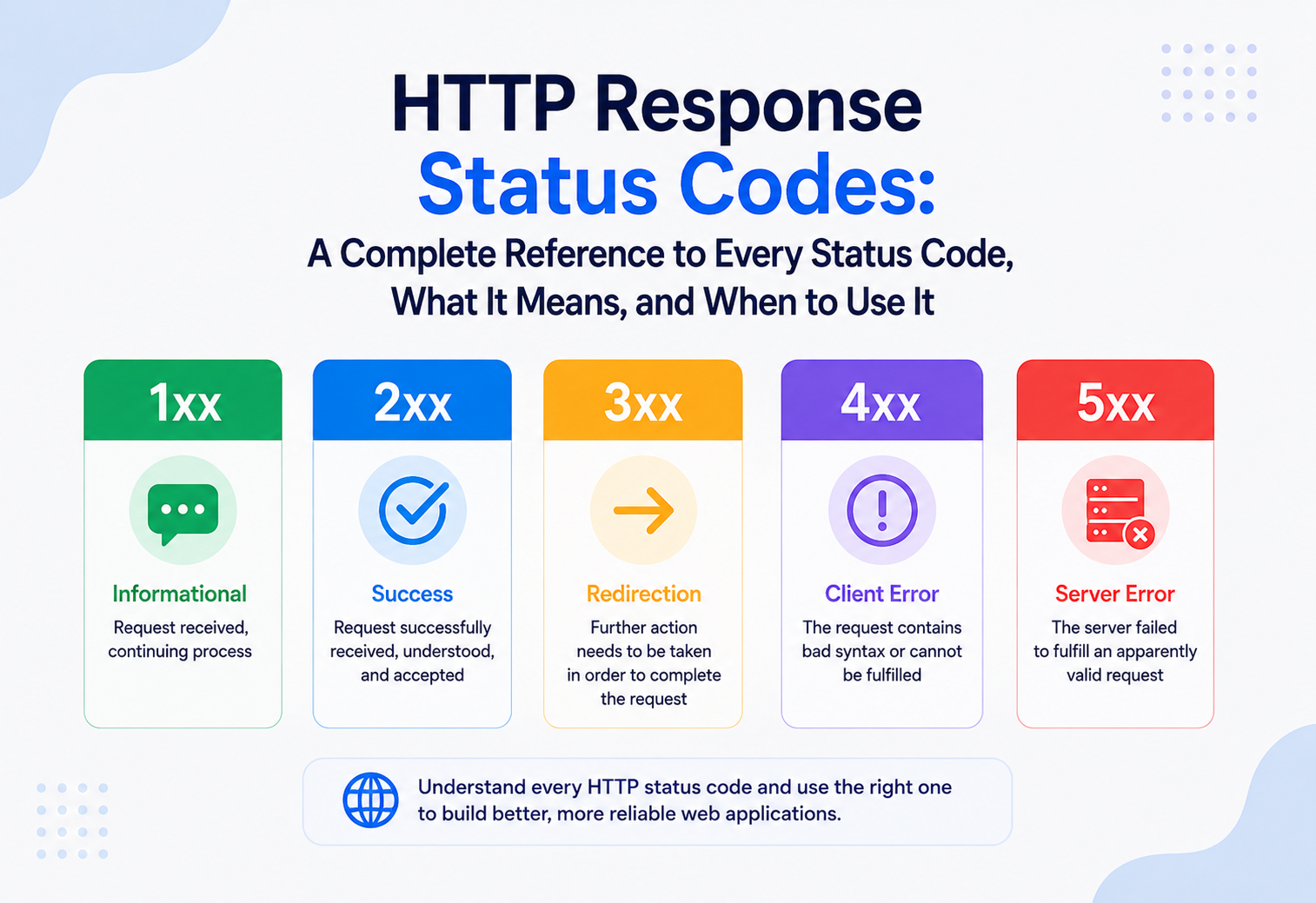
A status code’s first digit defines its class — the broad category of outcome. The remaining two digits refine that outcome. Critically, the classes are designed so that a client that doesn’t recognize a specific code can still act correctly based on the class alone: an unrecognized 2xx should be treated like 200 OK, an unrecognized 4xx should be treated like 400 Bad Request, and so on. This forward-compatibility rule is one of the more elegant parts of the design and is precisely why introducing a new code is safe — old clients degrade gracefully instead of breaking.
Anatomy of a Status Line
Every HTTP response, whether from a monolith or a globally distributed edge, opens with the same three ordered pieces of information.
HTTP/1.1 200 OK
Three parts, always in this order:
- Protocol version —
HTTP/1.1,HTTP/2, orHTTP/3. In HTTP/2 and HTTP/3 the status is technically sent as a pseudo-header (:status) rather than a literal status line, but the semantics are identical. - Status code — the three-digit number that carries all the machine-actionable meaning.
- Reason phrase — free text such as “OK,” “Not Found,” or “I’m a teapot.” Purely for human readability; RFC 9110 explicitly says a client MUST ignore the reason phrase and act only on the numeric code, and a server MAY send a different reason phrase than the one shown in the spec, or none at all.
Along with the status line, a response typically carries headers that add precision the code alone can’t express — Location for redirects, Retry-After for rate limits and maintenance windows, WWW-Authenticate for 401s, Allow for 405s. A status code without its expected companion headers is a common source of subtle bugs, and several are called out in the sections below.
201 Created pairs with Location. 401 Unauthorized pairs with WWW-Authenticate. 405 Method Not Allowed pairs with Allow. 429 Too Many Requests and 503 Service Unavailable pair with Retry-After. Every 3xx redirect pairs with Location. Omitting any of these is technically legal but almost always a bug — the code is only half-informative without its companion.
The Five Classes at a Glance
Before diving into individual codes, it helps to see all five classes side by side. Every registered status code lives in exactly one of these buckets.
Informational
Provisional. The request was received and understood; processing continues. Always followed by a final response.
Success
The request was received, understood, and accepted. What “accepted” means varies — fully processed, queued, or partially satisfied.
Redirection
Further action needed to complete the request — usually fetching a different URI. Subtly bug-prone because behaviors differ only under specific client conditions.
Client Error
The request cannot be fulfilled due to something about the request itself. The client should change something and try again.
Server Error
The server failed to fulfill an apparently valid request. By definition, the client did nothing wrong.
Automated retry logic, alerting, and SLOs all hinge on getting this distinction right. Returning 500 for bad user input pages every on-call engineer for no reason; returning 400 for a database outage hides a real incident behind “user error.” Every one of the anti-patterns catalogued later in this reference is, at root, some failure to honor this boundary.
1xx — Informational
Provisional responses. The request was received and understood; processing continues. A 1xx is always followed by a final response and is never the end of the transaction.
| Code | Name | Meaning / when to use | Spec |
|---|---|---|---|
| 100 | Continue | Sent by a server in response to an Expect: 100-continue request header, telling the client it’s safe to send the request body. Used to avoid transmitting large payloads (file uploads) that the server would reject based on headers alone. | RFC 9110 §15.2.1 |
| 101 | Switching Protocols | Server agrees to a client’s Upgrade request — the canonical use is upgrading a plain HTTP connection to a WebSocket connection. | RFC 9110 §15.2.2 |
| 102 | Processing | WebDAV. Server has accepted a request but processing (e.g. a large batch operation) will take time; keeps the connection alive so the client doesn’t time out. Rarely seen outside WebDAV servers. | RFC 2518 (WebDAV) |
| 103 | Early Hints | Lets a server send preliminary headers (typically Link preload/preconnect hints) before the final response is ready, so a browser can start fetching CSS/JS/fonts while the server is still assembling the page. A meaningful performance win for server-rendered pages with a slow backend. | RFC 8297 |
1xx codes are the least-used class in practice. They add a round trip and complexity that most applications don’t need, and many HTTP client libraries historically handled them inconsistently. 100 Continue is genuinely useful for large uploads; 103 Early Hints is gaining real adoption at CDN edge layers (Cloudflare, Google) for render-critical resource hints. The other two are effectively niche.
2xx — Success
The request was received, understood, and accepted. What “accepted” means varies by code — fully processed, queued, or partially satisfied.
| Code | Name | Meaning / when to use | Spec |
|---|---|---|---|
| 200 | OK | The generic success response. Request succeeded; the response body (if any) matches what was requested. Default for successful GET, and common for successful PUT/PATCH/POST when the response includes a representation of the result. | RFC 9110 §15.3.1 |
| 201 | Created | A new resource was created as a direct result of the request (typically POST or PUT). Should include a Location header pointing at the new resource. The textbook example: POST /orders → 201 Created with Location: /orders/12345. | RFC 9110 §15.3.2 |
| 202 | Accepted | Request accepted for processing, but processing isn’t complete and may not even have started — used for async/queued work (a background job, a batch import). The response should point to a status endpoint the client can poll. | RFC 9110 §15.3.3 |
| 203 | Non-Authoritative Information | The returned metadata isn’t from the origin server exactly as-is — typically a transforming proxy modified headers or body. Rare in modern APIs. | RFC 9110 §15.3.4 |
| 204 | No Content | Success, and there is deliberately no response body. Standard for DELETE, and common for PUT/PATCH when the client already has the updated representation and doesn’t need it echoed back. | RFC 9110 §15.3.5 |
| 205 | Reset Content | Like 204, but instructs the client to reset the document view that submitted the request — e.g. clear a form after successful submission. | RFC 9110 §15.3.6 |
| 206 | Partial Content | Response to a range request (Range header). Foundational for video/audio streaming and resumable downloads — the server returns only the requested byte range along with a Content-Range header. | RFC 9110 §15.3.7 |
| 207 | Multi-Status | WebDAV. The response body contains multiple independent status codes for sub-operations of a single batch request, encoded as an XML (or JSON, in some non-WebDAV APIs) payload. | RFC 4918 (WebDAV) |
| 208 | Already Reported | WebDAV. Used inside a 207 multi-status body to avoid re-enumerating the same resource multiple times when it’s a member of multiple collections. | RFC 5842 |
| 226 | IM Used | The server fulfilled a request for a resource using an “instance manipulation” — i.e. it returned a delta/diff rather than the full resource. Tied to HTTP delta encoding, which never saw wide adoption. | RFC 3229 |
200 vs 201 vs 204 is the most common design decision in this class. Returning 200 with a body for everything is simpler to implement but throws away information a well-behaved client could use — a 201 with Location lets a client immediately know the canonical URL of what it just created, without parsing the body. Returning 204 for updates saves bandwidth but forces the client to already trust its own local copy of the resource, which is wrong if the server applies any side effects (timestamps, computed fields) during the write.
3xx — Redirection
Further action is needed to complete the request, usually fetching a different URI. This is the class most prone to subtle, hard-to-debug mistakes because the codes differ in behavior that only shows up under specific client conditions.
| Code | Name | Meaning / when to use | Spec |
|---|---|---|---|
| 300 | Multiple Choices | Multiple representations exist for the resource (e.g. different formats/languages) and the server can’t decide which to serve — the response body should list the options. Almost never implemented; content negotiation is handled via Accept headers instead. | RFC 9110 §15.4.1 |
| 301 | Moved Permanently | The resource has permanently moved to a new URI, given in Location. Search engines transfer link equity to the new URL. Historically, per spec, a POST could be re-sent as GET by clients on a 301 — an ambiguity that caused real bugs (see deep dive below). | RFC 9110 §15.4.2 |
| 302 | Found | The resource is temporarily at a different URI. The original HTTP/1.0 spec was ambiguous about whether the method could change on redirect, and virtually every browser reinterpreted a 302 to a GET regardless of the original method — a de facto behavior that 303 and 307 were later introduced to disambiguate. | RFC 9110 §15.4.3 |
| 303 | See Other | Explicitly tells the client to fetch the redirect target with GET, regardless of the original method. The standard pattern for POST/Redirect/GET — after a form submission, redirect to a confirmation page so a page refresh doesn’t resubmit the form. | RFC 9110 §15.4.4 |
| 304 | Not Modified | Response to a conditional request (If-None-Match / If-Modified-Since) telling the client its cached copy is still valid. No body is sent — this is a bandwidth optimization, not an error, and is central to HTTP caching. | RFC 9110 §15.4.5 |
| 305 | Use Proxy | Deprecated. Was meant to say “you must access this resource through the given proxy.” Removed from practical use due to security concerns and is now widely ignored or rejected by browsers. | RFC 9110 §15.4.6 (reserved, deprecated) |
| 306 | (Unused) | Reserved. Used by an early draft of the spec (“Switch Proxy”) and never finalized; the code is kept reserved so it’s never reassigned. | RFC 9110 §15.4.7 |
| 307 | Temporary Redirect | Like 302, but unambiguous: the client MUST reuse the original method and body on the redirected request. Correct choice for temporarily redirecting a non-GET request (e.g. a POST to an API that’s temporarily served from a different host). | RFC 9110 §15.4.8 |
| 308 | Permanent Redirect | Like 301, but unambiguous: method and body must be preserved. The modern, precise replacement for 301 when the request isn’t a plain GET/HEAD. | RFC 9110 §15.4.9 |
301 and 302 were specified against a background assumption (from the HTTP/1.0 era) that redirects would almost always apply to GET requests. In practice, browsers converged on turning any redirected POST into a GET for 301, 302, and 303 — but not for 307/308, which is precisely why 307/308 exist. If you migrate a legacy 301/302-based redirect and a non-GET request starts silently losing its body or becoming a GET, this history is why.
4xx — Client Error
The request, as sent, cannot or will not be fulfilled due to something about the request itself. Except for HEAD responses, the body should explain what’s wrong in a way a client (or the developer reading logs) can act on.
| Code | Name | Meaning / when to use | Spec |
|---|---|---|---|
| 400 | Bad Request | Generic catch-all: malformed syntax, invalid request framing, or failed validation the server can’t map to a more specific code. The default for “the input was wrong” in most JSON APIs. | RFC 9110 §15.5.1 |
| 401 | Unauthorized | Really means unauthenticated — the request lacks valid credentials. Must be paired with a WWW-Authenticate header describing how to authenticate. The name is a well-known historical misnomer (see deep dive). | RFC 9110 §15.5.2 |
| 402 | Payment Required | Reserved for future use since HTTP/1.1’s inception. Some APIs (Stripe-adjacent tooling, a few metered SaaS platforms) repurpose it informally for “quota exhausted, add a payment method,” but it isn’t formally specified for that. | RFC 9110 §15.5.3 |
| 403 | Forbidden | The server understood the request and the client may even be authenticated, but the client does not have permission to access this resource, and re-authenticating won’t help. Distinct from 401 (see deep dive). | RFC 9110 §15.5.4 |
| 404 | Not Found | No resource matches the given URI. Also widely (and deliberately) used to hide the existence of a resource the client isn’t authorized to know about — see anti-patterns section. | RFC 9110 §15.5.5 |
| 405 | Method Not Allowed | The resource exists, but doesn’t support the HTTP method used. Must include an Allow header listing the methods that are supported. | RFC 9110 §15.5.6 |
| 406 | Not Acceptable | Server can’t produce a response matching the client’s Accept / Accept-Language / Accept-Encoding constraints. Rare in JSON-only APIs; more common in content-negotiated APIs and file-format services. | RFC 9110 §15.5.7 |
| 407 | Proxy Authentication Required | Like 401, but the credentials are for an intermediate proxy, not the origin server. Pairs with Proxy-Authenticate. | RFC 9110 §15.5.8 |
| 408 | Request Timeout | The server timed out waiting for the client to send the request. Some browsers retry automatically on 408 without user interaction. | RFC 9110 §15.5.9 |
| 409 | Conflict | The request conflicts with the current state of the resource — classic uses: optimistic-concurrency version mismatches, or trying to create a resource that already exists (duplicate username, double booking). | RFC 9110 §15.5.10 |
| 410 | Gone | Like 404, but asserts the resource used to exist and was intentionally, permanently removed. Stronger signal to caches and search engines than 404 — tells them to stop asking. | RFC 9110 §15.5.11 |
| 411 | Length Required | Server refuses the request because Content-Length wasn’t specified and the server requires it (usually because it disallows chunked transfer encoding for that endpoint). | RFC 9110 §15.5.12 |
| 412 | Precondition Failed | A conditional request header (If-Match, If-Unmodified-Since) evaluated to false. Used for safe concurrent updates — “only update this if it hasn’t changed since I last read it.” | RFC 9110 §15.5.13 |
| 413 | Content Too Large | Request body exceeds a size limit the server is willing to process. (Renamed from “Payload Too Large” in RFC 9110; both names are seen in the wild.) | RFC 9110 §15.5.14 |
| 414 | URI Too Long | The request-target is longer than the server is willing to interpret — usually a sign of a client bug (an infinite redirect loop appending query params) or a crude denial-of-service attempt. | RFC 9110 §15.5.15 |
| 415 | Unsupported Media Type | The request body’s format (per Content-Type) isn’t one the server/endpoint can process — e.g. sending XML to a JSON-only endpoint. | RFC 9110 §15.5.16 |
| 416 | Range Not Satisfiable | A Range request header specified a byte range outside the actual resource bounds. Companion to 206. | RFC 9110 §15.5.17 |
| 417 | Expectation Failed | The server can’t meet the requirement specified in an Expect request header (companion to 100 Continue). Rarely encountered directly. | RFC 9110 §15.5.18 |
| 418 | I’m a teapot | An April Fools’ joke from the Hyper Text Coffee Pot Control Protocol RFC. Not part of any real HTTP standard, but genuinely present in the IANA registry (marked as such) and occasionally implemented for fun or as an easter-egg / bot-detection tripwire. | RFC 2324 (joke) |
| 421 | Misdirected Request | The request was routed to a server that isn’t configured to produce a response for the combination of scheme and authority in the request — surfaces mainly with HTTP/2 connection reuse across virtual hosts. | RFC 9110 §15.5.20 |
| 422 | Unprocessable Content | The request is syntactically valid (well-formed JSON, correct content-type) but semantically wrong — fails business-rule or schema validation. The most useful, most under-used distinction against 400 in REST APIs. | RFC 9110 §15.5.21 (originated in WebDAV, RFC 4918) |
| 423 | Locked | WebDAV. The target resource is locked (e.g. checked out for editing by another client). | RFC 4918 |
| 424 | Failed Dependency | WebDAV. The request failed because a prior, related request in the same batch failed. | RFC 4918 |
| 425 | Too Early | Server is unwilling to process a request that might be replayed — a defense against replay attacks on TLS 1.3’s 0-RTT early-data mode. | RFC 8470 |
| 426 | Upgrade Required | Server refuses to service the request using the current protocol and wants the client to switch (paired with an Upgrade header) — e.g. forcing a client from HTTP/1.1 to a newer protocol or from HTTP to HTTPS at the application layer. | RFC 9110 §15.5.22 |
| 428 | Precondition Required | Server requires the request to be conditional (carry an If-Match etc.) to prevent the “lost update” problem, where two clients unknowingly overwrite each other’s changes. | RFC 6585 |
| 429 | Too Many Requests | Rate limiting. The client has sent too many requests in a given time window. Should include a Retry-After header. The single most important code for API client backoff logic. | RFC 6585 |
| 431 | Request Header Fields Too Large | Cumulative header size exceeds what the server will process — often a symptom of runaway cookies or an over-large JWT stuffed into a header. | RFC 6585 |
| 451 | Unavailable For Legal Reasons | Access is denied due to a legal demand (court order, government takedown, DMCA, sanctions/geo-blocking). The number is a deliberate reference to Ray Bradbury’s Fahrenheit 451. Real transparency-reporting value: it’s distinguishable in logs and by monitoring tools from an ordinary 403. | RFC 7725 |
419 Page Expired (Laravel, for expired CSRF tokens), 420 Enhance Your Calm (Twitter’s original rate-limit code before it adopted 429), 430 Request Header Fields Too Large (Shopify, superseded by the now-standard 431), 440 Login Timeout and 449 Retry With (Microsoft IIS). None of these are IANA-registered; they work only because the specific client and server agree on the convention out-of-band. Relying on them outside a closed system you control is a compatibility risk — an unaware intermediary will treat them per the generic 4xx rule and may behave unpredictably.
5xx — Server Error
The server failed to fulfill an apparently valid request. By definition, the client did nothing wrong — these are the codes that should page an on-call engineer, not a frontend developer.
| Code | Name | Meaning / when to use | Spec |
|---|---|---|---|
| 500 | Internal Server Error | Generic catch-all for an unhandled exception or unexpected condition on the server. The default when nothing more specific applies — arguably over-used as a dumping ground for every uncaught exception. | RFC 9110 §15.6.1 |
| 501 | Not Implemented | The server doesn’t support the functionality required to fulfill the request — e.g. an HTTP method the server has never implemented at all (distinct from 405, where the method exists globally but not for this resource). | RFC 9110 §15.6.2 |
| 502 | Bad Gateway | A server acting as a gateway or proxy got an invalid response from the upstream server it needed to fulfill the request. The classic nginx/Cloudflare “the app server crashed or returned garbage” error. | RFC 9110 §15.6.3 |
| 503 | Service Unavailable | Server is temporarily unable to handle the request — overloaded, or down for maintenance. Should include Retry-After. Signals “try again later,” distinct from a hard failure. | RFC 9110 §15.6.4 |
| 504 | Gateway Timeout | A gateway/proxy didn’t receive a timely response from the upstream server it was querying. Distinct from 502: here the upstream just never answered in time, rather than answering badly. | RFC 9110 §15.6.5 |
| 505 | HTTP Version Not Supported | The server doesn’t support the HTTP protocol version used in the request. Rare given near-universal HTTP/1.1+ support. | RFC 9110 §15.6.6 |
| 506 | Variant Also Negotiates | A server-side content-negotiation misconfiguration where the chosen “variant” resource is itself configured to negotiate, creating a loop. Essentially never seen outside Apache’s transparent content negotiation feature. | RFC 2295 |
| 507 | Insufficient Storage | WebDAV. Server can’t store the representation needed to complete the request — it’s out of space. | RFC 4918 |
| 508 | Loop Detected | WebDAV. Server detected an infinite loop while processing a request with dependencies on other resources (e.g. circular WebDAV bindings). | RFC 5842 |
| 510 | Not Extended | Further extensions to the request are required for the server to fulfill it, tied to the little-used HTTP Extension Framework. | RFC 2774 |
| 511 | Network Authentication Required | The client needs to authenticate to gain network access — the code returned by captive portals (hotel/airport Wi-Fi login pages) before internet access is granted. | RFC 6585 |
509 Bandwidth Limit Exceeded (used informally by some hosting panels, never standardized), 598/599 Network Connect/Read Timeout Error (used by some corporate proxies and Amazon services for proxy-level timeouts that occur before any real HTTP response exists), and Apache’s 218 This is fine (an internal-only sentinel some error-handling middleware repurposes as a joke reference to the “this is fine” meme — not sent over the wire).
Deep Dives on Frequently Confused Codes
These pairs (and trios) get mixed up constantly in code review. Each mistake has a specific, concrete consequence.
401 vs 403 — authentication vs authorization
“I don’t know who you are”
Credentials are invalid or missing. The fix is to authenticate (log in, refresh a token). Must include WWW-Authenticate.
“I know who you are, and no”
Re-authenticating won’t help — the identity is understood and rejected on permissions grounds.
The name “401 Unauthorized” is a well-known misnomer baked in from the earliest HTTP specs — it should have been called “Unauthenticated.” This causes real confusion in API design: a request with a valid-but-insufficiently-privileged token should return 403, not 401, but many codebases return 401 for both cases out of habit, which breaks client retry logic (a client that sees 401 will often try to refresh its auth token and retry — pointless and wasteful if the real problem is a permissions gap that a token refresh can never fix).
301 / 302 / 307 / 308 — permanence and method preservation
Permanent, method may change
Permanent redirect. Method may change to GET on redirect (legacy client behavior). SEO-safe.
Temporary, method may change
Temporary. Same historical ambiguity as 301 around method preservation.
Temporary, method preserved
Temporary redirect with a guarantee: method and body are preserved on the redirected request.
Permanent, method preserved
Permanent redirect with the same method-and-body preservation guarantee.
Two independent axes are being encoded here: permanence (does this affect caching and SEO link equity) and method preservation (does the client keep the original verb and body). 301/302 predate the method-preservation guarantee; 307/308 were added specifically to remove the ambiguity for non-GET redirects. If you’re redirecting a REST API’s POST/PUT/DELETE endpoint, use 307 or 308 — never 301/302.
502 vs 503 vs 504 — where exactly did it fail?
Upstream returned garbage
Upstream responded, but with something invalid or malformed — often a crash mid-response, or a raw stack trace where valid HTTP was expected.
This server isn’t serving
The server itself (not necessarily an upstream) is deliberately or temporarily not serving — overloaded, draining for deploy, in a maintenance window.
Upstream never answered
Upstream never responded within the time budget — a timeout, not a bad response.
Distinguishing these matters enormously for incident response: 502 usually points at an application crash, 504 usually points at a slow dependency (database, downstream API) or a hung connection pool, and 503 is often intentional (a readiness probe correctly failing during a rolling deploy). Collapsing all three into one alert bucket makes root-causing an outage much slower.
400 vs 422 — malformed vs unprocessable
400 is for requests that are broken as HTTP: invalid JSON, wrong content-type, missing required framing. 422 is for requests that are perfectly valid HTTP and valid JSON, but fail domain rules once the server actually looks at the values — an email field that isn’t a valid email, a date range where the end precedes the start, a username that’s already taken combined into one request the server can fully parse. Many frameworks (Rails, Laravel) draw this line by default; many hand-rolled APIs don’t bother and just return 400 for everything, which is defensible but throws away a useful signal for API consumers building form-validation UI.
Common Exceptions, Misuses & Anti-Patterns
Real HTTP traffic is full of deliberate deviations from the spec and accidental misclassifications. Both matter for interoperability — and the difference between the two comes down to whether the deviation is documented.
Always returning 200, errors encoded in the body
Some APIs (older SOAP-over-HTTP services, a handful of REST APIs, many GraphQL implementations) return 200 OK for every request regardless of outcome, with success/failure indicated inside a JSON envelope ({"ok": false, "error": "..."}). GraphQL does this somewhat by design, because a single HTTP request can contain multiple queries with independent success/failure. The trade-off is real: it defeats HTTP-layer tooling — caches, CDNs, load-balancer health checks, generic retry middleware, and API gateways that make decisions based on status code all become blind to actual failures. This is a deliberate, debated design choice, not simply “wrong,” but it should be a conscious decision, not a default.
Arguments for the always-200 envelope
- Simplifies clients that already parse a JSON envelope for every response
- Avoids ambiguity when a single request produces partial success (batch APIs, GraphQL)
- Sidesteps quirky behavior some HTTP client libraries have around non-2xx responses (silently discarding bodies, throwing exceptions instead of returning normally)
Arguments against it
- Breaks generic infrastructure: CDNs will cache “successful” error responses, load balancers won’t route around failing instances
- Monitoring/alerting built on status-code-based SLOs becomes blind
- Violates the expectations of every standard HTTP client and every developer’s first instinct
Using 404 to hide the existence of a resource
A very common, deliberate pattern in access-controlled systems: instead of returning 403 for a resource a user isn’t allowed to see, return 404 — so an attacker probing for valid resource IDs can’t distinguish “doesn’t exist” from “exists but you can’t see it.” GitHub famously does this for private repositories: a request for a private repo you don’t have access to returns 404, not 403, precisely to avoid leaking that the repo exists at all. This is a legitimate, security-motivated exception to the “use the most specific code” guideline, and it’s worth documenting explicitly wherever it’s used, since it looks like a bug to anyone reading the code without that context.
Vendor-specific unofficial codes
Covered in the 4xx/5xx sections above (419, 420, 430, 440, 449, 509, 599). These work within a closed client/server pair that both understand the convention, but any standards-compliant intermediary (proxy, CDN, monitoring tool) that doesn’t recognize the specific code will fall back to generic class-level handling — which is usually fine, but occasionally surprising if the intermediary has class-specific behavior (e.g. automatically retrying all unrecognized 5xx codes).
Returning 500 for client-caused failures
An extremely common real-world anti-pattern: an unhandled exception from bad user input (a malformed date string that blows up a parser, an out-of-range value that trips an unguarded array access) bubbles up as an uncaught server exception and gets rendered as 500, when the correct code is 400 or 422. This misclassifies “the client sent something the server should validate against” as “the server is broken,” which pollutes error-rate dashboards, triggers false-positive pages, and hides real server-side incidents in the noise.
Caching-unsafe misuse of 3xx
301 is treated as effectively permanent and heavily cached by browsers and CDNs — sometimes indefinitely, even past when a server later tries to change or remove the redirect. Using 301 for something that might change (A/B test routing, temporary maintenance redirects) can leave users stuck on stale caches long after the server-side redirect is reverted. 302/307 are the correct choice whenever there’s any chance the mapping will change.
Best Practices Checklist
A short list of habits that, followed consistently, prevent the vast majority of status-code misuse in production APIs.
Ship this checklist alongside every API
- Use the most specific code that’s true. 422 over 400 when validation (not framing) failed; 409 over 400 for a conflict with existing state; 410 over 404 when you know a resource is gone for good.
- Never let 4xx and 5xx cross their boundary. If the client can fix it by changing the request, it’s 4xx. If the client did everything right and it still failed, it’s 5xx. This single rule prevents most of the miscategorization seen in the wild.
- Pair codes with the headers they require. 401 needs
WWW-Authenticate; 405 needsAllow; 429/503 needRetry-After; 201/3xx needLocation. A code without its companion header is only half-informative. - Pick 307/308 over 301/302 for anything that isn’t a plain GET. It removes an entire class of “why did my POST become a GET” bugs.
- Design 4xx bodies for machines, not just humans. A stable, documented error-code field in the JSON body (distinct from the HTTP status) lets clients branch on cause without string-matching a human-readable message.
- Keep 500 for the genuinely unexpected. If you can name the failure mode in advance (bad input, missing resource, conflict, rate limit), it has a better code than 500. Reserve 500 for the failures you didn’t anticipate.
- Log the distinction between 502 and 504 upstream failures separately. They point at different root causes and should page different runbooks.
- Be deliberate, and document it, when you deviate from the spec — 404-for-403 privacy masking, always-200 envelopes, vendor-specific codes. Future maintainers need the “why,” or it reads as a bug.
Frequently Asked Questions
Can I invent my own status code?
Technically the number space allows it, and nothing physically stops a server from sending an unregistered code — but any HTTP-aware intermediary that doesn’t recognize it will fall back to generic behavior for that code’s class (per RFC 9110’s forward-compatibility rule). It works fine within a system you fully control end to end; it’s a liability the moment a CDN, proxy, monitoring tool, or third-party client sits in between.
Why does 401 mean “unauthenticated” instead of “unauthorized”?
A naming decision made early in HTTP’s history (RFC 2068/2616) that’s now permanently locked in for backward compatibility. Renaming it would break the web. 403 is the actual “unauthorized” (permission-denied) code.
Is 418 a real, usable status code?
It’s real in the sense that it’s formally registered in the IANA HTTP Status Code Registry (marked as originating from an April Fools’ RFC), and browsers and HTTP libraries handle it like any other 4xx. It isn’t part of any serious protocol semantics — it exists because RFC 2324 was published as a joke and the number was never reclaimed.
Should REST APIs use 200 with an error flag, or proper HTTP status codes?
Proper status codes, as the default. It’s what makes an API interoperate cleanly with the rest of the HTTP ecosystem — caches, gateways, monitoring, generic client libraries. The 200-with-envelope pattern is defensible in specific cases (GraphQL’s mixed-result queries, systems that must transparently pass through a non-HTTP protocol) but shouldn’t be the default choice for a typical REST API.
What’s the difference between a status code and an error code?
The HTTP status code is a transport-layer signal, standardized and understood by every HTTP-aware system. An “error code” (often a string like INSUFFICIENT_FUNDS or a numeric app-specific code inside the response body) is an application-layer detail specific to one API’s business logic. Good API design uses both together: the status code for generic infrastructure, the error code for the client application’s specific branching logic.
Summary & Key Takeaways
Status codes are a small, closed vocabulary doing a lot of work: they’re the primary channel through which caches, proxies, load balancers, monitoring systems, and client libraries make automated decisions, entirely independent of whatever a response body says in prose. Picking the right one — and pairing it with the headers it expects — is one of the cheapest, highest-leverage decisions available when designing an HTTP-based system.
Class is a safety net
The first digit is the class; an unrecognized specific code should still be handled correctly at the class level — this is what makes new codes safe to introduce.
Never cross the boundary
4xx means the client should change something; 5xx means the client did nothing wrong. Keeping this boundary clean keeps monitoring, alerting, and retry logic honest.
Two axes, not one
3xx redirects encode two independent facts — permanence and method preservation — and 307/308 exist specifically to remove the ambiguity 301/302 inherited from HTTP/1.0.
401 vs 403
401 is authentication, 403 is authorization; conflating them breaks client retry/refresh logic.
Key takeaways
- Class-level safety net. The first digit is the class; an unrecognized specific code should still be handled correctly at the class level — this is what makes new codes safe to introduce.
- 4xx vs 5xx is the boundary that matters most. 4xx means the client should change something; 5xx means the client did nothing wrong. Keeping this boundary clean keeps monitoring, alerting, and retry logic honest.
- 3xx encodes two independent facts. Permanence and method preservation are orthogonal; 307/308 exist specifically to remove the ambiguity 301/302 inherited from HTTP/1.0.
- 401 is authentication, 403 is authorization. Conflating them breaks client retry-and-refresh logic and wastes credential-refresh round trips.
- 502/503/504 point at three different failure locations — upstream returned garbage, this server is intentionally not serving, upstream never answered — and are worth alerting on separately.
- Deviate deliberately, not accidentally. Straying from the “most specific code” default (always-200 envelopes, 404-for-privacy) is sometimes the right engineering call, but should be a documented, deliberate choice rather than an accident of not knowing the alternatives.
- Pair every code with its companion header. 401 +
WWW-Authenticate, 405 +Allow, 429/503 +Retry-After, 201/3xx +Location. Half-informative codes are a common cause of silent bugs. - Design 4xx bodies for machines too. A stable, documented error-code field lets clients branch on cause without string-matching a human-readable message.
Pick the most specific code that’s honestly true, pair it with the header it expects, and document every deliberate deviation — do that, and status codes will quietly do their job for the rest of your infrastructure.