
Designing a Unified Feed for Text Posts and Long-Form Video
A complete, interview-ready walkthrough of building one feed architecture that can seamlessly serve short text posts and long-form video content — from ingestion and transcoding to ranking, fan-out, caching, and global delivery at millions of requests per second.
Introduction and History
Every social platform you have ever used — whether it is a place to share a quick thought in text or to upload a forty-minute video essay — is, underneath all its buttons and animations, solving one core problem: “What should I show this person right now, out of everything that exists?” That single sentence is the entire job of a feed system. Everything else — the databases, the queues, the video encoders, the ranking models — exists to answer that question quickly, cheaply, and correctly for hundreds of millions of people at once.
To understand why building a feed that handles both text and long-form video is a genuinely hard system design problem, it helps to walk through how feeds evolved historically. Nobody set out to build a “hybrid content” system on day one; the industry backed into this problem gradually.
The RSS Era
The earliest “feeds” were RSS (Really Simple Syndication) files. A blog published an XML file listing its latest articles, and a reader application would periodically pull that file to check for updates. There was no ranking, no personalization, and no video — just a chronological list of links. This is the ancestor of every feed system that came after it, and it establishes the very first core idea: a feed is a list of items ordered by some rule, refreshed over time.
Facebook News Feed
Facebook introduced the News Feed, aggregating updates from your friends into a single scrollable stream on the homepage. This was the first mass-scale system to combine multiple content types — status updates (text), photos, and links — into one ranked, personalized feed instead of a plain chronological list. It also introduced the idea of “fan-out”: when you posted something, the system had to somehow get that post in front of all your friends.
Twitter Real-Time Timeline
Twitter popularized the reverse-chronological timeline at a much higher velocity: millions of very short text posts per day, requiring extremely fast fan-out and read paths. Twitter’s engineering team became famous for publishing deep technical detail on the “fan-out-on-write vs fan-out-on-read” trade-off, which remains one of the most commonly asked system design interview topics today.
YouTube & Video-Native
YouTube (2005) proved that video could be delivered at web scale, but it was fundamentally a library — search and browse — model, not a personalized feed. Video introduced an entirely new set of problems that text never had: encoding, transcoding into multiple resolutions, adaptive bitrate streaming, enormous storage costs, and CDN delivery of files that can be gigabytes in size instead of a few hundred bytes.
Instagram & Algorithmic Ranking
Instagram moved away from strict chronological order toward a machine-learning-ranked feed, optimizing for predicted engagement rather than recency. This is the point where “feed generation” stopped being a database query problem and became a machine learning serving problem, adding a ranking service to the architecture.
TikTok: Video-as-Feed
TikTok’s “For You” feed blurred the line between a feed and a video platform entirely: every item in the feed was a video, and the ranking algorithm was the entire product. This proved that video did not have to be a secondary attachment to a feed — it could be the feed.
The Hybrid Feed
Modern platforms (X/Twitter with video, LinkedIn with native video posts, Facebook/Instagram with Reels alongside photos and text, Reddit with video posts alongside text discussions) now routinely mix text, images, short video, and long-form video in a single feed. This is the exact problem this tutorial addresses: one feed architecture, multiple fundamentally different content types.
This history matters because it explains why the architecture we are about to build looks the way it does. Text and video are not “the same thing with different sizes” — they have different lifecycles, different storage engines, different processing pipelines, and different delivery mechanisms. A well-designed hybrid feed system does not force them into one pipeline; instead, it gives each content type its own specialized processing path while presenting a single, unified feed to the end user. Keep that principle in your mind — specialize internally, unify externally — because it is the thread that runs through every section of this tutorial.
- “Why can’t you just store a video as a big blob in the same table as a text post?” — Test of whether you understand that video requires an entirely separate processing pipeline (transcoding, thumbnailing) before it is even “ready,” while text is ready the instant it is written.
- “Walk me through how feed systems evolved and why ranking became necessary.” — Tests whether you understand the transition from chronological to ranked feeds and why that added a new service to the architecture.
Problem and Motivation
Let’s state the problem precisely, the way you would in the first two minutes of a system design interview:
Design a system that allows users to create posts that are either short text (with optional images) or long-form video (anywhere from a few minutes to several hours), and to view a single, unified, ranked feed that seamlessly interleaves both content types — with acceptable latency, at a scale of hundreds of millions of users and tens of millions of posts per day.
On the surface this sounds like “just add a video field to the post table.” In practice, text and video pull the system in opposite directions along nearly every architectural dimension. Let’s enumerate exactly why.
2.1 The Size Problem
A text post is typically 50 bytes to a few kilobytes. A long-form video, even after compression, can be anywhere from tens of megabytes to several gigabytes. This six-to-nine-order-of-magnitude difference in size affects everything: how you store it, how you replicate it, how you cache it, and how you deliver it to a phone on a spotty cellular connection.
2.2 The “Readiness” Problem
A text post is readable the instant it is written — there is no processing step between “user hits submit” and “post exists in a readable form.” A video is the opposite: raw uploaded video is usually not directly playable at scale. It must be transcoded into multiple resolutions and bitrates (240p up to 4K), have thumbnails generated, have captions/subtitles extracted or generated, and be distributed to CDN edge nodes — a process that can take anywhere from tens of seconds to many minutes depending on video length. This means your system needs an explicit content state machine (uploading → processing → ready → failed) for video that simply does not exist for text.
2.3 The Delivery Problem
Text is delivered once, fully, in a single response. Video is streamed progressively using protocols like HLS (HTTP Live Streaming) or DASH (Dynamic Adaptive Streaming over HTTP), where the player fetches small chunks continuously and can switch quality mid-playback based on network conditions. Your feed’s “read path” therefore returns different kinds of payloads for different items — a fully materialized text blob for one, and a video manifest URL plus a thumbnail for another.
2.4 The Cost Problem
Video storage and especially video egress (bandwidth to serve video to viewers) can be one or two orders of magnitude more expensive than text and images combined, for a fraction of the item count. A feed with a small percentage of video items by count can still represent the overwhelming majority of your infrastructure spend. This changes how you think about caching, CDN strategy, and even which items your ranking algorithm should surface.
2.5 The Ranking Problem
If a naive ranking model simply predicts “probability the user watches/reads this,” long-form video will often lose to text and short clips because completing a 40-minute video is a much rarer event than reading a 15-second text post — even if the person who watches the video is far more satisfied by it. A hybrid feed’s ranking system needs content-type-aware signals and objectives or it will structurally starve one content type.
The upside of one feed
- Users want one place to catch up, not five separate apps/tabs
- A single ranking model can learn cross-content-type engagement patterns (e.g., users who read a text post about a topic often want the related long video)
- One social graph, one notification system, one moderation pipeline — huge operational leverage
- Creators gain a single audience regardless of content format they choose
Where the difficulty comes from
- Two very different storage/processing pipelines must be built and kept in sync
- Fan-out logic must handle wildly different payload sizes without one content type starving the other’s throughput
- Ranking must be fair across content types with different natural completion/engagement rates
- Cost model, caching strategy, and CDN strategy diverge sharply by content type
2.5.1 Why “Just Compress the Video More” Doesn’t Solve This
A natural instinct is to assume better compression codecs eventually shrink video down to something closer to text’s footprint, dissolving these differences. In practice, video demand keeps pace with available bandwidth and storage improvements — higher resolutions (4K, and eventually beyond), higher frame rates, and longer average content lengths continuously push total video data volume upward even as per-pixel compression efficiency improves. Codec improvements reduce cost per unit of video, but they do not change the fundamental architectural reality that video requires processing, adaptive delivery, and a readiness state machine that text does not. Compression is an optimization layered on top of this architecture, not a substitute for it.
2.6 The Discoverability and Session-Length Problem
There is a subtler product-level tension hiding underneath all of the technical differences above. Text posts are consumed in seconds, so a single feed session can surface dozens of them, giving the ranking system many chances to learn from a single user in a single sitting. A long-form video, by contrast, might occupy an entire session by itself. This changes what “a good feed” even means: for text, a good feed is a good sequence of many small decisions; for video, a good feed might be a single excellent recommendation followed by nothing else, because the person spent the next thirty-five minutes watching. Any system design that treats “a good feed” as simply “the highest-scoring list of N items” without accounting for this asymmetry in how much of a session each item type consumes will tend to under-serve video, because it is optimizing for item-level scores rather than session-level satisfaction.
2.7 The Storage Economics Problem, Restated Concretely
It is worth internalizing just how differently text and video behave as they age. A five-year-old text post costs essentially nothing to keep around — a few hundred bytes sitting in a database, occasionally read. A five-year-old video, if it is still occasionally watched, must still be stored in every rendition, still occupies CDN cache slots when popular, and still costs real money in storage even if nobody has watched it in months. This is why large video platforms invest heavily in storage-tiering strategies (moving cold video to cheaper, slower storage classes) and in some cases even re-transcode older video libraries when better compression codecs become available, trading one-time compute cost for ongoing storage savings across millions of files. Text platforms essentially never face an equivalent problem at the same order of magnitude.
2.8 Framing the Trade-off Space
Having walked through five distinct dimensions where text and video pull in opposite directions — size, readiness, delivery, cost, and ranking — it should now be clear why a naive “just add a video column” design fails in practice. The remainder of this tutorial builds out a specific architecture that resolves each of these tensions deliberately rather than accidentally, and each later section maps directly back to one of the problems introduced here.
- “What’s the single biggest architectural difference between serving text and serving video in a feed?” — They want to hear about the asynchronous processing / readiness state machine that video requires and text does not.
- “If video is only 5% of your posts but 90% of your bandwidth cost, how does that change your design?” — Tests cost-awareness: differential caching, CDN tiering, adaptive bitrate, and possibly ranking adjustments.
- “Why might optimizing purely for item-level engagement score hurt a hybrid feed?” — Tests whether the candidate understands the session-length asymmetry between text and long-form video and its effect on perceived feed quality.
Requirements and Core Concepts
Before drawing a single box on an architecture diagram, a senior engineer always nails down requirements. This is not busywork — the requirements you choose directly determine which trade-offs (fan-out-on-write vs fan-out-on-read, SQL vs NoSQL, strong vs eventual consistency) are correct later. Let’s scope this system the way you would in the first ten minutes of an interview.
3.1 Functional Requirements
Create Posts
Users can create a text post (with optional images) or upload a long-form video with a title, description, and thumbnail.
View Feed
Users see a single, ranked, paginated feed mixing text and video items from people/pages they follow, plus some recommended content.
Engage
Users can like, comment, share, and — for video — track watch progress and completion.
Follow Graph
Users follow other users/creators; the feed is primarily built from this graph plus a recommendation component.
Video Playback
Videos stream adaptively across resolutions depending on the viewer’s network and device.
Moderation
Both content types pass through automated and human moderation before wide distribution.
3.2 Non-Functional Requirements
| Requirement | Target | Why It Matters |
|---|---|---|
| Feed read latency (p99) | < 200 ms for the API response (excluding video streaming itself) | Feed scrolling must feel instant; nobody tolerates a spinner between posts |
| Post creation latency (text) | < 300 ms end-to-end | Text posting must feel immediate |
| Video processing latency | Seconds-to-minutes depending on length, with progress feedback | Users tolerate a wait for video if the system communicates progress |
| Availability | 99.99% for feed reads | Feed is the core loop of the product; downtime directly kills engagement |
| Consistency | Eventual consistency acceptable for feed content; strong consistency for auth/payments-adjacent flows | A few seconds’ delay before a post appears in followers’ feeds is acceptable; account security is not |
| Durability | 11 nines (typical of object storage like S3) for uploaded video/images | Losing user-generated content is unacceptable and irreversible |
| Scale | 100M+ daily active users, tens of millions of posts/day, low millions of video uploads/day | Sets partitioning, caching, and CDN strategy |
3.3 Back-of-the-Envelope Estimation
Estimation numbers are not meant to be “correct” — interviewers want to see that you can reason about orders of magnitude and that those numbers change your design decisions.
100M
Daily Active Users
20B/day
Total feed reads per day
~230K
Reads per second (average)
~1–2M
Reads per second (peak)
If each user checks their feed roughly 20 times a day (a conservative estimate for a habitual app), that’s 100M × 20 = 2 billion feed loads/day, and each feed load typically fetches a page of ~20 items, some of which trigger additional lookups — so real backend request volume easily reaches tens of billions of internal calls per day. Peak traffic (evenings, viral moments) is commonly 5–10× the daily average, which is why an aggregate peak of millions of requests per second across all backend services is a realistic planning target, not just the public feed API.
For writes: assume 50M text posts/day and 2M video uploads/day. Text posts are small and cheap. Video uploads at an average of 500MB raw size before compression means roughly 1 petabyte of new raw video ingested per day at this scale — this single number is why video storage and transcoding deserve their own dedicated subsystem rather than being bolted onto the text pipeline.
- “Why does eventual consistency matter here, and where would you draw the line?” — Tests understanding of which parts of the system need strong consistency (auth, payments, moderation holds) vs which can tolerate a short propagation delay (feed visibility).
- “Estimate the storage growth over one year.” — 1PB/day of raw video roughly implies ~365PB/year before considering multiple encoded renditions, which typically multiply storage by 3–5x.
High-Level Architecture
The guiding principle from the introduction — specialize internally, unify externally — shows up immediately: text and video split into separate ingestion and processing paths, but converge again at the Feed Service and the single Feed API that the client talks to.
Let’s now walk through every single box in this diagram and explain precisely what it does, why it exists, and what would break without it.
4.1 Client Apps
The web, iOS, and Android clients are responsible for rendering the feed, handling infinite scroll/pagination, and — critically for video — implementing an adaptive bitrate video player (such as one built on HLS or DASH) that can request different quality renditions from the CDN as network conditions change.
4.2 DNS / Global Traffic Manager
Before a request even reaches your data centers, DNS-based global load balancing (e.g., AWS Route 53 latency-based routing, or an Anycast-based system) routes the user to the nearest healthy region. This is your first line of defense for both latency and regional failover.
4.3 CDN Edge Network
The Content Delivery Network caches static assets (JS/CSS bundles), images, thumbnails, and — most importantly for this system — video segments, at edge locations physically close to users. For long-form video, the CDN is doing the overwhelming majority of the data transfer work; your origin servers should almost never be serving video bytes directly to end users at scale.
4.4 Load Balancer
Sitting in front of your API Gateway, the Load Balancer (typically an L7/HTTP-aware load balancer such as an AWS ALB, NGINX, or Envoy-based mesh ingress) terminates TLS, performs health checks against backend instances, and distributes incoming requests evenly across a fleet of API Gateway nodes using an algorithm such as round-robin, least-connections, or weighted-response-time. Without this component, a single overloaded or crashed instance could take down the whole read path, and you would have no way to scale horizontally by adding more instances.
4.5 API Gateway
The API Gateway is the single entry point for all client requests. It performs authentication (validating JWTs or session tokens), rate limiting (protecting backend services from abusive or buggy clients), request routing (directing /feed requests to the Feed Service, /videos requests to the Video Upload Service, and so on), and basic request validation. Centralizing these cross-cutting concerns here means individual microservices do not need to reimplement auth and rate limiting themselves.
4.6 Post Service
Handles the create/read/update/delete lifecycle of text posts. Because text posts are small and immediately readable, this service writes directly to the Post Metadata database and publishes a “post created” event to the message queue for downstream fan-out and moderation.
4.7 Video Upload Service
Rather than accepting large video files directly through the API Gateway (which would tie up gateway resources for a long time per request), this service issues a pre-signed upload URL that lets the client upload the raw video file directly to object storage. Once the upload completes, the client (or a storage-triggered event) notifies this service, which writes an initial video metadata record in a “processing” state and publishes an event onto the message queue to kick off transcoding.
4.8 Object Storage (Raw + Processed)
Durable, highly available blob storage (like Amazon S3 or Google Cloud Storage) holds both the raw uploaded video files and, after transcoding, the processed renditions (multiple resolutions/bitrates) plus generated thumbnails. Object storage is chosen over a traditional database or filesystem because it is designed specifically for storing very large, immutable binary blobs cheaply and durably at massive scale.
4.9 Message Queue (Kafka)
A distributed log-based message queue decouples the “fast” write path (a post or video record being created) from the “slower” downstream work: fan-out to followers, transcoding, moderation, and search indexing. This is the backbone of the entire asynchronous portion of the architecture — without it, a post-creation request would have to wait synchronously for fan-out and moderation to complete, which would badly hurt write latency and make the system fragile to slow downstream consumers.
4.10 Video Transcoding Pipeline
A fleet of worker processes (often orchestrated by a job scheduler) picks up “video uploaded” events, pulls the raw file from object storage, and produces multiple output renditions — different resolutions (240p to 4K) and bitrates — packaged for adaptive streaming, plus thumbnail images extracted at several timestamps. We dedicate an entire section (Chapter 9) to this pipeline because it is the single most operationally complex component in the whole system.
4.11 Video Metadata DB
Tracks the state machine for each video (uploading → processing → ready → failed), along with duration, available renditions, thumbnail URLs, and captions. The Feed Service consults this database (or, more commonly, a cache in front of it) to know whether a video is safe to include in a feed response yet.
4.12 Fan-out Service
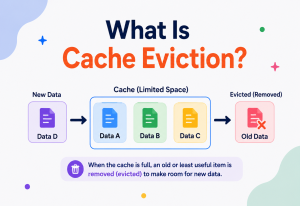
Consumes “post created” and “video ready” events and pushes references to those items into the precomputed feed caches of followers (for users using the fan-out-on-write strategy — discussed in depth in Chapter 8). This is where the “who should see this” fan-out problem — first made famous by early Twitter and Facebook engineering blog posts — is solved.
4.13 Feed Cache (Redis)
An in-memory data store (commonly Redis) holding each active user’s precomputed feed as a sorted list of content IDs. Reading a feed becomes a fast cache lookup rather than a complex multi-table join at read time, which is essential for hitting the sub-200ms read latency target.
4.14 Feed Service
The orchestrator that assembles the final response to a GET /feed request: it reads candidate item IDs from the Feed Cache (or generates them on the fly for the fan-out-on-read path), calls the Ranking Service to score and order them, hydrates the IDs into full post/video objects by querying the Post and Video Metadata databases (often through their own caches), and returns a paginated response.
4.15 Ranking Service
A machine-learning serving layer that scores each candidate feed item for a specific user using features like recency, affinity with the poster, content-type-specific engagement predictions, and more (Chapter 10 covers this in depth, including the specific problem of ranking text against video fairly).
4.16 Feature Store
A specialized low-latency store holding precomputed user and content features (e.g., “this user’s average video-completion rate,” “this creator’s follower engagement rate this week”) that the Ranking Service reads at serving time. It exists because computing these features from raw data on every single feed request would be far too slow.
4.17 Social Graph Service
Manages the follow/unfollow relationships between users. Both the Fan-out Service (to know who to push a new post to) and the Feed Service (to know whose posts to pull for a given user) depend on this service.
4.18 Engagement Service
Records likes, comments, shares, and — uniquely important for video — watch progress and completion events. These signals feed both the Ranking Service’s feature store and the analytics/monitoring pipeline.
4.19 Moderation Service
Every new post and video passes through automated content moderation (e.g., classifiers for graphic content, spam, hate speech) and, when flagged, a human review queue, before it is allowed to fan out broadly. This is a legal and trust-and-safety requirement, not an optional add-on.
- “Why not let the client upload video directly through the API Gateway?” — Tests understanding of pre-signed URLs and why you keep large binary transfers off your stateless application servers.
- “Where exactly does the message queue sit, and what would happen if it went down?” — Tests understanding of decoupling and the blast radius of a queue outage (writes might still succeed but fan-out/transcoding/moderation would stall).
Component Deep Dive: Internal Working
Having named every component, let’s go one layer deeper into how the two most distinctive services — the Feed Service and the Video Transcoding Pipeline — work internally, since these are the pieces an interviewer will most want you to open up.
5.1 Feed Service Internals
Think of the Feed Service as a conductor coordinating several specialists rather than a component that does heavy lifting itself. On a feed request, it performs roughly these steps:
- Fetch candidates: Read a list of candidate content IDs — from the precomputed Feed Cache for followed accounts, plus a separate call to a Recommendation Service for “you might like this” items outside the follow graph.
- Filter: Remove items the user has already seen, items still in “processing” state (unready video), and anything flagged by moderation.
- Score: Send the filtered candidate list to the Ranking Service, which returns a relevance score per item.
- Blend: Merge and re-sort candidates by score, often applying diversity rules (e.g., “no more than 2 videos from the same creator in a row,” or “don’t show 5 long videos back-to-back”).
- Hydrate: Convert the final ordered list of IDs into full response objects by fetching post text/images from the Post DB (or its cache) and video manifest URLs/thumbnails from the Video Metadata DB (or its cache).
- Paginate & respond: Return a page (commonly using cursor-based pagination rather than offset-based, since content is constantly being inserted) along with a cursor for the next page.
5.2 Java: A Simplified Feed Assembly Service
Below is a simplified but structurally realistic sketch of the Feed Service’s core assembly logic in Java. Real production code would add far more error handling, timeouts, and circuit breakers (see Chapter 18), but this captures the essential orchestration pattern.
public class FeedAssemblyService {

    private final FeedCacheClient feedCache;
    private final RankingServiceClient rankingClient;
    private final PostRepository postRepository;
    private final VideoMetadataRepository videoRepository;

    public FeedAssemblyService(FeedCacheClient feedCache,
                                RankingServiceClient rankingClient,
                                PostRepository postRepository,
                                VideoMetadataRepository videoRepository) {
        this.feedCache = feedCache;
        this.rankingClient = rankingClient;
        this.postRepository = postRepository;
        this.videoRepository = videoRepository;
    }

    public FeedPage getFeed(String userId, String cursor, int pageSize) {
        // 1. Fetch candidate content IDs from the precomputed feed cache
        List<ContentRef> candidates = feedCache.getCandidates(userId, cursor, pageSize * 3);

        // 2. Drop anything not yet ready (e.g. video still transcoding)
        List<ContentRef> readyCandidates = candidates.stream()
                .filter(this::isReadyForDisplay)
                .collect(Collectors.toList());

        // 3. Score candidates using the ranking service
        Map<String, Double> scores = rankingClient.score(userId, readyCandidates);

        // 4. Sort by score descending, then apply a simple diversity rule
        List<ContentRef> ranked = readyCandidates.stream()
                .sorted((a, b) -> Double.compare(
                        scores.getOrDefault(b.getId(), 0.0),
                        scores.getOrDefault(a.getId(), 0.0)))
                .collect(Collectors.toList());

        List<ContentRef> diversified = applyDiversityRules(ranked, pageSize);

        // 5. Hydrate IDs into full content objects (batched to avoid N+1 calls)
        List<FeedItem> items = hydrate(diversified);

        String nextCursor = computeNextCursor(diversified);
        return new FeedPage(items, nextCursor);
    }

    private boolean isReadyForDisplay(ContentRef ref) {
        if (ref.getType() == ContentType.VIDEO) {
            VideoStatus status = videoRepository.getStatus(ref.getId());
            return status == VideoStatus.READY;
        }
        return true; // text posts are always ready
    }

    private List<ContentRef> applyDiversityRules(List<ContentRef> ranked, int pageSize) {
        List<ContentRef> result = new ArrayList<>();
        int consecutiveVideos = 0;
        for (ContentRef ref : ranked) {
            if (result.size() >= pageSize) break;
            if (ref.getType() == ContentType.VIDEO) {
                if (consecutiveVideos >= 2) continue; // cap back-to-back videos
                consecutiveVideos++;
            } else {
                consecutiveVideos = 0;
            }
            result.add(ref);
        }
        return result;
    }

    private List<FeedItem> hydrate(List<ContentRef> refs) {
        List<String> postIds = refs.stream()
                .filter(r -> r.getType() == ContentType.TEXT)
                .map(ContentRef::getId).collect(Collectors.toList());
        List<String> videoIds = refs.stream()
                .filter(r -> r.getType() == ContentType.VIDEO)
                .map(ContentRef::getId).collect(Collectors.toList());

        Map<String, Post> posts = postRepository.batchGet(postIds);
        Map<String, VideoMetadata> videos = videoRepository.batchGet(videoIds);

        return refs.stream()
                .map(r -> r.getType() == ContentType.TEXT
                        ? FeedItem.fromPost(posts.get(r.getId()))
                        : FeedItem.fromVideo(videos.get(r.getId())))
                .collect(Collectors.toList());
    }

    private String computeNextCursor(List<ContentRef> items) {
        if (items.isEmpty()) return null;
        return items.get(items.size() - 1).getId();
    }
}
Notice a few deliberate design choices in this code that map directly back to earlier sections: candidates are over-fetched (pageSize * 3) because some will be filtered out for not being ready or for diversity reasons; video readiness is checked explicitly against a state machine; and hydration is batched per content type rather than looping and calling the database once per item (the classic N+1 query anti-pattern, discussed again in Chapter 18).
- “Why over-fetch candidates instead of fetching exactly pageSize?” — Tests understanding that filtering (readiness, diversity, dedup) happens after ranking, so you need headroom.
- “How would you avoid an N+1 query problem when hydrating 20 feed items?” — Tests knowledge of batch-get / multi-get patterns against the database or cache layer.
Data Flow and Lifecycle
Let’s trace the complete lifecycle of both a text post and a video post from creation to appearing in a follower’s feed, since the two paths diverge significantly.
6.1 Text Post Lifecycle
Text posting is optimized for speed: the write to the Post DB and the publish to Kafka happen almost immediately, and moderation runs asynchronously in parallel with fan-out rather than blocking it (with a mechanism to retract/hide a post quickly if moderation later flags it — a compensating action, similar in spirit to the Saga pattern discussed in Chapter 18).
6.2 Video Post Lifecycle
The key difference is obvious once drawn out: text has essentially one asynchronous hop (moderation/fan-out), while video has a long asynchronous chain (upload confirmation → transcoding → CDN propagation → moderation → fan-out) that can take from tens of seconds to many minutes. This is why platforms show upload progress bars and “processing…” states for video but never for text — the user experience must honestly reflect the underlying system’s real latency.
A frequent design flaw is fanning out a video post to followers’ feeds before transcoding completes, resulting in broken playback or a feed item that spins forever. Always gate fan-out on the video reaching the READY state — the Feed Service’s readiness check in Chapter 5.2 exists specifically to defend against this even if fan-out fires early due to a race condition.
Data Model and Storage
A hybrid feed system does not use one database for everything — it deliberately picks different storage engines for different access patterns. This is one of the clearest “polyglot persistence” examples in system design.
| Data | Store Type | Why This Choice |
|---|---|---|
| Post metadata (text content, author, timestamp) | Sharded NoSQL (e.g., Cassandra/DynamoDB) or sharded relational | High write throughput, simple key-based lookups by post ID, horizontally shardable by user ID or post ID |
| Video metadata (state, renditions, duration, thumbnails) | NoSQL document store | Semi-structured schema (renditions list varies), needs fast state-machine updates |
| Raw + processed video/image files | Object storage (S3-class) | Purpose-built for huge immutable blobs at low cost with high durability |
| Social graph (follows) | Graph-optimized store or specialized relational schema with heavy caching | Needs efficient “who follows X” and “who does X follow” queries at huge fan-out scale |
| Feed cache (precomputed per-user feed) | Redis (sorted sets) | Sub-millisecond reads; sorted sets give natural ranked ordering by score/timestamp |
| Engagement events (likes, watch time) | Append-only event log (Kafka) + aggregated store (columnar OLAP) | High-volume write-heavy events; analytics and ranking need aggregate queries, not row-by-row lookups |
| Feature store (ranking signals) | Low-latency key-value store | Ranking Service needs sub-10ms feature lookups per request |
7.1 Simplified Video Metadata Schema
{
  "videoId": "v_9f8a3c",
  "authorId": "u_1024",
  "title": "How Distributed Consensus Actually Works",
  "description": "A deep dive into Raft and Paxos...",
  "durationSeconds": 2415,
  "status": "READY",            // UPLOADING | PROCESSING | READY | FAILED
  "createdAt": "2026-07-20T10:15:00Z",
  "readyAt": "2026-07-20T10:22:40Z",
  "renditions": [
    { "resolution": "240p",  "bitrateKbps": 400,  "manifestUrl": "cdn://.../240p/index.m3u8" },
    { "resolution": "480p",  "bitrateKbps": 1200, "manifestUrl": "cdn://.../480p/index.m3u8" },
    { "resolution": "720p",  "bitrateKbps": 2500, "manifestUrl": "cdn://.../720p/index.m3u8" },
    { "resolution": "1080p", "bitrateKbps": 5000, "manifestUrl": "cdn://.../1080p/index.m3u8" }
  ],
  "masterManifestUrl": "cdn://.../master.m3u8",
  "thumbnails": ["cdn://.../thumb_0.jpg", "cdn://.../thumb_1.jpg"],
  "moderationStatus": "APPROVED"
}
Notice that the schema is designed around the state machine (status field) and around adaptive streaming (a masterManifestUrl that points to a manifest listing all renditions, letting the player choose quality dynamically — this is exactly how HLS/DASH master playlists work).
7.2 Sharding Strategy in Depth
Choosing a shard key is one of those decisions that looks simple on a whiteboard and then quietly determines how painful your operational life will be for years afterward, so it deserves a closer look here rather than a passing mention.
If you shard the Post DB by author ID, every post from a given user lands on the same shard. This makes “show me this user’s profile page, most recent posts first” a single-shard query — fast and simple. The cost is that a very active author (or, worse, a viral spike in posting activity from many users who happen to hash to the same shard) can create a hot shard that receives disproportionate write traffic, and there is no way to split that single author’s write load across multiple machines without further sub-partitioning.
If you instead shard by post ID (for example, a hash of a globally unique, time-ordered ID such as a Snowflake-style identifier), writes distribute evenly across shards almost regardless of any single author’s behavior, because consecutive posts from the same author land on effectively random shards. The cost shifts to the read side: reconstructing “this author’s most recent 20 posts” now requires querying multiple shards and merging the results, which is slower and more complex than the single-shard lookup in the author-sharded design.
In practice, most large-scale systems resolve this tension by sharding by post ID for write distribution, and then maintaining a separate secondary index — often an author-to-post-ID mapping stored in a fast key-value store — specifically to support the “list this author’s posts” query pattern without paying the multi-shard fan-out cost on every profile page view. This is a concrete example of a general system design principle: when a single shard key cannot serve every access pattern well, add a purpose-built secondary index for the access pattern the primary key does not serve, rather than compromising the primary key itself.
7.3 Video Metadata Sharding Considerations
Video metadata is typically sharded by video ID rather than author ID for the same write-distribution reasons described above, but with one additional wrinkle: because a single video record is updated multiple times over its lifecycle (status transitions from uploading to processing to ready, renditions being appended as they complete, moderation status being set), the shard needs to comfortably support relatively frequent partial updates to the same document, which is a natural fit for a document-oriented NoSQL store with atomic field-level update operations rather than a store that requires rewriting the entire record on every change.
- “Why not store video metadata in the same relational database as text posts?” — Tests understanding of schema flexibility needs (renditions array) and different scaling/access patterns.
- “How would you shard the Post DB?” — A good answer discusses sharding by author ID (keeps one user’s posts together, good for profile pages) vs by post ID/time (better write distribution, but scatter reads for a single author) and the trade-off between them, plus the secondary-index resolution described above.
- “What happens when one shard becomes a hotspot?” — Tests knowledge of re-sharding strategies, consistent hashing to minimize data movement, and secondary indexes as a mitigation that avoids re-sharding altogether for read-pattern problems.
Feed Generation: Fan-out Strategies
This is one of the most heavily tested system design topics, and it becomes even more interesting once you add video into the mix. There are two classic strategies, plus the hybrid approach almost every large platform actually uses.
8.1 Fan-out on Write (Push Model)
When a user creates a post, the system immediately pushes a reference to that post into the precomputed feed cache of every one of their followers. Reading a feed becomes a cheap cache lookup.
What makes it attractive
- Feed reads are extremely fast (just read the precomputed list)
- Read path is simple and predictable in latency
Where it breaks
- The “celebrity problem”: a user with 50 million followers triggers 50 million cache writes for a single post — extremely expensive and slow
- Wastes work fanning out to inactive followers who may never open the app
8.2 Fan-out on Read (Pull Model)
The feed is computed at read time by pulling recent posts from everyone the user follows and merging them on the fly.
What makes it attractive
- No wasted work for users who never check their feed
- Handles celebrity accounts gracefully — no explosive write amplification
Where it breaks
- Read path is expensive: must query and merge posts from potentially thousands of followed accounts on every feed load
- Harder to hit tight read-latency targets at scale
8.3 The Hybrid Approach (What Real Systems Do)
Nearly every large-scale platform (Twitter’s engineering blog has documented this extensively) uses a hybrid: fan-out on write for the vast majority of “normal” users, and fan-out on read for celebrity/high-follower-count accounts, merged together at read time.
8.4 How Video Changes the Fan-out Calculation
With text-only fan-out, the “cost” of pushing to a follower’s cache is trivial — a few bytes into a Redis sorted set. With video in the mix, two things change: first, fan-out must be gated on the video reaching READY status (never push a reference to an unplayable video); second, because video items are much rarer but much “heavier” in terms of downstream cost (CDN pre-warming, bandwidth), some platforms apply an additional pre-warming step — proactively pushing popular new videos’ first rendition to CDN edge nodes likely to serve them, based on the geographic distribution of the author’s follower base, before the video even shows up in feeds.
- “How would you handle a celebrity with 100 million followers posting a video?” — Tests the hybrid fan-out model plus the idea of CDN pre-warming based on predicted demand.
- “What threshold would you use to decide ‘push’ vs ‘pull’ for a given account?” — There’s no single right number; a good answer discusses tuning based on follower count and posting frequency, and mentions this is typically an empirically tuned configuration, not a fixed universal constant.
Long-Form Video Pipeline
This section deserves its own deep dive because long-form video is what makes this system fundamentally different from a text-only feed like early Twitter. Let’s walk through the entire pipeline component by component.
9.1 Why Chunk-Based Parallel Encoding?
A naive approach would transcode a 40-minute video file from start to finish as one continuous job — but that means a single worker holds the entire job for many minutes, and a slow worker delays the whole video. Instead, production pipelines split the source video into short segments (e.g., 4–10 seconds each), distribute those segments across many workers in parallel, encode each into every target resolution, and stitch the results back together. This turns a single long sequential job into a horizontally parallelizable batch job — directly analogous to the MapReduce pattern: “map” (encode each chunk independently) followed by “reduce” (stitch chunks back into one continuous stream per rendition).
9.2 Adaptive Bitrate Streaming (HLS/DASH)
Rather than serving one fixed-quality video file, the system produces multiple renditions and a “master manifest” — a small text file listing all available quality levels and their manifest URLs. The video player downloads the master manifest first, then continuously monitors the viewer’s network throughput and requests the next few seconds of video at whatever quality level the current bandwidth can sustain, switching up or down as conditions change. This is why a video might start blurry on a phone with poor signal and sharpen up automatically once the connection improves — the player is making that quality decision every few seconds, not the server.
9.3 Cost and Priority Considerations
Priority Queueing
Shorter videos are often prioritized to keep typical processing latency low for the majority of uploads, while long-form content is processed with proportionally more parallel workers rather than simply waiting longer.
Auto-scaling Worker Fleet
Transcoding is bursty (upload volume spikes at certain hours); the worker fleet auto-scales based on queue depth rather than running a fixed, always-on capacity sized for peak load.
Storage Tiering
Raw uploaded files are often moved to cheaper “cold” storage tiers once processing completes and only the processed renditions need to stay “hot,” since raw files are rarely needed again except for reprocessing.
Lazy Rendition Generation
Some platforms skip generating the highest resolutions (e.g., 4K) upfront and instead generate them on first request, since many videos are never watched at the highest quality — trading a small amount of first-view latency for large storage savings.
- “How would you reduce transcoding cost for a video that never gets watched?” — Tests knowledge of lazy/on-demand rendition generation and storage tiering.
- “What happens if a transcoding worker crashes halfway through a job?” — Tests understanding of idempotent, resumable job design: since the video is chunked, only the in-flight chunk needs to be retried, not the entire job, and the job orchestrator should track per-chunk completion state.
Ranking and Personalization
Recall the ranking problem raised in Chapter 2: if you naively rank every item by “predicted probability of full engagement,” long-form video will structurally lose to text because finishing a 40-minute video is a much rarer event than reading a short post, regardless of how satisfying the video actually was.
10.1 Content-Type-Aware Objectives
The fix is to define engagement targets per content type rather than one universal target:
| Content Type | Primary Engagement Signal | Why This Signal |
|---|---|---|
| Text post | Read + like/comment/share within N seconds | Reading is fast; completion is a near-instant, binary-ish signal |
| Long-form video | Watch time as a percentage of duration, plus explicit engagement (like/comment/share) | Watching 60% of a 40-minute video is a much stronger satisfaction signal than a binary “watched/didn’t watch,” and normalizing by duration avoids penalizing longer videos unfairly |
10.2 A Simplified Scoring Formula
// Simplified conceptual scoring model (not a real production formula)
score(user, item) =
      w1 * affinity(user, item.author)          // relationship strength
    + w2 * recency_decay(item.createdAt)        // newer content favored, decays over time
    + w3 * predicted_engagement(user, item)     // content-type-aware prediction
    + w4 * content_quality_score(item)          // moderation/quality signals
    - w5 * seen_penalty(user, item)             // down-weight if already shown recently
The critical detail is inside predicted_engagement: for a text post, this might be a model trained to predict “will read + engage”; for a video, it is a separate model trained to predict normalized watch-time percentage plus engagement, and the two models’ outputs are calibrated onto a comparable scale (often through techniques like isotonic regression or simple normalization against each content type’s historical score distribution) before being combined into one final ranking score. Without this calibration step, you cannot fairly compare a text score to a video score at all — they would be apples and oranges.
10.3 Java: Simplified Ranking Client Interface
public class RankingServiceClient {

    private final FeatureStoreClient featureStore;
    private final ModelServingClient textModel;
    private final ModelServingClient videoModel;

    public Map<String, Double> score(String userId, List<ContentRef> candidates) {
        Map<String, Double> results = new HashMap<>();

        List<ContentRef> textItems = filterByType(candidates, ContentType.TEXT);
        List<ContentRef> videoItems = filterByType(candidates, ContentType.VIDEO);

        Features userFeatures = featureStore.getUserFeatures(userId);

        // Each content type is scored by its own specialized model
        Map<String, Double> textScoresRaw = textModel.predict(userFeatures, textItems);
        Map<String, Double> videoScoresRaw = videoModel.predict(userFeatures, videoItems);

        // Calibrate both sets of raw scores onto a shared 0-1 scale before merging
        results.putAll(calibrate(textScoresRaw, ContentType.TEXT));
        results.putAll(calibrate(videoScoresRaw, ContentType.VIDEO));

        return results;
    }

    private Map<String, Double> calibrate(Map<String, Double> rawScores, ContentType type) {
        // Applies a per-content-type calibration curve (e.g. isotonic regression)
        // learned offline so that a 0.8 text score and 0.8 video score reflect
        // genuinely comparable predicted satisfaction, not just raw model output.
        return CalibrationCurves.apply(rawScores, type);
    }

    private List<ContentRef> filterByType(List<ContentRef> items, ContentType type) {
        return items.stream().filter(i -> i.getType() == type).collect(Collectors.toList());
    }
}
- “Why not use one single model to score both text and video?” — Tests whether you understand that the two content types have fundamentally different natural engagement distributions and often benefit from separate models plus a calibration step, rather than forcing one model to learn both patterns simultaneously.
- “How would you prevent the feed from becoming an all-video or all-text wall?” — Tests knowledge of diversity/interleaving rules applied after ranking (see the diversity logic in Chapter 5.2’s code sample).
Caching Strategy
Caching in this system is not a single layer — it is a stack of caches, each solving a different problem, and text and video benefit from different caching strategies.
| Layer | What’s Cached | Content-Type Notes |
|---|---|---|
| CDN Edge | Video segments, thumbnails, images, static assets | Video benefits enormously here — a popular video’s segments may be requested millions of times from the same edge cache, making the marginal cost of each additional view tiny |
| Feed Cache (Redis) | Precomputed per-user ranked candidate lists | Same structure for both types — stores lightweight content IDs, not full payloads |
| Content Cache | Hydrated post objects and video metadata objects (not the video bytes themselves) | Text posts can be cached in full; video “objects” cached here are just metadata/manifest URLs, since the actual bytes live in the CDN layer |
| Feature Store Cache | Precomputed user/content features for ranking | Shared structure, but video-specific features (e.g., historical completion rate) are refreshed on a different cadence than text engagement features due to different signal volume |
For video, the CDN is doing almost all of the caching “heavy lifting” — your application-layer caches barely ever need to hold video bytes. For text, your application-layer content cache is doing most of the work, since text posts are far too numerous and individually low-value to justify CDN edge caching the way a hit video does.
11.1 Cache Invalidation: The Classic Hard Problem
There is an old joke in computer science that there are only two hard things: cache invalidation and naming things. This system runs directly into the first one. Consider what happens when a user edits a text post after it has already been cached in the Content Cache and referenced in dozens of followers’ precomputed Feed Caches. The straightforward approach is a short time-to-live (TTL) on cached content objects, accepting that an edit may take a few seconds to propagate everywhere — a perfectly reasonable trade-off given the eventual-consistency requirement established back in Chapter 3.2. A more aggressive approach actively invalidates the specific cache key on edit, which reduces propagation delay but adds complexity and a new failure mode: if the invalidation message itself is lost (for example, due to a transient network partition), the cache can serve stale content indefinitely until the TTL eventually expires as a safety net. Production systems typically use both together — active invalidation as the fast path, with a conservative TTL as the guaranteed-correct fallback path.
Video introduces its own invalidation wrinkle: once a video reaches the READY state and has been cached and CDN-distributed, it is rarely mutated again except for its metadata (title, description, moderation status). The heavy video bytes themselves are effectively immutable once published, which is actually a simplifying property compared to text — you invalidate the lightweight metadata cache far more often than you ever need to invalidate anything at the CDN layer, since the CDN is holding immutable segment files addressed by content-specific URLs.
11.2 Cache Warming for Predictable Spikes
Some traffic spikes are predictable in advance — a major creator announcing an upcoming livestream-to-video upload, or a scheduled product launch video. For these known events, systems proactively warm the relevant caches (feed candidate lists for that creator’s most engaged followers, CDN edge nodes in the creator’s primary audience regions) ahead of the expected surge, rather than relying purely on reactive caching that only warms up after the first wave of requests has already stressed the origin systems.
- “Would you ever put video bytes in Redis?” — No — Redis is optimized for fast small-object access, not multi-gigabyte blobs; video always belongs in object storage + CDN.
- “A user edits their post right after it fans out to a million feed caches — how do you propagate that edit?” — Tests knowledge of TTL-based expiry as a safety net combined with active invalidation as a fast path, and acceptance of brief eventual consistency.
Performance and Scalability
Because this architecture cleanly separates concerns, each component can be scaled independently based on its own bottleneck.
API Gateway / Load Balancer
Scale horizontally by adding stateless instances behind the load balancer; these should never hold session state locally.
Feed Service
Stateless and horizontally scalable; the real bottleneck is usually the fan-in of calls it makes to the cache, ranking service, and databases, so connection pooling here matters enormously.
Transcode Workers
Scale based on queue depth (an auto-scaling policy tied to the message queue’s backlog length) rather than CPU utilization alone, since transcoding is bursty.
Databases
Post and Video metadata stores are sharded, typically by author ID or content ID, with read replicas absorbing the heavy read traffic from the Feed Service’s hydration step.
12.1 Connection Pooling Matters Here
Every Feed Service request fans out to several downstream calls (cache, ranking, two databases). Without connection pooling, each of those calls would pay the cost of establishing a brand-new TCP/TLS connection, which under peak load can dominate latency and exhaust ephemeral ports on the calling host. A pool of pre-established, reused connections to each downstream dependency keeps p99 latency predictable — this is exactly the same principle covered in connection pooling tutorials, applied here at the scale of millions of feed requests per second.
12.2 Applying Little’s Law
Little’s Law states that, in a stable system, $L = lambda times W$ — the average number of requests in the system ($L$) equals the average arrival rate ($lambda$) multiplied by the average time each request spends in the system ($W$). If your Feed Service targets a p99 latency of 200ms and expects a peak arrival rate of 2 million requests/second, you need enough concurrent request-handling capacity (threads, connections, event-loop workers) to hold roughly $2{,}000{,}000 times 0.2 = 400{,}000$ requests in flight simultaneously across your fleet — a number that directly drives how many Feed Service instances you need to provision, and a very concrete illustration of why reducing $W$ (latency) is often cheaper than scaling out raw instance count to hold a larger $L$.
12.3 Backpressure and Retry Storms
If the Ranking Service slows down under load, naive clients retrying aggressively can create a retry storm that makes the slowdown catastrophically worse. The Feed Service should apply exponential backoff with jitter on retries to downstream services, and should use a circuit breaker (see Chapter 18) to stop calling a clearly unhealthy dependency and instead fall back to a cheaper, lower-quality ranking (such as pure recency ordering) rather than compounding the failure.
- “Your Ranking Service starts timing out under load — what do you do?” — Tests knowledge of circuit breakers, graceful degradation (fallback to simpler ranking), and backoff-with-jitter rather than naive immediate retries.
High Availability and Reliability
At this scale, hardware fails, networks partition, and entire data centers occasionally go offline — the system must be designed assuming these events are normal, not exceptional.
Multi-Region Deployment
The entire stack is deployed across multiple geographic regions; DNS-based global routing directs users to the nearest healthy region, and a region-level failure fails traffic over to another region.
Database Replication
Post and video metadata databases are replicated across availability zones (and often regions), with automated leader failover so a single node loss does not cause data loss or extended downtime.
Graceful Degradation
If the Ranking Service is unavailable, the Feed Service falls back to a simple recency-based ordering rather than failing the entire feed request — a degraded feed beats no feed at all.
Object Storage Durability
Object storage services typically provide extremely high durability (often “11 nines”) through automatic multi-copy replication, meaning a hardware failure essentially never results in losing a user’s uploaded video.
13.1 Video-Specific Reliability Concerns
Video introduces reliability challenges text does not have: what happens if a transcoding worker crashes mid-job? As discussed in Chapter 9, chunk-based encoding means only the in-flight chunk needs to be retried, not the whole video — this idempotent, resumable design is itself a reliability strategy. What happens if the CDN has a regional outage? Well-designed CDN configurations include multi-CDN failover, where a secondary CDN provider serves traffic if the primary experiences issues, since video delivery interruption is highly visible to users mid-playback.
13.2 Active-Active vs Active-Passive, and Why It Matters Here
An active-passive multi-region setup keeps a secondary region on standby, replicating data from the primary but not serving live traffic until a failover is triggered. This is simpler to reason about but wastes capacity during normal operation and introduces a recovery-time gap during failover while the passive region spins up to serve real traffic. An active-active setup serves live traffic from multiple regions simultaneously, which uses capacity efficiently and eliminates the failover gap, but requires solving genuinely harder problems: how do you keep the Feed Cache and metadata databases consistent (or acceptably eventually consistent) across regions when both are being written to concurrently, and how do you route a given user consistently to the same region for cache locality without creating a single point of failure at the routing layer.
For this system, a common and pragmatic choice is active-active for the read-heavy, stateless services (API Gateway, Feed Service, Ranking Service) combined with regional data locality for the stateful stores — each user’s data lives primarily in one “home region” close to them, replicated asynchronously to other regions for disaster recovery and cross-region read access, rather than trying to achieve fully synchronous multi-region writes for every piece of data, which would add latency to every write in exchange for a level of consistency this particular system’s requirements (established back in Chapter 3.2) do not actually demand.
- “What’s your disaster recovery plan if an entire region goes down?” — Tests understanding of multi-region active-active or active-passive deployment, database replication topology, and DNS failover mechanics.
- “Why not make every database write synchronously replicated across all regions for maximum safety?” — Tests understanding that synchronous cross-region replication adds substantial write latency for a consistency guarantee this system’s eventual-consistency tolerance does not require, making asynchronous replication with a home-region model the more appropriate trade-off.
Security
Authentication & Authorization
The API Gateway validates JWTs/session tokens on every request; fine-grained authorization ensures users can only edit/delete their own content.
Rate Limiting
Enforced at the API Gateway to prevent abuse — e.g., limiting how many videos a single account can upload per hour to slow spam and reduce cost from abusive automated uploads.
Pre-Signed URL Scoping
Upload URLs issued by the Video Upload Service are time-limited and scoped to a single object key, so they cannot be reused or abused to upload arbitrary content elsewhere.
Content Moderation
Automated classifiers scan both text and video for policy violations (hate speech, graphic violence, spam); flagged content is held for human review before wide distribution.
DRM / Access Control for Video
For platforms with paid or restricted content, signed CDN URLs with short expiry (and optionally DRM licensing) prevent unauthorized redistribution of video segments.
Encryption
TLS in transit everywhere; data at rest (object storage, databases) encrypted using provider-managed or customer-managed keys.
- “How do you prevent someone from scraping/downloading video at unlimited scale via the CDN URL?” — Tests knowledge of signed, time-limited CDN URLs and rate limiting at the edge.
- “Where would you enforce that a user can only delete their own posts?” — Authorization should be enforced server-side in the Post/Video services, never trusted from client-supplied data alone.
Monitoring, Logging and Metrics
| Signal | Examples | Why It Matters |
|---|---|---|
| Latency metrics | Feed API p50/p99, transcoding job duration distribution | Directly tied to your SLOs from Chapter 3 |
| Error rates | 5xx rate per service, failed transcoding job rate | Early warning of regressions or dependency failures |
| Queue health | Kafka consumer lag for fan-out and transcoding queues | Growing lag means fan-out or video processing is falling behind live traffic |
| Business metrics | Feed engagement rate, video completion rate, by content type | Connects system performance to actual product health |
| Distributed tracing | End-to-end trace of a single feed request across Gateway → Feed Service → Ranking → DB | Essential for debugging exactly where latency is introduced in a multi-hop request |
Alerting thresholds should be tied to the non-functional requirements defined in Chapter 3 — for example, an alert fires if Feed API p99 latency exceeds 200ms for more than five consecutive minutes, or if Kafka consumer lag on the transcoding queue exceeds a threshold implying videos will take unacceptably long to become ready.
15.1 Content-Type-Specific Dashboards
A single “system health” dashboard tends to hide problems that only affect one content type, because video’s much lower request volume compared to text can get statistically drowned out in an aggregate metric. If video transcoding latency quietly doubles while text posting remains fast, an aggregate “average post-to-visible latency” metric across both content types may barely move, because text posts vastly outnumber video uploads — yet from a video creator’s perspective, something has gotten significantly worse. For this reason, production monitoring for a hybrid system like this one should always break out its core latency, error-rate, and throughput metrics by content type rather than relying solely on blended aggregates, and alerting thresholds should be defined per content type as well.
15.2 Synthetic Monitoring
Beyond passively observing real user traffic, it is common practice to run synthetic monitoring: scripted, automated clients that periodically post a test text item and upload a small test video through the full pipeline, verifying end-to-end that a post becomes visible within the expected time window and that a video reaches the READY state and plays back correctly. This catches full-pipeline regressions (for example, a broken transcoding worker image after a bad deployment) even during periods of naturally low real user upload volume, such as overnight hours in a given region, when passive monitoring alone might not generate enough real signal to trip an alert quickly.
- “How would you debug a sudden spike in feed latency at 2 AM?” — Tests whether you’d reach for distributed tracing and per-dependency latency breakdowns rather than guessing.
- “Your aggregate metrics look healthy, but video creators are complaining about slow processing — what’s going on?” — Tests understanding that content-type-blended metrics can hide a regression isolated to the lower-volume content type, and the fix is breaking out dashboards and alerts per content type.
Deployment and Cloud Architecture
Containerization & Orchestration
Stateless services (API Gateway, Feed Service, Post Service, Ranking Service) run as containers orchestrated by Kubernetes, enabling horizontal auto-scaling based on request rate or CPU/memory.
Infrastructure as Code
The entire topology — load balancers, Kubernetes clusters, database clusters, CDN configuration — is defined as code (e.g., Terraform), enabling reproducible multi-region deployment and disaster recovery.
Blue-Green / Canary Deployments
New versions of the Feed Service or Ranking Service are rolled out to a small percentage of traffic first (canary), with automated rollback if error rates or latency regress, before a full rollout.
Auto-scaling Transcode Fleet
Unlike the request-driven services above, the transcode worker fleet scales based on queue depth, since transcoding load is driven by upload volume rather than direct user requests.
Container Registry
All service images are stored in a private container registry with vulnerability scanning integrated into the CI/CD pipeline before deployment.
Cost Optimization
Transcode workers and other batch-style compute often run on spot/preemptible instances for cost savings, since jobs are naturally checkpointable/resumable (Chapter 9).
- “Why would you use spot instances for transcoding but not for the Feed Service?” — Tests understanding that transcode jobs are resumable/batch-friendly and can tolerate interruption, while the Feed Service serves live user-facing requests that cannot be interrupted mid-response.
APIs and Microservices
A few representative API contracts help ground the architecture in something concrete an interviewer can probe.
GET /v1/feed?cursor={cursor}&limit=20

Response:
{
  "items": [
    { "type": "TEXT",  "id": "p_123", "author": {...}, "body": "...", "createdAt": "..." },
    { "type": "VIDEO", "id": "v_456", "author": {...}, "title": "...",
      "durationSeconds": 812, "masterManifestUrl": "cdn://...", "thumbnailUrl": "cdn://..." }
  ],
  "nextCursor": "v_456"
}

POST /v1/videos/upload-init
Response:
{ "uploadUrl": "https://storage.example.com/...(pre-signed, expires in 15 min)",
  "videoId": "v_789" }

GET /v1/videos/{videoId}/status
Response:
{ "videoId": "v_789", "status": "PROCESSING", "progressPercent": 62 }
Each microservice owns its own data and exposes a narrow, versioned API to others — the Feed Service never reaches directly into the Video Metadata DB’s internal schema from another team’s service; it goes through the Video Service’s API (or a well-defined internal client library), which keeps the two content pipelines independently deployable and evolvable, directly reflecting the “specialize internally, unify externally” principle from Chapter 1.
- “Why does the client poll a status endpoint instead of the upload API blocking until processing completes?” — Tests understanding of async processing patterns; blocking an HTTP request for minutes is both a poor client experience and a resource-wasting anti-pattern on the server.
Design Patterns and Anti-Patterns
Circuit Breaker
Used around calls to the Ranking Service and databases; if failure rate crosses a threshold, stop calling the dependency temporarily and use a fallback path.
Bulkhead
Isolate resource pools (e.g., separate thread/connection pools per downstream dependency) so a slow Ranking Service can’t exhaust the same pool used for database calls.
Saga (Compensating Actions)
If moderation flags a post after it has already fanned out, a compensating action retracts/hides it from feeds rather than trying to run one giant distributed transaction across services.
CQRS-ish Read/Write Split
Writes go through the Post/Video Services into the source-of-truth databases; reads are served from the heavily cached, denormalized Feed Cache — a clear separation of write and read models.
18.1 Anti-patterns to Avoid
Looping and querying the database once per feed item instead of batch-fetching (avoided explicitly in Chapter 5.2’s code).
Making the upload API block until transcoding finishes — kills scalability and user experience.
Forcing video metadata, text posts, and engagement events into a single schema/store ignores their very different access patterns (Chapter 7).
Pushing a video reference to feeds before its status is READY (Chapter 6.2’s explicit warning).
Retrying a struggling downstream service aggressively, causing a retry storm that deepens the outage.
- “What’s the difference between a circuit breaker and a bulkhead, and when would you use each?” — A circuit breaker stops calls to a failing dependency entirely; a bulkhead isolates resource pools so one dependency’s slowness can’t starve resources needed for other dependencies. They’re often used together.
Best Practices and Common Mistakes
Design the state machine first
For video, get the READY/PROCESSING/FAILED state machine right before writing any feed logic — nearly every video-related bug traces back to a gap in this state machine.
Cursor-based pagination
Never use offset-based pagination for a constantly-growing feed — new inserts shift offsets and cause duplicate or skipped items; use a stable cursor (typically the last item’s ID or timestamp).
Idempotent event processing
Fan-out and transcoding consumers must handle duplicate message delivery gracefully (Kafka and most queues guarantee at-least-once delivery, not exactly-once, in most configurations).
Separate SLAs per content type
Don’t hold text posting hostage to video processing SLAs, or vice versa — they should have independent latency budgets and independent on-call ownership.
Test with realistic content-mix ratios
Load testing with an unrealistic text-to-video ratio (e.g., all text) will hide bottlenecks that only appear when video’s heavier payloads and longer processing chain are proportionally represented.
19.1 A Note on Evolving the System Over Time
It is worth closing this section with a broader observation: none of the decisions in this tutorial should be treated as permanent. The threshold for “celebrity” fan-out treatment, the specific ranking weights, the number of video renditions generated upfront versus lazily, and even the choice of which database technology backs each store are all parameters that should be revisited as usage patterns shift. A system designed for a hundred million users skews text-heavy today might, a few years later, see video-heavy usage overtake text as camera hardware, network bandwidth, and creator habits change — and a well-designed architecture is one where that shift requires re-tuning configuration and scaling individual components, not rewriting the system from scratch. This is ultimately the real test of whether the “specialize internally, unify externally” principle introduced at the very start of this tutorial was applied correctly: a good hybrid feed architecture should be able to absorb a changing content mix gracefully, because the content-type-specific pipelines can each be scaled, re-tuned, or even re-architected independently without requiring changes to the unifying Feed Service and API contract that the rest of the product depends on.
Real-World Industry Examples
Facebook / Instagram
Meta’s News Feed and Instagram feed combine text, photos, short video (Reels), and increasingly long-form video within one ranked, ML-driven feed, and Meta has published extensively on their fan-out and ranking infrastructure evolution.
Formerly Twitter
X’s public engineering writing on the hybrid fan-out model (push for most users, pull for celebrity accounts) is one of the most referenced case studies in system design education, and remains conceptually accurate even as the platform has added native video.
YouTube
While primarily a library/search model rather than a social-graph feed, YouTube’s transcoding-at-scale and adaptive bitrate streaming infrastructure is the reference architecture nearly every video pipeline (including this tutorial’s Chapter 9) is modeled after.
Video-native feed
Demonstrates that a feed can be entirely video-native, with ranking as the dominant product surface — a useful contrast case to this tutorial’s genuinely hybrid text+video design.
Professional network
A strong real-world example of professional-network feeds mixing text posts, articles, and native long-form video within one ranked feed, serving a very different content-quality objective than entertainment-first platforms.
Streaming reference
Though not a social feed, Netflix’s publicly documented use of adaptive bitrate streaming, multi-CDN strategy, and chaos engineering practices strongly influence how video delivery reliability is approached industry-wide.
The hardest part of a hybrid feed is rarely the video pipeline or the text pipeline in isolation — it’s making sure neither one quietly starves the other at the ranking layer. This lesson recurs across nearly every large platform’s public engineering writing on feed ranking.
20.1 What These Examples Teach Us Collectively
Looking across these platforms, a consistent pattern emerges regardless of the specific product: every large-scale system that mixes content types eventually arrives at the same shape described in this tutorial — separate, specialized ingestion and processing pipelines per content type, a shared social graph and follow model, a hybrid push/pull fan-out strategy tuned by account size, and a ranking layer that has to be explicitly taught to compare fundamentally different content types fairly. None of these platforms started with this architecture on day one; nearly all of them arrived at it after hitting the exact scaling walls this tutorial describes — celebrity fan-out explosions, video processing backlogs during traffic spikes, and ranking models that quietly favored whichever content type was cheaper to evaluate. Studying their public engineering blogs is one of the best ways to validate that the architecture in this tutorial is not an academic exercise but a reflection of what production systems actually converge toward at scale.
It is also worth noting where these platforms differ, since those differences are usually a direct consequence of product priorities rather than pure engineering preference. A professional network’s feed ranking objective (surfacing career-relevant, credible content) is deliberately more conservative than an entertainment platform’s objective (maximizing watch time and session length), even though both run on structurally similar pipelines. This is a useful thing to say out loud in an interview: the architecture described in this tutorial is a scaffold, and the specific ranking objectives, moderation strictness, and fan-out thresholds are product decisions layered on top of it, not fixed constants.
FAQ
Why not just make every video “short” to simplify the pipeline?
Long-form video is a deliberate product requirement in this problem statement (documentaries, tutorials, podcasts) — collapsing it into short-video-only would solve a different, easier problem than the one being asked.
Could you use a single unified database for both post and video metadata?
Technically yes, but it typically fights against both types’ natural access patterns and scaling needs (Chapter 7) — most large-scale systems choose polyglot persistence instead.
How is a feed different from a search index?
A feed is personalized, ranked, and time-sensitive per user; a search index responds to explicit queries. They often share underlying content stores but serve very different access patterns and typically have entirely separate serving infrastructure, since search demands strong text-matching and relevance capabilities that a feed’s candidate-generation layer does not need to replicate.
Should text-only posts and video posts share the same “create” API endpoint?
Most production systems keep them separate, as this tutorial does with the Post Service and Video Upload Service, because their request/response shapes and processing steps diverge so significantly — a text creation call is synchronous and completes in one round trip, while a video creation flow is inherently multi-step (initiate upload, receive pre-signed URL, upload bytes, poll or receive a callback for processing status). Forcing both through one endpoint would mean that endpoint’s contract has to awkwardly represent two very different interaction patterns, which tends to produce a confusing API that serves neither case well.
Do you need a separate ranking model per content type, or can one model handle both?
Either can work, but as discussed in Chapter 10, most production systems use content-type-specific models with a calibration step, because the natural engagement distributions of text and long-form video are different enough that one shared model tends to systematically favor one type.
What happens to a video post if moderation rejects it after it has already fanned out?
A compensating action (Chapter 18’s Saga pattern) retracts the reference from followers’ feed caches and marks the content as rejected, rather than attempting a single all-or-nothing distributed transaction across every service involved.
How would you support a “watch later” or “save for offline” feature within this architecture?
This layers cleanly on top of what already exists: a lightweight “saved items” service records a user-to-content-ID association (similar in shape to the follow graph), and at read time the Feed Service (or a dedicated Saved Items Service reusing the same hydration logic from Chapter 5) fetches the referenced posts and videos exactly the way it hydrates a normal feed page. Offline download for video would additionally require issuing a longer-lived, securely scoped download URL for a specific rendition, with its own rate limits and expiry policy distinct from normal streaming URLs.
How would live video fit into this architecture, if at all?
Live video is a meaningfully different problem from long-form video-on-demand, because there is no file sitting in object storage to transcode ahead of time — video must be encoded and packaged into streamable segments in near real time as it is being broadcast, and the feed reference has to point at a live manifest that keeps extending itself rather than a fixed-length asset. Most platforms treat live video as an adjacent, purpose-built subsystem (with its own low-latency streaming protocol and ingest servers) that hands off to the same long-form video pipeline described in Chapter 9 once the broadcast ends and the recording is finalized as an on-demand asset.
Why does the Feed Service call a separate Ranking Service instead of ranking inline?
Separating ranking into its own service allows the machine learning model to be deployed, scaled, and iterated on independently from the orchestration logic in the Feed Service. Ranking models are typically retrained and redeployed far more frequently than the orchestration code changes, and they often benefit from specialized serving hardware; coupling the two would force every model update to go through the Feed Service’s full deployment pipeline and would prevent the ranking layer from being scaled independently based on its own, very different resource profile (memory-heavy model inference versus the Feed Service’s comparatively lightweight orchestration work).
Summary and Key Takeaways
The seven ideas that hold this whole system together
- Specialize internally, unify externally: text and video get separate ingestion, storage, and processing pipelines, but converge into one Feed Service and one Feed API for the client.
- Video needs an explicit readiness state machine (uploading → processing → ready → failed) that text simply does not require, and fan-out must be gated on reaching the ready state.
- The transcoding pipeline is the most operationally complex subsystem — chunk-based parallel encoding, adaptive bitrate packaging (HLS/DASH), and CDN pre-warming are the core techniques.
- Fan-out strategy is hybrid in practice: push for most users, pull for celebrity/high-follower accounts, merged at read time.
- Ranking must be content-type-aware and calibrated so long-form video doesn’t structurally lose to text simply because completion is a rarer event.
- Every layer — cache, database, deployment, cost model — is chosen deliberately per content type rather than forcing one-size-fits-all infrastructure onto fundamentally different data.
- Reliability patterns (circuit breakers, bulkheads, sagas, idempotent consumers) are what keep this many moving parts from cascading into a single large outage.
A hybrid feed is ultimately a coordination problem more than a computation problem. Getting text and video to peacefully coexist — each following its own natural pipeline shape, each fairly ranked against the other, each scaled and cached according to its own economics — is what turns a collection of services into a single, coherent product surface that a user experiences as “my feed.”

