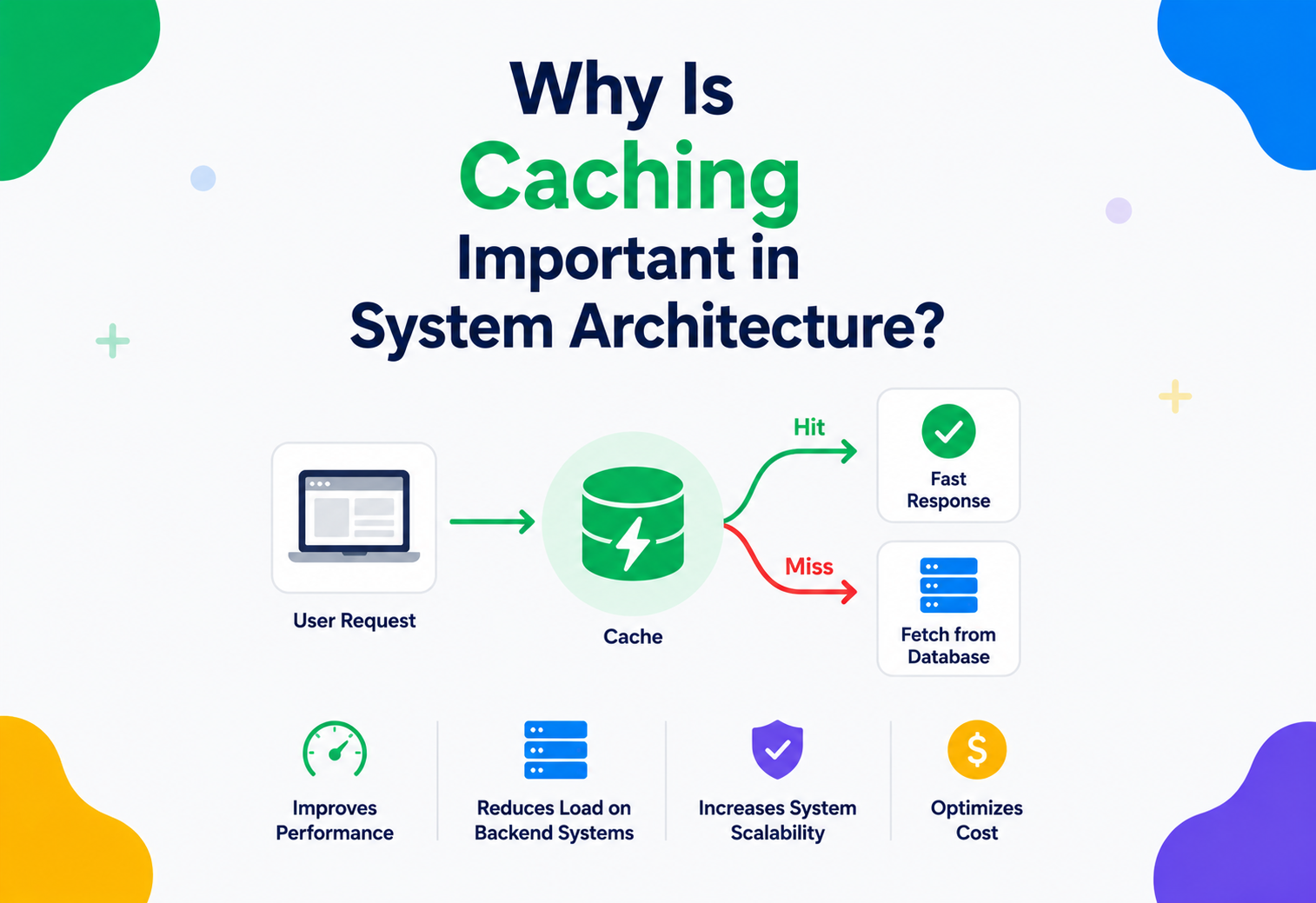
Why Is Caching Important in System Architecture?
A complete, beginner-friendly, production-ready guide to caching — what it is, why every large system depends on it, how it actually works internally and how to use it correctly in real projects and interviews.
Introduction & History
Imagine you have a little sister who keeps asking you the same math question over and over: “What is 27 times 4?” The first time, you sit down, do the multiplication carefully and answer “108”. If she asks again five seconds later, would you redo the whole multiplication? No — you would just remember the answer and say “108” instantly. Your brain just did something called caching.
Caching is the practice of storing a copy of data somewhere fast and close, so that the next time someone asks for that same data, the system does not have to redo the expensive work of fetching or computing it again. Instead, it just hands over the saved copy.
This one idea — “remember the answer instead of recalculating it” — is one of the most powerful and widely used ideas in all of computer science. It shows up everywhere: inside your CPU, inside your web browser, inside your phone’s apps, inside Google’s search engine, inside Netflix’s video streaming system and inside almost every large website you use every day.
1.1 Where did caching come from?
The word “cache” comes from the French word cacher, meaning “to hide”. It was originally used to describe a hidden storage spot — for example, explorers would bury a “cache” of food and supplies along a trail so they would not have to carry everything at once.
In computing, the idea appeared very early. In the 1960s, engineers building mainframe computers noticed a huge problem: the CPU (the “brain” of the computer) could process instructions far faster than the main memory (RAM) could deliver data. The CPU kept sitting idle, waiting for data. Their solution was to add a small, very fast memory chip physically close to the CPU that stored recently used data. This was called a “cache memory”, and it was one of the first formal uses of the term in engineering — attributed to work at IBM in 1965.
As computers evolved from single machines into networks, and then into the massive distributed systems that power the internet today, the same core idea kept getting reused at every layer: CPUs cache instructions, operating systems cache disk blocks, browsers cache web pages and modern web applications cache database query results, API responses and entire rendered pages. Caching did not stay a hardware trick — it became a fundamental architectural principle.
A cache is like keeping your most-used kitchen spices on the counter instead of in the store two miles away. You still could drive to the store every time you cook, but keeping a small, fast copy nearby saves enormous time and effort.
Today, when someone asks “Why is caching important in system architecture?” they are really asking: “How do we build software that can serve millions of users quickly, cheaply and reliably, without falling over under load?” Caching is one of the top three or four answers to that question, alongside load balancing, database indexing and horizontal scaling. This tutorial will walk you through the whole topic from the ground up, using simple language, analogies, diagrams and real Java code.

Problem & Motivation
To understand why caching matters, you first need to understand the problem it solves. Let us build the problem up slowly, step by step, with a story.
2.1 The Story of a Slow Website
Imagine you built a website that shows the current price of gold. Every time someone visits your website, your server does the following:
- Receives the visitor’s request.
- Connects to a database.
- Runs a query to calculate the current gold price from thousands of transaction records.
- Waits for the database to finish crunching the numbers (this takes, say, 2 seconds).
- Sends the result back to the visitor.
If only one person visits your site per minute, this is totally fine. Two seconds is a small wait. But what happens when your website becomes popular and 10,000 people visit every second, all asking for the exact same gold price?
Your database now has to run the exact same expensive 2-second query 10,000 times per second — even though the answer does not change from one request to the next. The database becomes overloaded, response times get slower and slower and eventually the whole website can crash. This is called a system being unable to scale.
This is the fundamental motivation behind caching: a huge amount of the work our systems do is repeated work on unchanged or slowly-changing data. If we can detect that repetition and avoid redoing it, we save time, save money and prevent our systems from collapsing under heavy traffic.
2.2 Three Real Costs That Caching Reduces
Time
Fetching data from a nearby, fast memory store takes microseconds. Fetching it from a disk-based database, or over the network from another continent, can take hundreds of milliseconds — thousands of times slower.
CPU / work
Recomputing a complex report, a machine-learning prediction or an aggregated statistic every single time wastes CPU cycles that could be serving other users.
Money
Every database query, every network call to another service and every unnecessary computation costs real money in cloud infrastructure bills. Caching directly reduces your cloud bill.
2.3 A Beginner Example
Say you are solving a coding problem: calculating the 40th Fibonacci number using plain recursion. Without caching (in programming, we call this memoisation when applied to function results), your program would recalculate the same smaller Fibonacci numbers millions of times, taking many seconds. With caching, you calculate each smaller number exactly once, store it and reuse it — the same calculation finishes in microseconds. This tiny example captures the essence of every large-scale caching system in the world: do the work once, remember it, reuse it.
2.4 A Production Example
When you open Instagram and see a celebrity’s post with 5 million likes, Instagram does not go count 5 million rows in a database every time someone views that post. That count is computed periodically and stored in a fast cache. Millions of viewers per second read that cached number instead of hammering the database. Without caching, a single viral post could crash the entire platform.
Core Concepts
Before we go further, let us build a solid vocabulary. Every term below is something you will see again and again in real systems and in interviews.
3.1 Cache
What it is: A small, fast storage layer that keeps a copy of frequently or recently used data.
Why it exists: Because the “original” source of data (a database, an external API, a slow computation) is usually much slower to access than a well-designed fast storage layer.
Where it is used: CPUs, operating systems, browsers, mobile apps, web servers, databases, content delivery networks (CDNs) — essentially every layer of modern computing.
Analogy: A cache is like a sticky note on your desk with a phone number you use every day, so you do not have to open your address book each time.
3.2 Cache Hit and Cache Miss
When your system looks in the cache for some data:
- Cache hit — the data is found in the cache. Great! We return it immediately, without touching the slow original source.
- Cache miss — the data is not in the cache. We must go fetch it from the original (slower) source, and usually we also store a copy in the cache for next time.
Cache hit is like reaching into your pocket and finding your house key already there. Cache miss is like realising the key is not in your pocket, so you have to go back inside and dig through a drawer to find it — then you put a copy in your pocket for next time.
Hit ratio is the percentage of requests that are cache hits. A hit ratio of 90% means 9 out of 10 requests were served instantly from the cache. This is one of the most important numbers engineers watch when tuning a caching system.
3.3 TTL (Time To Live)
What it is: A timer attached to cached data that says “this data is only valid for X seconds / minutes / hours”.
Why it exists: Cached data can become outdated (stale). If the gold price changes every 10 seconds, but we cache it for a whole day, users will see wrong prices. TTL forces old data to expire automatically.
Analogy: Milk in your fridge has an expiry date. After that date, you do not trust it anymore and you throw it out and buy fresh milk. TTL is the expiry date for cached data.
Example: A weather app might cache “today’s forecast” for 30 minutes, but cache “yesterday’s historical temperature” for a full year, because historical data never changes.

3.4 Eviction Policy
What it is: A cache has limited space (limited RAM). When it is full and new data needs to be stored, the cache must decide what old data to remove (“evict”). The rule it uses to decide is called an eviction policy.
| Policy | Rule | Analogy |
|---|---|---|
| LRU (Least Recently Used) | Remove the item that has not been accessed for the longest time | Cleaning out your closet by donating clothes you have not worn in the longest time |
| LFU (Least Frequently Used) | Remove the item that has been accessed the fewest number of times | Getting rid of the kitchen gadget you have used the fewest times, even if you used it recently |
| FIFO (First In, First Out) | Remove the oldest item added, regardless of use | A queue at a bakery — first person in line is served first and leaves first |
| Random | Remove a random item | Blindly picking a book off a shelf to donate |
LRU is by far the most common in real systems because it closely matches real usage patterns: data used recently is likely to be used again soon (this is called temporal locality).
3.5 Cache Invalidation
What it is: The process of removing or updating cached data because the original data has changed, even before the TTL expires.
Why it matters: There is a famous joke among computer scientists: “There are only two hard things in Computer Science: cache invalidation and naming things.” Making sure the cache never shows outdated (stale) data, while still keeping the benefits of speed, is genuinely one of the trickiest problems in system design.
Example: If a user updates their profile picture, the old cached picture must be invalidated immediately — you cannot wait for a TTL to expire, or other users will see the wrong photo for hours.
3.6 Stale Data
What it is: Data in the cache that no longer matches the true, current data in the original source.
Analogy: Looking at an old class photo and thinking that is what your classmates look like today — the photo is “stale”, it has not been updated.
3.7 Locality of Reference
This is the deep reason caching works at all. Computer scientists observed two patterns in how programs and users access data:
- Temporal locality: if data was accessed recently, it is likely to be accessed again soon (e.g., a trending news article).
- Spatial locality: if one piece of data was accessed, nearby data is likely to be accessed soon too (e.g., reading page 5 of a book, you will probably read page 6 next).
Caching exploits both patterns. Without locality of reference existing in real-world data access, caching would not help much at all — but in practice, the vast majority of real systems show strong locality, which is exactly why caching gives such dramatic performance improvements.
Architecture & Components
Caching is not one single thing — it happens at many different layers of a system, sometimes all at once. Let us walk through the layers, from the user’s device all the way down to the database.
4.1 Browser Cache (Client-Side Cache)
What it is: Your web browser stores images, CSS files and JavaScript files locally on your computer.
Why: So that when you revisit a website, or move between pages on the same site, the browser does not have to re-download the logo, the stylesheet and the scripts every single time.
Example: The first time you visit a news website, it might take 2 seconds to load. The second time, it loads almost instantly because the browser already has the images and styling saved.
4.2 CDN (Content Delivery Network)
What it is: A network of servers spread across many geographic locations around the world, each holding cached copies of static content (images, videos, HTML pages).
Why it exists: If your main server is in the United States, but a user is in India, every request would have to cross the globe, adding huge delay. A CDN server physically located in India can serve the cached content instead.
Production example: Netflix uses its own CDN, called Open Connect, with servers placed inside internet service providers’ networks around the world, so that popular shows are cached extremely close to viewers, keeping streaming smooth even during peak hours.
4.3 Reverse Proxy / Web Server Cache
What it is: A server sitting in front of your application (like Nginx or Varnish) that can cache entire HTTP responses.
Example: A blog’s homepage that looks the same for every visitor can be cached at the reverse proxy layer, so the application server is never even bothered for most requests.
4.4 Application-Level (In-Process) Cache
What it is: A cache that lives directly inside your application’s memory (RAM), often implemented with a simple data structure like a HashMap, or a library like Caffeine (Java) or Guava Cache.
Why: It is the fastest possible cache because there is no network call at all — the data is right there in the same process’s memory.
Trade-off: Each application server has its own separate cache. If you have 10 servers, you have 10 separate copies, which can waste memory and cause inconsistency between servers.
4.5 Distributed Cache
What it is: A dedicated, shared caching layer (like Redis or Memcached) that all your application servers connect to over the network.
Why: It solves the “10 separate copies” problem above — every application server sees the same, shared cached data. It also allows the cache to be much larger than what would fit on a single machine, because data can be spread (“sharded”) across many cache servers.
Production example: Twitter (X) uses large Redis and Memcached clusters to cache things like user timelines, so that generating a timeline does not require recomputing it from scratch on every page load.
4.6 Database Cache
What it is: Databases themselves have internal caches — for example, a “buffer pool” that keeps recently used data pages in memory instead of reading them from disk every time.
Example: MySQL’s InnoDB storage engine keeps a buffer pool in RAM. If your database server has enough memory to hold your entire working dataset in this buffer pool, queries become dramatically faster.
In a real production system, these layers work together like a series of nets catching fish. The browser cache catches the most requests with zero network cost. Whatever slips through goes to the CDN. Whatever slips through that goes to the app cache, then the distributed cache, and only a small fraction of all requests ever actually reach the database.
Internal Working
Now let us look under the hood: how does a cache actually store and retrieve data so quickly?
5.1 The Core Data Structure — Hash Map
Almost every cache is built around a hash map (also called a hash table). A hash map lets you store a “key” (like a username) mapped to a “value” (like that user’s profile data), and retrieve it in close to constant time — meaning the lookup takes roughly the same tiny amount of time whether you have 100 items or 100 million items stored.
How a hash map works, simply: A special mathematical function called a hash function converts the key into a number. That number tells the system exactly which “bucket” (slot in memory) to look in. Instead of searching one by one through every item (which would be slow), the system jumps straight to the right bucket.

A hash map is like a library where every book’s title is converted into a specific shelf number using a formula. Instead of searching every shelf for “Harry Potter”, you compute the shelf number instantly and walk straight there.
5.2 Hash Map + Doubly Linked List = LRU Cache
To implement an LRU (Least Recently Used) eviction policy efficiently, engineers combine two data structures:
- A hash map for instant lookups by key.
- A doubly linked list that keeps track of the order in which items were used — most recently used items at the front, least recently used at the back.
Every time an item is accessed, it is unlinked from its current position in the list and moved to the front. When the cache is full and a new item needs space, the item at the back of the list (the least recently used one) is removed. Both operations — moving an item and removing the last item — take constant time, which is why this design is used in almost every real LRU cache implementation, including Java’s own LinkedHashMap.
5.3 A Working Java Example — Simple LRU Cache
Java’s built-in LinkedHashMap can be configured to automatically behave as an LRU cache. Here is a minimal, production-style implementation:
import java.util.LinkedHashMap;
import java.util.Map;

public class LRUCache<K, V> extends LinkedHashMap<K, V> {

    private final int capacity;

    public LRUCache(int capacity) {
        // accessOrder = true means "reorder on get(), not just put()"
        super(capacity, 0.75f, true);
        this.capacity = capacity;
    }

    @Override
    protected boolean removeEldestEntry(Map.Entry<K, V> eldest) {
        // Once size exceeds capacity, the oldest (least recently used)
        // entry is automatically evicted.
        return size() > capacity;
    }

    public static void main(String[] args) {
        LRUCache<String, String> cache = new LRUCache<>(3);
        cache.put("gold_price",   "$2350");
        cache.put("silver_price", "$29");
        cache.put("oil_price",    "$78");

        cache.get("gold_price"); // gold_price is now "recently used"

        cache.put("copper_price", "$4.10"); // cache is full -> evicts silver_price
        // (least recently used, since gold_price was just accessed)

        System.out.println(cache.keySet());
        // Output: [oil_price, gold_price, copper_price]
    }
}
Explanation: This class extends LinkedHashMap and overrides removeEldestEntry, a hook Java gives you for exactly this purpose. When accessOrder is set to true, every get() call moves that entry to the “most recently used” end internally, so eviction always removes the truly least-recently-used item.
5.4 Read and Write Operations, Step by Step
- GET(key): Hash the key → jump to the bucket → if found, return value (cache hit) and update usage order; if not found, return “not found” (cache miss).
- PUT(key, value): Hash the key → if the cache is full, evict according to policy → insert the new key/value → update usage order.
- EXPIRE (TTL check): Either checked lazily (when the key is read, check if its TTL has passed) or actively (a background thread periodically scans for and removes expired keys). Redis, for example, uses a combination of both strategies for efficiency.
5.5 Concurrency — Many Threads at Once
In real applications, hundreds of threads might try to read and write the cache at the same time. If not handled carefully, this can cause bugs like two threads corrupting the same data structure. Real caching libraries solve this using techniques like:
- Lock striping: instead of one big lock for the whole cache (which would force every thread to wait in line), the cache is split into segments, each with its own lock, so unrelated operations can run in parallel.
- Lock-free / concurrent data structures: libraries like Caffeine (a popular modern Java caching library) use highly optimised, mostly lock-free algorithms based on research like the “Window TinyLFU” eviction policy, giving both high concurrency and a smarter-than-LRU hit ratio.
Data Flow & Lifecycle
Let us trace the complete life of a single piece of cached data, from birth to death.
6.1 The Four Stages of a Cached Item’s Life
Population (cache miss → write)
A request comes in, the data is not cached yet, so it is fetched from the source and written into the cache, usually with a TTL attached.
Active use (cache hits)
Following requests for the same data are served directly from the cache. This is where all the speed benefit happens. The item’s “last used” timestamp keeps getting refreshed.
Aging / staleness risk
Over time, the real underlying data might change (e.g., someone updates their profile). If nothing invalidates the cache, the cached copy is now “stale” — technically wrong, but still being served.
Expiration or eviction
Eventually the item is removed — either because its TTL timer ran out, because it was invalidated by an update event, or because the cache ran out of space and evicted it to make room for newer data.
Many beginners set a TTL and think their job is done. But TTL alone only limits how long data can be stale — it does not prevent staleness from happening in the first place. For data that changes often and must always be accurate (like account balances), you usually need active invalidation, not just a TTL.
Advantages, Disadvantages & Trade-offs
Caching is powerful, but it is not free. Like every tool in engineering, it comes with trade-offs you must understand to use it well.
Advantages
- Dramatically reduces response latency (milliseconds instead of seconds)
- Reduces load on databases and backend services
- Improves scalability — the same hardware can serve far more users
- Lowers infrastructure cost by avoiding repeated expensive work
- Improves user experience and can boost SEO ranking (faster sites rank better)
- Can provide limited resilience — some caches can serve slightly-stale data even if the database is briefly down
Disadvantages / costs
- Adds architectural complexity (another moving part to design, deploy and monitor)
- Risk of serving stale (outdated) data to users
- Cache invalidation is genuinely hard to get right
- Extra memory / infrastructure cost for the cache layer itself
- Can introduce new failure modes (e.g., “cache stampede”, covered later)
- Debugging becomes harder — “is this bug in my code, or is it a stale cache?”
7.1 The Central Trade-off — Consistency vs Performance
This is the heart of every caching decision. The faster and longer you cache something, the higher the chance it might be slightly out of date. The more strictly “correct” (consistent) you want your data to always be, the less benefit you get from caching. Good engineers do not try to make everything perfectly consistent and perfectly fast — they decide, consciously, for each piece of data: “How stale is acceptable here?”
| Data type | Acceptable staleness | Typical TTL |
|---|---|---|
| Stock market price | Very low — must be near real-time | < 1 second, or no cache at all |
| News homepage article list | Low-to-medium | 30–60 seconds |
| Product description text | Medium | Minutes to hours |
| Country / currency list | Very high — barely ever changes | Days or weeks |
Performance & Scalability
Let us now look at how caching connects to the bigger goal of building systems that can grow to serve millions of users.
8.1 Why a Single Cache Server Is Not Enough at Scale
A single Redis or Memcached server has limits: a fixed amount of RAM and a fixed number of network connections and operations per second it can handle. As traffic grows, one server becomes a bottleneck. The solution is to run a cluster of many cache servers and split (“shard” or “partition”) the data across them.
8.2 Consistent Hashing
What it is: A clever hashing technique used to decide which cache server should store which key, in a way that minimises disruption when servers are added or removed.
Why it exists: With a naive approach (like server_number = hash(key) % number_of_servers), adding or removing just one server would suddenly change the target server for almost every single key, causing a massive wave of cache misses all at once — a serious performance disaster.
How it works, simply: Imagine a clock face (a “ring”) with numbers from 0 to a very large maximum. Both the cache servers and the data keys are placed onto this ring using a hash function. Each key belongs to the first server found going clockwise from its position. When a server is added or removed, only the keys near that one server on the ring need to move — everyone else is unaffected.
8.3 Sharding vs Replication
Sharding splits different data across different servers to increase total capacity (more RAM overall, more throughput). Replication copies the same data onto multiple servers to increase read capacity and provide backup copies for reliability. Most large-scale caching systems use both together: data is sharded across many groups of servers, and each shard is itself replicated for safety.
8.4 Measuring Cache Performance
A low hit ratio (say, below 70–80% for a well-designed system) is often a sign that the cache is too small, the TTL is too short or the wrong data is being cached.
8.5 Cache Warming
What it is: The process of pre-loading a cache with data before real traffic arrives, instead of waiting for the first user request to trigger a slow cache miss.
Why it matters: Right after a deployment, a restart or scaling up new servers, a cache starts out completely empty — this is called a “cold cache”. If real traffic hits a cold cache all at once, every single request becomes a miss, and your database can suddenly experience the full, unfiltered load it was never designed to handle directly. This is one of the most common causes of “why did the site slow down right after we deployed?” incidents in real companies.
Analogy: Think of a restaurant kitchen before opening. A smart chef does not wait for the first customer to order soup before starting to make stock — they prepare the most commonly ordered items in advance, so the kitchen can serve the dinner rush instantly instead of falling behind from the very first order.
Practical example: Before launching a big sale event, an e-commerce team might run a script that pre-fetches and caches the product pages expected to get the most traffic (based on historical data or marketing spend), so that when the sale goes live and a huge spike of shoppers arrives, the cache is already warm and the database never sees the spike directly.

8.6 Vertical vs Horizontal Scaling of a Cache
Just like application servers, a caching layer can be scaled in two different directions:
- Vertical scaling means giving a single cache server more resources — more RAM, a faster CPU, faster network interfaces. This is simple, but it has a hard ceiling: eventually you run out of bigger machines to buy, and a single machine remains a single point of failure.
- Horizontal scaling means adding more cache servers and spreading the data and load across them (using sharding, as described above). This has effectively no ceiling and also improves resilience, since losing one server out of many is far less damaging than losing your only server.
In practice, most large-scale systems use a mix: individual cache nodes are reasonably well-resourced (some vertical scaling), while the overall capacity comes from running many such nodes together (horizontal scaling).
High Availability & Reliability
What happens if a cache server crashes? A well-designed system should not fall apart just because one cache node dies.
9.1 Replication
Most production caches, like Redis, support a primary-replica setup: a “primary” node handles writes, and one or more “replica” nodes keep an up-to-date copy. If the primary fails, a replica can be promoted automatically (this is called failover) to take over with minimal disruption.
9.2 The CAP Theorem, Briefly
The CAP theorem states that in a distributed system, when a network failure happens (a “partition”), you can only guarantee two out of three properties at once:
- Consistency (C): every read gets the most recent write.
- Availability (A): every request gets a response, even if it might not be the latest data.
- Partition tolerance (P): the system keeps working despite network failures between nodes.
Since network partitions can always happen in real distributed systems, you effectively must choose between prioritising Consistency or Availability during a failure. Most caching systems lean towards Availability — they would rather serve slightly stale data than serve no data at all — because the whole point of a cache is speed and resilience, and a cache is usually not the single source of truth anyway (the database is).
9.3 Graceful Degradation — What If the Whole Cache Goes Down?
A well-designed system treats the cache as an optimisation, not a hard dependency. If the entire cache layer becomes unavailable, the application should be able to fall back to querying the database directly — slower, but still functioning. This principle is sometimes called “failing open” for a cache: losing the cache should degrade performance, not break the application entirely.
If your entire cache goes down and comes back up completely empty, and you suddenly get a flood of traffic, every single request becomes a cache miss at once — hammering your database exactly when it is most vulnerable. This is called a cache stampede or “thundering herd”, and it has caused real outages at major companies. Mitigations include gradually warming the cache, request coalescing (only letting one request per key go to the database while others wait) and staggered / jittered TTLs so keys do not all expire at the same instant.
Security
Caching introduces its own set of security concerns that are easy to overlook.
10.1 Caching Sensitive Data
Never cache sensitive information (passwords, credit card numbers, private personal data) in a shared or easily-accessible cache unless it is properly encrypted and access-controlled. A cache is often less protected than the primary database, and a breach of the cache can leak data just as badly as a database breach.
10.2 Cache Poisoning
What it is: An attack where a malicious actor tricks a caching layer into storing and serving harmful or incorrect content to other users.
Example: If a web cache incorrectly includes user-specific headers (like a malicious script in a custom header) as part of the cache key, an attacker could get their malicious response cached and served to every other user who requests that same URL.
10.3 Cross-User Data Leakage
A very common and dangerous bug: caching a personalised response (like “Hello, John!”) using a cache key that is not unique per user (like just the URL /dashboard). The next user who visits /dashboard might be served John’s cached, personalised page. Cache keys must always include enough information (like a user ID or session token) to uniquely identify who the response belongs to.
10.4 Access Control on the Cache Itself
Distributed caches like Redis should never be exposed directly to the public internet. Best practices include running them inside a private network (VPC), requiring authentication, using TLS encryption for data in transit and applying the principle of least privilege for which services can read or write which keys.
Treat your cache with the same security seriousness as your database — because in practice, attackers know that caches are often configured more loosely, making them an attractive target.
Monitoring, Logging & Metrics
You cannot improve what you do not measure. A production caching layer needs proper observability.
11.1 Key Metrics to Track
Hit / miss ratio
The single most important health signal. A sudden drop usually means something is wrong — bad TTLs, cache eviction storms or a code bug.
Latency
Track both average and tail latency (p95, p99) — tail latency reveals problems average numbers hide.
Memory usage
How full is the cache? Rising memory pressure often causes premature eviction, which lowers your hit ratio.
Eviction count
A high eviction rate signals the cache is undersized for your workload.
Connection errors
Failed connections to the cache can indicate network issues or the cache server being overwhelmed.
Hot keys
Detect individual keys receiving disproportionately high traffic, which can overload a single shard even if the cluster overall looks healthy.
11.2 Tools Commonly Used
Popular monitoring stacks pair metrics collection (like Prometheus) with visualisation (like Grafana) to build dashboards for cache health. Redis exposes an INFO command and slow-log for diagnosing performance issues; cloud providers (AWS ElastiCache, Google Memorystore) expose similar metrics through their own monitoring dashboards (like CloudWatch). Distributed tracing tools (like OpenTelemetry, Jaeger or Zipkin) help you see, for a single request, exactly which cache layers were hit or missed — extremely useful for debugging slow requests in a microservices environment.
Always set up an alert for “hit ratio drops below X%” — this single alert catches an enormous range of real production problems early, often before users even notice a slowdown.
Deployment & Cloud
In modern software development, teams rarely install and manage caching software by hand. Cloud providers offer managed caching services that handle the operational burden.

| Provider | Managed cache service | Notes |
|---|---|---|
| Amazon Web Services | ElastiCache (Redis or Memcached) | Handles patching, backups, replication and automatic failover |
| Google Cloud | Memorystore | Fully managed Redis / Memcached with high availability options |
| Microsoft Azure | Azure Cache for Redis | Managed Redis with tiers from basic to enterprise-grade clustering |
| Any provider | CDN (Cloudflare, Akamai, Fastly, CloudFront) | Managed edge caching layer for static and semi-static content |
12.1 Deployment Considerations
- Placement: deploy your cache in the same region / availability zone as your application servers to minimise network latency.
- Auto-scaling: some managed caches can automatically add nodes as memory pressure increases.
- Backups and persistence: decide whether your cache needs to survive a restart (Redis supports optional disk persistence — RDB snapshots and AOF logs) or whether it is acceptable to start empty and warm back up over time.
- Infrastructure as Code: cache clusters are commonly defined using tools like Terraform or CloudFormation, so their configuration is versioned and repeatable, just like application code.
- Cost optimisation: right-size your cache instance — oversized caches waste money, undersized caches thrash with evictions. Reserved / committed-use pricing can significantly reduce cost for stable, long-running cache clusters.
Databases, Caching & Load Balancing
Caching does not work in isolation — it is one part of a bigger architectural picture, working alongside databases and load balancers.
13.1 Caching and Databases
The database is normally the source of truth — the permanent, authoritative record. The cache is a fast, temporary, disposable shortcut in front of it. This relationship matters: you should always be able to safely wipe your entire cache and have your system still function correctly (just more slowly), because the real data is always safe in the database.
Some databases blur this line by having built-in caching layers, like Redis being usable as a lightweight primary datastore for certain use cases (e.g., session storage, leaderboards using its sorted-set data structure), not just as a cache in front of another database.
13.2 Caching and Load Balancers
A load balancer distributes incoming requests across multiple application servers, so no single server gets overwhelmed. Load balancers and caches work together in a few important ways:
- Some load balancers (or the reverse proxies that sit near them) can cache full HTTP responses themselves, serving repeat requests without even reaching an application server.
- “Sticky sessions” (routing the same user consistently to the same server) are sometimes used specifically so that a user can keep benefiting from that server’s local, in-memory cache.
- Health checks performed by load balancers can be affected by a struggling cache layer — if the cache is down and every request now falls through to a slow database, servers might start timing out and get marked unhealthy, which can cascade into a larger outage.
13.3 Read Replicas vs Caching
Database read replicas (extra copies of a database used only for reading, not writing) are sometimes confused with caching, but they solve a slightly different problem. Replicas still run full SQL queries — they reduce load by spreading queries across more machines, but each query still costs real database work. A cache avoids that work entirely by skipping the database altogether on a hit. In large systems, both are commonly used together.
APIs & Microservices
In a microservices architecture, a single user action (like loading a product page) might trigger calls to many small independent services: a pricing service, an inventory service, a reviews service, a recommendations service and more. Every one of those network calls adds latency and a chance of failure. Caching plays several critical roles here.
14.1 API Response Caching
Standard HTTP has built-in caching support through headers like Cache-Control, ETag and Last-Modified. A client (or an intermediate proxy / CDN) can use these headers to know whether it is safe to reuse a previous response instead of making a new network call.
Cache-Control: public, max-age=300, stale-while-revalidate=60
ETag: "a1b2c3d4"
Last-Modified: Wed, 15 Jul 2026 10:00:00 GMT
Explanation: max-age=300 tells clients this response can be reused for 300 seconds. stale-while-revalidate=60 is a modern technique allowing the client to keep serving the slightly-stale cached copy for an extra 60 seconds while quietly fetching a fresh copy in the background — giving users instant responses even during revalidation.
14.2 Caching Between Microservices
When Service A calls Service B repeatedly for the same data (e.g., “get user’s shipping address” needed by both the order service and the notification service), caching that response — either inside Service A, or in a shared distributed cache — avoids redundant internal network calls, reduces the blast radius if Service B slows down and reduces the total load on Service B.
14.3 GraphQL and Caching
GraphQL APIs, which let clients request exactly the fields they need, historically made HTTP-level caching harder because every query can be different, breaking simple URL-based caching. Modern solutions include persisted queries (converting common queries into cacheable IDs) and normalised client-side caches (like those built into Apollo Client), which cache individual data objects rather than whole responses.
14.4 Rate Limiting and Caching
Interestingly, caches are also used to implement rate limiting (controlling how many requests a user can make per minute) — a fast in-memory or distributed cache like Redis is commonly used to store and quickly increment per-user request counters, because this needs to happen with extremely low latency for every single incoming request.
Uber’s backend, handling millions of ride requests, relies heavily on in-memory and distributed caching to keep services like pricing (surge calculations), driver location lookups and ETA estimation fast enough to feel instant to users, even though dozens of microservices are involved behind the scenes.
Design Patterns & Anti-Patterns
Over decades of building caching systems, engineers have converged on a handful of well-known patterns — proven strategies for how an application should interact with its cache and database.
15.1 Cache-Aside (Lazy Loading)
How it works: The application checks the cache first. On a miss, it reads from the database, then writes the result into the cache itself.
public Product getProduct(String id) {
    Product cached = cache.get(id);
    if (cached != null) {
        return cached; // cache hit
    }
    Product fromDb = database.findProductById(id);   // cache miss
    cache.put(id, fromDb, Duration.ofMinutes(10));   // populate for next time
    return fromDb;
}
Best for: Read-heavy workloads where it is fine for the cache to only contain data that has actually been requested. This is the most widely used pattern in the industry.
15.2 Read-Through
How it works: Very similar to cache-aside, but the cache itself is responsible for loading missing data from the database (the application only ever talks to the cache, never directly to the database for reads). This logic usually lives inside a caching library or a caching-aware data layer.

15.3 Write-Through
How it works: Every write goes to the cache and the database at the same time (as a single synchronous operation), keeping them always in sync.
Trade-off: Writes become slightly slower (since two systems must be updated), but reads are always guaranteed to be fresh from the cache.
15.4 Write-Behind (Write-Back)
How it works: Writes go to the cache immediately (fast), and the cache asynchronously writes the change to the database in the background, often batching multiple updates together.
Trade-off: Extremely fast writes, but risk of data loss if the cache crashes before the background write completes — so this pattern is only used when that risk is acceptable or mitigated with additional safeguards (like a durable write-ahead log).
15.5 Refresh-Ahead
How it works: The cache proactively refreshes popular items before they expire, based on predicted future access, so users almost never experience a cache miss for hot data.
15.6 Anti-Patterns to Avoid
Cache stampede / thundering herd
- Many requests hit a cache miss for the same key at the exact same moment (e.g., a popular key just expired), and all of them hammer the database simultaneously.
- Fix: use request coalescing / locking (only the first request fetches from DB, others wait for that result) or staggered / jittered TTLs.
Caching everything blindly
- Caching data that changes every second, or data that is rarely reused, wastes memory and adds complexity for little benefit.
- Fix: cache based on actual access patterns and how expensive the original computation truly is.
No cache key isolation (data leakage)
- Using shared cache keys for user-specific data, causing one user’s private data to be served to another.
- Fix: always include the correct identifying information (user ID, locale, permission level) in the cache key.
Treating the cache as guaranteed durable storage
- Assuming data will always be there — a cache can be flushed, restarted or evicted at any time.
- Fix: always have a real source of truth the system can rebuild the cache from.
Best Practices & Common Mistakes
If you internalise only the two lists below, you will avoid most of the caching pitfalls that show up in real production systems.
16.1 Best Practices Checklist
- Cache the expensive, frequently-requested stuff first. Do not guess — measure which queries or computations are slow and repeated, and start there.
- Always set a sensible TTL, even for data you think never changes — systems evolve, and unbounded cached data becomes a long-term liability.
- Design cache keys carefully — include every dimension that affects the value (user ID, locale, API version, permission level).
- Add jitter to TTLs (e.g., “5 minutes plus a random 0–30 seconds”) to avoid many keys expiring at the exact same instant and causing a stampede.
- Plan for cache failure. Your system should still function, just slower, if the cache is completely unavailable.
- Monitor hit ratio and latency continuously and alert on regressions.
- Invalidate proactively for critical data (on write), rather than relying purely on TTL expiration.
- Use compression for large cached values to save memory, when the CPU cost of compression / decompression is acceptable.
- Version your cache keys (e.g.,
v2:user:123) so that when your data format changes, old incompatible cache entries are naturally ignored rather than causing crashes.
16.2 Common Mistakes Beginners Make
- Caching mutable data with no invalidation strategy — leads to users seeing outdated information indefinitely.
- Setting TTLs way too long “to be safe” — actually makes staleness problems worse, not safer.
- Forgetting to handle cache misses gracefully — code that assumes the cache will always have the data will crash unexpectedly.
- Not testing the “cold cache” scenario — many systems work fine once warmed up but fail or slow to a crawl right after a deployment or restart.
- Storing huge objects in the cache — a cache is meant for fast access to reasonably-sized data, not as a dumping ground for massive files.
- Ignoring security — leaving cache servers open to the network without authentication.
“Cache what is expensive and repeated. Expire what can go stale. Measure everything. Assume it will fail, and design accordingly.”
Real-World & Industry Examples
Every abstract pattern in this guide has a concrete real-world footprint at a company you have probably used today.
Netflix
Uses EVCache (built on Memcached) for extremely high-throughput, low-latency caching across its microservices, and its own global CDN (Open Connect) to cache video content close to viewers around the world.
Facebook / Meta
Pioneered large-scale use of Memcached, running thousands of cache servers to keep the social graph and news feed fast for over a billion users, with published research on scaling Memcached to this level.
Amazon
Uses DynamoDB Accelerator (DAX), an in-memory cache built specifically in front of its DynamoDB database, to bring response times from single-digit milliseconds down to microseconds for read-heavy workloads like product catalogues.
Caches search index data and result pages extensively across its global infrastructure, and popularised the “stale-while-revalidate” caching approach now used across the web.
Twitter / X
Relies on Redis and Memcached clusters to cache user timelines, since recomputing a personalised feed from scratch for every page view would be far too slow and expensive at that scale.
Uber
Uses in-memory caching extensively for driver location data, ETA calculations and dynamic pricing, where even small delays would directly affect ride-matching quality.
17.1 A Small, Complete Beginner Project Idea
To truly understand caching, try building this: a simple Java command-line tool that fetches “today’s exchange rate” from a public API. Add a cache-aside layer using the LRUCache class shown earlier, with a TTL of 60 seconds. Print whether each request was a cache hit or miss, and time how long each request takes. You will directly see, with your own eyes, the dramatic speed difference between a cache hit and a cache miss — the same lesson every production engineer learns, just at a smaller scale.
FAQ, Summary & Key Takeaways
A compact set of the questions engineers ask most often about caching, followed by a summary and the takeaways worth memorising.
18.1 Frequently Asked Questions
Is caching the same as a database?
No. A database is meant for durable, permanent storage of the “true” data. A cache is a temporary, fast and disposable copy meant purely for performance. You should always be able to lose your cache without losing real data.
Is Redis a cache or a database?
Redis can be used as both. Most commonly, it is used purely as a cache in front of another database. But because it supports optional persistence and rich data structures, some teams also use it directly as a lightweight primary database for specific use cases, like leaderboards or session storage.
How do I decide what TTL to use?
Ask: “How wrong can this data be, and for how long, before it actually causes a problem for the user or business?” That acceptable window is roughly your TTL. Highly volatile, high-stakes data (like account balances) needs very short TTLs or active invalidation; slow-changing, low-stakes data (like a list of countries) can be cached for a long time.
Can caching ever make a system slower?
Yes, if used poorly. Caching very small or rarely-reused data adds network / lookup overhead without enough reuse to pay it back. This is why measuring access patterns before caching matters.
What is the difference between Memcached and Redis?
Memcached is a simple, extremely fast, multi-threaded key-value cache designed purely for caching. Redis supports everything Memcached does, plus richer data structures (lists, sets, sorted sets, hashes), optional persistence to disk and built-in replication — making it more versatile, though sometimes with a bit more overhead for the simplest use cases.
18.2 Summary
Caching is the practice of storing a copy of data in a fast, easily-accessible location so that future requests for that same data can be served quickly, without repeating expensive work. It exists at every layer of modern computing — from CPU registers to browsers to CDNs to distributed systems like Redis — because most real-world systems exhibit strong “locality of reference”: the same data tends to get requested again and again in a short window of time.
Caching dramatically improves latency, reduces load on databases and backend services, lowers infrastructure costs and is one of the core techniques that allows modern applications to scale to millions of users. But it introduces real trade-offs: the risk of stale data, added architectural complexity, new failure modes like cache stampedes and genuine security considerations. Mastering caching means understanding not just how to store data fast, but when to trust it, when to invalidate it and how to design a system that survives gracefully when the cache itself fails.
Key Takeaways
- Caching trades a small amount of staleness risk for a huge gain in speed, scalability and cost efficiency.
- A cache hit avoids expensive work entirely; a cache miss falls back to the slower original source and (usually) repopulates the cache.
- TTL and eviction policies (especially LRU) control how long data stays cached and what gets removed when space runs out.
- Cache-aside is the most common pattern; write-through and write-behind trade write speed against read freshness.
- Distributed caches use techniques like consistent hashing to scale across many servers with minimal disruption.
- Always design for cache failure — the system should degrade gracefully, not break, if the cache disappears.
- Watch your hit ratio like a hawk — it is the single best signal of whether your caching strategy is actually working.

