
What Is a Design Pattern in Software Development?
Every craft has its tried-and-tested tricks — a carpenter’s way of joining wood, a chef’s way of building a sauce. Software has them too. Here’s what design patterns really are, where they came from, and how to actually use them well without turning your codebase into pattern soup.
The Big Idea, in One Breath
Imagine you’re building something out of building blocks, and you keep running into the exact same little problem: how do you make a wall strong enough that it won’t topple over? At some point, you or a friend figures out a trick — stagger the blocks so the seams never line up on top of each other. Once you know that trick, you never have to solve the “wobbly wall” problem from scratch again. You just remember the trick, and apply it wherever a wall needs to stand strong.
A design pattern in software is exactly that kind of trick, except instead of building walls, it solves a recurring problem that shows up again and again while building computer programs. Programmers have been writing software for decades, and across millions of different projects, the same handful of problems keep appearing in disguise: “how do I make sure only one of this thing ever exists?”, “how do I let two pieces of code talk even though they were never designed to?”, “how do I let one part of my program know when something changes in another part, without them being tightly glued together?” Design patterns are the well-tested, battle-proven answers to exactly these kinds of recurring questions.
Think about recipes. A recipe for a basic tomato sauce isn’t tied to one specific kitchen or one specific brand of tomato — it’s a reusable method that works in any kitchen, with any decent tomatoes, any time someone needs a sauce. You don’t reinvent tomato sauce from nothing every time you cook; you follow the proven method and adjust it to your situation. A design pattern is a recipe for solving a coding problem — not the finished dish itself, just the trusted method for making it.
It helps to understand why these recurring problems exist in the first place. Software is built out of objects and functions that need to cooperate — one part of a program has to create things, another part has to connect pieces together, and yet another part has to let different pieces communicate without becoming permanently glued to one another. Every team that has ever built anything non-trivial has run into these same three kinds of friction, usually without realising that thousands of other teams hit the exact same wall before them. Design patterns exist because someone, somewhere, eventually noticed the pattern in the problem itself — and once the problem has a recognisable shape, a reusable solution can be shaped to match it.
What a Design Pattern Really Is
Put simply, a design pattern is a general, reusable solution to a problem that keeps showing up in a particular context while designing software. It is important to understand what a pattern is not: it is not a finished piece of code you can copy and paste, and it is not a rigid rule you must follow exactly. A pattern is closer to a template or a proven strategy — a shape for the solution — that you then adapt to fit the specific language, project, and situation you’re working in.
This distinction matters a lot. Two developers using the same design pattern to solve similar problems in two completely different projects will likely end up writing quite different code, in different programming languages, with different variable names and structures — yet both solutions will share the same underlying shape, the same core idea about how the pieces relate to each other. That shared shape is the pattern; the actual code is just one particular way of expressing it.
If someone asks “what design pattern did you use here?”, they’re really asking: “What proven, reusable idea shaped how you organised this part of the code, and what recurring problem was it solving?”
Design patterns are usually described alongside object-oriented programming — the style of coding built around “objects” that bundle together data and behaviour — because that’s the context in which they were first written down formally. But the underlying idea, solving a recurring design problem with a reusable, well-tested approach, shows up in every style of programming, even ones that don’t use objects at all.
A Little History: Where the Idea Came From
Oddly enough, the idea of a “design pattern” didn’t start in computer science at all — it started with buildings. In 1977, an architect named Christopher Alexander published a book called A Pattern Language, which catalogued recurring, proven solutions to problems that show up again and again in physical architecture, like how to design a comfortable entryway or how to place windows so a room feels naturally lit. Alexander’s core insight was that good design solutions repeat themselves across countless buildings, and that naming and cataloguing those solutions helps every future architect avoid reinventing the wheel.
Software engineers noticed the parallel. In 1994, four authors — Erich Gamma, Richard Helm, Ralph Johnson, and John Vlissides — published a book called Design Patterns: Elements of Reusable Object-Oriented Software, cataloguing 23 recurring solutions they had observed appearing again and again in well-built object-oriented software. Because there were four authors, the software community nicknamed them the “Gang of Four,” and to this day, most people simply refer to their catalogue as the GoF patterns.
The Gang of Four didn’t invent these 23 patterns out of thin air. They studied real, working software systems, noticed the same clever solutions appearing independently in many different codebases, and simply gave each recurring solution a name so engineers everywhere could finally talk about them using a shared vocabulary.
That last point is easy to underestimate but genuinely important: before the Gang of Four’s book, two engineers could independently invent the exact same clever solution and have no way of quickly telling each other about it, because there was no shared name for it. Afterward, one engineer could simply say “let’s use an Observer here,” and any other engineer familiar with the catalogue would instantly understand the shape of the solution being proposed, without a single line of code needing to be written first.
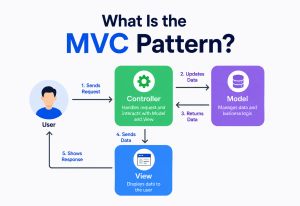
The catalogue hasn’t stood still since 1994, either. As new programming styles emerged — web applications, mobile apps, distributed systems running across many machines — engineers began cataloguing new families of patterns suited to those specific contexts, like patterns for organising web application code (Model-View-Controller being a well-known example) or patterns for coordinating communication between independent services. The original 23 remain the foundation almost everyone learns first, precisely because the problems they solve — object creation, structural composition, and communication — are so fundamental that they show up no matter what kind of software you’re building, decades later.
Why It Matters So Much
You could, of course, solve every design problem from scratch every single time, ignoring every pattern that’s ever been catalogued. Some small projects do exactly that, and it’s fine at a small scale. But as a codebase grows and more engineers touch it, working without shared, proven solutions starts to cost real time and introduce real risk. Here’s what design patterns actually buy a team:
A common language
Saying “let’s wrap this in a Decorator” communicates an entire design idea in seconds, instead of requiring a lengthy whiteboard explanation.
Tested by thousands of projects
Patterns aren’t guesses — they’re solutions that have already been battle-tested across countless real systems, so their weaknesses are well understood.
Skip the reinventing
Recognising “this is a Strategy problem” lets an engineer jump almost straight to a solution shape, instead of exploring from a blank page.
Familiar shapes, faster ramp-up
A new engineer who already knows common patterns can understand unfamiliar code faster, because the shapes are recognisable.
There’s also a subtler benefit that experienced architects value highly: patterns encode not just a solution, but the trade-offs of that solution. A well-documented pattern tells you not only how to solve the problem, but also what you’re giving up by choosing that approach — extra complexity, a little more memory use, an additional layer of indirection. That built-in honesty about trade-offs is often more valuable than the solution itself, because it helps a team make an informed choice rather than a blind one.
Consider two teams solving the same problem — letting different parts of a shopping app react whenever an order’s status changes. A team unfamiliar with patterns might wire each interested part directly into the order-processing code, creating a tangle where the order class has to know about payment tracking, email sending, and inventory updates all at once. A team that recognises this as an Observer problem instead keeps the order class blissfully unaware of who’s listening, and adding a new reaction later — like a new analytics tracker — requires touching nothing but the new piece itself. Same problem, same amount of code, wildly different long-term cost.

The Anatomy of a Pattern
Every properly documented design pattern, no matter which catalogue it comes from, is described using the same four essential ingredients. Understanding these four parts makes it far easier to read about any new pattern you encounter in the future, because you’ll always know exactly what to look for.
The name is more valuable than it first appears — a good name becomes a piece of shared vocabulary the moment it’s coined. The problem describes when the pattern applies, and just as importantly, when it doesn’t. The solution is described abstractly, usually with a diagram showing roles and relationships rather than a specific programming language, precisely so it can be adapted anywhere. And the consequences section — often the most skipped, and most important, part — honestly lays out the trade-offs so a team can decide whether this particular solution is worth its cost in their particular situation.
The Three Families of Patterns
The Gang of Four organised their 23 patterns into three broad families, based on what kind of problem each pattern is trying to solve. This grouping has stuck around for three decades because it’s genuinely useful for quickly narrowing down which pattern might fit your situation.
| Family | What It’s About | Question It Answers |
|---|---|---|
| Creational | How objects get built | “How should this object be created, so creation stays flexible?” |
| Structural | How objects and classes are connected | “How should these pieces be composed together into a bigger structure?” |
| Behavioral | How objects communicate | “How should responsibility and communication be shared between these objects?” |
Twenty-three might sound like a lot to memorise, but almost nobody carries the entire catalogue around in their head. What experienced architects actually develop, over years of practice, is a sense for which family a new problem belongs to — is this a creation problem, a structure problem, or a communication problem? Once you know the family, narrowing down to the exact right pattern becomes a much smaller step.
Creational Patterns: Building Things Wisely
Creational patterns solve one core problem: creating an object directly, using the raw new-object syntax every language provides, can quietly lock you into decisions you’ll regret later — which exact class to build, how many to build, or how complicated the building process is. Creational patterns give you more flexible, controlled ways of bringing objects into existence.
The underlying worry all five creational patterns share is this: the moment your code says, in plain terms, “build exactly this specific class,” you’ve hard-wired a decision that’s often hard to change later. If tomorrow you need to build a different, related class instead — a different notification type, a different database connection, a different UI theme — you’d have to hunt down and rewrite every single place in the codebase that hard-wired the old decision. Creational patterns push that decision-making into one controlled, easily changeable place instead of scattering it everywhere.

Singleton
Sometimes, a program needs exactly one of something, and only one, no matter how many times different parts of the code ask for it — a single shared settings object, or a single connection manager. The Singleton pattern guarantees that no matter how many times you request this object, you always get back the exact same instance.
class AppSettings:
    _instance = None

    def __new__(cls):
        if cls._instance is None:
            cls._instance = super().__new__(cls)
            cls._instance.theme = "light"
        return cls._instance

# Both variables point to the exact same object underneath
a = AppSettings()
b = AppSettings()
print(a is b)  # True — same instance every time
It’s worth knowing upfront that Singleton is one of the most debated patterns in the entire catalogue — many experienced architects consider it easy to overuse, because a single shared object accessible from anywhere can quietly create hidden dependencies throughout a codebase. It’s covered in more depth later, in the pitfalls section.
Factory Method
Rather than writing code that directly builds a specific class, the Factory Method pattern hands off the actual building work to a separate method — a “factory” — whose entire job is deciding which specific class to construct. This means the rest of the program never needs to know the exact class being built; it only needs to trust the factory to hand back something usable.
class EmailNotification:
    def send(self, message):
        return f"Emailing: {message}"

class SMSNotification:
    def send(self, message):
        return f"Texting: {message}"

def create_notifier(channel):
    # The factory decides which class to build — callers never
    # need to know EmailNotification or SMSNotification exist.
    if channel == "email":
        return EmailNotification()
    return SMSNotification()

notifier = create_notifier("email")
print(notifier.send("Order shipped!"))
Builder
Some objects need many optional pieces put together step by step — a burger with a changeable list of toppings, or a complex configuration object with dozens of optional settings. The Builder pattern walks through construction one step at a time, letting the caller assemble exactly what they need without a constructor that demands twenty parameters at once.
Families of related objects
Produces whole families of related objects — like a matching button, checkbox, and scrollbar for one visual theme — guaranteeing they always match.
Copy, don’t rebuild
Creates a new object by cloning an existing one, which is often far cheaper than building a complex object completely from scratch.
Structural Patterns: Fitting Things Together
Structural patterns solve a different family of problem: how do you combine existing classes and objects into larger, more capable structures, often without changing the pieces themselves? These patterns shine especially brightly when you need to connect code you don’t control — a third-party library, an older legacy system, or code owned by another team.
What ties all seven structural patterns together is a kind of respect for what already exists. Instead of rewriting an awkward class from scratch, or forcing every part of a system to look identical, structural patterns focus on building thoughtful connective tissue — an adapter here, a wrapper there, a simplified front door over a messy back room — so that pieces built at different times, by different people, with different assumptions, can still work together smoothly.
Adapter
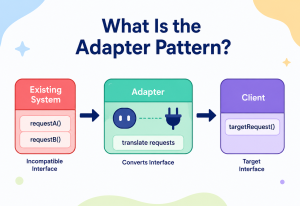
Picture a travel plug adapter — it doesn’t change your laptop charger or the foreign wall socket at all; it simply sits between the two, translating one shape into the other so they can connect. The Adapter pattern does exactly this in code: it wraps an existing class with a mismatched interface, translating its methods into the shape your code actually expects.

class LegacyPrinter:
    # An old class with an inconvenient method name
    def old_print_text(self, text):
        return f"[legacy] {text}"

class PrinterAdapter:
    # Wraps the legacy class and exposes the modern method name
    # our application already expects everywhere else.
    def __init__(self, legacy_printer):
        self._legacy = legacy_printer

    def print(self, text):
        return self._legacy.old_print_text(text)

printer = PrinterAdapter(LegacyPrinter())
print(printer.print("Invoice ready"))
Decorator
Think about a plain coffee, and then adding milk, then caramel syrup, then whipped cream — each addition wraps around the drink before it, adding something new without changing what’s already there. The Decorator pattern lets you add new behaviour to an individual object by wrapping it, layer by layer, instead of creating a huge, unwieldy family of subclasses for every possible combination.
Facade
A car’s dashboard is a facade — behind it sits a tangle of engines, sensors, and wiring, but the driver only ever needs to deal with a steering wheel and a few pedals. The Facade pattern provides one clean, simple entry point in front of a complicated subsystem, hiding the messy details from everyone who doesn’t need to see them.
Trees of similar things
Lets you treat a single object and a whole group of objects the same way — like a single file and an entire folder both supporting “delete.”
A stand-in with control
Provides a placeholder object that controls access to the real one — useful for security checks, caching, or delaying expensive work.
Split to vary independently
Separates an abstraction from its implementation so each can change on its own, without one being locked to the other’s design.
Share what’s common
Saves memory by sharing the parts that are identical across many objects, instead of duplicating that data over and over.
Behavioral Patterns: Coordinating Communication
Behavioral patterns solve the trickiest family of problem: how should separate objects talk to each other, share responsibility, and stay coordinated, without becoming so tightly tangled together that changing one always means changing all the others?
This is often considered the hardest family to master, because unlike creation or structure, communication problems tend to be less visible on a diagram — they live in the timing and sequence of what happens when, rather than in a static picture of boxes and lines. A system with poor behavioral design might look perfectly reasonable on a whiteboard and still be a nightmare to change in practice, because every object quietly assumes too much about every other object’s internal behaviour. The eleven behavioral patterns in the original catalogue each attack a different flavour of that coordination problem.
Observer
Think about subscribing to a YouTube channel — you don’t have to keep checking back to see if a new video was posted. The channel simply notifies every subscriber the moment something new arrives. The Observer pattern works the same way in code: one object (the “subject”) keeps a list of interested objects (the “observers“) and automatically notifies all of them whenever something worth knowing about happens.
class NewsChannel:
    def __init__(self):
        self.subscribers = []

    def subscribe(self, callback):
        self.subscribers.append(callback)

    def publish(self, headline):
        # Every subscriber gets notified automatically —
        # the channel doesn't need to know who they are.
        for notify in self.subscribers:
            notify(headline)

channel = NewsChannel()
channel.subscribe(lambda h: print(f"Reader A saw: {h}"))
channel.subscribe(lambda h: print(f"Reader B saw: {h}"))
channel.publish("Big game tonight!")
Strategy
Imagine a GPS app that can calculate a route by car, by bike, or on foot — the destination stays the same, but the method for getting there swaps out entirely. The Strategy pattern packages up a family of interchangeable algorithms and lets the calling code pick whichever one fits the moment, without rewriting the surrounding logic.
def by_car(distance):
    return distance / 60

def by_bike(distance):
    return distance / 18

class RoutePlanner:
    def __init__(self, strategy):
        self.strategy = strategy  # any function with the same shape

    def estimate_time(self, distance):
        return self.strategy(distance)

planner = RoutePlanner(by_bike)
print(planner.estimate_time(9))  # swap strategy, nothing else changes
Template Method
Think of a recipe card that lists fixed steps — preheat, mix, bake, cool — but leaves the exact ingredients up to the cook. The Template Method pattern defines the overall skeleton of an algorithm in a base class, while letting subclasses fill in specific steps without changing the overall order.
Turn actions into objects
Wraps a request as an object, making it possible to queue, log, undo, or delay actions — the same way a restaurant order ticket represents a request.
Behaviour that shifts
Lets an object change its behaviour entirely when its internal state changes, like a traffic light behaving differently at red, yellow, or green.
Step through, one at a time
Provides a standard way to move through a collection’s items one by one, without exposing how that collection is actually stored internally.
Pass it along
Sends a request along a chain of possible handlers until one of them takes care of it — like customer support escalation levels.
Patterns vs. Principles vs. Anti-Patterns
These three terms get mixed up constantly, so it’s worth pinning down the difference clearly, because each plays a genuinely different role in an architect’s thinking.
| Term | What It Is | Example |
|---|---|---|
| Design Principle | A general guideline about what makes code healthy | “Depend on abstractions, not concrete details” (part of SOLID) |
| Design Pattern | A specific, reusable solution shape to a recurring problem | Observer, Factory Method, Adapter |
| Anti-Pattern | A common but harmful “solution” that looks tempting but backfires | A “God Object” that tries to do absolutely everything |
Principles are the compass; patterns are proven routes that already tend to point the compass in the right direction; anti-patterns are the well-worn paths that look inviting but lead somewhere painful. A useful way to think about it: principles tell you what good looks like in the abstract, patterns give you a concrete way to get there for a specific recurring problem, and anti-patterns are the mistakes that happen when a shortcut is chosen instead.
A design pattern that’s misapplied to the wrong problem — used just because it’s familiar, not because it fits — can itself quietly turn into an anti-pattern. The pattern isn’t magic; it only helps when the problem it’s solving genuinely matches the problem you actually have.
Choosing the Right Pattern
Knowing 23 pattern names is far less useful than knowing how to figure out which one — if any — actually fits the problem sitting in front of you right now. Here’s a practical way to approach it, step by step.
Name the actual problem first
Before reaching for any pattern, write down, in plain words, exactly what’s difficult or fragile about the current design — not which pattern you think might apply.
Identify the family
Is this a creation problem, a structure problem, or a communication problem? That alone narrows 23 options down to a handful.
Check the consequences, honestly
Read the trade-offs of the candidate pattern. Does the extra layer of indirection genuinely earn its keep here, or is it solving a problem you don’t actually have yet?
Start simple, add the pattern later if needed
Many experienced architects deliberately write the plain, boring version first, and only introduce a formal pattern once the recurring problem actually shows up in practice.
Good Reasons to Use One
- The exact same problem keeps appearing in multiple places.
- You genuinely expect this part of the system to change or grow.
- A team member will need to recognise the shape quickly later.
Weak Reasons to Use One
- “It sounds impressive” or “I just learned this pattern.”
- The problem is simple and unlikely to ever change.
- Nobody on the team will recognise the pattern anyway.
Common Pitfalls
Design patterns are a genuinely useful tool, but even useful tools cut both ways when they’re misapplied. A handful of failure modes show up over and over again once a team first discovers the catalogue.
Pattern Overuse (“Golden Hammer”)
Once someone learns a handful of patterns well, there’s a strong temptation to see every problem as a chance to use one — sometimes called the “golden hammer” trap, where if the only tool you have is a hammer, everything starts looking like a nail. This usually produces code that’s more complicated to read than the plain, straightforward version would have been.
Singleton Overuse
Because it’s one of the easiest patterns to understand, Singleton is often reached for far more than it should be. A single shared, globally accessible object can quietly create hidden dependencies between completely unrelated parts of a system, and it can make automated testing significantly harder, since tests can no longer easily swap in a fresh, isolated version of that object.
Learning Names Without Understanding Trade-Offs
Memorising that “Decorator adds behaviour by wrapping” without understanding when the extra layers of wrapping start to hurt readability leads to applying the pattern in situations where a simple method would have been clearer and easier to maintain.

Code reviews where a pattern is defended with “but it’s the correct pattern for this” rather than “here’s the specific problem it’s solving in this code.” A pattern used without a genuine, current problem behind it is decoration, not design.
Frequently Asked Questions
A handful of questions come up whenever a team first starts using design patterns as a shared design vocabulary. Getting straight answers on them early keeps discussions moving forward instead of stalling on definitions.
Do I need to memorise all 23 Gang of Four patterns?
Not really. Most working architects comfortably use a small handful of patterns regularly — Factory Method, Strategy, Observer, Adapter, and Decorator are especially common — and simply know that a wider catalogue exists to consult when a less common situation shows up.
Are design patterns tied to one specific programming language?
No. Patterns describe a general shape of solution, independent of language. The exact code used to express a pattern in Python will look different from the code used to express the same pattern in Java or C#, but the underlying idea, and the problem it solves, stays identical.
Do design patterns apply outside object-oriented programming?
The original Gang of Four catalogue was written specifically with object-oriented programming in mind, but the deeper habit, recognising and naming recurring solution shapes, applies everywhere. Functional programming, for instance, has its own well-known recurring patterns, even though they look quite different on the page.
Is using a design pattern always a sign of good code?
No — a pattern used to solve a problem that genuinely exists is a sign of good code. A pattern used because it seemed clever, or because a tutorial mentioned it, without a real matching problem, often makes code harder to follow rather than easier.
How is a design pattern different from a framework or a library?
A library or framework is actual, runnable code you install and call directly. A design pattern is not code at all — it’s an idea, a reusable shape for solving a problem, that you implement yourself, by hand, using whatever language and tools you’re already working with.
Key Takeaways
Everything above collapses neatly into a handful of durable ideas — the ones worth carrying into any future project where design patterns are likely to come up.
Remember This
- A pattern is a shape, not code. A design pattern is a reusable, proven solution shape for a problem that keeps recurring across software projects — not a finished piece of code to copy.
- Two origins, one lineage. The idea originated in architecture with Christopher Alexander and was brought into software by the Gang of Four’s 1994 catalogue of 23 patterns.
- Four ingredients. Every well-documented pattern has four parts: a name, the problem it solves, the general solution, and its honest consequences or trade-offs.
- Three families. Patterns fall into three families: creational (how things are built), structural (how things are connected), and behavioral (how things communicate).
- Three distinct terms. Patterns, principles, and anti-patterns are three different things — a compass, a proven route, and a tempting wrong turn, respectively.
- Problem first, pattern second. The right way to choose a pattern is to name the actual problem first, then look for a matching pattern — never the other way around.
- Beware pattern soup. The most common pitfall isn’t using too few patterns — it’s reaching for one without a genuine, current problem behind it.