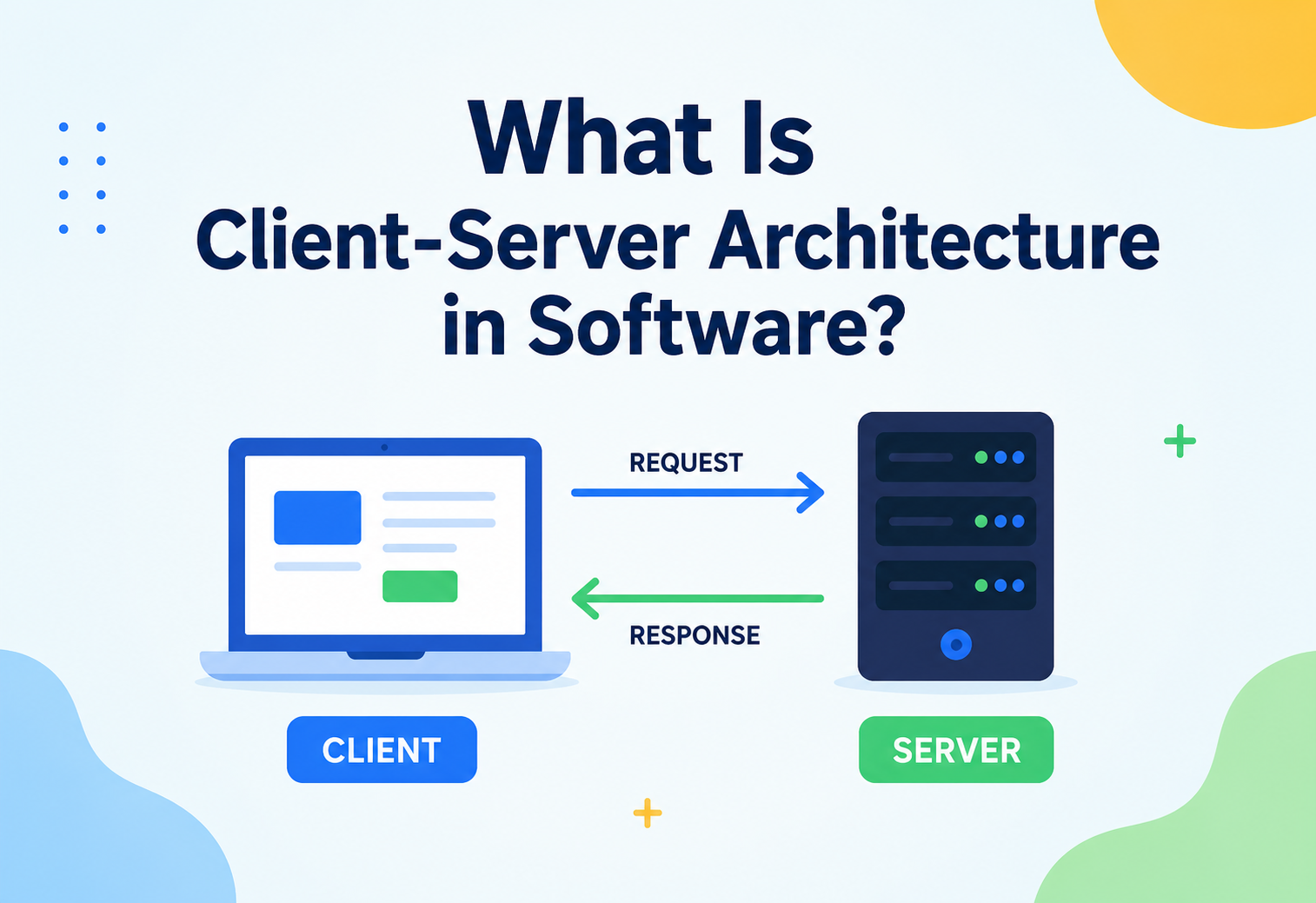
What Is Client-Server Architecture in Software?
Every time you open an app and something appears on your screen a moment later, two very different computers just had a quiet conversation. This guide explains that conversation from the ground up — who is asking, who is answering, and why this simple idea runs almost the entire internet.
The Big Idea, in One Breath
A pizza shop and a phone call are all you need to picture it. One side asks for something; the other side, always ready, sends it back. That is the entire internet in a single sentence.
Imagine calling a pizza shop. You dial the number, ask for a large pepperoni pizza, and then you wait. You didn’t have to know how the dough was made, which oven it went into, or who chopped the toppings — you simply asked, and a little while later, the answer arrived at your door. The shop, meanwhile, sat ready the whole time, waiting for someone, anyone, to call and ask for something.
Almost every app on your phone works on exactly this idea. One side — called the client — asks for something. The other side — called the server — has what is being asked for, and sends it back. Your phone is the caller. Somewhere far away, a powerful computer is the pizza shop, sitting ready, waiting for requests, day and night. This simple back-and-forth is called client-server architecture, and it is quite possibly the single most common way computers talk to each other across the entire internet.
Think of a library. You don’t wander behind the counter and start pulling books off the shelves yourself. You walk up to the librarian, ask for the book you want, and the librarian — who knows exactly where everything is kept — hands it to you. You are the client making a request; the librarian, with all the books and all the knowledge of where they live, is the server. This is client-server architecture happening in a room made of paper instead of code.
What makes this idea so powerful is how naturally it splits work into two very different jobs. The client’s job is to be friendly, fast, and easy for a person to use. The server’s job is to be reliable, organised, and trustworthy with information that matters. Neither side needs to be good at the other’s job, and that clean split is exactly what has let this one simple idea quietly power everything from a five-minute weather check to a multi-billion-dollar online bank, without needing to be reinvented each time.
What Client-Server Architecture Really Is
A precise definition of the two roles, plus the shared “language” — a protocol — that makes the whole conversation work.
Formally speaking, client-server architecture is a way of organising a computer system into two distinct roles. The client is the part that asks for a service or piece of information — often the app or website you interact with directly. The server is the part that owns the resource being asked for, and its whole job is to listen for requests and respond to them correctly.
The two sides don’t have to sit anywhere near each other. Your phone might be in one country while the server answering it sits in a data centre thousands of kilometres away, and the whole exchange can still happen in a fraction of a second. What actually connects them is a shared, agreed-upon language called a protocol — a set of rules both sides follow so the request makes sense on arrival and the response makes sense when it comes back.
If someone asks “what is client-server architecture?”, the simplest honest answer is: it is one computer asking a question, and another computer — usually bigger, always waiting — giving the answer.
There is also a quiet but important agreement buried inside this relationship: the server promises to always be listening, and the client promises to always ask in a way the server understands. This is sometimes called a contract between the two sides. As long as both sides honour that contract, it genuinely doesn’t matter what the client looks like on the outside — a phone, a laptop, a smart fridge — or what the server is built from underneath. The contract is what makes the whole relationship dependable, the same way a postal address works no matter what kind of envelope you put it on.
Why This Idea Was Invented
Early computers did everything on one machine. As personal computers arrived, a new question appeared: how do many machines share the same accurate information? Client-server was the answer.
In the earliest days of computing, a single giant computer did absolutely everything, and people gathered around it or connected simple terminals directly to it just to get anything done. As computers became smaller, cheaper, and more personal, a new problem appeared: how could thousands of separate personal computers all share the same information — the same customer records, the same files, the same up-to-date prices — without everyone needing a full copy of everything on their own machine?
Client-server architecture solved this beautifully. Instead of every computer holding a full copy of everything, one trusted computer — the server — would hold the real, official copy of the information, and every other computer could simply ask it questions whenever needed. This kept information consistent, made it far easier to update in one place, and let ordinary, everyday computers stay lightweight, since they no longer needed to store or manage everything themselves.
This shift happened alongside the rise of office networks in the 1980s, when companies began connecting many personal computers together and needed one shared place to keep records like customer databases and shared files. It grew even further once the internet became something ordinary people used every day, because suddenly the “server” didn’t have to sit down the hallway — it could sit anywhere in the world, and millions of clients could reach it at once. That leap is really what turned a useful office trick into the backbone of the modern internet.
Here is what that shift actually bought engineering teams, in very concrete terms:
No conflicting copies
Everyone asks the same server, so nobody is ever working from an outdated or conflicting version of the information.
Easier to secure and manage
Updates, security fixes, and new rules only need to be applied in one place — the server — rather than on every single device.
Devices can stay simple
The client doesn’t need enormous power or storage, since the heavy lifting happens on the server’s side.
Many people, one resource
Thousands of clients can request the same information from the same server at once, the way thousands of people can call the same pizza shop.
The Two Sides, Explained
Client, server, and the shared language between them. Three pieces — each with a specific job, none pretending to do the others’ work.

The Client
The client is whatever software sits closest to the person using it — a phone app, a web browser, a desktop program. Its main job is to collect what the user wants, package it into a proper request, send it off, and then present whatever comes back in a way that makes sense to a human. A client never stores the “official” version of shared information; it only ever borrows a copy for a moment.
Good client design pays close attention to what happens while waiting for that answer to arrive. A well-built client shows a friendly loading indicator, handles a slow or dropped connection gracefully, and never leaves a person staring at a frozen, unresponsive screen wondering if anything is happening at all. This attention to the “waiting moment” is a surprisingly large part of what separates an app that feels pleasant to use from one that feels frustrating, even when the underlying server is doing exactly the same job in both cases.
The Server
The server is a program, usually running on a powerful, always-on machine, whose entire purpose is to sit and wait for requests, then respond to them correctly and quickly. A single server can often handle requests from thousands, sometimes millions, of clients at the very same time, thanks to careful engineering that lets it juggle many conversations at once without getting confused.
A server’s reputation is built almost entirely on two qualities: correctness and availability. Correctness means always giving back the right answer, never a wrong or corrupted one. Availability means actually being there, ready to answer, whenever a client comes calling — day or night, holiday or ordinary Tuesday. Losing either quality, even briefly, is usually far more noticeable to users than almost any other kind of software problem, which is exactly why so much engineering effort goes into protecting both.
The Network and the Protocol
Connecting the two is a network — often the internet itself — and a shared protocol that both sides agree to follow, such as the familiar HTTP used by websites. A protocol is simply an agreed-upon way of speaking, the same way two people speaking the same language can understand each other clearly, even if they have never met before.
Different kinds of conversations use different protocols, much like a phone call and a letter both deliver a message but follow completely different rules for how that message is structured. Loading a web page typically uses HTTP or its more secure cousin HTTPS; sending an email typically uses a protocol built specifically for mail; streaming a video uses yet another protocol tuned for sending large amounts of data smoothly. The client and server don’t need to invent their own private language every time — they simply pick whichever established protocol fits the job, and both sides already know exactly what to expect from the other.
How a Conversation Actually Happens
Let’s walk through something familiar — opening a weather app to check if it is going to rain — and follow the four quiet steps behind it.
Let’s walk through something familiar — opening a weather app to check if it is going to rain — and follow it step by step.
All of this typically happens in well under a second. The astonishing part is that this exact same four-step dance — ask, travel, look up, answer — repeats itself billions of times every single minute across the world, for everything from checking the weather to transferring money to loading a video. It is a small, humble pattern doing an enormous amount of quiet, invisible work.
The very same four steps play out no matter what is actually being requested. Sending a message on a chat app follows the identical journey: you type and hit send, the message travels to a server, the server figures out which device it needs to reach and stores a copy safely, and then the message travels back out to your friend’s phone, appearing as if by magic. Underneath that magic sits the exact same humble pattern — ask, travel, look up, answer — quietly doing its job, over and over, billions of times a day, almost always going unnoticed by the person simply enjoying a fast, working app.

Different Flavours of Client-Server
Two-tier, three-tier, thin, thick, one-to-many, many-to-many. A handful of familiar variations, each suited to a different balance of simplicity, safety, and scale.
Not every client-server system is built the same way. Over the years, a handful of useful variations have emerged, shaped by how much work should sit on the client versus the server, and how many layers should sit in between.
Two-Tier Architecture
The simplest possible setup: a client talks directly to a server, and that is the whole picture. It is fast to build and easy to understand, and it suits smaller applications where the client and server can safely have a direct, ongoing relationship — like a small desktop program talking straight to a local database.
Three-Tier and N-Tier Architecture
As systems grow, a middle layer is often introduced between the client and the data — usually an application server that handles business logic, sitting between the client and the database server. This keeps the client simple, keeps the database protected from direct outside contact, and allows each of the three parts to be improved or replaced somewhat independently.
Thin Client vs. Thick Client
A thin client does very little on its own — it mostly just displays what the server sends it, the way a plain web page behaves. A thick client (sometimes called a “fat client”) does much more of the work itself, storing data locally and only checking in with the server occasionally, the way some desktop software works even without a constant internet connection. Neither is universally better; the right choice depends on how reliable the network is and how powerful the user’s device happens to be.
One-to-Many vs. Many-to-Many
Most client-server systems are “many-to-many” in practice — many clients, each talking to one of several servers, often spread across different locations to share the load. A single small server handling every client alone is a “one-to-many” setup, simpler to run but far more limited in how many people it can serve at once.
None of these flavours are mutually exclusive, either. A single modern application might use a thin client for its mobile app, a thicker client for its desktop software, and a three-tier setup underneath both, simply because different users and different devices call for slightly different trade-offs. Choosing the right flavour is less about picking one “correct” answer and more about matching the shape of the conversation to the needs of the people having it.
Strengths That Made This Idea So Popular
A side-by-side look at what client-server gets right, and where the very same centralised design quietly starts to struggle.
What It Gets Right
- Centralised data is easier to keep accurate, secure, and backed up
- Clients can stay lightweight, since heavy work happens on the server
- Updates and fixes on the server reach every user instantly, without needing to touch each device
- Well understood, well documented, and supported by decades of tools and expertise
- Naturally supports many users accessing the same resource at once
Where It Struggles
- If the server goes down, every connected client is affected at once
- A very popular server can become overwhelmed without careful planning
- The server is a single, attractive target for anyone trying to cause harm
- Running and maintaining server infrastructure costs real, ongoing money
- Distance between client and server can add noticeable delay
Picture one water tower supplying an entire town. It is wonderfully efficient — one place to maintain, one place to check the quality of the water. But if that single tower ever springs a serious leak, the whole town feels it at once. Client-server systems share this exact trade-off: beautifully efficient when the server is healthy, and painfully noticeable to everyone the moment it isn’t.
It is worth noticing that almost every strength on this list traces back to the same root idea: centralising control in one trustworthy place. That centralisation is precisely what makes the style so easy to secure, so easy to update, and so easy to reason about — and, just as honestly, it is exactly the same centralisation that creates the weaknesses covered next. Strength and weakness, in this case, really are two sides of the very same coin.
A Closer Look at the Trade-offs
Four honest trade-offs baked into a centralised design, plus a small warning about the assumption that trips up almost every growing team.

The Single Point of Failure Problem
Because clients depend entirely on the server for the information they need, the server becomes what engineers call a “single point of failure” — if it stops working, everything built on top of it stops working too. This is why serious systems rarely rely on just one server machine; they usually run several copies working together, so one going down doesn’t bring the whole service to a halt.
The Crowd Problem
A server built to comfortably handle a thousand requests a minute can genuinely struggle if a hundred thousand requests suddenly arrive at once — the digital equivalent of a huge crowd rushing through one small doorway all at the same moment. This is why popular websites invest heavily in extra servers and clever traffic-management techniques, especially around big, predictable moments like a major sale or a live event.
The Distance Problem
Even at the speed of light, information takes real, measurable time to travel across long distances. A server sitting far away from its users will always feel slightly slower than one sitting nearby, which is why many services keep copies of their servers in several regions around the world, so each user’s request has a shorter physical distance to travel.
This is closely related to a technique called caching, where a temporary copy of frequently requested information is kept somewhere closer to the user — sometimes on the client itself, sometimes on smaller helper servers scattered around the world — so most requests never need to travel all the way back to the original, distant server at all. It is the digital equivalent of a large chain of shops keeping a local warehouse in every city, rather than shipping every single order from one central factory on the other side of the world.
The Security Target Problem
Because the server holds the valuable, official copy of everything, it naturally becomes the most attractive target for anyone attempting to cause harm. This isn’t a flaw unique to client-server thinking, but it does mean that protecting the server properly — through careful access rules, encryption, and constant vigilance — deserves to be treated as a core part of the architecture itself, not an afterthought bolted on at the end.
Assuming one server will always be “enough.” Almost every real growth story in software includes a moment where a single server quietly became the thing holding the whole system back.
When to Use It — and When Not To
Three quick signals that client-server is the right foundation, plus a simple ownership question that reveals when it isn’t.
Client-server architecture is an excellent default choice for almost any application where information needs to be shared, kept accurate, and controlled centrally — which describes the overwhelming majority of websites, mobile apps, and online services in use today. It is especially strong whenever security, consistency, and easy central updates matter more than raw independence between users.
It is a weaker fit for situations demanding that users keep working seamlessly with zero server involvement at all, such as certain offline-first tools, or for very large-scale file sharing between equal participants, where a peer-to-peer approach — covered later in this guide — can spread the load more evenly instead of leaning on one central point.
If your application needs one trustworthy, shared, accurate version of information that many people rely on, client-server is very likely still the right foundation to build on.
A simple way to test the decision is to ask: “who owns the real, official version of this information?” If the honest answer is a single, clear place — a company, a database, a service — then client-server almost always fits naturally, because that owner can simply become the server. If the honest answer is “nobody really owns it, everyone just contributes and shares equally,” that is usually the earliest sign that a more decentralised approach, like peer-to-peer, might be worth exploring instead.
Common Mistakes Teams Make
Even a well-understood, decades-old idea gets built poorly surprisingly often. Five recurring mistakes to keep on the shortlist.
Even a well-understood, decades-old idea like this one gets built poorly surprisingly often, usually through small oversights rather than a lack of knowledge. Most of these mistakes share a common thread: they work perfectly fine while a system is small, quiet, and only lightly used, and only reveal themselves once real growth, real users, or real bad actors start putting genuine pressure on the system.

Trusting the Client Too Much
A tempting shortcut is to let the client decide something important on its own — like calculating a price — and simply trust whatever number it sends back. Since a determined person can modify what a client sends, servers should always double-check anything important themselves, never blindly trusting what arrives from the outside.
No Plan for the Server Going Down
Some teams only discover how much they depended on a single server the day it actually fails. Planning ahead — running backup servers, setting up automatic failover, monitoring health continuously — turns a potential disaster into a brief, barely noticeable hiccup.
Ignoring Distance and Delay
Building and testing an app only on a fast local network can hide how sluggish it will feel to someone far away with a weaker connection. Testing under realistic, imperfect network conditions catches this early, long before real users are the ones discovering it.
Overloading a Single Server With Every Responsibility
Cramming file storage, business logic, and heavy calculations onto one single server often works fine at first, then quietly becomes a serious bottleneck as usage grows. Splitting responsibilities across more than one server, even a modest number, tends to pay for itself quickly.
Changing the Contract Without Warning
When a server’s expected request or response format changes without telling the clients relying on it, older versions of an app can suddenly start breaking in confusing ways. Thoughtful teams version their server’s contract clearly and support older versions for a reasonable transition period, so updates roll out smoothly instead of catching anyone off guard.
Best Practices for Building It Well
Five habits that quietly turn a fragile server into a dependable one over months and years, without demanding heroic effort.
Never rely on just one server
Run more than one copy of critical servers, so the failure of any single machine doesn’t take the whole service down with it.
Verify everything on the server
Treat every request as if it might be incorrect or even intentionally harmful, and check it properly before acting on it.
Don’t repeat unnecessary work
Store frequently requested answers temporarily, close to the client, so the server isn’t asked the exact same question over and over.
Watch the server’s health constantly
Track how busy the server is and set up alerts long before it becomes genuinely overwhelmed, not after.
Fail politely, not silently
When something does go wrong, show the user a clear, friendly message instead of leaving them staring at a blank, confusing screen.
It also helps enormously to plan for growth from the very beginning, even if that growth is still far away. Designing a server so it can be duplicated easily — rather than assuming there will only ever be one — means that when popularity does arrive, scaling up becomes a calm, well-rehearsed step rather than a stressful, last-minute scramble. Teams that build this habit early tend to look back and find that their “big scaling problem” quietly turned into a routine, well-practised Tuesday afternoon task instead of a genuine emergency.
Quick Questions, Straight Answers
Short, honest answers to the questions engineers ask most often once client-server thinking has clicked into place.
Is client-server the same as the internet?
Not exactly, though they are closely related. The internet is the network that connects computers together; client-server is one very common way of organising how those connected computers talk to each other over that network. A great deal of the internet does run on the client-server idea, but they aren’t the same thing.

Can a computer be a client and a server at the same time?
Yes, this happens often. A single machine might act as a server, answering requests from users, while also acting as a client itself, requesting information from yet another server behind the scenes — the way a website’s server might ask a separate payment company’s server to process a transaction.
Why do some apps still work without internet access?
Many apps are designed as thick clients, storing enough information locally to keep working for a while without contacting the server, and simply syncing up again once a connection returns. This blends the convenience of offline use with the accuracy benefits of a central server.
Is client-server architecture still relevant today, or has it been replaced?
It is very much still relevant — in fact, it is the quiet foundation underneath most modern architectural styles, including microservices, which are really just many small, specialised servers, each with their own clients calling on them.
Does a big application always need many servers?
Not necessarily at the very start. Plenty of successful applications begin life running comfortably on a single, well-configured server, and only add more once real, measured demand actually calls for it. The important part isn’t starting with many servers — it is designing things so that adding more, later, is straightforward rather than a painful rebuild.
Compared to Other Architectural Styles
A side-by-side view of client-server, peer-to-peer, and microservices — followed by three familiar systems in which client-server thinking is quietly doing its job every day.
Placing client-server next to a couple of close relatives makes its particular trade-offs easier to picture.
| Style | Shape | Best For | Main Limitation |
|---|---|---|---|
| Client-Server | One asks, one answers, centrally | Most websites, apps, and online services | Server can become a bottleneck or single point of failure |
| Peer-to-Peer | Every participant is equal | File sharing, decentralised systems | Harder to guarantee consistency and control |
| Microservices | Many small client-server pairs | Large products, many teams | Operationally complex to run smoothly |
Interestingly, microservices architecture doesn’t really replace client-server thinking — it multiplies it. Instead of one client talking to one big server, you end up with many small servers, each handling one specific job, each still being asked questions by clients in exactly the same request-and-response spirit. Understanding client-server deeply, in other words, quietly prepares you to understand almost every other style built on top of it.
Online banking
Your banking app is the client; the bank’s secure servers hold the real account data and confirm every transaction.
Your inbox app asks a mail server for new messages and hands over anything you write to be delivered onward.
Online multiplayer games
Game servers keep the official version of the match — scores, positions, results — while each player’s device acts as a client showing their own view of it.
Looking across all three examples, the same underlying shape keeps reappearing: something valuable and shared sits centrally, and everything else simply asks politely for its share of it. Once that shape feels familiar, spotting it in a brand-new app becomes almost second nature — and recognising it is often the first real step toward understanding how that app is actually built underneath its screens.
Key Takeaways
If you remember only six ideas from this guide, let it be these. Together they cover most of the situations where client-server thinking actually matters in day-to-day engineering practice.
Remember This
- Two roles, one conversation. Client-server architecture splits a system into two roles: the client that asks, and the server that answers.
- A shared protocol connects them. A well-defined language lets both sides understand each other, no matter how far apart they physically are.
- The tiers describe the layers. Two-tier, three-tier, and n-tier setups differ mainly in how many layers sit between the client and the data.
- Centralisation has a price. It offers centralised control, security, and consistency, at the cost of the server becoming a potential bottleneck or single point of failure.
- Discipline keeps it healthy. Redundancy, validation, caching, and monitoring are what turn a fragile server into a dependable one.
- Everything else is built on top. Nearly every modern architectural style, including microservices, is really built on this same simple ask-and-answer idea, just repeated many times over.

