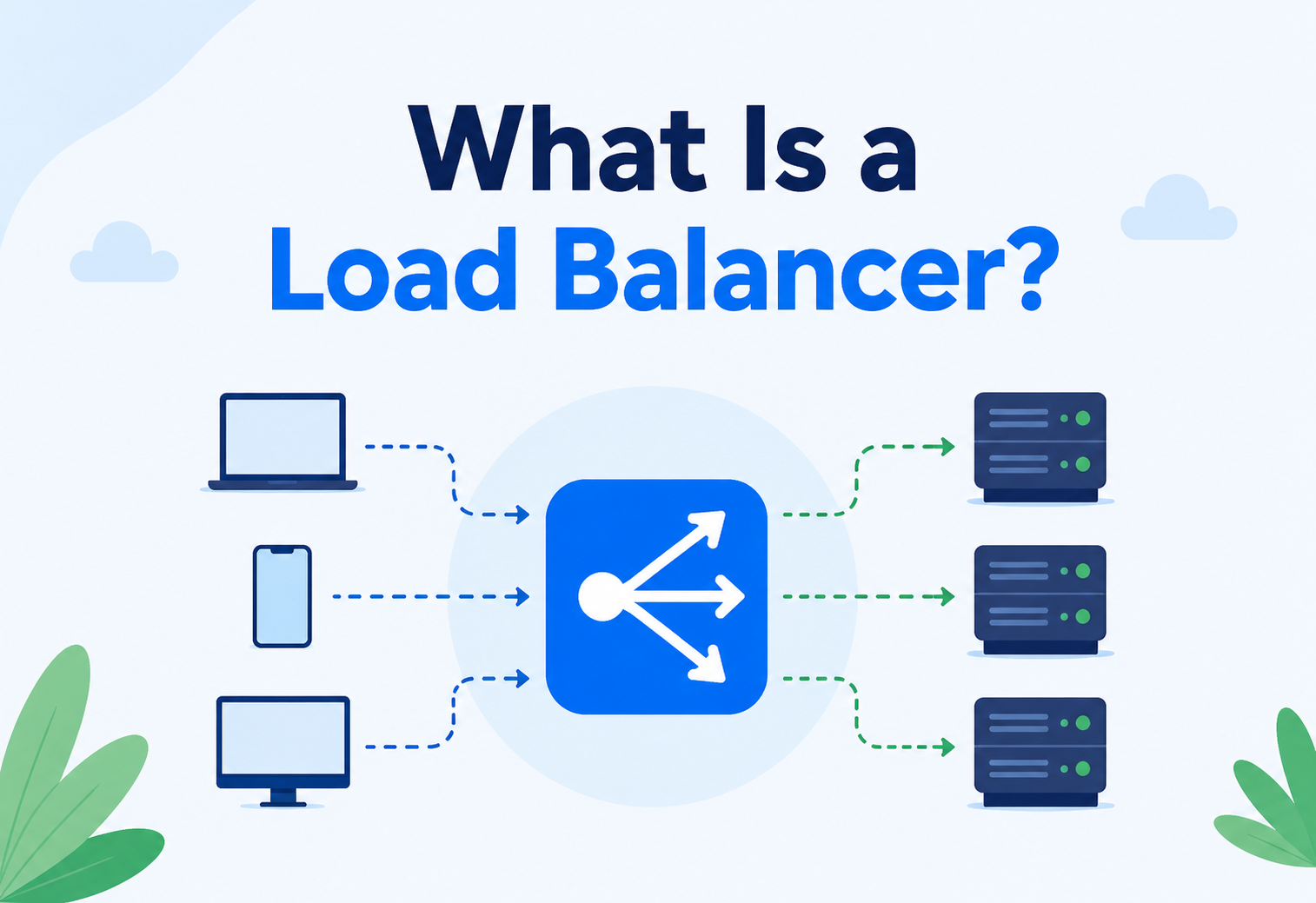
What Is a Load Balancer?
Behind almost every busy website is an invisible traffic director quietly deciding which of many identical servers should answer each incoming request. That director is called a load balancer, and this complete guide walks through what it really is, why it matters so much, how it actually works, the algorithms it follows, where it lives in a real system, and how to choose the right one for your situation.
The Big Idea, in One Breath
A load balancer is the friendly staff member standing at the front of a busy queue, quietly waving each new arrival toward whichever line is shortest and moving fastest — and quietly routing around any spot that stops working.
Picture an amusement park with one wildly popular roller coaster and only a single entrance gate. On a busy Saturday, hundreds of excited kids all funnel into the exact same line, shuffling forward one painfully slow step at a time, while three other perfectly good gates around the side of the ride sit completely empty because nobody realised they were even there.
Now imagine the park hires a friendly staff member whose entire job is to stand at the front, watch all four gates at once, and calmly wave newcomers toward whichever line is shortest and moving fastest. Suddenly the wait shrinks dramatically, all four gates get used fairly, and if one gate’s turnstile jams and stops working, that staff member simply stops sending anyone there until it is fixed. Nobody in line even notices anything went wrong.
That helpful staff member is exactly what a load balancer does for a website or app. Instead of gates and roller coasters, it is dealing with millions of requests and rows of computers called servers, but the underlying idea is identical: spread the crowd out evenly, keep everyone moving quickly, and quietly route around any spot that stops working.

Think about a busy toll plaza on a highway with ten toll booths. If every car lined up behind just one booth, traffic would back up for miles even though nine other booths sat empty. A good toll plaza spreads cars across all ten booths evenly, so traffic keeps flowing. A load balancer is that same spreading‑out trick, applied to internet traffic instead of cars.
What a Load Balancer Really Is
A load balancer is a device or piece of software that sits between users and a group of servers, deciding which server should handle each incoming request so that no single server ever gets overwhelmed while others sit idle.
It is an invisible middleman — users never know it is there, and they never need to. They simply type in a web address, and somewhere behind the scenes, the load balancer quietly decides which of possibly hundreds of identical servers will actually answer that particular request.
The group of servers a load balancer manages is often called a server farm or a server pool — a cluster of machines that all hold copies of the same application and the same data, ready to step in and help at a moment’s notice. Because every server in the pool is capable of answering any request, the load balancer has real freedom to pick whichever one makes the most sense at that exact instant.
If someone asks “what does the load balancer do here?”, they are really asking: “Who decides which server answers each visitor, and how do they make sure nobody gets stuck waiting behind a busy one?”
It is worth noting that a load balancer is not really “smart” in the way a person is smart. It does not understand what a website sells or what a video is about. It follows a specific, carefully chosen set of rules — an algorithm — over and over again, thousands of times a second, tirelessly and without ever getting tired or distracted. That tireless consistency is precisely what makes it so valuable.
It also helps to be clear about what a load balancer is not. It does not create new computing power out of nowhere — the actual work of answering each request is still done entirely by the servers behind it. What a load balancer contributes is not raw strength; it is coordination. A team of five ordinary workers, properly coordinated so nobody stands around idle while someone else drowns in tasks, will almost always outperform that same team left to sort themselves out randomly — and that coordinating role is the entire reason a load balancer exists.
Why It Matters So Much
It is tempting to think of a load balancer as a minor convenience — a nice‑to‑have that speeds things up a little. In reality, for any application serving a meaningful number of people, it is closer to a foundational necessity, because it touches four different pillars of what makes a system genuinely good.
Stays online
If one server crashes or needs maintenance, the load balancer quietly reroutes traffic to healthy servers, so visitors never even notice.
Grows with demand
New servers can be added to the pool at any time, and the load balancer immediately starts sharing traffic with them.
Absorbs the shocks
It can spot and spread out sudden floods of malicious traffic, softening the blow of certain kinds of attacks before they reach real servers.
Feels fast
By routing each request to the least busy, best‑placed server, load balancing shrinks waiting time and keeps things snappy.
These four benefits reinforce each other in a way that is easy to underestimate. A system that is highly available but painfully slow does not feel trustworthy. A system that is fast but falls over the moment one server hiccups does not feel reliable. A load balancer is one of the few pieces of architecture that meaningfully improves all four qualities at the same time, which is exactly why it shows up in nearly every serious, large‑scale system ever built.
There is also a quieter economic argument for load balancing that rarely makes it into flashy marketing material. A single, enormous, extremely powerful server is usually far more expensive, machine for machine, than several smaller, ordinary servers combined — and it still eventually runs out of room to grow. Spreading work across a pool of modest, replaceable servers is often not just more resilient, but genuinely cheaper, while also giving a team the freedom to add or remove capacity in small, affordable steps rather than one enormous, all‑or‑nothing purchase.
How It Actually Works, Step by Step
Even though the technology underneath can get fairly sophisticated, the actual sequence of events a load balancer follows is refreshingly simple, and it repeats itself constantly, over and over, for every single request that arrives.
A request arrives
A user’s device sends a request — say, loading a web page — and it lands on the load balancer instead of going directly to any one server.
The load balancer checks its rules
It looks at its chosen algorithm and, often, the current health and workload of every server in the pool.
A server is chosen
Based on those rules, one specific, healthy, appropriately available server is selected to handle this particular request.
The request is forwarded
The load balancer passes the request along to the chosen server, which does the actual work of generating a response.
The response comes back
The chosen server’s answer travels back — sometimes through the load balancer, sometimes directly — and the user sees a normal, fast response, with no idea any of this happened.
This entire loop happens in a tiny fraction of a second, and it repeats independently for every single request — meaning two people loading the very same web page at the very same moment could easily end up being served by two completely different servers, without either of them ever noticing a thing.
There is a small but important detail hiding inside step four. Some load balancers act as a full proxy, meaning they receive the entire response from the chosen server and then personally hand it back to the user, staying involved in the conversation the whole way through. Others act more like a pass‑through director, pointing the user’s connection toward the right server and then largely stepping out of the way, letting the response travel back more directly. Both approaches accomplish the same basic goal, but the proxy style gives the load balancer more visibility and control, while the pass‑through style tends to shave off a small amount of extra delay.

The Building Blocks
Strip away the jargon, and every load‑balanced system is really built from just a handful of moving pieces working together.
The people asking
Anyone using a browser, an app, or another program that sends requests toward the system.
The traffic director
The component making the moment‑to‑moment decision about which server should answer which request.
The team of workers
A group of interchangeable servers, each capable of handling any request sent its way.
The wellness checkups
Small, regular tests the load balancer runs to confirm each server is actually alive and working properly.
These four pieces combine into a simple but powerful shape: many possible answers to the exact same question, one gatekeeper deciding which answer to use each time, and a constant, quiet stream of check‑ins making sure every option on the table is actually still good to go.
Two Families of Algorithms
The rules a load balancer follows to pick a server are collectively called a load balancing algorithm, and nearly every algorithm in use today falls into one of two broad families, distinguished by a single question: does the load balancer bother checking how busy each server actually is right now, or does it just follow a fixed, pre‑agreed pattern no matter what?
Static Algorithms
- Follow a fixed, predetermined pattern.
- Simple, fast, and easy to set up.
- Do not look at real‑time server health or load.
Dynamic Algorithms
- Constantly check current server conditions.
- Adapt intelligently as things change.
- More complex to configure and maintain.
Neither family is universally “better” — they are simply suited to different situations. A small system with near‑identical, reliably fast servers might do perfectly well with a simple static approach. A large, unpredictable system with servers of different strengths, occasional slowdowns, and constantly shifting traffic almost always benefits from the extra awareness that dynamic algorithms provide.
Static Algorithms in Detail
Static algorithms do not ask any questions about the current moment — they simply follow the same fixed pattern, request after request, regardless of what is actually happening on each server.
Round robin is the simplest and most widely recognised static approach. Requests are handed out to each server in turn, one after another, and once the list reaches the end, it loops back around to the beginning and starts again. It is wonderfully easy to set up and works well when every server in the pool is roughly equal in power.
Weighted round robin is a small but meaningful upgrade: each server is given a “weight,” reflecting how much traffic it can realistically handle. A powerful server might be given a weight of three, meaning it receives three requests for every one request sent to a smaller, less powerful machine. This lets a pool of mismatched hardware still be shared out fairly.
IP hash is a different approach entirely. Instead of simply cycling through servers, this method runs the visitor’s IP address through a mathematical formula, and the result consistently points to the same server every time that same visitor comes back. This is especially handy when it matters that one particular user keeps landing on the exact same server across multiple requests.
Static algorithms shine in simple, predictable environments — a small, uniform server pool, steady traffic, and no urgent need to react to sudden slowdowns. They are the reliable, low‑maintenance choice when complexity is not earning its keep.
It is worth noting that “static” does not mean “bad” — it means “not currently paying attention.” A well‑run pool of identical, healthy servers can happily run on round robin for years without issue, and the simplicity itself becomes an advantage: fewer moving parts means fewer things that can quietly misbehave, and troubleshooting a static setup tends to be far more straightforward than untangling a dynamic one when something unexpected happens.
Dynamic Algorithms in Detail
Dynamic algorithms take the extra step of actually checking in on each server before making a decision — how busy is it right now, how quickly has it been responding lately, how much spare capacity does it genuinely have left.
Least connections keeps count of how many active connections each server currently has open, and simply routes each new request to whichever server has the fewest. It is a straightforward, sensible way to avoid piling more work onto an already‑busy machine.
Weighted least connections is the same idea as least connections, but adjusted for the fact that not every server is equally powerful. A stronger server is allowed to comfortably carry more active connections than a weaker one before it is considered “busy,” so the comparison stays fair across mismatched hardware.
Least response time also factors in how quickly each server has actually been responding lately. A server might have few active connections but still be answering slowly for some other reason — this method catches that nuance and steers new traffic away from it.
Resource‑based routing is the most detailed dynamic approach. A small helper program running on each server constantly reports back real information — how much processing power and memory is actually free — and the load balancer uses that live snapshot to make its decision, rather than relying on connection counts alone.
All this extra awareness comes at a cost: dynamic algorithms need more setup, more ongoing monitoring, and slightly more computing overhead than their static cousins. For large, high‑stakes systems, that trade is almost always worth making.
Many real‑world load balancers actually blend several of these ideas together rather than picking just one in isolation, weighing connection counts, response times, and configured weights all at once to arrive at a single, well‑rounded decision for each request. This blended approach captures most of the benefit of dynamic routing while smoothing out the occasional odd decision that a single, narrower method might make on its own.

Different Kinds of Traffic to Balance
Not every request looks the same to a load balancer, and treating them all identically can quietly cause trouble. A handful of traffic patterns are worth recognising, because each one nudges the right configuration in a slightly different direction.
Quick in, quick out
A typical webpage request that arrives, gets answered, and disappears within a fraction of a second — the easiest pattern to balance evenly.
Staying on the line
Video calls, live chats, and real‑time dashboards keep a single connection open for minutes or hours, which changes how “busy” a server really is.
Calm, then chaos
Ticket sales or flash sales sit quiet for days, then explode into an enormous spike within seconds, testing how fast a load balancer can react.
Big, slow transfers
Large file uploads or downloads tie up a connection for longer, meaning fewer of them can be handled at once per server.
Long‑lived connections deserve special attention, because a server holding open a hundred video calls is genuinely busier than a server holding open a hundred connections that each finish in a tenth of a second — even though a naive counting method might treat both situations as identical. This is exactly why dynamic algorithms that consider response time and resource usage, not just a raw connection count, tend to handle these more demanding, modern traffic patterns far more gracefully than a simple static method ever could.
Layer 4 vs Layer 7: How Deep Does It Look?
Networking engineers often describe how computers talk to each other using a mental map called the OSI model, broken into seven numbered layers. Load balancers are usually described by which of these layers they are able to see into, and this distinction turns out to matter quite a lot in practice.
A Layer 4 load balancer works down at the transport level, which mostly deals with plain network addresses and port numbers. It can see who is talking to whom, but it has no idea what is actually being said — it cannot tell a request for a product photo apart from a request to check out a shopping cart. This makes it extremely fast, since there is very little to inspect, but somewhat limited in how cleverly it can route traffic.
A Layer 7 load balancer works up at the application level, meaning it actually opens and reads the contents of each request — the web address being requested, special tags called headers, small bits of stored information called cookies, and more. This lets it make far more precise decisions, like sending anyone asking for a video file toward servers built for streaming, while sending shopping cart requests toward a completely different set of servers optimised for that job. The cost of this extra insight is a small amount of additional processing time, though on modern hardware that added delay is usually barely noticeable.
| Question | Layer 4 | Layer 7 |
|---|---|---|
| What does it look at? | IP address and port only | Full request content — URL, headers, cookies |
| Speed | Extremely fast | Slightly slower, still very quick |
| Routing precision | Basic, one‑size‑fits‑all | Highly specific, content‑aware |
| Best suited for | Simple, high‑volume traffic | Complex apps with varied request types |
Types of Load Balancing by Scope
Beyond how deep a load balancer looks into a request, it is also worth understanding the different scales at which load balancing operates — from a single building to the entire planet.
Inside one application
Balances traffic across servers dedicated to a single app’s different functions — browsing, checkout, search — each tuned for its own job.
Inside one network
Works with IP addresses and network‑level details to spread traffic efficiently within a data centre or local network.
Across the whole planet
Spreads traffic across data centres in different countries, usually sending each visitor to whichever location is geographically closest.
At the address book level
Configures the internet’s own “phone book” to hand out different server addresses to different visitors, spreading load before a connection even begins.
These types are not rivals competing for the same job — they are layers that stack neatly on top of one another in a mature system. Global server load balancing might first decide which country’s data centre should handle a visitor, DNS load balancing might help spread that decision across multiple entry points, and then a local application load balancer takes over once traffic actually arrives inside that data centre, making the fine‑grained, moment‑to‑moment decisions covered earlier in this guide.
A useful habit is to ask, for any given system, “at what scale is traffic actually a problem here?” A small business serving customers from a single country rarely needs global server load balancing at all — a single, well‑configured application load balancer might be the entire solution. A worldwide platform, on the other hand, genuinely needs several of these types working together, since no single layer alone can solve both “which continent” and “which exact server” at the same time.
Hardware vs Software Load Balancers
Just like the servers they manage, load balancers themselves come in two broad flavours, and choosing between them is itself an architectural decision worth understanding.
Hardware Load Balancers
- A dedicated physical device, purpose‑built for the job.
- Can push enormous amounts of traffic very reliably.
- Sits neatly in a data centre rack, centrally managed.
Software Load Balancers
- Runs as a program on ordinary servers or in the cloud.
- Flexible, easy to scale up or down quickly.
- Generally far cheaper to set up and maintain over time.
Hardware load balancers require a real upfront investment — buying the physical box, configuring it, and maintaining it over its lifespan — and if traffic suddenly grows past what that one box can handle, upgrading means physically buying and installing another one, which takes real time. Software load balancers sidestep this problem almost entirely: because they are just programs, they can be spun up, resized, or duplicated within minutes, which fits naturally with how modern cloud computing works. This flexibility is a major reason why software‑based and cloud‑managed load balancers have become the default choice for most new systems being built today, even though dedicated hardware appliances remain common in large, established data centres with very specific performance needs.
There is a nuance worth adding here, though: “software” does not automatically mean “cheaper” once traffic gets truly massive. At an enormous, sustained scale, the raw efficiency of purpose‑built hardware can sometimes edge out general‑purpose software running on ordinary machines. This is exactly why the biggest technology companies in the world often end up using a careful mix of both — leaning on flexible, cloud‑native software load balancers for most of their needs, while still reserving specialised hardware appliances for their most demanding, highest‑traffic entry points.
Health Checks and Failover: The Safety Net
A load balancer that blindly kept sending traffic to a crashed server would be worse than useless — it would actively be steering visitors toward failure. This is why health checks sit at the very core of how a trustworthy load balancer operates.
A health check is a small, regular test the load balancer sends to every server in its pool — often nothing more than a lightweight “are you there and working?” message sent every few seconds. If a server answers correctly and quickly, it stays in the rotation. If it answers too slowly, incorrectly, or not at all, the load balancer marks it as unhealthy and stops sending it new traffic, at least until it starts passing its checkups again.
When a server does fail, the process of automatically shifting its workload onto healthy servers is called failover. Done well, failover happens so quickly and smoothly that users never notice anything went wrong at all — their request simply gets handled by a different, perfectly healthy server instead, with no visible interruption. This quiet resilience is arguably the single most valuable, if least glamorous, thing a load balancer does.
Health checks themselves usually come in two flavours. Active checks involve the load balancer reaching out on its own, on a fixed schedule, and asking each server directly whether it is okay. Passive checks instead watch real traffic as it flows past, noticing when a particular server’s genuine responses start turning into errors or slow replies, without needing to send any extra, artificial test requests at all. Combining both approaches tends to catch problems fastest — active checks catch a server that is completely unresponsive, while passive checks catch a server that is technically still replying, just badly.
Sticky Sessions: When One Server Should Remember You
Spreading every single request evenly sounds ideal, but it occasionally causes an awkward problem. Imagine adding items to a shopping cart, only to have your very next request land on a completely different server that has no memory of what you just added. Without any coordination, your cart could appear empty a moment after you filled it.
Session persistence, often nicknamed “sticky sessions,” solves this by making sure one particular visitor keeps landing on the same server for the length of their visit, rather than being freely reshuffled with every new request. This can be achieved a few different ways — remembering a visitor by a small cookie stored in their browser, or, as covered earlier, hashing their IP address so the math always points back to the same server.
Sticky sessions trade away a little bit of perfectly even distribution in exchange for consistency. Modern systems often solve the underlying problem differently — by storing cart and session data somewhere all servers can share, like a common database — which removes the need for stickiness altogether and keeps the full benefit of even load spreading.
There is a real cost hiding inside sticky sessions worth being honest about. If the one server a visitor is “stuck” to happens to fail, that visitor’s entire session — their cart, their login state, whatever they were doing — can disappear along with it, unless something else has been put in place to protect against exactly that. This is precisely why many architects treat sticky sessions as a short‑term convenience rather than a long‑term foundation, gradually moving toward shared, server‑independent storage as a system matures and reliability starts to matter more than the small convenience of avoiding that extra shared‑database lookup.
Where It Lives in a Real System
Load balancers rarely work entirely alone. In a mature, real‑world architecture, they usually sit at more than one layer, each one solving a slightly different piece of the overall puzzle.
A visitor’s request might first be pointed toward the nearest geographic region by a global load balancer, then handed to a regional load balancer that spreads traffic across dozens of application servers within that data centre, and finally, deeper inside the architecture, another load balancer might sit in front of a database cluster, spreading read requests across several database replicas. Each layer solves its own local version of the exact same problem — too many requests, not enough of any one resource — using whichever scope and algorithm fits best at that particular level.
It is worth pointing out that not every system needs every one of these layers. A modest application serving a single country might comfortably stop at a single, well‑configured application load balancer, and adding global or database‑level balancing before there is a genuine need for it would be solving a problem the system does not actually have yet. Recognising how many layers a given system genuinely requires — rather than automatically copying the architecture of a much larger company — is itself a valuable, mature piece of architectural judgment.

A Worked Example: Balancing an Online Store
Concepts click faster with a concrete story, so let us walk through one the way an architect might actually narrate it. Imagine a growing online store that currently runs on a single server, and traffic has grown to the point where that one server visibly struggles every evening between six and nine, when most shoppers are browsing.
Add more servers
Three more identical servers are brought online, each holding a copy of the same store application and connected to the same shared database.
Place a load balancer in front
A software load balancer is set up so that shoppers now connect to it first, rather than to any one server directly.
Choose an algorithm
Since all four servers are identical in power, weighted round robin is not necessary — plain round robin is chosen for its simplicity.
Turn on health checks
Every ten seconds, the load balancer quietly asks each server “are you still working?” and stops sending traffic to any that stop answering correctly.
Solve the shopping cart problem
Rather than relying on sticky sessions, cart data is moved into a shared database all four servers can read from, so any server can pick up any shopper’s cart at any time.
Watch the evening rush
The next six‑to‑nine rush arrives, and instead of one server struggling alone, four servers each comfortably handle a quarter of the load, and response times stay smooth throughout.
Notice that nothing about the store itself changed — the same application, the same products, the same checkout flow. What changed was purely how traffic got distributed across a now‑larger pool of identical helpers, coordinated by a load balancer quietly making thousands of small, sensible decisions every minute.
Real‑World Use Cases
Load balancing is not an abstract concept confined to textbooks — it is actively working behind an enormous share of the internet’s biggest, busiest moments. Whenever a headline mentions a website that “handled record traffic without a hitch,” there is a very good chance a well‑configured load balancer, quietly and without fanfare, was a major part of the reason why.
Surviving big sales
A flash sale can multiply traffic overnight; load balancers spread that sudden crowd across many servers instead of letting one buckle.
Smooth playback for millions
Video platforms route viewers to servers close to them and capable of handling heavy, sustained bandwidth demands.
Fast, fair matches
Game servers get balanced so players connect to the least congested, lowest‑latency option available.
Reliable behind the scenes
Countless apps quietly rely on load‑balanced APIs to stay responsive even when thousands of other apps are calling them at once.
A handful of documented, real examples show just how much difference this makes in practice. A pest‑control company scaling its digital operations reported handling three times more throughput after adopting a modern load balancing setup. A sports‑analytics company using artificial intelligence to track live broadcasts managed to cut its hosting costs by roughly ninety percent after refining how it balanced load across its infrastructure. A nonprofit organisation running online coding events for schools was able to comfortably absorb a fourfold spike in traffic during its busiest events, purely because its load balancer was ready for it. These are not edge cases — they are a preview of what thoughtful load balancing makes possible for organisations of very different sizes and purposes.
Load Balancing in Modern Microservices
Modern applications are increasingly built as a collection of small, independent services rather than one large, unified program — an approach often called microservices. This shift has actually multiplied how often load balancing shows up inside a single system, rather than reducing the need for it.
In a microservices world, load balancing does not just happen once, at the system’s front door — it happens constantly, between services talking to each other deep inside the architecture. A checkout service calling an inventory service might itself need to balance across several running copies of that inventory service, entirely invisible to the end user placing an order. Tools built specifically for this internal, service‑to‑service balancing are often called service meshes, and they apply many of the same ideas covered in this guide — health checks, dynamic algorithms, failover — but aimed inward, at conversations happening entirely between a system’s own moving parts.
Container orchestration platforms, the tools that manage large fleets of these small services, typically bundle their own built‑in load balancing as a core feature rather than an optional add‑on. An ingress controller, for example, acts much like the Layer 7 load balancer described earlier, sitting at the edge of a cluster of containers and routing each incoming request to whichever internal service and specific running copy of it makes the most sense. The underlying logic has not changed from the fundamentals in this guide — only the scale and the sheer frequency with which it happens has grown, often thousands of times more often than in a simpler, single‑application system.
A Short History of Load Balancing
Load balancing was not born fully formed — it grew up alongside the internet itself, evolving as traffic grew from a trickle into a flood.
In the earliest days, a technique called round robin DNS did the job almost by accident: a domain name was simply configured to point to several different server addresses, and visitors were handed a different one each time almost at random, with no awareness of which server was actually healthy or busy.
As traffic kept growing through the 1990s and 2000s, dedicated hardware appliances emerged — physical boxes built specifically to sit in front of server farms and make smarter, faster routing decisions than DNS alone ever could. These hardware load balancers became a fixture of serious data centres, prized for their raw speed and reliability, even though they came with a real price tag and a real installation project attached.
The rise of cloud computing changed the picture again. Suddenly, load balancing did not need to mean buying a physical box at all — it could be a service, summoned in minutes, resized on demand, and billed by actual usage rather than a fixed upfront cost. This shift did not make hardware appliances disappear entirely, but it opened the door to a much wider range of organisations, including small teams and individual developers, being able to run genuinely resilient, load‑balanced systems without ever touching a physical server rack.
Each stage of this history solved the limitations of the one before it — DNS load balancing was too blind, hardware appliances were too rigid and expensive, and cloud‑based software load balancers arrived to offer both intelligence and flexibility at once. Understanding this progression makes today’s options feel less like arbitrary choices and more like the natural next step in a long‑running story.
Cost, Pros & Cons
Load balancing is not free, and a thoughtful architect treats its cost as part of the overall design rather than an afterthought. As with every architectural decision, it is also worth being honest about both sides of the ledger.

Cost Considerations
Three separate cost factors are worth keeping in mind.
Direct cost
Whether it is a physical appliance or a metered cloud service, the load balancer itself has a price tag attached, which grows with the amount of traffic it handles.
Doubling up, safely
Running the load balancer redundantly, so it is not itself a single point of failure, effectively doubles that particular cost.
Indirect cost
A well‑balanced pool can often run comfortably with fewer total servers than an unbalanced one, since none of them sit needlessly idle.
That final point is worth dwelling on, because it is often the most financially significant one. A poorly balanced system frequently ends up over‑provisioned, with extra servers added simply to compensate for uneven distribution rather than genuine extra demand. A well‑tuned load balancer can sometimes let an organisation run on noticeably fewer total servers while still comfortably meeting the exact same peak demand — turning load balancing from a pure added expense into something that can genuinely pay for itself.
Pros and Cons of Load Balancing
Strengths
- Dramatically improves uptime and resilience to failure.
- Lets a system grow simply by adding more servers.
- Improves speed by avoiding overloaded machines.
- Adds a useful layer of protection against certain attacks.
Trade‑Offs
- Introduces a new component that itself needs to be reliable.
- Adds a small amount of processing delay to every request.
- Requires thoughtful configuration to avoid new kinds of mistakes.
- Can add real cost, especially with premium hardware appliances.
That first point in the trade‑offs list deserves special attention: if a load balancer itself has no backup and it fails, it can single‑handedly take down an otherwise perfectly healthy system, simply because every request was forced to pass through it. This is exactly why serious deployments almost always run load balancers in redundant pairs or clusters — turning the traffic director itself into something that cannot become a single point of failure.
Common Pitfalls
A handful of mistakes show up again and again when teams first start working with load balancers, and they are worth knowing about ahead of time. None of them stem from a lack of skill so much as from load balancing quietly being treated as a background detail rather than a first‑class part of the design.
Forgetting to make the load balancer itself redundant
A single load balancer with no backup simply moves the single point of failure one step earlier in the chain.
Skipping health checks, or setting them too loosely
A server that is technically running but silently failing can keep receiving traffic far longer than it should.
Overusing sticky sessions
Leaning too heavily on sticky sessions can quietly recreate the very unevenness a load balancer was supposed to prevent.
Choosing the wrong algorithm for the situation
A simple static method on a pool of very unevenly powered servers can leave the strongest machines underused and the weakest ones overwhelmed.
Treating it as a “set it and forget it” tool
Traffic patterns, server pools, and business needs all change over time, and a load balancer’s configuration deserves the same ongoing attention.
Ignoring long‑lived connections
Applying a simple connection‑counting method to video calls or streaming sessions can badly misjudge how busy a server really is.
Load Balancer vs. Related Ideas
A few neighbouring terms often get blurred together with load balancers. Keeping them separate in your mind makes architecture conversations much clearer.
| Term | Main Job | How It Differs |
|---|---|---|
| Load Balancer | Spreads traffic across many identical servers | Focused purely on distributing load evenly and avoiding overload |
| Reverse Proxy | Sits in front of servers, hiding them from the internet | Often includes load balancing, but its core job is masking and forwarding requests |
| API Gateway | Manages and secures access to a collection of APIs | Adds authentication, rate limiting, and routing logic, beyond simple traffic spreading |
| CDN | Stores copies of content close to users worldwide | Focused on reducing distance and delay, not on managing a live server pool |
In practice, these roles frequently overlap in the same physical product — many modern tools bundle reverse proxy behaviour, load balancing, and even some CDN‑like caching into a single piece of software. Understanding each concept on its own, though, makes it much easier to reason about what a particular tool is actually doing for a system at any given moment.
Choosing the Right Approach
With so many types, algorithms, and technologies covered in this guide, it is worth stepping back and offering a simple, practical way to decide what actually fits a given situation, rather than reaching for whichever option sounds the most impressive.
| If Your Situation Is… | A Sensible Starting Point |
|---|---|
| A small app, one region, uniform servers | A single software load balancer, round robin, basic health checks |
| A growing app with mixed server sizes | Weighted round robin or least connections, active health checks |
| A complex app with varied request types | A Layer 7 load balancer routing by content, plus dynamic algorithms |
| A global audience across continents | Global server load balancing layered above regional balancers |
| A microservices or containerised system | A built‑in ingress controller and service mesh, rather than a separate appliance |
None of these starting points are permanent commitments. A sensible architecture usually begins simple and earns its way into more sophisticated tooling only once real evidence — actual traffic patterns, actual server mismatches, actual growth — justifies the added complexity. Choosing the fanciest available option on day one, before a system has even proven it needs it, tends to create more maintenance burden than it solves problems.
Before adding any new load balancing feature, ask: “What specific problem, that we are actually experiencing right now, does this solve?” If the honest answer is “none yet, but it might help someday,” it is usually fine to wait.
Best Practices Checklist
Keep these habits in mind whenever setting up, reviewing, or troubleshooting a load‑balanced system.
Quick Glossary
A handful of terms carried most of the weight throughout this guide. Here they are again, gathered together in the plainest words possible.
The team of workers
A group of interchangeable servers, all capable of handling the same kinds of requests.
The rulebook
The specific set of rules a load balancer follows to decide which server gets each request.
The checkup
A small, regular test confirming a server is genuinely alive and working correctly.
The safety net
Automatically shifting traffic away from a failed server and onto healthy ones.
Remembering you
Keeping one visitor connected to the same server for the length of their visit.
Balancing across the globe
Spreading traffic across data centres in different countries or regions.
The microservices doorway
A load balancer built specifically to route traffic into a cluster of containerised services.
Balancing on the inside
A layer that manages load balancing and communication between a system’s own internal services.
Key Takeaways
If you remember nothing else from this guide, remember the eight ideas below — and the quiet habit of matching the technique to the actual shape of the traffic and servers in front of you.
Remember This
- The invisible traffic director. A load balancer is the invisible traffic director that spreads requests across a pool of servers, so no single machine ever gets overwhelmed.
- Four pillars at once. It improves availability, scalability, security, and performance simultaneously — which is why it is found in nearly every serious system.
- Two families of algorithms. Algorithms split into static, which follows a fixed pattern, and dynamic, which reacts to real‑time server conditions.
- Layer 4 vs Layer 7. Layer 4 balancers work fast but blind, only seeing addresses and ports; Layer 7 balancers read the actual content of each request for smarter routing.
- Health checks & failover. These form the safety net that quietly routes around failed servers before users ever notice.
- Layers of balancers. Real systems often layer several load balancers together — global, regional, and local — each solving its own piece of the puzzle.
- Redundancy is essential. A load balancer that is not itself made redundant simply relocates the single point of failure rather than removing it.
- Match to reality, not habit. Choosing the right type, algorithm, and configuration should always be driven by the actual shape of your traffic and servers, not by habit or assumption.

