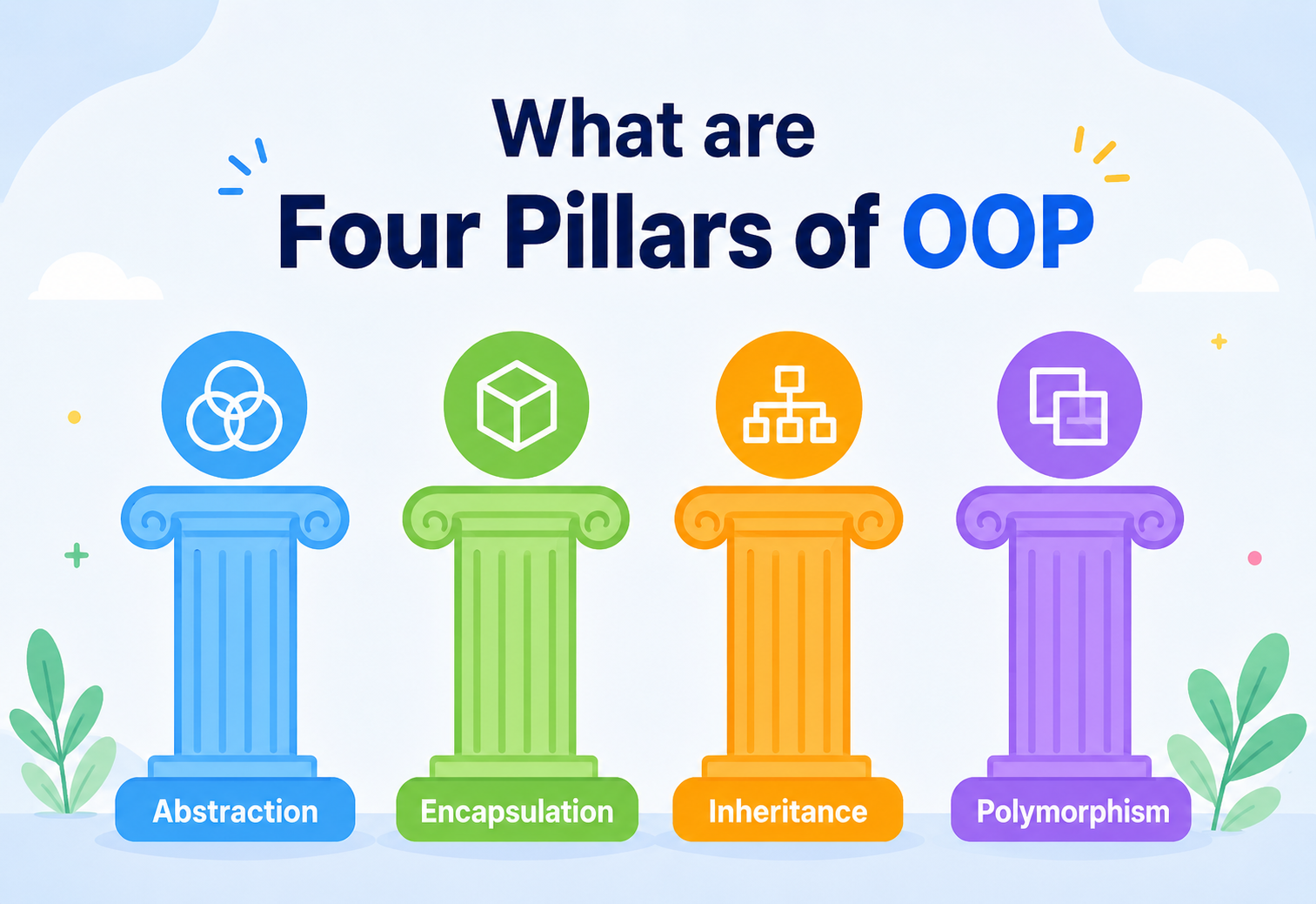
What are the Four Pillars of OOP?
Four ideas hold up almost every large piece of software you have ever used — from the app that orders your food to the game you played last weekend. They sound technical, but underneath, they are just clever ways of organising things. Here is what they really mean.
The Big Idea, in One Breath
Four ideas — encapsulation, abstraction, inheritance, polymorphism — hold up almost every large piece of software. Long, formal names for something everyone already understands from everyday life.
Imagine you are organising a toy box. Instead of throwing every toy in loose — cars mixed with blocks mixed with action figures — you decide to group things sensibly. Every car goes in its own little bin, and every bin works the same way: it has wheels, it can roll, it has a colour. You do not need to know how the wheels were glued on to play with the car. You just need to know it rolls.
That is basically what object-oriented programming, usually shortened to OOP, does for code. Instead of writing one giant tangle of instructions, programmers organise their code into little self-contained “objects” — each one bundling together its own information and its own abilities, much like that toy car bundles together its colour and its ability to roll. Four core ideas make this style of organising code work well, and programmers have nicknamed them the four pillars of OOP: encapsulation, abstraction, inheritance, and polymorphism.
Think of a pillar the way you would think of a pillar holding up a porch roof. Remove one, and the whole roof starts to sag in a different, unpredictable way. These four ideas work the same way inside object-oriented code — each one supports a different part of the design, and together they keep large programs from collapsing into confusion as they grow.
Here is another way to picture the whole idea before diving into each pillar individually: imagine a library. Every book on the shelf is organised the same way — a cover, a title, an author, a set of pages. You do not need to personally know how each book was printed or bound to pick it up and read it; the library’s system of consistent, predictable organisation is what lets thousands of completely different books coexist on the same shelves without turning into chaos. Object-oriented programming brings that same sense of consistent, predictable organisation to code, and the four pillars are the specific rules that keep it working smoothly as more and more “books” get added to the shelf.
These four words can sound intimidating the first time you hear them, mostly because of the long, formal names. But every single one of them describes something you already understand instinctively from everyday life — you just have not seen it written down as a rule for computers before. By the end of this guide, each pillar should feel less like a computer science term and more like common sense with a fancy label attached.
It is also worth knowing where these ideas came from, at least in broad strokes. Object-oriented programming grew out of a simple observation made decades ago: as programs got bigger and more ambitious, the old way of writing code — one long list of instructions from top to bottom — became almost impossible to manage. A change in one place could break something completely unrelated somewhere else, simply because everything was tangled together with no clear boundaries. Object-oriented programming offered a different approach: break the program into smaller, self-contained pieces that each manage their own small slice of responsibility, and let those pieces cooperate through clear, well-defined interactions. The four pillars are the specific rules that make those self-contained pieces trustworthy, reusable, and easy to reason about.

Objects and Classes, Quickly
A class is like a cookie cutter — a template. An object is an actual cookie made using that cutter. Both words appear on every page of this guide.
Before the four pillars make sense, it helps to understand the two words they all lean on: class and object.
A class is like a cookie cutter — a template that describes the shape something should have, without actually being the thing itself. An object is an actual cookie made using that cutter. You can make as many cookies as you like from one cutter, and each cookie is separate from the others, even though they all share the same basic shape.
class Dog:
    def __init__(self, name, breed):
        self.name = name
        self.breed = breed

    def bark(self):
        return f"{self.name} says woof!"

# creating two separate objects from the same class
buddy = Dog("Buddy", "Beagle")
milo = Dog("Milo", "Poodle")
Here, Dog is the cookie cutter — the class. buddy and milo are two actual cookies — two objects — each with their own name and breed, but both built from the exact same shape. Once this idea clicks, the four pillars become much easier to follow, because every single one of them is really just a rule about how classes and objects should be designed and how they should behave toward each other.
It also helps to notice that an object usually carries two kinds of things at once: its own private information, sometimes called its attributes or properties (like a dog’s name and breed), and its own set of actions it can perform, sometimes called its methods (like barking). Bundling information together with the actions that belong to it, rather than scattering them across a program separately, is the very first step toward everything the four pillars build on.
Encapsulation — Complexity Tucked Safely Inside
Bundle an object’s information with the actions allowed to change it. Then hide the messy details from the outside world, showing only a simple, safe way to interact.
Encapsulation means bundling an object’s information together with the actions that are allowed to use that information — and then hiding the messy inner details from the outside world, only showing a simple, safe way to interact with it.
Think of a television remote control. You press a button labelled “Volume Up,” and the volume goes up. You do not need to understand the circuits, infrared signals, or wiring hidden inside the remote to use it correctly. The remote’s outer shell hides all of that complexity and only shows you a few simple buttons. That is encapsulation — complexity tucked safely inside, simplicity shown on the outside.
In code, encapsulation usually shows up as keeping certain pieces of information private, and only allowing them to be changed through specific, controlled actions rather than letting any part of the program reach in and mess with them directly.
class BankAccount:
    def __init__(self, balance):
        self.__balance = balance  # hidden from outside

    def deposit(self, amount):
        if amount > 0:
            self.__balance += amount

    def get_balance(self):
        return self.__balance
Notice that nobody outside the class can directly set __balance to a negative number or skip the rules — they have to go through deposit(), which checks that the amount makes sense first. This is exactly why bank apps do not let you set your own balance by typing in a number; every change has to pass through a controlled, trustworthy gate.
Encapsulation prevents accidental damage. If any part of a large program could freely reach in and change any other part’s private information, one small mistake in a distant corner of the code could quietly break something important elsewhere — and nobody would know where to even start looking for the cause.
There is a second, quieter benefit to encapsulation worth mentioning: it makes future changes safer. If a bank later decides balances need to be stored differently — perhaps switching from a simple number to a more detailed record that tracks currency and cents separately — only the inside of the BankAccount class needs to change. Every other part of the program that calls deposit() and get_balance() keeps working exactly as before, because they never depended on knowing how the balance was stored internally in the first place. This freedom to change internal details without breaking the rest of the program is one of the most valuable, and most underappreciated, gifts encapsulation offers a growing codebase.

Abstraction — Only What You Need to See
Show only the essential, relevant details. Hide everything else that is not necessary for the task at hand.
Abstraction means showing only the essential, relevant details of something and hiding everything else that is not necessary for the task at hand. It is closely related to encapsulation, but the focus is slightly different: encapsulation is about protecting information, while abstraction is about simplifying what the user of an object even needs to think about in the first place.
Think about driving a car. You turn the steering wheel, press the pedals, and the car responds. You do not think about the fuel injection timing, the transmission gears shifting, or the hundreds of tiny electronic signals happening under the hood every second. The car’s design abstracts all of that away, leaving you with just a steering wheel and two or three pedals — the essential controls, nothing more.
In code, abstraction often shows up as a simple, clearly defined interface that hides a complicated implementation behind it.
class CoffeeMachine:
    def make_coffee(self):
        self.__grind_beans()
        self.__heat_water()
        self.__brew()
        return "Here's your coffee!"

    def __grind_beans(self): ...
    def __heat_water(self): ...
    def __brew(self): ...
Anyone using this CoffeeMachine only ever needs to call make_coffee(). The grinding, heating, and brewing steps happen automatically behind that one simple button-press, exactly the way a real coffee machine hides its inner mechanics behind a single “Brew” button.
A simple way to keep these two straight: encapsulation hides data to protect it from misuse, while abstraction hides complexity to make something easier to use. A locked toolbox is encapsulation. A single “on” switch on a complicated machine is abstraction.
Abstraction also shows up in a slightly different, more formal way in many object-oriented languages, through something called an interface or an abstract class. This is essentially a promise: “any object that claims to be this type must offer these particular actions, even though how each one actually carries out those actions is left up to that specific object.” A payment system, for example, might define an abstract idea of “Payment Method” that promises a charge() action, without specifying whether that charge happens through a credit card, a digital wallet, or a bank transfer. Each specific payment type fills in the real details later, but everyone using the abstract “Payment Method” idea can rely on that one shared promise.
A good way to test whether something counts as a useful abstraction is to ask: could a new user understand how to use this without reading any of its internal code? A car’s steering wheel passes that test easily. A tangle of exposed wires under the dashboard would not. The same test applies to a well-designed class — someone should be able to use it correctly by reading only its public actions, never needing to peek inside to understand what is really going on underneath.

Inheritance — Sharing What is Common
Let one class borrow the abilities and information of another, so common features do not need to be rewritten again and again from scratch.
Inheritance lets one class borrow the abilities and information of another class, so common features do not need to be rewritten again and again from scratch. The class doing the borrowing is usually called a child class or subclass, and the class being borrowed from is called the parent class or superclass.
Think about family traits. A child often inherits their parent’s eye colour or height without anyone having to teach them how to grow those features — they simply come along automatically as part of being that parent’s child. The child can still develop their own unique traits on top of what they inherited. Inheritance in code works the same way: a new class automatically gets everything the parent class already has, and can then add its own special abilities on top.
class Animal:
    def __init__(self, name):
        self.name = name

    def eat(self):
        return f"{self.name} is eating."

class Bird(Animal):
    def fly(self):
        return f"{self.name} is flying."

class Fish(Animal):
    def swim(self):
        return f"{self.name} is swimming."
Both Bird and Fish automatically get the eat() action from Animal, without anyone having to type it out twice. Bird adds its own special fly() ability, and Fish adds its own special swim() ability. Nobody had to repeat the shared “eating” behaviour in both places — that is the entire point of inheritance.
Inheritance is powerful, but stacking too many layers of parent-of-a-parent-of-a-parent classes tends to make code confusing to trace. Many experienced developers now prefer to use inheritance sparingly, only when the “is-a” relationship is genuinely true — a bird truly is a kind of animal, so that relationship is a natural fit.
Some languages also allow a child class to slightly adjust or override a behaviour it inherited, rather than accepting it exactly as-is. Picture a general Animal class where make_sound() simply returns a generic noise, but a Dog class overrides that same action to specifically return a bark, and a Cat class overrides it to return a meow. Each child class still counts as inheriting from Animal, but each one gets to put its own personal stamp on a shared behaviour. This particular ability — overriding an inherited action — turns out to be the exact bridge that connects inheritance to the fourth and final pillar.
Polymorphism — Many Shapes, One Instruction
A long word built from Greek roots meaning “many shapes.” One instruction produces different, fitting results depending on which object receives it.
Polymorphism is a long word built from Greek roots meaning “many shapes.” In code, it means the same action or the same instruction can behave differently depending on which object it is actually used with — without the code calling that action needing to know or care about the difference.
Think about the word “play.” Press play on a music app, and a song starts. Press play on a video game, and a level starts. Tell a child to “go play,” and they run outside. The single instruction “play” produces a completely different, sensible result depending on who or what receives it — and you do not need a separate word for each situation. That is polymorphism.
class Bird:
    def move(self):
        return "flies through the sky"

class Fish:
    def move(self):
        return "swims through water"

for creature in [Bird(), Fish()]:
    print(creature.move())

# flies through the sky
# swims through water
The code that calls creature.move() does not need a separate if statement checking “is this a bird? is this a fish?” It simply asks each object to move, and each object knows, on its own, how to respond correctly. This is what makes polymorphism so valuable — it lets programmers write one simple piece of code that keeps working correctly even when new kinds of objects are added later.
Without polymorphism, adding a new type of object — say, a Snake that slithers — would mean hunting down every place in the program that checks “is this a bird or a fish?” and adding a new check. With polymorphism, the Snake simply defines its own move() method, and everything else keeps working without a single change.
Polymorphism actually comes in a couple of different flavours, though the underlying idea stays the same. What is shown above — different classes each defining their own version of the same action — is sometimes called “runtime polymorphism,” because the program decides which version to run only once it actually knows which specific object it is dealing with, while the program is running. There is also a second flavour, sometimes called “overloading,” where a single action can accept different kinds or numbers of information and respond sensibly to each — much like the same light switch working whether you flip it with a finger, an elbow, or a broom handle. Both flavours share the same underlying spirit: one consistent way of asking for something, many appropriate ways of delivering it.
How the Four Pillars Work Together
Not meant to be used in isolation. In real, working software, they lean on each other constantly — often all four in the same class.
These four ideas are not meant to be used in isolation — in real, working software, they lean on each other constantly. A single well-designed class often demonstrates all four pillars at once, just in different corners of its design.
Protects the inside
Keeps an object’s private details safe from being changed carelessly by outside code.
Simplifies the outside
Gives everyone else a clean, simple way to use the object without needing to understand its inner workings.
Shares what is common
Lets related objects reuse shared behaviour instead of duplicating it everywhere.
Adapts to differences
Lets each related object respond to the same instruction in its own appropriate way.
Picture a video game with dozens of different characters — knights, wizards, dragons, goblins. Every character shares some basics, like having health points and being able to take damage, which naturally suggests a shared parent class (inheritance). Each character’s health points are protected so nothing outside the character can set them to an invalid value carelessly (encapsulation). Other parts of the game only need to call a simple attack() action without worrying about each character’s internal combat math (abstraction). And when that attack() action is called, a wizard casts a spell while a knight swings a sword — the exact same instruction, producing entirely different, fitting results (polymorphism).
It is worth pausing on why this combination matters so much as software grows larger. A tiny program with one file and fifty lines barely needs any of this — a programmer can hold the whole thing in their head at once. But real software often grows to thousands or even millions of lines, built and maintained by teams of people who were not even present when the earliest decisions were made. At that scale, nobody can hold the entire system in their head. The four pillars are, in a very real sense, a way of building software that stays understandable in small, manageable pieces — so that any one person only ever needs to fully understand the piece directly in front of them, trusting that the surrounding pieces behave the way their interfaces promise.
Weighing It Fairly: Pros and Cons of OOP
Not automatically the right choice for every situation. A tool with real strengths and real trade-offs — and a fair look should acknowledge both.
Object-oriented programming is not automatically the right choice for every situation — it is a tool with real strengths and real trade-offs, and a fair look at the topic should acknowledge both sides honestly. It is easy, especially early on, to hear about these four pillars and assume they are simply “correct” in every circumstance. In practice, experienced developers treat them the way a carpenter treats a well-stocked toolbox: immensely useful for the right job, and occasionally unnecessary for a job that calls for something simpler.
Strengths
- Code mirrors real-world things, making it easier to reason about.
- Shared behaviour can be reused instead of rewritten (inheritance).
- Internal details stay protected from accidental misuse (encapsulation).
- New object types can be added with minimal changes elsewhere (polymorphism).
- Large teams can work on different objects independently without stepping on each other.
Trade-offs
- Can lead to unnecessarily complicated designs for very simple problems.
- Deep inheritance chains can be genuinely hard to trace and debug.
- Slightly more setup and structure required compared to simpler styles of coding.
- Learning to design good classes takes real practice and often a few false starts.
Many experienced developers describe object-oriented programming as excellent for modelling systems with lots of related, evolving “things” — like a banking system with accounts, a game with characters, or a store with products — but sometimes overkill for a short script that just needs to run a handful of calculations once and finish.
It is also worth mentioning that object-oriented programming is not a single rigid rulebook enforced identically everywhere. Different languages lean on these four pillars to different degrees, and different teams within the same company sometimes adopt slightly different conventions for how strictly to apply them. A thoughtful developer treats the four pillars as a set of well-tested tools to reach for when they genuinely help — not as an obligation to force onto every single piece of code regardless of whether it actually needs that structure.
Common Pitfalls to Avoid
Learning the four pillars is one thing; using them wisely is another. Four common traps to steer clear of.
Learning the four pillars is one thing; using them wisely is another. Here are a few of the most common traps that even experienced developers occasionally fall into, along with why each one causes trouble down the line.

Forcing inheritance where it does not truly belong
A common beginner mistake is using inheritance just to reuse a bit of code, even when the “is-a” relationship does not really make sense. A Car is not truly a kind of Engine, even though a car contains an engine — that relationship calls for a different design, sometimes called “composition,” where one object simply holds another rather than inheriting from it.
Exposing too much and encapsulating too little
Marking everything as freely accessible from anywhere, instead of protecting the sensitive parts, defeats the purpose of encapsulation entirely. It might feel convenient in the short term, but it quietly recreates the exact tangled-mess problem object-oriented programming was designed to prevent.
Building abstractions nobody actually needs yet
It is tempting to design an elaborate, flexible system upfront “in case” it is needed later. Often, that flexibility never gets used, and the extra complexity just makes the code harder to understand for no real benefit. A simpler design, built only for what is actually needed today, is usually the wiser choice.
Copying and pasting instead of reaching for polymorphism
When a new, slightly different type of object needs to be added, it is tempting to simply copy an existing class and tweak a few lines. This feels fast in the moment, but it means the same bug, if discovered later, now needs to be fixed in multiple places instead of one. A little upfront thought about shared structure and polymorphism usually saves considerable time down the road.
Treating the four pillars as a checklist to prove on every single class, rather than as tools to reach for when they genuinely solve a real problem. Good object-oriented design uses each pillar with purpose, not out of habit.
Where You Will Meet These Every Day
Not confined to textbooks. The four pillars quietly power an enormous amount of the software people use every single day.
The four pillars are not confined to textbooks — they quietly power an enormous amount of the software people use every single day.
| Pillar | Everyday Software Example |
|---|---|
| Encapsulation | A shopping app hides your saved card details behind a secure “Pay Now” button rather than exposing them freely. |
| Abstraction | A ride-hailing app shows one simple “Book Ride” button, hiding the complicated matching and routing happening behind it. |
| Inheritance | A messaging app’s “Voice Message” and “Photo Message” both share common features from a general “Message” type, like a timestamp and a sender. |
| Polymorphism | A media player’s single “Play” button works correctly whether it is playing a song, a podcast, or a video. |
These ideas show up across nearly every popular programming language — Java, C#, Python, C++, Kotlin, and Swift all support object-oriented programming as one of their core styles, even though each language has its own particular syntax for expressing these same four ideas.
Core pillars shared across languages
Encapsulation, abstraction, inheritance, and polymorphism — the same four ideas, expressed slightly differently in every OOP language.
Roughly when these ideas took shape
The formal names and pillars came together as programs outgrew the linear top-to-bottom style of writing code.
Of apps built on this foundation
From banking to games to streaming, the pillars quietly hold up almost every piece of software people rely on daily.
The ideas travel
Java, Python, C#, C++, Kotlin, Swift — different syntax, same underlying wisdom about how to organise growing systems.
It is genuinely worth appreciating how much of daily digital life quietly rests on these four ideas. The banking app that protects your balance, the food delivery app that hides its complicated routing behind one “Order Now” button, the streaming service where episodes and movies and songs all share a common “Play” action, the ride-hailing app whose different vehicle types all inherit shared trip logic from a common blueprint — all of it traces back to the same four principles this guide has walked through, just applied at a much larger, more polished scale by teams of professional engineers.
Questions People Often Ask
Seven honest questions that come up over and over — and honest answers to each.

Do all four pillars have to be used in every single program?
No. Small, simple programs might only lean on one or two of these ideas, or sometimes none at all. The four pillars become genuinely valuable once a program grows large enough that organising, protecting, and reusing code starts to matter — a tiny five-line script rarely needs the full weight of object-oriented design.
Is object-oriented programming the only good way to organise code?
Not at all. There are other well-respected styles, such as functional programming, which organises code around small, predictable functions rather than objects. Many real projects actually blend styles, using whichever approach fits a given problem best rather than sticking rigidly to just one.
Which pillar is the most important?
They are genuinely designed to work as a team rather than compete for importance, but if a newcomer had to start somewhere, encapsulation and abstraction are usually the easiest to appreciate first, since they show up even in the very first class anyone writes. Inheritance and polymorphism tend to click a little later, once a program has more than one related type of object.
Why do these four ideas get called “pillars” specifically?
The word “pillar” suggests something that holds weight and supports a larger structure — exactly the role these four ideas play in a well-organised, object-oriented program. Remove one, and the design tends to become noticeably weaker or messier, the same way removing a support pillar weakens a physical structure.
Do beginners need to memorise the formal definitions?
Memorising the exact wording matters far less than understanding what each idea actually does and why it helps. A beginner who can explain encapsulation using a television remote, without ever using the word “encapsulation” itself, already understands the concept better than someone who can only recite a dictionary definition.
What is the best order to learn these four pillars in?
There is no single required order, but many learners find it easiest to start with encapsulation and abstraction, since both concepts already make sense with just a single class and no relationships to other classes yet. Inheritance naturally comes next, once there is a reason to relate two or more classes together. Polymorphism tends to click best last, since it depends on already being comfortable with inheritance or shared interfaces.
Is it a problem if a class only uses one or two of the pillars?
Not at all. A single, simple class that just bundles a bit of information together with a couple of related actions is already demonstrating encapsulation, even without ever touching inheritance or polymorphism. Not every class needs to showcase all four ideas at once — good design uses exactly what a situation calls for, nothing more and nothing less.
Key Takeaways
None of these four ideas are as complicated as their names first suggest. Each is a formal name for something people already do naturally when organising anything in real life.
None of these four ideas are as complicated as their names first suggest. Each one is simply a formal name for something people already do naturally when organising anything in real life — a toy box, a television remote, a family tree, or a single word that means different things in different situations. The next time an unfamiliar codebase feels overwhelming, it can genuinely help to ask, one class at a time: what is this class protecting, what is it simplifying, what is it borrowing, and what is it adapting? More often than not, the answer will map cleanly onto one of these four familiar pillars.
Remember this
- Encapsulation bundles data with the actions allowed to change it, and hides the messy details from the outside.
- Abstraction shows only what is essential, hiding unnecessary complexity behind a simple, clean interface.
- Inheritance lets related classes share common behaviour instead of repeating it everywhere.
- Polymorphism lets the same instruction behave appropriately differently depending on which object receives it.
- The four pillars work best as a team, each solving a different part of the same underlying goal: organised, protected, reusable, adaptable code.
- None of these ideas need to be forced into every program — they earn their value as a codebase grows larger and more complex.

