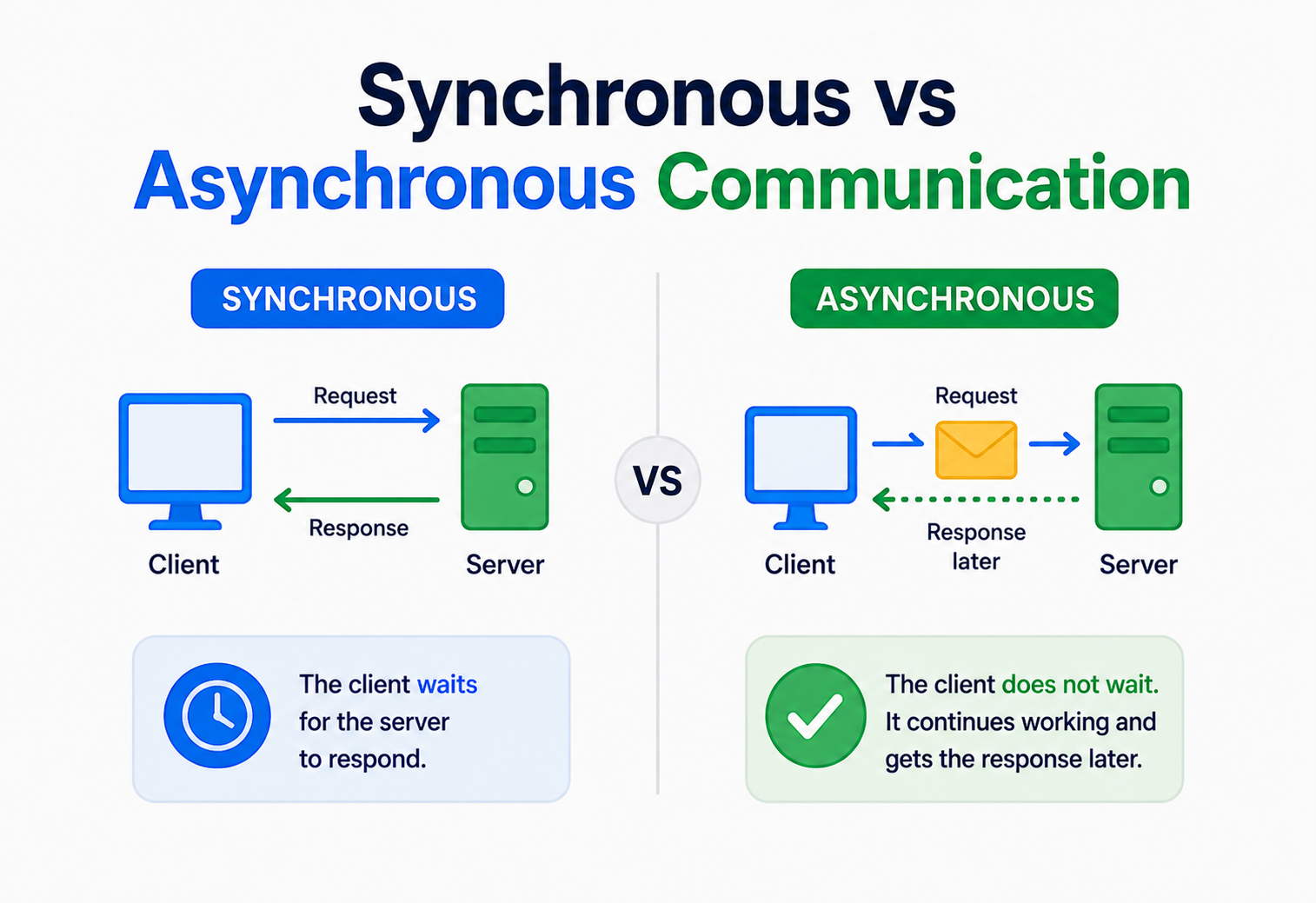
Synchronous vs Asynchronous?
Two programs need to talk to each other. Should one wait for the other to answer, or should it just send the message and move on? This one choice shapes almost every large system you have ever used — and this guide explains it from absolute zero.
Introduction
When one program sends a message to another, does it wait around for a reply, or does it just send the message and carry on with something else? That single question — wait, or do not wait — is the entire idea behind synchronous and asynchronous communication.
Every time you use an app, tiny computer programs are talking to each other behind the scenes. Your phone talks to a server. That server talks to a database. That database might talk to another server far away. All day long, programs are sending each other messages, like little digital notes.
But here is a question almost nobody asks out loud: when one program sends a message to another, does it wait around for a reply, or does it just send the message and carry on with something else?
That single question — wait, or do not wait — is the entire idea behind synchronous and asynchronous communication. It sounds small. It is not small. It is one of the most important decisions behind how fast, how reliable, and how scalable a piece of software turns out to be.
By the end of this guide, you will understand this topic more deeply than most working software engineers, because we are going to build the idea from the very ground up, one small piece at a time, using simple words and everyday comparisons before we ever touch a line of code.
Complete beginners who have never written a line of code. Students learning computer science. Engineers preparing for interviews. Working professionals who want to design better systems. Nobody is left out — we start from zero.
One more promise before we begin: nothing in this guide will be left half‑explained. Every new word gets defined the moment it appears. Every idea gets a simple, everyday comparison before it gets a technical one. If a sentence ever feels confusing, the very next sentence is almost always there to make it click. Take your time, read slowly, and let each section fully settle before moving to the next — this topic rewards patience far more than speed.
A Little History
Synchronous was the default for decades because it was simple. As the internet grew, engineers realised waiting for slow, distant machines wasted enormous amounts of time — and asynchronous communication became the dominant style behind large, high‑traffic systems.
In the very early days of computing, most programs ran completely alone on a single machine. One program, one computer, no talking to anyone else. When programs finally started needing to talk to other programs — maybe on the very same computer, maybe across a whole building — engineers borrowed the most natural pattern they already knew from human conversation: ask a question, then wait for the answer. This is synchronous communication, and it was the default for decades because it was simple to understand and simple to build.
As computers got connected across cities and then across the entire planet through the internet, a new problem showed up. Waiting for an answer from a computer on the other side of the world, or waiting for a slow, overloaded computer to respond, started to waste enormous amounts of time. Programmers realised they did not always need to freeze in place waiting. Sometimes, it was perfectly fine to send a message, carry on with other useful work, and deal with the reply whenever it eventually showed up. This second style is asynchronous communication, and it grew enormously in popularity as the internet grew, especially once websites started serving millions of people at the exact same time.
Today, almost no large system uses only one style. The biggest, most reliable systems in the world — the ones running apps like Netflix, Amazon, and Uber — carefully mix both styles together, using each one exactly where it fits best. That mixing is precisely what this guide will teach you to understand and eventually do yourself.
The Problem This Solves
Deciding which parts of a system should wait for each other, and which parts should be allowed to work independently. Get this decision right, and your app feels fast and holds up under pressure. Get it wrong, and your app feels sluggish or, worse, breaks completely.
Imagine you are building an app. A user taps a button to place an order. Behind that single tap, many things might need to happen: check if the item is in stock, charge the user’s card, update the warehouse, send a confirmation email, and notify the delivery team.
If your program tries to do every single one of those steps one after another, waiting for each one to fully finish before starting the next, the user could be standing there staring at a loading spinner for several seconds. That feels slow and broken, even if nothing is actually wrong.
Now imagine a different approach. The program quickly checks stock and charges the card — the two things the user truly needs confirmed right away — and then hands off the slower, less urgent tasks (sending the email, notifying delivery) to be handled a little later, without making the user wait for them. The user sees “Order placed!” almost instantly, while the less urgent work quietly finishes in the background.
This is the exact problem synchronous and asynchronous communication are designed to solve: deciding which parts of a system should wait for each other, and which parts should be allowed to work independently. Get this decision right, and your app feels fast and holds up under pressure. Get it wrong, and your app feels sluggish or, worse, breaks completely when too many people use it at once.
The Big Analogy: Phone Call vs Letter
Two rock‑solid mental pictures — a phone call and a letter — that every technical idea in this guide is really just a more detailed version of.
Before any code, let’s build a rock‑solid mental picture using something everyone already understands.
You call your friend. You ask a question. You hold the phone to your ear and wait, saying nothing else, doing nothing else, until your friend answers. You cannot hang up and do your homework in the middle — the call keeps both of you “busy” until the conversation finishes. That waiting, that blocking of your attention until a reply arrives, is exactly what synchronous communication feels like inside a computer program.
You write your friend a letter and drop it in the mailbox. You do not stand next to the mailbox waiting for a reply. You go back to your normal life — homework, dinner, games — and whenever your friend’s reply letter eventually arrives, you read it then. Sending the letter did not freeze your entire day. That freedom to walk away and do other things while waiting for a reply is exactly what asynchronous communication feels like inside a computer program.
Keep these two pictures — the phone call and the letter — in your mind for the rest of this guide. Every single technical idea we cover from here forward is really just a more detailed version of one of these two simple stories.
Another everyday version of this: ordering food at a fast‑food counter (you stand there and wait — synchronous) versus ordering food through a delivery app (you place the order and go about your day until it arrives — asynchronous).
Basic Terminology
Twelve terms that show up constantly in synchronous‑versus‑asynchronous conversations. Nothing scary — just plain definitions with simple examples.
Client
The program that sends a request, asking for something to be done. Like the person placing a phone call.
Server
The program that receives a request and does the work. Like the person answering the phone.
Request
The message asking for something. “Please give me the weather for Delhi.”
Response
The message answering the request. “It is 34 degrees and sunny.”
Blocking
When a program must pause and wait, doing nothing else, until it gets a reply.
Non‑Blocking
When a program can continue doing other work while it waits for a reply to arrive later.
Callback
A piece of code you hand over in advance, saying “run this automatically once the answer shows up.”
Latency
How long it takes to get a response back after sending a request. Lower is faster.
Throughput
How many requests a system can successfully handle in a given period of time, like one second.
Message Queue
A waiting line where messages sit safely until a program is ready to pick them up and process them.
Event
A small announcement that something happened — “an order was placed” — that other programs can react to.
Coupling
How tightly two programs depend on each other. Tightly coupled programs break easily if one changes; loosely coupled ones do not.
What Is Synchronous Communication
Synchronous communication means one program sends a request and then stops everything else, waiting patiently, until it receives a response. Only once that response arrives does the program continue doing anything further.
Synchronous communication means one program sends a request and then stops everything else, waiting patiently, until it receives a response. Only once that response arrives does the program continue doing anything further.
Why does it exist? Because many real tasks genuinely need an answer before the next step can happen. If you are checking whether a password is correct before letting someone into their account, you obviously cannot let them in before you know the answer. The next step truly depends on the previous one finishing first.
Which problem does it solve? It solves the problem of ordering and certainty. Synchronous communication guarantees: “I will not move forward until I definitely know the result of this step.” That guarantee is incredibly valuable whenever the very next action depends completely on knowing that result.
How It Works, Step by Step
Client sends a request
The client program packages up what it needs and sends it to the server.
Client pauses (blocks)
The client stops doing anything else related to this task and simply waits.
Server processes the request
The server does whatever work is needed — checking a database, running a calculation, and so on.
Server sends back a response
Once finished, the server sends the result back to the waiting client.
Client resumes
The client receives the response and continues on with the next step, now armed with the answer.
Where It Is Used
Logging into a website, withdrawing cash from an ATM, loading a webpage, checking if a username is available while signing up, and querying a database for a specific record — all of these are naturally synchronous, because the very next step cannot sensibly happen without knowing the answer first.
Advantages
- Simple to understand and reason about
- Results are known immediately, in order
- Easier to debug — everything happens in a predictable sequence
- Great when the next step truly depends on this result
Disadvantages
- Wastes time if the server is slow
- One slow step can hold up everything behind it
- Harder to scale to huge numbers of simultaneous users
- A single failure can freeze or crash the whole chain
What Is Asynchronous Communication
Asynchronous communication means one program sends a request and immediately continues doing other work, without waiting. Whenever the response eventually arrives, it gets handled separately — often through a callback, a notification, or by checking a message queue.
Asynchronous communication means one program sends a request and immediately continues doing other work, without waiting. Whenever the response eventually arrives, it gets handled separately — often through a callback, a notification, or by checking a message queue.
Why does it exist? Because plenty of real tasks do not need an instant answer before you can move on to something else useful. Sending a confirmation email does not need to block a user from browsing the rest of an app. Asynchronous communication exists to reclaim all of that otherwise‑wasted waiting time.
Which problem does it solve? It solves the problem of wasted time and fragility. If ten different steps must each wait for the one before it, the whole system is only as fast as its slowest step, and a single broken step can freeze everything behind it. Asynchronous communication breaks that fragile chain into independent pieces that can proceed, fail, and recover on their own.
How It Works, Step by Step
Client sends a request
Same first step as before — the client sends its message.
Client immediately continues
Instead of waiting, the client moves right along to its next task.
Server processes independently
The server works on the request at its own pace, with nobody staring over its shoulder waiting.
Response arrives later
Once ready, the result is delivered through a callback function, a notification, or picked up from a queue.
Client handles it whenever convenient
The client processes the result at that later moment, fitting it in around whatever else it is doing.
Where It Is Used
Sending emails or push notifications, processing uploaded videos, generating reports, updating a search index after new data is added, and handling any task where the user does not need to sit and watch it finish — all of these fit naturally into an asynchronous style.
Advantages
- Nobody wastes time waiting unnecessarily
- One slow or failed step does not automatically freeze everything else
- Scales far better under heavy, unpredictable traffic
- Systems can be built as smaller, independent, loosely connected pieces
Disadvantages
- Harder to reason about — things happen “eventually,” not immediately
- Debugging is trickier since steps are not in one simple, visible order
- Requires extra tools like queues and callbacks to manage
- Needs careful handling of what happens if a step fails later, unseen
Request Lifecycle, Side by Side
Compare both styles using the exact same everyday example — ordering a pizza online — and notice that the outcome is identical in both. What changes is entirely how your attention and time were spent while waiting for that outcome.
Let’s compare both styles using the exact same everyday example: ordering a pizza online.
| Step | Synchronous Version | Asynchronous Version |
|---|---|---|
| Placing the order | You call the pizza shop and stay on the line | You place the order through an app and close it |
| While waiting | You cannot do anything else — you are stuck on the phone | You watch TV, do homework, live your life |
| Getting the update | The shop tells you directly, live, on the call | The app sends you a notification when it is ready |
| If something goes wrong | You find out immediately, on the same call | You find out later, through another notification |
| Best suited for | Quick answers you truly need right now | Longer tasks you do not need to babysit |
Notice something important: the pizza still gets made and delivered in both cases. The outcome is the same. What changes is entirely how your attention and time were spent while waiting for that outcome. This is the heart of the whole topic.
Internal Architecture
One layer deeper: synchronous systems typically use one blocked thread per waiting request. Asynchronous systems use a single event loop that never blocks, juggling thousands of in‑progress requests.
Let’s go one layer deeper and look at what is actually happening inside a computer during each style, using simple, non‑scary language.
Inside Synchronous Communication
When a program makes a synchronous call, it typically uses something called a thread — think of a thread as one single worker inside a program who can only focus on one task at a time. That worker sends the request and then literally cannot do anything else until the reply comes back; the worker is “blocked.” If a hundred users show up at once, and each one needs its own worker to sit around waiting, the program may need a hundred workers just standing there doing nothing useful except waiting. That eats up computer memory and resources fast.
Inside Asynchronous Communication
Asynchronous systems usually use an event loop — imagine one incredibly fast, incredibly organised worker who never blocks. Instead of freezing while waiting for a reply, this worker simply notes down “let me know the moment this reply shows up” and instantly moves on to check if any other task needs attention. When the reply eventually does show up, the event loop picks it back up and finishes handling it. This means a single worker can juggle thousands of in‑progress requests, since it is never frozen waiting on any single one of them.
Components Involved
In a typical asynchronous setup, you will often meet: a producer (the program creating a message), a message broker or queue (the safe waiting line holding messages), and a consumer (the program that eventually picks up and processes the message). We will explore these deeply in the patterns section ahead.
Code Examples
The exact same idea — “get the price of a product” — written both synchronously and asynchronously in Java, Python, and JavaScript, each block explained in plain English right underneath.
Seeing real code makes everything click. Below, the exact same idea — “get the price of a product” — is written both synchronously and asynchronously, in three popular languages. Do not worry if you have never coded before; each block is explained in plain English right underneath it.
Java
public Double getPrice(String productId) {
    // This line pauses everything until the database replies
    Double price = database.fetchPrice(productId);
    return price;
}

// Calling it:
Double price = getPrice("item-42");
System.out.println("Got price: " + price); // runs only after the wait
database.fetchPrice(productId) blocks the program — nothing below it runs until this line finishes. The very next line only executes once price already has a real value. Time complexity here refers to the database lookup itself, often O(1) for an indexed lookup, but the program’s clock time is fully spent waiting. Common mistake: doing this inside a loop for thousands of products, one at a time, which multiplies the wasted waiting time enormously.
CompletableFuture<Double> futurePrice = database.fetchPriceAsync("item-42");

// This runs immediately — it does NOT wait
System.out.println("Order received, fetching price in background...");

futurePrice.thenAccept(price -> {
    // This block runs later, automatically, once the price is ready
    System.out.println("Got price: " + price);
});
fetchPriceAsync returns a CompletableFuture — a placeholder promising “the real value will show up eventually.” The println right after runs immediately, without waiting for the database at all. thenAccept registers a callback — code that runs automatically once the future actually completes. Common mistake: forgetting that the code inside thenAccept might run on a different thread, so shared data must be handled carefully to avoid conflicts.
Python
def get_price(product_id):
    # This line blocks until the database responds
    price = database.fetch_price(product_id)
    return price

price = get_price("item-42")
print("Got price:", price)  # only runs after the wait finishes
A plain Python function call runs top to bottom, waiting at every step, exactly like reading a recipe one instruction at a time. Nothing else in this program can happen while fetch_price is running. Space complexity stays minimal here, since only one call is “in flight” at any moment.
import asyncio

async def get_price(product_id):
    price = await database.fetch_price_async(product_id)
    return price

async def main():
    # Both requests start at almost the same time
    task1 = asyncio.create_task(get_price("item-42"))
    task2 = asyncio.create_task(get_price("item-99"))

    price1 = await task1
    price2 = await task2
    print("Prices:", price1, price2)

asyncio.run(main())
async def marks a function as one that can pause and resume without blocking everything else. await means “pause just this function here, but let other tasks keep running in the meantime.” asyncio.create_task starts a job running in the background right away, without waiting for it to finish first. Both prices are fetched roughly at the same time instead of one after another, which is much faster overall. Common mistake: forgetting the await keyword, which silently breaks the intended behaviour.
JavaScript
function getPriceSync(productId) {
    // Imagine this blocks until it has an answer
    const price = database.fetchPriceBlocking(productId);
    return price;
}

const price = getPriceSync("item-42");
console.log("Got price:", price);
JavaScript is normally built around asynchronous behaviour, so true blocking calls are rare and generally discouraged — this example shows the idea of blocking for comparison. If this really blocked, an entire web page could freeze while it waits, since JavaScript in browsers typically runs on a single main thread.
async function getPrice(productId) {
    const price = await database.fetchPriceAsync(productId);
    return price;
}

console.log("Order received, fetching price...");

getPrice("item-42").then(price => {
    console.log("Got price:", price);
});

console.log("This line runs before the price arrives!");
await pauses only the getPrice function itself, not the whole program. The final console.log actually prints before the price, proving the program never stopped to wait. .then() registers a callback that runs once the promise resolves — the JavaScript version of “let me know when it is ready.” Common mistake: assuming code after an async call always runs after it finishes — in JavaScript, it usually runs immediately unless you explicitly await it.
Async Patterns & Message Queues
Real production systems rarely use raw callbacks alone for asynchronous work between separate services. Instead, they lean on a powerful tool called a message queue.
Real production systems rarely use raw callbacks alone for asynchronous work between separate services. Instead, they lean on a powerful tool called a message queue.
Think of a post office sorting room. Letters (messages) get dropped into labelled bins (queues). Mail carriers (consumers) come by whenever they are ready and pick up letters from their bin, one at a time, delivering each one. The sender does not need to know exactly when the letter gets delivered — they trust the system to eventually get it there.
A message queue lets one part of a system (the producer) drop off a message without needing the receiving part (the consumer) to be ready right that second. The queue safely holds onto the message in the meantime. This is one of the most powerful ideas in all of asynchronous system design, because it completely separates the sender’s speed from the receiver’s speed.
Popular Real Tools
- Apache Kafka — a high‑throughput system for streaming huge volumes of events, widely used by companies handling massive real‑time data.
- RabbitMQ — a flexible, widely used message broker great for task queues and routing messages between services.
- Amazon SQS — a fully managed cloud queue service, popular for connecting microservices without managing queue servers yourself.
Common Asynchronous Patterns
Fire‑and‑Forget
Send a message and never check back for a result at all — used for things like logging, where the outcome does not need confirming.
Publish‑Subscribe
One event gets broadcast, and any number of interested consumers can react to it independently.
Request‑Reply over a Queue
A request is queued, and the reply is later delivered back through a separate reply queue — waiting without blocking.
Event Sourcing
Every important change is recorded as an event, letting other parts of a system rebuild or react to history asynchronously.
The Core Trade‑offs
Neither style is “better” in general — each one trades away something to gain something else. Real systems mix both.
This is the heart of the entire topic. Neither style is “better” in general — each one trades away something to gain something else. Here is the full comparison, laid out clearly.
| Dimension | Synchronous | Asynchronous |
|---|---|---|
| Simplicity | Easier to read and reason about, step by step | Harder to trace — things happen out of order |
| Speed felt by user | Can feel slow if any step is slow | Can feel fast, since slow steps happen out of sight |
| Resource usage | More memory used holding waiting connections | More efficient use of resources at scale |
| Failure impact | One failure can block the entire chain | Failures can often be isolated and retried independently |
| Consistency | Easier to guarantee an immediate, up‑to‑date result | Often “eventually consistent” — a short delay before things settle |
| Debugging | Straightforward — one clear sequence of events | Trickier — needs good logging and tracing tools |
| Scalability | Struggles more under very heavy simultaneous load | Scales more gracefully under heavy, bursty load |
| Coupling | Tighter — caller and callee are directly linked in time | Looser — caller and callee do not need to be available at the same moment |
Synchronous buys you certainty right now. Asynchronous buys you resilience and scale later.
Here is the honest truth most tutorials skip: you almost never pick one style for your whole system. Real systems mix both, using synchronous calls where an instant, guaranteed answer truly matters, and asynchronous messaging where speed, scale, and resilience matter more than an instant answer.
Performance & Scalability
The real performance question is not simply “sync is slow, async is fast” — it is “how much waiting time is being wasted, and can that waiting be avoided without breaking correctness?”
Imagine a small restaurant with one waiter. If the waiter has to stand at each table, take the order, walk it to the kitchen, and then just stand there waiting until the food is fully cooked before serving the next table — that is synchronous. On a quiet night, this works fine. On a packed Saturday evening, tables start waiting forever, because the single waiter is stuck standing around instead of taking new orders.
Now imagine the waiter drops off each order at the kitchen window and immediately moves to the next table, coming back to deliver food only once it is actually ready. That waiter can serve far more tables in the same amount of time. This is exactly why asynchronous designs tend to scale better under heavy, unpredictable traffic — they do not waste a single worker’s time just standing around.
That said, synchronous systems can still scale well using techniques like adding more servers behind a load balancer, or using efficient non‑blocking threading models internally. The real performance question is not simply “sync is slow, async is fast” — it is “how much waiting time is being wasted, and can that waiting be avoided without breaking correctness?”
Reliability & Fault Tolerance
Sync chains fail loudly and immediately. Async systems tend to delay failures rather than lose them — but they move complexity into duplicate messages, out‑of‑order delivery, and dead‑letter queues.
What happens when something breaks? This is where the two styles behave very differently.
In a synchronous chain, if step three out of five fails, the whole operation typically fails right then and there — the caller finds out immediately, which is honest and clear, but it also means the entire request was wasted if it cannot be retried cleanly.
In an asynchronous system built around a message queue, if a consumer fails while processing a message, the message often is not lost — many queues are designed to redeliver a message if it was not successfully marked as “done.” This gives asynchronous systems a natural kind of resilience: a temporary crash does not necessarily mean lost work, just delayed work.
Timeouts, Retries, and Circuit Breakers
Synchronous calls need a timeout — a rule saying “if I do not get an answer within X seconds, give up rather than waiting forever.” Without timeouts, one slow dependency can freeze an entire system, a domino effect sometimes nicknamed a “cascading failure.”
A circuit breaker is a clever safety pattern that watches for repeated failures and, after enough of them, temporarily stops sending new requests to a struggling service altogether — giving it breathing room to recover, rather than piling on more doomed requests. This pattern protects both styles of communication, but it is especially critical in synchronous chains, where failures can cascade quickly.
Asynchronous systems are not automatically more reliable — they simply move the complexity elsewhere. You now need to carefully handle duplicate messages, out‑of‑order delivery, and messages that repeatedly fail no matter how many times they are retried (often parked safely in what is called a “dead‑letter queue”).
Consistency & CAP Considerations
Sync leans toward strong consistency; async leans toward eventual consistency. Both connect directly to the CAP theorem’s honest trade‑off between consistency, availability, and partition tolerance.
When multiple parts of a system update data, an important question arises: does everyone see the exact same, up‑to‑date information at the exact same instant, or is it acceptable for some parts to catch up slightly later?
Synchronous designs often naturally lean toward strong consistency — because the caller waits for confirmation, it can be fairly sure the update is fully complete before moving on. Asynchronous designs often lean toward eventual consistency — the update will happen, and everything will eventually match up, but there might be a brief window where different parts of the system momentarily disagree.
This connects to a famous idea in distributed systems called the CAP theorem, which states that a distributed system can only fully guarantee two out of three things at once: Consistency (everyone sees the same data), Availability (the system always responds), and Partition tolerance (the system keeps working even if parts of the network cannot talk to each other). Since network problems are simply a fact of life in any large, real system, partition tolerance is rarely optional — which means most large systems must choose, at least in certain moments, between prioritising consistency or prioritising availability. Asynchronous, event‑driven designs often lean toward favouring availability, accepting a short delay before full consistency catches up.
Imagine two friends updating the same shared shopping list app from different rooms in a house with a spotty Wi‑Fi signal. Strong consistency means the app refuses to show anything until both rooms fully agree. Eventual consistency means the app shows each person their own version immediately, then quietly syncs everyone up moments later.
Security Considerations
Both communication styles need careful security thinking, but the specific risks differ a little — from exposed waiting connections in sync to message tampering and replay attacks in async.
Both communication styles need careful security thinking, but the specific risks differ a little.
Exposed waiting connections
Many open, waiting connections can be a target for attacks designed to exhaust server resources.
Tight coupling exposure
A directly connected caller often needs more direct access or credentials, widening the potential attack surface.
Message tampering
Messages sitting in a queue need encryption and authentication so nobody can read or alter them in transit or at rest.
Replay attacks
Since messages might be redelivered, systems must ensure a malicious actor cannot resend an old, valid‑looking message to cause harm.
Good practices for both include always encrypting data in transit, carefully authenticating who is allowed to send or receive messages, validating every incoming request rather than blindly trusting it, and applying the principle of least privilege — giving each part of a system only the access it truly needs, nothing more.
Monitoring & Observability
Sync systems live and die by latency, error rate and saturation. Async systems need queue depth, consumer lag, and dead‑letter queue size on top of those — and distributed tracing to make sense of it all.
You cannot fix what you cannot see. Watching how a system behaves in real time is called observability, and it looks a little different for each communication style.
For synchronous systems, the most important numbers to track are usually latency (how long each request takes), error rate (how often requests fail), and saturation (how close the system is to running out of capacity, like waiting threads).
For asynchronous systems, an extra set of numbers becomes important: queue depth (how many messages are waiting to be processed — a growing number is often an early warning sign), consumer lag (how far behind consumers are compared to producers), and the size of the dead‑letter queue (messages that failed repeatedly and need human attention).
Good production systems also use distributed tracing, which attaches a unique ID to a request as it travels through many different services, letting engineers follow its entire journey — synchronous or asynchronous — on one unified timeline, even when dozens of services were involved.
Set up alerts, not just dashboards. A dashboard only helps if someone happens to be staring at it; an alert reaches out and taps someone on the shoulder the moment something looks wrong.
Microservices & API Design
Sync APIs (REST, gRPC) work well when a service genuinely needs an immediate, guaranteed answer. Async event‑driven architecture works beautifully when services do not need each other’s immediate confirmation to keep functioning.
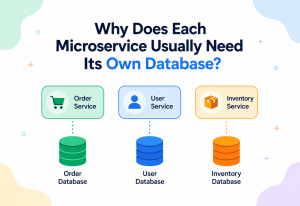
Modern large applications are often broken into many small, independent services, each responsible for one job — this style is called microservices. Deciding how these services talk to each other is one of the single biggest design decisions a team makes.
A synchronous approach commonly uses REST APIs (a widely used way for services to ask each other for things over the web, using simple, predictable request‑and‑response messages) or gRPC (a faster, more efficient option often used between internal services that need speed). These work well when a service genuinely needs an immediate, guaranteed answer from another service before continuing.
An asynchronous approach commonly uses event‑driven architecture, where services announce “something happened” as an event, and any other service that cares can react on its own time. This works beautifully when services do not need each other’s immediate confirmation to keep functioning — for example, an order service does not need the email service to instantly confirm an email was sent before letting the customer see their order confirmation.

Synchronous APIs Shine When…
- You genuinely need an immediate answer
- The operation is simple and quick
- Strong, immediate consistency really matters
Async Events Shine When…
- The task can happen a little later, safely
- Many different services might care about the same event
- You want services to survive even if others are temporarily down
Real Industry Examples
One guiding rule explains an enormous amount of real‑world system design: whatever the user is actively staring at and waiting for tends to stay synchronous, while whatever can safely happen “a little later” moves to asynchronous processing.
Streaming & recommendations
Playing a video needs a fast, synchronous response, while updating your “recommended for you” list happens asynchronously in the background, using huge event‑driven pipelines.
Order processing
Confirming your payment is synchronous and immediate, while updating warehouse inventory, triggering shipping labels, and notifying delivery partners happen asynchronously afterward.
Ride matching
Finding you a nearby driver needs to feel instant and synchronous, while trip receipts, ratings processing, and analytics are handled asynchronously after the ride ends.
Notifications feed
Viewing your profile is synchronous, but “so‑and‑so viewed your profile” notifications and feed updates are generated asynchronously across massive event‑streaming pipelines.
Booking confirmations
Confirming a booking slot is available uses a fast synchronous check, while sending confirmation emails, calendar updates, and host notifications happen asynchronously.
Search indexing
Returning search results to you is synchronous and needs to feel instant, while crawling and indexing the entire web happens through enormous asynchronous background pipelines.
Notice the pattern repeating across every single company: whatever the user is actively staring at and waiting for tends to stay synchronous, while whatever can safely happen “a little later” moves to asynchronous processing. That one guiding rule explains an enormous amount of real‑world system design.
Design Patterns & Anti‑Patterns
A short catalogue of what genuinely helps — request‑response, publish‑subscribe, saga, outbox — and the anti‑patterns that quietly hollow out both styles.
Helpful Patterns
- Request‑Response: The classic synchronous pattern — ask, then wait for a direct answer.
- Publish‑Subscribe: An asynchronous pattern where one event can be received by many independent listeners.
- Saga Pattern: A way of managing a long chain of steps across multiple services asynchronously, with a clear plan for undoing earlier steps if a later one fails.
- Outbox Pattern: A reliable technique ensuring a database update and a message being sent do not accidentally fall out of sync with each other.
Anti‑Patterns to Avoid
- Chained Synchronous Calls: Service A synchronously calls B, which synchronously calls C, which calls D — one slow link freezes the entire chain, and a single failure anywhere breaks everything.
- The “Big Ball of Callbacks”: Deeply nested callbacks stacked on top of each other, sometimes nicknamed “callback hell,” making code painfully hard to read or fix.
- Fake Asynchrony: Marking something as asynchronous in name only, while it secretly still blocks everything internally — offering none of the real benefits.
- Unbounded Queues: Letting a message queue grow forever without limits or monitoring, quietly hiding a growing backlog until it becomes a serious emergency.
Common Mistakes
Six recurring mistakes teams make when mixing sync and async — from forgetting timeouts to ignoring message duplication to silently losing permanently failing messages.
Forgetting to handle errors
Assuming a request will always succeed, and having no plan at all for what happens when it does not.
Blocking the wrong thread
Accidentally using a synchronous call inside code that was meant to stay fully asynchronous, quietly undoing all the benefits.
No timeouts anywhere
Letting a synchronous call wait forever if the other side never responds, freezing resources indefinitely.
Ignoring message duplication
Assuming a message will only ever be processed exactly once, when most real queues can occasionally redeliver the same message.
No dead‑letter handling
Letting permanently failing messages vanish silently, instead of routing them somewhere a human can review and fix them.
Not monitoring queue depth
Missing the early warning signs of a growing backlog until users start noticing real delays.
Best Practices
Eight habits that separate a thoughtfully mixed sync/async system from one that quietly falls apart under load.
- Always set timeouts on synchronous calls, so nothing waits forever.
- Design for retries in asynchronous processing, and make sure retrying the same message twice does not cause harm — a property called idempotency.
- Use circuit breakers to stop hammering a struggling downstream service with more doomed requests.
- Monitor queue depth and consumer lag continuously, not just error counts.
- Keep synchronous chains short. The fewer synchronous hops in a row, the less fragile the whole path becomes.
- Document what is eventually consistent. If users might briefly see slightly outdated information, be upfront about that rather than letting it surprise people.
- Use dead‑letter queues so permanently broken messages are visible, not silently lost.
- Test failure scenarios on purpose, not just the happy path where everything works perfectly.
When to Use Which
A simple decision guide you can genuinely use in real projects — ask a handful of honest questions and let the answers point toward sync, async, or a thoughtful mix.
Here is a simple decision guide you can genuinely use in real projects.
| Ask Yourself | If Yes, Lean Toward |
|---|---|
| Does the next step truly need this exact answer to continue? | Synchronous |
| Can this task safely happen a little later without anyone noticing? | Asynchronous |
| Do multiple independent services need to react to the same event? | Asynchronous |
| Is this a simple, quick, low‑risk operation? | Synchronous |
| Does the system need to survive a temporary outage of another service? | Asynchronous |
| Is strict, immediate consistency absolutely required? | Synchronous |
Most real, production‑grade systems land somewhere in the middle, choosing thoughtfully on a case‑by‑case basis rather than picking one style for absolutely everything. That thoughtful mixing is, in fact, the actual skill being tested in most system design interviews.
Interview Questions
Nine questions across beginner, intermediate, advanced, scenario, and full system‑design difficulty — the kind of sync‑versus‑async questions that come up in nearly every system‑design interview.
Beginner Questions
Q: What is the main difference between synchronous and asynchronous communication?
A: Synchronous communication makes the sender wait for a response before continuing. Asynchronous communication lets the sender continue with other work immediately, handling the response whenever it eventually arrives.
Q: Give one real‑world example of each.
A: A phone call is synchronous — you wait on the line for an answer. Sending a letter is asynchronous — you carry on with your day until a reply arrives.
Intermediate Questions
Q: Why might asynchronous communication scale better than synchronous communication?
A: Because it avoids tying up resources like threads while waiting. A single event loop can juggle many in‑progress tasks, while synchronous designs often need one dedicated worker per waiting request, which becomes expensive at large scale.
Q: What is a message queue, and why is it useful?
A: A message queue is a safe waiting line that temporarily holds messages between a producer and a consumer. It is useful because it lets the two sides work at their own pace without needing to be available at exactly the same moment.
Advanced Questions
Q: How does the CAP theorem relate to choosing synchronous vs asynchronous designs?
A: Since network partitions are unavoidable in distributed systems, teams often must choose between strong consistency and high availability during a partition. Synchronous designs often favour consistency, confirming results immediately, while asynchronous, event‑driven designs often favour availability, accepting a short delay before full consistency is reached.
Q: What is idempotency, and why does it matter for asynchronous systems?
A: Idempotency means performing an operation multiple times produces the same result as performing it once. It matters because many message queues can occasionally redeliver the same message, and without idempotency, that redelivery could cause duplicate side effects, like charging a customer twice.
Scenario‑Based Questions
Q: You are building a checkout flow. Which steps should be synchronous, and which should be asynchronous?
A: Checking stock availability and charging the customer’s card should be synchronous, since the user needs to know right away whether the order succeeded. Sending confirmation emails, updating analytics, and notifying the warehouse can all be asynchronous, since the user does not need to wait for those.
Q: A queue’s depth keeps growing every day. What might be happening, and how would you investigate?
A: This usually means consumers are processing messages slower than producers are creating them. You would check consumer health and error rates, consider adding more consumers, check for a bottleneck like a slow database call inside the consumer, and review whether messages are failing and retrying repeatedly instead of completing.
System Design Interview Questions
Q: Design a notification system that can send millions of push notifications without slowing down the main application.
A: The main application should synchronously validate the request and then asynchronously publish a “send notification” event to a message queue. Separate, independently scalable consumer services pick up these events and handle actual delivery, retries, and failures — completely decoupled from the main application’s response time.
Frequently Asked Questions
A handful of questions come up in nearly every conversation on this topic. Here are short, honest answers to the ones that surface most often.
Is asynchronous always faster than synchronous?
Not exactly. Asynchronous communication does not make any single task complete faster — it simply avoids wasting time waiting around, which improves how much work a whole system can handle overall. For a single, quick, simple task, synchronous can feel just as fast, or even simpler.
Can a system be both synchronous and asynchronous at the same time?
Yes, and in fact, almost every large real‑world system is exactly this kind of mix. Different parts of the same application often use whichever style fits that particular task best.
Is asynchronous communication harder to learn?
It can feel trickier at first, mainly because things do not happen in one neat, visible order. But once you are comfortable with the core idea — send now, handle the response later — it becomes just as natural as synchronous thinking.
What does “non‑blocking” mean exactly?
It means a program can start an operation and immediately move on to other work, instead of freezing in place until that operation finishes. It is closely related to asynchronous communication, though the two terms are used slightly differently depending on context.
Do I need a message queue to do asynchronous communication?
No. Asynchronous communication can happen with simple callbacks or promises within a single program too. Message queues become especially valuable when separate services or entirely separate computers need to communicate asynchronously and reliably.
Why do people say asynchronous systems are “eventually consistent”?
Because updates do not always reach every part of the system in the exact same instant. There is often a small window of time where one part of the system has the newest information and another part has not caught up yet. Given a little time, everything settles into agreement — hence “eventually” consistent, rather than “instantly” consistent.
Is REST always synchronous and events always asynchronous?
Not strictly. REST APIs are traditionally used in a synchronous, request‑and‑wait style, but they can also be used to simply kick off a background job, with the real result delivered later through another channel. Events are almost always asynchronous by nature, since the whole point of an event is to announce something without demanding an immediate reply.
Summary & Key Takeaways
If you remember nothing else from this guide, remember these six ideas — and the honest habit of choosing your communication style deliberately, not by accident.
Wrapping It Up
- Synchronous communication means waiting for a reply before continuing — simple, predictable, but potentially wasteful of time and resources.
- Asynchronous communication means sending a message and continuing on, handling the reply later — more scalable and resilient, but more complex to reason about.
- Neither style is universally better. The right choice depends entirely on whether the very next step genuinely needs an immediate answer.
- Message queues are the backbone tool that makes reliable asynchronous communication possible between separate services.
- Real production systems, from Netflix to Amazon to Uber, thoughtfully mix both styles, choosing case by case.
- Good engineering means understanding the trade‑offs — latency, complexity, consistency, reliability, and scale — well enough to make that choice deliberately, not by accident.
At its heart, synchronous versus asynchronous is one of those quietly disciplined ideas that shows up wherever software has to survive the messy, unpredictable real world. From the earliest telephone‑style computer calls of the 1970s, through the rise of the internet and the message‑queue revolution of the 2000s, to the modern event‑driven microservice architectures behind every streaming platform, ride‑sharing app, and global marketplace, the underlying insight never really changes: some things genuinely need to wait, and many things do not, and knowing the honest difference between the two is one of the most transferable skills in all of system design. Systems built with that discipline tend to be the ones that stay calm under stress, recover cleanly from setbacks, and quietly earn the trust of the people relying on them every single day.

