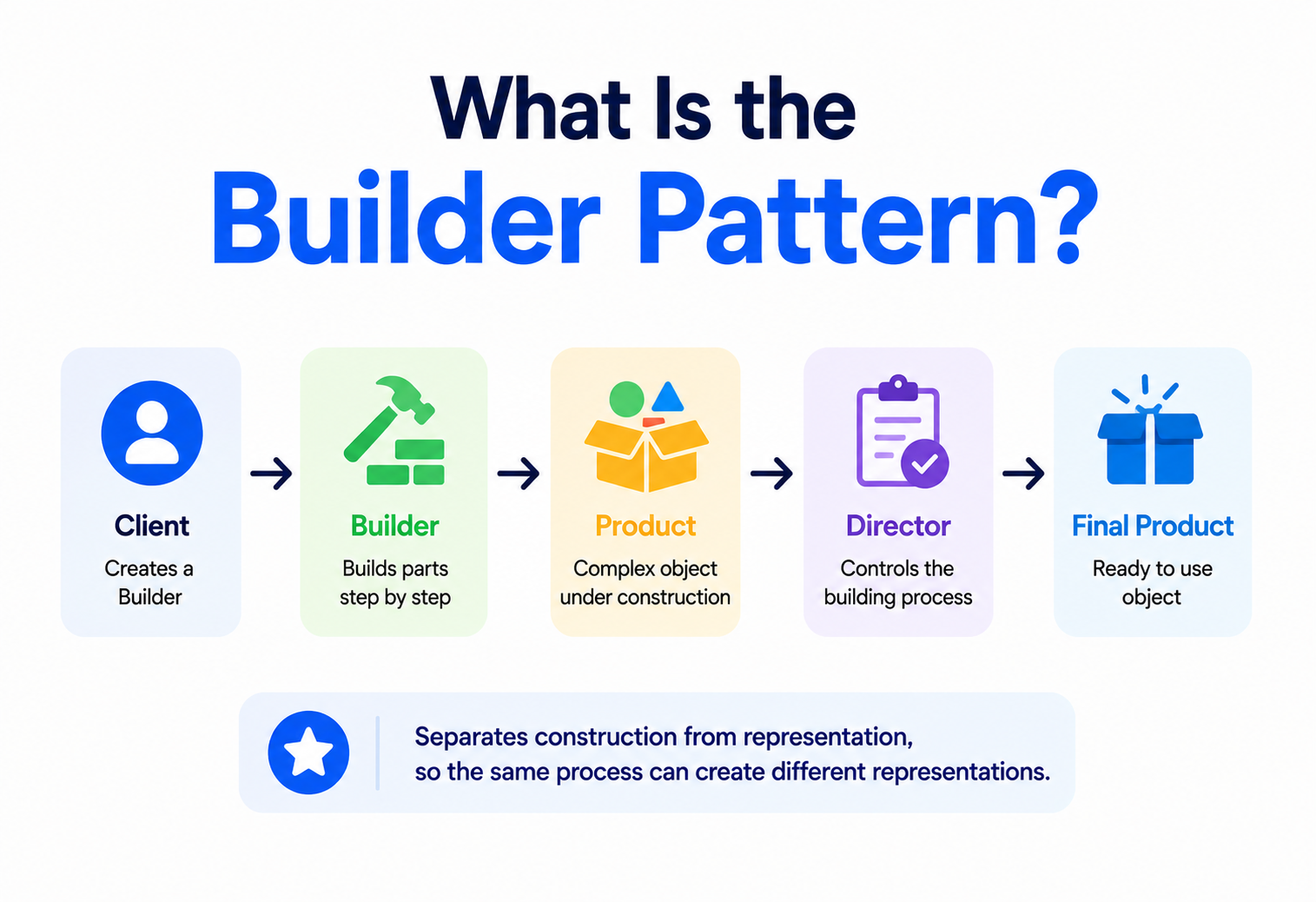
What Is the Builder Pattern?
Ordering a custom sandwich means choosing your bread, your fillings, and your sauces one step at a time — not shouting fifteen ingredients at the counter all at once. The Builder pattern brings that same calm, step-by-step approach to constructing complicated objects in code.
The Big Idea, in One Breath
Imagine ordering a custom sandwich at a deli counter. You don’t walk up and shout every single detail at once — the bread, the cheese, the three different vegetables, the two sauces, whether it’s toasted — all crammed into one breathless sentence. Instead, the person behind the counter walks you through it calmly, one choice at a time: “Which bread? Toasted or not? Which fillings? Any sauce?” Step by step, your sandwich comes together, exactly the way you wanted it, without you or the counter person needing to hold fifteen details in their head all at once.
The Builder pattern brings that same calm, one-step-at-a-time approach into software. It’s a design pattern used to construct a complicated object gradually, piece by piece, instead of demanding every single detail be provided all at once in one enormous, confusing instruction. Each step adds one more piece, and only once every needed piece is in place does the finished object get handed over, fully assembled and ready to use.
Think about building a custom burger at a restaurant that lets you choose everything — the bun, the patty, the cheese, the toppings, the sauce. If the menu forced you to specify all nine choices in one exact order every single time, even when you only cared about three of them, ordering would be exhausting and error-prone. A proper build-your-own-burger process lets you specify only what matters to you, walk through it one decision at a time, and skip anything you don’t care about. The Builder pattern gives software objects that exact same flexible, step-by-step ordering experience.
What makes this approach so valuable isn’t just convenience — it’s clarity. When every choice gets its own clearly labelled step, both the person placing the order and the person fulfilling it always know exactly what’s been decided so far, and exactly what’s still left to decide. Nothing gets lost in a jumble of unlabelled details, and nothing gets accidentally forgotten because it wasn’t obvious it needed deciding at all. That same clarity is exactly what the Builder pattern brings to constructing complicated objects in software — a calm, traceable sequence of decisions, rather than one overwhelming instruction trying to capture everything at once.
What the Builder Pattern Really Is
Formally, the Builder pattern is a creational design pattern that separates the construction of a complex object from its final representation, allowing the exact same step-by-step construction process to produce different variations of the finished result. That’s a fairly dense sentence, so it’s worth unpacking carefully, because both halves matter.
- Separating construction from representation. The logic for “how do I put this together, piece by piece” lives in its own dedicated place, completely separate from the object’s own class definition.
- The same process, different results. Because construction is broken into small, reusable steps, following those steps in slightly different combinations can produce meaningfully different finished objects.
If someone asks “what does the Builder pattern actually do?”, the honest answer is: it turns “give me every single detail right now, all at once, in the right order” into “let’s set this up together, one clear step at a time, and I’ll tell you when we’re done.”
It’s worth being precise about what makes Builder different from simply writing a class with a lot of optional settings. The pattern specifically focuses on situations where an object has enough pieces, or complex enough assembly rules, that building it correctly benefits from being broken into distinct, well-named steps — rather than a single, overwhelming operation trying to do everything at once.
There’s a subtler benefit hiding inside that formal definition too, worth calling out explicitly: because the finished object only comes into being once construction is genuinely complete, a well-designed Builder can guarantee that no one ever ends up holding a half-finished, invalid version of the object by accident. Compare this to a class where every field can be individually set and changed at any time, even after the object is already being used elsewhere in a program — nothing stops some other piece of code from grabbing that object mid-setup, before it’s actually ready. Builder sidesteps this risk entirely by keeping the in-progress, still-being-assembled object safely tucked inside the builder itself, only releasing a finished, trustworthy version once every required step has genuinely been completed.
A Little History
The Builder pattern is one of the five creational patterns catalogued in 1994 by Erich Gamma, Richard Helm, Ralph Johnson, and John Vlissides — the four authors nicknamed the “Gang of Four” — in their book Design Patterns: Elements of Reusable Object-Oriented Software. It sits alongside Singleton, Factory Method, Abstract Factory, and Prototype as one of the foundational ways of managing how complex objects come into existence.
The original description in the 1994 catalogue placed particular emphasis on a specific scenario: producing different representations of an object using the exact same construction process — for instance, building both a plain-text version and a fully formatted version of a document, using the same underlying sequence of assembly steps. Over the following decades, as software moved through new eras of web development, mobile apps, and configuration-heavy systems, engineers found the pattern just as useful for a slightly different, related purpose: taming objects with a large number of optional settings, which has become the pattern’s most common everyday use today.
Many popular modern programming languages have quietly absorbed a lightweight version of the Builder idea directly into their syntax — optional named parameters, keyword arguments, and configuration objects all echo the same underlying goal the original pattern was designed to solve, even when nobody involved calls it “the Builder pattern” out loud.
It’s worth noting how the pattern’s popularity has actually grown, rather than faded, in the years since its original 1994 description — somewhat unusual among the older creational patterns. As software systems have grown steadily more configurable, with more optional settings, more feature flags, and more environment-specific variations than a typical 1990s application ever needed, the core problem Builder solves has only become more common, not less. Modern API design, in particular, leans heavily on the fluent, chainable style closely associated with Builder, precisely because it scales so gracefully as the number of configurable options keeps growing over a product’s lifetime.
Why Not Just Use a Constructor?
To understand why Builder exists, it helps to look closely at what goes wrong when a complicated object relies purely on its constructor — the special method that runs the moment an object is created — especially once that object accumulates many optional pieces.
class Pizza:
    def __init__(self, size, crust="regular", cheese=True,
                 pepperoni=False, mushrooms=False,
                 olives=False, extra_sauce=False, gluten_free=False):
        # Eight parameters, most optional — remembering their
        # exact order and meaning becomes a genuine challenge.
        self.size = size
        self.crust = crust
        self.cheese = cheese
        self.pepperoni = pepperoni
        # ...and so on for every remaining ingredient

# Which True/False belongs to which topping? Easy to get wrong.
pizza = Pizza("large", "thin", True, True, False, True, False, False)
This pattern of a constructor that keeps growing new optional parameters, one after another, has a well-known nickname among engineers: the telescoping constructor, because each new variation “telescopes” out into an even longer, even more error-prone parameter list. Reading that final line of code — a long row of unlabelled True and False values — offers almost no clue about which value means what, without constantly cross-referencing back to the constructor’s definition.
What does each value mean?
A long list of positional arguments forces readers to memorise or look up exactly what each position represents.
Easy to swap two values
Two adjacent boolean parameters are trivially easy to accidentally swap, and many languages won’t catch the mistake.
Optional isn’t always optional
Skipping one optional value in the middle often means explicitly passing a default for every parameter before it too.
Every new option changes the signature
Adding one new optional ingredient means changing the constructor’s signature, and potentially every place that calls it.
The Builder pattern exists specifically to dissolve this problem, replacing one overwhelming, error-prone constructor call with a sequence of small, clearly named, self-explanatory steps.
It’s worth pausing on why this problem tends to sneak up on teams rather than announcing itself early. A class often starts out with just two or three fields, and a plain constructor genuinely is the simplest, most sensible choice at that stage — reaching for a full Builder from day one would be needless ceremony. The trouble is that classes representing real-world things — a pizza order, a network request, a user profile — tend to accumulate new optional fields naturally over time, as a product grows and new features get requested. Because each individual addition feels small on its own, teams rarely notice the moment a perfectly reasonable four-parameter constructor has quietly grown into an unreadable eleven-parameter one; the discomfort tends to arrive gradually, then all at once, usually right around the time someone introduces a bug by mixing up two adjacent boolean flags.

The Anatomy of a Builder
A properly structured Builder implementation is made up of a small number of clear, cooperating roles — a small enough cast to stay teachable, but distinct enough that each role earns its keep once a real system starts leaning on the pattern.
- Product. The complex object being built — the finished pizza, the assembled HTTP request, the completed report.
- Builder. An interface or base class describing the individual construction steps available —
add_cheese(),set_size(), and so on. - ConcreteBuilder. A specific implementation of those steps, actually assembling one particular kind of product.
- Director. An optional coordinator that knows a specific, reusable sequence of steps to call on the builder, useful when the same construction recipe is used repeatedly.
Notice that only two of these four roles — Product and Builder — are genuinely required for the pattern to work at all. Many everyday, real-world uses of Builder skip ConcreteBuilder as a separately named class, folding its logic directly into a single builder implementation, and skip the Director entirely, letting calling code decide the step order itself. This flexibility is one of the pattern’s underrated strengths: it scales down gracefully to a lightweight, two-role version for simple cases, while still offering the full four-role structure for situations that genuinely call for reusable, standardised construction recipes.
Building One, Step by Step
Watching the telescoping pizza constructor evolve into a proper Builder makes the benefit immediately obvious — the noise disappears, and the reader is left with something that almost reads like plain English.
class Pizza:
    def __init__(self):
        self.toppings = []
        self.size = None
        self.crust = "regular"

class PizzaBuilder:
    def __init__(self):
        self.pizza = Pizza()

    def set_size(self, size):
        self.pizza.size = size
        return self  # returning self enables chaining

    def set_crust(self, crust):
        self.pizza.crust = crust
        return self

    def add_topping(self, topping):
        self.pizza.toppings.append(topping)
        return self

    def build(self):
        return self.pizza

# Every step is clear, named, and easy to read at a glance
pizza = (PizzaBuilder()
         .set_size("large")
         .set_crust("thin")
         .add_topping("pepperoni")
         .add_topping("olives")
         .build())
Compare this final block to the earlier telescoping version. There’s no ambiguity about which value means what — set_size("large") and add_topping("pepperoni") speak for themselves, in plain, self-documenting language. Skipping an ingredient is as simple as not calling that particular method, with no need to remember a default value’s exact position in a long parameter list.
There’s a second, quieter benefit worth pointing out: adding a brand-new topping option to this builder is a small, low-risk change. A new add_extra_sauce() method can simply be added to PizzaBuilder without touching Pizza itself, and without breaking a single existing line of calling code anywhere in the program, because nobody was relying on a fixed parameter position that a new option might have disturbed. Compare that to the telescoping constructor from before, where adding one new optional ingredient meant carefully inserting a new parameter into an already-long list, and hoping every existing call site still worked correctly, or updating every one of them by hand.

Fluent Builders
Notice that every method in the PizzaBuilder example above returns self — the builder object itself — rather than returning nothing. This small, deliberate choice enables what’s called method chaining, letting multiple steps be linked together in one smooth, readable sequence, often referred to as a fluent interface because the resulting code reads almost like a flowing sentence.
HttpRequest request = new HttpRequestBuilder()
    .setUrl("https://api.example.com/orders")
    .setMethod("POST")
    .addHeader("Authorization", "Bearer token123")
    .setBody(orderJson)
    .build();
Fluent builders have become especially popular precisely because of how naturally readable the resulting code is — a new engineer can often understand what’s being constructed at a glance, without needing to read any documentation at all, simply by reading the chain of clearly named method calls from top to bottom.
It’s worth noting one small technical detail that trips up newcomers writing their first fluent builder: returning self only works cleanly when each step genuinely can happen independently of the others, in almost any order. If certain steps truly must happen before others — say, a size must be chosen before toppings can be priced correctly — a fluent interface alone won’t enforce that ordering; it will happily let a caller chain the methods in the wrong sequence without complaint. In situations like that, some architects reach for a slightly more advanced technique, sometimes called a “stepwise” or “staged” builder, where each method returns a different, more restricted type that only exposes the next valid step — making it structurally impossible to call things out of order, rather than merely relying on the caller to remember the correct sequence themselves.
If a builder’s methods don’t need to return anything meaningful of their own, having them return self instead is almost always worth the small extra effort — the resulting fluent, chainable syntax tends to make calling code significantly easier to read.
The Role of a Director
Many everyday uses of Builder skip the Director entirely — the calling code itself simply decides which steps to call, in which order, exactly like the pizza and HTTP request examples above. A Director becomes genuinely useful once the exact same construction sequence needs to be reused repeatedly, in more than one place.
class PizzaDirector:
    def make_margherita(self, builder):
        # This exact recipe can now be reused anywhere,
        # without repeating these four steps by hand each time.
        return (builder
                .set_size("medium")
                .set_crust("regular")
                .add_topping("tomato")
                .add_topping("basil")
                .build())

director = PizzaDirector()
margherita = director.make_margherita(PizzaBuilder())
The Director’s real value shows up once a codebase has several well-known, standard “recipes” that get built repeatedly — a few standard pizza types on a menu, a handful of standard report formats, a few common configuration presets. Without a Director, each of those recipes would either need to be manually re-typed everywhere it’s needed, or duplicated across several different pieces of calling code, risking small, inconsistent variations creeping in over time.
A helpful way to decide whether a given situation calls for a Director is to ask: “if this exact combination of steps changes slightly next year — say, the margherita recipe adds a drizzle of olive oil — how many places in the codebase would need to be updated?” If the honest answer is “just one, inside the Director,” that’s a strong signal the Director is earning its keep. If the answer is “wherever a margherita happens to get built, scattered across several files,” that’s usually the moment a Director is worth introducing, consolidating a scattered, repeated recipe into one clearly named, single source of truth.
Real-World Use Cases
The Builder pattern shows up constantly in real, professional software, often in tools engineers reach for daily without necessarily thinking of them by this formal name.
Assembling strings efficiently
Many languages include a dedicated string-builder tool that assembles a long piece of text piece by piece, far more efficiently than repeatedly gluing smaller strings together.
Configuring a web request
Building a network request — URL, method, headers, body — piece by piece is one of the most common everyday applications of a fluent builder.
Assembling complex components
A dialog box, an alert, or a complex form with many optional settings is often assembled through a builder rather than one enormous constructor.
Creating realistic test objects
Automated tests often use builders to create sample data objects, overriding just the one or two fields relevant to a specific test while sensible defaults fill in the rest.
Database query builders are another especially common example — rather than writing out an entire raw query as one long string, a query builder lets code add a table, a set of conditions, a sort order, and a limit, one step at a time, producing a correctly formed query at the end without the calling code needing to worry about exact syntax or the order pieces must appear in.
Document and report generation is worth calling out separately too, since it closely echoes the pattern’s original 1994 motivation. A single reporting builder can be walked through the same sequence of steps — add a title, add a summary section, add a data table, add a chart — while producing a plain-text version for one audience and a richly formatted, styled version for another, simply by swapping which ConcreteBuilder is handed the same sequence of instructions. The steps stay identical; only the underlying builder, and therefore the final representation, changes — a direct, practical illustration of the “same process, different results” idea sitting at the very heart of the pattern’s formal definition.
Builder vs. Other Creational Patterns
Builder is often mentioned in the same breath as its fellow creational patterns, so it’s worth placing them side by side to see exactly where each one earns its keep.
| Pattern | Core Focus | When It Fits Best |
|---|---|---|
| Builder | Assembling one complex object, step by step | The object has many optional parts or a multi-step assembly process |
| Factory Method | Deciding which single class to build | You need to swap which class gets built, decided by a subclass |
| Abstract Factory | Producing a whole family of related objects | You need matching sets of objects that must stay consistent together |
| Prototype | Cloning an existing object | Building from scratch is more expensive than copying an existing one |
A useful way to keep Builder and Factory Method clearly apart in your head: Factory Method is about which class gets created, usually in one single step. Builder is about how a single, often complicated object gets assembled, across several deliberate steps. It’s entirely possible, and quite common, for a Builder to internally use a Factory Method to decide which specific sub-component to construct at one particular step along the way — the two patterns frequently cooperate rather than compete.
The comparison with Abstract Factory is worth spelling out a little further too, since the two are sometimes confused despite solving quite different problems. Abstract Factory produces several separate, related objects that need to match each other — a button, a checkbox, and a scrollbar that all belong to the same visual theme, for instance — and each of those objects is typically finished the moment it’s created, in one step. Builder, by contrast, is laser-focused on producing a single object whose own internal construction genuinely benefits from being broken into a sequence of steps. A team building a single, richly configurable pizza uses a Builder; a team producing a whole matching set of differently themed pizza-ordering screens uses an Abstract Factory.
Pros and Cons
Like every pattern, Builder is a genuine trade-off. Understanding both sides clearly is what allows a thoughtful architect to reach for it deliberately, rather than out of habit.
Strengths
- Removes the readability and error risk of long, unlabelled parameter lists.
- Makes optional pieces genuinely optional, without awkward default juggling.
- Produces highly readable, self-documenting construction code.
- Keeps the object itself immutable and only fully valid once finished.
Trade-offs
- Introduces an extra builder class, adding some upfront code.
- Can feel like unnecessary ceremony for a genuinely simple object.
- A poorly designed builder can still be called in an incomplete, invalid order.
The general guidance most experienced architects settle on: Builder earns its place once an object has roughly four or more optional or configurable pieces, or once its assembly genuinely benefits from being broken into clear, named, sequential steps. For a simple object with only one or two straightforward fields, a plain constructor remains simpler and entirely sufficient.
It’s worth being honest that the “extra ceremony” concern listed among the trade-offs is a real, ongoing cost, not just a one-time setup fee. Every additional builder class is a class that has to be read, understood, and maintained by every future engineer who touches that part of the codebase — it isn’t free simply because it was written once. Weighing this fairly means asking not just “does this object have several optional pieces today,” but “will this object’s construction complexity plausibly stay this way, or grow further, over the coming months and years.” A thoughtful yes to that second question is usually what tips the balance firmly in Builder’s favour.
Common Pitfalls
The pattern’s simplicity hides a handful of failure modes that only reveal themselves once a system has been running under real load for a while. Recognising them early is cheaper than debugging them under pressure.
Reaching for It on Genuinely Simple Objects
Wrapping a two-field object in a full Builder hierarchy adds structure without adding meaningful benefit — the extra ceremony outweighs the small readability gain for objects this simple.
Forgetting to Validate the Finished Object
A builder that allows build() to be called before all genuinely required pieces have been set can hand back an incomplete, broken object. A well-designed builder checks that everything essential is in place before returning the finished product.
Making the Builder Mutable and Reusable in Confusing Ways
If a single builder instance is reused to construct multiple different objects without being properly reset between uses, leftover settings from a previous build can silently leak into the next one, producing subtle, hard-to-trace bugs.
Skipping Validation Because “the Steps Look Complete”
It’s tempting to assume that if a caller walked through several builder steps, the resulting object must be valid. But a caller might genuinely forget a required step, especially in a large codebase with many optional methods available. A builder that silently accepts an incomplete configuration, rather than raising a clear error, trades an obvious, easy-to-fix problem for a quiet, hard-to-trace one later.
A builder whose steps must be called in one exact, undocumented order to work correctly, with no clear error if that order is violated. A well-designed builder should either tolerate steps in any order or fail clearly and immediately when a required step is skipped.
Frequently Asked Questions
A handful of questions come up again and again whenever a team first considers reaching for Builder. Getting straight answers on them early prevents a lot of second-guessing later.

Is a fluent interface required for something to count as the Builder pattern?
No — method chaining is a popular, convenient style choice, but the core Builder pattern works perfectly well without it. What matters is that construction is broken into distinct, well-defined steps, not whether those steps happen to be chained together syntactically.
How many optional parameters justify switching to a Builder?
There’s no strict universal number, but many experienced engineers start seriously considering Builder once a constructor grows past three or four optional parameters, especially if several of them share the same data type, making them easy to accidentally swap.
Can the finished product from a Builder be made immutable?
Yes, and this is a commonly recommended practice — the builder assembles all the pieces first, and only creates the actual, final, unchangeable object in one step at the very end, once every needed piece is confirmed to be in place.
Is Builder only useful in object-oriented languages?
The classic implementation relies on classes and methods, but the underlying idea — breaking complex construction into clear, separate steps — applies just as well in other programming styles, often expressed through a chain of functions instead of builder methods.
What’s the difference between a Builder and simply using named or keyword arguments?
Keyword arguments solve part of the same problem — making each value’s meaning clear — but Builder additionally allows construction logic, validation, and multi-step assembly rules to live in their own dedicated place, which a flat list of keyword arguments alone cannot provide.
Key Takeaways
Everything above collapses neatly into a handful of durable ideas — the ones worth carrying into any future project where an object’s construction has genuinely outgrown a plain constructor.
Remember This
- Separation of concerns. The Builder pattern separates the step-by-step construction of a complex object from its final finished representation.
- Kills the telescoping constructor. It solves the “telescoping constructor” problem, where a growing list of optional parameters becomes hard to read and easy to get wrong.
- Up to four roles. It’s built from up to four cooperating pieces: Product, Builder, ConcreteBuilder, and an optional Director for reusable construction recipes.
- Fluent by default. Fluent builders, whose methods return the builder itself, allow readable, chainable construction code.
- Everywhere in modern software. The pattern shows up constantly in string builders, HTTP request builders, UI configuration, test data setup, and query builders.
- Builder ≠ Factory. Builder focuses on assembling one complex object step by step; Factory Method focuses on deciding which single class to build.
- Know when to reach for it. It earns its place once an object has several optional or configurable pieces — for a genuinely simple object, a plain constructor remains the better choice.