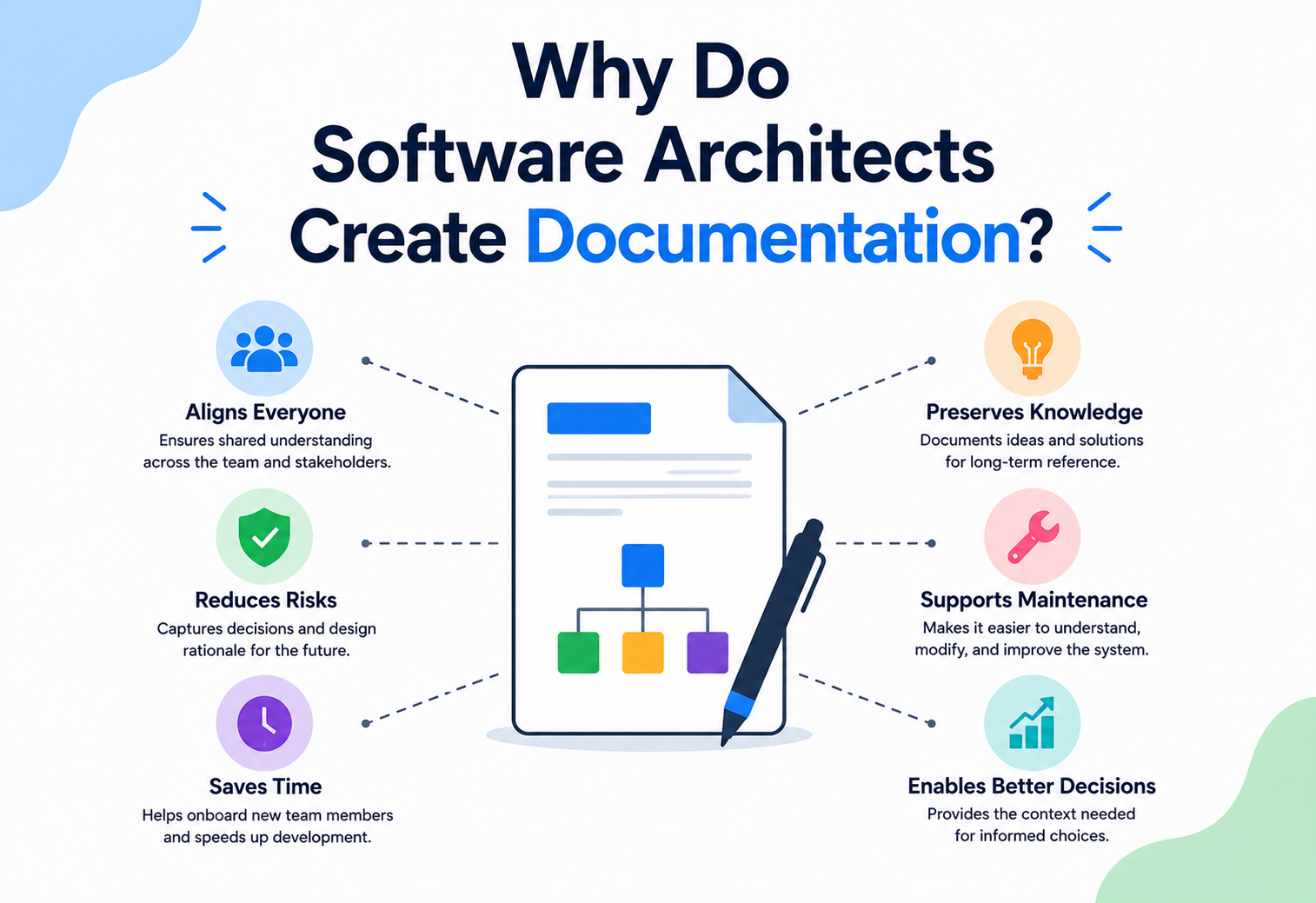
Why Do Software Architects Create Documentation?
The code can tell you what a system does. It almost never tells you why it was built that way, or what would break if you changed it. That missing “why” is exactly what architecture documentation is for.
The Big Idea, in One Breath
Software systems are full of locked boxes — strange bits of code that only make sense once you know the story behind them. Documentation is where that story lives.
Imagine moving into a new house and finding a locked box in the attic labelled “do not open — important.” You could ignore the label and open it anyway. But wouldn’t it help enormously if, somewhere, there was a note explaining why it is locked, what is inside, and what happens if you open it at the wrong time?
Software systems are full of these locked boxes — pieces of code that look strange or overly cautious until you understand the story behind them. Maybe a service retries three times because it once caused an outage when it didn’t. Maybe two systems talk in a roundabout way because a simpler path once leaked private data. None of that reasoning lives in the code itself. It lives in architecture documentation — the notes architects leave behind explaining not just what was built, but why.
Think of a hiking trail map. The trail itself just exists, silently, on the mountain. But a good map adds notes the trail can’t speak for itself — “steep here,” “closed in winter,” “shortcut, but slippery after rain.” Architecture documentation is that map for a software system: the trail (the code) exists either way, but the notes are what keep the next hiker from getting hurt.
What Architecture Documentation Really Is
Words and pictures, together. Diagrams show structure; sentences carry reasoning. Neither works well without the other.
Architecture documentation is a structured, organised collection of writing and diagrams that explains how a software system is built, how its parts connect, and why key decisions were made the way they were. It is meant to be read by humans, not run by a computer — its whole purpose is to carry understanding from one person’s head into someone else’s.
It usually blends two ingredients: pictures that show structure (boxes, arrows, layers) and words that explain reasoning (why this pattern, why this trade-off, why not the obvious alternative). Neither ingredient works well alone — a diagram without explanation raises more questions than it answers, and paragraphs without diagrams are exhausting to hold in your head all at once.

If someone asks “where’s the documentation for this system?”, they are really asking: “Where can I go to understand how this was built and why, without having to read every single file of code myself?”
The Core Reasons It Exists
Three quiet reasons documentation earns its keep — and one deeper truth underneath them: teams change, memories fade, priorities shift.
Architects don’t write documentation out of habit or love of paperwork. It solves specific, recurring problems that every growing software team eventually runs into.
Underneath those three, there is a deeper truth: software teams change constantly. People join, people leave, memories fade, and priorities shift. Documentation is how an organisation keeps its understanding of a system from disappearing every time someone walks out the door.
Why Code Alone Isn’t Enough
The code is accurate. It is also a poor teacher of “why” and a worse guide to the big picture. Here is the honest split, at a glance.
A common objection goes: “the code is the real truth — why not just read that?” It is a fair question, and code genuinely is the most accurate description of exactly what a system does. But it is a poor teacher of why, and an even worse guide to the bigger picture.

| Question | What Code Answers | What Documentation Answers |
|---|---|---|
| What does this do? | Yes, precisely and accurately | Yes, at a higher, easier-to-grasp level |
| Why was it built this way? | Rarely — reasoning isn’t stored in syntax | Yes — this is documentation’s main job |
| What’s the big picture? | Hard to see across thousands of files | Yes — diagrams show structure at a glance |
| What happens if I change this? | Only if you trace every dependency yourself | Often flagged directly as a known risk |
Code tells you what is true right now. Documentation tells you why it became true, and what to watch out for if you want to change it.
Types of Architecture Documentation
Different readers need different views of the same system — just as a house has separate plans for plumbing, wiring, and floor layout, even though they describe one building.
Not all documentation looks the same, because different readers need different views of the same system — much like a house has separate plans for plumbing, electrical wiring, and floor layout, even though they all describe the same building.
The 10,000-foot picture
Shows the system as a single box, and how it connects to the outside world — other systems, users, and services.
Zooming in one level
Breaks the system into its major internal parts, showing how they are organised and how they talk to each other.
Step-by-step flow
Shows the order events happen in — useful for understanding what occurs when, say, someone places an order.
The reasoning trail
Short write-ups explaining a specific choice, the alternatives considered, and why one was picked over the rest.
A mature team rarely needs all of these to be exhaustive. The goal is coverage where it matters most — the parts of the system that are complex, risky, or likely to confuse a newcomer — rather than documenting every last detail equally.
Who Actually Reads It
Rarely one audience. Four different readers open the same document looking for four different things — and good documentation makes each layer easy to find.
Architecture documentation rarely has just one audience, which is part of why it is harder to write well than it looks. Different readers open the same document looking for very different things.
Learning the ropes
Want a fast, honest overview: what are the major parts, and where do I start looking if I need to change something?
Checking for fit
Want to know how this system connects to theirs, and whether shared standards were followed.
Tracking risk
Want to understand dependencies and risk areas, without needing to read a single line of code.
Verifying compliance
Want evidence that security, privacy, and regulatory requirements were actually considered and addressed.
Good documentation doesn’t try to please everyone with a single wall of text. It is organised so each of these readers can quickly find the layer that is meant for them, without wading through details meant for someone else.

A Closer Look: Architecture Decision Records
Short, dated notes captured the moment a big decision is made. Five simple parts — and one very human problem they solve.
One particularly useful habit, borrowed from many well-run engineering teams, is keeping short, dated notes every time an important architectural decision is made. These are often called Architecture Decision Records, or ADRs, and they solve a very specific, very human problem: nothing is more frustrating than finding a strange piece of code and having absolutely no idea why it exists.
Name the Decision
A short, clear title — like “Use a message queue for order processing” — so it is instantly searchable later.
State the Context
What problem or pressure led to this decision needing to be made in the first place?
List the Options
What alternatives were seriously considered, and what made each one attractive or risky?
Record the Choice
Which option was picked, and — most importantly — why, in language a future reader will still understand.
Note the Consequences
What trade-offs come with this choice, and what should someone watch for if they ever revisit it?
How Good Documentation Actually Gets Written
Not in one long sitting. A little at a time, close to the moments decisions are actually made. Plain language, consistent names, and a habit of writing while the reasoning is still fresh.
Great architecture documentation rarely appears in one long writing session. It grows alongside the system, a little at a time, close to the moments when decisions are actually made.
The most effective habit is writing things down while the reasoning is still fresh — right after a design discussion, not months later from memory. Clear, plain language beats clever or overly formal writing every time, since the goal is to be understood quickly, not to sound impressive. Consistent naming matters too: if a component is called the “order service” in one diagram and the “checkout engine” in another, readers waste time wondering if those are even the same thing.

Writing documentation once and never touching it again. A system that has quietly changed while its documentation stayed frozen in time becomes actively misleading — often worse than having no documentation at all.
Tools Teams Commonly Use
Plenty of tools help. None are mandatory. The habit matters more than the tool — but the right tool makes the habit easier to keep.
Plenty of tools exist to make architecture documentation easier to create, store, and keep up to date. None of them are mandatory — the habit matters more than the tool — but the right tool can make good habits much easier to keep.
Visual structure
Tools for drawing context, component, and sequence diagrams that stay easy to update as the system evolves.
Documentation next to the code
Writing documentation in plain text files stored alongside the actual code, so both change together and stay in sync.
A shared home base
Central, searchable spaces where anyone in the organisation can find and browse existing documentation.
A running history
Simple, chronological records of ADRs, so the reasoning behind past choices is never more than a search away.
Benefits and Trade-offs
Not free. Tend it like a garden, not a monument. A little care regularly beats one huge, one-time effort.
Documentation takes real time to write and maintain, so it is worth being honest about what it gives back — and where the effort can go too far.
Strengths
- Shrinks the time it takes new engineers to become productive
- Preserves reasoning that would otherwise vanish when people move on
- Reduces costly, uninformed changes that quietly break the system
- Gives non-technical stakeholders a way to understand progress and risk
Trade-offs
- Takes genuine time and discipline to keep accurate
- Outdated documentation can mislead readers worse than none at all
- Over-documenting minor, obvious details wastes everyone’s time
- Requires buy-in — one person alone rarely keeps it alive for long
The healthiest approach treats documentation like a garden, not a monument: something tended regularly in small amounts, rather than built once, admired, and left to grow wild.
Common Pitfalls
Three recurring traps — the abandoned diagram, writing for nobody in particular, and mistaking detail for value.
The Beautiful, Abandoned Diagram
A gorgeous, detailed diagram made once during a big kickoff meeting, then never touched again, slowly turns from useful to actively wrong as the real system moves on without it.
Writing for No One in Particular
Documentation that tries to explain everything to everyone at once often ends up genuinely useful to no one. Knowing who you are writing for shapes what belongs on the page.
Confusing Detail with Value
More pages don’t automatically mean more understanding. A short, well-organised page that answers the right questions beats a hundred pages nobody has time to read.

Good documentation answers the questions a smart newcomer would actually ask — not every question that could theoretically be asked.
Key Takeaways
If you remember only these six ideas from the whole guide, you’ll be able to introduce and sustain healthy documentation habits on any team.
Remember This
- The missing “why.” Architecture documentation explains how a system is built and, more importantly, why — reasoning that code alone rarely preserves.
- Three quiet jobs. It exists to share knowledge, support communication, and remember decisions long after the meeting that made them.
- Diagrams plus prose. Good documentation combines diagrams (structure) with writing (reasoning) — neither works as well alone.
- Organised by audience. Different readers need different views; organising documentation by audience makes it far more useful.
- ADRs preserve the “why.” Architecture Decision Records are a simple, powerful habit for capturing why a choice was made, right when it happens.
- Only valuable while accurate. An outdated document can mislead more than an absent one.

