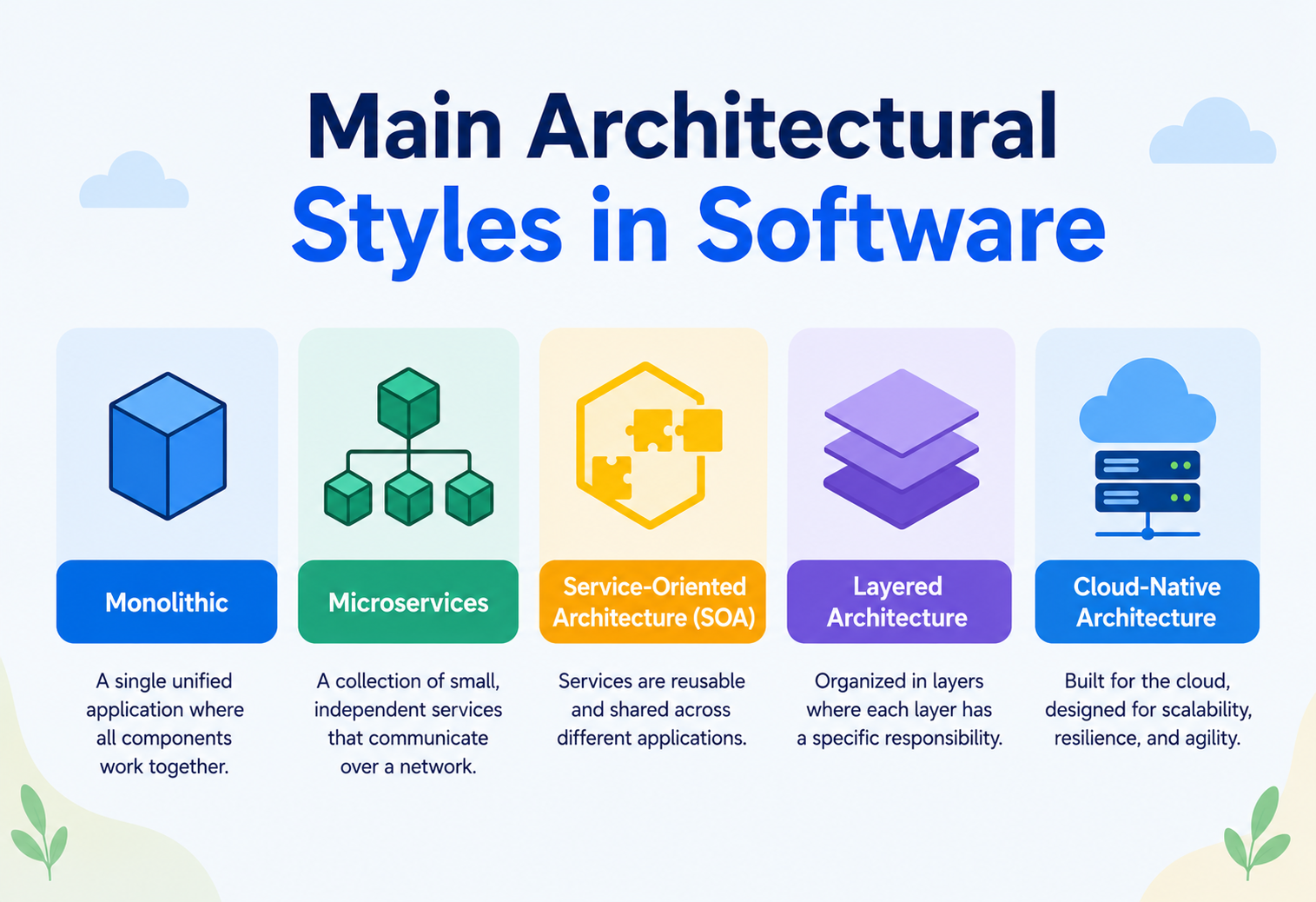
The Main Architectural Styles in Software
Every big app you use is built like a building — and just like buildings, software can be put together in very different ways. This guide walks through the main “blueprints” engineers choose from, using plain language and everyday examples, so the idea makes complete sense no matter your background.
The Big Idea, in One Breath
Bicycles, buses, trains — different ways to travel, each brilliant at its own job. Software is the same. An architectural style is the “shape” a team picks before typing a single line of code.
Think about how many different ways there are to travel from one place to another. You could walk, ride a bicycle, drive a car, take a bus, or hop on a train. Each option gets you where you are going, but each one is built completely differently, costs a different amount, carries a different number of people, and works best in different situations. A bicycle is great for a short trip to the corner store; it would be a terrible way to move a hundred people across a city.
Software works the same way. When engineers build an application, they don’t just start typing code — they first decide on a “shape” for the system, a general way of organising all its moving parts. That general shape is called an architectural style. It is the difference between building your app like a bicycle (small, simple, easy to maintain) or like a train system (bigger, more complex, but able to carry far more weight).
Imagine a box of building blocks. You can use the very same blocks to build a tall tower, a wide bridge, or a small house. The blocks don’t change — but the overall plan for putting them together does, and that plan decides whether your creation is tall and wobbly or short and sturdy. An architectural style is that overall plan for a piece of software.
Architectural Style vs. Architectural Pattern
Two words that get mixed up constantly, even by experienced engineers. One is the skyline; the other is a brick. Here is how to tell them apart.
These two words get used interchangeably so often that even experienced engineers mix them up, so let’s untangle them gently. An architectural style is a broad, big-picture way of organising an entire system — it answers the question “what does the whole system look like from far away?” A design pattern, on the other hand, is a smaller, reusable solution to one specific problem inside that system — it answers a much narrower question, like “how should this one piece talk to that other piece?”
Here is a comparison that keeps it simple, borrowing from the world of houses again:
| Level | Question It Answers | House Example |
|---|---|---|
| Architectural Style | What is the overall shape of the whole system? | “We are building a two-storey house with a garage.” |
| Design Pattern | How does one specific part get solved? | “We’ll use a sliding door here instead of a hinged one.” |
| Implementation | What exact materials and steps are used? | “Use these exact screws, this exact brand of glass.” |
So, a single architectural style — say, microservices — might use dozens of smaller design patterns inside it, like the “circuit breaker” pattern or the “API gateway” pattern. The style is the skyline; the patterns are the bricks that make each building within that skyline actually stand up.

If someone asks “what is the architecture style of this app?”, they want to know the big shape — layered, microservices, event-driven, and so on — not the tiny details of how one button talks to one database table.
Why Choosing the Right Style Matters So Much
Picking a style is one of the first decisions on any project — and one of the hardest to undo later. Four concrete reasons that decision reaches far beyond the code.
Picking an architectural style is one of the very first decisions made on any software project, and it is also one of the hardest to undo later. It is a bit like choosing the foundation of a house — you can repaint the walls any time you like, but you cannot easily change the foundation once the house is standing on top of it.
Builds faster later
A style that fits the problem lets a team move quickly, because they aren’t constantly fighting the shape of the system.
Saves money over time
The wrong style often means expensive rebuilding work a year or two down the road, once cracks start to show.
Handles more users
Some styles are built to grow smoothly from a hundred users to a hundred million; others simply were not designed for that.
Shapes how people work
The style even decides how many teams can work on the app at once without stepping on each other’s toes.
There is no style that wins in every situation — that is the part beginners often get wrong. A style that is perfect for a huge company like a streaming service could be complete overkill for a small weekend project, in the same way it would be silly to use a freight train to deliver one letter across the street.
The Common Ingredients Behind Every Style
No matter which style engineers choose, every single one is built from the same three basic ingredients. Learn to spot these, and every style suddenly becomes easier to understand.
No matter which style engineers choose, every single one of them is built from the same three basic ingredients. Learning to spot these three things makes every style in this guide much easier to understand.
- Components — the individual working parts (a login screen, a payment service, a search feature).
- Connectors — the pathways that let components talk to each other (a direct call, a shared queue, a network request).
- Constraints — the rules about who is allowed to talk to whom, and in what order.
Every style you are about to read about is really just a different way of arranging these three ingredients. Some styles stack them in layers, some scatter them across a network, and some organise them around events instead of direct calls — but the ingredients themselves never change.

The Major Architectural Styles
Six styles that show up most often, one at a time — how each one is shaped, where it shines, and where it quietly starts to struggle.
Here are the styles you’ll encounter most often, explained one at a time, along with what they’re good at and where they tend to struggle.
1. Layered (N-Tier) Architecture
This is usually the very first style anyone learns, because it mirrors how we naturally organise tasks — one step leads to the next. The system is split into horizontal layers, commonly presentation (what the user sees), business logic (the rules and calculations), and data (where information lives). Each layer is only allowed to talk to the layer directly beneath it, the same way each floor of a building is reached through the staircase, never by jumping through the ceiling.
Strengths
- Easy to learn and explain to new engineers
- Clear separation between “what users see” and “how data is stored”
- Great fit for smaller teams and everyday business apps
Trade-offs
- Can become rigid as the app grows larger
- The whole application usually has to be deployed together
- A single small change can ripple across several layers
2. Client-Server Architecture
This is one of the oldest and most familiar styles of all — so familiar, in fact, that most people use it every day without ever knowing its name. One side, the client, asks for something. The other side, the server, has the resources and provides an answer. Your email app is a client; the mail company’s computers are the server holding your inbox.

Strengths
- Simple and easy to reason about
- Centralising data makes it easier to keep secure and up to date
- Works for almost any kind of application
Trade-offs
- If the server goes down, every client is affected
- Can get slow if too many clients ask at once
- The server often becomes a bottleneck as usage grows
3. Microservices Architecture
Instead of building one enormous application, the system is broken into many small, independent services — each one responsible for a single job, each one deployable on its own, and often each one owned by its own small team. They talk to each other over a network, usually through simple, well-defined requests.
Strengths
- Teams can build and release independently
- Only the busy parts need to be scaled up
- One service crashing rarely brings down the whole app
4. Event-Driven Architecture
Instead of one part directly calling another and waiting for a reply, components simply announce that “something happened” — an event — and anyone interested can react to it whenever they are ready. It is the difference between phoning a friend directly and pinning a note on a shared notice board that anyone can read at their own convenience.
Strengths
- Loosely connected — the sender doesn’t need to know who is listening
- Handles sudden bursts of activity naturally
- New reactions can be added without touching old code
Trade-offs
- Harder to trace exactly what happened and in what order
- Different parts of the system can briefly show slightly different information
- Debugging needs good event-tracking tools
5. Microkernel (Plug-in) Architecture
A small, stable “core” handles only the most essential jobs, while everything else is added later as optional plug-ins. It is exactly how a web browser works — the core knows how to display a web page, and everything extra, like an ad-blocker or a password manager, is bolted on afterward without ever touching the core itself.
Strengths
- The core stays small, stable, and easy to trust
- New features can be added without risking the whole system
- Users can pick only the plug-ins they actually need
Trade-offs
- Poorly built plug-ins can still slow down or crash the app
- Managing plug-in versions can get messy over time
- Some jobs don’t split neatly into “core” and “plug-in”
6. Service-Oriented Architecture (SOA)
SOA is an older cousin of microservices. Independent services still exist, but they typically share a common communication pathway, often called an “enterprise service bus,” and they agree to strict, well-documented contracts about exactly how they’ll talk to each other. Think of a big office building where every department shares one central mailroom instead of everyone using their own separate delivery service.

Strengths
- Great at connecting old legacy systems with new ones
- Shared contracts keep large organisations consistent
- Strong governance suits heavily regulated industries
Trade-offs
- The shared bus can become a bottleneck or a single point of failure
- Tends to be heavier and slower to change than microservices
- Requires significant setup and specialised tooling
A Few More Styles Worth Knowing
Six more patterns worth keeping in your back pocket — each one earns its place in the right kind of system.
Beyond the six major styles above, a handful of other patterns show up often enough that they are worth having in your back pocket.
A data assembly line
Information passes through a chain of independent steps, each one doing a single transformation — much like water flowing through a series of filters, getting cleaner at every stage.
Everyone is equal
There is no central server at all — every computer in the network can act as both a client and a provider, sharing the workload directly with its neighbours, the way file-sharing networks work.
One boss, many workers
A “master” component splits up a big job and hands pieces of it to several “worker” components, then combines their results — similar to a teacher splitting a class project among small groups.
Built to never crash under load
Data and processing are spread across many identical, self-sufficient units, so a sudden traffic spike — like a flash sale — gets absorbed instead of crashing the whole system.
Someone else runs the servers
Developers write small pieces of logic and let a cloud provider handle starting them up, running them, and shutting them down automatically, paying only for the moments the code actually runs.
A matchmaker for services
A middle component receives requests and forwards them to whichever service is best suited to answer, hiding the details of who actually does the work — like a receptionist directing visitors to the right office.
A small team building their very first product is almost always better off with a simple, well-organised style than jumping straight into something complex. Complexity should be earned by real, proven need — never assumed from day one.
Comparing the Styles Side by Side
A quick-reference view of the six major styles — what each is best for, plus its clearest strength and honest weakness.
Sometimes the fastest way to understand something is to see it laid out next to its alternatives. Here is a quick-reference table for the six major styles covered earlier.
| Style | Best For | Main Strength | Main Weakness |
|---|---|---|---|
| Layered | Business apps, small teams | Simple, easy to understand | Gets rigid at large scale |
| Client-Server | Almost any connected app | Centralised, easy to secure | Server can be a bottleneck |
| Microservices | Large products, many teams | Independent scaling and releases | Operationally complex |
| Event-Driven | Real-time, reactive systems | Loosely connected, handles bursts | Harder to trace and debug |
| Microkernel | Extensible tools and platforms | Stable core, flexible add-ons | Plug-in quality varies |
| SOA | Large enterprises, legacy systems | Connects old and new systems | Shared bus can bottleneck |
Real-World Examples You Already Use
Five familiar systems, each quietly built on one of the styles above — proof that these aren’t whiteboard theories, they are the shape of the apps you already open every day.
These styles aren’t just theory drawn on a whiteboard — they quietly power apps you likely open every day.

Video streaming platforms
Big streaming services are famously built from hundreds of independent microservices — one team owns recommendations, another owns billing, another owns video playback, all working together but deployed separately.
Instant messaging apps
Chat apps lean heavily on event-driven design — the moment you hit send, that action becomes an event that instantly notifies the recipient’s app, updates delivery ticks, and syncs across your other devices.
Web browsers
Modern browsers are a textbook microkernel — a small core renders web pages, while thousands of independently built extensions plug into that core without ever needing to touch its internals.
Online banking systems
Banks often rely on SOA to connect brand-new mobile apps to decades-old mainframe systems that still process the actual transactions underneath, through a shared, tightly governed set of contracts.
Simple company websites
A small business website is frequently just a clean layered architecture — a presentation layer, a bit of business logic, and a database — because that is genuinely all it needs to do its job well.
How to Choose the Right Style
Five honest questions that narrow the field faster than any framework diagram. Match the shape of the solution to the shape of the actual problem.
Choosing a style isn’t about picking whichever one sounds the most impressive — it is about matching the shape of the solution to the shape of the actual problem. A few honest questions help narrow it down:
- How many people will use this? A hundred users and a hundred million users call for very different foundations.
- How big and experienced is the team? A small team of three engineers will usually struggle to properly operate a large microservices setup.
- How fast does it need to grow? If rapid, unpredictable growth is expected, styles built for scaling deserve serious consideration early.
- What already exists? If the company already runs older systems, a style like SOA that is good at bridging old and new may fit best.
- How much operational complexity can the team realistically handle? More powerful styles usually demand more monitoring, more tooling, and more expertise to run well.
Choosing an architectural style is a lot like choosing a vehicle for a house move. Moving a single bag needs nothing more than a backpack. Moving a whole household needs a truck. Renting a truck for the single bag wastes money and effort; trying to carry a whole household in a backpack simply doesn’t work. The right choice always depends on the size of the job.
Picking a big, complex style purely because a famous company uses it. What works beautifully for a company serving a billion users can be genuinely painful for a small team just getting started.
Quality Attributes Each Style Favors
Every style quietly trades one “-ility” for another. Scalability, simplicity, reliability, flexibility — no style wins them all at once.
Every architectural style quietly makes trade-offs between qualities engineers often call the “-ilities.” No style scores perfectly on all of them at once — improving one usually costs a little of another.
Growing with demand
Microservices and event-driven styles tend to shine here, since individual pieces can grow independently.
Easy to understand
Layered and client-server styles usually win here, favouring clarity over raw power.
Staying up under stress
Space-based and event-driven styles are often chosen specifically to survive sudden, unpredictable spikes.
Adapting to new needs
Microkernel and microservices styles make it easiest to add new capability without disturbing the core.
Part of an architect’s job is figuring out which of these qualities matter most for a specific business, and then leaning toward the style that protects those qualities — even if it means giving up a little of something else.
Common Pitfalls When Choosing a Style
Three recurring mistakes that trip up teams choosing an architectural style, plus a small warning about decisions that never get written down anywhere.
Copying Big Tech Without the Big Tech Problem
It is tempting to reach for the same complex style used by a giant, famous company, without stopping to ask whether the actual problem being solved is anywhere near that size. Complexity brought in too early tends to slow a small team down rather than help it.
Mixing Styles Without a Plan
Blending two styles together — say, layered and event-driven — can absolutely work, but only when it is a deliberate decision, clearly documented, and understood by the whole team. Mixing them by accident, one small shortcut at a time, usually leads to a confusing system nobody fully understands anymore.
Treating the First Choice as Permanent
No style has to last forever. Many long-lived, successful systems actually begin life as a simple layered application and only shift toward something like microservices once real, measurable growth genuinely demands it — not before.
Decisions about architectural style that get made informally in a chat message and never written down anywhere. Months later, nobody remembers the reasoning, and the same debate starts all over again.
Key Takeaways
If you remember only six ideas from this guide, let it be these. Together they cover most of the situations where architectural style actually matters in day-to-day engineering practice.
Remember This
- Style is the skyline; patterns are bricks. An architectural style is the big-picture shape of a whole system, while a design pattern solves one small piece inside it.
- Three ingredients, always. Every style is built from the same three ingredients: components, connectors, and constraints.
- Simplicity has a home. Layered and client-server styles favour simplicity; microservices and event-driven styles favour scale and flexibility.
- Different tools, different jobs. Microkernel styles keep a small stable core with optional plug-ins; SOA connects many services through a shared, governed bus.
- No universal winner. There is no universally “best” style — only the one that fits today’s team, budget, and scale.
- Styles evolve with systems. Styles can and should evolve as a system grows; the smartest teams start simple and add complexity only when it is truly earned.

