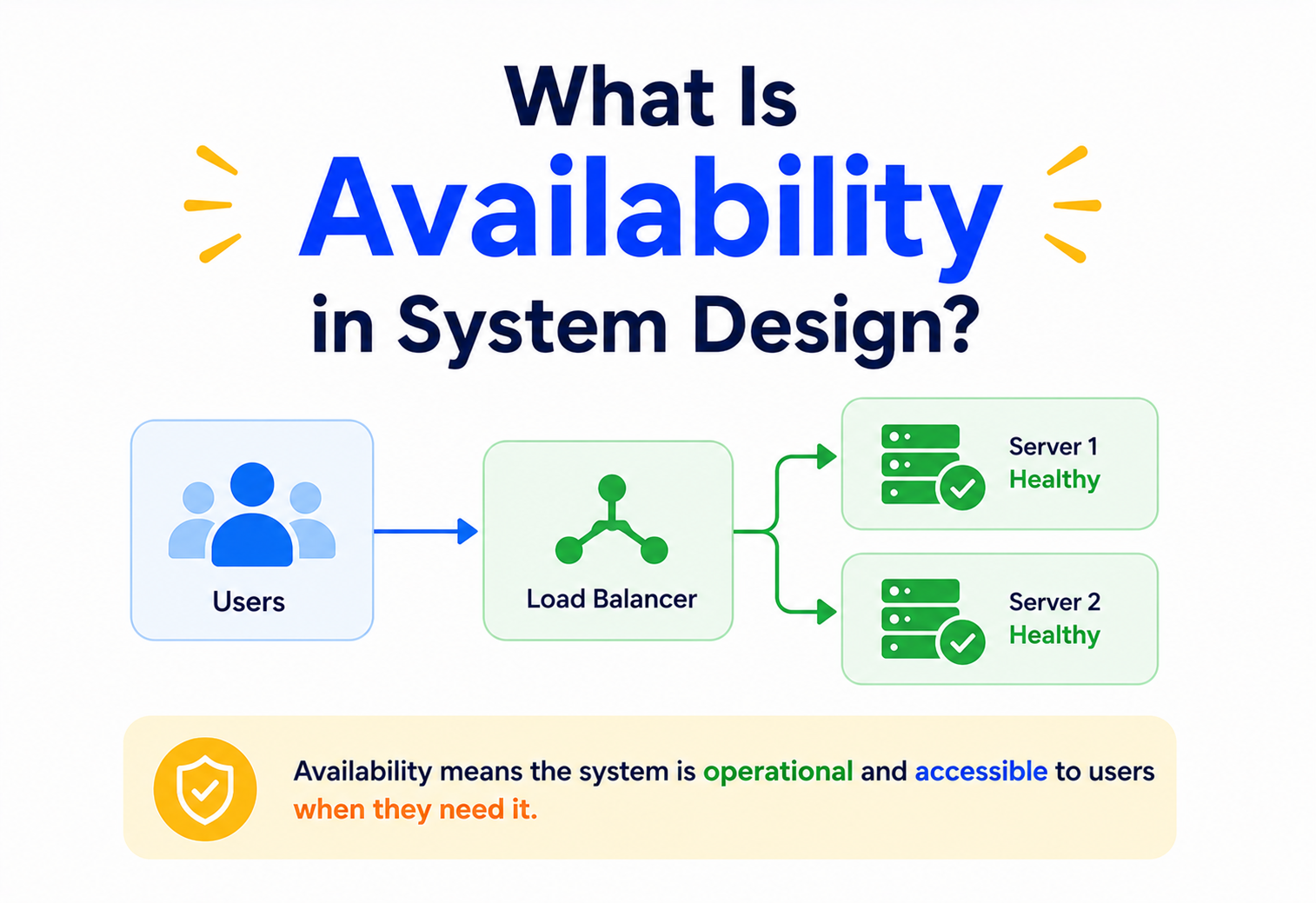
What Is Availability in System Design?
Have you ever tried to open an app and it just… worked, instantly, without you even thinking about it? That’s not luck. That’s a team of engineers making sure the system almost never goes to sleep. This guide breaks down exactly how they do it — in plain, friendly language.
The Big Idea, in One Breath
Availability is about a system quietly keeping its doors open even when parts of it are having a bad day — not by refusing to break, but by making sure a backup is always ready to step in.
Picture a small neighbourhood shop with only one cash register and only one person working there. The moment that cashier steps away for lunch, or the till jams, the whole shop shuts down. No one can buy anything until that one person comes back. Now picture a big supermarket instead — it has ten registers, and even if two of them break down or two cashiers go on a break at the same time, the other eight keep serving customers without anyone outside even noticing something went wrong.
That supermarket is behaving the way a well-built software system should behave. In the world of computers, we call this quality availability — the idea that a system should keep responding to the people using it, even when parts of it are having a bad day. A highly available system doesn’t try to be perfect and never break. It simply makes sure that when something does break, nobody outside notices, because there was always a backup ready to take over.
Think about a hospital. Hospitals keep backup generators humming quietly in the basement, ready to switch on the instant the main power goes out, because a hospital simply cannot afford to go dark in the middle of a surgery. Big websites and apps think the same way about their computers — they always keep a spare “generator” ready, so the lights never actually go out for you, the visitor.
This same idea shows up everywhere once you start looking for it. An airport rarely relies on just one runway, because a single stuck plane shouldn’t be able to ground every flight for the day. A school usually has more than one exit, so a jammed door never traps everyone inside. Engineers borrow exactly this thinking when they design the computer systems behind the apps we use every day — they assume, right from the start, that something will eventually break, and they build a plan for that moment long before it ever arrives.
That’s really the whole spirit of this guide. We’re not going to talk about building a system that never fails — nobody has ever managed that, and nobody ever truly will. Instead, we’re going to talk about building a system that fails quietly, recovers quickly, and leaves the people using it none the wiser.

What Availability Really Is
In simple words, availability is the amount of time a system is actually up and working, compared to the total time it was supposed to be working. If a website is meant to be reachable all day, every day, and it manages to stay reachable for nearly all of that time, we say it has high availability. If it keeps freezing, crashing, or showing error pages, its availability is low — no matter how fast or clever it is the rest of the time.
Engineers usually turn this idea into a simple formula, so it can be measured instead of just guessed at:
Availability = Uptime ÷ (Uptime + Downtime) — usually written as a percentage. If a service ran for 995 hours and was broken for 5 hours out of a possible 1000, its availability for that period was 99.5%.
Notice something important here: availability is not the same thing as speed, and it’s not the same thing as never having bugs. A system can be a little slow and still count as “available,” as long as it keeps responding. But the instant it stops responding altogether — even for a minute — that minute gets counted as downtime, and it drags the percentage down.
If someone asks “how available is your system?”, they are really asking: “Out of all the time people might want to use this, how much of that time did it actually work?”
It’s also worth knowing that not all downtime is treated the same way. Planned downtime is scheduled on purpose — say, a Sunday-night maintenance window announced ahead of time, while engineers carefully upgrade something behind the scenes. Unplanned downtime is the kind nobody saw coming — a sudden crash, an unexpected surge of visitors, or a mistake in a new release. Many teams calculate their official availability number using only unplanned downtime, since planned maintenance was a deliberate, communicated choice rather than a failure. Still, from an everyday user’s point of view, an app that won’t open is an app that won’t open, whether the reason was planned or not — which is exactly why even “planned” maintenance windows are kept as short and as rare as possible.
Why It Matters So Much
It’s tempting to think of downtime as a small, forgivable hiccup. In reality, even a short outage can ripple outward in ways that are far bigger than the outage itself. Here’s what’s actually at stake when a system goes down:
Lost transactions
Every minute an online store or payment app is down, purchases simply stop happening — and most of those shoppers won’t come back later to try again.
Broken confidence
People remember the app that let them down right when they needed it. Trust takes months to build and minutes to lose.
Real-world consequences
For hospitals, emergency services, air traffic systems, and banks, downtime isn’t just inconvenient — it can put people’s wellbeing directly at risk.
Public visibility
Outages at popular apps often become news within minutes, because millions of people notice and talk about it at the same time.
There’s also a quieter cost that’s easy to miss: every outage forces engineers to drop whatever they were building and firefight instead. Teams that experience frequent downtime end up spending huge chunks of their time reacting to fires rather than building new things — which slows down everyone’s progress, not just the people directly affected by the outage.
Imagine a large online store during its biggest sale of the year. If the checkout page stops working for even ten minutes at the busiest hour, thousands of carts full of items simply never turn into completed purchases — and many of those shoppers move on to a competitor’s site instead of waiting around. The same ten minutes on a quiet Tuesday afternoon might barely register. This is exactly why availability matters most at the precise moments a business can least afford to lose it — which is rarely convenient timing.
It also helps to remember that availability problems rarely announce themselves politely. A system doesn’t usually send a calendar invite before it decides to fail — it tends to happen at the worst possible moment, during the busiest hour, on the most important day. That unpredictability is precisely why availability has to be designed in advance, rather than patched together after the first bad outage teaches everyone a painful lesson.

Measuring With “The Nines”
Because “high availability” can sound vague, engineers usually describe it using a string of 9s — as in 99%, 99.9%, or 99.999%. Each extra “nine” you add sounds like a tiny improvement on paper, but it actually demands a huge amount of extra engineering effort, because it shrinks the allowed downtime dramatically.
| Availability | Nickname | Downtime per Year | Downtime per Day |
|---|---|---|---|
| 90% | One nine | ~36.5 days | 2.4 hours |
| 99% | Two nines | ~3.65 days | 14.4 minutes |
| 99.9% | Three nines | ~8.76 hours | 1.44 minutes |
| 99.99% | Four nines | ~52.6 minutes | 8.6 seconds |
| 99.999% | Five nines | ~5.26 minutes | 0.86 seconds |
Most everyday websites are perfectly happy sitting around 99% to 99.9% availability. Chasing five nines is expensive — it usually means spreading a system across multiple data centres, building automatic failover, and running rehearsals for failures that haven’t even happened yet. That level of effort is usually reserved for systems where downtime is genuinely dangerous or extremely costly, like payment networks, emergency communication systems, or core banking infrastructure.
Choosing the right number of nines is really a business decision dressed up as a technical one. A personal blog that goes offline for an hour probably won’t cost anyone real money or safety, so aiming for 99% is perfectly sensible and far cheaper to run. A stock trading platform that goes offline for even a few seconds during market hours, on the other hand, can cause genuine financial harm to thousands of people at once, which is exactly why such systems justify the enormous cost of chasing four or five nines. There’s no shame in a smaller team choosing a more modest target — the mistake is not choosing one deliberately at all.
Availability vs Reliability vs Durability
These three words get mixed up constantly, even by experienced engineers, so let’s untangle them using a simple example: a school library.
| Term | Question It Answers | Library Example |
|---|---|---|
| Availability | Is the library open right now? | The library is unlocked and staffed during its posted hours. |
| Reliability | Does it work correctly, consistently, over time? | The catalogue system always shows the correct list of books, every single time you search. |
| Durability | Is the data safe from being lost forever? | Even if the librarian’s computer breaks, the list of borrowed books isn’t lost — it’s backed up somewhere safe. |
A system can technically be “up” (available) while still returning wrong answers (unreliable) — imagine the library door is open, but the catalogue tells you a book is on the shelf when it was actually returned to a different branch. Likewise, a system could lose no data at all (fully durable) while still being completely unreachable for hours (unavailable) — the books are all safe, but the doors are locked. Strong systems need all three qualities working together, not just one of them.
Availability is about being reachable. Reliability is about being correct. Durability is about never losing what was stored.
These three qualities also tend to pull against each other in subtle ways, which is part of what makes system design genuinely interesting. Making a system more durable often means writing every change to slower, more careful storage, which can quietly work against speed. Making a system more available by adding lots of copies can make it harder to keep every copy perfectly reliable and in agreement with the others at every single instant. Good architects don’t treat these three qualities as boxes to be maximised independently — they treat them as dials to be balanced sensibly, based on what actually matters most for the specific system being built.
What Causes Downtime
Before learning how to prevent downtime, it helps to know where it usually comes from. Here are the usual suspects engineers watch out for:
Machines wear out
Hard drives, power supplies, and network cables physically fail over time — it’s not a question of if, but when.
Bugs and bad releases
A new update pushed without enough testing can crash the very system it was meant to improve.
Sudden surges
A flash sale, a viral post, or breaking news can send far more visitors than usual, overwhelming a system built for normal days.
Connections break
The path data travels between computers can get congested, cut, or misconfigured, even if every machine itself is healthy.
Honest mistakes
A wrongly typed command or an accidentally deleted setting can bring down systems that were otherwise working fine.
Bigger events
Storms, fires, power grid failures, or regional internet outages can take out an entire building full of servers at once.
None of these causes can be eliminated completely — machines will always eventually fail, and people will always occasionally make mistakes. The goal of good system design isn’t to prevent every possible failure. It’s to make sure that when one of these things inevitably happens, the overall system barely notices.
Interestingly, industry studies of major outages tend to point to one cause more often than any dramatic hardware explosion or natural disaster: a change made by a human, usually a routine software update or configuration tweak that had an unexpected side effect somewhere else in the system. This is exactly why careful testing, gradual rollouts, and the ability to instantly undo a change are treated as seriously as any piece of physical hardware in a well-run engineering team.

Most outages aren’t caused by dramatic disasters. They’re caused by small, ordinary changes that quietly went wrong — which is actually good news, because ordinary problems can be caught with ordinary discipline.
Core Techniques for High Availability
This is where the real engineering happens. Over the years, a handful of techniques have proven, again and again, to be the backbone of highly available systems.
Redundancy
Redundancy simply means having more than one of something important, so that if one copy fails, another is ready to take over immediately. It’s the supermarket-with-ten-registers idea from earlier, applied to servers, databases, power supplies, and even entire data centres.
Replication
Redundancy is about having extra machines. Replication is about making sure those extra machines actually have the same data. A database is usually replicated across two or more machines, so that if the main copy goes down, a replica already holds an up-to-date copy of the information and can step in without anyone losing their data.
Strengths
- Data survives even if one machine is destroyed
- Read traffic can be spread across replicas
- Backups are always close at hand
Trade-offs
- Keeping replicas perfectly in sync takes extra coordination
- There’s a small delay before every replica catches up
- More copies mean more infrastructure to maintain
Load Balancing
A load balancer is like the host standing at the entrance of a busy restaurant, directing each new customer to whichever table is free instead of letting everyone crowd around a single one. In software terms, it sits in front of a group of servers and spreads incoming requests evenly across them, so no single server gets overwhelmed while others sit idle.
Health Checks and Auto-Healing
A modern system doesn’t just wait for a human to notice something is broken. It constantly asks each of its own servers a simple question — “are you still okay?” — many times a minute. The moment a server stops answering properly, it gets automatically pulled out of rotation, and traffic quietly stops flowing to it, often before any human even sees an alert.
Graceful Degradation
Sometimes a full recovery isn’t possible right away, and that’s fine — the trick is to fail gracefully instead of failing completely. Imagine a shopping app where the recommendation section briefly stops working during a busy sale; a well-designed system simply hides that one section and lets you keep browsing and buying, rather than crashing the entire page over one broken feature.

It’s far better for one small part of an app to quietly go missing for a few minutes than for the whole app to go dark because of that one part.
Circuit Breakers
Old electrical circuit breakers trip on purpose the moment they sense too much current, cutting power to protect the rest of the house from catching fire. Software borrows the exact same trick. When one part of a system starts failing repeatedly, a circuit breaker “trips” and stops sending it any more requests for a little while, giving that struggling part time to recover instead of being buried under an endless pile of doomed requests. Once things look healthy again, the circuit breaker cautiously lets traffic flow back in.
Without this safety switch, a single overwhelmed component can drag down everything connected to it, the same way one clogged pipe can eventually back up an entire plumbing system. With it, trouble stays contained to the one area where it started.
Caching
A cache is simply a fast, nearby copy of information that’s asked for often, so the system doesn’t have to redo the same expensive work over and over. It’s the digital version of keeping a jug of water on the kitchen counter instead of walking to the well every single time someone is thirsty. When a heavily used database or service starts to struggle under load, a well-placed cache can quietly absorb a huge share of the traffic, buying the rest of the system valuable breathing room.
Content Delivery Networks, often shortened to CDNs, take this idea a step further by storing copies of a website’s content on servers scattered around the world, so a visitor is served from a location physically close to them rather than from one distant, potentially overloaded server on the other side of the planet.
Capacity Planning
Even the sturdiest system will buckle if it’s asked to handle far more visitors than it was ever built for — think of a small neighbourhood bridge suddenly asked to carry the traffic of a citywide festival. Capacity planning is the practice of estimating how much load a system realistically needs to handle, testing it against that load ahead of time, and building in a comfortable safety margin above the busiest moments a team can reasonably expect. Many teams also design their systems to automatically add more servers the moment traffic climbs, and quietly remove them again once things calm down, so they’re never paying for far more capacity than they actually need on an ordinary day.
Active-Passive vs Active-Active
When engineers set up backup systems, they usually choose between two broad strategies for how those backups behave while everything is calm.
Active-Passive keeps one full copy of the system doing all the real work, while a second copy sits quietly on standby, ready to take over the moment the first one fails. It’s simpler to reason about, but that standby copy is essentially sitting idle most of the time, which can feel wasteful — like keeping a spare car in the garage that’s driven only once a year.
Active-Active keeps two or more copies working at the same time, sharing real traffic every day. If one fails, the others simply absorb the extra load, often without needing any special “switch-over” step at all. It makes better use of resources, but it’s harder to build correctly, since every copy must stay in sync with the others while all of them are being used simultaneously.
Many organisations go a step further and spread these copies across entirely different geographic regions — one set of servers in one part of the world, another set thousands of kilometres away. That way, even a disaster big enough to take out an entire city’s power grid or internet connection can’t take the whole system down, because the other region keeps everything running.
Disaster Recovery: RTO and RPO
Redundancy handles the everyday bumps — a server crashing here, a network hiccup there. But every system also needs a plan for the rare, much bigger event: an entire data centre catching fire, a whole region losing power, or a serious human mistake that wipes out something important. That bigger plan is called disaster recovery, and it’s usually described using two simple but powerful questions.
Recovery Time Objective
How long can the system realistically stay down before it must be back up and running again? A payments system might demand minutes; an internal reporting tool might tolerate a day.
Recovery Point Objective
How much recent data can the system afford to lose if it has to restore from the last available backup? A chat app might accept losing the last few seconds; a bank cannot afford to lose even one transaction.
Think of RTO and RPO the way you’d think about saving a long school essay. RPO is about how often you hit “save” — save every few seconds, and you’ll lose almost nothing if your laptop suddenly shuts off. RTO is about how quickly you can get back to writing after that shutdown — having your laptop reboot in ten seconds instead of ten minutes makes a real difference when a deadline is looming. Systems that need very small RTOs and RPOs cost far more to build, because they demand constant, near-instant copying of data across multiple independent locations, along with automated tools that can switch everything over in seconds rather than hours.
RPO asks “how much can we afford to lose?” RTO asks “how long can we afford to wait?” Every disaster recovery plan is really just an honest answer to those two questions, backed by real engineering.
SLAs, SLOs and SLIs
Saying “we want high availability” isn’t enough on its own — teams need a concrete number to aim for, measure against, and be held accountable to. That’s where three closely related terms come in.
SLI — Service Level Indicator
The actual measurement being tracked, such as “the percentage of requests that succeeded in the last 30 days.”
SLO — Service Level Objective
The internal goal a team sets for that measurement, such as “we aim to keep that success rate above 99.9%.”
SLA — Service Level Agreement
A promise made to customers, often with consequences attached, such as “if availability drops below 99.9% in a month, customers receive a partial refund.”
Think of it this way: the SLI is the thermometer reading, the SLO is the temperature the family is comfortable with, and the SLA is the written promise the landlord made about how warm the apartment will always be kept, with a penalty if that promise is broken. Teams usually set their internal SLOs a little stricter than the SLA they’ve promised customers, so there’s a safety cushion before an actual broken promise happens.
Behind these numbers sits a whole discipline of watching systems closely: dashboards that show live health at a glance, alerts that wake up an engineer the moment something looks wrong, and clear playbooks describing exactly what steps to take during an incident. After any serious outage, mature teams also write a calm, blame-free report explaining what happened and what will change — often called a postmortem — so the same failure is far less likely to repeat itself.
A good postmortem is less about pointing fingers and more like a doctor’s case notes after treating a patient — what were the symptoms, what was the actual underlying cause, and what change will stop this exact problem from happening again. Teams that punish people for causing outages quietly end up with a culture where mistakes get hidden instead of reported, which paradoxically makes the whole system less available over time, because small warning signs never reach the people who could fix them. The healthiest engineering cultures treat every outage as a lesson the system just taught them, free of charge.
Common Pitfalls
The Hidden Single Point of Failure
Teams often carefully make their application servers redundant, and then forget that everything still depends on one lonely database, one shared network cable, or one login service that was never given a backup. A chain is only as strong as its weakest, unprotected link.

Never Actually Testing the Backup
A standby server that has never once been switched on during a real drill is a guess, not a guarantee. Many organisations discover — during an actual emergency — that their years-old backup plan quietly stopped working months ago and nobody noticed.
Chasing 100% as a Goal
Perfect, unbroken uptime forever isn’t realistic, and chasing it blindly usually means spending enormous amounts of money and effort for very little real benefit. Experienced teams instead pick a sensible target — like 99.9% or 99.95% — that matches how much downtime the business can genuinely tolerate, and then get comfortable with the small, planned gap that’s left over, sometimes called an “error budget.”
Forgetting the People, Not Just the Machines
A backup server is only as useful as the team that knows how to switch it on. It’s surprisingly common for a company to build excellent redundant infrastructure and then never train anyone on exactly what to click, or in what order, when a real emergency hits at three in the morning. Clear, rehearsed, written-down steps matter just as much as the technology sitting behind them.
Adding “one more backup server” without ever rehearsing the actual failover often gives a false sense of safety — the plan looks solid on a slide, but nobody has confirmed it truly works.
How Availability Practice Evolves
Building a highly available system is never really “finished.” As more people start using an app, as new features get added, and as the system spreads across more servers and regions, new weak points quietly appear that didn’t exist before. Because of this, mature engineering teams treat availability as an ongoing habit rather than a one-time project.
One increasingly common habit is deliberately causing small, controlled failures on purpose, during normal business hours, just to see whether the system’s safety nets actually catch them — a practice sometimes called chaos testing. It might sound risky, but it’s really the software equivalent of a fire drill: it’s far better to discover a broken exit door during a calm, planned drill than during an actual fire.
Teams also keep revisiting their monitoring, tightening alerts that were too noisy, adding checks for parts of the system that were never watched closely before, and retiring old backup plans that no longer match how the system actually works today. Just like a growing city keeps widening roads and adding new water lines as more people move in, a growing software system keeps adding new safety nets as more people start depending on it.
Some organisations go further still, scheduling full “game day” exercises where an entire team gathers to intentionally break something significant — turning off a whole data centre, or cutting a major network link — purely to see, in a controlled setting, whether every alarm, every backup, and every written plan behaves the way everyone assumed it would. These exercises are rarely comfortable, but they are enormously valuable, because they turn “we think this would work” into “we’ve actually watched this work.” Over time, this habit of rehearsing failure is what separates systems that merely look resilient on a diagram from systems that have genuinely proven themselves under pressure.
Key Takeaways
Remember This
- Availability measures how much of the time a system actually works, expressed as a percentage such as 99.9%.
- Every extra “nine” you chase shrinks allowed downtime dramatically and costs proportionally more engineering effort.
- Availability, reliability, and durability are related but different — being reachable, being correct, and never losing data are three separate promises.
- Redundancy, replication, load balancing, health checks, and graceful degradation are the everyday building blocks of high availability.
- Active-Passive setups are simpler; Active-Active setups make fuller use of resources but demand more careful engineering.
- SLIs, SLOs, and SLAs turn a vague wish for “high availability” into a measurable, trackable, and honestly reported promise.
- Backups that are never tested aren’t real backups — and chasing 100% uptime is usually the wrong goal entirely.

