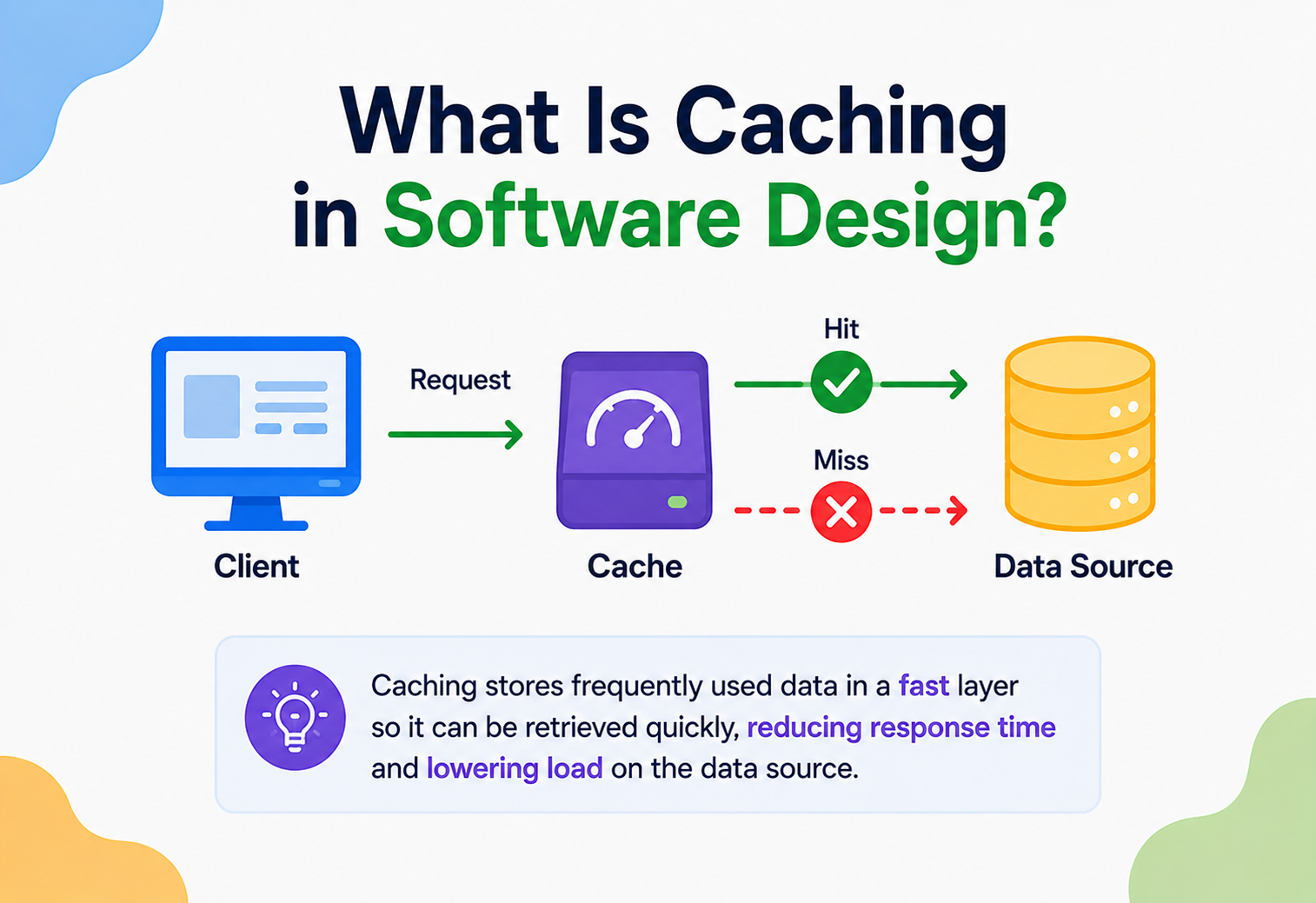
What Is Caching in Software Design?
Some answers are worth remembering, so nobody has to work them out twice. That single, simple habit — keeping a copy of something close by so it is ready the instant it is needed again — is the whole idea behind caching, and it quietly powers almost every fast app or website you have ever used. This complete guide walks through what caching really is, how it works, and how architects design with it well.
The Big Idea, in One Breath
A cache is the software equivalent of a sticky note pressed onto the corner of a desk: a small, quick‑to‑reach copy of an answer already worked out once, kept close by specifically so the same slow work never needs to be repeated.
Picture a kid doing homework at the kitchen table, working through a stack of math problems. The first time she needs to know what seven times eight equals, she works it out carefully on scratch paper. But she is clever, so she writes the answer — fifty‑six — on a sticky note and presses it right onto the corner of her desk. The next time that same multiplication shows up in a later problem, she does not redo the math at all. She just glances at the sticky note and moves on, instantly.
That sticky note is a cache. It is a small, quick‑to‑reach copy of an answer she already worked out once, kept close by specifically so she never has to repeat the same slow work twice. Computers use exactly this trick, constantly, all across the software you use every day — storing a copy of something recently looked up or calculated, right next to where it is needed, so the next request for that same thing can be answered almost instantly instead of being worked out from scratch again.
In software terms, this is called caching, and the fast, nearby storage spot holding those saved copies is called a cache. The original, slower place the information came from — a big database, a distant server, a heavy calculation — is often called the source of truth, precisely because it is the place the cache borrowed its copy from in the first place.
Think about keeping your everyday spices on a little rack right next to the stove, instead of walking to a pantry down the hall every single time a recipe calls for salt. The pantry still holds the full, complete supply — that is your database. The rack by the stove holds just the handful of things you reach for constantly — that is your cache. Cooking gets dramatically faster, as long as the rack is kept stocked with the right spices.
Keep that spice rack picture in mind as you read on, because nearly every idea in this guide — the benefits, the tricky trade‑offs, the strategies for keeping a cache trustworthy — traces back to that same simple bargain: trading a little bit of extra bookkeeping for a whole lot of speed.
What makes caching such an enduring idea is how quietly universal it is. It shows up in a browser remembering a picture it already downloaded, in a phone remembering your recent app switches, in a search engine remembering a popular query’s results, and in a massive video platform remembering which show is trending tonight. Different scales, wildly different technologies, but the exact same underlying trick, applied again and again.

A Short History of Caching
Caching is one of the oldest ideas in computer hardware, dating back to the 1960s and 70s, when engineers first solved the gap between fast processors and slower main memory. Decades later, the same trick powers the modern web.
Caching is not a modern software trick invented for the internet age — it is actually one of the oldest ideas in computer hardware, dating back to the earliest days of computing itself, long before the web existed at all.
In the 1960s and 1970s, computer engineers noticed a persistent, frustrating gap: processors, the “thinking” part of a computer, had become dramatically faster than the memory chips storing the data those processors needed to work with. A processor would sit idle, waiting, every time it needed to fetch something from comparatively slow main memory. Engineers solved this by adding a small amount of extremely fast, extremely expensive memory directly next to the processor, and using it to hold copies of whatever data was being used most often. That invention was literally called a “cache,” borrowing the French word for a hidden storage place, and the idea has barely changed since.
As computing moved from single machines to networks, and eventually to the web, the same basic idea simply got applied at bigger and bigger scales. Web browsers began caching images and pages locally in the 1990s so a revisited website would load instantly. Later, entire networks of servers scattered around the world — content delivery networks — began caching copies of popular content close to wherever people were actually browsing from, rather than making every single visitor’s request travel all the way back to one distant, original server.
Today, caching happens at nearly every layer imaginable: inside processor chips, inside operating systems, inside browsers, inside databases, and across whole networks of servers spanning the globe. It is one of the rare ideas from the earliest days of computing that has scaled up, essentially unchanged in spirit, to run some of the largest systems on Earth.
Caching started as a hardware trick to keep processors fed with data fast enough. Decades later, the exact same idea keeps entire websites and apps feeling instant for billions of people.
It is worth appreciating just how many layers of caching are quietly stacked on top of each other by the time you load a single modern webpage. Your processor’s own hardware cache speeds up the calculations happening on your device. Your browser’s cache speeds up loading images and scripts you have seen before. A CDN somewhere between you and the website’s servers speeds up delivery of shared content. And behind the scenes, the website’s own database likely has its own cache too. One page load, four or five layers of the very same idea, working together without you ever noticing any of them individually.
What Caching Really Is
Caching means storing a copy of data somewhere fast and easy to reach, so future requests for that same data can be answered quickly, without repeating the slower work of fetching or calculating it all over again.
Caching means storing a copy of data somewhere fast and easy to reach, so future requests for that same data can be answered quickly, without repeating the slower work of fetching or calculating it all over again. The word applies both to the action — the act of storing that copy — and to the storage spot itself, which is simply called “the cache.”
A cache almost always trades two things against each other: capacity for speed. Caches tend to be relatively small and comparatively expensive per byte of storage, precisely because they are built from very fast hardware, like memory chips, rather than slower, cheaper storage like a traditional disk. Because of that trade‑off, a cache cannot realistically hold everything — it has to be selective, holding only the data that is genuinely likely to be asked for again soon.
It is worth being precise about what caching is not. A cache is not the same thing as the primary database or storage system — it is a temporary, often disposable copy sitting alongside it. If a cache is wiped out completely, a well‑designed system should still work correctly; it would just be temporarily slower until the cache fills back up again. That disposability is actually one of caching’s most important properties, and it is what separates a cache from a database in the first place.
If someone says “we added a caching layer,” they mean this: somewhere between the users and the slow, original data, they have added a small, fast shortcut that remembers recent answers.
Two ideas are worth carrying with you through the rest of this guide, because they explain almost every decision an engineering team makes about caching:
- A cache is a bet on repetition. Caching only helps when the same piece of data is likely to be requested again soon — caching something nobody ever asks for twice is wasted effort.
- Freshness has to be actively managed. A cache does not automatically know when the original data changes, so keeping cached copies honest takes deliberate design, not luck.
There is a useful way to picture how caching relates to the rest of a system: it sits quietly in the middle, between whoever is asking a question and whoever eventually has to answer it properly. A well‑placed cache intercepts as many repeated questions as possible, only forwarding the genuinely new ones onward, sparing the busy, expensive machinery behind it from doing the same work again and again.
How It Actually Works
Every interaction with a cache follows one of two simple paths — a hit or a miss — and the vocabulary around them shows up constantly in real engineering conversations.
Every interaction with a cache follows one of two simple paths, and the vocabulary around them shows up constantly in real engineering conversations, so it is worth knowing by heart.
A cache hit happens when the requested data is already sitting in the cache, ready to hand over immediately — no slow trip to the original database required. A cache miss happens when the cache does not have it yet, forcing a trip to the slower, original source. After a miss, a well‑designed system almost always saves a fresh copy of that answer into the cache before responding, so the very next request for the same thing becomes a hit instead.
Engineers track this behaviour closely using something called a hit rate — simply the percentage of requests answered directly from the cache, versus the percentage that had to fall back to the slower source. A high hit rate is the whole point of adding a cache in the first place; a stubbornly low one is usually a sign the cache is holding the wrong things, or is not big enough for how the system is actually being used.
The very first time any piece of data is ever requested, it is guaranteed to be a cache miss — there is simply nothing to hit yet. Caches only start earning their keep once the same data gets asked for a second time.
This is sometimes called the “cold start” problem — a freshly created or freshly cleared cache starts out empty, meaning every single request briefly behaves as though there is no cache there at all. Systems that expect to be wiped or restarted occasionally sometimes deliberately “warm up” a cache in advance, quietly pre‑loading the most popular, predictable answers before real traffic arrives, so users never experience that initial slow stretch.

Types of Caches
Not all caches live in the same place or serve the same purpose. As systems grow, engineers reach for different flavours depending on exactly what problem they are solving.
Not all caches live in the same place or serve the same purpose. As systems grow bigger, engineers reach for different flavours of caching depending on exactly what problem they are solving.
Right next to the code
A cache built directly into one application server, holding whatever that particular server has recently needed.
Shared across many servers
A cache spread across several machines, letting many different application servers share one consistent pool of cached data.
One shared space for everyone
A single, central cache that every part of a system checks first, before anyone falls back to the original database.
Close to the visitor
Copies of content stored on servers physically near the person requesting it, cutting down the distance data has to travel.
A simple application cache, tucked inside just one server, works beautifully when a system is small — but it runs into trouble the moment a system grows to use several servers behind a load balancer. Each server ends up keeping its own separate, disconnected cache, meaning the very same piece of data might need to be fetched and stored freshly by every single server, one at a time, which wastes much of the benefit caching was supposed to provide. Distributed and global caches exist specifically to solve that exact problem, by giving every server in a cluster access to one shared, consistent pool of cached memory.
A CDN is a lot like having copies of a popular library book placed in branch libraries all across a city, rather than making every reader travel to one single central library downtown. Whichever branch is closest to you hands you a copy immediately, instead of everyone crowding one distant building.
It is worth noting that these types are not mutually exclusive within a single system — plenty of large applications use all four at once, layered on top of each other. A CDN might handle static images at the very edge of the network, a distributed cache might sit closer to the application servers handling dynamic data, and each individual server might still keep a tiny local cache of its very own most‑used values, refreshed constantly from the shared layer beneath it.
Reading and Writing Strategies
Beyond deciding where a cache lives, engineers have to decide when data gets written into it, and how updates to the original source get reflected. A handful of well‑known strategies cover most real situations.
Beyond simply deciding where a cache lives, engineers also have to decide exactly when data gets written into it, and how updates to the original source get reflected. A handful of well‑known strategies cover most real situations.
The application decides
The application checks the cache first; on a miss, it fetches from the database itself and then saves a copy into the cache.
Update both, together
Every write goes to the cache and the database at the same moment, keeping them reliably in sync at the cost of slightly slower writes.
Update the cache first
Writes land in the cache immediately and are saved to the database a little later, trading some risk for faster write performance.
Skip the cache on writes
New data goes straight to the database, only entering the cache later if it happens to be read — useful when writes rarely get re‑read soon.
Cache‑aside, sometimes called “lazy loading,” is by far the most common pattern in everyday web applications, mostly because it is simple and puts the application fully in control of what gets cached and when. Write‑through is favoured whenever a cache and its underlying database absolutely cannot be allowed to disagree, since every update touches both at once. Write‑back trades a small amount of safety for noticeably faster writes, which makes sense for systems where a brief delay before data is fully saved is an acceptable risk. Write‑around suits situations like logging, where most written data is rarely, if ever, read again soon.
Choosing a caching strategy is really about answering one question honestly: if the cache and the database briefly disagreed with each other, how much would that actually matter for this particular piece of data?
It is also worth noting that these strategies are not locked in forever once chosen. A system might start with simple cache‑aside logic while it is small, and later introduce write‑through behaviour for a specific, sensitive piece of data — like account balances — once the cost of even brief disagreement becomes too high to accept. Revisiting the strategy as a system’s needs change is a normal, healthy part of maintaining a caching layer over time.
A quick mental shortcut some engineers use: cache‑aside is the default choice unless there is a specific, well‑understood reason to reach for something else. Starting simple and only adding complexity once a genuine need appears tends to produce cleaner, more maintainable systems than reaching for the most sophisticated strategy available right from the very beginning.
Eviction Policies: What Gets Kicked Out
A cache is always smaller than the full universe of data it could theoretically hold, so it eventually fills up. The rule deciding what gets removed to make room is called an eviction policy.
Because a cache is always smaller than the full universe of data it could theoretically hold, it eventually fills up — and when it does, something has to make room for new arrivals. The rule deciding what gets removed is called an eviction policy.
Least Recently Used
Removes whatever has not been asked for in the longest time, betting that old, ignored data is unlikely to be needed again soon.
Least Frequently Used
Removes whatever has been asked for the fewest total times, favouring consistently popular data over one‑off requests.
First In, First Out
Removes whatever entered the cache earliest, regardless of how often or recently it has actually been used.
Time To Live
Automatically removes an item once a set amount of time has passed, whether or not it was ever used again.
LRU is by far the most widely used eviction policy in the real world, because it captures a genuinely reliable pattern in how people actually use data — something looked at recently tends to get looked at again soon. LFU shines for data with a clear, consistent popularity, like a handful of extremely famous social media profiles that get visited constantly, day after day. FIFO is the simplest to implement but the least sophisticated, since it ignores usage patterns entirely. TTL is not really an eviction policy on its own so much as a safety net, often layered on top of the others to guarantee that nothing sits in the cache forever, no matter how popular it seemed.
Picture that spice rack by the stove again, but now imagine it only has room for eight jars. An LRU approach would bump whichever spice you have not reached for in the longest time. An LFU approach would instead bump whichever spice you use the least often overall, even if you happened to grab it yesterday.
Real caching systems sometimes combine several of these ideas together rather than picking strictly one. A common pattern uses LRU as the main eviction rule while also applying a TTL safety net on top, ensuring that even a genuinely popular item is eventually forced to refresh, just in case something about the underlying data quietly changed without anyone actively telling the cache.
It is worth noting that no single eviction policy is universally “correct” — each one is simply a different bet about how future requests are likely to behave, based on patterns seen in the past. Choosing the right one for a given system is less about theory and more about actually observing real traffic and picking whichever bet tends to pay off most often for that particular workload.
Cache Invalidation: The Hard Problem
Keeping a cache honest as the original data changes is famously difficult — famous enough that engineers joke about it as one of the two hardest problems in computer science.
There is an old, half‑joking saying among software engineers that there are only two genuinely hard problems in computer science: naming things, and cache invalidation. The joke exists because keeping a cache honest turns out to be surprisingly tricky in practice.
Cache invalidation means making sure that once the original data changes, the cached copy either gets updated or thrown away, rather than quietly continuing to hand out an answer that is no longer true. Get this wrong, and a cache stops being a helpful shortcut and starts being an active source of confusing, incorrect information.
Expire after a while
The simplest approach — cached data automatically expires after a set duration, forcing a fresh fetch eventually.
Update on change
Whenever the original data changes, the system actively notifies the cache to update or remove the affected entry immediately.
A human decides
An engineer or an administrative tool deliberately clears specific cached entries, often after a known, significant update.
Time‑based expiration is easy to implement but always involves a trade‑off: a longer expiry means better cache performance but a higher chance of serving stale information; a shorter expiry means fresher data but more frequent, costly trips back to the original source. Event‑driven invalidation is more precise and can react the instant something actually changes, but it requires extra engineering effort to wire every relevant change up to the cache correctly.
A cache with no invalidation strategy at all is not really a shortcut — it is a slowly aging photograph of the truth, growing less accurate the longer nobody checks on it.
Manual invalidation, while the least elegant of the three approaches, still earns a permanent place in most real toolkits, precisely because unexpected situations arise that no automated rule anticipated. A sudden data correction, an emergency fix, or a rare edge case sometimes genuinely calls for an engineer to simply reach in and clear a specific cached entry by hand, rather than waiting for a scheduled expiry or hoping an automated trigger catches it.

Consistency Across Many Caches
Invalidation gets noticeably trickier the moment a system grows past a single cache. Large applications often run several caches at once, and keeping all of them in agreement is a genuinely harder problem.
Invalidation gets noticeably trickier once a system grows beyond a single cache. Large applications often run several caches at once — one per server, or several regional caches spread around the world — and keeping all of them in agreement is a genuinely harder problem than managing just one.
Imagine a system with three separate caches, each serving a different group of users. If a piece of data changes and only one of those three caches finds out, two‑thirds of visitors could keep seeing the old, outdated answer, even though the underlying data has already moved on. This is called a cache coherence problem, and solving it well usually means building a reliable way for a single change to notify every cache that is holding a copy, not just the nearest one.
Tell everyone at once
A change triggers a message sent to every cache holding a copy, asking each one to drop or refresh that entry.
Let time heal the gap
Rather than actively notifying every cache, entries are simply given a short enough lifespan that disagreements resolve themselves quickly.
Change the name, not the data
Updated data gets a new cache key entirely, so old cached copies simply become irrelevant rather than needing to be found and removed.
None of these approaches make the problem disappear entirely — they simply trade off how quickly all caches agree against how much extra coordination effort a system has to build and maintain. Systems that absolutely cannot tolerate any disagreement between caches, like ones handling financial balances, often lean toward stronger, more actively synchronised approaches, accepting the added complexity as the cost of correctness.
One cache disagreeing with the database is a manageable problem. Several caches disagreeing with the database, and with each other, is the real challenge distributed caching has to solve.
Interestingly, this is one of the areas where caching design overlaps closely with broader distributed‑systems thinking. Many of the same trade‑offs that show up when keeping several databases in sync — how quickly changes propagate, how much temporary disagreement is tolerable, how much coordination overhead is worth paying for certainty — show up again here, just applied to fast, temporary copies of data instead of the permanent originals.
Where Caching Actually Shows Up
Caching is not confined to one corner of software — it is woven through nearly every layer of the systems people use daily, from browsers to CDNs to databases to phones.
Caching is not confined to one corner of software — it is woven through nearly every layer of the systems people use daily.
Faster repeat visits
Browsers keep local copies of images, scripts, and pages, so revisiting a site loads dramatically faster the second time.
Fewer repeated queries
Frequently requested query results are kept in fast memory, sparing the database from answering the same question over and over.
Quicker, cheaper responses
Popular API responses — weather, stock prices, product listings — are cached so repeated requests do not hit the backend every time.
Remembering who’s logged in
A user’s login status and preferences are often cached, so every click does not require a fresh database lookup just to confirm identity.
DNS — the system that translates a website address like “example.com” into the numeric address computers actually use to find it — relies heavily on caching too. Once your device or internet provider looks up a domain’s address, it keeps that answer cached for a while, so the exact same lookup does not need to be repeated every single time you visit the same site again that day.
Content delivery networks apply the same idea to entire websites’ worth of images, videos, and files, storing copies on servers scattered around the world so a visitor in Tokyo and a visitor in Toronto can both be served quickly from a nearby location, rather than both waiting on a single, distant original server.
Even the small, everyday conveniences on a phone lean on caching constantly. A weather app showing yesterday’s forecast for a split second before refreshing, a maps app remembering a recently viewed area so it does not have to redraw from scratch, a music app keeping a few songs downloaded locally for offline listening — all of these are caching, just applied at the scale of a single device rather than an entire company’s infrastructure.
Real Companies, Real Choices
It helps to see caching playing out in systems people use every single day, rather than staying purely theoretical.
It helps to see caching playing out in systems people use every single day, rather than staying purely theoretical.
Social media platforms lean on caching heavily for exactly the kind of moment that makes headlines: a single post suddenly goes viral, and suddenly enormous numbers of people are requesting the exact same piece of content within seconds of each other. Without a cache, that spike would hammer the underlying database with thousands of near‑identical requests at once. With a cache, the very first request fetches the post, and every request after that — potentially millions of them — is served straight from fast memory instead.
Streaming and media platforms depend on caching in a similar way, especially through content delivery networks, so that a hugely popular new episode or song can be handed out from servers positioned close to viewers worldwide, rather than every single stream travelling back to one central location.
Online retailers lean on caching heavily around big sales events. Product listings, prices, and category pages tend to change relatively rarely compared to how often they are viewed, making them excellent caching candidates — which is exactly why a retailer’s site can often stay fast even while enormous numbers of shoppers browse the same handful of popular deals simultaneously.
The busier and more “spiky” a system’s traffic is expected to be, the more valuable caching tends to become — it is precisely during sudden surges that a cache earns back its cost many times over.
Search engines lean on caching too, particularly for extremely common queries. A search for a well‑known topic, asked millions of times a day by different people, is an excellent caching candidate, since the result rarely needs to be recalculated from scratch for every single person who happens to ask the very same question within a short window of time.

The Advantages of Caching
Caching has remained one of the most consistently valuable techniques in software design for very good reasons — speed, reduced load, resilience during spikes, and often lower infrastructure cost all in one package.
Caching has remained one of the most consistently valuable techniques in software design for very good reasons.
What It’s Great At
- Dramatically faster responses for frequently requested data
- Reduces load on databases and backend services
- Helps systems stay steady during sudden traffic spikes
- Cuts down on repeated, wasteful computation
- Can meaningfully lower infrastructure costs at scale
Why Teams Still Reach for It
- Improves the experience for users, who simply notice things feel fast
- Buys breathing room for a database that might otherwise need expensive upgrades
- Smooths out “hot spot” problems where a few items get most of the traffic
- Works at nearly every layer, from browsers to backend databases
- Often relatively simple to add on top of an existing system
That last point deserves attention. Caching is one of the few performance techniques that can often be layered onto an already‑built system without a ground‑up redesign — a big part of why it is such a popular first step whenever a system starts to feel sluggish under growing demand.
There is also a quieter, longer‑term advantage worth naming: caching buys valuable time. A database nearing its own limits does not have to be replaced or urgently upgraded the moment it starts to strain — a well‑placed cache can often absorb enough load to keep things comfortable for months or years longer, giving a team breathing room to plan a more permanent solution calmly, rather than scrambling under pressure.
The Trade‑offs and Limits
Caching is not free of downsides, and pretending otherwise leads teams straight into the very problems this section is meant to warn about.
Caching is not free of downsides, and pretending otherwise leads teams straight into the very problems this section is meant to warn about.
The Honest Downsides
- Cached data can become stale if invalidation is not handled carefully
- Adds real complexity — another moving part that can fail or behave unexpectedly
- Fast cache hardware is often more expensive per byte than regular storage
- A crashed or cleared cache can briefly overwhelm the original source
- Debugging becomes trickier when a cached answer disagrees with reality
Hidden Costs to Watch For
- Poorly sized caches can waste money without meaningfully improving performance
- Overly aggressive caching can hide real bugs in the underlying system
- Distributed caches need their own monitoring, just like any other service
- A “cache stampede,” where many requests miss at once, can spike backend load suddenly
Adding a cache does not make a system simpler — it adds a new component that itself needs to be sized, monitored, and kept honest. The performance gain is real, but so is the added responsibility.
There is a subtler cost worth naming too: caching can quietly mask real underlying problems. A slow, poorly optimised database query might feel perfectly fine as long as its results are almost always served from cache — right up until a cache miss happens at exactly the wrong moment, revealing how genuinely slow that underlying query actually was all along. Relying on caching alone, without ever addressing the root cause, can leave a system fragile in ways that only show up during unlucky timing.
Caching in the Cloud
Modern cloud platforms have made adding a serious caching layer dramatically easier than it used to be, turning what once required specialised hardware into a service anyone can switch on in minutes.
Modern cloud platforms have made adding a serious caching layer dramatically easier than it used to be, turning what once required specialised hardware into a service anyone can switch on in minutes.
Managed in‑memory data stores — services built specifically to run fast, reliable caches — let teams add a powerful caching layer without personally managing the underlying servers, patching software, or worrying about hardware failures. These services are typically built around well‑known, battle‑tested caching engines that store data directly in memory for the fastest possible access.
Spin up a cache cluster
A managed caching service is created in just a few clicks, with a chosen size and number of nodes.
Connect the application
The application is updated to check the cache first, falling back to the database only on a miss.
Set expiry and eviction rules
Sensible time‑to‑live values and an eviction policy are configured to keep the cache both fresh and appropriately sized.
Monitor hit rate
The team watches how often the cache is actually being used successfully, adjusting size or strategy as real traffic patterns emerge.
Content delivery networks, offered by essentially every major cloud provider, extend this same idea across the globe, automatically caching static content like images and videos on servers near wherever visitors actually are, without any team needing to build or maintain that worldwide network themselves.
Using a managed caching service is a bit like renting a professionally staffed storage unit instead of building your own warehouse. Someone else worries about the building, the security, and the shelving — you just decide what goes in and out.
Serverless computing environments have introduced their own particular caching challenges, since the very same statelessness that makes serverless functions so easy to scale also means they cannot easily hold onto a local cache between calls the way a traditional long‑running server might. This has pushed many teams toward external, shared caching services even more strongly, since that shared layer becomes the one reliable place memory can genuinely persist across otherwise short‑lived, disposable functions.
The Cost and Performance Picture
Whether caching genuinely saves money depends heavily on how it is used. It is worth separating the different kinds of cost involved rather than assuming it is automatically cheaper across the board.
Whether caching genuinely saves money depends heavily on how it is used, and it is worth separating the different kinds of cost involved rather than assuming it is automatically cheaper across the board.
On the performance side, the win is usually dramatic and easy to measure. Reading from fast, in‑memory cache storage typically takes a fraction of a millisecond, while a comparable trip to a disk‑based database can take many times longer, especially under heavy load. That speed difference compounds quickly across thousands or millions of requests, translating directly into a system that simply feels faster to everyone using it.
| Cost Area | Without Caching | With Caching |
|---|---|---|
| Database load | Every request hits the database directly | Most requests never reach the database at all |
| Response time | Consistently limited by disk‑based storage | Sub‑millisecond for cache hits |
| Infrastructure spend | May require overprovisioned database hardware | Cache absorbs load, often cheaper overall |
| Operational complexity | Simpler — one less moving part | Higher — cache needs its own care |
On the cost side, the picture is genuinely nuanced. Fast cache hardware costs more per unit of storage than a typical database disk, so caching everything indiscriminately would actually be expensive and wasteful. The real savings show up specifically because a cache does not need to hold everything — it only needs to hold the relatively small, frequently‑requested slice of data that accounts for most real traffic, letting a modest amount of fast, pricier storage meaningfully reduce the load on a much larger, cheaper database.
Caching tends to be a case of “spend a little on fast storage, save a lot on everything else” — as long as the cache is sized and targeted thoughtfully, rather than treated as a place to dump all data indiscriminately.
There is also a cost worth naming on the human side: someone has to keep watch over a cache’s health, much like any other piece of infrastructure. Monitoring hit rates, adjusting sizes as traffic grows, and occasionally troubleshooting a stubborn staleness bug all take real time and attention. For most systems, that ongoing attention is a small price to pay next to the performance gained, but it is worth budgeting for honestly rather than assuming a cache runs itself forever once switched on.

The Stale Data Problem
The moment a cache saves a copy of something, that copy begins the slow process of becoming potentially wrong, because the original data is always free to change without asking permission first.
Here is the uncomfortable truth sitting at the heart of every caching strategy: the moment a cache saves a copy of something, that copy begins the slow process of becoming potentially wrong, because the original data is always free to change without asking permission first.
This gap between “what the cache says” and “what is actually true right now” is called staleness, and every cached system lives with some amount of it, whether measured in milliseconds or hours. The real engineering question is not whether staleness can be eliminated entirely — for most systems, it cannot be, not perfectly — but how much staleness a particular piece of data can tolerate before it becomes a real problem.
A blog post’s view count being a few seconds out of date rarely matters to anyone. A bank account balance being a few seconds out of date could matter enormously. Good caching design starts by honestly sorting data into these categories, and applying much shorter expiry times, or skipping caching altogether, for anything where staleness carries real consequences.
Before caching anything, ask: “If this answer were thirty seconds out of date, would anyone genuinely be harmed?” The honest answer to that question should shape how aggressively, or cautiously, that data gets cached.
It is worth noting that staleness is not purely a technical inconvenience — it can quietly shape how much people trust a system. A shopper who adds an item to their cart, only to discover at checkout that the cached price shown moments earlier was already out of date, walks away with a slightly diminished sense of confidence in the whole experience, even if the mistake was small and quickly corrected. Treating staleness as a genuine user‑experience concern, not just a background technical detail, leads to noticeably better caching decisions.
Choosing the Right Strategy
Deciding exactly how to cache something is not a one‑size‑fits‑all decision. It depends heavily on how the data behaves and how much staleness it can tolerate.
Deciding exactly how to cache something is not a one‑size‑fits‑all decision — it depends heavily on how the data behaves and how much staleness it can tolerate.
Cache aggressively
Data read far more often than it is changed — like product descriptions — makes an excellent, low‑risk caching candidate.
Cache briefly, or skip it
Data that changes every few seconds, like a live stock price, often needs very short expiry times or no caching at all.
Favour write‑through
Data where being wrong even briefly is unacceptable benefits from strategies that keep cache and database tightly in sync.
Consider write‑around
Data written constantly but rarely re‑read soon after, like raw event logs, often does not need to occupy cache space at all.
In practice, most real systems end up using several different caching strategies at once, applied thoughtfully to different kinds of data within the very same application, rather than picking one universal approach and forcing everything through it.
That guiding sentence captures how experienced architects tend to approach the decision: aggressiveness toward caching everywhere it plausibly helps, balanced by genuine caution wherever the cost of a stale answer would be too high to accept.
A useful habit for making this decision concrete is to sketch out, for each major kind of data in a system, three simple facts: how often it is read, how often it changes, and how bad it would be if a reader briefly saw an old version. Data with high read frequency, low change frequency, and low harm from staleness are the obvious, easy wins. Data scoring the opposite on all three deserves real caution, and sometimes deserves no caching at all.
A Worked Example, Start to Finish
Ideas like this are easiest to remember through a story, so imagine a small app called Petalog, where people look up care instructions for houseplants by searching a plant’s name.
Ideas like this are easiest to remember through a story, so imagine a small app called Petalog, where people look up care instructions for houseplants by searching a plant’s name. Here is how caching might come together for it.
First search of the day
Someone searches “monstera.” Nothing is cached yet, so Petalog fetches the care guide from its database — a cache miss.
The answer gets remembered
Before replying, Petalog saves that monstera care guide into its cache, tagged to expire in one hour.
A hundred more people search it
Every one of those searches becomes a cache hit, answered instantly, without a single extra database query.
The care guide gets updated
A gardening expert corrects a watering tip in the database. Petalog’s event‑driven invalidation immediately clears the old cached entry.
The next search refreshes it
The very next monstera search is a fresh miss, correctly rebuilding the cache with the corrected, up‑to‑date advice.
Notice what this simple flow accomplished: the database was spared from answering the same monstera question a hundred separate times, the correction reached real users almost immediately instead of lingering incorrectly for an hour, and nobody using Petalog ever had to think about any of this happening behind the scenes.
The best caching story is usually an invisible one — searches feel instant, corrections show up quickly, and the database quietly handles only a fraction of the traffic it otherwise would have.
It is worth imagining, briefly, how differently this same story could have gone without caching at all. Every single monstera search, from every single visitor, would have needed its own trip to the database, even though the answer never actually changed between most of those requests. During a busy gardening season, that repeated, wasted effort could easily become the very thing that slows Petalog down — exactly the problem a thoughtfully placed cache is built to prevent.
Common Pitfalls
A handful of specific mistakes come up again and again in caching work. Each one is worth naming plainly, so it can be spotted early — ideally before it causes a confusing outage.
Caching Everything Indiscriminately
Not every piece of data benefits from being cached — rarely‑requested or constantly‑changing data can waste cache space without ever meaningfully improving performance.
Forgetting Invalidation Entirely
Adding a cache without a real plan for keeping it fresh is one of the fastest ways to start quietly serving outdated, incorrect information to real users.
The Cache Stampede
When a hugely popular cached item expires all at once, a sudden flood of requests can hit the database simultaneously, momentarily overwhelming it — a problem that thoughtful expiry staggering can help avoid.
Ignoring Hit Rate
A cache running quietly with a surprisingly low hit rate is often a hidden cost sitting unnoticed, providing far less benefit than its size and expense would suggest.
Treating the Cache as a Database
Storing data only in a cache, with no reliable copy anywhere else, risks permanent data loss the moment that cache is cleared, restarted, or crashes.
Copying Cache Settings From a Different System
Expiry times and eviction policies that worked perfectly for one system do not automatically fit another — traffic patterns and data behaviour vary enough that settings deserve to be chosen deliberately, not borrowed blindly.
A team that added caching once, celebrated the speed boost, and never revisited it again. Traffic patterns change over time, and a caching strategy that was perfect on day one can quietly become the wrong fit a year later.
Best Practices for Building With Caches
Good caching design tends to follow a consistent handful of habits, regardless of the specific technology involved.
Good caching design tends to follow a consistent handful of habits, regardless of the specific technology involved.
- Cache the things people actually ask for repeatedly. Let real traffic patterns, not guesses, guide what belongs in the cache.
- Set sensible expiry times. Match how long data stays cached to how quickly that particular data actually tends to change.
- Plan invalidation from the start. Decide how the cache will learn about changes before writing a single line of caching code.
- Watch the hit rate. A consistently low hit rate is a signal to rethink what is being cached, not a reason to simply make the cache bigger.
- Treat the cache as disposable. Never let anything live only in the cache — the original source of truth should always be able to rebuild it.
- Guard against stampedes. Stagger expiry times for hugely popular items so they do not all fail at once and swamp the database.
- Warm up caches after a restart. Pre‑load the most predictably popular data before real traffic arrives, avoiding a rough, slow start.
- Revisit the strategy periodically. Traffic patterns shift over time, so a caching setup that fit perfectly a year ago deserves a fresh look now.
None of these habits demand exotic tools or a huge team — they mostly come down to treating a cache as a real, living part of the system, deserving the same ongoing attention as a database or any other critical component, rather than a one‑time addition that is switched on and then forgotten.
Before adding a cache anywhere, ask a simple pair of questions: “How often is this data read compared to how often it changes, and what happens if someone briefly sees an old version?” The answers usually point straight to the right strategy.
Questions People Often Ask
A few questions about caching come up again and again, in conversations ranging from casual curiosity to serious architecture reviews. Here are short, honest answers to the ones that surface most often.
Is a cache the same thing as a database?
No. A database is meant to be the complete, durable source of truth. A cache is a smaller, faster, often temporary copy of a portion of that data, built purely for speed.
What happens if a cache is completely wiped out?
A well‑designed system should keep working correctly — just more slowly for a while, since every request briefly becomes a cache miss until the cache fills back up naturally.
Can caching ever make a system slower?
Yes, if it is poorly designed — an oversized or poorly targeted cache can add overhead without meaningfully improving hit rates, or a cache stampede can briefly overwhelm the very database it was meant to protect.
How long should cached data usually last?
It depends entirely on how quickly the underlying data changes and how much a stale answer would matter — anywhere from a few seconds to many hours, depending on the specific case.
Do small personal projects need caching?
Usually not right away. A small project with light, steady traffic can often run comfortably without any caching layer until real growth or spiky traffic patterns show up.
Is browser caching the same idea as server‑side caching?
Yes, at heart — both save a copy of something close by to avoid repeating slow work. Browser caching just happens on your own device, while server‑side caching happens somewhere in the system delivering the content to you.
What is the difference between a cache and a CDN?
A CDN is really a specific, large‑scale application of caching — a network of caches placed at many physical locations around the world, mainly used for delivering static content like images and videos quickly.
Can caching cause bugs that are hard to find?
Yes — a common trap is an engineer chasing a mysterious bug for hours, only to discover the underlying data was actually correct all along, and it was simply a stale cached copy quietly showing an old, wrong answer.
Key Takeaways
If you remember nothing else from this guide, remember the six ideas below — and the quiet habit of pairing every cache with a clear, deliberate plan for what to cache, when to expire it, and how to keep it honest.
Remember This
- Caching means storing a fast, nearby copy of data so future requests can be answered without repeating slow work.
- A cache hit answers instantly; a cache miss falls back to the slower, original source and refreshes the cache along the way.
- Eviction policies like LRU decide what gets removed when a cache fills up, while invalidation keeps cached data honest as the original changes.
- Caching’s biggest strength is speed and reduced load on slower systems; its biggest risk is quietly serving stale, outdated answers.
- Not all data deserves caching — the best candidates are read far more often than they change.
- Most healthy systems combine several caching strategies thoughtfully, matched to how each specific piece of data actually behaves.
At its heart, caching is one of those quietly universal ideas that shows up wherever a system needs to do less work without sacrificing what it delivers. From a sticky note on a kitchen desk to a globe‑spanning content delivery network, the underlying trick never really changes: remember what is worth remembering, close by, so nobody ever has to work the same answer out twice. The systems that apply that trick thoughtfully — sized right, expired at the right rhythm, kept honest as the world changes — are the ones that feel fast, calm, and trustworthy, even under demand that would otherwise crush them.

