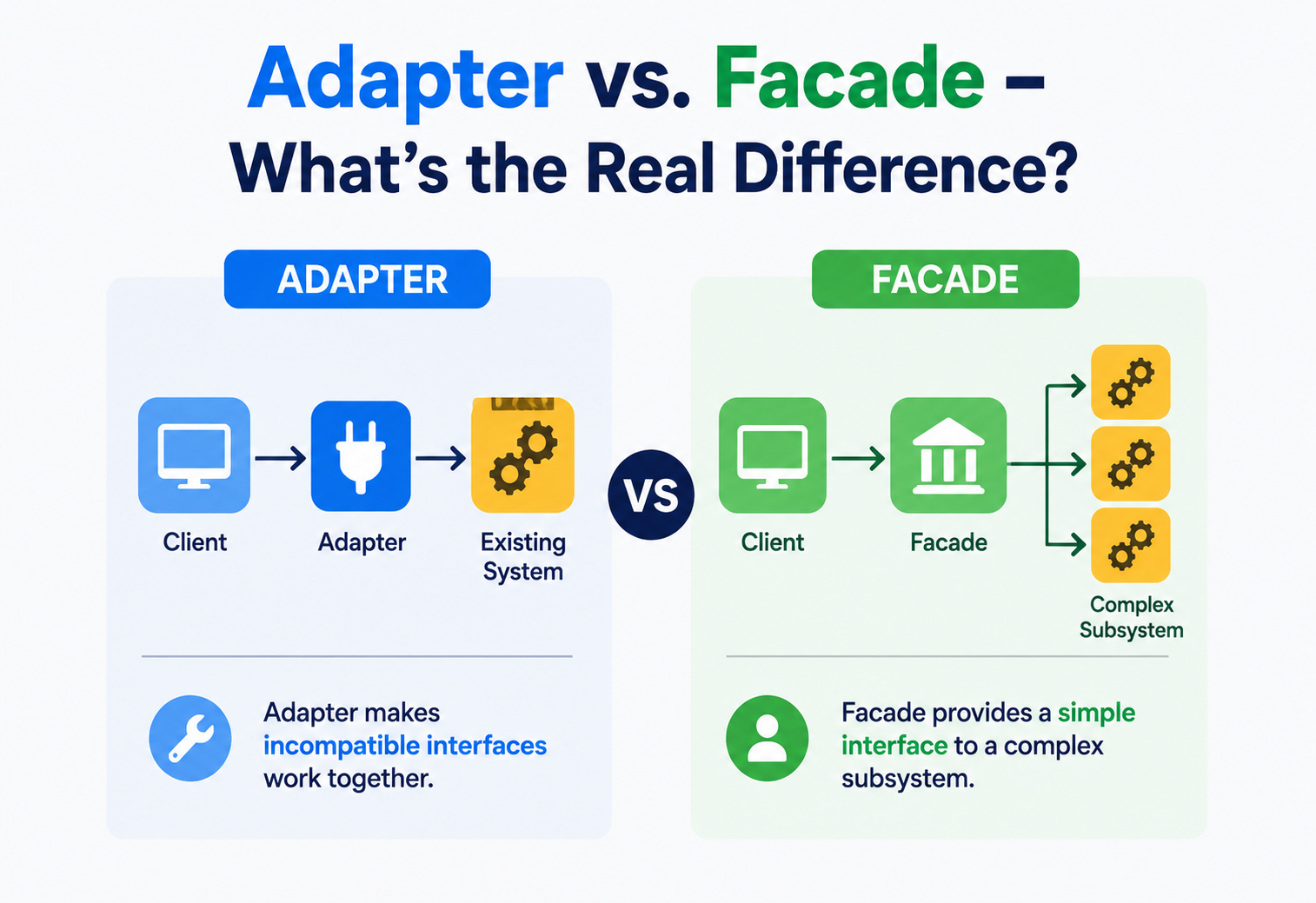
Adapter vs. Facade — What’s the Real Difference?
Both patterns wrap something. Both patterns make life easier for whoever calls them. And yet they solve two genuinely different problems. Let’s untangle exactly where they overlap, where they split apart, and how to know which one you actually need.
The Big Idea, in One Breath
Imagine two different helpers standing between you and a complicated task, and imagine mixing up which one to call for help. The first helper is like a travel plug adapter — the little block you carry when visiting a country with different wall sockets. It doesn’t make electricity simpler; it just changes the shape of the plug so your charger, which was never designed for that wall socket, fits perfectly anyway.
The second helper is like a hotel concierge. A concierge doesn’t change the shape of anything. Instead, they take a complicated request — “I want dinner reservations, theater tickets, and a car to the airport” — and quietly coordinate with the restaurant, the box office, and the car service on your behalf, so you only ever have one simple conversation.
The plug adapter and the concierge both “stand in the middle” and both make your life easier. But notice how differently they do it. The plug adapter exists because your charger’s plug and the wall socket simply don’t match — it translates one shape into another so the connection can happen at all. The concierge exists because there are too many separate things to coordinate — it simplifies a pile of separate tasks into one easy request. That’s the entire difference between Adapter and Facade, dressed up in a travel story.
Both the Adapter pattern and the Facade pattern belong to the same family of structural design patterns, and both work by placing an object between a caller and some existing code. That shared shape is exactly why the two get confused so often. But the reason each one exists — the actual problem each one was invented to solve — points in two genuinely different directions, and untangling that difference is the whole purpose of this guide.
It’s worth pausing on why this particular mix-up happens so often, even among engineers with years of experience. Most design pattern confusion comes from focusing on the mechanics — “an object wraps another object” — instead of the intent behind it. Adapter and Facade share almost identical mechanics: a new class sits between a caller and some existing code, and the caller only ever talks to the new class. If you only ever look at the shape of the code, the two patterns can genuinely look identical on the page. The real difference only becomes obvious once you ask why the wrapper was needed in the first place, which is exactly the question this guide keeps coming back to.
A Quick Refresher: What Is the Adapter Pattern?
The Adapter pattern exists to solve one very specific, very common headache: you have two pieces of code that both do useful things, but they were never designed to talk to each other, because their interfaces — the exact shape of their methods and inputs — don’t match up.
Picture an old-fashioned power drill that only accepts a certain size of drill bit, and a brand-new bit that’s shaped just a little differently. Rather than redesigning the drill or the bit, a small metal collar can be slipped between them, gripping the drill’s chuck on one side and the new bit’s shaft on the other. Neither the drill nor the bit had to change at all — the collar did all the translating.
In software, an adapter class does exactly that. It wraps around an existing class — often one you didn’t write and can’t change, like a third-party library — and exposes a different interface, the one your own code was actually built to expect. Internally, every call is quietly translated into whatever calls the wrapped class actually understands.
Adapter answers the question: “I already have this useful thing, but it doesn’t fit the shape my code expects — how do I make it fit, without changing either side?”
Both Adapter and Facade come from the same widely read 1994 book of twenty-three reusable design solutions, written by four software engineers often nicknamed the “Gang of Four.” Adapter is sometimes also called a “wrapper” in casual conversation, though that more general term can also refer to Decorator or Proxy, which is one more small source of the naming confusion that surrounds this whole family of patterns. What makes Adapter specifically an adapter, rather than just any wrapper, is that its entire purpose is translation between two interfaces that were never designed with each other in mind.
A Quick Refresher: What Is the Facade Pattern?
The Facade pattern exists to solve a very different headache: you have a group of classes that all fit together just fine and work correctly, but using them properly requires knowing a lot of fiddly detail — the right classes to call, in the right order, with the right settings.
Picture a home theater setup with a television, a receiver, a sound system, and a dimmable set of lights. Nothing about these devices is broken or mismatched — they all work exactly as intended. The problem is simply that starting a movie means operating all four of them correctly, in the right sequence, every single time. A facade adds one clean “watch a movie” button that quietly handles all four devices on your behalf.
In software, a facade class wraps around a group of subsystem classes, offering a small number of simple, well-named methods that internally coordinate everything underneath. None of the wrapped classes are mismatched or incompatible with each other — the facade isn’t fixing a compatibility problem. It’s purely reducing how much a caller needs to know and do.
Facade answers a different question: “I have several things that already work well together, but using all of them correctly is a lot of repetitive effort — how do I make that effort disappear behind one simple step?”
Scale is a useful clue when spotting a facade in the wild. Adapter almost always involves exactly two interfaces — the one your code expects, and the one the existing class actually offers. Facade tends to involve several classes at once, sometimes just two or three, sometimes a dozen, all being coordinated together. That “many parts, one entry point” shape is a strong signal that complexity reduction, not compatibility, is the real goal.

The Core Difference, Made Visual
Once the two refreshers above sit side by side, the real difference becomes much easier to see. Adapter is about compatibility — making a mismatched shape fit. Facade is about simplicity — making a complicated group easy to use. They aren’t opposites, exactly, but they’re aimed at two completely different kinds of pain.
Here’s a detail that trips a lot of people up: an adapter almost always wraps one class and changes its interface into a different one. A facade almost always wraps several classes and doesn’t necessarily change any of their interfaces — it just adds a new, simpler one on top. That single detail, “one mismatched thing” versus “several already-working things,” is usually the fastest way to tell the two apart in a real codebase.
There’s a second, quieter distinction worth knowing too. An adapter is defined by the relationship between exactly two interfaces: the target interface your code expects, and the adaptee’s own, different interface. A facade isn’t really defined by an interface mismatch at all — it’s defined by a client‘s desire for less effort. You could, in principle, build a facade in front of subsystem classes that all already share a perfectly consistent, well-designed set of interfaces; the facade would still be worthwhile purely because it saves the client from calling five methods instead of one. An adapter without an actual mismatch, on the other hand, would have nothing left to do.
Building Blocks, Side by Side
Laying the two patterns’ pieces next to each other makes the family resemblance, and the real difference, even clearer.
Target interface
The shape your code already expects and knows how to use.
The facade class
One simplified class offering a handful of easy, well-named methods.
Adaptee
The existing class being wrapped, whose interface doesn’t match what’s expected.
Subsystem classes
The group of classes doing the real work, coordinated by the facade.
Adapter class
Implements the target interface, and translates each call into whatever the adaptee actually understands.
Client
Code that would rather call one simple method than coordinate every subsystem by hand.
Notice that Adapter’s whole job revolves around two interfaces that don’t match — the target interface the client expects, and the adaptee’s own interface, which is completely different. Facade doesn’t really have this “two mismatched shapes” idea at all; the subsystem classes it wraps already have interfaces that work correctly, both individually and together. Facade adds a shape; it doesn’t need to reconcile two conflicting ones.

Same Scenario, Two Different Patterns
Nothing clears up a comparison faster than watching both patterns solve their own version of a related problem. Let’s imagine an app that needs to send push notifications through an old, already-integrated notification library.
The Adapter Angle — fixing a mismatched interface
Suppose the app’s own code always calls a method named send(message), but the old notification library only offers a very differently shaped method called dispatchAlert(payload, priorityLevel). The two simply don’t match, so an adapter bridges them.
NotifierAdapter.tsinterface Notifier {
    send(message: string): void
}

// The old library — can't be changed, interface doesn't match
class LegacyAlertLibrary {
    dispatchAlert(payload: string, priorityLevel: number) { /* ... */ }
}

class NotifierAdapter implements Notifier {
    constructor(private legacy: LegacyAlertLibrary) {}

    send(message: string) {
        this.legacy.dispatchAlert(message, 1)
    }
}
The app’s own code only ever calls send(message), completely unaware that underneath, it’s being translated into dispatchAlert(payload, priorityLevel). The old library never had to change, and neither did the app’s own expectations.
The Facade Angle — simplifying a multi-step process
Now suppose sending a fully correct notification actually requires three separate, already-compatible steps: formatting the message, checking the user’s notification preferences, and finally dispatching it. Nothing here is mismatched — it’s just a lot of steps to repeat correctly every time.
NotificationFacade.tsclass NotificationFacade {
    constructor(
        private formatter: MessageFormatter,
        private preferences: PreferenceChecker,
        private notifier: Notifier
    ) {}

    notifyUser(userId: string, rawMessage: string) {
        if (!this.preferences.allows(userId)) return
        const formatted = this.formatter.format(rawMessage)
        this.notifier.send(formatted)
    }
}
Every screen in the app that wants to notify a user now calls exactly one method, notifyUser(), instead of repeating the same three-step dance everywhere. Notice, too, that the facade in this example happily uses the Notifier interface built earlier by the adapter — a small preview of how the two patterns often end up cooperating rather than competing, which we’ll return to shortly.
Stepping back, notice how differently each class earns its keep. The adapter’s entire fifteen-line existence is justified by a single fact: two shapes don’t match, and somebody has to bridge them. Remove that mismatch — say, if the notification library were rewritten someday to natively offer a send(message) method — and the adapter would have no reason left to exist at all. The facade’s existence, on the other hand, isn’t tied to any mismatch. Even if every one of its three dependencies had perfectly matching, elegant interfaces from day one, the facade would still be worth keeping, purely because it saves every caller from repeating the same three steps by hand.
The Full Comparison Table
With both refreshers and both examples in view, here’s the complete side-by-side comparison worth bookmarking.
| Aspect | Adapter | Facade |
|---|---|---|
| Main goal | Make an incompatible interface compatible | Make a complicated interface simple |
| Typically wraps | One existing class | Several subsystem classes |
| Changes the interface? | Yes — translates one shape into another | Not necessarily — adds a new, simpler one alongside |
| Problem it responds to | Two things don’t fit together | Too many steps to use something correctly |
| When it’s usually introduced | When integrating existing or third-party code | When designing or simplifying your own subsystem |
| Can the wrapped code still be used directly? | Rarely useful to, since the interface doesn’t fit | Yes, subsystem classes usually remain directly usable |
| Closest analogy | A travel plug adapter | A hotel front desk or concierge |
Ask: “Am I trying to make two mismatched shapes fit together, or am I trying to make a group of already-working things easier to use?” The first is Adapter. The second is Facade.
One more angle worth adding to the table above: think about who typically introduces each pattern, and when. An adapter is very often written the moment a team decides to integrate an external library, service, or legacy system — it tends to appear early, right at the boundary where outside code meets inside code. A facade, by contrast, is often introduced later, once a team notices that several parts of their own application keep repeating the same clunky multi-step setup. Adapter tends to be reactive, responding to something outside your control. Facade tends to be proactive, cleaning up something inside your own design.
Real-World Examples of Each
Seeing both patterns in tools you’ve likely encountered helps the distinction stick.
Universal phone chargers
One charging brick with swappable tips lets the same charger fit outlets and devices it was never originally designed for.
A car’s ignition button
One press coordinates the fuel system, starter motor, and onboard computer — nothing about them was mismatched, it’s just a lot to coordinate.
Language interpreters
A human interpreter translates one language into another so two people who don’t share a language can still communicate.
A restaurant’s fixed menu
Ordering “the tasting menu” hides an entire sequence of separate, already-working kitchen tasks behind one simple order.
Legacy database drivers
An adapter class lets modern application code speak to an old database system that uses a completely different, older set of commands.
A bank’s mobile app “Pay Bill” button
One tap coordinates account verification, balance checks, and a funds transfer — all of which already worked fine on their own.
A subtly different pair of examples helps sharpen the line even further. A sign-language interpreter is a pure adapter: two languages that don’t match are made mutually understandable, without either language being simplified. A wedding planner, on the other hand, is a pure facade: caterers, florists, photographers, and venues all already function correctly on their own — the planner’s entire value is turning “coordinate fifteen vendors” into “make one phone call.”
Kitchen appliances offer one more helpful pairing. A stovetop-to-induction conversion disk, placed under a pot that wasn’t designed for an induction cooktop, is an adapter — it makes an incompatible pairing work without changing the pot or the stove. A multi-function rice cooker with a single “cook rice” button, hiding away separate heating, timing, and pressure-release steps that were already perfectly capable of working correctly on their own, is a facade — nothing was mismatched, the button just removes the tedium of doing each step by hand.
When They Work Together
In real codebases, Adapter and Facade often show up side by side rather than as competitors. It’s entirely common for a facade to sit on top of one or more adapters, especially when a subsystem includes both a mismatched third-party library and a genuinely complicated multi-step process.
This layering makes complete sense once the individual jobs are clear. The adapter’s job is narrow and mechanical: make this one mismatched piece speak the right language. The facade’s job is broader: coordinate several pieces — some adapted, some not — into one simple experience. Neither pattern needs to know about the other’s existence; the facade simply treats the adapter as just another subsystem class it happens to depend on.
An adapter is often a small piece hiding inside a subsystem. A facade is the outer layer sitting in front of the whole subsystem, adapters included.
This layering habit becomes especially valuable when a system integrates with the outside world — payment processors, shipping carriers, third-party authentication providers — each of which almost always has its own quirky, mismatched interface. A thoughtful architecture often introduces one adapter per external service, quietly normalizing each one into a consistent internal shape, and then places a single facade in front of all of them, giving the rest of the application one clean, unified way to say “charge this customer” or “ship this package,” regardless of which external provider is actually doing the work behind the scenes. Replacing a payment processor later becomes a matter of swapping one adapter, with the facade — and everything built on top of it — never needing to change at all.
Strengths and Trade-offs of Each
Adapter Strengths
- Lets incompatible code be reused instead of rewritten.
- Keeps the mismatched class completely untouched.
- Isolates messy translation logic in one clearly named place.
Adapter Trade-offs
- Only solves compatibility — adds no simplicity by itself.
- Can hide subtle behavior differences between the two interfaces.
- Extra indirection if overused for interfaces that already match closely.
Facade Strengths
- Sharply reduces repeated setup code across an app.
- Makes a complicated subsystem approachable for new engineers.
- Keeps most of the codebase decoupled from subsystem internals.
Facade Trade-offs
- Doesn’t fix any underlying mismatch — it assumes there isn’t one.
- Can grow into an overloaded “god object” if not kept lean.
- Advanced callers may occasionally need to bypass it for fine control.
Put simply: Adapter’s value comes from making the impossible possible — two things that couldn’t talk to each other, now can. Facade’s value comes from making the possible pleasant — several things that already worked, now work with far less effort. Neither pattern is “better”; they’re simply aimed at different kinds of friction.
A practical way to decide between them on a real project is to trace the actual pain back to its source. If the pain is “this third-party thing’s methods don’t match what my code expects, and I can’t change the third-party thing,” that’s a mismatch, and Adapter is the natural fix. If the pain is “using this correctly requires remembering five steps in the right order, and I keep copying that logic everywhere,” that’s friction from complexity, not mismatch, and Facade is the natural fix. Many real features actually contain both kinds of pain stacked on top of each other, which is exactly why the two patterns so often appear together rather than as alternatives to choose between.
Common Mix-Ups to Avoid
Calling Every Wrapper an “Adapter”
Not every class that wraps another class is an adapter. If the wrapped classes already worked fine together and the wrapper’s only goal is convenience, that’s a facade, even if it technically “adapts” the experience in casual conversation. Save the word “adapter” for situations with a genuine interface mismatch.

Building a “Facade” That’s Secretly Doing Translation Work
If a so-called facade spends most of its code quietly reformatting mismatched data types or reconciling two conflicting method signatures, it may really be functioning as an adapter wearing a facade’s name. Renaming it honestly — or splitting the translation logic into its own small adapter — usually makes the codebase easier to reason about later.
Assuming One Pattern Replaces the Need for the Other
Some engineers, once they learn Facade, try to use it everywhere, including situations with a genuine interface mismatch that really calls for a proper adapter. A facade can call a mismatched class directly, awkwardly juggling the translation itself, but that logic tends to be cleaner and more reusable once it’s pulled out into its own dedicated adapter class.
Forgetting That Facade Can Still Leave the Door Open
Because Adapter usually replaces direct use of the adaptee entirely, some engineers assume Facade should do the same for its subsystem classes. In most well-designed systems, the opposite is true — the subsystem classes behind a facade generally remain available for callers who need more control, while an adaptee behind an adapter usually isn’t meant to be called directly anymore, since its interface doesn’t match what the rest of the code expects anyway.
The fastest way to misapply either pattern is skipping the “why” question. Always ask what specific pain you’re solving — a mismatch, or a mountain of repeated steps — before reaching for either one.
Naming a Class “Manager” or “Helper” Instead of Being Specific
A generic name like PaymentManager or NotificationHelper often hides which pattern is actually being used underneath, and sometimes hides that a class has quietly grown into doing both jobs at once — some genuine interface translation, plus some genuine step-by-step coordination. Naming classes closer to their real role, such as StripeAdapter or CheckoutFacade, makes the intent obvious to the next engineer at a glance, and often reveals when a class has taken on more than one responsibility and should be split apart.
None of these mix-ups are catastrophic on their own — plenty of working software has a facade doing a little quiet translation, or an adapter that happens to simplify a few extra steps along the way. But keeping the underlying intent clear in your own head, even when the code blurs the line a little, makes it far easier to explain design decisions to teammates, and far easier to recognize when a class has grown past its original, single purpose.
Key Takeaways
Remember This
- Both patterns wrap existing code, which is exactly why they’re so often confused with each other.
- Adapter exists to solve a mismatch — it translates one interface into a different one so two incompatible things can work together.
- Facade exists to solve complexity — it offers one simple entry point in front of several already-compatible classes.
- Adapter typically wraps one class and changes its interface; Facade typically wraps many classes and adds a new, simpler one alongside.
- The two patterns aren’t rivals — a facade frequently sits in front of one or more adapters as part of a larger, cleanly organized subsystem.
- When in doubt, ask: is something broken and mismatched, or is something just tedious and repetitive? The answer points straight to the right pattern.