What Is the Decorator Pattern?
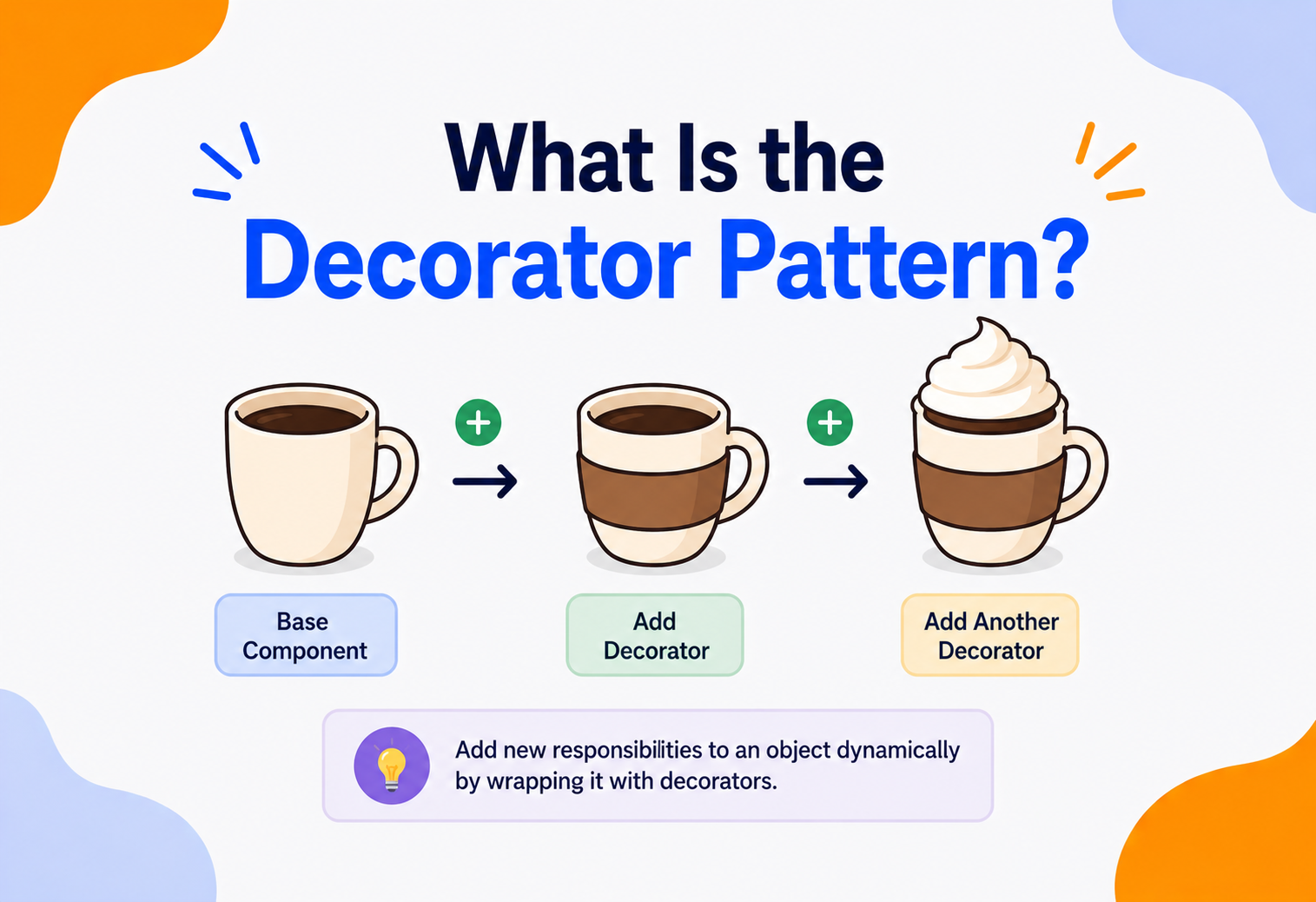
Picture a plain cup of coffee. Now add milk. Now add sugar. Now add whipped cream on top. You never changed the coffee — you just wrapped new abilities around it, one layer at a time. That’s the entire idea behind one of the handiest tools in a software architect’s toolbox.
The Big Idea, in One Breath
Think about getting dressed on a cold, rainy morning. You start with a plain t-shirt. Then you pull a sweater over it. Then you zip up a raincoat over the sweater. Then maybe you wrap a scarf around your neck for good measure. At no point did you redesign the t-shirt. You didn’t sew the sweater into it or glue the raincoat on permanently. You simply added one layer on top of another, and you could take any of those layers off again whenever you wanted, in any order that made sense.
That everyday habit of layering things on top of a simple starting point — without ever touching the original — is exactly what the Decorator pattern does inside a computer program. It lets a programmer take a simple object and wrap it with extra abilities, one wrapper at a time, without ever opening up and rewriting the object underneath.
Imagine a plain cardboard gift box. You can wrap it in colorful paper. You can tie a ribbon around the paper. You can stick a bow on top of the ribbon. You can even add a little tag that says “Happy Birthday.” Each layer adds something new to look at or unwrap, but the box inside never changes. Remove every layer, and the same plain box is still sitting there, exactly as it always was. That stack of wrapping paper, ribbon, bow, and tag is a perfect real-world picture of decorators.
In software terms, the Decorator pattern is a way of adding new behavior to a single object — not to an entire class of objects, just that one specific object — by placing it inside a series of wrapper objects that all pretend to be the exact same type of thing. From the outside, nobody can tell whether they’re holding the plain coffee or the coffee-with-milk-and-sugar-and-cream, because both look and behave like “a cup of coffee.” The wrapping simply adds a little something extra along the way.
Why does that matter so much? Because it separates two jobs that usually get tangled together: building the basic thing, and dressing it up afterward. Once those two jobs are cleanly separated, either one can change without disturbing the other. The person who bakes the cake never needs to worry about the frosting, and the person adding frosting never needs to know how the cake was baked. Software built this way tends to stay flexible for years, long after the original programmer has moved on to a different project, because nobody has to relearn the whole recipe just to add one new topping.
What the Decorator Pattern Really Is
In more formal terms, the Decorator pattern is a structural design pattern that lets you attach new behaviors to an object by placing that object inside a special wrapper object that carries those behaviors. It belongs to a well-known family of twenty-three reusable software design solutions first written down by four authors in the 1990s, often nicknamed the “Gang of Four” patterns. Decorator sits in the “structural” group, which is simply the group of patterns concerned with how objects and classes are put together to form larger, more useful structures.
Two ideas sit at the very heart of this pattern, and it helps to hold onto them as you read the rest of this guide:
- The wrapper looks identical to the thing it wraps. A decorated coffee and a plain coffee both answer to “I am a Beverage.” Anyone using the object never needs to know, or care, how many layers of wrapping are hiding underneath.
- Behavior is added by composition, not by rewriting. Instead of opening up the Coffee class and editing its code every time somebody wants a new topping, you build a small, separate wrapper class for each topping and simply place the coffee inside it. The original class is never touched again.
If someone asks “what does the Decorator pattern do?”, the honest short answer is: it lets you keep adding new little abilities to one specific object, one wrapper at a time, without ever cracking open the object’s original code.
A little bit of background helps explain why this pattern has stuck around for so long. It was one of twenty-three patterns written down in a widely read 1994 book by four software engineers, whose names — Erich Gamma, Richard Helm, Ralph Johnson, and John Vlissides — are still cited today, though most programmers simply know them by their group nickname. The book’s real contribution wasn’t inventing these ideas from thin air; it was noticing that skilled engineers kept independently reinventing the same handful of clever solutions, and giving those solutions clear names so teams could talk about them without re-explaining the whole idea every time. Decorator is one of the patterns that has aged the best, because the underlying problem — wanting to add optional features without a mess of subclasses — never really goes away, no matter how programming languages evolve.
The Problem It Solves
To really appreciate why this pattern exists, it helps to see what happens without it. Imagine a small coffee shop app that needs to price different drinks. A plain coffee costs a certain amount. Add milk, and the price goes up a little. Add sugar, and it goes up a little more. Add whipped cream, and it goes up again. The most obvious first idea is to create a new class for every single combination.
Notice what just happened. Adding one single new topping doubled the number of classes needed to describe every possible drink. This runaway growth even has a nickname among programmers: the class explosion problem. It happens whenever new features are bolted on by creating more and more subclasses, because subclassing multiplies rather than adds.
A second, quieter problem shows up too. Subclassing locks in combinations at the moment the code is written. If a customer wants milk and cream but not sugar, and nobody thought to create a CoffeeWithMilkAndCream class ahead of time, the app simply can’t offer that combination without a programmer going back in and writing new code. Real customers don’t think in fixed combinations — they think in layers, added freely, in whatever order they like. Static subclassing can’t keep up with that kind of flexibility.
There’s also a maintenance cost that’s easy to overlook until it’s too late. Every one of those combination classes needs its own tests, its own documentation, and its own attention whenever a shared calculation changes — say, the coffee shop decides to round all prices to the nearest ten cents. With eight or sixteen separate classes, that single business rule has to be found and updated in every one of them, and it’s astonishingly easy to miss one, leaving a silent pricing bug that nobody notices until a customer complains.
Decisions frozen at compile time
Every possible combination must be planned and written in advance as its own class.
Class explosion
The number of subclasses grows far faster than the number of features being added.
Touching shared code is risky
Editing a shared base class to add a feature can accidentally break every other class built on top of it.
No changes at runtime
A regular object can’t gain or lose an ability once the program is already running.
The Decorator pattern was invented precisely to sidestep this mess. Instead of describing every possible combination as its own permanent class, it treats each individual feature — milk, sugar, whipped cream — as its own small, independent wrapper. Wrappers can then be combined freely, stacked in any order, added or removed while the program is actually running, and mixed and matched without ever needing a new class for every possible outcome.
It’s worth noticing there’s a second, equally tempting bad idea lurking nearby: instead of exploding into many subclasses, a programmer might try to cram every possible topping into one single giant Coffee class, with a pile of true-or-false switches like hasMilk, hasSugar, and hasCream. This avoids the class explosion, but trades it for a different headache — the class keeps growing every time a new topping is imagined, its cost-calculating method turns into a long tangle of if-statements, and every single change risks breaking a class that everything else in the program depends on. The Decorator pattern avoids both traps at once: no explosion of subclasses, and no single overstuffed class either.
The Building Blocks
Every implementation of the Decorator pattern, no matter which programming language it’s written in, is built from the same four moving parts. Once these four names click, the whole pattern becomes easy to recognize anywhere you meet it.
- Component — a shared interface (or abstract class) that both the plain object and every decorated version of it agree to follow. It’s the “shape” that everything in this pattern must match.
- Concrete Component — the original, undecorated object. This is the plain coffee, the plain t-shirt, the plain cardboard box, before any wrapping is added.
- Decorator — an abstract wrapper class that also follows the Component interface, and additionally holds a private reference to another Component tucked inside it. This is what makes stacking possible: a decorator can wrap the concrete component, or it can just as easily wrap another decorator.
- Concrete Decorator — one specific, real wrapper, such as “Milk” or “Sugar” or “WhippedCream,” that adds its own small piece of extra behavior before or after passing the request along to whatever it’s wrapping.
The clever part is that a Decorator both is a Component and holds a Component. That single, small detail is the entire secret of the pattern. Because a Decorator holds another Component, and that inner Component might itself be another Decorator, wrappers can be nested inside wrappers inside wrappers, exactly like those Russian nesting dolls, each one hiding a slightly smaller version of the same shape inside it.
There’s a name in software design for the promise that makes this whole trick trustworthy: it’s often called substitutability. In plain terms, it just means that anywhere a plain Component is expected, a decorated one must work exactly as well, with no surprises and no extra setup. If a piece of code somewhere quietly assumed “this must be a PlainCoffee, not something wrapped,” the whole pattern would fall apart the first time somebody added a topping. Because every decorator faithfully honors the same Component shape, that assumption never needs to be made anywhere in the program — a decorated object is always, safely, just as usable as the original.
How It Works, Step by Step
Let’s build the coffee shop example properly, one small piece at a time, so the mechanics become second nature. We’ll use simple, language-agnostic pseudocode that reads a lot like Java, C#, or TypeScript — the pattern looks almost identical in all of them.

Step 1 — Define the shared shape
Everything in the pattern, decorated or not, has to promise the same two abilities: reporting a cost, and describing itself.
interface Beverage {
    getCost(): number
    getDescription(): string
}
Step 2 — Build the plain object
This is the concrete component — the object that exists before any wrapping happens.
class PlainCoffee implements Beverage {
    getCost() { return 2.50 }
    getDescription() { return "Coffee" }
}
Step 3 — Build the abstract wrapper
The decorator base class holds onto a Beverage, and — this is the important bit — it agrees to follow the Beverage shape too, so it can stand in anywhere a Beverage is expected.
abstract class BeverageDecorator implements Beverage {
    protected wrapped: Beverage

    constructor(beverage: Beverage) {
        this.wrapped = beverage
    }
}
Step 4 — Build the real toppings
Each concrete decorator adds its own little slice of extra cost and description, then quietly hands the rest of the work back to whatever it’s wrapping.
class MilkDecorator extends BeverageDecorator {
    getCost() { return this.wrapped.getCost() + 0.50 }
    getDescription() { return this.wrapped.getDescription() + ", Milk" }
}

class SugarDecorator extends BeverageDecorator {
    getCost() { return this.wrapped.getCost() + 0.25 }
    getDescription() { return this.wrapped.getDescription() + ", Sugar" }
}
Step 5 — Stack the layers
Now the payoff. Any combination of toppings, in any order, without a single new class:
let order: Beverage = new PlainCoffee()
order = new MilkDecorator(order)
order = new SugarDecorator(order)

// order.getDescription() → "Coffee, Milk, Sugar"
// order.getCost()        → 3.25
Notice the flow. When something asks the outermost decorator, SugarDecorator, for its cost, it doesn’t calculate that number by itself. It adds its own 0.25, then politely asks whatever it’s wrapping — MilkDecorator — for its cost too. MilkDecorator does exactly the same thing, adding its own 0.50 and asking PlainCoffee, which finally answers with the real base price. The final number bubbles back up through every layer, each one adding its own small piece along the way — a pattern programmers sometimes call a “chain of responsibility in miniature,” even though the two patterns are officially different tools.
Nobody using order ever needs to know it’s secretly three objects wrapped inside each other. As far as any other part of the program is concerned, it’s just “a Beverage” — that’s the whole point.
Step 6 — Removing or reordering a layer
Because each layer is just an ordinary object sitting on top of another, the flexibility works in both directions. Building the same order with the toppings applied in the opposite sequence is just as valid:
let orderB: Beverage = new PlainCoffee()
orderB = new SugarDecorator(orderB)
orderB = new MilkDecorator(orderB)

// orderB.getDescription() → "Coffee, Sugar, Milk"
// orderB.getCost()        → 3.25  (same total, different label)
In this particular example the final price comes out the same either way, since addition doesn’t care about order. But that won’t always be true. Imagine a decorator that applies a ten-percent discount instead of a flat fee — applying the discount before or after the milk and sugar are added would produce two different final prices. This is exactly why thoughtful engineers pay close attention to the sequence in which decorators are stacked, and often write a short comment or a small piece of documentation explaining why a particular order was chosen.

Decorator vs. Other Ideas
It’s easy to mix Decorator up with a few nearby ideas that sound similar but solve different problems. Here’s a quick, honest comparison to keep them apart.
| Approach | What It Actually Does | Main Limitation |
|---|---|---|
| Subclassing | Bakes new behavior permanently into a brand-new class, fixed at compile time. | Leads to class explosion; can’t change at runtime. |
| Decorator | Wraps an existing object at runtime, stacking behaviors freely, any object at a time. | Many small wrapper objects can be harder to debug. |
| Strategy | Swaps out one algorithm for another, entirely, as a single replaceable unit. | Only replaces one behavior, doesn’t stack several. |
| Proxy | Wraps an object to control or restrict access to it, not to add new features. | Same interface, but the goal is gatekeeping, not enhancement. |
| Adapter | Wraps an object to translate one interface into a completely different one. | Changes the interface; Decorator deliberately keeps it identical. |
A helpful rule of thumb: Decorator, Proxy, and Adapter all share the same basic trick — one object wrapping another. The difference is intent. Decorator wraps to add abilities. Proxy wraps to control access. Adapter wraps to translate a mismatched interface into one the rest of the code expects.
It also helps to compare Decorator with its cousin, the Composite pattern, since both involve tree-like structures of wrapped objects. Composite is built for representing whole-part relationships — a folder containing files and other folders, for instance — where a group of objects should be treated the same way as a single object. Decorator borrows that same “treat a wrapped thing like the original thing” trick, but its purpose is narrower: each wrapper adds one specific behavior rather than representing a branch of a larger tree. Engineers sometimes even combine the two, using Composite to represent a structure and Decorator to add extra behavior to individual pieces of it.
Real-World Examples You’ve Already Used
The Decorator pattern isn’t just a textbook idea — it quietly powers tools you’ve probably touched already.
Input and output streams
A plain FileInputStream can be wrapped in a BufferedInputStream, then wrapped again in a GZIPInputStream — each layer adding buffering or compression without touching the original stream class.
Filters on a photo
Adding a black-and-white filter, then a vignette, then a border, is exactly the same “wrap, wrap, wrap again” idea applied to an image instead of a coffee.
Middleware pipelines
Many web frameworks let you wrap a request handler with logging, then authentication, then rate-limiting — each middleware layer decorating the one before it.
Scrollable, bordered windows
Classic windowing toolkits build a plain text box, then wrap it in a scrollbar decorator, then a border decorator — mixing visual features without new subclasses for every combination.
A particularly good mental model, if you’ve ever built anything in a text editor with layers — think of a simple drawing app. You start with a plain shape. A “shadow” layer sits on top of it. A “glow” layer sits on top of that. An “outline” layer sits on top of that. Toggle any layer off, and the layers beneath it are completely unaffected, because each one only ever knew about the layer directly underneath.
A plain sandwich is bread and cheese. Add lettuce, and you’ve wrapped it with a “lettuce layer.” Add tomato, and you’ve wrapped it again. The sandwich-maker never rebuilds the sandwich from scratch for each order — they just add or remove layers on top of whatever’s already there. A restaurant menu that tried to list every single possible sandwich combination as its own named item would need hundreds of entries. A restaurant that just lets you add layers needs only a handful of ingredients.
Web browsers offer another familiar example. A browser extension that blocks ads doesn’t rewrite the browser itself — it wraps around the way web pages are loaded, quietly filtering out certain content before the page is handed back to you. Install a second extension that highlights spelling mistakes, and it wraps around that same pipeline again, adding its own small behavior without needing to know anything about what the ad blocker is doing. Each extension is its own tiny decorator, stacked on top of the browser’s core behavior.
Shipping and logistics apps use a similar layering idea for pricing. A base shipping cost might get wrapped with an “insurance” charge, then wrapped again with an “express delivery” surcharge, then wrapped once more with a “fragile handling” fee. The checkout screen simply asks the final, fully-wrapped price object for its total, with no need to know how many optional add-ons were layered underneath.

Strengths and Trade-offs
Like every design pattern, Decorator is a trade-off, not a free lunch. It solves the class explosion problem beautifully, but it introduces its own small costs in exchange.
Strengths
- New abilities can be added without touching or risking existing, tested code.
- Behaviors can be combined at runtime, in whatever order makes sense.
- Each responsibility lives in its own small, focused class.
- Follows the “open for extension, closed for modification” principle cleanly.
- Avoids the runaway class explosion caused by heavy subclassing.
Trade-offs
- A long chain of decorators can be harder to read and step through while debugging.
- Many tiny, near-identical wrapper classes can clutter a codebase.
- The order in which decorators are applied can quietly change the result.
- Object identity can become confusing — a decorated object is technically a different object than the one it wraps.
- Overusing it for simple problems adds needless ceremony.
A pattern is a tool for a specific kind of problem, not a badge of honor. Using Decorator where a single simple class would do just fine only adds extra layers of indirection for no real benefit.
The healthiest way to think about these trade-offs is as a trade of complexity, not a removal of it. Subclassing hides its complexity in the sheer number of classes; a giant switch-filled class hides its complexity in tangled conditional logic; Decorator moves that same complexity into a chain of small, individually simple objects. None of these approaches makes the underlying problem disappear — they just choose where the complexity lives. Decorator tends to win out specifically when that complexity needs to be flexible and reconfigurable, and tends to lose out when the situation is simple and fixed enough that moving it around isn’t worth the ceremony.
When to Reach for It (and When Not To)
Decorator earns its keep in a fairly specific set of situations. Recognizing those situations is more valuable than memorizing the code structure.
Optional, combinable features
A base object needs a handful of independent, mix-and-matchable extras — toppings, filters, middleware, formatting options.
Changes needed at runtime
The exact combination of behaviors isn’t known until the program is already running, based on user choices.
Subclassing would explode
The number of subclasses needed to cover every combination would spiral out of control.
Only one or two fixed variants
If there are only ever two or three well-known combinations, a couple of straightforward subclasses are simpler and easier to read.
A useful gut-check question: “Am I trying to add abilities to individual objects, one at a time, in flexible combinations?” If the honest answer is yes, Decorator is very likely a good fit. If the real need is closer to “swap this one algorithm for a different one” or “control who’s allowed to access this object,” a different pattern — Strategy or Proxy, respectively — is usually the better tool.
Team size and project lifespan matter too. A short-lived prototype or a small script rarely benefits from the extra structure a decorator setup introduces — a couple of if-statements will do the job faster and be just as easy to throw away later. A long-lived system maintained by many engineers over several years, on the other hand, tends to benefit enormously from the discipline the pattern enforces, because new features can be added by writing new, small, isolated classes instead of repeatedly editing a shared, load-bearing piece of code that everyone else also depends on.
Common Pitfalls and Best Practices
Order Can Matter More Than It Looks
Wrapping a “compression” decorator around an “encryption” decorator produces a very different result than wrapping it the other way around. Whenever the order of decorators changes the outcome, document that ordering clearly, because it’s an easy detail for the next engineer to get wrong.
Too Many Tiny Classes
If a codebase ends up with dozens of one-line decorator classes, it’s worth asking whether a lighter-weight approach — like passing a list of small functions instead of full classes — might achieve the same flexibility with less ceremony, especially in languages that support that style comfortably.
Losing Track of the Original Object
Because each decorator wraps the previous layer, code that needs to reach back to the very first, undecorated object can find itself digging through several layers to get there. Keeping a reference to the original object nearby, separate from the decorated stack, avoids this headache.
Testing Every Layer in Isolation
One of the pattern’s best-kept advantages is that each decorator can be unit-tested completely on its own, with a simple fake Component standing in for whatever it wraps. Skipping this and only testing fully-assembled stacks throws away a lot of that benefit.
Keep every concrete decorator focused on exactly one small responsibility. The moment a single decorator starts doing three unrelated things, it’s usually a sign it should be split into three separate decorators instead.
Letting the Shared Interface Grow Too Large
Every decorator has to implement the full Component interface, even the parts it doesn’t personally care about. If that interface keeps growing new methods over time, every single decorator — old and new — has to keep up with each addition, even ones that have nothing to do with what that particular decorator actually does. Keeping the Component interface small and focused on only the essentials keeps this maintenance cost from creeping up as the system grows.
A Quick Tour Across Languages
The shape of the pattern stays remarkably consistent wherever it shows up, though each language has its own personality.
| Language | How It Typically Appears |
|---|---|
| Java | Classic interface-and-wrapper classes — the java.io stream classes are the textbook example almost every course points to. |
| C# | Nearly identical to Java, often paired with interfaces and used heavily in stream and UI-control libraries. |
| TypeScript / JavaScript | Sometimes written as classic wrapper classes, and sometimes achieved more loosely by composing small functions that each add one behavior. |
| Python | Python also has a built-in language feature called a “function decorator,” written with the @ symbol above a function. It’s inspired by the same wrapping idea but is really a separate language mechanism — worth knowing so the two don’t get confused in conversation. |
Python’s @ symbol “decorators” and the Decorator design pattern share a name and a spirit — both wrap something with extra behavior — but they aren’t the same tool. The @ syntax wraps a function; the design pattern wraps an object. It’s fine, and common, to use one without ever using the other.
What all of these languages share is the underlying philosophy, not just the syntax. Whether the wrapping is done with classes, functions, or a built-in language shortcut, the goal is always the same: take something that already works, and quietly add a little more to it, without reopening and risking the original. Once that habit of thinking clicks, spotting the Decorator pattern — or reaching for it on purpose — becomes second nature in almost any language a programmer picks up next.
Key Takeaways
Remember This
- Wrap, don’t rewrite. The Decorator pattern adds new abilities to a single object by wrapping it, without ever editing the object’s original code.
- Kills class explosion. It solves the “class explosion” problem that happens when every feature combination needs its own permanent subclass.
- Four building blocks. Four building blocks make it work: Component, Concrete Component, Decorator, and Concrete Decorator.
- Same shape, invisibly. The trick is that every wrapper follows the exact same shape as the thing it wraps, so it can be used anywhere the original could be.
- Free-form stacking. Decorators can be stacked in any order, at runtime, and combined freely — like toppings on a coffee or layers of wrapping paper.
- It’s a trade-off. It’s a trade-off: real flexibility in exchange for a few more small classes and a bit more care while debugging.