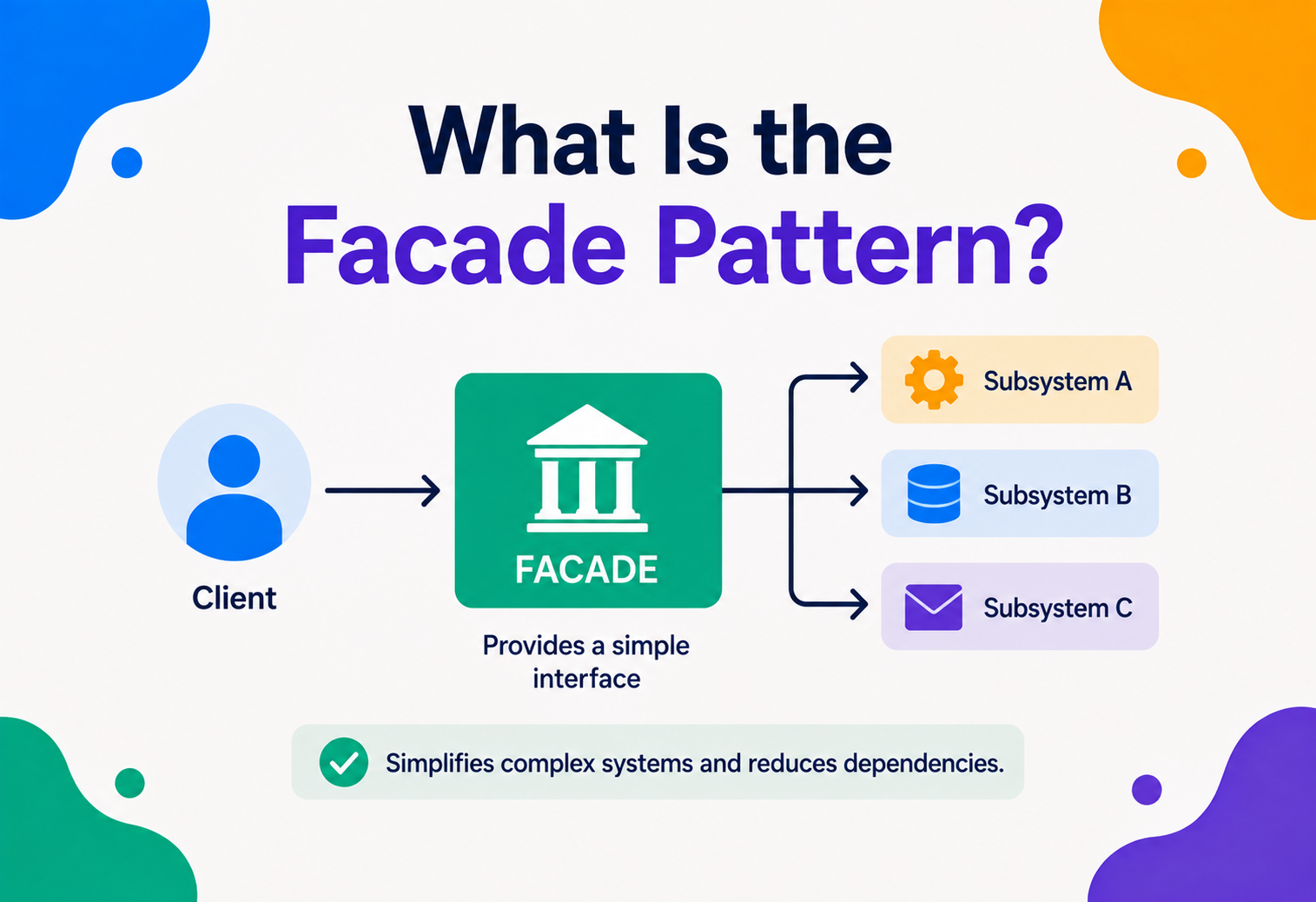
What Is the Facade Pattern?
Think about starting a car. You turn one key (or press one button), and behind that single action, dozens of hidden systems spring into life — fuel, ignition, electronics, sensors. You never see any of it. That single, friendly button hiding a mountain of complexity is the whole idea behind the Facade pattern.
The Big Idea, in One Breath
Picture a hotel with a front desk. If there were no front desk, every guest who wanted fresh towels, a dinner reservation, a wake-up call, or a taxi to the airport would have to track down the housekeeping staff, the restaurant manager, the concierge, and the transportation team all by themselves — learning each department’s own rules, phone extensions, and paperwork along the way. Instead, a hotel gives guests one friendly face at the front desk. You ask for what you need in plain language, and the front desk quietly coordinates with whichever departments are required behind the scenes.
That front desk is doing exactly what the Facade pattern does inside a computer program. It places one simple, welcoming entry point in front of a group of complicated, interconnected parts, so that anyone using the system only ever has to talk to that one friendly entry point — never to the tangle of moving parts hiding behind it.
Think about a television remote control. Behind the scenes, turning on a home theater might involve powering up the television, switching the receiver to the right input, waking the sound system, dimming the smart lights, and lowering a projector screen. Nobody wants to operate five separate remotes and remember the correct order every single time. So instead, a “Watch a Movie” button is created that quietly does all five things in the right sequence, the moment it’s pressed. That one friendly button is a facade.
The word “facade” is borrowed from architecture, where it simply means the front face of a building — the part everyone sees from the street, while the plumbing, wiring, and steel beams stay safely out of sight behind the walls. Software borrowed the word for precisely the same reason: it describes a clean, simple face placed in front of something far messier underneath.
It’s worth noticing what a facade is not. It isn’t a way to make a complicated system less complicated on the inside — the television still has to be turned on, the receiver still has to be switched to the right input, and the sound system still has to be powered up in the correct order. None of that real work goes away. What changes is who has to think about it. A facade takes on the burden of remembering all those fiddly details, so that everyone else can simply ask for the outcome they actually want, in plain language, and trust that the details will be handled correctly every time.

What the Facade Pattern Really Is
Formally speaking, the Facade pattern is a structural design pattern that provides a simplified, unified interface to a larger, more complicated set of classes, libraries, or subsystems. It’s one of the twenty-three classic reusable solutions written down by four software engineers in a widely read 1994 book, a group often nicknamed the “Gang of Four.” Like the Decorator pattern, Facade belongs to the “structural” family — the group of patterns concerned with how classes and objects are arranged and connected to form larger, more manageable wholes.
Two ideas anchor this pattern, and they’re worth keeping in mind throughout the rest of this guide:
- Simplicity for the caller, complexity still exists underneath. A facade doesn’t delete the complicated subsystem — it just gives everyone else a much easier way to use it, while the full complexity keeps quietly running in the background.
- One direction of dependency. Code that uses the facade knows about the facade, but the facade’s own internal subsystems don’t need to know the facade exists. This keeps the messy internal wiring completely separate from everything that depends on it.
If someone asks “what does a facade do?”, the honest short answer is: it gives you one easy button to press, so you don’t have to learn how ten complicated things work together just to get one simple job done.
Facade also connects naturally to a broader idea in good software design: keeping each piece of a system focused on one clear job. The subsystem classes stay focused on doing their own detailed work well. The facade stays focused on offering a simple, well-organized entry point. Neither one tries to do the other’s job, and that clean separation is a big part of why the pattern holds up so well as systems grow larger over time.
A small bit of history: the same 1994 book that documented Decorator also documented Facade, alongside twenty-one other patterns, written by Erich Gamma, Richard Helm, Ralph Johnson, and John Vlissides. Facade is often the very first pattern engineers learn, not because it’s the cleverest, but because almost every programmer has already built one by accident, long before they ever learned its name — the idea of “wrap the messy part in one clean function” is something people tend to discover naturally, and the pattern simply gives that natural habit a name and a set of best practices to follow.
The Problem It Solves
To see why Facade earns its place in a software architect’s toolbox, imagine building that home theater system without one. Every single screen in the app that wants to start a movie now needs to know about the television class, the receiver class, the sound system class, the lighting class, and the projector screen class — and it needs to call each of them in exactly the right order, every single time.
Now imagine that logic copied into every screen of the app that needs to start a movie — the home screen’s “quick play” button, the settings screen’s “test my setup” button, a voice-assistant integration, and a scheduled “movie night at 7pm” timer. Each of those four places now needs to independently know the correct startup sequence for five different subsystems. If the sound system class ever changes — say, a newer model needs one extra setup call — a programmer has to hunt down and fix all four places separately. Miss just one, and that corner of the app quietly breaks.
This is sometimes called tight coupling: many unrelated parts of a program end up depending directly on the fine details of a complicated subsystem, so a change in one place ripples outward and breaks things in several other places that had nothing to do with the original change. It’s a bit like ten different people each memorizing their own private shortcut through a maze — the moment the maze’s layout changes even slightly, all ten shortcuts stop working at once, and each person has to relearn their own path separately.
The same setup code, copied everywhere
Every place that needs the subsystem ends up re-writing the same sequence of calls.
One change breaks many places
A tweak to a single subsystem class can quietly ripple out and break every caller that used it directly.
Too much to learn just to get started
New team members have to understand five complicated classes just to press “play.”
Everything is tangled together
Testing “does the movie start correctly” means testing five different subsystems at once, every time.
The Facade pattern fixes this by giving all four of those callers a single, simple thing to depend on instead: one HomeTheaterFacade class with one clearly named method, something like watchMovie(). All four callers now depend only on that one simple method. If a subsystem changes later, only the facade needs updating — every caller keeps working exactly as before, completely unaware that anything changed underneath.
The Building Blocks
Every use of the Facade pattern, in any language, is built from three simple roles. Once these three click into place, the pattern becomes instantly recognizable wherever it shows up.
- Facade — the single, simplified class that offers a small number of easy-to-use methods, and internally knows how to talk to the various subsystem classes on the caller’s behalf.
- Subsystem classes — the real workers doing the real, detailed work: the television, the receiver, the sound system, the lighting. They don’t know or care that a facade exists; they just do their own job when asked.
- Client — any piece of code that wants something done, and would rather ask the facade for it in one simple step than coordinate every subsystem by hand.
Notice the direction every arrow points: from the client toward the facade, and from the facade toward the subsystems. Nothing ever points backward. The television class has no idea a facade exists, and it doesn’t need to — it just does its job, exactly as it always has, whether it’s being called directly or through a facade.
How It Works, Step by Step
Let’s build the home theater example properly, one small piece at a time, using simple pseudocode that reads a lot like Java, C#, or TypeScript.
Step 1 — The subsystem classes already exist
These classes were probably written first, each one focused only on its own job, with no awareness of one another.
class Television {
    turnOn() { /* ... */ }
}
class Receiver {
    setInput(source: string) { /* ... */ }
}
class SoundSystem {
    powerOn() { /* ... */ }
    setVolume(level: number) { /* ... */ }
}
class Lighting {
    dimTo(percent: number) { /* ... */ }
}
class ProjectorScreen {
    lower() { /* ... */ }
}
Step 2 — Build the facade around them
The facade holds a reference to each subsystem, and offers one clean method that knows the correct order to call them in.
class HomeTheaterFacade {
    private tv: Television
    private receiver: Receiver
    private sound: SoundSystem
    private lights: Lighting
    private screen: ProjectorScreen

    watchMovie() {
        this.lights.dimTo(20)
        this.screen.lower()
        this.tv.turnOn()
        this.receiver.setInput("bluray")
        this.sound.powerOn()
        this.sound.setVolume(15)
    }
}
Step 3 — The client just presses one button
Every screen in the app that wants to start a movie now needs to know exactly one thing.
const theater = new HomeTheaterFacade()
theater.watchMovie()

// Lights dim, screen lowers, TV and sound power on,
// receiver switches input, volume is set — all in one call.
Notice what didn’t happen: none of the five subsystem classes were rewritten, merged, or changed in any way. They still work exactly as they did before, and can still be used directly by any code that genuinely needs fine-grained control — say, a settings screen that lets a user manually test each device on its own. The facade doesn’t remove that option; it simply adds an easier path for everyone who doesn’t need that level of detail.
A facade doesn’t hide the subsystem from everyone forever — it just gives most callers a much simpler default path, while the detailed subsystem classes remain available for the rare situations that truly need them.
Step 4 — Adding a second convenience method
Because the facade is just an ordinary class, adding a new simple action, like ending movie night and returning everything to normal, is just as easy.
endMovie() {
    this.screen.raise()
    this.lights.dimTo(100)
    this.sound.powerOff()
    this.tv.turnOff()
}
Both methods live in the same friendly, unified place, and any part of the app that wants “start movie night” or “end movie night” behavior now has one obvious, well-documented spot to look.
Facade vs. Other Ideas
Facade often gets confused with a few nearby structural patterns, since all of them involve one object standing in front of another. Here’s a clear-eyed comparison.
| Approach | What It Actually Does | Main Difference From Facade |
|---|---|---|
| Facade | Offers one simplified interface in front of many subsystem classes. | — |
| Adapter | Wraps one object to translate its interface into a different, expected shape. | Adapter makes one mismatched thing fit; Facade simplifies many things at once. |
| Decorator | Wraps one object to add extra behavior to it, keeping the same interface. | Decorator adds abilities; Facade reduces complexity, and doesn’t stack. |
| Proxy | Wraps one object to control or delay access to it. | Proxy stands in for one object; Facade fronts an entire group of them. |
| Mediator | Sits between several objects so they never talk directly to each other. | Mediator manages two-way communication; Facade offers a one-way simplified entry point. |
The cleanest way to keep these apart: Adapter answers “how do I make this fit?” Decorator answers “how do I add more to this?” Proxy answers “how do I control access to this?” Mediator answers “how do these many things talk to each other without a tangle?” Facade answers a different question entirely — “how do I make this whole complicated group easy to use?”
It’s also worth noting that a facade is often deliberately kept “dumb” on purpose — it usually doesn’t add new business logic of its own, and it usually doesn’t try to control who’s allowed to call it. Those responsibilities belong to Proxy and to authentication or permission checks elsewhere in the system. A facade’s only job is convenience and simplicity, and mixing in other responsibilities tends to make it harder to reason about later.
People sometimes also lump Facade together with the idea of an “API,” and while the two overlap, they aren’t quite the same thing. An API is a broader concept — any defined way that one piece of software agrees to talk to another. A facade is one specific, deliberate design choice that can be used to build a particularly clean and simple API in front of a messy internal system. Every facade is a kind of API, but not every API is a facade — a large, sprawling API that exposes every internal detail of a subsystem hasn’t actually simplified anything, even if it’s technically well documented.

Real-World Examples You’ve Already Used
The Facade pattern shows up constantly in tools you’ve probably already relied on, often without realizing it.
Simplified browser libraries
Many popular JavaScript libraries offer one short, friendly method that quietly handles a dozen messy, inconsistent browser behaviors underneath.
ORM libraries
Object-relational mapping tools let a programmer save an object with one simple call, hiding away the actual SQL statements, connections, and transactions underneath.
One “print” command
Pressing print in an app hides an enormous amount of coordination between drivers, spoolers, and hardware — all behind one simple button.
One-click deployment tools
A single “deploy” button can quietly coordinate servers, networking, storage, and security settings that would otherwise take dozens of manual steps.
Everyday life offers just as many examples once you start looking. A hospital’s reception desk is a facade in front of dozens of departments — radiology, billing, pharmacy, specialists — so a patient only ever has one simple conversation to start with. A car’s ignition system is a facade in front of the fuel system, the starter motor, the battery, and the onboard computer, all triggered by one twist of a key or press of a button. Even a restaurant’s menu is a kind of facade: ordering “the pasta special” hides an entire sequence of chopping, boiling, sautéing, and plating that the customer never has to think about.
Customer service phone lines work the same way. Calling a single support number is far easier than knowing which of twelve internal departments actually handles your particular problem — the person answering the phone acts as a facade, routing the request to the right place behind the scenes while you experience only one simple conversation.
Airports offer a particularly rich example. A single check-in counter acts as a facade in front of baggage handling, security coordination, gate assignment, and boarding systems — a traveler simply hands over a passport and a bag, without ever seeing or needing to understand the dozens of coordinated systems working behind that counter. Similarly, a car’s dashboard is a facade over an enormous amount of mechanical and electronic complexity: a driver reads a simple fuel gauge and a simple speed number, never needing to understand the sensors, wiring, and computation that produce those two simple readouts.
Strengths and Trade-offs
Facade is one of the gentler design patterns to adopt, but it still comes with real trade-offs worth understanding honestly.
Strengths
- Dramatically easier for most callers to use a complicated subsystem correctly.
- Shrinks the amount of code duplicated across the app for common tasks.
- Keeps most of the codebase decoupled from subsystem internals.
- Changes to the subsystem usually only require updating the facade, not every caller.
- Makes onboarding new engineers noticeably faster.
Trade-offs
- Can turn into a bloated “god object” if too much logic gets piled into it.
- Adds one more layer of indirection between a caller and the real work.
- Advanced callers who need fine control may find the facade too limiting.
- A facade with a bug can quietly hide problems happening deeper in the subsystem.
- Doesn’t remove the underlying complexity — it just relocates and hides it.
A facade is meant to be a convenience, not a wall. If advanced users are constantly forced to bypass it just to get real work done, that’s usually a sign the facade needs a few more thoughtfully designed methods, not that it should be abandoned.
It helps to think of a facade as a trade of one kind of cost for another. Without it, the cost shows up as duplicated setup code scattered everywhere the subsystem is used. With it, the cost shows up as a small amount of extra indirection, and the discipline required to keep the facade itself from growing out of control. For almost any system with more than a couple of callers sharing the same complicated subsystem, that trade tends to be a clear win — the scattered cost is far more expensive to maintain over time than the concentrated one.
When to Reach for It (and When Not To)
Facade earns its keep in a fairly recognizable set of situations.
A complicated subsystem with a common use case
Most callers only ever want one or two simple outcomes from a much larger, more detailed system.
Reducing dependencies on a messy library
Wrapping a third-party library in a facade means only the facade needs updating if that library ever changes or gets replaced.
Layering a large system
Each layer of a big application can expose a facade to the layer above it, keeping the layers cleanly separated.
A subsystem that’s already simple
Wrapping a single, already-simple class in a facade just adds an unnecessary extra step for no real benefit.
A useful gut-check question: “Are most callers of this subsystem doing the exact same handful of things, over and over, using a lot of repeated boilerplate?” If yes, a facade will likely pay for itself quickly. If every caller genuinely needs different, fine-grained control over the subsystem, a facade may end up needing so many specialized methods that it stops being simple at all — at which point it’s worth asking whether a facade is really solving the problem, or just adding a layer that nobody benefits from.
Team context matters too. In a small project maintained by one person, the value of a facade is smaller, since that person already holds the whole picture in their head. In a large project with many engineers touching different parts of the codebase, a facade becomes far more valuable, because it lets each engineer safely use a complicated part of the system without first having to become an expert in it.
The lifespan of a project matters as well. A quick prototype built to test an idea over a weekend rarely benefits from the extra structure a facade introduces — by the time it would pay off, the prototype has probably already been thrown away or rewritten. A production system expected to run for years, maintained by a rotating cast of engineers, tends to benefit enormously, because the facade becomes a stable, well-understood front door that survives long after any one engineer’s personal knowledge of the subsystem’s fine details has faded.
Common Pitfalls and Best Practices
The “God Facade” Problem
A facade that keeps absorbing more and more responsibilities over time can quietly grow into a giant, tangled class that knows far too much about far too many things — the exact problem the pattern was meant to prevent in the first place. When a facade starts to feel like it’s doing everything in the entire application, it’s usually a sign it should be split into a few smaller, more focused facades instead.
Leaky Facades
A facade is only genuinely useful if it hides the subsystem’s messy details completely. If callers still need to know internal facts about the subsystem to use the facade correctly — like a specific order they must call two facade methods in, or an internal error code they need to interpret themselves — the facade hasn’t really simplified anything; it’s just added an extra layer on top of the same old complexity.
Hiding Errors Too Well
Because a facade absorbs a lot of detail on the caller’s behalf, it’s tempting to also quietly swallow every error that happens underneath. This can backfire badly — a caller who genuinely needs to know that the sound system failed to power on shouldn’t be left thinking everything worked fine. Good facades pass along meaningful information about failures, even while hiding the unnecessary implementation detail behind them.
Skipping Direct Access Entirely
Some teams mistakenly believe a facade means the subsystem classes should become off-limits to everyone. In most healthy designs, the subsystem classes stay available for the rare callers who genuinely need fine control, while the facade simply offers a friendlier shortcut for everyone else. Locking the subsystem away entirely often creates frustrating, artificial limitations down the road.
Design a facade around real, common use cases — not around every single feature the subsystem happens to offer. A facade with three well-chosen methods is usually far more useful than one with thirty methods that just mirror the subsystem one-to-one.
Forgetting to Document the “Why”
A facade’s methods often bundle together several steps that, on their own, wouldn’t obviously belong together. A year later, an engineer looking at watchMovie() might wonder why it dims the lights at all — isn’t that a lighting concern, not a movie-watching one? A short comment explaining the reasoning behind each bundled step saves future engineers from having to reverse-engineer decisions that made perfect sense at the time they were written but aren’t self-evident later.
A Quick Tour Across Languages
The shape of a facade stays remarkably consistent across languages, since it’s really more of an organizing idea than a special language feature.
| Language | How It Typically Appears |
|---|---|
| Java | A plain class exposing a small number of public methods, often used to wrap several service or utility classes at once. |
| C# | Very similar to Java, frequently used to wrap complicated framework or library calls behind a project-specific, friendlier class. |
| Python | Sometimes a class, and sometimes simply a module of a few well-named functions that internally call several other modules on the caller’s behalf. |
| JavaScript / TypeScript | Frequently seen as a small “service” or “client” object exposed by a library, hiding away network requests, retries, and formatting details. |
What stays constant across every one of these languages is the underlying goal: give the caller one clear, well-named door to walk through, and keep every messy hallway behind that door out of sight until it’s genuinely needed. Once a programmer has spotted this pattern once, in any language, they tend to start noticing “hidden facades” absolutely everywhere — in libraries, in operating systems, and in the very tools they use to write code in the first place.
Key Takeaways
Remember This
- One friendly door. The Facade pattern places one simple, friendly entry point in front of a group of complicated, interconnected subsystem classes.
- Complexity hidden, not removed. It doesn’t remove complexity — it hides it behind an easy-to-use interface, while the subsystem keeps working exactly as before.
- Three roles. Three roles make it work: the Facade, the Subsystem classes, and the Client that calls the facade.
- Practical wins. It reduces duplicated setup code, shrinks tight coupling, and makes onboarding new engineers much faster.
- Design with restraint. Good facades stay focused on common use cases, pass along meaningful errors, and don’t block advanced access to the subsystem when it’s genuinely needed.
- Keep it lean. Overloading a facade with too many responsibilities can turn it into the very tangle it was built to avoid — keep it lean, and split it when it grows too large.