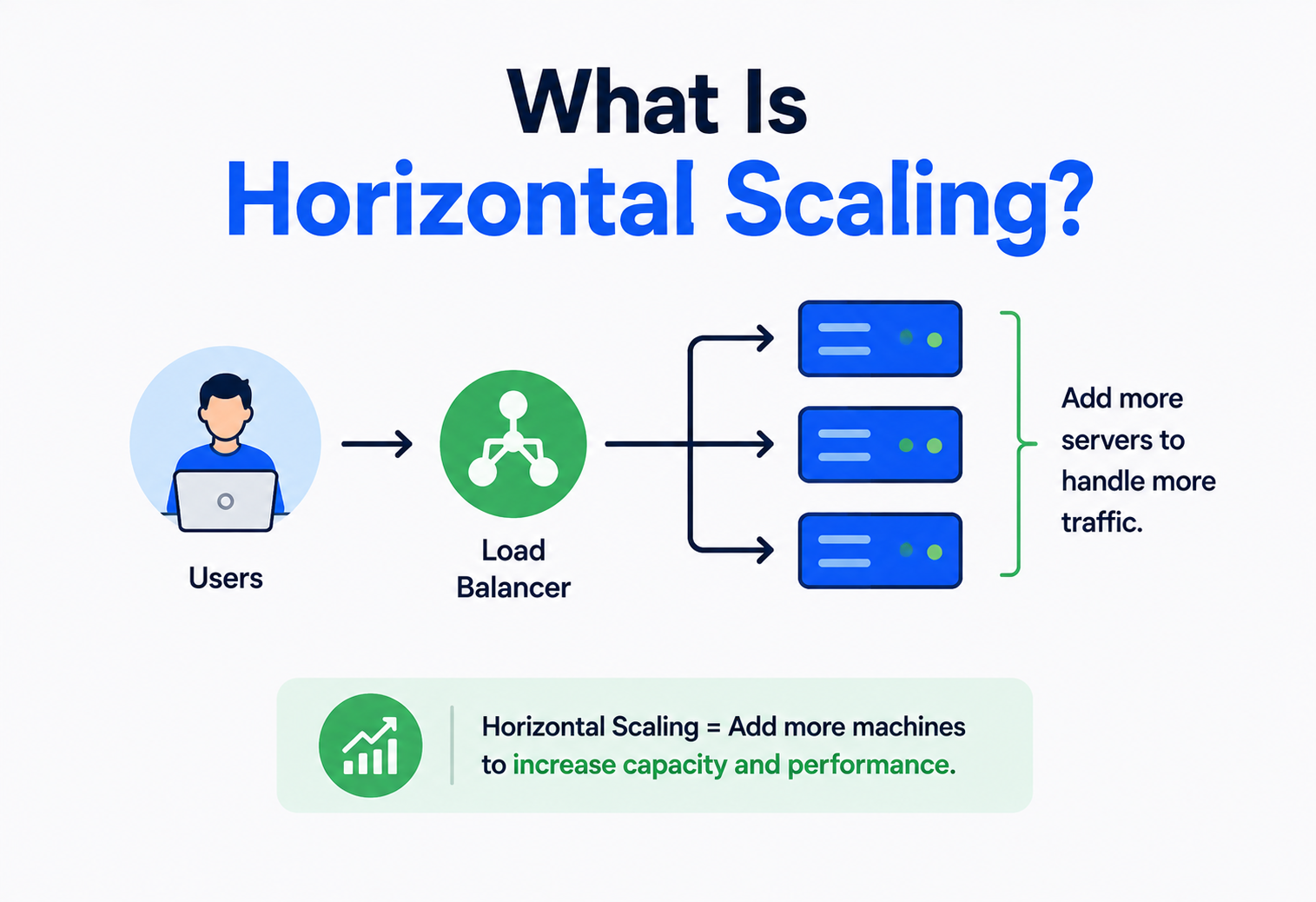
What Is Horizontal Scaling?
Have you ever noticed how a school adds more classrooms instead of squeezing every student into one giant room? Computers grow the same way. This complete guide walks through horizontal scaling — what it is, why engineers love it, and how it quietly keeps your favourite apps running when millions of people show up at once.
The Big Idea, in One Breath
Horizontal scaling is the software equivalent of calling over more friends and setting up more tables at a busy lemonade stand: spread the crowd across many hands, rather than demanding superhuman speed from just one pair.
Picture a small lemonade stand on a quiet street. One kid pours the lemonade, takes the money, and hands over the cup. On a slow afternoon, that is plenty. But then word spreads that the lemonade is amazing, and suddenly there is a line of fifty thirsty people stretching around the block.
The kid running the stand now has two choices. The first is to get faster — pour quicker, count coins quicker, move their hands like lightning. That only goes so far; a single pair of hands can only move so fast no matter how hard they try. The second choice is to call over some friends, set up two more tables, and split the crowd into three shorter lines. Suddenly the same fifty people get served in a third of the time, because now three “stands” are working at once instead of one.
That second choice — adding more workers side by side instead of trying to make one worker superhuman — is the whole idea behind horizontal scaling. Computers that run websites and apps face the exact same crowd problem every single day, just with visitors instead of lemonade customers, and horizontal scaling is one of the two main tools engineers reach for to keep the line moving.
Think about checkout lines at a busy supermarket. When more shoppers arrive, the store does not try to make one cashier scan items twice as fast. It opens more checkout lanes. Each new lane is a fresh, independent worker who can serve customers at the exact same time as all the others. Horizontal scaling is simply “opening more lanes” for computer traffic instead of pushing one lane to its limit.
This one idea — spreading work across many hands instead of demanding superhuman speed from a single pair — turns out to be one of the most important ideas in all of modern computing. It is the quiet reason a video call with hundreds of people does not crash, the reason a popular app does not grind to a halt the moment it gets featured somewhere, and the reason a company can promise millions of customers a smooth experience without needing to build one impossibly powerful supercomputer. The rest of this guide takes that simple lemonade‑stand idea and walks through exactly how it plays out inside real computer systems.
What Horizontal Scaling Really Means
Horizontal scaling — sometimes called “scaling out” — is the practice of handling more work by adding more machines to a system, rather than making a single machine more powerful.
Horizontal scaling — sometimes called “scaling out” — is the practice of handling more work by adding more machines to a system, rather than making a single machine more powerful. Instead of one giant, muscular computer doing everything by itself, you have a team of ordinary computers, all doing the same job, all sharing the load between them.
Each of those machines is often called a node. A node might be a physical server sitting in a data centre, or — much more commonly today — a virtual server that a cloud company rents out by the hour. What matters is not the size of any single node; what matters is that you can keep adding more of them whenever the workload grows, a bit like adding more train carriages when more passengers show up rather than trying to build one impossibly long locomotive.
- Scaling out means adding more nodes to the group.
- Scaling in means removing nodes once they are no longer needed — for example, late at night when far fewer people are browsing.
If someone asks “did you scale this system horizontally?”, they are really asking: “did you handle more traffic by adding more machines that share the work, instead of buying one bigger machine?”
It is worth noticing that the word “horizontal” is not chosen randomly. If you drew a simple picture of a single powerful machine, you might draw it as one tall box, growing upward as you make it stronger — that is why growing a single machine is called scaling up. Now imagine drawing several ordinary machines side by side, in a row — that row grows sideways, across the page, which is exactly why adding more of them is called scaling out, or horizontal scaling. The names are really just describing the shape of the picture.
A Little History: Why This Idea Even Exists
Horizontal scaling was born from the internet’s new kind of problem: millions of people scattered all over the planet visiting one website all at once — a demand no single mainframe was ever built to serve.
Long before smartphones and streaming apps existed, the very first computers were enormous, room‑sized machines called mainframes. There was usually only one of them in a whole building, and if a company needed more computing power, the only real option was to buy an even bigger, even more expensive mainframe. This was scaling up in its earliest form, and for a long time, it was simply how things were done.
That approach worked fine when only a handful of people used a computer at once. But then came the internet, and with it, a completely new kind of problem: a single website could suddenly be visited by thousands, then millions, of people scattered all over the planet, all at the same moment. No single machine — no matter how expensive — could realistically be built strong enough to serve all of them at once, and even if one could, having everything depend on that one machine was a frightening risk. If it broke, everything broke with it.
Engineers began experimenting with splitting the work across many smaller, cheaper, ordinary computers instead of relying on one giant one. Early on, this was difficult and mostly hand‑built by specialists at a handful of huge companies. Over the following years, as cloud computing arrived and made renting extra machines as easy as clicking a button, horizontal scaling went from being a rare, expert‑only trick to something almost any team building a website or app could set up in an afternoon. That shift is a big part of why so many of today’s apps can comfortably handle sudden waves of new users without breaking a sweat.
It is a bit like the history of moving furniture. Long ago, you needed one enormous strong person to carry the heaviest items alone. Eventually, people realised it was often easier, cheaper, and safer to gather a group of ordinary helpers and have them lift things together. Computing went through the very same shift, just a little later.
Scalability vs. Elasticity — Two Words That Get Mixed Up
Scalability is the ability to grow when asked to. Elasticity goes a step further — it is the ability to grow and shrink automatically, without a person stepping in.
People often use “scalability” and “elasticity” as if they mean exactly the same thing, but they describe two slightly different superpowers, and it is worth telling them apart.
Scalability is simply the ability to grow — to handle more work by adding more resources, whether that is a bigger machine or more machines. It answers the question: “can this system grow at all, and how far?” Elasticity goes a step further. It is the ability to grow and shrink automatically, in response to real, changing demand, without a person having to step in and make it happen. It answers a different question: “does this system adjust itself, up and down, on its own?”
A system can be scalable without being elastic — imagine a store that could physically add ten more checkout lanes if it really needed to, but only after weeks of construction work and planning meetings. That is scalability without elasticity: the growth is technically possible, just slow and manual. A cloud‑based system with auto‑scaling turned on, by contrast, is both scalable and elastic — it can add ten new servers within minutes when a surge hits, and quietly remove them again once the surge passes, all without anyone lifting a finger.
Why does this distinction matter in practice? Because a system can technically be capable of huge scale and still waste enormous amounts of money if it is not elastic — imagine paying for a hundred checkout lanes to stay open all night even though only two shoppers wander in after midnight. Elasticity is what makes horizontal scaling genuinely efficient, not just theoretically possible.

Horizontal Scaling vs. Vertical Scaling
Vertical scaling makes an existing machine stronger. Horizontal scaling adds more machines alongside the one you already have. Almost every real scaling decision boils down to a mix of the two.
To really understand horizontal scaling, it helps to meet its sibling: vertical scaling, also called “scaling up.” These are the two fundamental paths every system can take when it needs to handle more work, and almost every scaling decision in the real world boils down to a mix of the two.
Vertical scaling means making an existing machine stronger — giving it more memory, a faster processor, or more storage, the same way you might trade in a small family car for one with a bigger engine. Horizontal scaling means adding more machines alongside the one you already have, the same way a moving company adds more trucks instead of buying one truck the size of a building.
| Question | Vertical Scaling | Horizontal Scaling |
|---|---|---|
| What changes | One machine gets bigger and stronger | More machines join the group |
| Upper limit | Hits a hardware ceiling eventually | Can keep growing, in theory, almost endlessly |
| Downtime to upgrade | Often needs a restart or migration | New machines can join without stopping the rest |
| Failure risk | One machine down means everything is down | One machine down still leaves the others running |
| Typical cost pattern | Cheaper at small scale, pricier per unit as it grows | More setup effort, but cost grows in a straighter line |
| Good first move for | Small apps, early‑stage products, quick fixes | Apps expecting big or unpredictable growth |
Imagine a birthday party. Vertical scaling is buying one enormous cake big enough for everyone. Horizontal scaling is baking many regular‑sized cakes and setting them out on different tables. If one cake gets a crack in it, the party still has plenty of cake left from the other tables — but if the one giant cake gets ruined, the whole party goes without dessert.
Most real systems use a blend of both. Teams often scale a server up a little first because it is simple, and only reach for horizontal scaling once they hit the ceiling of what one machine can comfortably handle, or once they need the extra safety of having several machines instead of just one.
It also helps to notice that vertical and horizontal scaling are not rivals fighting for the same job — they are more like two different tools in the same toolbox, each suited to a different kind of problem. A team might scale a server up simply because it is the fastest possible fix on a busy afternoon, buying themselves breathing room while they plan a more thorough, longer‑lasting horizontal setup in the background. In fact, many well‑designed systems horizontally scale a group of reasonably (but not extremely) powerful machines, rather than picking either extreme — a handful of strong helpers working together, instead of one overpowered giant or a swarm of the weakest possible machines.
There is a physical limit worth mentioning too: even the most expensive computer that money can buy today still has a ceiling on how much memory or processing power can be packed inside it. Horizontal scaling does not really have that same hard ceiling, because you can, in principle, keep adding more machines almost indefinitely — which is exactly why enormous systems serving hundreds of millions of people always end up relying on horizontal scaling at their core, no matter how they started out.
How Horizontal Scaling Actually Works
Adding more servers only helps if visitors actually get spread across them evenly. That job belongs to a clever traffic director called a load balancer — and to a helper called auto‑scaling that quietly adds and removes machines on its own.
Adding more servers only helps if visitors actually get spread across them evenly. Imagine opening three checkout lanes at the supermarket but forgetting to tell any shoppers — everyone would still pile into the one lane they already know, and the two new lanes would sit empty. Computers have the exact same problem, and they solve it with a clever traffic director called a load balancer.
A load balancer sits in front of the group of servers and greets every single visitor first. It does not do the actual work of building the web page or processing the order — its only job is deciding which server should handle this particular request, based on things like which server is currently least busy, which one responds fastest, or simply taking turns in a rotation.
What makes this so powerful is that the visitor never knows any of this is happening. They just type in a web address and get an answer, with no idea whether their request landed on Server A, B, or C. That invisibility is exactly the point — the group of machines behaves, from the outside, like one single reliable service, even though on the inside it might be dozens or even thousands of individual computers working as a team.
There is an extra trick many systems use called auto‑scaling. Instead of a human deciding when to add or remove servers, the system watches its own workload and adjusts automatically — adding fresh servers the moment traffic starts climbing, like an amusement park opening more ticket booths the moment the queue gets long, and quietly closing those booths again once the rush is over.
A load balancer is a lot like the host at a busy restaurant. Guests do not pick their own table — the host looks around, sees which tables and waiters are free, and sends each new group somewhere that can serve them quickly. The guests just enjoy their meal, never realising how much thought went into how they were seated.
Load balancers also quietly perform something called a health check — every few seconds, they gently poke each server with a small test question, just to make sure it is still awake and responding properly. If a server stops answering, the load balancer notices almost immediately and simply stops sending new visitors its way, without any drama or downtime for anyone else. It is a bit like the restaurant host occasionally glancing over to check that a table has not been left in a mess, before seating the next group of guests there.
There is one more decision a load balancer sometimes needs to make: whether to always send the same visitor back to the same server, known as session affinity or a “sticky session.” This can help in systems that have not fully embraced statelessness yet, but it comes with a catch — if that one server goes down, that visitor’s information can go down with it. As you will see next, the more elegant long‑term fix is to design the servers so that it simply does not matter which one answers.
The Hidden Challenge: Remembering Things
Bouncing between servers can feel like talking to someone with short‑term memory loss unless servers are designed to be stateless. Moving memory out of individual servers and into a shared place is what makes horizontal scaling smooth.
Here is a tricky problem that trips up a lot of beginners. Suppose you log into a shopping website and add a toy to your cart. If your very next click gets routed by the load balancer to a completely different server than the one that remembers your cart, that new server might have no idea you added anything at all — your toy could simply vanish.
This happens because of something called state — the information a system needs to remember about you, like being logged in, or what is sitting in your cart. A server that keeps this information locally, tucked away in its own memory, is called stateful. The trouble is, stateful servers do not share their memory with each other by default, so bouncing between them can feel like talking to someone with short‑term memory loss.
The fix that makes horizontal scaling work smoothly is designing servers to be stateless wherever possible — meaning no individual server holds onto your personal information at all. Instead, that information lives somewhere all the servers can reach together, such as a shared database or a fast shared memory store. Every server can then ask, “what does this person’s cart look like right now?” and get the exact same answer, no matter which server happens to be handling the request.
Stateless Servers
- Any server can handle any visitor at any moment
- Adding or removing servers is smooth and simple
- One server crashing barely disturbs anyone
Stateful Servers
- Visitors must often be sent back to “their” server
- Losing that one server can lose their session data
- Makes horizontal scaling noticeably trickier
A common beginner mistake is scaling out a system while quietly leaving important information stored on just one server’s local memory. It works fine in testing with a single user, then breaks mysteriously the moment real, unpredictable traffic gets spread across the group.
So where does that shared information actually live, if not on any one server? Teams usually reach for one of a few common homes for it. A fast, shared memory store keeps frequently needed information — like “is this person logged in?” — ready to answer in a fraction of a second, much like a whiteboard sitting in the middle of a room that everyone on the team can glance at and update. A regular shared database can hold longer‑term information, like the full contents of a shopping cart, in a way every server can reach. Some systems even store small pieces of information directly with the visitor themselves, tucked safely inside their web browser, so the server does not need to remember anything about them at all between visits.
Whichever option a team chooses, the underlying goal never changes: any server should be able to step in and help any visitor at any moment, without needing to have met that visitor before. That single idea is really the engine that makes the whole idea of horizontal scaling work as smoothly as it does.

Scaling the Database Too
A database sits behind those front‑facing servers, quietly storing everything from user accounts to order history — and it can become just as crowded. It needs its own way of spreading the load, usually through replication or sharding.
So far we have mostly talked about the servers that handle requests — but there is usually a database sitting behind all of them, quietly storing everything from user accounts to order history. And that database can become just as crowded as the servers in front of it, so it needs its own way of spreading the load.
Replication: Many Copies of the Same Book
One approach is replication — keeping several identical copies of the database on different machines. Usually, one copy (the “primary”) handles anything that changes the data, like a new order being placed, while the other copies (the “replicas”) mainly handle people simply reading data, like checking a product’s price. It is a bit like a library keeping several copies of a popular book — more readers can borrow a copy at the same time, even though there is still only one librarian in charge of adding brand‑new books to the collection.
Sharding: Splitting the Bookshelf
The other approach is sharding, which splits the data itself into separate chunks, each living on a different machine. For example, a giant social media app might store every user whose name starts with A through M on one shard, and N through Z on another. Instead of one overloaded bookshelf holding every book in existence, you now have several smaller, faster bookshelves, each responsible for its own section.
Sharding is powerful, but it comes with real trade‑offs, which is why teams do not reach for it lightly. Once data is split up, finding information that spans multiple shards — like “show me every user who bought this toy, regardless of their name” — becomes more complicated, because the system may need to check several shards and combine the answers instead of just asking one place.
A Gentle Word on Consistency
Here is a subtle puzzle that comes up once data is copied or split across many machines: what happens if two people check the same information at almost exactly the same moment, right as it is changing? Imagine two friends both peeking at a shared notebook at the exact instant a third friend is halfway through writing a new entry — they might see slightly different things depending on the split second they looked.
Some systems insist on being perfectly consistent every single time, meaning every copy of the data must agree before anyone is allowed to see it, even if that means everyone waits an extra moment. Other systems are happy to be “eventually consistent” — every copy will agree very soon, usually within a fraction of a second, but there might be a tiny window where two people see slightly different versions of the same information. Most everyday apps happily choose the second option, because a customer glimpsing a one‑second‑old version of a product page is a far smaller problem than the entire app slowing down to keep every single copy perfectly in sync at every single instant.
Real‑World Examples You Already Know
Horizontal scaling is not some rare, exotic technique reserved for giant tech companies — it is quietly working behind almost every popular app you touch every day.
Horizontal scaling is not some rare, exotic technique reserved for giant tech companies — it is quietly working behind almost every popular app you touch every day.
Video services on a Friday night
When millions of people press play at the same time, the service simply adds more streaming servers to the group so every viewer still gets smooth, uninterrupted video.
Big sale days
On huge shopping events, online stores expect way more shoppers than usual, so they spin up extra servers in advance and quietly remove them once the rush settles down.
Billions of questions a day
No single computer could ever answer that many searches. The work is split across enormous groups of machines, each handling its own slice of requests at the same time.
A post that suddenly goes viral
When one post explodes in popularity, extra servers absorb the surge of new visitors so the rest of the app keeps working normally for everyone else.
What all of these examples share is unpredictability. Nobody can say exactly how many people will show up at 8pm on a Friday, or which post will suddenly become the one everyone is talking about. Horizontal scaling, especially when paired with auto‑scaling, lets a system breathe — expanding when the crowd grows and relaxing again once things quiet down — without an engineer needing to sit awake at their desk making manual adjustments all night.
It is also worth remembering that horizontal scaling is not only about handling growth gracefully — it is about handling growth without anyone outside the engineering team ever noticing. A shopper checking out during a massive sale has no idea whether they were the tenth person to visit that hour or the ten‑millionth. To them, the page simply loads, the cart simply works, and the payment simply goes through. That quiet, invisible reliability is often the clearest sign that horizontal scaling is doing its job well.
Picture a Launch Day
Imagine a video streaming company releasing the finale of an enormously popular show at exactly 9pm. In the minutes leading up to that moment, almost nobody is watching. Then, the very second the episode goes live, huge numbers of people press play within the same few minutes, all around the world. If the company relied on one giant machine, that single burst of demand could overwhelm it instantly. Instead, the system watches the numbers climbing in real time and quietly brings dozens or hundreds of extra servers online in the background, absorbing the wave before viewers ever notice a slowdown. A few hours later, as the excitement settles and viewers drift off to bed, those same extra servers are switched off again, just as quietly as they appeared.

This exact pattern shows up everywhere in daily life, not just in computing. A hospital calls in extra nurses during flu season and lets the schedule shrink back down once the season passes. An amusement park brings in seasonal staff for the busy summer months. A pizza shop schedules extra cooks for Friday and Saturday nights. Every one of these is horizontal scaling in disguise — handling a temporary surge by temporarily adding more helpers, rather than permanently keeping enough staff on hand for the busiest possible day, every single day of the year.
How Do You Know Scaling Actually Worked?
Adding more servers is easy to talk about, but how does a team actually know it helped? Engineers watch a handful of simple signals — much like a coach watching a team’s performance rather than just trusting that having more players means winning.
Adding more servers is easy to talk about, but how does a team actually know it helped? Engineers watch a handful of simple signals to judge whether their scaling strategy is doing its job, much like a coach watching a team’s performance rather than just trusting that having more players automatically means winning.
How long people wait
If pages keep loading quickly even as more visitors arrive, the extra servers are genuinely sharing the load the way they should.
How often something breaks
A rising number of failed requests during busy periods is a strong sign that scaling has not kept pace with demand.
How hard each server is working
Healthy scaling usually shows each server working at a comfortable, similar level, rather than a few machines struggling while others sit nearly idle.
What growth is actually costing
Good scaling keeps the cost of serving each additional visitor roughly steady, instead of climbing faster and faster as the crowd grows.
None of these numbers matter much on their own — what really matters is watching them together, over time, especially during real spikes in traffic. A system that stays fast, keeps its error rate low, and spreads work evenly across its servers during a genuine rush is a system whose horizontal scaling is earning its keep.
Many teams also set up simple visual dashboards, showing these numbers as easy‑to‑read charts that climb and fall throughout the day. Glancing at a dashboard and seeing all the servers rise and fall together, staying roughly level with one another, is a reassuring sign — it means the load balancer is doing its job fairly, rather than accidentally favouring some servers over others.
The Pros and Cons of Horizontal Scaling
Horizontal scaling is not magic — it trades one set of problems for another. Knowing both sides explains why so many modern systems are built this way, and why it still is not automatically the right answer for every situation.
Like every engineering choice, horizontal scaling is not magic — it trades one set of problems for another. Knowing both sides helps you understand why so many modern systems are built this way, and why it still is not automatically the right answer for every situation. It is a little like getting a bigger house by adding new rooms instead of knocking down walls to make one existing room enormous: you gain a lot of flexibility and space, but now there are more doors to lock, more light switches to remember, and more rooms that all need to be kept tidy and connected to one another.
Strengths
- Can keep growing almost without limit by simply adding more machines
- If one machine fails, the rest keep the system running
- New capacity can be added without shutting anything down
- Works beautifully with cloud computing, where machines can be rented and released on demand
- Spreads risk — no single point does all the work, and no single point can bring everything down
Trade‑offs
- More machines mean more moving parts to monitor and maintain
- Requires extra tools, like load balancers, to coordinate everything
- Keeping data consistent across many machines takes careful planning
- Applications often need to be redesigned to be stateless before they scale out well
- Can cost more upfront in setup time and complexity than simply buying a bigger machine
When to Choose Horizontal, Vertical, or Both
There is no single “correct” answer here. The right choice depends on the size of the system, how predictable the traffic is, and how much engineering effort a team is ready to invest.
There is no single “correct” answer here — the right choice depends on the size of the system, how predictable the traffic is, and how much engineering effort a team is ready to invest.
Small or brand‑new project
A single, slightly stronger server (vertical scaling) is often enough, and it is far simpler to manage while the product is still finding its feet.
Steady, predictable growth
Vertical scaling can be stretched surprisingly far, but teams usually start preparing their software to run on multiple machines before they actually need to.
Unpredictable spikes or huge scale
Horizontal scaling becomes essential — no single machine, however powerful, can safely absorb a sudden flood of millions of extra visitors.
Mission‑critical systems
Hospitals, banks, and other systems that simply cannot go down often lean on horizontal scaling for the safety net it provides, even before raw traffic demands it.
Vertical scaling buys you time. Horizontal scaling buys you room to grow and a safety net if something breaks. Most healthy systems eventually use a combination: reasonably strong individual machines, arranged in a group that can expand or shrink as needed.
Team size and experience matter here too, more than people often expect. A small team without much experience running distributed systems can genuinely struggle to keep a large, horizontally scaled setup healthy — all those extra moving parts need someone watching over them. In cases like that, it is often wiser to lean on vertical scaling and simple, well‑tested tools for longer than the raw numbers might suggest, and only take on the added complexity of horizontal scaling once the team has the people and experience to support it properly. Choosing the technically “best” option on paper is not very useful if nobody on the team can comfortably operate it at two in the morning when something goes wrong.
The Cost Conversation Nobody Skips
Money is a huge part of every scaling decision, even though it rarely gets discussed in the same breath as diagrams of servers and load balancers. The honest answer to “which is cheaper” is almost always “it depends on how big you are, and how bumpy your traffic is.”
Money is a huge part of every scaling decision, even though it rarely gets discussed in the same breath as diagrams of servers and load balancers. Buying one much bigger machine often looks cheaper on paper at first glance, but that price tag does not tell the whole story.
A single very powerful machine tends to get disproportionately expensive as it grows — doubling its strength often costs more than double the price, the same way a car with twice the engine power rarely costs exactly twice as much. A group of many smaller, ordinary machines, on the other hand, tends to grow in cost much more predictably: ten machines usually cost close to ten times what one costs, no unpleasant surprises.
There is also the cost of doing nothing. A system that cannot handle a sudden rush of visitors does not just lose those particular visitors for a moment — it can lose their trust entirely, sending them off to try a competitor instead. For a business, a slow or broken app during its busiest, most important moment can be far more expensive than the cost of the extra servers that would have prevented it.
Where horizontal saves money
- Pay only for the extra machines you actually need, when you need them
- Avoid buying one huge machine “just in case” traffic spikes
- Shrink back down automatically once a rush ends
Where it can cost more
- More time spent designing and testing the system properly
- Extra tools, like load balancers, that need their own upkeep
- Skilled engineers to set it all up and monitor it well
The honest answer to “which is cheaper” is almost always “it depends on how big you are, and how bumpy your traffic is.” A steady, predictable amount of visitors every day might genuinely be cheaper to handle with a single well‑sized machine. A business that lives or dies by unpredictable rushes — a ticket sale, a viral moment, a holiday shopping weekend — usually finds that the flexibility of horizontal scaling pays for itself many times over the very first time it saves the day.
Common Pitfalls
A handful of specific mistakes come up again and again when teams first try horizontal scaling. Each one is worth naming plainly, so it can be spotted early rather than during a stressful outage.
Forgetting About Shared State
As mentioned earlier, scaling out an app that secretly still depends on one server “remembering” things locally is one of the most common and confusing bugs teams run into. It often only appears once real users are spread across multiple machines, which makes it painful to catch early.
Treating the Database as an Afterthought
Teams sometimes scale their front‑facing servers beautifully, only to discover the database behind them was never designed to handle the extra requests all those new servers are now sending its way. Scaling out is only as strong as its weakest, most overlooked part.
Over‑Engineering Too Early
Building an enormous, horizontally‑scaled system for a product that only has a handful of users adds a lot of complexity for very little real benefit. It is a bit like hiring fifty lemonade sellers before you have sold your first cup — better to grow the team as the crowd genuinely grows.
Ignoring the “Thundering Herd”
Sometimes, when one server fails, all of its traffic suddenly floods over to the remaining servers at once — and if that flood is big enough, it can overwhelm the next server too, tipping it over like a row of dominoes. Thoughtful systems plan for this ahead of time, spreading a sudden overflow gradually instead of dumping it all in one spot at once.
Assuming More Servers Always Means More Speed
Adding servers helps enormously when the bottleneck is how much traffic a system can handle at once. But if the real slowdown is something else entirely — a single slow database query, for instance — piling on more servers will not fix it, the same way adding more cashiers does not help if the real holdup is one broken cash register that every lane still has to share.
Adding more servers without a plan for how they will be monitored. A group of ten machines that nobody is watching can hide problems for far longer than a single machine would, simply because there is more ground to cover.
Signs It Might Be Time to Scale Out
A few telltale signs tend to show up together when a system is ready for horizontal scaling. Noticing them early makes the whole process far less stressful than waiting for something to break in front of real users.
How does a team actually know the moment has arrived? A few telltale signs tend to show up together, and noticing them early makes the whole process far less stressful than waiting for something to break in front of real users.
- Pages start loading noticeably slower as more people use the app at the same time, even though nothing else about the app has changed.
- One server is constantly maxed out while the rest of the system waits patiently, doing very little.
- Growth plans are on the horizon — a marketing push, a big launch, or seasonal shopping events are expected to bring a serious jump in visitors.
- A single point of failure keeps everyone up at night — the team realises that if this one server goes down, the entire product goes down with it.
- Vertical scaling has hit its ceiling — the machine is already about as big and powerful as money can buy, and it is still struggling.
None of these signs alone means panic is required. But when a few of them start showing up together, it is usually a strong hint that it is time to start seriously planning for horizontal scaling, rather than continuing to patch things one quick fix at a time.
Tools That Make Horizontal Scaling Possible
Engineers rarely build all of this from scratch. A whole ecosystem of tools — cloud platforms, containers, orchestration, load balancers — exists to make adding, removing, and coordinating servers much easier.
Engineers rarely build all of this from scratch. A whole ecosystem of tools exists to make adding, removing, and coordinating servers much easier.
Rent machines by the minute
Cloud providers let teams spin up new servers in seconds and pay only for what they actually use, which is what makes elastic, automatic scaling realistic for almost any team.
Package once, run anywhere
Packaging an application into a lightweight, portable container makes it far easier to copy that exact same setup onto dozens of new machines quickly and consistently.
Automatic traffic‑cop software
Orchestration tools watch the whole group of machines, automatically restarting failed ones, adding new ones under pressure, and removing them again once traffic settles.
The friendly traffic director
As covered earlier, these sit at the front door and decide, request by request, which server is best placed to help right now.
None of these tools are strictly required to horizontally scale a system, but together they turn what used to be a painstaking, manual process — one engineer physically plugging in new servers — into something that can happen automatically within seconds, driven entirely by how busy the system currently is.
Picture a small team launching a new app. In the early days, they might run everything on a single rented server, which is more than enough. As downloads pick up, they package their app into a container so it can be copied identically onto new machines without any guesswork. They put a load balancer in front of everything, and turn on auto‑scaling with a simple rule: “if the servers are working harder than 70% of their capacity for more than a couple of minutes, add another one.” From that point on, the system quietly takes care of itself — growing during a surprise feature in the news, and shrinking back down again once the excitement fades, all without a single 2am phone call to a tired engineer.
These tools do not make the decisions on their own — engineers still set the rules. What the tools do is carry out those rules instantly, tirelessly, and exactly the same way every single time, which is something no human team could realistically match around the clock.
Best Practices for Getting It Right
Knowing the theory behind horizontal scaling is one thing; actually running it well, day after day, is another. Teams that get the most out of horizontal scaling tend to share a handful of habits.
Knowing the theory behind horizontal scaling is one thing; actually running it well, day after day, is another. Teams that get the most out of horizontal scaling tend to share a handful of habits, gathered here as a simple checklist worth returning to.
- Design for statelessness from day one. Even small projects benefit from keeping session information in a shared place rather than on one server’s local memory.
- Automate the boring parts. Let the system add and remove servers on its own based on real traffic, rather than relying on someone noticing a problem manually.
- Monitor everything, not just the average. A handful of struggling servers can hide behind a healthy‑looking average if nobody checks each machine individually.
- Test what happens when a server disappears. Deliberately turning off one machine in a safe testing environment reveals hidden weak spots before real users ever find them.
- Plan the database story early. Decide how replication or sharding will work well before traffic makes the decision urgent and stressful.
- Keep servers identical wherever possible. A group of near‑identical, interchangeable machines is far easier to manage than a patchwork of one‑off, specially configured ones.
- Set sensible limits, not just sensible triggers. Auto‑scaling should be told how far it is allowed to grow, so a strange bug or a mistaken alarm cannot accidentally spin up an unlimited, expensive number of servers overnight.
- Practice removing a server on purpose. Regularly retiring and replacing servers, even when nothing is wrong, keeps the whole group healthy and confirms that losing any one machine truly is a non‑event.
None of these practices need to be adopted all at once. Most teams pick them up gradually, usually right after learning a lesson the harder way first — which is exactly why writing them down here, ahead of time, is worth far more than it might seem.

Think of a well‑run school with several identical classrooms rather than one classroom for math, a different one for science, and so on, each built completely differently. If every classroom is set up the same way, any teacher can step into any room and get straight to work. That interchangeability is exactly what makes a horizontally scaled system easy to grow.
Questions People Often Ask
A handful of questions come up in nearly every conversation about horizontal scaling. Here are short, honest answers to the ones that surface most often.
Is horizontal scaling always better than vertical scaling?
Not always. Vertical scaling is simpler to set up and manage, and for a small system, it is often the smarter first step. Horizontal scaling shines once a system needs to grow beyond what any single machine could handle, or needs the extra safety of not depending on just one machine.
Does horizontal scaling cost more than vertical scaling?
It depends on the size of the system. At small scale, buying one bigger machine can be cheaper and easier. At large scale, spreading the load across many ordinary machines is usually more cost‑effective, and it grows in a much more predictable, straight‑line way.
Can every application be scaled horizontally?
In theory almost any application can be redesigned to scale horizontally, but some are far easier than others. Applications that do not rely on any single server “remembering” things locally tend to scale out smoothly. Applications that were built around one central machine doing everything often need real redesign work first.
What happens if one server in the group crashes?
The load balancer notices the server is not responding and simply stops sending it new visitors, quietly routing everyone to the remaining healthy servers instead. Most visitors never notice anything happened at all — which is exactly the point of spreading the work across many machines in the first place.
Is horizontal scaling only for huge companies?
No — thanks to cloud computing, even a small team building a brand‑new app can set up horizontal scaling in an afternoon, often for a very modest cost, and let it automatically grow only if and when real visitors show up.
Does horizontal scaling fix a slow website by itself?
Not automatically. It fixes the problem of too many visitors arriving at once, but if the website is slow because of something like a poorly written piece of code or an unoptimised database question, adding more servers just means more machines running that same slow code, rather than fixing the actual cause.
How quickly can new servers actually join the group?
With modern cloud tools and pre‑packaged containers, a fresh server can often be up, running, and ready to help within seconds to a couple of minutes — fast enough to respond to a sudden spike in visitors while it is still happening, rather than long after the moment has passed.
Words Worth Knowing
A short glossary of the terms that came up throughout this guide, gathered together in one place for quick reference.
One machine in the group
A single server — physical or virtual — that is part of a larger team of machines sharing the work.
The traffic director
The component that decides which server should handle each incoming visitor or request.
No local memory
A server that does not store personal visitor information locally, making it easy to swap in and out of the group.
Growth on autopilot
A system that adds or removes servers automatically, based on how busy things currently are.
Splitting the data
Breaking a large database into smaller chunks, each stored and managed on a different machine.
Copying the data
Keeping multiple identical copies of the same database on different machines, mainly to help with reading data quickly.
Are you okay?
A small, repeated test message a load balancer sends to each server, just to confirm it is still up and responding properly.
Growing and shrinking
The ability of a system to add and remove resources automatically as real demand rises and falls, without a person stepping in.
A Day in the Life of a Scaled System
To tie everything together, imagine following one horizontally scaled system through an ordinary day, from quiet morning to busy evening.
To tie everything together, imagine following one horizontally scaled system through an ordinary day, from quiet morning to busy evening.
Early morning
Traffic is light. Just two or three servers are running, quietly handling the small trickle of visitors, while the rest of the group stays switched off to save money.
Lunchtime rush
More people check the app on their break. Auto‑scaling notices the servers working harder than usual and brings a few more online within minutes, right as they are needed.
A server hiccups
One machine develops a fault. The load balancer’s health checks catch it almost instantly, quietly routes visitors elsewhere, and a fresh replacement server is started to take its place.
Evening surge
The busiest hours of the day arrive. The system scales out to its largest size, spreading a huge wave of visitors evenly across many machines, all working stateless and interchangeable.
Late night
The crowd thins out. Auto‑scaling gently shuts down the extra servers one by one, and the system settles back to its small, quiet overnight size — ready to repeat the whole cycle again tomorrow.
Notice that nobody had to stay up all night watching dashboards for any of this to happen smoothly. The system simply breathed in and out with the natural rhythm of its visitors, all because of the ideas covered throughout this guide: more machines instead of one giant one, a load balancer directing traffic, servers designed without local memory, and automation quietly making the small decisions in the background.
Key Takeaways
We started at a lemonade stand with a long line of thirsty customers, and ended up walking through load balancers, sharded databases, and servers quietly switching on and off through the night.
We started at a lemonade stand with a long line of thirsty customers, and ended up walking through load balancers, sharded databases, and servers quietly switching on and off through the night. It is a lot of ground to cover, but underneath every diagram and every unfamiliar word sits the same simple idea we began with: when the crowd grows, add more helpers who can work side by side, rather than asking one worker to somehow become impossibly fast. Everything else in this guide is really just the detail of how computers put that one idea into practice.
Remember This
- Horizontal scaling handles more work by adding more machines, rather than making one machine bigger and stronger.
- Its sibling, vertical scaling, grows a single machine instead — and most real systems end up blending both approaches over time.
- A load balancer is the traffic director that spreads visitors evenly across the group of machines, so no single one gets overwhelmed.
- Keeping servers “stateless” — not holding personal memory locally — is what makes horizontal scaling actually work smoothly.
- Databases need their own scaling strategy too, usually through replication, sharding, or a mix of both.
- The upside is huge growth potential and resilience against failure; the trade‑off is added complexity that needs careful planning.
- There is no universal right answer — the best choice depends on the size, predictability, and importance of the system in question.

